%%{init: {'theme': 'base', 'themeVariables': {'primaryColor': '#2C3E50', 'primaryTextColor': '#fff', 'primaryBorderColor': '#16A085', 'lineColor': '#E67E22', 'secondaryColor': '#16A085', 'tertiaryColor': '#7F8C8D'}}}%%
graph TB
    Master[Modbus Master<br/>PLC / SCADA]

    Master -->|Request| S1[Slave 1<br/>Address: 1]
    Master -->|Request| S2[Slave 2<br/>Address: 2]
    Master -->|Request| S3[Slave 3<br/>Address: 3]
    Master -->|Request| SN[Slave N<br/>Address: 247]

    S1 -->|Response| Master
    S2 -->|Response| Master
    S3 -->|Response| Master
    SN -->|Response| Master

    style Master fill:#16A085,stroke:#2C3E50,color:#fff
    style S1 fill:#E67E22,stroke:#2C3E50,color:#fff
    style S2 fill:#E67E22,stroke:#2C3E50,color:#fff
    style S3 fill:#E67E22,stroke:#2C3E50,color:#fff
    style SN fill:#E67E22,stroke:#2C3E50,color:#fff
1254 Modbus Protocol
1254.1 Modbus: The Industrial Workhorse
NoteLearning Objectives
By the end of this section, you will be able to:
- Understand Modbus data model (coils, registers)
- Implement Modbus RTU communication over RS-485
- Configure Modbus TCP/IP for Ethernet networks
- Design Modbus network topologies for industrial applications
- Troubleshoot common Modbus communication issues
- Integrate Modbus devices with modern IoT platforms
1254.2 Prerequisites
Before diving into this chapter, you should be familiar with:
- Industrial Protocols Overview: IT/OT networking context
- Networking Basics: TCP/IP fundamentals
NoteRelated Chapters
Industrial Protocols: - Industrial Protocols Overview - Protocol landscape - OPC-UA Fundamentals - Modern integration layer - Industrial Ethernet - High-speed alternatives
1254.3 For Beginners: Understanding Modbus
TipWhy is a 1979 Protocol Still Everywhere?
Modbus is 45+ years old and still the most common industrial protocol. Why?
- Simplicity: A few pages of specification vs hundreds for modern protocols
- Vendor-neutral: Open standard, no licensing fees
- Proven: Decades of real-world testing
- Cheap: Simple hardware requirements
Analogy: Modbus is like the telephone: - Everyone knows how to use it - It works everywhere - New technologies (Zoom, Teams) are better but not always necessary - When something needs to “just work,” people reach for the phone
How Modbus Works (Simple Version): 1. Master asks a question: “Device 5, what’s your temperature reading?” 2. Slave answers: “25.5 degrees” 3. That’s it. Request → Response. Simple.
1254.4 Modbus Architecture
1254.4.1 Master-Slave Model
NoteAlternative View: Request-Response Sequence
This sequence diagram shows Modbus polling timing: master queries each slave in turn, waits for response, handles timeouts for offline devices.
{fig-alt=“Modbus master-slave architecture: Single Master (PLC/SCADA) in teal sends requests to multiple Slaves (addresses 1, 2, 3, up to 247) in orange, each slave responds back to master. Shows polling-based communication where master initiates all transactions.”}
Key Characteristics: - Only master initiates communication - Slaves respond only when addressed - Maximum 247 slaves (addresses 1-247) - Address 0 = broadcast (no response)
1254.5 Modbus Data Model
TipUnderstanding Modbus Addressing
Core Concept: Modbus uses a simple memory-mapped addressing scheme with four distinct register types—coils (1-bit R/W), discrete inputs (1-bit R), input registers (16-bit R), and holding registers (16-bit R/W)—each accessed by a numeric address from 0 to 65535.
Why It Matters: The beauty of Modbus is its simplicity: every device presents its data as a flat array of addresses. However, this simplicity comes with a catch—address assignments are vendor-specific. Address 40001 might be temperature on one device and pressure on another. Always consult the device’s register map documentation before integration.
Key Takeaway: When documenting a Modbus integration, create a register map table showing address, data type, scaling factor, and engineering units. This becomes your single source of truth for the entire project lifecycle.
1254.5.1 Register Types
| Type | Address Range | Size | Access | Typical Use |
|---|---|---|---|---|
| Coils | 0-65535 | 1 bit | R/W | Digital outputs, relay control |
| Discrete Inputs | 0-65535 | 1 bit | R | Digital inputs, switches |
| Input Registers | 0-65535 | 16 bit | R | Analog inputs, sensor readings |
| Holding Registers | 0-65535 | 16 bit | R/W | Configuration, setpoints |
%%{init: {'theme': 'base', 'themeVariables': {'primaryColor': '#2C3E50', 'primaryTextColor': '#fff', 'primaryBorderColor': '#16A085', 'lineColor': '#E67E22', 'secondaryColor': '#16A085', 'tertiaryColor': '#7F8C8D'}}}%%
graph TB
    subgraph Device["Modbus Device Memory Map"]
        subgraph Coils["Coils (1-bit R/W)"]
            C1[0: Pump 1 ON/OFF]
            C2[1: Valve 1 OPEN/CLOSE]
            C3[2: Alarm ACK]
        end

        subgraph DI["Discrete Inputs (1-bit R)"]
            D1[0: Emergency Stop]
            D2[1: High Level]
            D3[2: Low Level]
        end

        subgraph IR["Input Registers (16-bit R)"]
            I1[0: Temperature × 10]
            I2[1: Pressure × 100]
            I3[2: Flow Rate]
        end

        subgraph HR["Holding Registers (16-bit R/W)"]
            H1[0: Setpoint Temp]
            H2[1: Alarm Threshold]
            H3[2: Device ID]
        end
    end

    style Coils fill:#16A085,stroke:#2C3E50
    style DI fill:#7F8C8D,stroke:#2C3E50
    style IR fill:#E67E22,stroke:#2C3E50
    style HR fill:#2C3E50,stroke:#16A085
{fig-alt=“Modbus device memory map showing four register areas: Coils in teal (Pump ON/OFF, Valve OPEN/CLOSE, Alarm ACK), Discrete Inputs in gray (Emergency Stop, High Level, Low Level), Input Registers in orange (Temperature, Pressure, Flow Rate with scaling factors), and Holding Registers in navy (Setpoint Temp, Alarm Threshold, Device ID).”}
1254.5.2 Data Representation
16-bit Register Encoding for Common Data Types:
| Data Type | Registers | Encoding Example |
|---|---|---|
| 16-bit Integer | 1 | 0x1234 = 4660 |
| 32-bit Integer | 2 | Registers 0-1, Big-endian |
| 32-bit Float | 2 | IEEE 754, word order varies |
| String | N | 2 chars per register |
| Scaled Integer | 1 | 255 × 10 = 25.5°C |
1254.6 Modbus RTU (Serial)
1254.6.1 Physical Layer
%%{init: {'theme': 'base', 'themeVariables': {'primaryColor': '#2C3E50', 'primaryTextColor': '#fff', 'primaryBorderColor': '#16A085', 'lineColor': '#E67E22', 'secondaryColor': '#16A085', 'tertiaryColor': '#7F8C8D'}}}%%
graph LR
    Master[PLC<br/>RS-485 Master] --> T1[Termination<br/>120Ω]

    T1 -->|A+/B- Twisted Pair| S1[Slave 1]
    S1 --> S2[Slave 2]
    S2 --> S3[Slave 3]
    S3 --> T2[Termination<br/>120Ω]

    style Master fill:#16A085,stroke:#2C3E50,color:#fff
    style T1 fill:#7F8C8D,stroke:#2C3E50,color:#fff
    style T2 fill:#7F8C8D,stroke:#2C3E50,color:#fff
    style S1 fill:#E67E22,stroke:#2C3E50,color:#fff
    style S2 fill:#E67E22,stroke:#2C3E50,color:#fff
    style S3 fill:#E67E22,stroke:#2C3E50,color:#fff
{fig-alt=“Modbus RTU RS-485 physical topology: PLC Master in teal connects through 120-ohm termination resistor to daisy-chained Slaves (1, 2, 3) in orange via A+/B- twisted pair, ending with second 120-ohm termination. Shows proper bus topology for multi-drop RS-485.”}
RS-485 Specifications:
| Parameter | Value | Notes |
|---|---|---|
| Max Distance | 1200 m (4000 ft) | With proper cabling |
| Max Devices | 32 unit loads | 247 with repeaters |
| Baud Rate | 9600-115200 | 9600 most common |
| Wiring | Twisted pair | Shielded recommended |
| Termination | 120Ω | Both ends of bus |


1254.6.2 RTU Frame Format
| Address | Function | Data     | CRC-16 |
| 1 byte  | 1 byte   | N bytes  | 2 bytes|
Example: Read Holding Registers (Function 03)
Request:
| 01 | 03 | 00 00 | 00 02 | C4 0B |
| ID | Fn | Start | Count | CRC   |
Response:
| 01 | 03 | 04 | 01 F4 | 00 64 | B8 44 |
| ID | Fn | Bytes| Reg 0 | Reg 1 | CRC |- Reg 0 = 0x01F4 = 500 (e.g., 50.0°C if scaled by 10)
- Reg 1 = 0x0064 = 100
1254.6.3 Common Function Codes
| Code | Name | Description |
|---|---|---|
| 01 | Read Coils | Read 1-2000 coil statuses |
| 02 | Read Discrete Inputs | Read 1-2000 input statuses |
| 03 | Read Holding Registers | Read 1-125 registers |
| 04 | Read Input Registers | Read 1-125 registers |
| 05 | Write Single Coil | Write one coil |
| 06 | Write Single Register | Write one register |
| 15 | Write Multiple Coils | Write 1-1968 coils |
| 16 | Write Multiple Registers | Write 1-123 registers |
1254.7 Modbus TCP/IP
1254.7.1 Protocol Stack
%%{init: {'theme': 'base', 'themeVariables': {'primaryColor': '#2C3E50', 'primaryTextColor': '#fff', 'primaryBorderColor': '#16A085', 'lineColor': '#E67E22', 'secondaryColor': '#16A085', 'tertiaryColor': '#7F8C8D'}}}%%
graph TB
    subgraph TCPIP["Modbus TCP Stack"]
        App[Modbus Application<br/>Function Codes, Data]
        MBAP[MBAP Header<br/>Transaction ID, Protocol ID, Length, Unit ID]
        TCP[TCP<br/>Port 502]
        IP[IP<br/>Addressing, Routing]
        Eth[Ethernet<br/>802.3]
    end

    App --> MBAP
    MBAP --> TCP
    TCP --> IP
    IP --> Eth

    style App fill:#16A085,stroke:#2C3E50,color:#fff
    style MBAP fill:#E67E22,stroke:#2C3E50,color:#fff
    style TCP fill:#2C3E50,stroke:#16A085,color:#fff
    style IP fill:#2C3E50,stroke:#16A085,color:#fff
    style Eth fill:#7F8C8D,stroke:#2C3E50,color:#fff
{fig-alt=“Modbus TCP protocol stack showing five layers: Modbus Application (Function Codes, Data) in teal, MBAP Header (Transaction ID, Protocol ID, Length, Unit ID) in orange, TCP on port 502, IP for addressing/routing in navy, Ethernet 802.3 at bottom in gray.”}
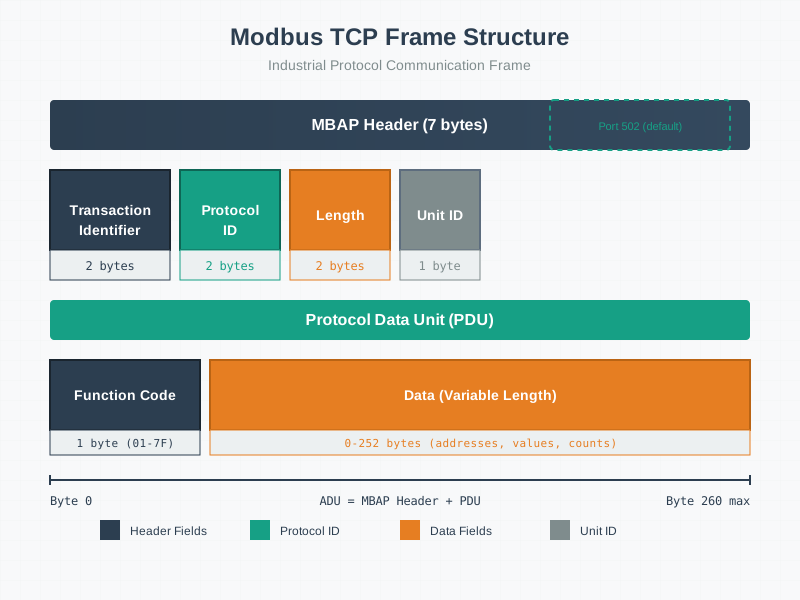
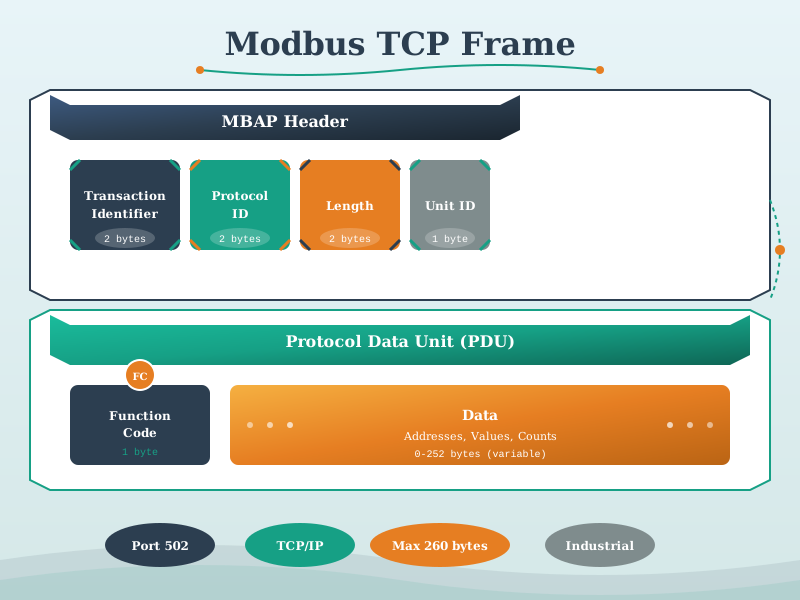
1254.7.2 MBAP Header
| Transaction ID | Protocol ID | Length    | Unit ID |
| 2 bytes        | 2 bytes     | 2 bytes   | 1 byte  |
| Client-set     | 0x0000      | Remaining | RTU addr|
Key Differences from RTU: - No CRC (TCP handles error detection) - Transaction ID for matching requests/responses - Unit ID for gateway routing to RTU slaves
1254.7.3 Network Topology
%%{init: {'theme': 'base', 'themeVariables': {'primaryColor': '#2C3E50', 'primaryTextColor': '#fff', 'primaryBorderColor': '#16A085', 'lineColor': '#E67E22', 'secondaryColor': '#16A085', 'tertiaryColor': '#7F8C8D'}}}%%
graph TB
    SCADA[SCADA System<br/>Modbus TCP Client]

    SCADA --> Switch[Industrial Switch]

    Switch --> PLC1[PLC 1<br/>192.168.1.10]
    Switch --> PLC2[PLC 2<br/>192.168.1.11]
    Switch --> GW[Modbus Gateway<br/>192.168.1.20]

    GW --> RTU1[RTU Slave 1]
    GW --> RTU2[RTU Slave 2]
    GW --> RTU3[RTU Slave 3]

    style SCADA fill:#16A085,stroke:#2C3E50,color:#fff
    style Switch fill:#7F8C8D,stroke:#2C3E50,color:#fff
    style PLC1 fill:#E67E22,stroke:#2C3E50,color:#fff
    style PLC2 fill:#E67E22,stroke:#2C3E50,color:#fff
    style GW fill:#E67E22,stroke:#2C3E50,color:#fff
    style RTU1 fill:#2C3E50,stroke:#16A085,color:#fff
    style RTU2 fill:#2C3E50,stroke:#16A085,color:#fff
    style RTU3 fill:#2C3E50,stroke:#16A085,color:#fff
{fig-alt=“Modbus TCP/IP network topology: SCADA TCP Client in teal connects through Industrial Switch to Ethernet devices (PLC 1 at 192.168.1.10, PLC 2 at 192.168.1.11, Modbus Gateway at 192.168.1.20) in orange. Gateway bridges to RS-485 RTU Slaves in navy, providing TCP-to-RTU protocol conversion.”}
1254.8 Implementation Examples
1254.8.1 Python Modbus TCP Client
from pymodbus.client import ModbusTcpClient

# Connect to Modbus TCP server
client = ModbusTcpClient('192.168.1.10', port=502)
client.connect()

# Read holding registers (address 0, count 10)
result = client.read_holding_registers(address=0, count=10, slave=1)
if not result.isError():
    print(f"Registers: {result.registers}")
    # [500, 100, 255, 0, 1234, ...]

# Read temperature (register 0, scaled by 10)
temp_raw = client.read_holding_registers(0, 1, slave=1).registers[0]
temperature = temp_raw / 10.0  # 500 → 50.0°C

# Write setpoint (register 100 = 60.0°C)
client.write_register(100, 600, slave=1)

# Read coils (digital outputs)
coils = client.read_coils(0, 8, slave=1)
print(f"Pump status: {'ON' if coils.bits[0] else 'OFF'}")

# Write coil (turn on pump)
client.write_coil(0, True, slave=1)

client.close()
1254.8.2 Modbus RTU with Arduino
#include <ModbusMaster.h>

ModbusMaster node;

void setup() {
    Serial.begin(9600);     // Debug
    Serial1.begin(9600);    // RS-485

    // Modbus slave ID 1
    node.begin(1, Serial1);

    // Callbacks for RS-485 direction control
    node.preTransmission(preTransmission);
    node.postTransmission(postTransmission);
}

void loop() {
    uint8_t result;
    uint16_t data[2];

    // Read 2 holding registers starting at 0
    result = node.readHoldingRegisters(0, 2);

    if (result == node.ku8MBSuccess) {
        data[0] = node.getResponseBuffer(0);
        data[1] = node.getResponseBuffer(1);

        float temperature = data[0] / 10.0;
        Serial.print("Temperature: ");
        Serial.println(temperature);
    }

    delay(1000);
}

void preTransmission() {
    digitalWrite(DE_PIN, HIGH);  // Enable driver
}

void postTransmission() {
    digitalWrite(DE_PIN, LOW);   // Enable receiver
}
1254.9 Troubleshooting Guide
1254.9.1 Common Issues
| Symptom | Likely Cause | Solution |
|---|---|---|
| No response | Wrong address, baud rate | Verify slave ID and serial settings |
| CRC errors | Noise, termination | Add termination, use shielded cable |
| Timeout | Polling too fast | Increase delay between requests |
| Wrong data | Byte order | Check endianness (big/little) |
| Intermittent | Ground loop | Use isolated RS-485 converter |
1254.9.2 Debugging Checklist
%%{init: {'theme': 'base', 'themeVariables': {'primaryColor': '#2C3E50', 'primaryTextColor': '#fff', 'primaryBorderColor': '#16A085', 'lineColor': '#E67E22', 'secondaryColor': '#16A085', 'tertiaryColor': '#7F8C8D'}}}%%
flowchart TB
    Start[No Response] --> Q1{Correct Address?}
    Q1 -->|No| Fix1[Set correct slave ID]
    Q1 -->|Yes| Q2{Correct Baud Rate?}

    Q2 -->|No| Fix2[Match baud rate]
    Q2 -->|Yes| Q3{Wiring OK?}

    Q3 -->|No| Fix3[Check A+/B- polarity<br/>Add termination]
    Q3 -->|Yes| Q4{Power OK?}

    Q4 -->|No| Fix4[Check device power]
    Q4 -->|Yes| Q5{Device Configured?}

    Q5 -->|No| Fix5[Configure device<br/>via local interface]
    Q5 -->|Yes| Scope[Use oscilloscope<br/>to verify signals]

    style Start fill:#c0392b,stroke:#2C3E50,color:#fff
    style Scope fill:#16A085,stroke:#2C3E50,color:#fff
{fig-alt=“Modbus troubleshooting flowchart starting with No Response problem: Check correct slave address, then baud rate, then wiring (A+/B- polarity and termination), then power, then device configuration. If all checks pass, use oscilloscope to verify signals. Shows systematic debugging approach.”}
1254.10 Security Considerations
1254.10.1 Modbus Security Vulnerabilities
| Vulnerability | Risk | Mitigation |
|---|---|---|
| No authentication | Anyone can send commands | Network segmentation |
| No encryption | Data visible on wire | VPN for remote access |
| No authorization | All clients equal | Firewall rules |
| Broadcast abuse | DoS via address 0 | Block broadcasts |
1254.10.2 Secure Architecture
%%{init: {'theme': 'base', 'themeVariables': {'primaryColor': '#2C3E50', 'primaryTextColor': '#fff', 'primaryBorderColor': '#16A085', 'lineColor': '#E67E22', 'secondaryColor': '#16A085', 'tertiaryColor': '#7F8C8D'}}}%%
graph TB
    subgraph IT["IT Network"]
        SCADA[SCADA Server]
        Historian[Historian]
    end

    subgraph DMZ["DMZ"]
        FW1[Firewall]
        Jump[Jump Server]
    end

    subgraph OT["OT Network"]
        FW2[Industrial Firewall]
        PLC[Modbus Devices]
    end

    SCADA --> FW1
    FW1 --> Jump
    Jump --> FW2
    FW2 --> PLC

    style IT fill:#2C3E50,stroke:#16A085
    style DMZ fill:#E67E22,stroke:#2C3E50
    style OT fill:#16A085,stroke:#2C3E50
{fig-alt=“Secure Modbus network architecture with three zones: IT Network in navy (SCADA, Historian), DMZ in orange (Firewall, Jump Server), and OT Network in teal (Industrial Firewall, Modbus Devices). Traffic flows through multiple firewalls and jump server for defense in depth.”}
1254.11 Understanding Check
WarningKnowledge Check
Scenario: You’re retrofitting a water treatment plant with: - 20 analog sensors (temperature, pH, flow) - 10 pumps with on/off control - 5 VFDs (variable frequency drives) with speed control - Need integration with new cloud monitoring system
Questions:
- How would you assign Modbus register addresses?
- What baud rate and cable length limits apply?
- How would you connect to cloud monitoring?
- What polling interval is appropriate?
NoteSolution
1. Register Address Assignment:
Input Registers (Read-only sensors):
  0-19: Temperature sensors × 10 (0.1°C resolution)
  20-39: pH sensors × 100 (0.01 pH resolution)
  40-59: Flow rate sensors

Coils (Pump control):
  0-9: Pump ON/OFF commands

Holding Registers (VFD control):
  100-104: VFD 1-5 speed setpoints (0-10000 = 0-100.00%)
  200-204: VFD 1-5 actual speeds (read)
2. Baud Rate and Cable: - RS-485 at 9600 baud (standard, reliable) - Max cable: 1200m total, but keep under 500m for reliability - Use shielded twisted pair, 120Ω termination at both ends - Consider Modbus TCP for long distances
3. Cloud Connection: Option A: Modbus TCP → OPC-UA Gateway → MQTT → Cloud Option B: Edge gateway with Modbus RTU client → REST API → Cloud Recommended: Use industrial IoT gateway (e.g., Advantech, Moxa) with: - Modbus RTU master - Data buffering for connection loss - MQTT publisher to cloud
4. Polling Interval: - Sensors: 1-second poll (water processes are slow) - Pump status: 1-second poll - VFD speed: 500ms poll (faster response needed) - Total cycle: ~3 seconds for all 35 devices at 9600 baud - Reserve headroom: poll every 5 seconds
1254.12 Visual Reference Gallery
NoteModbus Protocol Diagrams
These visual references provide alternative perspectives on Modbus protocol concepts covered in this chapter.


1254.12.1 Protocol Stack Architecture Comparison (Variant View)
This diagram provides an alternative perspective by comparing the protocol stacks of Modbus RTU, Modbus TCP, and OPC-UA side by side, showing how each technology layers functionality:
%%{init: {'theme': 'base', 'themeVariables': {'primaryColor': '#2C3E50', 'primaryTextColor': '#fff', 'primaryBorderColor': '#16A085', 'lineColor': '#E67E22', 'secondaryColor': '#16A085', 'tertiaryColor': '#7F8C8D'}}}%%
graph TB
    subgraph RTU["Modbus RTU Stack"]
        direction TB
        R1["Application Layer<br/>Function Codes 01-16"]
        R2["Data Link Layer<br/>RTU Framing + CRC-16"]
        R3["Physical Layer<br/>RS-485 / RS-232"]
        R1 --> R2 --> R3
    end

    subgraph TCP["Modbus TCP Stack"]
        direction TB
        T1["Application Layer<br/>Function Codes 01-16"]
        T2["MBAP Header<br/>Transaction + Unit ID"]
        T3["Transport Layer<br/>TCP Port 502"]
        T4["Network Layer<br/>IP Addressing"]
        T5["Physical Layer<br/>Ethernet 802.3"]
        T1 --> T2 --> T3 --> T4 --> T5
    end

    subgraph OPC["OPC-UA Stack"]
        direction TB
        O1["Information Model<br/>Nodes, Types, Methods"]
        O2["Services Layer<br/>Browse, Read, Subscribe"]
        O3["Security Layer<br/>Auth, Encryption, Signing"]
        O4["Transport Layer<br/>TCP/WebSocket/HTTPS"]
        O5["Physical Layer<br/>Ethernet / Wi-Fi"]
        O1 --> O2 --> O3 --> O4 --> O5
    end

    Compare["Layer Comparison"]
    Compare -.->|"2-3 layers<br/>No security"| RTU
    Compare -.->|"5 layers<br/>TCP reliability"| TCP
    Compare -.->|"5+ layers<br/>Built-in security"| OPC

    style RTU fill:#16A085,color:#fff
    style TCP fill:#E67E22,color:#fff
    style OPC fill:#2C3E50,color:#fff
    style Compare fill:#7F8C8D,color:#fff
    style R1 fill:#16A085,stroke:#fff,color:#fff
    style R2 fill:#16A085,stroke:#fff,color:#fff
    style R3 fill:#16A085,stroke:#fff,color:#fff
    style T1 fill:#E67E22,stroke:#fff,color:#fff
    style T2 fill:#E67E22,stroke:#fff,color:#fff
    style T3 fill:#E67E22,stroke:#fff,color:#fff
    style T4 fill:#E67E22,stroke:#fff,color:#fff
    style T5 fill:#E67E22,stroke:#fff,color:#fff
    style O1 fill:#2C3E50,stroke:#fff,color:#fff
    style O2 fill:#2C3E50,stroke:#fff,color:#fff
    style O3 fill:#2C3E50,stroke:#fff,color:#fff
    style O4 fill:#2C3E50,stroke:#fff,color:#fff
    style O5 fill:#2C3E50,stroke:#fff,color:#fff
1254.12.2 Industrial Protocol Comparison (Variant View)
This comparison chart positions Modbus against other industrial protocols to help select the right protocol for your application:
%%{init: {'theme': 'base', 'themeVariables': {'primaryColor': '#2C3E50', 'primaryTextColor': '#fff', 'primaryBorderColor': '#16A085', 'lineColor': '#E67E22', 'secondaryColor': '#16A085', 'tertiaryColor': '#7F8C8D'}}}%%
graph TB
    subgraph Header["Industrial Protocol Selection Matrix"]
        direction LR
        H1["🔧 Complexity"]
        H2["⚡ Speed"]
        H3["🔐 Security"]
        H4["💰 Cost"]
    end

    subgraph Modbus["Modbus RTU/TCP"]
        M1["Complexity: ●○○○○<br/>Very Simple"]
        M2["Speed: ●●○○○<br/>~ms response"]
        M3["Security: ●○○○○<br/>None built-in"]
        M4["Cost: ●●●●●<br/>Lowest cost"]
        M5["Best For:<br/>Simple I/O, sensors,<br/>legacy integration"]
    end

    subgraph OPCUA["OPC-UA"]
        O1["Complexity: ●●●●○<br/>Complex stack"]
        O2["Speed: ●●●○○<br/>Good throughput"]
        O3["Security: ●●●●●<br/>Built-in encryption"]
        O4["Cost: ●●●○○<br/>Moderate"]
        O5["Best For:<br/>Modern SCADA,<br/>IT/OT integration"]
    end

    subgraph MQTT["MQTT + Sparkplug"]
        Q1["Complexity: ●●●○○<br/>Moderate"]
        Q2["Speed: ●●●●○<br/>Low latency"]
        Q3["Security: ●●●●○<br/>TLS available"]
        Q4["Cost: ●●●●○<br/>Low-moderate"]
        Q5["Best For:<br/>Cloud IoT,<br/>event-driven systems"]
    end

    subgraph Profinet["PROFINET/EtherCAT"]
        P1["Complexity: ●●●●●<br/>Most complex"]
        P2["Speed: ●●●●●<br/>μs deterministic"]
        P3["Security: ●●●○○<br/>Layer 2 isolation"]
        P4["Cost: ●○○○○<br/>Highest cost"]
        P5["Best For:<br/>Motion control,<br/>real-time automation"]
    end

    style Header fill:#f9f9f9,stroke:#2C3E50
    style Modbus fill:#16A085,color:#fff
    style OPCUA fill:#2C3E50,color:#fff
    style MQTT fill:#E67E22,color:#fff
    style Profinet fill:#7F8C8D,color:#fff
1254.13 Key Takeaways
TipSummary
Modbus is simple by design—request/response with 4 register types
RTU uses RS-485 (serial, up to 1200m, 247 devices)
TCP uses Ethernet (port 502, unlimited devices, faster)
Register addressing varies by vendor—always check documentation
No built-in security—use network segmentation and firewalls
Still the most common industrial protocol for simple I/O
Use gateways to bridge Modbus to modern protocols (OPC-UA, MQTT)
1254.14 What’s Next
Continue exploring industrial protocols:
- OPC-UA Fundamentals - Modern integration layer
- Industrial Ethernet - High-speed alternatives
- Industrial Protocols Overview - Protocol comparison