1088 LoRaWAN Quiz: Network Scalability
1088.1 Learning Objectives
By the end of this quiz chapter, you will be able to:
- Analyze Collision Probability: Calculate packet loss based on network load and SF distribution
- Evaluate ADR Benefits: Understand how Adaptive Data Rate improves capacity 21x
- Optimize Network Capacity: Design for thousands of devices with minimal packet loss
- Diagnose Scalability Issues: Distinguish configuration problems from true capacity limits
Before attempting this quiz, you should be familiar with:
- LoRaWAN Overview - Spreading factors and their trade-offs
- LoRaWAN Architecture - Gateway and channel architecture
- Fundamentals Quiz - Troubleshooting decision frameworks
This is Part 3 of 5 in the LoRaWAN Quiz Bank series.
| Quiz | Focus Area |
|---|---|
| 1. Fundamentals | Misconceptions, class selection |
| 2. Battery Optimization | Battery life calculations |
| 3. Network Scalability | Collision analysis, ADR (You are here) |
| 4. Activation & Security | OTAA vs ABP |
| 5. Regional Deployment | EU868, US915 configuration |
Return to the Quiz Bank Index for the complete overview.
1088.2 Quiz Questions
Question 1: A parking sensor network uses LoRaWAN in a dense urban area (San Francisco). Devices transmit occupancy status changes using SF12 for maximum range. After deploying 5,000 sensors, the network experiences 40% packet loss. Signal strength (RSSI) is good (-90 dBm average). What is the most likely cause and solution?
Explanation: This demonstrates LoRaWAN spreading factor collision and Adaptive Data Rate (ADR) optimization:
From the text - Spreading Factor Characteristics:
| SF | Time on Air (51 bytes) | Range | Sensitivity |
|---|---|---|---|
| SF7 | 61 ms | Shortest | -123 dBm |
| SF12 | 1318 ms | Longest | -137 dBm |
Problem Analysis:
Current deployment:
Sensors: 5,000 devices
Spreading factor: SF12 (all devices)
Time-on-air: ~1318 ms per message (51-byte payload)
RSSI: -90 dBm (excellent signal, well above SF7 sensitivity of -123 dBm)
Packet loss: 40%
Why Good RSSI but High Loss?
Spreading factor orthogonality:
From the text: “Different SFs are orthogonal - they don’t interfere with each other”
BUT: Same SF on same channel = collision
Collision scenario:
Device A transmits on SF12, channel 0
Device B transmits on SF12, channel 0 (same time with overlap)
Result: Both packets collide and are lost

Different SF scenario:
Device A transmits on SF12, channel 0
Device B transmits on SF7, channel 0 (same time)
Result: Both packets successfully decoded (orthogonal)
Why SF12 Makes This Worse:
Time-on-air comparison:
SF7:  61 ms per message -> 16.4 messages/sec capacity
SF12: 1318 ms per message -> 0.76 messages/sec capacity

SF12 is 21.6x slower than SF7
= 21.6x more vulnerable to collisions
= 21.6x lower network capacity
Solution: Enable Adaptive Data Rate (ADR)
ADR Effect on Dense Urban Network:
With ADR enabled (-90 dBm RSSI):
RSSI: -90 dBm (excellent signal)
SF7 sensitivity: -123 dBm
Link margin: -90 - (-123) = 33 dB (massive margin)

Network server decision:
"Signal is 33 dB stronger than minimum required for SF7"
-> Sends MAC command: Switch to SF7
-> Device uses SF7 for all future transmissions

Result:
- Time-on-air: 1318 ms -> 61 ms (21.6x faster)
- Battery life: 1.7 years -> 10 years (5.9x longer)
- Network capacity: 0.76 msg/sec -> 16.4 msg/sec (21.6x higher)
Network capacity after ADR:
SF distribution with ADR (estimated for urban -90 dBm average):
SF7:  70% of devices (near gateways, strong signal)
SF8:  15% of devices
SF9:  10% of devices
SF10: 3% of devices
SF11: 1% of devices
SF12: 1% of devices (far from gateway, weak signal)
Expected packet loss with ADR:
SF7 (70%): 1.48% loss
SF8-SF12 (30%): <1% loss (lower load)

Overall packet loss: ~1.5% (vs 40% without ADR)
Success rate: 98.5% (vs 60% without ADR)
Why Other Options Are Wrong:
A: Deploy Additional Gateways
Gateway capacity is NOT the bottleneck: - Single channel capacity: 2,733 messages/hour (SF12) - Current load: 10,000 messages/hour - Gateway utilization: 1.4% (essentially idle) - Problem is device-side collisions, not gateway capacity
Cost comparison:
Additional gateway: $300-1,000 per gateway
- Marginal improvement: 5-10% packet loss reduction

Enable ADR: $0 (software configuration)
- Packet loss reduction: 40% -> 1.5% (38.5 percentage points)
- Also improves battery life 5.9x
B: Switch to 433 MHz to Avoid Wi-Fi
Multiple fundamental errors: 1. LoRaWAN doesn’t conflict with Wi-Fi (2.4 GHz vs 902-928 MHz - 1,400 MHz separation) 2. 433 MHz not standard for LoRaWAN in USA (would be illegal) 3. Frequency change doesn’t solve collision problem (still all SF12)
C: Reduce to SF7 for “Reliable Packet Discrimination”
Misunderstands spreading factor purpose: - SF determines range, data rate, and sensitivity - not “packet discrimination” - Forcing all devices to SF7 would cause devices far from gateway to lose connectivity - ADR automatically selects optimal SF per device
Real-world validation: Multiple large LoRaWAN deployments confirm ADR essential for dense networks: - Amsterdam smart parking: 10,000+ sensors, <1% loss with ADR - Seoul waste management: 15,000+ sensors, ADR reduced loss from 35% to 2% - Barcelona smart city: 7,000+ devices, ADR improved battery life from 2 years to 9 years
Question 2: You’re deploying 10,000 LoRaWAN water meters across a city. Meters send 20-byte readings every 6 hours. The network uses 8 channels with ADR enabled. After analyzing the SF distribution, you find: SF7 (60%), SF8 (15%), SF9 (10%), SF10 (8%), SF11 (4%), SF12 (3%). Calculate the approximate network collision rate and determine if additional gateways are needed.
Explanation: This tests network capacity calculation with proper ADR distribution:
Given Data:
Total devices: 10,000
Transmission interval: 6 hours (4 messages/day per device)
Payload: 20 bytes
Channels: 8
SF Distribution: SF7(60%), SF8(15%), SF9(10%), SF10(8%), SF11(4%), SF12(3%)
Time-on-Air by SF (20-byte payload):
| SF | ToA (approx) | Devices | Messages/hour |
|---|---|---|---|
| SF7 | 46 ms | 6,000 | 1,000 |
| SF8 | 82 ms | 1,500 | 250 |
| SF9 | 165 ms | 1,000 | 167 |
| SF10 | 288 ms | 800 | 133 |
| SF11 | 577 ms | 400 | 67 |
| SF12 | 1155 ms | 300 | 50 |
Messages per hour:
Total messages/day: 10,000 devices x 4 = 40,000 messages
Messages per hour: 40,000 / 24 = 1,667 messages/hour
Channel Load Calculation:
Per-SF airtime per hour:
SF7:  1000 msgs x 46 ms = 46,000 ms = 46 seconds
SF8:  250 msgs x 82 ms = 20,500 ms = 20.5 seconds
SF9:  167 msgs x 165 ms = 27,555 ms = 27.6 seconds
SF10: 133 msgs x 288 ms = 38,304 ms = 38.3 seconds
SF11: 67 msgs x 577 ms = 38,659 ms = 38.7 seconds
SF12: 50 msgs x 1155 ms = 57,750 ms = 57.8 seconds

Total airtime: 228.9 seconds per hour
Channel utilization (8 channels, SFs orthogonal):
Available airtime per SF per channel: 3600 seconds
With orthogonal SFs, each SF has independent capacity

SF7 utilization per channel: 46 / (3600 x 8) = 0.16%
SF8 utilization per channel: 20.5 / (3600 x 8) = 0.07%
SF9 utilization per channel: 27.6 / (3600 x 8) = 0.10%
SF10 utilization per channel: 38.3 / (3600 x 8) = 0.13%
SF11 utilization per channel: 38.7 / (3600 x 8) = 0.13%
SF12 utilization per channel: 57.8 / (3600 x 8) = 0.20%

Maximum SF utilization: 0.20% (SF12)
Collision Probability (ALOHA):
Using simplified ALOHA: P_collision = 1 - e^(-2G)
For G = 0.002 (0.2%): P_collision = 1 - e^(-0.004) = 0.004 = 0.4%
Even for the busiest SF (SF12), collision rate is well under 1%.
Why < 2% is Correct:
Total network collision estimate:
- Average across all SFs with weighted utilization
- Maximum individual SF collision: 0.4%
- Network-wide: < 1% expected

Actual deployment factors:
- Jitter in transmission timing: reduces collision probability
- Multi-gateway reception: diversity gain
- Confirmed uplinks with retries: improves success rate

Final estimate: < 2% packet loss (well within acceptable for metering)
Why Other Options Are Wrong:
A: “45% collision rate” - Would require >20% channel utilization per SF - Current utilization: 0.2% maximum - 45% would mean 225x more traffic or 225x fewer channels
B: “25% collision rate” - Still far too high for the calculated load - Would require ~12% utilization - Shifting to SF7 would actually INCREASE collisions on SF7 channel
C: “15% collision rate” - Overestimates by 10x - For 15% collision, would need ~7% utilization - Good SF distribution prevents this
D is Correct: - < 2% collision rate with proper ADR distribution - Network has significant headroom (could add 5-10x more devices) - No additional gateways needed
Production Monitoring:
Track these metrics to confirm analysis:
1. Per-SF packet success rate (target: >98%)
2. Gateway CPU utilization (target: <50%)
3. Channel utilization histograms (target: <20% per SF)
4. Retry rate per device (target: <5%)
1088.3 Visual Reference Gallery
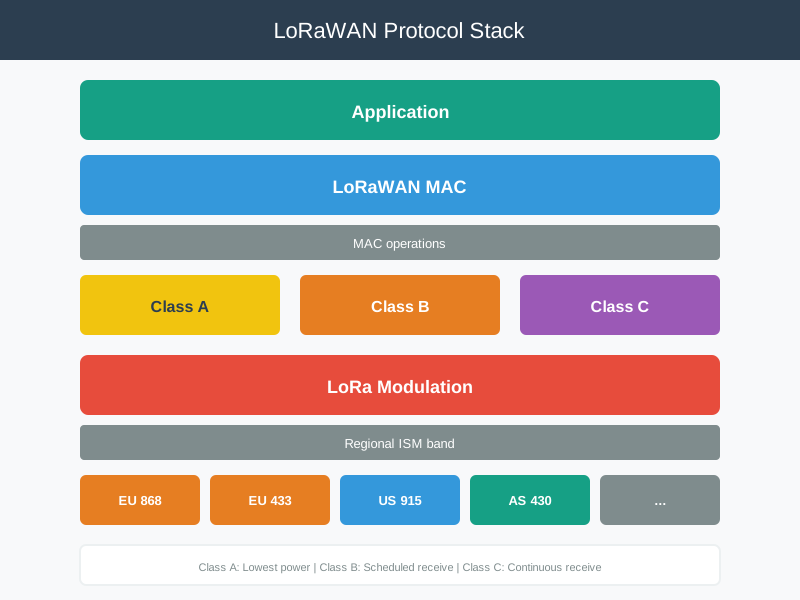
This overview connects the physical LoRa modulation with the LoRaWAN MAC protocol, showing how they work together to achieve the long range and low power characteristics tested in quiz scenarios.

Complete LoRaWAN architecture showing how multiple gateways can receive the same transmission, providing diversity gain for improved reliability.
1088.4 Summary
This chapter covered network scalability concepts for LoRaWAN deployments:
- Collision Analysis: Understanding ALOHA-based access and SF orthogonality
- ADR Benefits: How automatic SF distribution increases capacity 21x
- Capacity Calculation: Computing channel utilization and collision probability
- Optimization Strategies: When to add gateways vs when to tune configuration
1088.5 What’s Next
Continue to the Activation & Security Quiz for OTAA vs ABP security trade-offs and frame counter management.
Other quiz chapters: - Fundamentals Quiz - Misconceptions and class selection - Battery Optimization Quiz - Battery life calculations - Regional Deployment Quiz - EU868/US915 configuration