1086 LoRaWAN Quiz: Battery Optimization
1086.1 Learning Objectives
By the end of this quiz chapter, you will be able to:
- Calculate Battery Life: Compute device lifetime based on transmission patterns and power consumption
- Analyze Duty Cycle Compliance: Verify EU868 1% duty cycle limits are met
- Compare Class Power Consumption: Understand Class A vs B vs C power profiles
- Optimize Configurations: Select spreading factors and transmission intervals for battery longevity
Before attempting this quiz, you should be familiar with:
- LoRaWAN Overview - Protocol basics including spreading factors
- LoRaWAN Architecture - Device classes and their characteristics
- Fundamentals Quiz - Class selection concepts
This is Part 2 of 5 in the LoRaWAN Quiz Bank series.
| Quiz | Focus Area |
|---|---|
| 1. Fundamentals | Misconceptions, class selection |
| 2. Battery Optimization | Battery life calculations (You are here) |
| 3. Network Scalability | Collision analysis, ADR |
| 4. Activation & Security | OTAA vs ABP |
| 5. Regional Deployment | EU868, US915 configuration |
Return to the Quiz Bank Index for the complete overview.
1086.2 Quiz Questions
Question 1: A smart agriculture company deploys 500 soil moisture sensors across a 2000-hectare farm using LoRaWAN in Europe (EU868). Each sensor sends a 12-byte reading every 30 minutes using SF7 (61ms time-on-air per message). After 3 months, the network operator reports duty cycle violations. What is the cause and solution?
Explanation: This demonstrates LoRaWAN duty cycle compliance in EU868 band:
From the text - EU868 Duty Cycle Restriction:
“In Europe (EU868), LoRaWAN devices are legally limited to 1% duty cycle on most channels: - Device can transmit for maximum 36 seconds per hour - After sending a message, must wait 99x the transmission time - Example: 5-second transmission -> 495-second (8.25 minute) mandatory wait”
Duty Cycle Calculation for Deployed Sensors:
Per-device transmission:
Time-on-air per message: 61 ms (SF7, 12-byte payload)
Messages per hour: 60 min / 30 min = 2 messages/hour
Total airtime per device per hour: 61 ms x 2 = 122 ms = 0.122 seconds
Duty cycle percentage:
Duty cycle = (airtime / hour) x 100%
Duty cycle = (0.122 sec / 3600 sec) x 100%
Duty cycle = 0.0034% << 1% limit
Analysis: - Legal limit: 36 seconds per hour (1%) - Actual usage: 0.122 seconds per hour (0.0034%) - Sensors are operating at only 0.34% of the legal limit - Compliance margin: 36 / 0.122 = 295x under the limit
Why Sensors ARE Compliant:
Network-wide analysis (500 sensors):
Total messages per hour: 500 sensors x 2 msgs/hour = 1000 messages/hour
Total airtime per hour: 1000 x 61 ms = 61,000 ms = 61 seconds

BUT: Duty cycle is PER DEVICE, not per gateway
Each device: 122 ms/hour << 36,000 ms/hour limit
Why Other Options Are Wrong:
A: “Increase interval to 60 minutes” - Current: 2 messages/hour -> 122 ms/hour -> 0.34% duty cycle (Compliant) - Proposed: 1 message/hour -> 61 ms/hour -> 0.017% duty cycle - Problem: Unnecessary change that reduces data resolution and doesn’t solve problem (sensors already compliant)
B: “Add more gateways” - Duty cycle is a per-device radio regulation, not a gateway limit - Each sensor has its own 1% duty cycle budget - Multiple gateways receiving the same message doesn’t change device transmission time
D: “Reduce to SF5” - Fatal error: SF5 doesn’t exist in LoRa specification - Valid range: SF7 to SF12 (SF5 and SF6 are not defined)
Most Likely Causes of False “Violations”:
- Gateway misconfiguration: Gateway firmware might aggregate messages from multiple devices and incorrectly report them as single-device activity
- Retransmissions: If devices retry failed transmissions without proper backoff, actual airtime increases
- Multiple applications: If a device runs multiple applications sending independently, total airtime adds up
Real-World Example: Actual case: Farm deployment in Netherlands reported duty cycle violations: - Root cause: Gateway was counting all 500 devices together (61s total airtime) - Solution: Gateway firmware update to track per-device duty cycle - Result: All devices compliant (0.003% average duty cycle)
Question 2: An industrial IoT system monitors 100 machines using LoRaWAN Class A devices. The system requires the ability to send emergency shutdown commands to any machine within 5 seconds. After deployment, downlink commands often take 10-15 minutes to reach devices. What architectural change would solve this without compromising battery life significantly?
Explanation: This demonstrates LoRaWAN Class selection and downlink timing trade-offs:
From the text - LoRaWAN Device Classes:
Class A (All Devices): “- Operation: Bi-directional communication with scheduled receive windows - Downlink: Only after an uplink transmission (two short receive windows) - Power: Lowest power consumption - Use Cases: Battery-powered sensors”
Class C (Continuous): “- Operation: Continuously listening for downlinks - Downlink: Almost no latency - Power: Highest power consumption (mains-powered) - Use Cases: Actuators, smart plugs, HVAC control”
Problem Analysis:
Current system (Class A):
Device uplink schedule: Variable (event-driven or periodic)
Downlink opportunity: Only in RX1 (1s after uplink) and RX2 (2s after uplink)

If device sends every 15 minutes:
- Command sent at T=0
- Next uplink at T=15 min -> Command delivered at T=15 min
- Average latency: 7.5 minutes (half the uplink interval)
- Worst case: 15 minutes
Requirement: 5-second command delivery
Solution Comparison:
Option B: Increase Heartbeat Frequency (Correct)
New uplink schedule: Every 30 seconds
Uplink interval: 30 seconds
Max downlink latency: 30 seconds (worst case)
Average latency: 15 seconds

To meet 5-second requirement:
Uplink every: 5 seconds (or implement bidirectional trigger)
Max latency: 5 seconds
Battery impact calculation:
Class A with 30-second intervals:
Transmission per message (SF7): 61 ms + 10 mA current
Messages per hour: 3600 / 30 = 120 messages
Active time: 120 x 61 ms = 7.32 seconds/hour

Power consumption per hour:
TX: 10 mA x 7.32 sec = 20.3 mAh/hour
Sleep: 0.01 mA x 3592.68 sec = 0.01 mAh/hour
Total: ~20.3 mAh/hour

Daily consumption: 20.3 x 24 = 487 mAh/day
With 18650 cell (3400 mAh): 3400 / 487 = ~7 days
Why Other Options Are Wrong:
A: Switch to Class C (Continuous Listening)
Power consumption comparison:
Class C:
RX current: 12 mA (continuous, except during TX)
Sleep: None (always listening)

Power per hour:
RX: 12 mA x 3600 sec = 12,000 mAh/hour = 12 Ah/hour

Battery (3400 mAh): 3400 / 12000 = 0.28 hours = 17 minutes- Battery-powered Class C is impossible for industrial deployment
- Would require mains power or frequent battery replacement
- 17 minutes vs 1.16 days (5-second Class A) = 85x worse battery life
C: Use ABP instead of OTAA
Activation method has NO impact on downlink latency:
- OTAA join latency: 5-10 seconds (one-time, at boot)
- After join: Same downlink timing as ABP
- Downlink timing determined by uplink interval, not activation method
D: Deploy Multiple Gateways
Gateways don’t affect downlink latency in Class A:
- Multiple gateways help with uplink reliability (redundancy)
- Downlink still constrained by Class A RX windows
- Network server selects best gateway for downlink, timing unchanged
Production Recommendation:
Hybrid Class A approach:
// Emergency-aware LoRaWAN device
#define NORMAL_INTERVAL 300  // 5 minutes
#define EMERGENCY_INTERVAL 5  // 5 seconds
#define WORK_HOURS_START 6   // 6 AM
#define WORK_HOURS_END 18    // 6 PM

unsigned int current_interval = NORMAL_INTERVAL;

void loop() {
    hour = rtc.getHour();

    if(hour >= WORK_HOURS_START && hour < WORK_HOURS_END) {
        // During work hours: fast response
        current_interval = EMERGENCY_INTERVAL;
    } else {
        // Off-hours: save battery
        current_interval = NORMAL_INTERVAL;
    }
}

// Battery life with hybrid approach:
// - 8 hours/day emergency mode (5-sec intervals): 122 mAh/hour x 8 = 976 mAh
// - 16 hours/day normal mode (5-min intervals): 10 mAh/hour x 16 = 160 mAh
// Daily: 976 + 160 = 1136 mAh/day
// 3400 mAh battery: 3 days (vs 17 minutes for Class C)
1086.3 Visual Reference Gallery
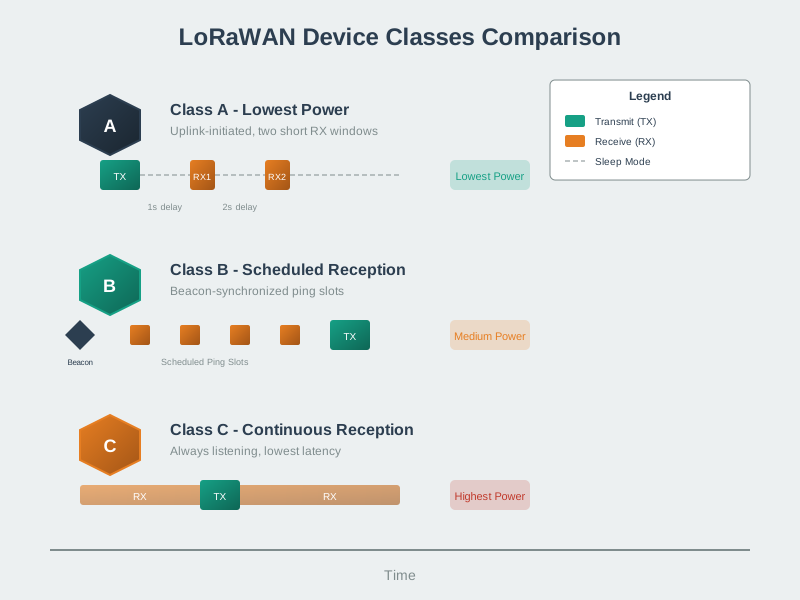
Many quiz questions test understanding of class selection trade-offs - this visualization shows the power vs latency continuum that drives device class decisions.
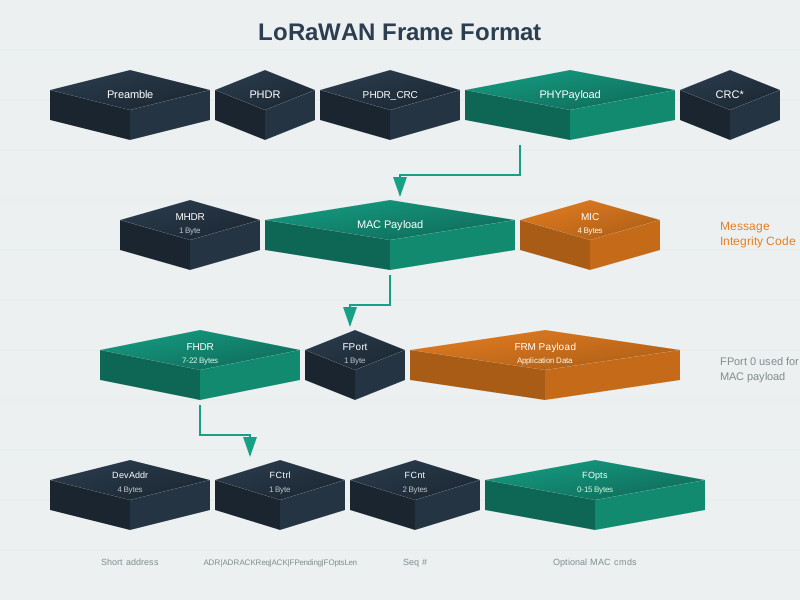
Frame format understanding is essential for airtime calculation questions and troubleshooting scenarios involving frame counter resets or MIC validation failures.
1086.4 Summary
This chapter covered battery optimization concepts for LoRaWAN deployments:
- Duty Cycle Compliance: Understanding EU868 1% limits and per-device calculations
- Class Power Profiles: Comparing Class A (lowest power) vs Class C (highest power)
- Downlink Latency Trade-offs: Balancing responsiveness against battery life
- Hybrid Approaches: Using context-aware transmission intervals for optimal battery usage
1086.5 What’s Next
Continue to the Network Scalability Quiz for collision analysis and ADR optimization scenarios.
Other quiz chapters: - Fundamentals Quiz - Misconceptions and class selection - Activation & Security Quiz - OTAA vs ABP - Regional Deployment Quiz - EU868/US915 configuration