%%{init: {'theme': 'base', 'themeVariables': { 'primaryColor': '#2C3E50', 'primaryTextColor': '#fff', 'primaryBorderColor': '#16A085', 'lineColor': '#E67E22', 'secondaryColor': '#7F8C8D', 'tertiaryColor': '#ECF0F1', 'fontSize': '16px'}}}%%
graph LR
    Sensor[IoT Sensor<br/>Temperature: 23C] -->|LoRa Radio<br/>868 MHz| Gateway[Gateway<br/>Receives & Forwards]
    Gateway -->|Internet<br/>4G/Ethernet| Cloud[Cloud Server<br/>Stores & Processes]
    Cloud -->|API| App[Your Application<br/>Dashboard/Alerts]

    style Sensor fill:#16A085,stroke:#2C3E50,stroke-width:3px,color:#fff
    style Gateway fill:#E67E22,stroke:#2C3E50,stroke-width:3px,color:#fff
    style Cloud fill:#2C3E50,stroke:#16A085,stroke-width:3px,color:#fff
    style App fill:#7F8C8D,stroke:#2C3E50,stroke-width:2px,color:#fff
1084 LoRaWAN Network Architecture
1084.1 Learning Objectives
By the end of this chapter, you should be able to:
- Describe the complete LoRaWAN network architecture from device to cloud
- Explain the role of gateways as transparent bridges
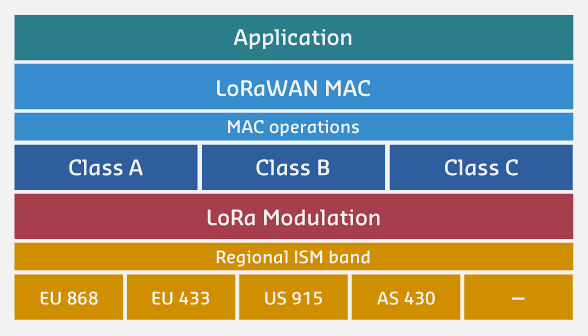
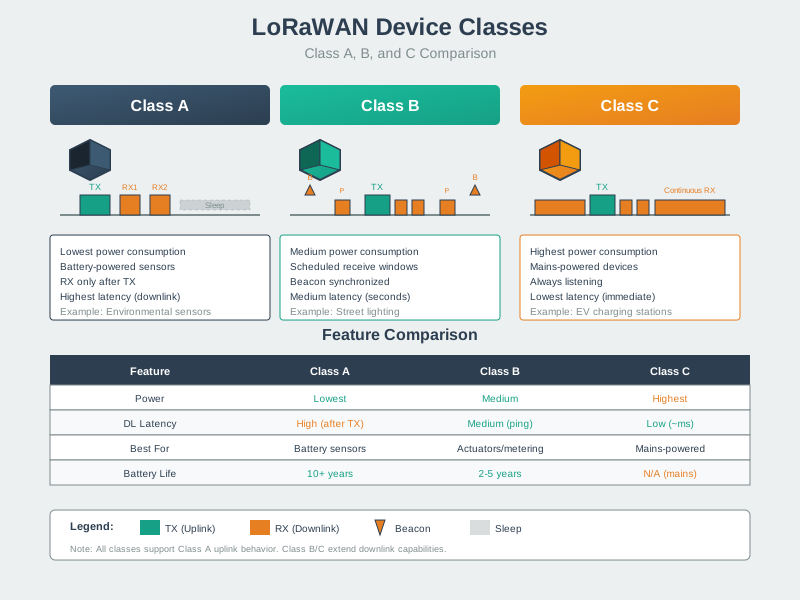
- Understand the three device classes (A, B, C) and their trade-offs
- Design multi-gateway deployments for redundancy
- Calculate power consumption for each device class
1084.2 LoRaWAN Network Architecture: Progressive Detail
Understanding LoRaWAN architecture is easier when we build up from simple to complex. Here are three levels of detail:
1084.2.1 Level 1: Simple Overview (The Big Picture)
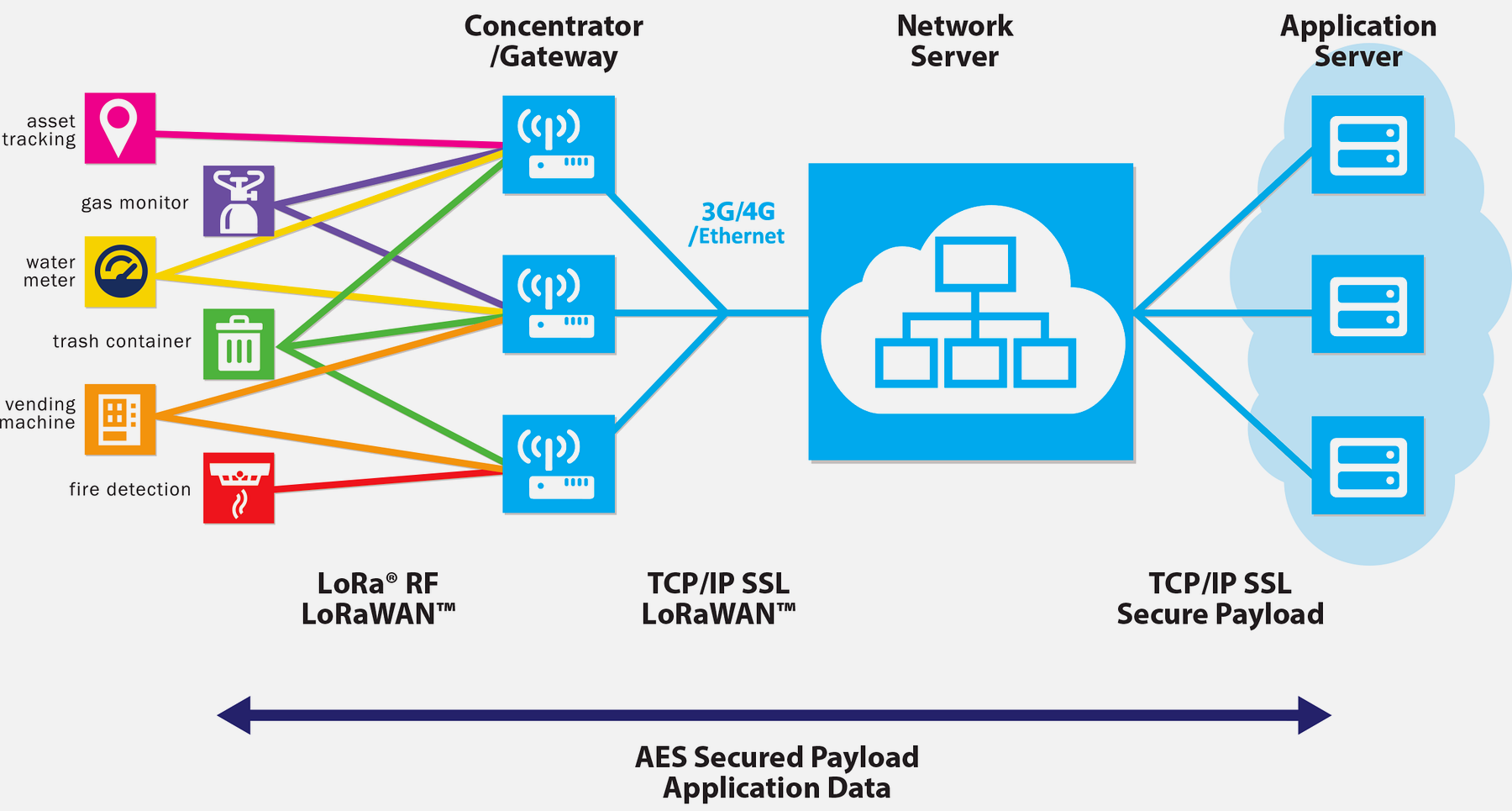
At its core, LoRaWAN follows a simple flow: sensors send data to gateways, which forward it to the cloud:
Key Concept: Gateways are “transparent bridges” - they don’t process data, just relay it. One gateway can serve thousands of sensors.
1084.2.2 Level 2: With Protocol Details (What’s Actually Transmitted)
Let’s add technical detail about what happens at each stage:
%%{init: {'theme': 'base', 'themeVariables': { 'primaryColor': '#2C3E50', 'primaryTextColor': '#fff', 'primaryBorderColor': '#16A085', 'lineColor': '#E67E22', 'secondaryColor': '#7F8C8D', 'tertiaryColor': '#ECF0F1', 'fontSize': '14px'}}}%%
graph TD
    subgraph End_Device["End Device (Battery-Powered Sensor)"]
        D1[Sensor Reading:<br/>23C]
        D2[Add Device Address<br/>DevAddr: 0x1234ABCD]
        D3[Encrypt with AES-128<br/>AppSKey + NwkSKey]
        D4[Transmit via LoRa<br/>SF10, 125 kHz, 868 MHz]
    end

    subgraph Gateway["Gateway (Powered, Multi-Channel Receiver)"]
        G1[Receive on 8 channels<br/>Simultaneously]
        G2[Demodulate LoRa signal<br/>Extract packet]
        G3[Add metadata:<br/>RSSI, SNR, timestamp]
        G4[Forward via Internet<br/>JSON over MQTT/HTTP]
    end

    subgraph Network_Server["Network Server (TTN/ChirpStack)"]
        N1[Decrypt network layer<br/>NwkSKey]
        N2[Check packet validity<br/>Frame counter, MIC]
        N3[Deduplicate<br/>Multiple gateways]
        N4[Send ADR commands<br/>Optimize SF]
    end

    subgraph Application_Server["Application Server (Your Backend)"]
        A1[Decrypt payload<br/>AppSKey]
        A2[Parse data:<br/>Temperature = 23C]
        A3[Store in database<br/>InfluxDB/PostgreSQL]
        A4[Trigger actions:<br/>Alerts, webhooks]
    end

    D1 --> D2 --> D3 --> D4
    D4 -->|LoRa Radio<br/>370 ms airtime| G1
    G1 --> G2 --> G3 --> G4
    G4 -->|4G/Ethernet<br/>JSON: 500 bytes| N1
    N1 --> N2 --> N3 --> N4
    N4 -->|Decrypted payload<br/>20 bytes| A1
    A1 --> A2 --> A3 --> A4

    style End_Device fill:#16A085,stroke:#2C3E50,stroke-width:3px,color:#fff
    style Gateway fill:#E67E22,stroke:#2C3E50,stroke-width:3px,color:#fff
    style Network_Server fill:#2C3E50,stroke:#16A085,stroke-width:3px,color:#fff
    style Application_Server fill:#7F8C8D,stroke:#2C3E50,stroke-width:3px,color:#fff
Key Insights:
Encryption at two layers: Network server sees device address but NOT payload. Only your application server can decrypt sensor data.
Data amplification: 20-byte sensor payload becomes 500-byte gateway packet (adds RSSI, SNR, GPS, timestamp).
Deduplication: If 3 gateways hear the same message, network server picks the best one.
1084.2.3 Level 3: Complete Network with Multiple Devices
Real deployments have many sensors, multiple gateways, and bidirectional communication:
%%{init: {'theme': 'base', 'themeVariables': { 'primaryColor': '#2C3E50', 'primaryTextColor': '#fff', 'primaryBorderColor': '#16A085', 'lineColor': '#E67E22', 'secondaryColor': '#7F8C8D', 'tertiaryColor': '#ECF0F1', 'fontSize': '13px'}}}%%
graph TB
    subgraph Devices["End Devices (Star Topology)"]
        D1[Sensor 1<br/>SF7, Class A<br/>2 km away]
        D2[Sensor 2<br/>SF10, Class A<br/>8 km away]
        D3[Sensor 3<br/>SF12, Class A<br/>15 km away]
        D4[Actuator<br/>SF8, Class C<br/>Always listening]
    end

    subgraph Gateways["LoRaWAN Gateways (Overlapping Coverage)"]
        GW1[Gateway 1<br/>Urban location<br/>Serves D1, D2]
        GW2[Gateway 2<br/>Rural location<br/>Serves D2, D3, D4]
    end

    subgraph Backend["Cloud Infrastructure"]
        NS[Network Server<br/>TTN, ChirpStack, AWS IoT<br/>Manages devices, ADR, encryption]
        AS[Application Server<br/>Your custom backend<br/>Business logic, storage]
        JS[Join Server<br/>Handles OTAA activation<br/>Generates session keys]
    end

    subgraph Integration["External Integrations"]
        DB[(Database<br/>InfluxDB<br/>Time-series data)]
        Dashboard[Dashboard<br/>Grafana/ThingBoard<br/>Visualization]
        Alert[Alert System<br/>Email/SMS<br/>Threshold triggers]
    end

    D1 -.->|LoRa uplink| GW1
    D2 -.->|LoRa uplink| GW1
    D2 -.->|LoRa uplink<br/>Also heard by GW2| GW2
    D3 -.->|LoRa uplink| GW2
    D4 -.->|LoRa uplink/downlink| GW2

    GW1 -->|Internet<br/>MQTT/HTTP| NS
    GW2 -->|Internet<br/>MQTT/HTTP| NS

    NS <-->|Authentication| JS
    NS <-->|Decrypted data| AS

    AS --> DB
    AS --> Dashboard
    AS --> Alert

    GW2 -.->|LoRa downlink<br/>Commands| D4

    style D1 fill:#16A085,stroke:#2C3E50,stroke-width:2px,color:#fff
    style D2 fill:#16A085,stroke:#2C3E50,stroke-width:2px,color:#fff
    style D3 fill:#16A085,stroke:#2C3E50,stroke-width:2px,color:#fff
    style D4 fill:#E67E22,stroke:#2C3E50,stroke-width:2px,color:#fff
    style GW1 fill:#2C3E50,stroke:#16A085,stroke-width:3px,color:#fff
    style GW2 fill:#2C3E50,stroke:#16A085,stroke-width:3px,color:#fff
    style NS fill:#E67E22,stroke:#2C3E50,stroke-width:3px,color:#fff
    style AS fill:#7F8C8D,stroke:#2C3E50,stroke-width:2px,color:#fff
    style JS fill:#7F8C8D,stroke:#2C3E50,stroke-width:2px,color:#fff
Key Network Behaviors:
Redundant Gateway Coverage: Sensor 2 is heard by both gateways. Network server automatically picks the best signal (highest RSSI).
Spreading Factor Adaptation: Nearby sensor (D1) uses fast SF7. Distant sensor (D3) uses slow SF12. ADR optimizes this automatically.
Class A vs C Difference: Sensors (D1-D3) sleep 99.9% of time. Actuator (D4) listens continuously for immediate commands (e.g., “turn on valve”).
Scalability: Adding 1000 more sensors? No problem - they all share the same gateways. No pairing, no configuration.
1084.3 Device Classes: Communication Patterns Visualized
Different device classes have dramatically different listening behaviors:
%%{init: {'theme': 'base', 'themeVariables': { 'primaryColor': '#2C3E50', 'primaryTextColor': '#fff', 'primaryBorderColor': '#16A085', 'lineColor': '#E67E22', 'secondaryColor': '#7F8C8D', 'tertiaryColor': '#ECF0F1', 'fontSize': '14px'}}}%%
gantt
    title LoRaWAN Device Class Behaviors (15-Minute Timeline)
    dateFormat X
    axisFormat %M min

    section Class A (Battery Sensor)
    Sleep : 0, 900000
    TX Uplink : 900000, 900370
    RX1 Window (1s) : 900370, 901370
    RX2 Window (1s) : 901370, 902370
    Sleep : 902370, 1800000

    section Class B (Scheduled Actuator)
    Sleep : 0, 128000
    Beacon RX : 128000, 128100
    Sleep : 128100, 256000
    Beacon RX : 256000, 256100
    TX Uplink : 256000, 256370
    RX1 Window : 256370, 257370
    Sleep : 257370, 384000

    section Class C (Always-On Actuator)
    Listen Continuously : 0, 900000
    TX Uplink : 900000, 900370
    Listen Continuously : 900370, 1800000
Power Consumption Comparison (2000 mAh battery):
| Class | Listening Time | Battery Life | Use Case |
|---|---|---|---|
| Class A | 2 seconds/hour (0.06%) | 5-10 years | Sensors, meters (95% of devices) |
| Class B | 1 second every 128 seconds (0.78%) | 6-18 months | Industrial monitoring, scheduled commands |
| Class C | Continuous (100%) | 5-7 days | Mains-powered actuators, streetlights |
Decision Rule: Use Class A unless you NEED downlinks (commands from server). Even then, consider whether commands can wait until next uplink.
1084.4 Class A: Lowest Power (Default for Sensors)
Class A devices are the most common and power-efficient:
Timeline:
[SLEEP 14:59] --> [TX 370ms] --> [RX1 1s] --> [RX2 1s] --> [SLEEP 15:00]
Key Characteristics: - Opens receive windows ONLY after transmitting - Sleeps 99.9% of the time - Downlink latency: minutes to hours (depends on uplink interval) - Use case: Temperature sensors, water meters, parking sensors
Power Budget Example: - Sleep: 1 uA x 14.99 minutes = 0.25 mAh/hour - TX: 120 mA x 370 ms = 0.01 mAh/hour - RX: 15 mA x 2 s = 0.008 mAh/hour - Total: ~0.27 mAh/hour = 7,400 hours (10 months) on 2000 mAh battery
1084.5 Class B: Scheduled Receive Windows
Class B adds beacon-synchronized receive slots for predictable downlink latency:
Timeline:
[SLEEP] --> [BEACON] --> [PING 1] --> [PING 2] --> [BEACON] --> ...
           |            |           |
           Sync         Every 128s  Every 128s
Key Characteristics: - Requires gateway beacon synchronization - Opens ping slots at scheduled intervals (configurable: 1-128 seconds) - Downlink latency: predictable (ping slot period) - Use case: Street lights, industrial valves, scheduled control
Power Budget Example: - Sleep + beacon + ping slots: ~0.5 mA average - Battery life: ~4000 hours (5-6 months) on 2000 mAh battery
1084.6 Class C: Continuous Receive
Class C devices listen continuously except when transmitting:
Timeline:
[RX ALWAYS] --> [TX 370ms] --> [RX ALWAYS] --> ...
Key Characteristics: - Near-instant downlink capability (<1 second latency) - High power consumption (radio always on) - ONLY for mains-powered devices - Use case: Industrial controllers, powered gateways, smart plugs
Power Budget: - Continuous RX: ~15 mA average - Battery life: ~133 hours (5.5 days) on 2000 mAh battery - Conclusion: Class C is NOT suitable for battery-powered devices
1084.7 Gateway Architecture
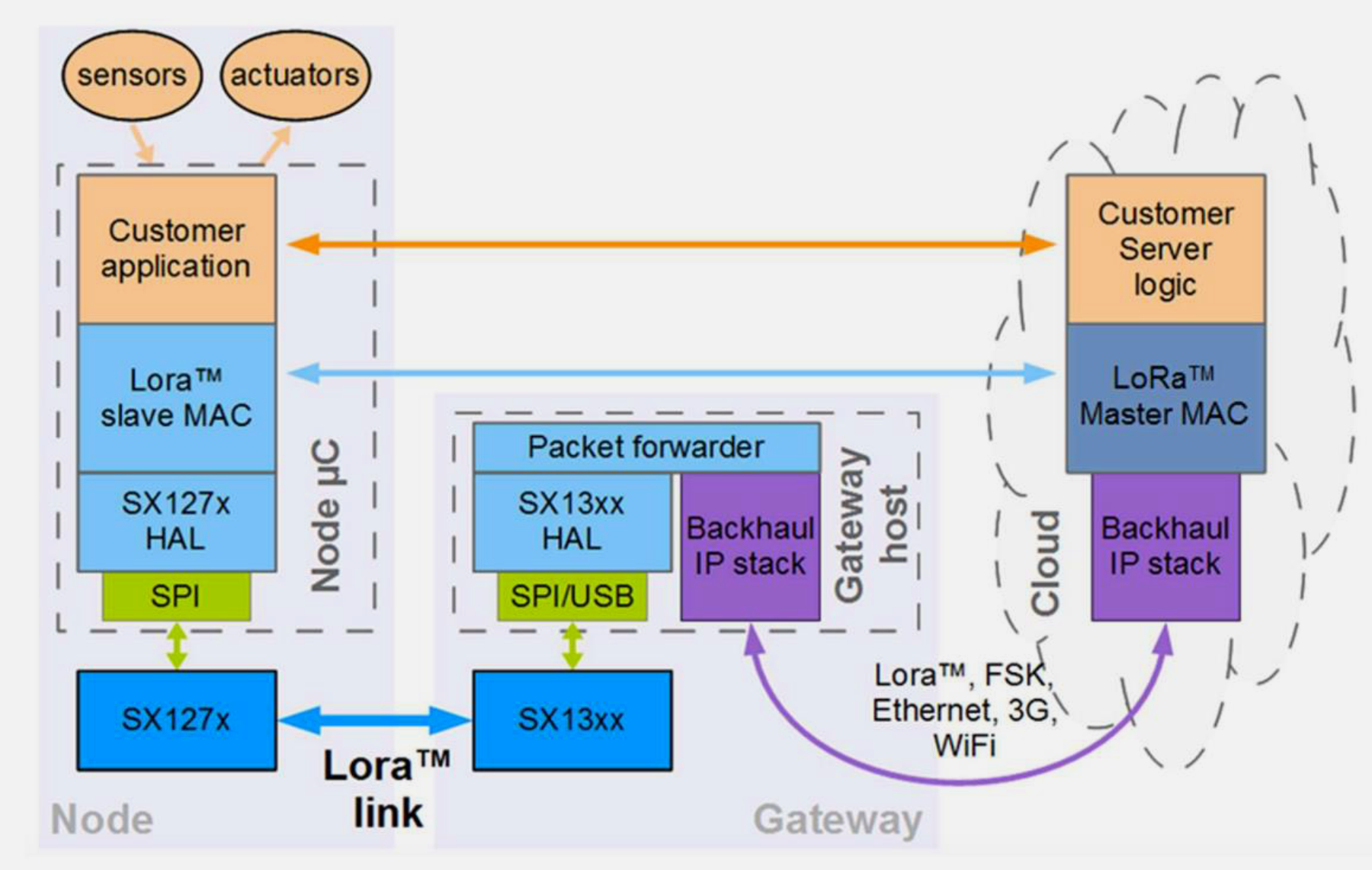
LoRaWAN gateways are “transparent bridges” that don’t process data:
%%{init: {'theme': 'base', 'themeVariables': { 'primaryColor': '#2C3E50', 'primaryTextColor': '#fff', 'primaryBorderColor': '#16A085', 'lineColor': '#E67E22', 'secondaryColor': '#7F8C8D', 'fontSize': '13px'}}}%%
graph TB
    subgraph Gateway["LoRaWAN Gateway Internals"]
        ANT[Antenna<br/>868/915 MHz]
        RF[RF Front-end<br/>8 channels x 6 SFs]
        PROC[Processor<br/>Packet forwarder]
        NET[Network Interface<br/>4G/Ethernet/Wi-Fi]
    end

    subgraph Capabilities["Simultaneous Reception"]
        C1[Channel 1: SF7]
        C2[Channel 2: SF8]
        C3[Channel 3: SF9]
        C4[...]
        C8[Channel 8: SF12]
    end

    ANT --> RF
    RF --> C1
    RF --> C2
    RF --> C3
    RF --> C4
    RF --> C8
    C1 --> PROC
    C2 --> PROC
    C3 --> PROC
    C4 --> PROC
    C8 --> PROC
    PROC --> NET
    NET -->|To Network Server| NS[Network Server]

    style Gateway fill:#2C3E50,stroke:#16A085,stroke-width:3px,color:#fff
    style Capabilities fill:#E67E22,stroke:#2C3E50,stroke-width:2px,color:#fff
Key Gateway Facts:
- No device registration: Gateways don’t “know” which devices they serve
- Multi-channel: Typically 8 channels x 6 SFs = 48 concurrent receptions
- Metadata added: RSSI, SNR, GPS location, timestamp
- Protocol agnostic: Same gateway serves any LoRaWAN device
1084.8 Network Server Role
The network server is the “brain” of LoRaWAN:
| Function | Description |
|---|---|
| Deduplication | Multiple gateways receive same packet; server keeps best one |
| MAC Commands | Sends ADR, LinkCheck, DevStatus commands to devices |
| Security | Validates MIC, manages session keys (NwkSKey) |
| Routing | Forwards decrypted payloads to correct application server |
| Device Management | Tracks frame counters, device state, activation |
Popular Network Servers: - The Things Network (TTN): Free community network, good for prototyping - ChirpStack: Open-source, self-hosted, full control - AWS IoT Core for LoRaWAN: Managed, integrates with AWS services - Actility ThingPark: Enterprise, carrier-grade
1084.9 Visual Reference: Architecture Images
1084.10 Summary
This chapter covered LoRaWAN network architecture:
- Star-of-Stars Topology: Devices communicate with multiple gateways for redundancy
- Gateways as Bridges: Transparent packet forwarding, no device registration
- Network Server: Deduplication, MAC commands, security, routing
- Device Classes: Class A (lowest power), Class B (scheduled), Class C (continuous)
- Power Trade-offs: Class A for 10-year battery life, Class C for instant response
1084.11 What’s Next
Continue to ADR Optimization for a deep dive into Adaptive Data Rate algorithms and duty cycle regulations.
Alternative paths: - Common Pitfalls - Avoid common LoRaWAN deployment mistakes - LoRaWAN Lab - Hands-on simulation exercises