%%{init: {'theme': 'base', 'themeVariables': {'primaryColor': '#2C3E50', 'primaryTextColor': '#fff', 'primaryBorderColor': '#16A085', 'lineColor': '#E67E22', 'secondaryColor': '#16A085', 'tertiaryColor': '#7F8C8D'}}}%%
flowchart TD
    START(["Select Device Class"])
    Q1{"Device<br/>battery-powered?"}
    Q2{"Need downlink<br/>commands?"}
    Q3{"Downlink latency<br/>critical?"}
    Q4{"Scheduled<br/>commands OK?"}

    CLASSA["Class A<br/>Battery Optimized"]
    CLASSB["Class B<br/>Beacon-Synchronized"]
    CLASSC["Class C<br/>Always Listening"]

    EXA["Examples:<br/>• Environmental sensors<br/>• Water meters<br/>• Parking sensors<br/>• Asset trackers"]
    EXB["Examples:<br/>• Irrigation valves<br/>• Street lights (timed)<br/>• Access control<br/>• HVAC scheduling"]
    EXC["Examples:<br/>• Smart locks<br/>• Industrial actuators<br/>• Emergency lighting<br/>• Real-time displays"]

    POWER_A["Power: 10-15 µA sleep<br/>Battery: 10+ years<br/>Latency: Minutes-hours"]
    POWER_B["Power: ~100 µA avg<br/>Battery: 3-5 years<br/>Latency: 128s max"]
    POWER_C["Power: 15+ mA always<br/>Battery: N/A (mains)<br/>Latency: <1 second"]

    START --> Q1
    Q1 -->|"Yes"| Q2
    Q1 -->|"No (mains)"| Q3
    Q2 -->|"No"| CLASSA
    Q2 -->|"Yes"| Q4
    Q4 -->|"Yes"| CLASSB
    Q4 -->|"No, immediate"| CLASSC
    Q3 -->|"Yes (<1s)"| CLASSC
    Q3 -->|"No"| CLASSB

    CLASSA --> EXA
    CLASSB --> EXB
    CLASSC --> EXC

    EXA --> POWER_A
    EXB --> POWER_B
    EXC --> POWER_C

    style START fill:#7F8C8D,color:#fff
    style Q1 fill:#2C3E50,color:#fff
    style Q2 fill:#2C3E50,color:#fff
    style Q3 fill:#2C3E50,color:#fff
    style Q4 fill:#2C3E50,color:#fff
    style CLASSA fill:#27ae60,color:#fff
    style CLASSB fill:#E67E22,color:#fff
    style CLASSC fill:#e74c3c,color:#fff
    style EXA fill:#d5f5e3,color:#2C3E50
    style EXB fill:#fdebd0,color:#2C3E50
    style EXC fill:#fadbd8,color:#2C3E50
    style POWER_A fill:#27ae60,color:#fff
    style POWER_B fill:#E67E22,color:#fff
    style POWER_C fill:#e74c3c,color:#fff
1076 LoRaWAN Device Classes
1076.1 Learning Objectives
By the end of this chapter, you will be able to:
- Differentiate Device Classes: Compare Class A, B, and C devices and their trade-offs
- Select Appropriate Class: Choose the right device class based on power and latency requirements
- Understand Receive Windows: Explain RX1 and RX2 timing for each device class
- Calculate Power Impact: Estimate power consumption differences between classes
1076.2 Prerequisites
Before diving into this chapter, you should be familiar with:
- LoRaWAN Network Topology: Understanding star-of-stars architecture
- LoRaWAN Overview: Basic LoRa modulation concepts
TipFor Beginners: Understanding Device Classes
LoRaWAN has three device classes—Class A (lowest power, sensor sleeps except when transmitting), Class B (scheduled receive windows), and Class C (always listening, for actuators needing commands). Choose based on whether you need to send commands back to devices.
| Term | Simple Explanation |
|---|---|
| Class A | Device sleeps most of time—ultra low power (battery lasts years) |
| Class B | Device wakes at scheduled times to receive commands |
| Class C | Device always listening—can receive commands anytime (higher power) |
| Uplink | Data from device to server |
| Downlink | Commands/config from server to device |
| RX Window | Brief period when device listens for responses |
Analogy: Think of checking your mailbox: - Class A: You only check the mailbox right after you send a letter (very occasionally) - Class B: You check the mailbox at scheduled times each day (whether you sent mail or not) - Class C: You stand by the mailbox 24/7 waiting for mail (most responsive, but tiring!)
1076.3 Device Classes Overview
LoRaWAN defines three device classes with different power/latency trade-offs:
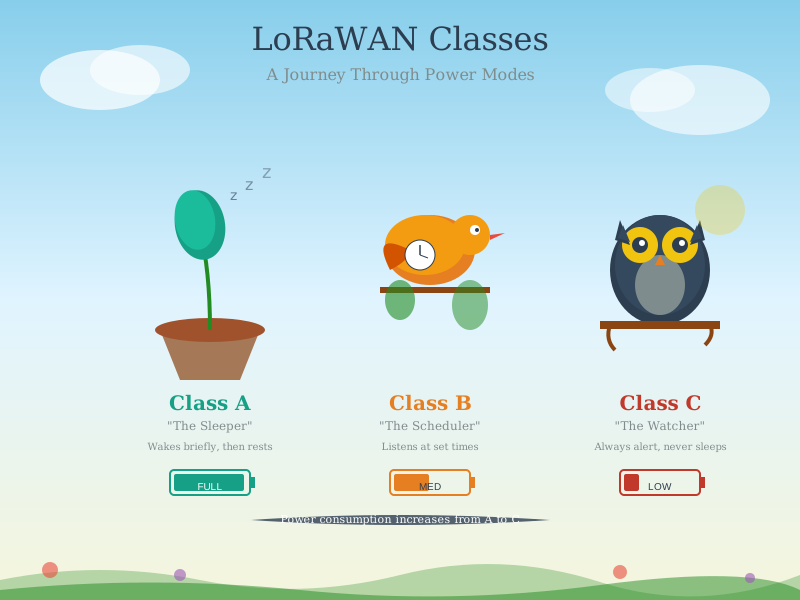
1076.3.1 Class A (All Devices)
Bi-directional with scheduled receive slots
- Lowest power consumption
- Device initiates all communication
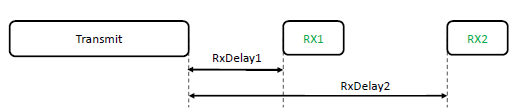
- Two short receive windows after each uplink
- Downlink only possible after an uplink
NoteAlternative View: Interactive Timing Sequence
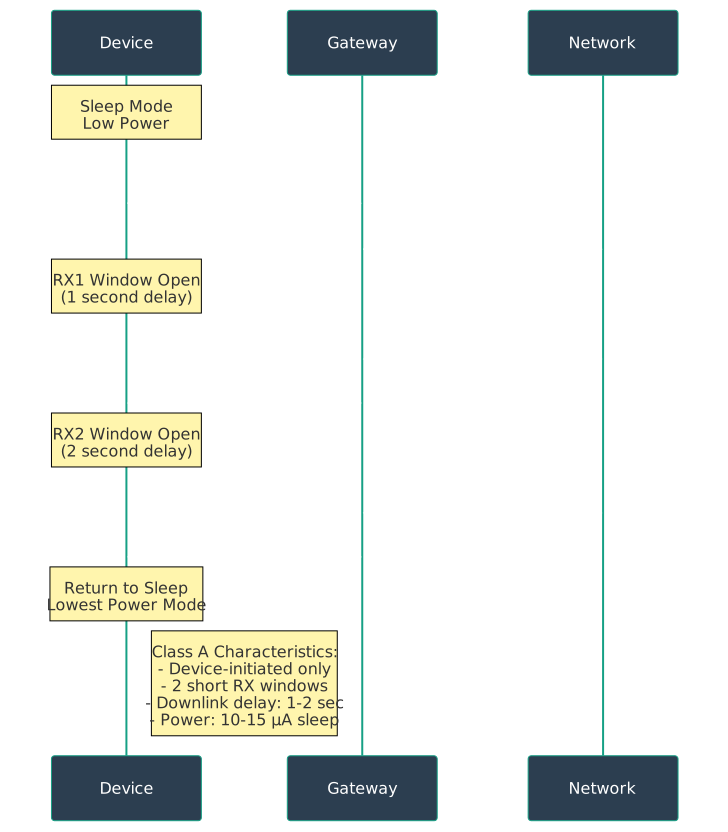
Class A Timing Details:
| Parameter | Value | Notes |
|---|---|---|
| RX1 Delay | 1 second | Opens on same frequency as uplink |
| RX2 Delay | 2 seconds | Fixed frequency (869.525 MHz EU868) |
| RX Window Duration | ~500 ms | Just long enough to detect preamble |
| Sleep Current | 10-15 µA | Between transmissions |
| TX Current | 100 mA | During transmission (14 dBm) |
1076.3.2 Class B (Beacon)
Bi-directional with scheduled receive slots
- Medium power consumption
- Synchronized receive windows using network beacons
- Allows server-initiated downlinks at scheduled times
- Reduced latency compared to Class A

Class B Key Features:
- Beacon Period: 128 seconds between gateway beacons
- Ping Slots: Configurable number of receive slots per beacon period (1 to 128)
- Maximum Latency: Depends on ping slot periodicity (128 seconds worst case)
- Power Consumption: ~100 µA average (beacon reception + ping slots)
1076.3.3 Class C (Continuous)
Bi-directional with continuous receive
- Highest power consumption
- Nearly continuous receive window
- Lowest latency for downlink messages
- Suitable for mains-powered devices
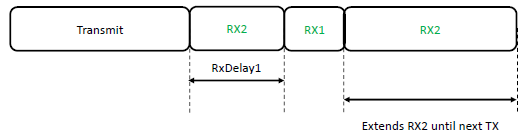
Class C Characteristics:
- Downlink Latency: < 1 second (immediate response possible)
- Power Consumption: 15+ mA continuous (RX mode)
- Battery Life: Not practical for battery operation
- Typical Use Cases: Street lights, industrial actuators, gateways
1076.4 Device Class Comparison
NoteAlternative View: Interactive Class Comparison Diagram

| Class | Power | Downlink Latency | Use Case |
|---|---|---|---|
| A | Lowest | Seconds to hours | Battery sensors |
| B | Medium | Seconds | Actuators needing scheduled control |
| C | Highest | Milliseconds | Mains-powered devices, street lights |
1076.4.1 Detailed Comparison Table
| Parameter | Class A | Class B | Class C |
|---|---|---|---|
| Sleep Current | 10-15 µA | ~100 µA avg | 15+ mA (always RX) |
| Battery Life (2000 mAh) | 10+ years | 3-5 years | Days (not practical) |
| Downlink Initiation | Device only | Server scheduled | Server anytime |
| Max Downlink Latency | Hours (until next uplink) | 128 seconds | < 1 second |
| Beacon Required | No | Yes | No |
| Firmware Update | Slow (multicast Class B) | Practical | Fast |
| Typical Devices | Sensors, meters, trackers | Irrigation valves, HVAC | Actuators, displays |
1076.5 Device Class Selection Flowchart
This decision flowchart provides an approach to selecting the optimal LoRaWAN device class based on power constraints and downlink requirements:
1076.6 Knowledge Check
Test your understanding of LoRaWAN device classes.
1076.7 Practice Exercise
1076.8 Common Pitfalls
CautionPitfall: Missing the RX1/RX2 Downlink Windows
The Mistake: Developers configure devices expecting downlink commands (ACKs, MAC commands, application data), but downlinks never arrive. The device firmware processes uplink transmission correctly but fails to open receive windows at the precise times required by the LoRaWAN specification.
Why It Happens: Class A devices must open RX1 exactly 1 second (+/- 20 microseconds) after uplink TX ends, and RX2 exactly 2 seconds after. Common causes of missed windows:
- Clock drift: Low-cost 32 kHz crystals drift 20-100 ppm. After 1 second, 100 ppm drift = 100 microseconds error
- Processing delays: MCU waking from deep sleep takes 1-5 ms; if not accounted for, RX1 window opens late
- Incorrect frequency: RX1 uses same frequency as uplink (for EU868); RX2 uses fixed 869.525 MHz at SF12. Misconfiguration means gateway response goes unheard
- Wrong spreading factor: RX2 defaults to SF12/BW125; if device expects SF9, it won’t decode the response
The Fix: Implement precise timing with calibration:
- Pre-calculate wake time:
wake_time = TX_end + 1000ms - MCU_wakeup_time - radio_setup_time - Use hardware timers: Don’t rely on software delays; use RTC or timer interrupts
- Calibrate crystal: Measure actual crystal frequency and apply correction factor
- Configure RX2 correctly: Always SF12, BW125, 869.525 MHz (EU868) or 923.3 MHz (US915)
- Test with confirmed uplinks: Send confirmed messages and verify ACKs arrive
Timing budget example (EU868):
TX ends:          T+0 ms
Target RX1 open:  T+1000 ms
MCU wake time:    2 ms
Radio RX setup:   1 ms
Buffer margin:    5 ms
--------------------------
Start wake:       T+992 ms  (1000 - 2 - 1 - 5 = 992)
Without this precision, expect 30-50% downlink loss even with strong signal.
1076.9 Summary
LoRaWAN device classes provide flexibility for different application requirements:
- Class A: Lowest power, device-initiated communication only, ideal for battery sensors
- Class B: Scheduled receive windows via beacons, moderate power, suitable for actuators with latency tolerance
- Class C: Continuous reception, highest power, required for instant command response
The key to selecting the right class is understanding your power budget and downlink latency requirements.
TipWhat’s Next?
Continue to LoRaWAN Security and Joining to learn about encryption, OTAA, and ABP activation methods.