This chapter introduces the Constrained Application Protocol (CoAP), a lightweight RESTful protocol designed specifically for resource-constrained IoT devices.
1223.2 Learning Objectives
By the end of this chapter, you will be able to:
Understand CoAP Protocol: Explain how CoAP provides lightweight RESTful services
Compare with HTTP and MQTT: Differentiate between web protocols for IoT
Implement CoAP Communication: Use CoAP for machine-to-machine applications
Choose Message Types: Select appropriate confirmable vs non-confirmable messages
Design Resource-Constrained Systems: Apply CoAP in low-power IoT devices
TipFor Beginners: What is CoAP and Why Do We Need It?
Think of CoAP as “HTTP’s little sibling” built specifically for tiny devices.
You know how websites use HTTP to communicate? When you visit a webpage, your browser sends a request (GET /page) and the server responds with content. CoAP works the same way, but it’s designed for devices with very limited resources—like a battery-powered temperature sensor with only 10KB of memory.
The Problem CoAP Solves:
HTTP is great for web browsers but terrible for tiny IoT sensors because: - HTTP headers can be hundreds of bytes—wasteful when your sensor data is just “22.5°C” - HTTP requires TCP connections with multiple handshakes—drains batteries - HTTP parsing is complex—needs more processing power
How CoAP is Different:
Feature
HTTP
CoAP
Header size
100s of bytes
Just 4 bytes!
Runs over
TCP (reliable but heavy)
UDP (lightweight)
Best for
Web browsers
Tiny sensors
Real-world analogy: HTTP is like sending a formal letter (envelope, address, return address, stamp, tracking). CoAP is like sending a postcard—minimal overhead, gets the message across.
When to Use CoAP:
Direct device control: “Turn on the light” → device responds “OK”
Reading sensor values: “What’s the temperature?” → “22.5°C”
Very constrained devices: Devices with <100KB RAM, running on coin-cell batteries
Where UDP works: Local networks, not blocked by firewalls
Key Concepts You’ll Learn:
CON (Confirmable): “Did you get my message?” - reliable delivery
NON (Non-confirmable): Fire-and-forget - fastest but no guarantee
GET/POST/PUT/DELETE: Same concepts as HTTP REST APIs
Observe: Like subscribing to updates (similar to MQTT’s publish-subscribe)
By the end of this chapter, you’ll understand when to choose CoAP vs MQTT vs HTTP for your IoT projects!
NoteKey Takeaway
In one sentence: CoAP brings REST to constrained devices over UDP, providing HTTP-like semantics with minimal overhead for resource-limited IoT sensors.
Remember this rule: Use CoAP for request-response patterns on battery-powered devices that need direct addressing; use MQTT when you need event-driven pub-sub streaming or broker-based decoupling.
1223.3 Prerequisites
Before diving into this chapter, you should be familiar with:
MQTT Protocol: Understanding the alternative publish-subscribe messaging approach helps appreciate CoAP’s request-response model and when to choose each protocol
Networking Basics: Foundation for understanding RESTful principles, HTTP methods (GET/POST/PUT/DELETE), URIs, and how CoAP adapts these concepts for constrained devices
UDP/IP Networking: CoAP operates over UDP rather than TCP, requiring knowledge of connectionless communication, packet loss, and reliability trade-offs
1223.4 What is CoAP?
TipIn Plain English
CoAP is like a lightweight version of the web (HTTP) designed for tiny devices. Instead of heavy web requests, CoAP uses small UDP packets - perfect for sensors with limited memory and battery.
Everyday Analogy: If HTTP is a formal letter with envelope, address, and tracking, CoAP is a postcard - gets the message across with much less overhead.
When you’d use it: A battery-powered temperature sensor that needs to last 2 years, a smart light bulb that responds to commands instantly, or a building with 1,000 sensors where bandwidth is limited.
TipDefinition
CoAP (Constrained Application Protocol) is a specialized web transfer protocol designed for resource-constrained nodes and networks. It provides a lightweight RESTful interface similar to HTTP, but optimized for IoT devices with limited processing power, memory, and energy.
Designed by: IETF Constrained RESTful Environment (CoRE) Working Group
Key Characteristics:
Transport: UDP (not TCP like HTTP)
Architecture: RESTful (like HTTP)
Security: DTLS (Datagram TLS)
Overhead: Minimal (4-byte header vs HTTP’s larger headers)
Network: IPv4 and IPv6 (esp. for IEEE 802.15.4)
Use Cases: Smart energy, building automation, sensor networks
1223.5 Why CoAP Instead of HTTP?
1223.5.1 The Problem with HTTP for IoT
HTTP is excellent for the web, but problematic for constrained devices:
Issue
HTTP
CoAP
Protocol
TCP (connection-oriented)
UDP (lightweight)
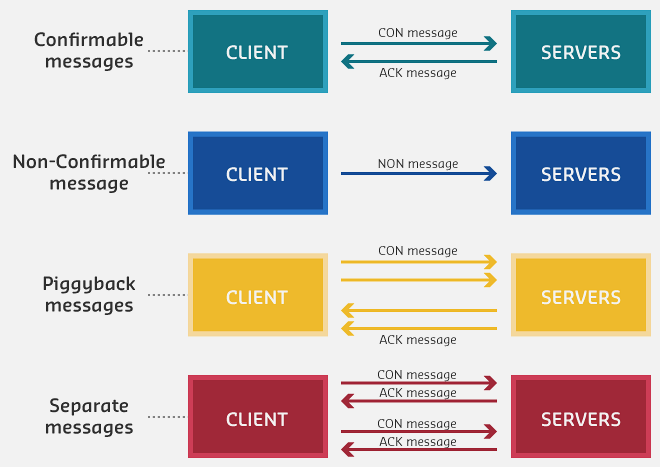
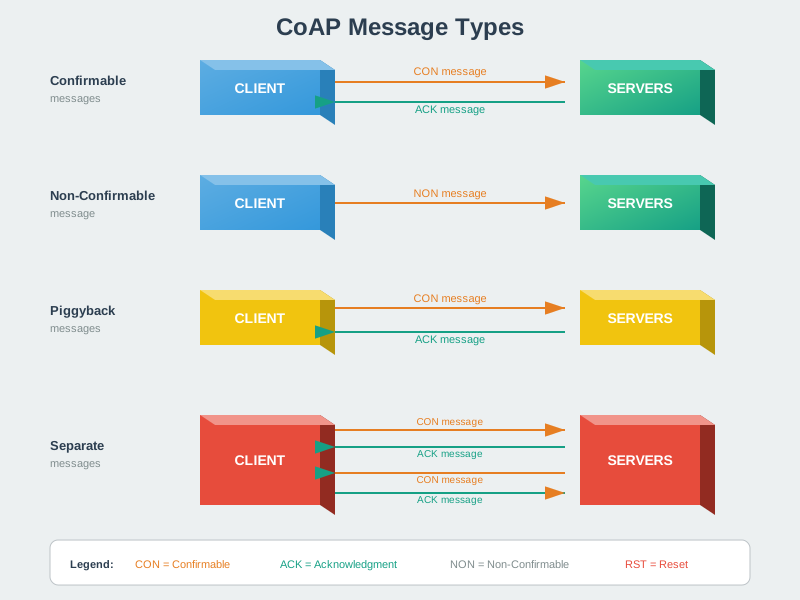
Figure 1223.1: CoAP message types: CON, NON, ACK, RST
CoAP Header Format
Figure 1223.2: CoAP’s 4-byte base header achieves minimal overhead while providing reliable messaging options. The compact design is essential for resource-constrained devices with limited memory and bandwidth.
CoAP Observe Mechanism
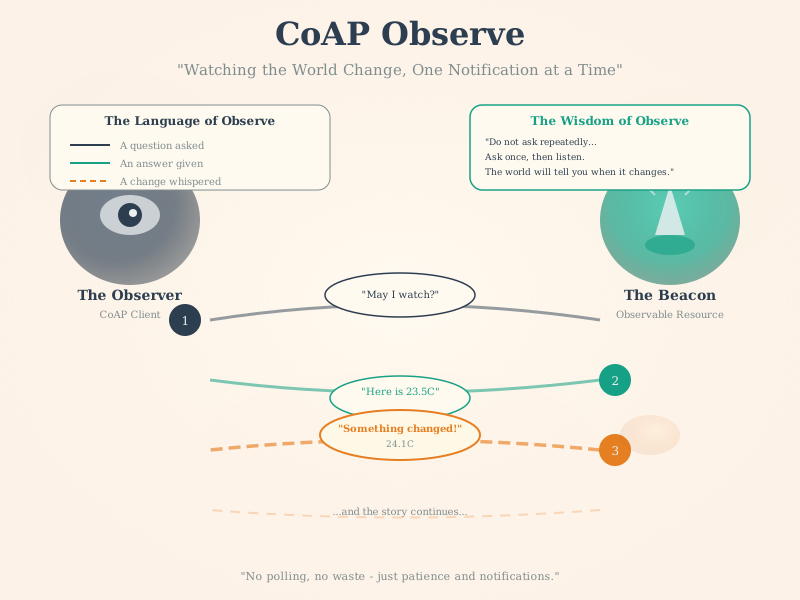
Figure 1223.3: CoAP Observe extends the RESTful model with server push notifications. Clients register interest in a resource, and the server pushes updates on value changes, combining the simplicity of REST with the efficiency of publish-subscribe.
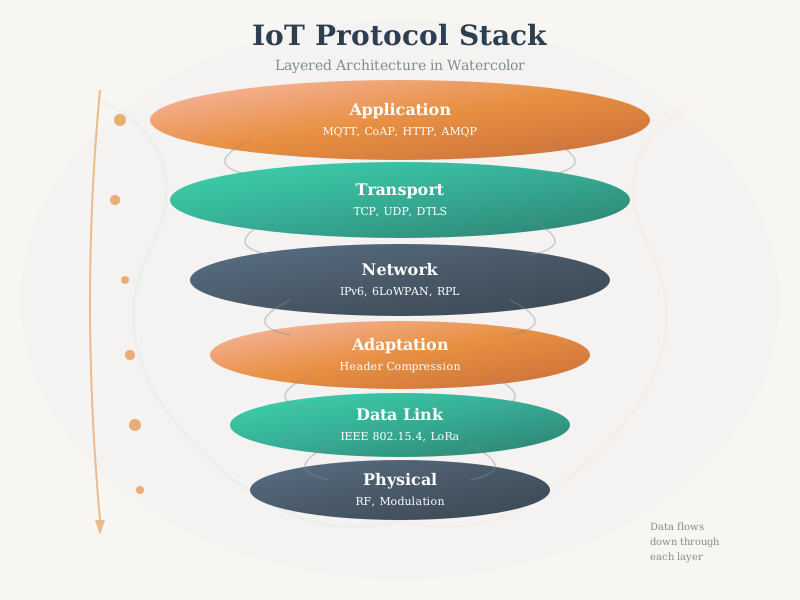
CoAP runs over UDP rather than TCP, eliminating connection establishment overhead. For security, CoAP uses DTLS (Datagram TLS) which provides the same cryptographic protection as TLS but adapted for unreliable transport. The 6LoWPAN adaptation layer enables CoAP over IEEE 802.15.4 networks.
CoAP Request-Response
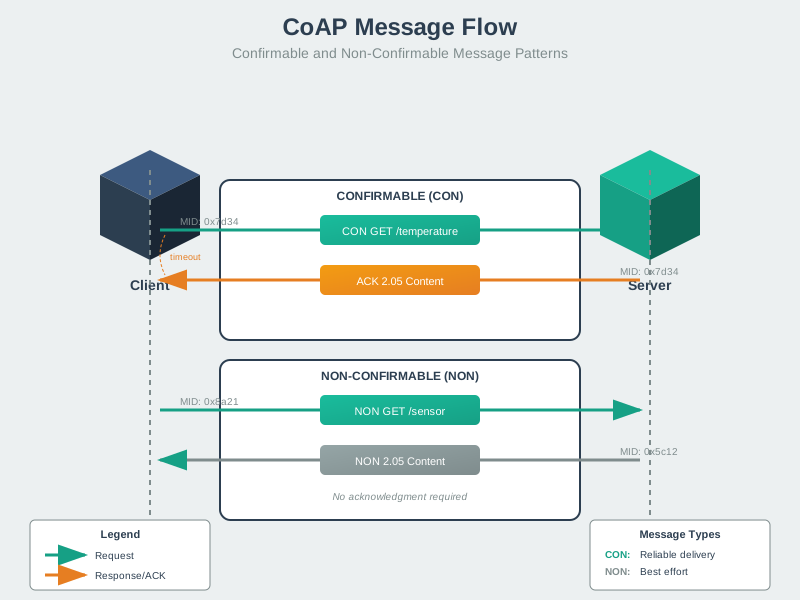
Figure 1223.5: CoAP confirmable request with piggybacked response
Confirmable messages (CON) provide reliability over unreliable UDP. The server can piggyback the response directly on the ACK, reducing round trips. For slow operations, the server sends an empty ACK immediately and the response separately (separate response pattern).
CoAP Block Transfer
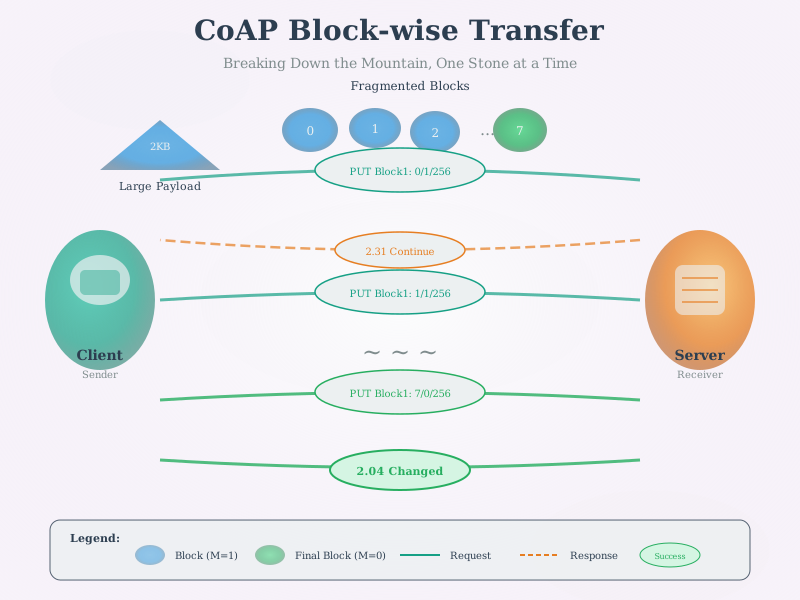
Figure 1223.6: CoAP block-wise transfer for large resources
Block-wise transfer (RFC 7959) enables transferring resources larger than typical CoAP MTU limits. Block1 handles request payloads (e.g., firmware uploads), while Block2 handles response payloads. Each block is individually acknowledged, providing partial reliability.
Show code
{const container =document.getElementById('kc-coap-7');if (container &&typeof InlineKnowledgeCheck !=='undefined') { container.innerHTML=''; container.appendChild(InlineKnowledgeCheck.create({question:"A manufacturer needs to push a 50KB firmware update to thousands of battery-powered sensors deployed over a 6LoWPAN mesh network. The network has a maximum transmission unit (MTU) of 127 bytes per frame. How should this firmware transfer be implemented using CoAP?",options: [ {text:"Send the entire 50KB payload in a single CoAP PUT request - the network layer handles fragmentation",correct:false,feedback:"Incorrect. While IP can fragment packets, 6LoWPAN fragmentation of 50KB would create ~400 fragments. If ANY fragment is lost, the entire payload must be retransmitted. This is extremely unreliable and wastes battery on failed attempts."}, {text:"Use CoAP Block1 option to upload firmware in ~64-byte blocks, with each block individually acknowledged before sending the next",correct:true,feedback:"Correct! Block-wise transfer (RFC 7959) divides the 50KB into manageable blocks (e.g., 64 bytes for constrained networks). Block1 is used for request payloads (uploads to device). Each block is acknowledged before the next is sent, so only failed blocks need retransmission. At 64 bytes/block, the firmware requires ~782 blocks, but the transfer is resilient to packet loss."}, {text:"Use Block2 option since firmware updates are downloads from the device's perspective",correct:false,feedback:"Incorrect. Block2 is for response payloads (downloading from server). From the sensor's perspective, a firmware update is received in the request payload, so Block1 is correct. The OTA server sends PUT requests with Block1 to upload firmware to the sensor."}, {text:"Switch to MQTT for firmware updates since CoAP cannot handle payloads over 1KB",correct:false,feedback:"Incorrect. CoAP handles large payloads through block-wise transfer. MQTT would actually face similar challenges - large MQTT messages still need to traverse the constrained 6LoWPAN network and would require similar chunking strategies."} ],difficulty:"hard",topic:"coap-block-transfer" })); }}
CoAP Resource Discovery
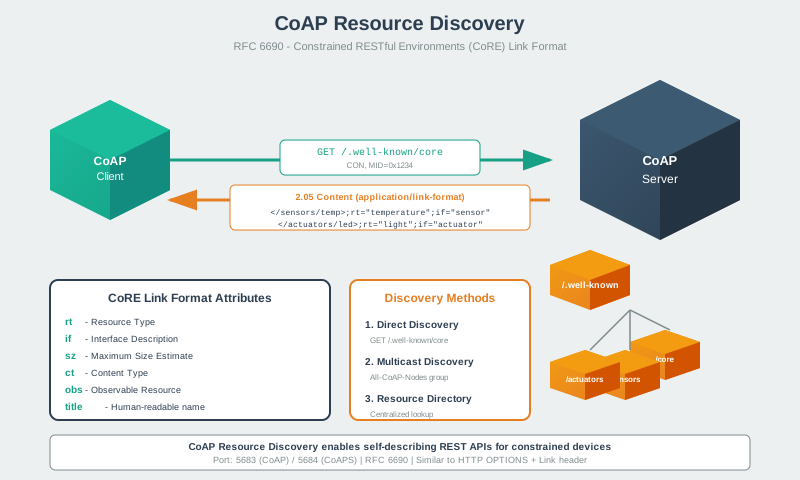
Figure 1223.7: CoAP resource discovery using .well-known/core
CoAP devices expose their resources through the /.well-known/core URI, responding in CoRE Link Format. This enables automatic discovery of available sensors, actuators, and their capabilities, supporting zero-configuration deployments.
Header Size | 100s of bytes | 4 bytes minimum | Power Consumption | High (TCP handshake) | Very low | Overhead | Significant | Minimal | Complexity | Complex parsing | Simple | Best For | Web browsers | Sensors, actuators |
TipReal-World Example: Smart Light Bulb Control
Scenario: Your smartphone wants to turn on a Philips Hue-style smart light bulb.
Result: CoAP uses 95% fewer bytes, 10x faster response, and 15x less energy than HTTP. For a battery-powered light switch, this means 2 years of battery life vs 2 months with HTTP!
Why this matters: In a smart building with 500 light switches each pressed 20 times/day, CoAP saves 3.7 GB of bandwidth and $1,200/year in cellular data costs compared to HTTP.
WarningUDP Means No Reliability Guarantees
CoAP uses UDP, which has critical implications for IoT deployments:
UDP characteristics: - No connection - packets can arrive out-of-order or be lost - No automatic retransmission - application must handle with CON messages - No congestion control - can overwhelm networks if not careful - Firewall/NAT challenges - many networks block UDP traffic
When this causes problems: - Lossy Wi-Fi/cellular networks: 10-30% packet loss means frequent retransmissions - Firewall traversal: Corporate networks often block UDP, preventing CoAP communication - NAT timeout: UDP “connections” expire faster than TCP (30-60 seconds typical)
Solutions: - Use CON messages for important data (adds reliability) - Implement exponential backoff for retransmissions - Consider MQTT (TCP-based) for unreliable networks - Use CoAP over DTLS for secure, more reliable communication - Test thoroughly in production network conditions
NoteWhat Would Happen If: 15% Packet Loss Scenario
Scenario: You deploy 50 CoAP temperature sensors in a warehouse with spotty Wi-Fi. Network analysis shows 15% packet loss.
Figure 1223.9: Impact of using CON messages showing 99.6 percent delivery rate but doubled battery consumption
The Trade-Off Decision:
Approach
Use When
Don’t Use When
Stick with NON
Data is statistical (average temps okay), battery life critical, dashboards show “last reading: 2 min ago” is acceptable
Regulatory compliance required, missing data causes alarms, each reading is critical
Switch to CON
Each reading matters (billing, safety), can afford battery replacement, data integrity > battery life
Battery replacement impossible (remote sensors), network has >20% loss (retransmissions overwhelm it), latency-sensitive
Hybrid approach
Send NON normally, CON for alerts/changes
-
Switch to MQTT/TCP
Persistent 15%+ loss, infrastructure supports broker, many sensors
Low power critical, direct device-to-device needed
Real-World Fix: The warehouse deployed a mesh Wi-Fi extender ($80), reducing packet loss to 2%. Kept NON messages, achieved 98% delivery rate with 2-year battery life. Cost of solution < cost of 6-month battery replacements.
TipWhen to Choose CoAP Over MQTT
Both are lightweight IoT protocols, but serve different use cases:
Choose CoAP when: - You need request-response pattern (like HTTP GET/POST) - RESTful API design is important (resources with URIs) - Minimal overhead is critical (4-byte header vs MQTT’s 2-byte minimum + TCP overhead) - Devices sleep most of the time (CoAP stateless, reconnects fast) - Integration with web services (CoAP to HTTP proxies exist)
Choose MQTT when: - You need publish-subscribe (one-to-many communication) - Persistent connections are acceptable - Network is unreliable (TCP handles retransmissions automatically) - Multiple subscribers need same data - Broker-based architecture fits your deployment
Example: Smart thermostat that responds to user commands → CoAP. Temperature sensor publishing to dashboard and logging service → MQTT.
Show code
{const container =document.getElementById('kc-coap-1');if (container &&typeof InlineKnowledgeCheck !=='undefined') { container.innerHTML=''; container.appendChild(InlineKnowledgeCheck.create({question:"A startup is building a battery-powered soil moisture sensor for agriculture that sends readings every 15 minutes. The device has only 32KB RAM and must last 2 years on a single AA battery. The current prototype uses HTTP REST API calls. Why is switching to CoAP recommended?",options: [ {text:"CoAP supports more HTTP methods like PATCH and OPTIONS",correct:false,feedback:"Incorrect. CoAP actually supports fewer methods than HTTP (GET, POST, PUT, DELETE). The advantage of CoAP is not in additional methods but in reduced overhead and energy efficiency."}, {text:"CoAP's 4-byte header vs HTTP's 100+ byte headers dramatically reduces transmission energy, extending battery life from months to years",correct:true,feedback:"Correct! HTTP's verbose headers and TCP handshake overhead are prohibitive for constrained devices. CoAP's minimal 4-byte header, UDP transport (no handshake), and simpler parsing reduce energy consumption by 10-15x. For a sensor sending 96 readings/day, CoAP saves ~20KB/day in protocol overhead, directly translating to longer battery life."}, {text:"HTTP cannot run on devices with less than 64KB RAM",correct:false,feedback:"Incorrect. HTTP can run on devices with 32KB RAM, though it's memory-intensive. The issue isn't that HTTP won't work, but that it wastes precious battery power on unnecessary overhead for simple sensor data."}, {text:"CoAP provides encryption that HTTP lacks",correct:false,feedback:"Incorrect. HTTP supports TLS encryption just like CoAP supports DTLS. Both protocols can be secured. The advantage of CoAP is efficiency, not security features."} ],difficulty:"easy",topic:"coap-vs-http" })); }}
1223.5.2 REST for Constrained Devices
REST (Representational State Transfer) is the standard interface between HTTP clients and servers. CoAP brings REST to IoT:
Figure 1223.10: CoAP RESTful Operations: GET, POST, and PUT Method Examples
NoteAlternative View: Message Type Matrix
%%{init: {'theme': 'base', 'themeVariables': { 'primaryColor': '#2C3E50', 'primaryTextColor': '#fff', 'primaryBorderColor': '#16A085', 'lineColor': '#E67E22', 'secondaryColor': '#7F8C8D'}}}%%
graph TB
    subgraph Confirmable["CON (Confirmable)"]
        C1["Requires ACK"]
        C2["Reliable delivery"]
        C3["Retransmit if no ACK"]
    end

    subgraph NonConfirmable["NON (Non-Confirmable)"]
        N1["No ACK needed"]
        N2["Fire-and-forget"]
        N3["Periodic telemetry"]
    end

    subgraph Acknowledgment["ACK (Acknowledgment)"]
        A1["Response to CON"]
        A2["May carry payload"]
    end

    subgraph Reset["RST (Reset)"]
        R1["Error response"]
        R2["Unable to process"]
    end

    style Confirmable fill:#16A085,stroke:#2C3E50
    style NonConfirmable fill:#E67E22,stroke:#2C3E50
    style Acknowledgment fill:#7F8C8D,stroke:#2C3E50
    style Reset fill:#2C3E50,stroke:#16A085
This diagram shows CoAP’s four message types: CON for reliable transfer, NON for fire-and-forget, ACK for confirmations, and RST for error handling.
REST principles in CoAP: - Resources identified by URIs (like HTTP) - Standard methods: GET, POST, PUT, DELETE - Stateless client-server architecture - Content-type support (JSON, XML, etc.)
Show code
{const container =document.getElementById('kc-coap-2');if (container &&typeof InlineKnowledgeCheck !=='undefined') { container.innerHTML=''; container.appendChild(InlineKnowledgeCheck.create({question:"A smart factory has a CoAP-enabled machine sensor that exposes several resources. An engineer needs to: (1) read current RPM, (2) set a new temperature threshold, (3) submit a new calibration record, and (4) remove old maintenance logs. Which sequence of CoAP methods should be used?",options: [ {text:"GET /rpm, POST /threshold, PUT /calibration, DELETE /logs",correct:false,feedback:"Incorrect. You've confused POST and PUT. POST creates new resources (like a calibration record), while PUT updates existing resources (like a threshold setting). POST is not idempotent - calling it twice creates two records. PUT is idempotent - calling it twice with the same value has the same effect."}, {text:"GET /rpm, PUT /threshold, POST /calibration, DELETE /logs",correct:true,feedback:"Correct! GET retrieves the current RPM value. PUT updates the existing threshold configuration (idempotent - same result if called multiple times). POST creates a new calibration record (not idempotent - each call creates a new record). DELETE removes the old maintenance logs."}, {text:"READ /rpm, UPDATE /threshold, CREATE /calibration, REMOVE /logs",correct:false,feedback:"Incorrect. CoAP uses the same RESTful method names as HTTP: GET, POST, PUT, DELETE. There are no READ, UPDATE, CREATE, or REMOVE methods in CoAP."}, {text:"GET /rpm, GET /threshold?value=85, GET /calibration?action=add, GET /logs?action=delete",correct:false,feedback:"Incorrect. Using GET for all operations violates REST principles. GET should only retrieve data, not modify it. This approach also makes the API harder to secure (you can't easily restrict write operations) and breaks caching semantics."} ],difficulty:"easy",topic:"coap-methods" })); }}