%%{init: {'theme': 'base', 'themeVariables': { 'primaryColor': '#2C3E50', 'primaryTextColor': '#fff', 'primaryBorderColor': '#16A085', 'lineColor': '#16A085', 'secondaryColor': '#E67E22', 'tertiaryColor': '#7F8C8D'}}}%%
graph TD
    subgraph Net1["Network 1: 192.168.1.0/24<br/>(Your Local Network)"]
        PC1["PC1<br/>192.168.1.100"]
        ESP1["ESP32<br/>192.168.1.50"]
    end

    subgraph Net2["Network 2: 10.0.0.0/8<br/>(IoT Sensor Network)"]
        IoT1["Sensor 1<br/>10.0.0.10"]
        IoT2["Sensor 2<br/>10.0.0.20"]
    end

    subgraph Net3["Network 3: 172.16.0.0/16<br/>(Backend Servers)"]
        Server["Web Server<br/>172.16.0.100"]
        DB["Database<br/>172.16.0.200"]
    end

    R1["Router R1<br/>Gateway<br/>192.168.1.1"]
    R2["Router R2<br/>10.0.0.1"]
    R3["Router R3<br/>172.16.0.1"]
    ISP["ISP Router<br/>(Internet)"]

    PC1 ---|"Direct"| R1
    ESP1 ---|"Direct"| R1
    R1 ---|"metric 1"| R2
    R1 ---|"metric 5"| R3
    R2 ---|"metric 10"| R3
    R1 ---|"Default route"| ISP
    R2 --- IoT1
    R2 --- IoT2
    R3 --- Server
    R3 --- DB

    style PC1 fill:#2C3E50,stroke:#16A085,color:#fff
    style ESP1 fill:#E67E22,stroke:#16A085,color:#fff
    style IoT1 fill:#E67E22,stroke:#16A085,color:#fff
    style IoT2 fill:#E67E22,stroke:#16A085,color:#fff
    style Server fill:#16A085,stroke:#16A085,color:#fff
    style DB fill:#16A085,stroke:#16A085,color:#fff
    style R1 fill:#2C3E50,stroke:#16A085,color:#fff
    style R2 fill:#16A085,stroke:#16A085,color:#fff
    style R3 fill:#16A085,stroke:#16A085,color:#fff
    style ISP fill:#7F8C8D,stroke:#16A085,color:#fff
689 Routing Labs and Quiz
689.1 Learning Objectives
By the end of this lab series, you will be able to:
- Examine Routing Tables: Use system commands to view and interpret routing tables on Windows, Linux, and macOS
- Configure Static Routes: Add, modify, and delete static routes for network segmentation
- Analyze Route Selection: Understand how routing decisions are made based on metrics and longest-prefix matching
- Troubleshoot Connectivity: Use traceroute and ping to diagnose routing issues in IoT networks
- Implement Default Gateways: Configure gateway addresses for proper internet connectivity
- Design Subnet Routing: Plan routing tables for multi-subnet IoT deployments
NoteRelated Chapters
Deep Dives: - Routing Fundamentals - Core routing theory and concepts - Routing Comprehensive Review - Advanced routing strategies - RPL Operation - DODAG formation and routing metrics
IoT Routing: - RPL Fundamentals - Low-power routing protocol - RPL Labs - Hands-on RPL implementation - WSN Routing - Sensor network patterns
Topologies: - Network Topologies - How topology impacts routing - Topologies Labs - Topology design and documentation
Related Protocols: - 6LoWPAN - IPv6 routing over constrained networks - Thread Routing - Thread mesh routing
Learning: - Simulations Hub - Routing simulators and tools - Videos Hub - Routing video tutorials
689.2 Lab Series Overview
This routing lab series is organized into three focused chapters:
| Chapter | Focus | Difficulty | Time |
|---|---|---|---|
| Routing Labs: Fundamentals | View tables, traceroute, ESP32 basics | Intermediate | 30 min |
| Routing Labs: Advanced | Packet forwarding, convergence simulation | Advanced | 45 min |
| Routing Labs: Algorithms | Dijkstra, Bellman-Ford, longest prefix | Advanced | 40 min |
689.3 Prerequisites
These labs build on the core routing theory. You will find them easier if you have already studied:
- Networking Basics - IP addressing, subnets, and default gateways
- Layered Models: Fundamentals - how the network layer fits into the stack
- Routing Fundamentals - static vs dynamic routing, metrics, and longest-prefix match
- Transport Fundamentals - basic understanding of TCP/UDP and ports
You should also be comfortable running simple commands in a terminal (PowerShell, Command Prompt, or a Linux shell).
TipCross-Hub Connections
These labs connect to multiple learning resources:
Simulations Hub: - Network Topology Visualizer - Interactive tool to explore star, mesh, tree topologies and understand how topology affects routing decisions - Routing Protocol Simulators - Compare distance-vector (RIP) vs link-state (OSPF) convergence behavior
Videos Hub: - Routing Fundamentals Videos - Visual explanations of longest-prefix matching, TTL decrement, and routing table lookup - RPL Protocol Deep Dive - DODAG formation, rank calculation, and parent selection in IoT networks
Knowledge Gaps Hub: - Common Routing Misconceptions - Default route confusion, metric vs hop count, and static route precedence - TTL vs Hop Count Confusion - Why TTL prevents loops but doesn’t measure distance
Quizzes Hub: - Routing Mastery Quiz - Test longest-prefix matching, route selection, and failover scenarios - RPL Protocol Quiz - DODAG construction, rank calculation, and routing metrics
These labs work best when combined with simulations (see routing behavior visually) and videos (understand WHY routes are selected before practicing HOW to configure them).
689.4 Getting Started (For Beginners)
TipFor Beginners: Making the Most of Routing Labs
Routing can feel abstract until you see packets actually taking different paths. These labs are designed to connect the theory to real tools.
- If you are on a laptop where you can run
route,ip route,ping, andtraceroute:- Work through the labs in order and copy the commands exactly.
- Compare your output with the examples and note any differences (different gateways, subnets, or hop counts).
- If you cannot run privileged commands (e.g., on a managed corporate machine):
- Focus on reading the command examples and explanations.
- Sketch routing tables on paper and answer the quiz questions to check your understanding.
Key ideas to keep in mind:
| Idea | Plain-language explanation |
|---|---|
| Default route | “Send everything I don’t recognise to this next hop.” |
| Connected route | Automatically added when an interface gets an IP address |
| Metric | Cost value; lower metric = more preferred route |
| Hop | Each router a packet passes on its way to the destination |
When the questions talk about “floating static routes” or “failover”, picture two default routes with different metrics, where the backup only becomes active when the primary path disappears. If that feels fuzzy, revisit routing-fundamentals.qmd first, then come back to these labs.
689.5 Lab Network Topology Overview
Before diving into individual labs, let’s visualize a typical multi-router lab network topology that demonstrates routing concepts:
%%{init: {'theme': 'base', 'themeVariables': { 'primaryColor': '#2C3E50', 'primaryTextColor': '#fff', 'primaryBorderColor': '#16A085', 'lineColor': '#16A085', 'secondaryColor': '#E67E22', 'tertiaryColor': '#7F8C8D'}}}%%
flowchart TD
    PKT["Packet arrives<br/>Dest: 172.16.0.100"]

    PKT --> Q1{"Is destination<br/>on local subnet?"}
    Q1 -->|"Yes: Same /24"| LOCAL["Direct Delivery<br/>ARP -> MAC -> Send"]

    Q1 -->|"No: Different network"| Q2{"Check routing table<br/>Longest prefix match"}

    Q2 --> MATCH{"Found matching<br/>route entry?"}

    MATCH -->|"172.16.0.0/16<br/>via R3 (metric 5)"| FORWARD1["Forward to R3<br/>TTL-1 -> Next hop"]

    MATCH -->|"10.0.0.0/8<br/>via R2 (metric 1)"| FORWARD2["Forward to R2<br/>TTL-1 -> Next hop"]

    MATCH -->|"0.0.0.0/0<br/>Default route"| DEFAULT["Forward to ISP<br/>Gateway of last resort"]

    MATCH -->|"No match found"| DROP["ICMP Unreachable<br/>Packet dropped"]

    style PKT fill:#E67E22,stroke:#2C3E50,color:#fff
    style LOCAL fill:#16A085,stroke:#2C3E50,color:#fff
    style FORWARD1 fill:#16A085,stroke:#2C3E50,color:#fff
    style FORWARD2 fill:#16A085,stroke:#2C3E50,color:#fff
    style DEFAULT fill:#7F8C8D,stroke:#2C3E50,color:#fff
    style DROP fill:#E74C3C,stroke:#2C3E50,color:#fff
TipLab Scenarios You Can Test
This topology enables hands-on practice with:
- Direct Delivery (PC1 to ESP1): Both on 192.168.1.0/24, packets delivered locally without routing
- Single Hop Routing (PC1 to IoT1): R1 forwards to R2 (one hop between networks)
- Multi-Hop Routing (PC1 to Server): Packets traverse R1 to R2 to R3 or R1 to R3 (metric decides)
- Default Route Testing (PC1 to Internet): All unknown destinations forward via R1 to ISP
- Path Selection (R1 to R3): Direct link (metric 5) vs via R2 (metric 11), demonstrates lowest-cost path selection
- TTL Tracking: traceroute from PC1 to DB shows TTL decrement at each hop
The labs below use this topology conceptually, even if you’re working on a simpler single-router setup.
689.7 Quiz: Test Your Understanding
TipUnderstanding Check: IoT Gateway Redundancy Design
Scenario: You’re deploying 500 environmental sensors in a remote warehouse. Internet connectivity is critical for real-time alerts, but the site has unreliable internet:
- Primary connection: Fiber (99.9% uptime, 500 Mbps)
- Backup connection: 4G LTE (95% uptime when fiber fails, 25 Mbps, $50/GB overage)
Current Setup (Single Default Route):
ip route 0.0.0.0/0 via 192.168.1.1 # Fiber gateway onlyProblem: When fiber fails (0.1% of time = 8.8 hours/year), sensors can’t send alerts. Fire detected at 2 AM? No alert until fiber restored 6 hours later.
Solution Options:
Option A: Manual failover (call IT, add LTE route, wait 30 min response time) Option B: Dual default routes with equal metrics (load balancing) Option C: Floating static route (primary metric 10, backup metric 100)
Floating Static Route Config:
ip route 0.0.0.0/0 via 192.168.1.1 metric 10   # Fiber - preferred
ip route 0.0.0.0/0 via 10.0.0.1 metric 100     # LTE - standby
How It Works:
- Normal: Fiber installed (metric 10 < 100), all traffic to fiber, LTE route ignored
- Fiber fails: Fiber route removed (link down), LTE route activates (only remaining default)
- Fiber returns: Fiber route reinstalled (metric 10 < 100), LTE route deactivated, failback automatic
The Math:
- Fiber downtime: 8.8 hours/year
- During downtime: 500 sensors x 12 readings/hour x 8.8 hours = 52,800 packets
- Average packet: 200 bytes
- LTE usage: 52,800 x 200 bytes = 10.56 MB/year
- LTE cost: 10.56 MB x $50/GB = $0.52/year (negligible)
- Benefit: Zero downtime for critical fire/safety alerts
Key Insight: The metric difference (10 vs 100) creates a clear preference hierarchy. When fiber is up, LTE costs $0. When fiber fails, LTE costs cents but maintains system availability.
NoteQuestion 1: Router Decision Making
Question: A router receives a packet for destination 192.168.50.10. The routing table has no specific route to 192.168.50.0/24, but it does have a default route (0.0.0.0/0). What does the router do?
Explanation: B. Routers use longest prefix match. If no specific route matches, the default route (0.0.0.0/0) is the catch-all and is used to forward traffic. Dropping occurs only if there is no default route.
NoteQuestion 2: Time-To-Live
Question: A packet starts with TTL = 64. After passing through 10 routers, what is the TTL value?
Explanation: B. Each router decrements TTL by 1. After 10 hops: 64 - 10 = 54. TTL prevents packets from looping forever; when it reaches 0, routers drop the packet.
NoteQuestion 3: Routing Table Entries
Question: Which type of route is added automatically when a router interface is configured with an IP address and brought up?
Explanation: C. Connected routes are installed automatically for directly attached networks when an interface is up. They are removed automatically if the interface goes down.
NoteQuestion 4: IoT Routing Protocols
Question: Which routing protocol is specifically designed for low-power, lossy IoT networks?
Explanation: D. RPL (Routing Protocol for Low-Power and Lossy Networks) is designed for constrained wireless meshes (e.g., 6LoWPAN/Thread) and forms a DODAG topology optimized for lossy links and energy constraints.
NoteQuestion 5: Floating Static Routes
Question: Your IoT gateway has both Wi-Fi (eth0: 192.168.1.1) and LTE cellular (eth1: 10.0.0.1) interfaces. You want to use Wi-Fi primarily, LTE only as backup. Which configuration achieves this with automatic failover?
Explanation: A. Floating static routes provide automatic failover. Lower metric (10) = preferred. When Wi-Fi fails, its route is removed and LTE route (metric 100) becomes active. Option C has reversed metrics (LTE would be preferred). Option D is overkill for this scenario.
689.8 RPL DODAG Formation
%%{init: {'theme': 'base', 'themeVariables': { 'primaryColor': '#2C3E50', 'primaryTextColor': '#fff', 'primaryBorderColor': '#16A085', 'lineColor': '#16A085', 'secondaryColor': '#E67E22'}}}%%
graph TD
    subgraph Phase1["Phase 1: Root Broadcasts DIO"]
        Root1["Root<br/>RANK 0<br/>Sends DIO"]
    end

    subgraph Phase2["Phase 2: Tier-1 Nodes Join"]
        Root2["Root<br/>RANK 0"]
        N1["Node 1<br/>RANK 256<br/>Parent: Root"]
        N2["Node 2<br/>RANK 256<br/>Parent: Root"]

        Root2 -.->|"DIO"| N1
        Root2 -.->|"DIO"| N2
    end

    subgraph Phase3["Phase 3: Multi-Level Hierarchy"]
        Root3["Root<br/>RANK 0"]
        N3["Node 1<br/>RANK 256"]
        N4["Node 2<br/>RANK 256"]
        N5["Node 3<br/>RANK 512<br/>Parent: Node 1"]
        N6["Node 4<br/>RANK 512<br/>Parent: Node 2"]

        Root3 --> N3
        Root3 --> N4
        N3 -.->|"DIO"| N5
        N4 -.->|"DIO"| N6
    end

    style Root1 fill:#2C3E50,stroke:#16A085,color:#fff
    style Root2 fill:#2C3E50,stroke:#16A085,color:#fff
    style Root3 fill:#2C3E50,stroke:#16A085,color:#fff
    style N1 fill:#16A085,stroke:#16A085,color:#fff
    style N2 fill:#16A085,stroke:#16A085,color:#fff
    style N3 fill:#16A085,stroke:#16A085,color:#fff
    style N4 fill:#16A085,stroke:#16A085,color:#fff
    style N5 fill:#E67E22,stroke:#16A085,color:#fff
    style N6 fill:#E67E22,stroke:#16A085,color:#fff
NoteAlternative View: RPL Message Exchange Timeline
This sequence diagram shows the temporal flow of RPL control messages during DODAG formation and data transmission, emphasizing the message types and their purposes.
%%{init: {'theme': 'base', 'themeVariables': {'primaryColor': '#2C3E50', 'primaryTextColor': '#fff', 'primaryBorderColor': '#16A085', 'lineColor': '#16A085', 'secondaryColor': '#E67E22', 'actorLineColor': '#2C3E50', 'signalColor': '#16A085'}}}%%
sequenceDiagram
    participant R as Root<br/>(Border Router)
    participant N1 as Node 1<br/>(Rank 256)
    participant N2 as Node 2<br/>(Rank 512)
    participant N3 as Node 3<br/>(Rank 768)

    Note over R,N3: Phase 1: DODAG Construction (Downward)
    R->>N1: DIO (DODAG Info Object)<br/>Rank=0, DODAG ID
    N1->>N1: Calculate Rank=256
    N1->>N2: DIO (Rank=256)
    N2->>N2: Calculate Rank=512
    N2->>N3: DIO (Rank=512)
    N3->>N3: Calculate Rank=768

    Note over R,N3: Phase 2: Route Registration (Upward)
    N3->>N2: DAO (Destination Advertisement)<br/>Register N3 route
    N2->>N1: DAO (aggregate N2+N3)
    N1->>R: DAO (aggregate all)
    R->>N1: DAO-ACK

    Note over R,N3: Phase 3: Data Transmission
    N3->>N2: Sensor Data (upward)
    N2->>N1: Forward to parent
    N1->>R: Forward to root
    R->>R: Send to Internet
TipUnderstanding RPL DODAG Formation
The diagram above illustrates how RPL creates routing hierarchies in IoT networks:
- Rank: Numerical value indicating distance from root (lower = closer)
- Parent Selection: Nodes choose best parent based on metrics (ETX, latency, hop count)
- Self-Healing: If a parent fails, nodes automatically select alternate parents
- Upward Routes: Established via DIO messages (toward root)
- Downward Routes: Established via DAO messages (toward leaf nodes)
This hierarchical structure is ideal for sensor networks where most traffic flows to/from a central gateway or border router.
689.9 Visual Reference Gallery
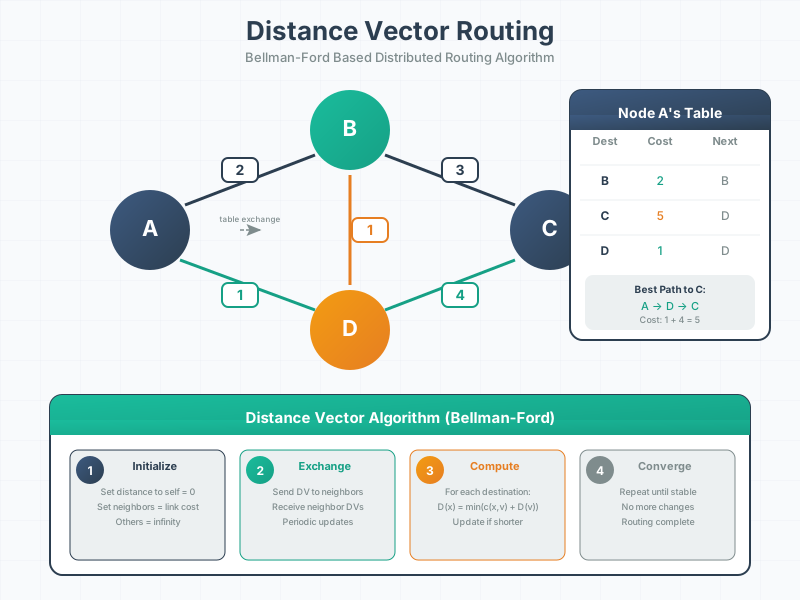
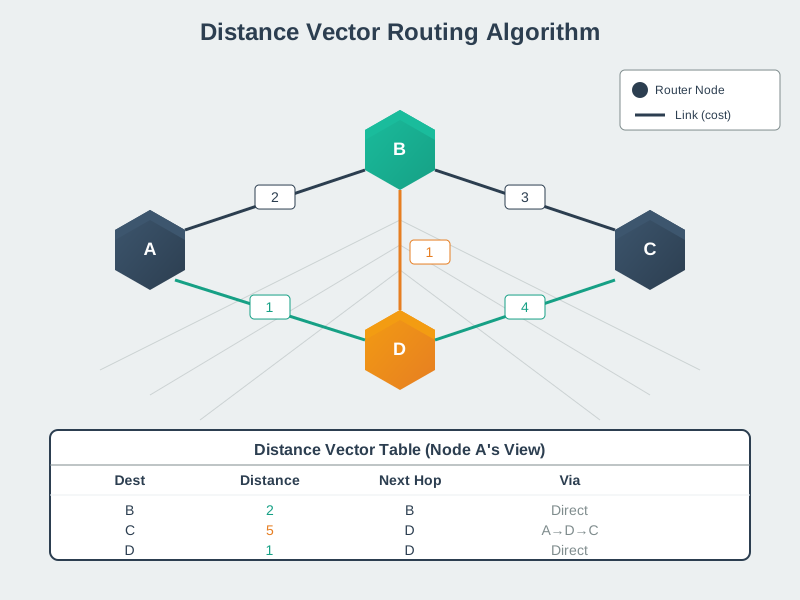
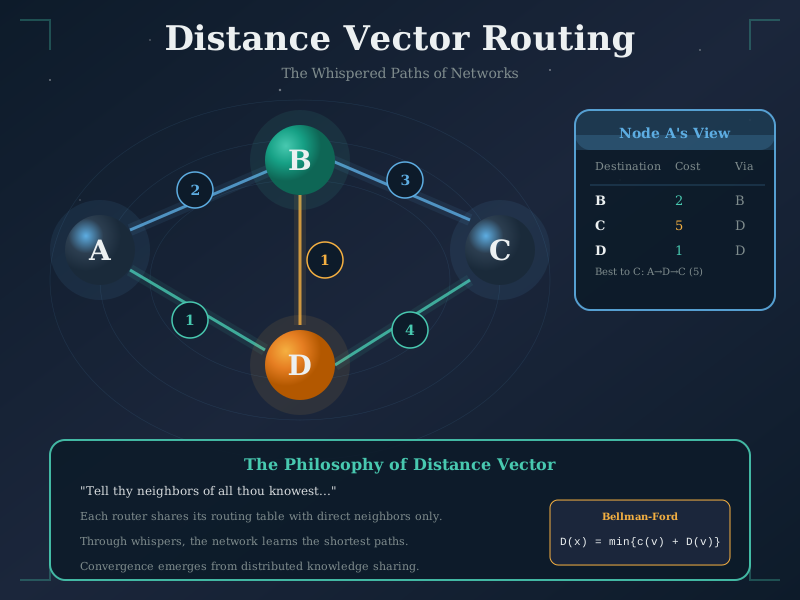
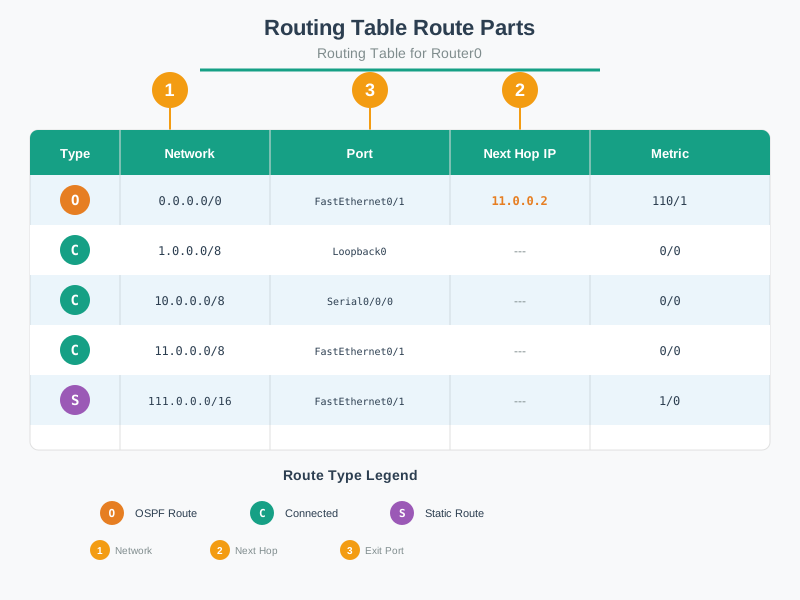
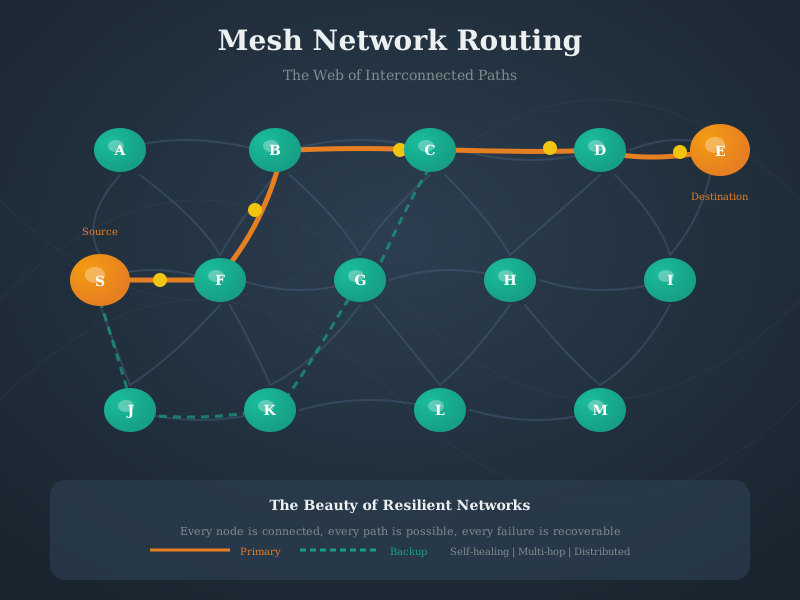
NoteAI-Generated Figure Variants
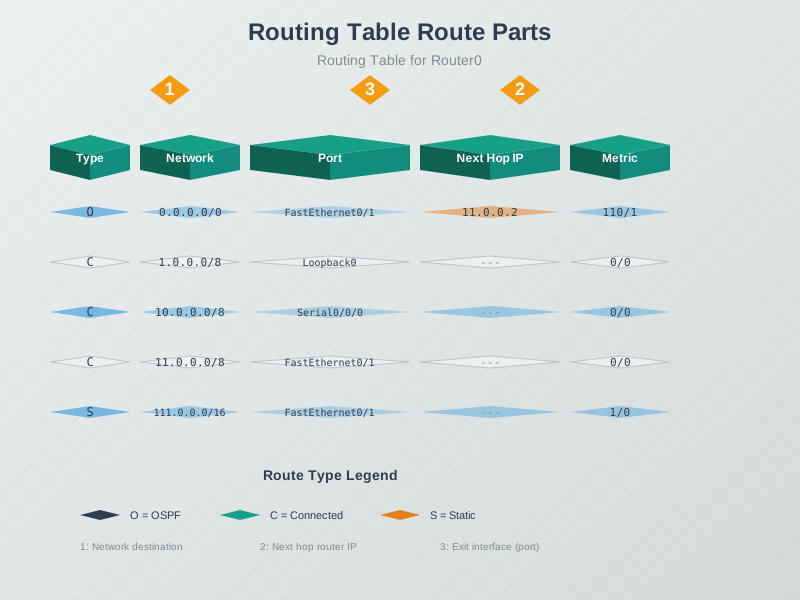
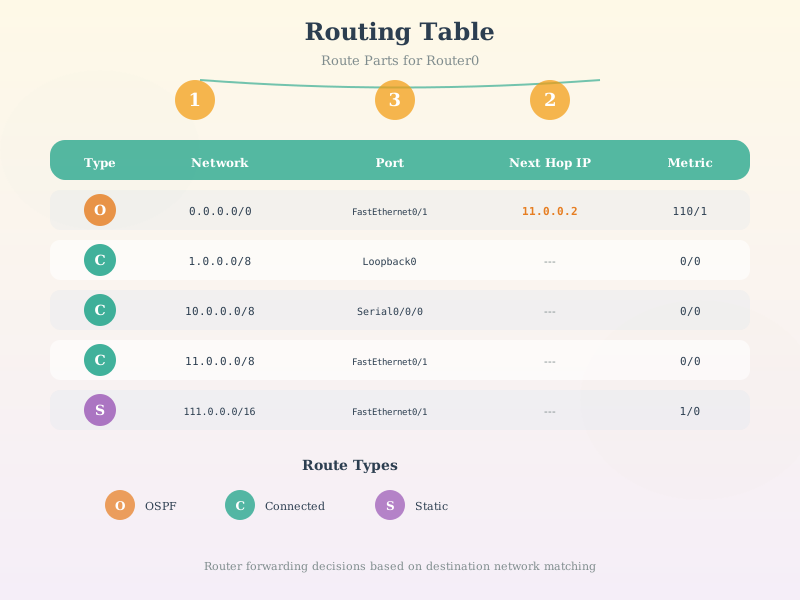
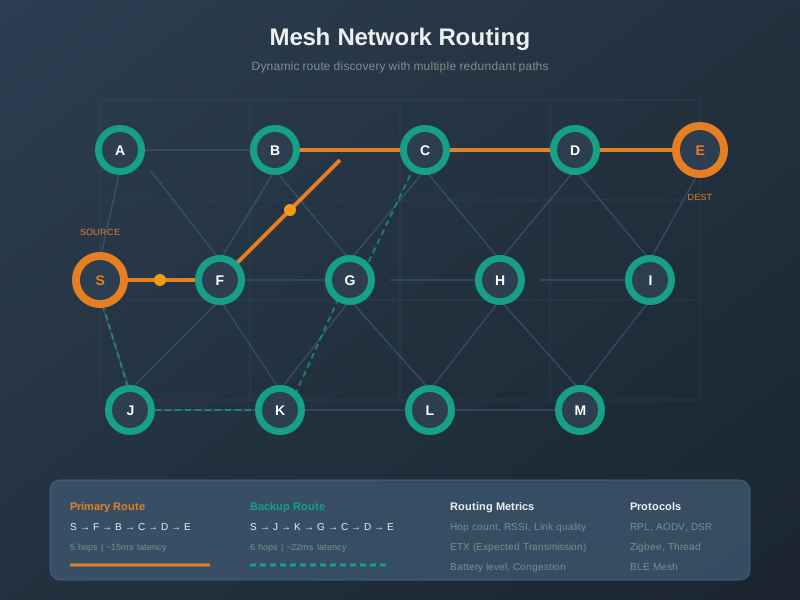
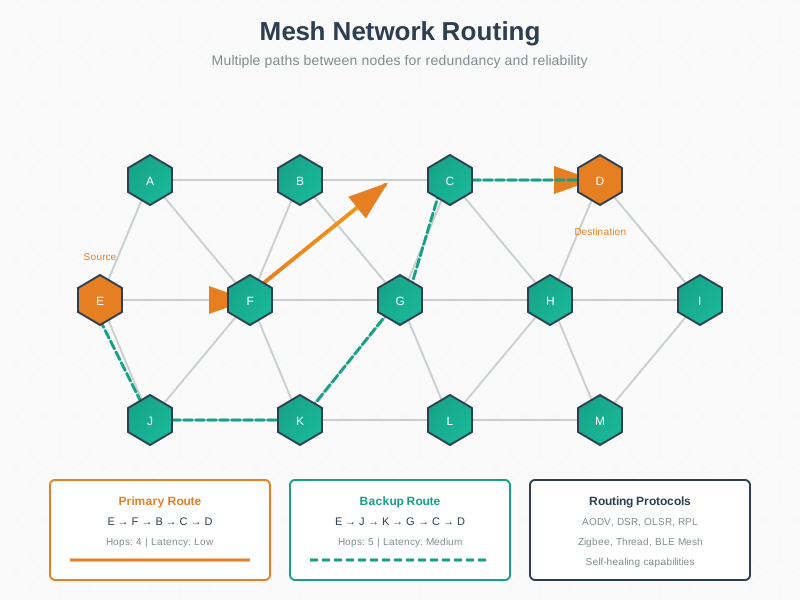
Explore alternative visual representations of routing concepts covered in this chapter. These AI-generated figures offer different artistic perspectives while maintaining technical accuracy.
689.10 Summary
- Routing tables can be examined using
route print(Windows) orip route show(Linux/macOS) to view how packets are forwarded - Traceroute commands map the complete path packets take across multiple routers, revealing network topology and performance bottlenecks
- Static routes can be manually configured on IoT devices and routers to direct traffic through specific gateways or interfaces
- TTL (Time-To-Live) decrements at each router hop and prevents routing loops by dropping packets when TTL reaches zero
- Routing protocols like RPL are specifically designed for low-power IoT networks, providing automatic route discovery and self-healing capabilities
- Longest prefix matching ensures routers select the most specific route available, with default routes serving as catch-all when no specific match exists
- Hands-on labs with ESP32 and Python demonstrate packet forwarding, route lookup algorithms, and convergence behavior in real networks
689.11 What’s Next
After mastering routing fundamentals through hands-on practice, you’re ready to explore:
Network Topologies - Understanding how devices are physically and logically arranged in star, mesh, tree, and hybrid configurations
Wired Communication Protocols - Diving into RS-232, I2C, SPI, and other protocols for direct device-to-device connections
Wireless IoT Protocols - Exploring Wi-Fi, BLE, LoRaWAN, Zigbee, and their routing characteristics in mesh and star topologies
The routing concepts you’ve practiced - longest prefix matching, TTL management, and route convergence - directly apply when designing IoT networks. Many wireless protocols like Zigbee and Thread implement RPL routing internally, making your understanding of routing mechanics essential for troubleshooting and optimizing real deployments.