%%{init: {'theme': 'base', 'themeVariables': { 'primaryColor': '#2C3E50', 'primaryTextColor': '#fff', 'primaryBorderColor': '#16A085', 'lineColor': '#16A085', 'secondaryColor': '#E67E22', 'tertiaryColor': '#7F8C8D'}}}%%
flowchart TD
    subgraph Application["Application Layer"]
        A1[CoAP]
        A2[MQTT]
        A3[HTTP]
    end

    subgraph Transport["Transport Layer"]
        T1[UDP]
        T2[TCP]
        T3[DTLS]
    end

    subgraph Network["Network Layer"]
        N1[IPv6]
        N2[6LoWPAN]
        N3[RPL]
    end

    subgraph Link["Data Link Layer"]
        L1[802.15.4]
        L2[BLE]
        L3[LoRaWAN]
        L4[Wi-Fi]
    end

    subgraph Physical["Physical Layer"]
        P1[Sub-GHz Radio]
        P2[2.4 GHz Radio]
    end

    Application --> Transport
    Transport --> Network
    Network --> Link
    Link --> Physical

    style Application fill:#E67E22,stroke:#2C3E50,color:#fff
    style Transport fill:#16A085,stroke:#2C3E50,color:#fff
    style Network fill:#2C3E50,stroke:#16A085,color:#fff
    style Link fill:#16A085,stroke:#2C3E50,color:#fff
    style Physical fill:#7F8C8D,stroke:#2C3E50,color:#fff
665 IoT Protocols: Stack Architecture
NoteLearning Objectives
By the end of this section, you will be able to:
- Describe the complete IoT protocol stack layer by layer
- Identify protocols at each layer and their IoT-specific adaptations
- Compare protocol categories by function (communication pattern, transport, network)
- Use protocol selection decision trees for deployment scenarios
- Map protocols to the TCP/IP layer model
665.1 Prerequisites
Before diving into this chapter, you should be familiar with:
- IoT Protocols: Introduction: Understanding of why IoT needs specialized protocols and basic constraints
- Layered Models Fundamentals: Knowledge of the OSI and TCP/IP models helps you understand where each IoT protocol fits
665.2 IoT Protocol Stack
TipAlternative View: Protocol Selection Decision Tree
This variant helps you select protocols based on your deployment scenario:
%%{init: {'theme': 'base', 'themeVariables': { 'primaryColor': '#2C3E50', 'primaryTextColor': '#fff', 'primaryBorderColor': '#16A085', 'lineColor': '#16A085', 'secondaryColor': '#E67E22', 'tertiaryColor': '#7F8C8D'}}}%%
flowchart TD
    START["What is your<br/>primary constraint?"] --> Q1{"Battery<br/>powered?"}

    Q1 -->|Yes| Q2{"Range<br/>needed?"}
    Q1 -->|No| Wi-Fi["Wi-Fi + MQTT/HTTP<br/>High bandwidth"]

    Q2 -->|"< 100m"| Q3{"Data rate?"}
    Q2 -->|"> 1km"| LPWAN["LoRaWAN/NB-IoT<br/>+ CoAP"]

    Q3 -->|"< 1 Mbps"| ZIGBEE["802.15.4/Zigbee<br/>6LoWPAN + CoAP"]
    Q3 -->|"> 1 Mbps"| BLE["BLE<br/>GATT or CoAP"]

    style START fill:#2C3E50,stroke:#16A085,color:#fff
    style Q1 fill:#E67E22,stroke:#2C3E50,color:#fff
    style Q2 fill:#E67E22,stroke:#2C3E50,color:#fff
    style Q3 fill:#E67E22,stroke:#2C3E50,color:#fff
    style Wi-Fi fill:#16A085,stroke:#2C3E50,color:#fff
    style LPWAN fill:#16A085,stroke:#2C3E50,color:#fff
    style ZIGBEE fill:#16A085,stroke:#2C3E50,color:#fff
    style BLE fill:#16A085,stroke:#2C3E50,color:#fff
This decision tree guides you through common IoT deployment scenarios to recommended protocol stacks.
665.3 Protocol Categories by Layer
NoteLayer-by-Layer Protocol Breakdown
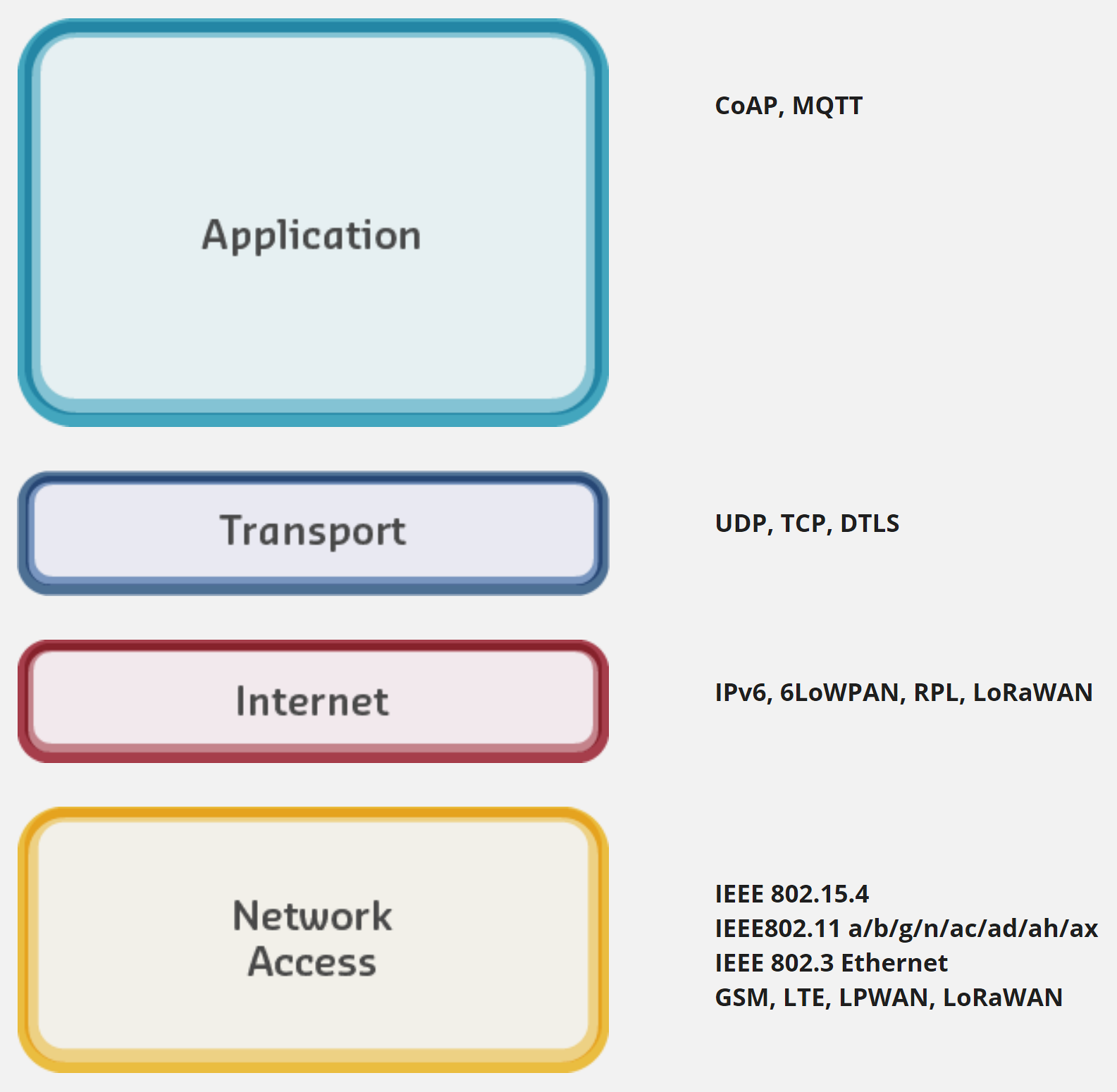
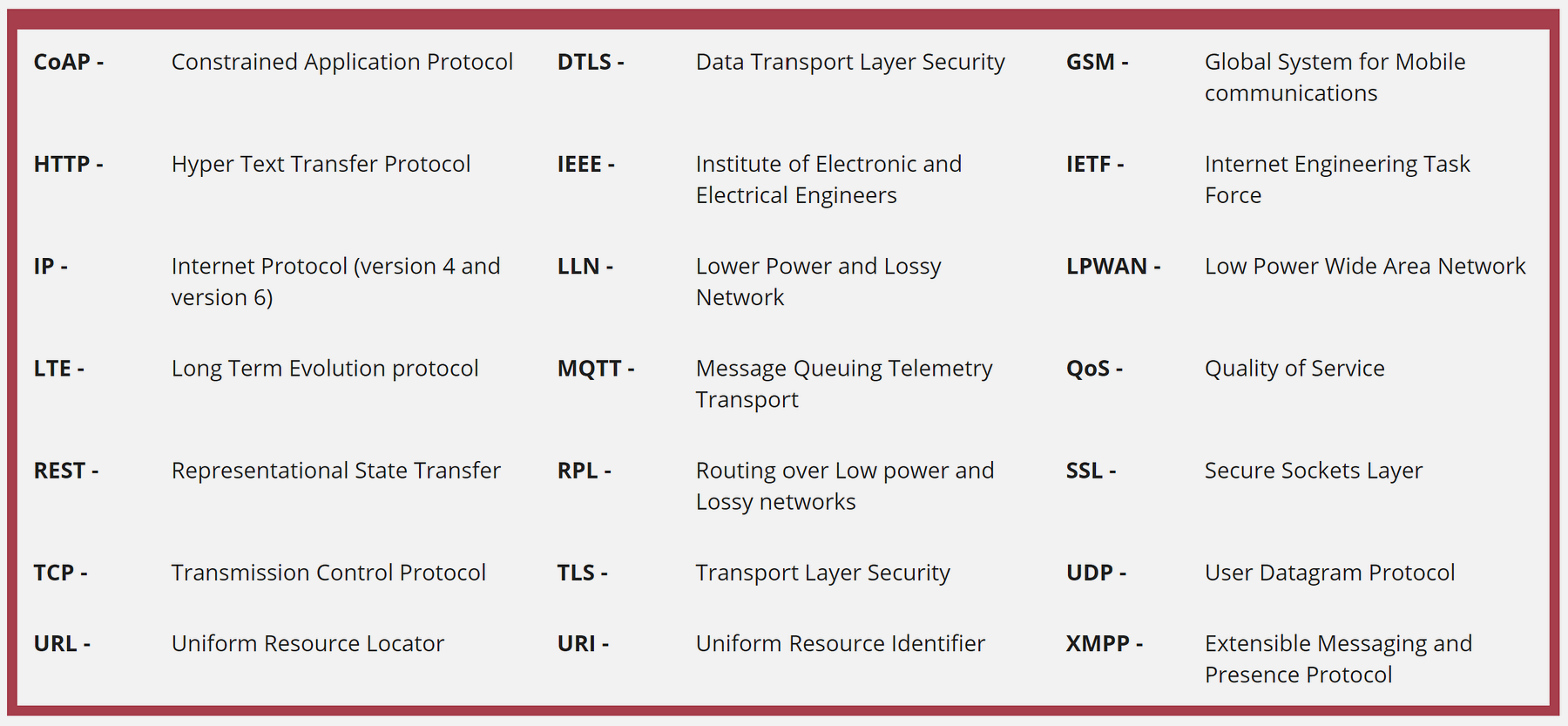
Application Layer (What applications use): - CoAP: RESTful for constrained devices (UDP-based) - MQTT: Publish-subscribe messaging (TCP-based) - HTTP: Web APIs (via gateways, not directly on sensors) - AMQP: Enterprise messaging - XMPP: Extensible messaging (less common for IoT)
Transport Layer (How data is transported): - UDP: Connectionless, lightweight, unreliable
- TCP: Connection-oriented, reliable, higher overhead
- DTLS: Secure UDP (TLS for datagrams)
Network Layer (How packets are routed): - IPv6: 128-bit addresses (IoT standard) - IPv4: 32-bit addresses (legacy, exhausted) - ICMPv6: Network diagnostics - RPL: Routing for low-power lossy networks
Adaptation Layer (How protocols adapt to constraints): - 6LoWPAN: IPv6 header compression for 802.15.4 - Thread: IPv6-based mesh (uses 6LoWPAN)
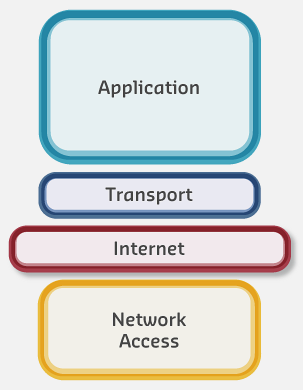
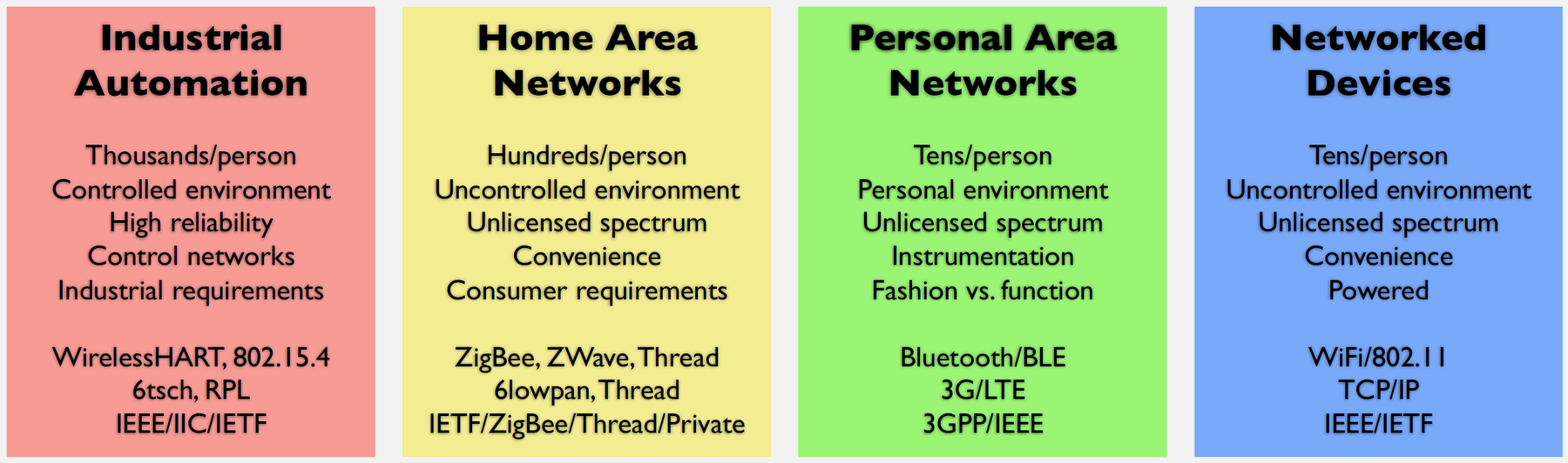
Data Link Layer (How devices access medium): - IEEE 802.15.4: Low-power wireless (Zigbee, Thread) - Bluetooth LE: Short-range personal area network - LoRaWAN: Long-range, low-power WAN - Wi-Fi (802.11): Local area network - Cellular (NB-IoT, LTE-M): Wide area network
Physical Layer (How bits are transmitted): - Radio: 2.4 GHz (Wi-Fi, BLE, Zigbee), Sub-GHz (LoRa, Z-Wave) - Wired: Ethernet, I2C, SPI, RS-232
665.4 Protocol Comparison Tables
665.4.1 Application Layer Protocols
| Protocol | Header Size | Transport | Pattern | Best For |
|---|---|---|---|---|
| CoAP | 4 bytes | UDP | Request-Response | Battery devices, M2M |
| MQTT | 2 bytes | TCP | Publish-Subscribe | Telemetry, dashboards |
| HTTP | 200+ bytes | TCP | Request-Response | Web APIs, gateways |
| AMQP | Variable | TCP | Queue-based | Enterprise messaging |
665.4.2 Transport Layer Protocols
| Protocol | Connection | Reliability | Overhead | Power | Security |
|---|---|---|---|---|---|
| UDP | Connectionless | Best-effort | 8 bytes | Low | None (add DTLS) |
| TCP | Connection-oriented | Guaranteed | 20+ bytes | High | None (add TLS) |
| DTLS | Connectionless | Best-effort | 13+ bytes | Medium | Built-in |
| TLS | Connection-oriented | Guaranteed | 5-40 bytes | High | Built-in |
665.4.3 Network Layer Protocols
| Protocol | Address Size | Header Size | Compression | IoT Suitability |
|---|---|---|---|---|
| IPv4 | 32 bits | 20 bytes | None | Limited (NAT) |
| IPv6 | 128 bits | 40 bytes | Via 6LoWPAN | Excellent |
| 6LoWPAN | 128 bits | 2-7 bytes | Yes | Essential for 802.15.4 |
665.4.4 Data Link Layer Protocols
| Protocol | Range | Data Rate | Power | Topology |
|---|---|---|---|---|
| 802.15.4 | 10-100m | 250 kbps | Very Low | Star, Mesh |
| BLE | 10-100m | 1-2 Mbps | Low | Star, Mesh |
| Wi-Fi | 50-100m | 10-1000 Mbps | High | Star |
| LoRaWAN | 2-15 km | 0.3-50 kbps | Very Low | Star |
| NB-IoT | Cellular | 20-250 kbps | Low | Star |
665.5 Understanding Check: IoT Protocol Stack Selection
TipUnderstanding Check: Agricultural IoT Deployment
Scenario: You’re deploying 500 battery-powered soil moisture sensors across a 200-acre farm. Each sensor uses an IEEE 802.15.4 radio and has 32KB RAM. Sensors must transmit 50-byte readings every 30 minutes to a cloud server for 5+ years without battery replacement.
Think about: 1. Why would using HTTP over TCP add 10-20 extra packets per reading compared to CoAP over UDP? 2. What happens to your 50-byte payload when you try to fit it inside an 802.15.4 frame with a 40-byte IPv6 header?
Key Insight: CoAP/UDP/6LoWPAN compression reduces the protocol overhead from 73 bytes (IPv6+UDP headers) to just 10 bytes (6LoWPAN compressed). This means:
Why CoAP Stack Wins:
%%{init: {'theme': 'base', 'themeVariables': { 'primaryColor': '#2C3E50', 'primaryTextColor': '#fff', 'primaryBorderColor': '#16A085', 'lineColor': '#16A085', 'secondaryColor': '#E67E22'}}}%%
graph TD
    A[50-byte Reading<br/>Every 10 min] --> B{Protocol Choice}
    B -->|CoAP/UDP/6LoWPAN| C[54 bytes total<br/>4-byte header]
    B -->|MQTT/TCP/IPv6| D[94+ bytes total<br/>TCP handshake]
    B -->|HTTP/TCP| E[200+ bytes total<br/>Text headers]

    C --> F[Fits in 127-byte<br/>802.15.4 frame]
    D --> G[Requires<br/>fragmentation]
    E --> H[Major<br/>fragmentation]

    F --> I[Battery: 5-10 years]
    G --> J[Battery: 2-3 years]
    H --> K[Battery: months]

    style C fill:#16A085,stroke:#2C3E50,color:#fff
    style D fill:#E67E22,stroke:#2C3E50,color:#fff
    style E fill:#7F8C8D,stroke:#2C3E50,color:#fff
    style I fill:#16A085,stroke:#2C3E50,color:#fff
Why 6LoWPAN is essential: - 802.15.4 MTU = 127 bytes - IPv6 header = 40 bytes (before compression) - 6LoWPAN compresses IPv6 header to 2-7 bytes - Without 6LoWPAN, no room for application data!
Why CoAP over MQTT:
For 50-byte sensor reading:

CoAP (UDP):
- 4-byte header + 50-byte payload = 54 bytes
- No connection setup (UDP)
- Confirmable mode for reliability
- Perfect for infrequent readings

MQTT (TCP):
- Requires TCP connection (3-way handshake = 3 packets)
- TCP header per packet (20 bytes)
- MQTT CONNECT sequence (multiple packets)
- Keep-alive overhead
- Better for continuous streaming, not periodic readings
RAM Comparison:
Protocol    RAM Required    32KB Fit?
CoAP        2-10 KB         Yes
MQTT        10-30 KB        Tight
HTTP        50-100 KB       No
AMQP        100+ KB         No
Why other options fail:
A - HTTP/TCP/IPv4: - HTTP headers are text-based, ~200-500 bytes - TCP requires connection state memory - IPv4 has no header compression for 802.15.4 - Won’t fit in 127-byte MTU without fragmentation
C - MQTT/TCP/IPv6: - MQTT is efficient but TCP overhead for infrequent messages - IPv6 without 6LoWPAN = 40-byte header (too large) - TCP connection maintenance drains battery
D - AMQP/TCP/IPv4: - Enterprise protocol, not designed for constrained devices - Complex protocol = large code footprint - TCP overhead same problems as MQTT
TipUnderstanding Check: High-Frequency Industrial Telemetry
Scenario: A steel mill deploys 500 temperature sensors monitoring blast furnaces. Each sensor transmits 4-byte readings every second (43.2 million readings/day total). A central control room needs to display data on multiple dashboards, log all readings, and trigger alarms when temperatures exceed thresholds—all with <2 second latency.
Think about: 1. How many TCP connections would 500 HTTP sensors create/destroy per day sending individual requests every second? 2. Why does having 3 different subscribers (dashboard, logger, alarm system) make publish-subscribe more efficient than request-response?
Key Insight: MQTT’s persistent connections reduce network overhead by 75% compared to per-request protocols:
MQTT Wins Because:
1. Persistent TCP Connection:
CoAP/HTTP (per-message overhead):
Each message: DNS lookup + TCP handshake + Request + Response
500 sensors x 4 packets = 2,000 packets/second overhead!

MQTT (persistent connection):
Initial: Connect once per sensor (500 connections)
Ongoing: PUBLISH packet only (2-byte header + payload)
500 sensors x 1 packet = 500 packets/second (75% reduction)
2. Pub/Sub Pattern:
%%{init: {'theme': 'base', 'themeVariables': { 'primaryColor': '#2C3E50', 'primaryTextColor': '#fff', 'primaryBorderColor': '#16A085', 'lineColor': '#16A085', 'secondaryColor': '#E67E22'}}}%%
flowchart TD
    S1[Sensor 1] -->|temp: 25C| B[MQTT Broker]
    S2[Sensor 2] -->|temp: 23C| B
    S3[Sensor 500] -->|temp: 24C| B

    B -->|Subscribe: sensors/temp/#| D1[Dashboard]
    B -->|Subscribe: sensors/#| D2[Data Logger]
    B -->|Subscribe: sensors/temp/line1/+| D3[Alert System]

    style B fill:#2C3E50,stroke:#16A085,color:#fff
    style S1 fill:#16A085,stroke:#2C3E50,color:#fff
    style S2 fill:#16A085,stroke:#2C3E50,color:#fff
    style S3 fill:#16A085,stroke:#2C3E50,color:#fff
    style D1 fill:#E67E22,stroke:#2C3E50,color:#fff
    style D2 fill:#E67E22,stroke:#2C3E50,color:#fff
    style D3 fill:#E67E22,stroke:#2C3E50,color:#fff
Topics: - sensors/temp/line1/machine001 - sensors/temp/line1/machine002 - …
Subscribers can use wildcards: - Dashboard: sensors/temp/# (all temperatures) - Line1 alerts: sensors/temp/line1/+ (line1 only)
3. QoS Levels:
QoS 0 (At most once): Fire-and-forget (lowest overhead)
  - Perfect for high-frequency sensor data
  - Missing one reading out of 86,400/day is acceptable

QoS 1 (At least once): Acknowledged delivery
  - For critical alerts
  - Slightly more overhead
Performance Comparison:
%%{init: {'theme': 'base', 'themeVariables': { 'primaryColor': '#2C3E50', 'primaryTextColor': '#fff', 'primaryBorderColor': '#16A085', 'lineColor': '#16A085', 'secondaryColor': '#E67E22'}}}%%
graph LR
    A[500 messages/sec] --> B{Protocol}
    B -->|MQTT| C[~25 KB/sec<br/>500 packets]
    B -->|CoAP| D[~30 KB/sec<br/>2000 packets]
    B -->|HTTP| E[~250 KB/sec<br/>2000+ packets]

    C --> F[Winner!<br/>Lowest overhead]
    D --> G[Good but<br/>more packets]
    E --> H[10x more<br/>bandwidth]

    style C fill:#16A085,stroke:#2C3E50,color:#fff
    style D fill:#E67E22,stroke:#2C3E50,color:#fff
    style E fill:#7F8C8D,stroke:#2C3E50,color:#fff
    style F fill:#16A085,stroke:#2C3E50,color:#fff
Verify Your Understanding: - Calculate: If each sensor sends 43,200 readings/day, how many total packet transmissions occur with HTTP request-response vs MQTT persistent connection? - Why does MQTT’s topic-based routing (sensors/temp/#) eliminate the need for application-level filtering that HTTP would require?
TipUnderstanding Check: Smart City Cost Optimization
Scenario: A city IT department deploys 10,000 parking sensors across downtown. Each sensor reports status changes (occupied/vacant) ~5 times/day plus monthly battery level. Sensors use NB-IoT cellular ($0.50/MB data). The city already has REST API infrastructure for their web portal and mobile app, but needs to minimize cellular data costs for 5-year sensor deployment.
Think about: 1. What’s the total cost difference over 5 years between 500-byte HTTP requests and 50-byte CoAP messages at $0.50/MB for 10,000 sensors? 2. How does a CoAP-to-HTTP gateway let you keep constrained protocols on sensors while maintaining REST API compatibility?
Key Insight: CoAP with HTTP proxy reduces cellular data costs by $900,000 over 5 years while maintaining REST API compatibility:
Why CoAP + Proxy Architecture Wins:
Architecture:
%%{init: {'theme': 'base', 'themeVariables': { 'primaryColor': '#2C3E50', 'primaryTextColor': '#fff', 'primaryBorderColor': '#16A085', 'lineColor': '#16A085', 'secondaryColor': '#E67E22'}}}%%
flowchart LR
    S1[Parking Sensor 1] -->|CoAP GET| P[CoAP-HTTP<br/>Proxy Gateway]
    S2[Parking Sensor 2] -->|CoAP POST| P
    S3[Sensor 10,000] -->|CoAP| P

    P -->|HTTP REST API| C[City Cloud<br/>Backend]
    C --> D1[Parking App]
    C --> D2[Revenue System]
    C --> D3[Analytics]

    style P fill:#2C3E50,stroke:#16A085,color:#fff
    style S1 fill:#16A085,stroke:#2C3E50,color:#fff
    style S2 fill:#16A085,stroke:#2C3E50,color:#fff
    style S3 fill:#16A085,stroke:#2C3E50,color:#fff
    style C fill:#E67E22,stroke:#2C3E50,color:#fff
Benefits:
1. Sensor Side (CoAP):
   - Minimal code footprint (~10KB vs ~50KB for HTTP)
   - Low power (UDP, no TCP handshake)
   - Small messages (4-byte header vs 300+ for HTTP)
   - Perfect for NB-IoT's bursty nature

2. Backend Side (Proxy):
   - Translates CoAP to HTTP seamlessly
   - Existing REST APIs unchanged
   - Single point of protocol translation
   - Can add caching, aggregation
Cost Analysis (10,000 sensors, 5 years):
                    CoAP+Proxy    HTTP Direct    MQTT
Sensor RAM          16 KB         64 KB          32 KB
Sensor cost         $15           $25            $20
Data/msg            ~50 bytes     ~500 bytes     ~60 bytes
Monthly data        1 MB          10 MB          1.2 MB
NB-IoT cost/month   $0.50         $2.00          $0.60
Backend change      Proxy ($500)  None           Broker ($2K)

5-Year TCO:
Sensors:            $150,000      $250,000       $200,000
Connectivity:       $300,000      $1,200,000     $360,000
Backend:            $500          $0             $2,000
------------------------------------------------------------
TOTAL:              $450,500      $1,450,000     $562,000
665.6 Visual Reference Gallery
NoteIoT Protocol Visualizations
The following AI-generated diagrams provide additional perspectives on IoT protocol concepts.
665.6.1 Protocol Overview


665.6.2 Protocol Concepts


665.7 Summary
This chapter explored the IoT protocol stack architecture in detail:
- The IoT protocol stack spans from physical layer (radio/wired) through adaptation (6LoWPAN), network (IPv6), transport (UDP/TCP), to application (CoAP/MQTT) layers
- Application layer protocols differ in their communication patterns: CoAP uses request-response (RESTful), MQTT uses publish-subscribe with a broker
- Transport layer choices depend on reliability requirements: UDP for low-power battery devices, TCP for reliable streaming
- Network layer uses IPv6 for massive address space; 6LoWPAN compression is essential for 802.15.4 networks
- Data link layer options range from short-range (BLE, 802.15.4) to long-range (LoRaWAN, NB-IoT)
- Protocol selection depends on deployment constraints: battery life, range, data rate, and reliability requirements
665.8 Knowledge Check
665.9 What’s Next
Having understood the IoT protocol stack architecture, the next chapter explores real-world scenarios and interview preparation:
- IoT Protocols: Scenarios and Interview Prep: System design scenarios, technical interview questions, and troubleshooting approaches
- IoT Protocols: Labs and Selection: Hands-on protocol implementation and selection frameworks
NoteRelated Chapters
Deep Dives: - IoT Protocols Labs and Selection - Hands-on protocol implementation and selection frameworks - IoT Protocols Review - Comprehensive protocol comparison and assessment
Application Protocols: - MQTT Fundamentals - Lightweight pub/sub messaging for IoT - CoAP Fundamentals and Architecture - RESTful protocol for constrained devices - Application Protocols - HTTP, MQTT, CoAP, AMQP comparison
Network Layer: - 6LoWPAN Fundamentals and Architecture - IPv6 header compression for 802.15.4 - IPv6 for IoT - IPv6 addressing and deployment
Link Layer Technologies: - 802.15.4 Fundamentals - Low-power wireless MAC and PHY - Wi-Fi Fundamentals and Standards - Wi-Fi for IoT applications - Bluetooth Fundamentals - BLE for personal area networks
Foundational Concepts: - Layered Models Fundamentals - OSI and TCP/IP model foundations - Networking Basics - Core networking principles
Learning: - Simulations Hub - Interactive protocol demonstrations - Videos Hub - Protocol stack video tutorials