%%{init: {'theme': 'base', 'themeVariables': {'primaryColor': '#2C3E50', 'primaryTextColor': '#fff', 'primaryBorderColor': '#16A085', 'lineColor': '#16A085', 'secondaryColor': '#E67E22', 'tertiaryColor': '#7F8C8D', 'clusterBkg': '#ECF0F1', 'clusterBorder': '#2C3E50', 'edgeLabelBackground':'#ffffff'}}}%%
graph TD
    A[Plan Testing Session] --> B[Recruit 5-8<br/>Representative Users]
    B --> C[Create Realistic<br/>Task Scenarios]

    C --> D[Conduct Test]
    D --> D1[Think-Aloud Protocol]
    D1 --> D2[Observe Behavior<br/>Not Just Opinions]
    D2 --> D3[Test in Realistic<br/>Context]

    D3 --> E[Collect Data]
    E --> E1[Success/Failure Rates]
    E --> E2[Time to Complete]
    E --> E3[Errors & Recovery]
    E --> E4[User Emotions & Quotes]

    E1 --> F[Analyze Results]
    E2 --> F
    E3 --> F
    E4 --> F

    F --> G{What did we learn?}
    G --> H[Insights for<br/>Next Iteration]

    style A fill:#2C3E50,color:#fff
    style D fill:#16A085
    style D1 fill:#16A085
    style D2 fill:#16A085
    style F fill:#E67E22
    style H fill:#2C3E50,color:#fff
1521 User Testing and Iteration
1521.1 Learning Objectives
By the end of this chapter, you will be able to:
- Recruit Representative Users: Find and select appropriate participants for testing
- Create Effective Test Tasks: Design scenarios that reveal usability issues without leading users
- Conduct Testing Sessions: Use think-aloud protocol and observation techniques effectively
- Balance Iteration with Progress: Know when to iterate and when to ship
- Analyze Research Challenges: Understand the unique difficulties of IoT user research
1521.2 Prerequisites
Before diving into this chapter, you should be familiar with:
- Interactive Design Principles: Understanding why observation beats opinion helps you conduct effective testing
- Interactive Design Process: Knowledge of where testing fits in the design cycle
- Prototyping Techniques: Understanding what you’re testing at each fidelity level
1521.3 Introduction
Prototypes are worthless unless tested with actual users. Effective user testing requires careful planning and execution. This chapter provides detailed guidance on conducting user research for IoT systems, balancing iteration with shipping deadlines, and navigating research challenges unique to IoT.
1521.4 User Testing Best Practices
{fig-alt=“User testing workflow: Plan testing session, recruit 5-8 representative users, create realistic task scenarios. Conduct test using think-aloud protocol, observe behavior not opinions, test in realistic context. Collect data on success rates, time to complete, errors & recovery, user emotions & quotes. Analyze results to generate insights for next iteration.”}
1521.4.1 Recruiting Representative Users
- Test with people who match target user demographics and behaviors
- Avoid testing only with colleagues, friends, or early adopters
- Recruit 5-8 users per testing round (diminishing returns beyond 8)
- Why: Designers and tech-savvy users have different mental models than target users
1521.4.2 Creating Realistic Tasks
Good task: “You just woke up at 3am and heard a noise. Check if someone entered your home.”
Bad task: “Click the security tab and view the event log.”
Key difference: Don’t tell users HOW to do tasks, just WHAT to accomplish.
1521.4.3 Think-Aloud Protocol
Prompt: “Please say what you’re thinking as you use the system”
Benefits: - Reveals mental models and expectations - Identifies confusing elements before users give up - Captures emotional responses
1521.4.4 Observation Over Opinion
%%{init: {'theme': 'base', 'themeVariables': {'primaryColor': '#2C3E50', 'primaryTextColor': '#fff', 'primaryBorderColor': '#16A085', 'lineColor': '#16A085', 'secondaryColor': '#E67E22', 'tertiaryColor': '#7F8C8D', 'clusterBkg': '#ECF0F1', 'clusterBorder': '#2C3E50', 'edgeLabelBackground':'#ffffff'}}}%%
graph LR
    A[User Says:<br/>I like this design!] --> B{But what do they DO?}

    B --> C[Observation 1:<br/>Struggled to find<br/>power button]
    B --> D[Observation 2:<br/>Gave up after<br/>2 attempts]
    B --> E[Observation 3:<br/>Asked for help<br/>3 times]

    C --> F[Reality:<br/>Design needs work]
    D --> F
    E --> F

    F --> G[Design Decision:<br/>Make button more visible]

    A -.->|Less Important| H[Stated Opinion]
    B -.->|More Important| I[Revealed Behavior]

    style A fill:#E67E22
    style F fill:#16A085
    style G fill:#2C3E50,color:#fff
    style I fill:#16A085
{fig-alt=“Observation vs Opinion diagram: User says ‘I like this design!’ (stated opinion - less important), but observations reveal struggled to find power button, gave up after 2 attempts, asked for help 3 times (revealed behavior - more important). Reality is design needs work, leading to decision to make button more visible.”}
Metrics to track: - Success rates - Time to completion - Errors and recovery - Not just satisfaction ratings!
1521.4.5 Testing in Realistic Contexts
IoT-specific considerations:
- Test smart home devices in actual homes, not conference rooms
- Consider environmental factors: lighting, noise, distractions, multi-tasking
- Conduct multi-day studies to observe habituation and long-term usage patterns
1521.4.6 Avoiding Leading Questions
| Bad (Leading) | Good (Neutral) |
|---|---|
| “Don’t you think this button is easy to find?” | “How would you turn on the lights?” |
| “Isn’t this faster than the old way?” | “How does this compare to what you do now?” |
| “You like the blue design better, right?” | “Which design do you prefer and why?” |
Mindset: Stay neutral, don’t defend design decisions during testing. Goal is learning, not validation.
WarningTradeoff: Lab Testing vs Field Testing
Option A (Lab Testing): Controlled environment with standardized tasks, screen recordings, and think-aloud protocols. Researchers observe 5-8 users completing predefined scenarios. Testing sessions are 30-60 minutes. Identifies 75% of usability issues at lower cost ($500-2000 per study). Results are reproducible. Option B (Field Testing): Real-world deployment in actual homes, offices, or factories for 1-4 weeks. Captures authentic usage patterns, environmental factors (lighting, noise, interruptions), and longitudinal behavior changes. Reveals issues invisible in labs: user abandonment, workarounds, multi-user conflicts, and habituation effects. Decision Factors: Use lab testing for interface usability, task flow validation, and early-stage concept testing when quick iteration matters. Use field testing for IoT-specific concerns: installation difficulties, real-world connectivity issues, family dynamics, and long-term adoption patterns. Lab tests answer “Can users complete tasks?” while field tests answer “Will users actually use this in their lives?” Combine both: lab testing to refine core interactions (weeks 4-6), field testing to validate real-world viability (weeks 8-12).
1521.5 Balancing Iteration with Progress
While iteration is valuable, projects must eventually ship. How do teams balance continuous refinement with the need to deliver?
%%{init: {'theme': 'base', 'themeVariables': {'primaryColor': '#2C3E50', 'primaryTextColor': '#fff', 'primaryBorderColor': '#16A085', 'lineColor': '#16A085', 'secondaryColor': '#E67E22', 'tertiaryColor': '#7F8C8D', 'clusterBkg': '#ECF0F1', 'clusterBorder': '#2C3E50', 'edgeLabelBackground':'#ffffff'}}}%%
graph TD
    A[Project Start] --> B[Sprint 1:<br/>2 weeks<br/>Low-fi Prototype]
    B --> C[Sprint 2:<br/>2 weeks<br/>Medium-fi Prototype]
    C --> D[Sprint 3:<br/>2 weeks<br/>High-fi Prototype]

    D --> E{MVP Complete?}
    E -->|No| F[Prioritize Features]
    F --> G[Sprint 4:<br/>2 weeks<br/>Critical Features]
    G --> E

    E -->|Yes| H[Launch MVP]
    H --> I[Beta Testing<br/>100 Users]
    I --> J[Collect Usage Data]

    J --> K{Major Issues?}
    K -->|Yes| L[Sprint 5:<br/>Fix Critical Bugs]
    L --> K
    K -->|No| M[Full Launch]

    M --> N[Continuous Iteration<br/>Based on Analytics]

    style B fill:#16A085
    style C fill:#E67E22
    style D fill:#E67E22
    style H fill:#2C3E50,color:#fff
    style M fill:#2C3E50,color:#fff
{fig-alt=“Balancing iteration with progress timeline: Time-boxed 2-week sprints progress from low-fi to medium-fi to high-fi prototype. Check if MVP is complete; if not, prioritize critical features and iterate. Once MVP complete, launch to beta testing with 100 users, collect usage data, fix critical bugs if needed, then full launch followed by continuous iteration based on analytics.”}
1521.5.1 Time-Boxed Iterations
- Define fixed-length sprints (1-2 weeks typical)
- Each sprint produces testable increment
- Prevents endless redesign paralysis
1521.5.2 Prioritize Ruthlessly
- Focus iteration on highest-impact, highest-uncertainty elements
- Well-understood standard interfaces may not need multiple iterations
- Innovative or high-risk features deserve more iteration
1521.5.3 Minimum Viable Product (MVP)
- Identify minimum feature set that delivers core value
- Ship MVP, then iterate based on real-world usage data
- Principle: Better to have 100 users loving 3 features than 10 users confused by 20 features
1521.5.4 Beta Testing and Continuous Deployment
- Release to small user group before broad launch
- For software/firmware, enable remote updates to fix issues
- Treat post-launch as continuation of iteration, not end of process
- Monitor usage analytics to guide next iteration
1521.6 Research Challenges
%%{init: {'theme': 'base', 'themeVariables': {'primaryColor': '#2C3E50', 'primaryTextColor': '#fff', 'primaryBorderColor': '#16A085', 'lineColor': '#16A085', 'secondaryColor': '#E67E22', 'tertiaryColor': '#7F8C8D', 'clusterBkg': '#ECF0F1', 'clusterBorder': '#2C3E50', 'edgeLabelBackground':'#ffffff'}}}%%
graph TD
    A[Interactive Design<br/>Research Challenges] --> B[Long-term Studies]
    A --> C[Cross-Device Ecosystems]
    A --> D[Privacy vs Testing]
    A --> E[Cultural Differences]
    A --> F[Emergent Behaviors]

    B --> B1[IoT usage patterns<br/>emerge over weeks/months<br/>not hours]
    C --> C1[Testing interconnected<br/>devices is complex<br/>and expensive]
    D --> D1[How to test smart home<br/>without invading<br/>privacy?]
    E --> E1[Interaction expectations<br/>vary by culture<br/>and context]
    F --> F1[Users repurpose<br/>IoT in unexpected<br/>ways]

    B1 --> G[Research Opportunities]
    C1 --> G
    D1 --> G
    E1 --> G
    F1 --> G

    style A fill:#2C3E50,color:#fff
    style B fill:#E67E22
    style C fill:#E67E22
    style D fill:#E67E22
    style E fill:#E67E22
    style F fill:#E67E22
    style G fill:#16A085
{fig-alt=“Interactive Design Research Challenges mind map: Long-term Studies (IoT usage patterns emerge over weeks/months not hours), Cross-Device Ecosystems (testing interconnected devices is complex and expensive), Privacy vs Testing (how to test smart home without invading privacy), Cultural Differences (interaction expectations vary by culture and context), Emergent Behaviors (users repurpose IoT in unexpected ways). All challenges present research opportunities.”}
1521.7 Visual Reference Gallery
NoteAI-Generated Visual References for Interactive Design
These AI-generated illustrations provide alternative visual perspectives on key interactive design concepts covered in this chapter.
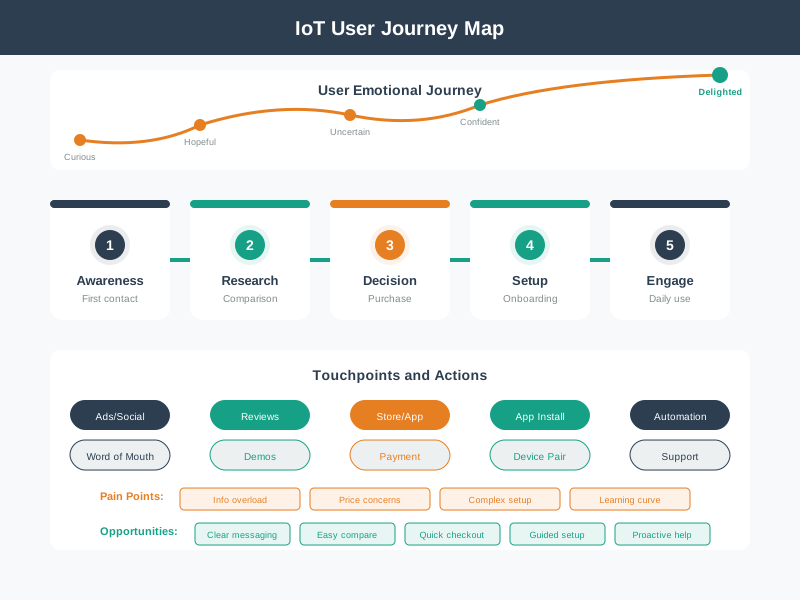
1521.7.1 User Journey Visualization
1521.7.2 Context-Aware Design
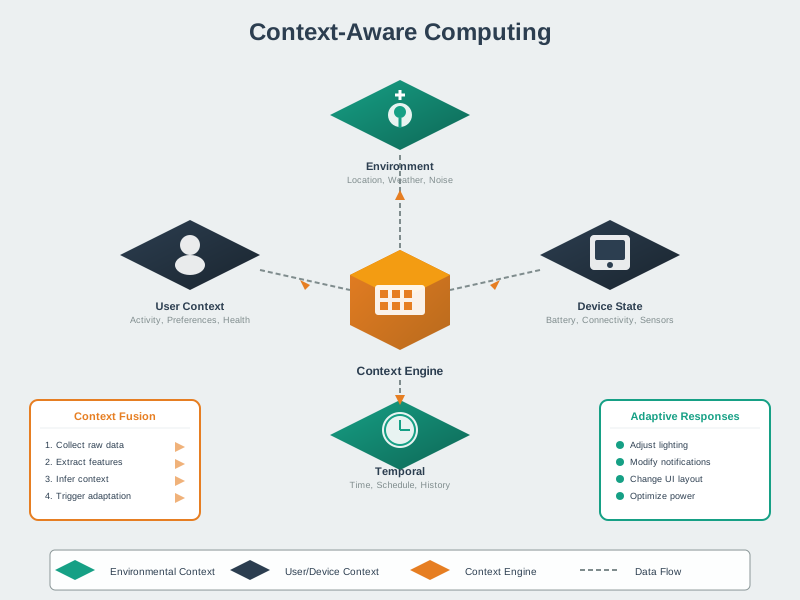
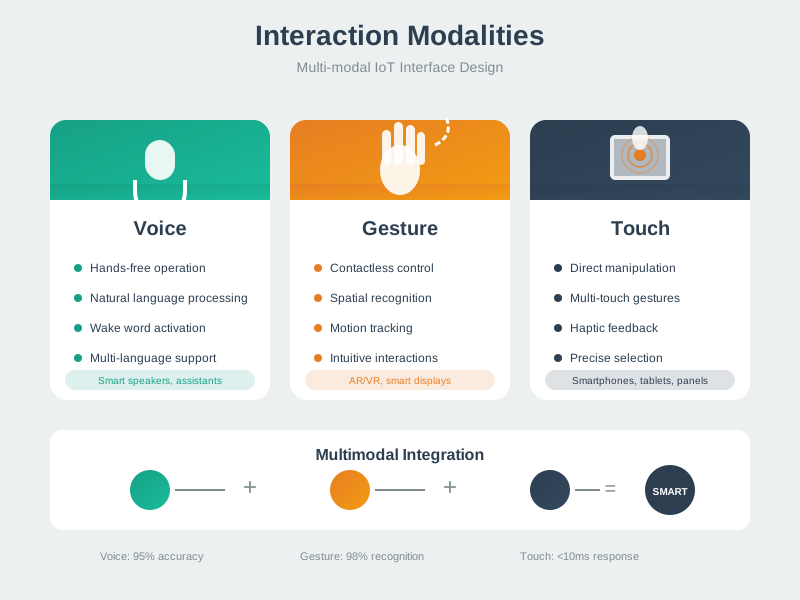
1521.7.3 Interaction Modalities
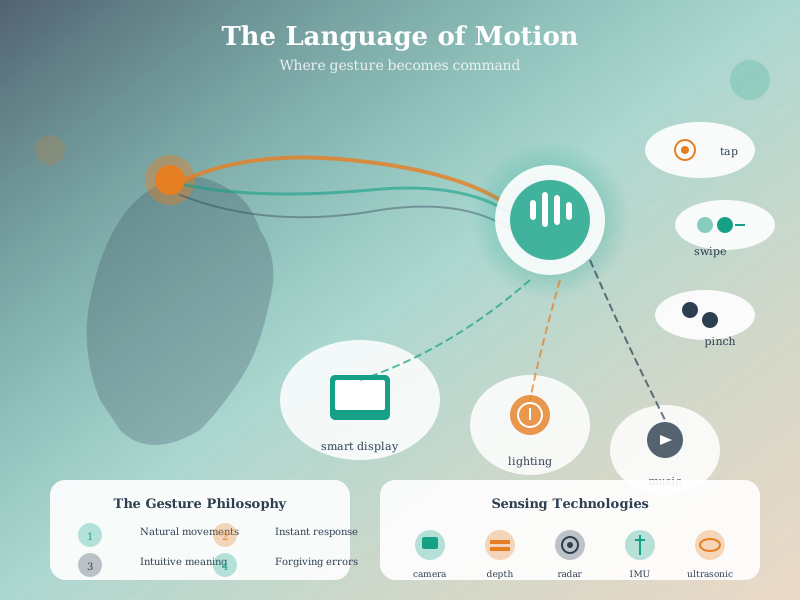
1521.7.4 Gesture-Based Interaction
1521.7.5 Voice User Interface Design

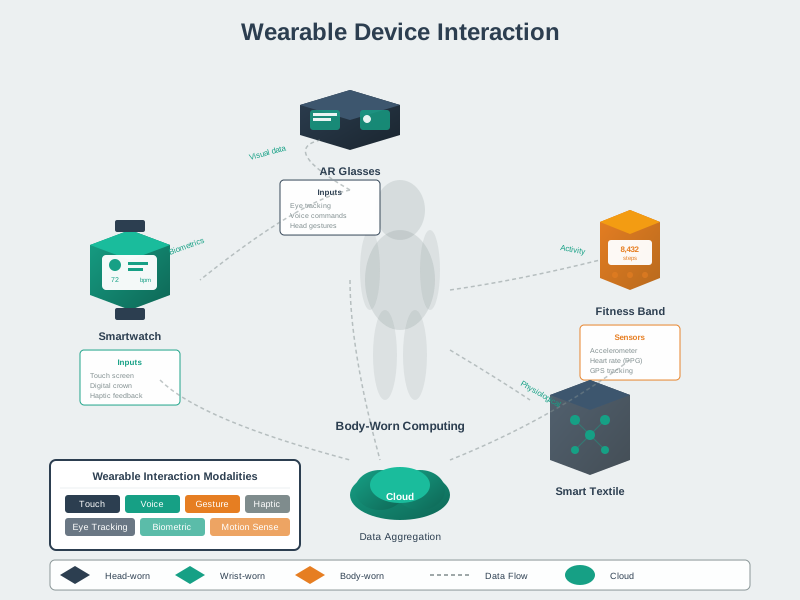
1521.7.6 Wearable Interaction Patterns
1521.8 Knowledge Check
Test your understanding of interactive design concepts.
1521.9 Summary
Key Takeaways:
Recruit representative users (5-8 per round) who match target demographics, not colleagues or early adopters
Create realistic task scenarios that describe goals, not procedures—“check if someone entered” not “click security tab”
Observe behavior, not just stated opinions—what users DO reveals more than what they SAY
Balance iteration with shipping through time-boxed sprints, ruthless prioritization, and MVP focus
Lab vs field testing serve different purposes: lab tests “can users complete tasks?” while field tests “will users use this in their lives?”
IoT research faces unique challenges: long-term usage patterns, cross-device ecosystems, privacy concerns, cultural differences, and emergent behaviors
1521.10 Key Concepts
NoteKey Takeaways
- Early User Involvement: Engage users from project inception, not just at endpoints; observe real behavior in natural contexts
- Iterative Refinement: Build-test-learn cycles reveal what works; fail fast with low-fidelity prototypes before expensive implementation
- Design Thinking Process: Empathize, define, ideate, prototype, test—emphasize user insights over assumed requirements
- Prototyping Spectrum: Use low-fidelity (sketches, storyboards) early for concept exploration; progress to high-fidelity only after validation
- Divergent Then Convergent: Generate many possibilities without judgment; converge to best options later with evidence
- Observe Behavior: Watch what users DO, not what they SAY they do; behavior reveals unmet needs and workarounds
- Test in Context: Lab testing misses real-world issues (noise, lighting, interruptions, actual usage patterns)
- Build Learning In: Document what you learn; share findings; iterate design based on evidence, not preferences
NoteRelated Chapters & Resources
Interaction Design: - Interface Design - UI patterns for IoT - Understanding Users - User research - UX Design - Experience principles
Product Interaction Examples: - Amazon Echo - Voice interaction paradigm - Fitbit - Glanceable wearable interaction
Design Resources: - Design Model for IoT - IoT-specific design patterns - Design Thinking - Ideation process
1521.11 What’s Next
The next chapter explores Understanding People and Context, examining user research methodologies for uncovering user needs, behaviors, and design constraints that should inform IoT system development.
1521.12 Resources
Design Thinking: - “Design Thinking Comes of Age” by David Kelley and Tom Kelley (IDEO founders) - “The Design of Everyday Things” by Don Norman - “Sprint” by Jake Knapp - Rapid prototyping methodology - Design Council’s Double Diamond framework
Prototyping and Testing: - “Rocket Surgery Made Easy” by Steve Krug - User testing guide - “Prototyping” by Tod Brethauer and Peter Krogh - Nielsen Norman Group usability resources - A/B testing and experimentation guides
Tools: - Figma - Digital prototyping - Adobe XD - Wireframing and prototyping - Framer - Interactive prototyping - Maze - User testing platform - UserTesting - Remote testing platform