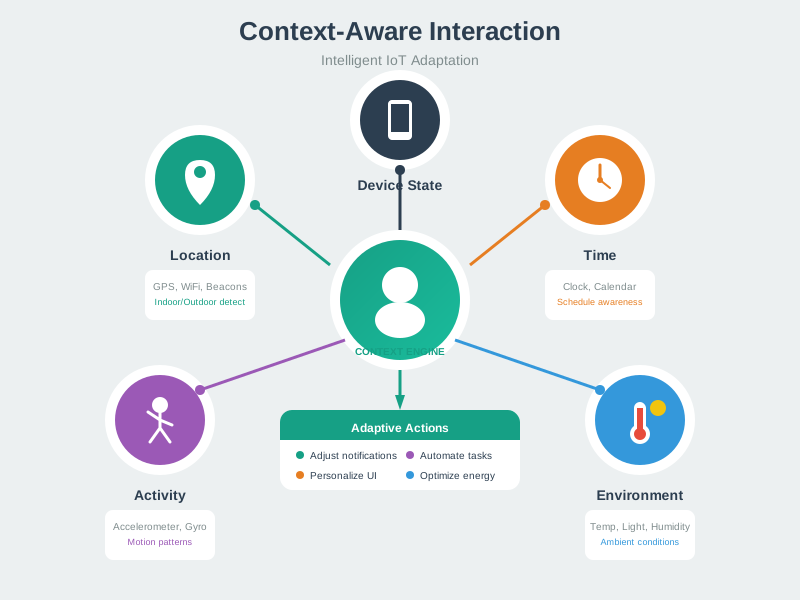
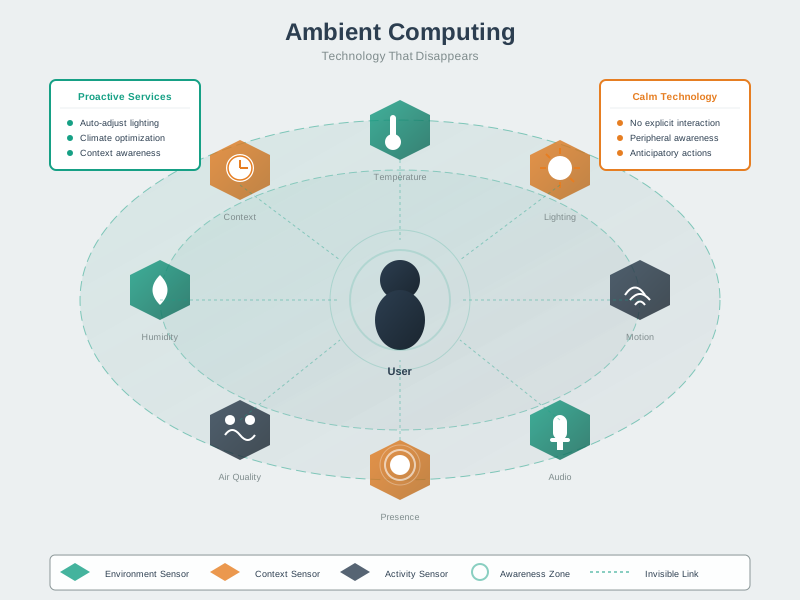
viewof dq1_answer = Inputs.radio(
  ["A) Perception layer (on the sensors)",
   "B) Application layer (in the cloud)",
   "C) Network/Middleware layer (edge gateway with local control)",
   "D) Distribute evenly across all layers"],
  {label: "Question 1: You're designing a smart agriculture system. Irrigation control must respond within 200ms to soil moisture changes, but you also need cloud-based analytics. Where should irrigation control logic be placed?", value: null}
)

dq1_feedback = {
  if (dq1_answer === null) return "";
  const correct = "C) Network/Middleware layer (edge gateway with local control)";
  const isCorrect = dq1_answer === correct;
  return html`<div style="padding: 15px; margin: 10px 0; border-radius: 5px; background-color: ${isCorrect ? '#d4edda' : '#f8d7da'}; border: 1px solid ${isCorrect ? '#c3e6cb' : '#f5c6cb'}; color: ${isCorrect ? '#155724' : '#721c24'}">
    <strong>${isCorrect ? 'Correct!' : 'Incorrect'}</strong><br/>
    ${isCorrect ?
      'Excellent! Edge gateway placement enables sub-200ms latency without cloud round-trips, provides sufficient compute for multi-sensor coordination, continues functioning during internet outages, and forwards historical data to cloud for analytics. This is the fog/edge computing pattern - time-critical decisions at the edge, long-term analytics in the cloud.' :
      'Think about latency requirements. Cloud round-trips take 50-500ms, too slow for 200ms requirement. Sensors lack compute power for complex logic. Edge gateway provides local intelligence for real-time control while forwarding data to cloud for analytics. This is fog computing - distribute intelligence based on latency requirements.'}
  </div>`;
}

viewof dq2_answer = Inputs.radio(
  ["A) Trust stated preference and implement smartphone notifications",
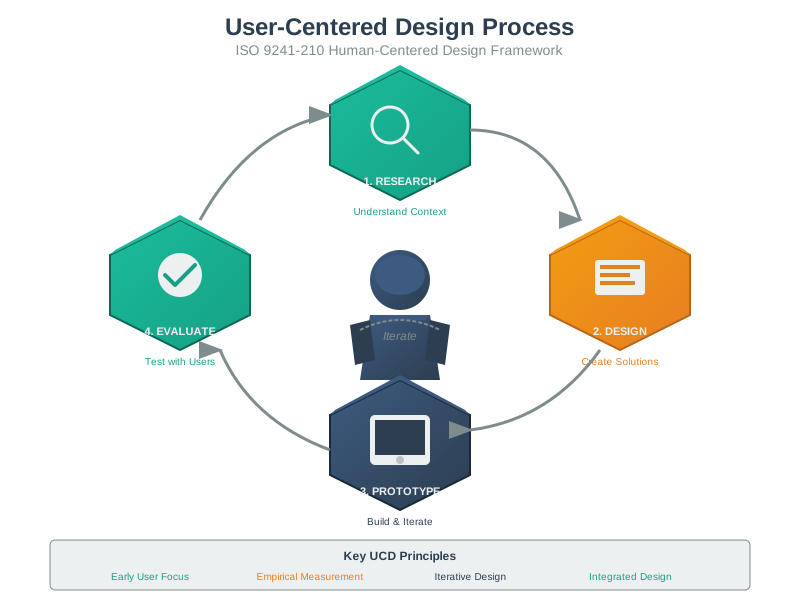
   "B) Define phase should reframe: 'users need reminders they'll notice even when phones aren't nearby'",
   "C) Skip to Prototype phase immediately",
   "D) Tell users to keep phones with them"],
  {label: "Question 2: During Design Thinking Empathize phase, elderly medication reminder users say they want smartphone notifications, but you observe phones are often in other rooms. What's the next step?", value: null}
)

dq2_feedback = {
  if (dq2_answer === null) return "";
  const correct = "B) Define phase should reframe: 'users need reminders they'll notice even when phones aren't nearby'";
  const isCorrect = dq2_answer === correct;
  return html`<div style="padding: 15px; margin: 10px 0; border-radius: 5px; background-color: ${isCorrect ? '#d4edda' : '#f8d7da'}; border: 1px solid ${isCorrect ? '#c3e6cb' : '#f5c6cb'}; color: ${isCorrect ? '#155724' : '#721c24'}">
    <strong>${isCorrect ? 'Correct!' : 'Incorrect'}</strong><br/>
    ${isCorrect ?
      'Perfect! This demonstrates proper Design Thinking progression. Empathize revealed discrepancy between stated need (smartphone) and observed behavior (phones not nearby). Define phase synthesizes insights into accurate problem statement capturing real need: reliable reminders regardless of phone location. This might lead to smart speakers, wearables, visual indicators on medicine bottles, or ambient displays.' :
      'The Define phase should reframe surface requests into underlying needs. Users said "smartphone notifications" but observation revealed the real need: "noticeable reminders regardless of location." Proper design thinking means synthesizing observations to understand the true problem before jumping to solutions. This leads to better options like wearables, smart speakers, or ambient indicators.'}
  </div>`;
}

viewof dq3_answer = Inputs.radio(
  ["A) Digital Twin - create cloud twin of each vehicle",
   "B) Gateway pattern with edge filtering (predictive filtering at vehicle gateway)",
   "C) Observer pattern - vehicles observe routing changes",
   "D) Command pattern - cloud sends movement commands"],
  {label: "Question 3: Fleet management system: 1000 delivery vehicles report GPS every 30s (33,000 updates/min), overwhelming the cloud. Vehicle locations change gradually on highways. Which design pattern helps?", value: null}
)

dq3_feedback = {
  if (dq3_answer === null) return "";
  const correct = "B) Gateway pattern with edge filtering (predictive filtering at vehicle gateway)";
  const isCorrect = dq3_answer === correct;
  return html`<div style="padding: 15px; margin: 10px 0; border-radius: 5px; background-color: ${isCorrect ? '#d4edda' : '#f8d7da'}; border: 1px solid ${isCorrect ? '#c3e6cb' : '#f5c6cb'}; color: ${isCorrect ? '#155724' : '#721c24'}">
    <strong>${isCorrect ? 'Correct!' : 'Incorrect'}</strong><br/>
    ${isCorrect ?
      'Excellent! Gateway pattern with predictive filtering: vehicle gateway maintains expected position based on last location/speed/heading. Only sends updates when actual position deviates significantly (>100m). For highway driving, most updates show vehicle exactly where predicted - suppress these. Only meaningful updates (turns, stops, speed changes) go to cloud. This reduces load from 33,000 to ~3,000-5,000 updates/min (90% reduction).' :
      'Gateway pattern with edge intelligence is the solution. Each vehicle gateway predicts next position based on trajectory. Only transmit when actual location deviates from prediction. This filters redundant data at the edge - highway driving is predictable, so most 30-second updates are unnecessary. Only send updates for turns, stops, or unexpected deviations. This dramatically reduces cloud processing load while maintaining accuracy.'}
  </div>`;
}

viewof dq4_answer = Inputs.radio(
  ["A) Component outputs raw voltage; applications convert",
   "B) Two methods: getTemperatureC() and getTemperatureF()",
   "C) Component outputs SI base unit (Celsius) with optional conversion method",
   "D) Output JSON: {value: 23.5, unit: 'C'}"],
  {label: "Question 4: Designing reusable temperature sensor component (hardware outputs 10mV per degree C). Some products need Celsius, others Fahrenheit. How should the component interface be designed?", value: null}
)

dq4_feedback = {
  if (dq4_answer === null) return "";
  const correct = "C) Component outputs SI base unit (Celsius) with optional conversion method";
  const isCorrect = dq4_answer === correct;
  return html`<div style="padding: 15px; margin: 10px 0; border-radius: 5px; background-color: ${isCorrect ? '#d4edda' : '#f8d7da'}; border: 1px solid ${isCorrect ? '#c3e6cb' : '#f5c6cb'}; color: ${isCorrect ? '#155724' : '#721c24'}">
    <strong>${isCorrect ? 'Correct!' : 'Incorrect'}</strong><br/>
    ${isCorrect ?
      'Perfect! Good component interface design: (1) Component encapsulates hardware details (voltage to temperature), (2) Primary interface returns standard unit (Celsius), (3) Optional utility method convert(value, from, to) handles conversions, (4) Adding new units doesn\'t change component interface, (5) Most components work with standard unit, avoiding repeated conversions. This balances encapsulation, simplicity, and extensibility.' :
      'The best practice is: component returns temperature in standard SI unit (Celsius), encapsulating the voltage to temperature conversion. Provide an optional utility method for unit conversion if needed. This keeps the interface clean and minimal while supporting flexibility. Don\'t expose raw voltage (forces all consumers to convert) or create multiple getters (interface bloat). Use standard units as base, convert when necessary.'}
  </div>`;
}

viewof dq5_answer = Inputs.radio(
  ["A) Option A (10-second updates, 5-day battery)",
   "B) Option B (60-second updates, 14-day battery)",
   "C) Hybrid: Adaptive transmission (10-second during activity, 60-second otherwise)",
   "D) Option A but require daily charging"],
  {label: "Question 5: Wearable fitness tracker design choice: (A) BLE every 10s, 5-day battery OR (B) BLE every 60s, 14-day battery. Users want accurate steps, no charger while traveling (7-10 days), and real-time workout progress. Which option?", value: null}
)

dq5_feedback = {
  if (dq5_answer === null) return "";
  const correct = "C) Hybrid: Adaptive transmission (10-second during activity, 60-second otherwise)";
  const isCorrect = dq5_answer === correct;
  return html`<div style="padding: 15px; margin: 10px 0; border-radius: 5px; background-color: ${isCorrect ? '#d4edda' : '#f8d7da'}; border: 1px solid ${isCorrect ? '#c3e6cb' : '#f5c6cb'}; color: ${isCorrect ? '#155724' : '#721c24'}">
    <strong>${isCorrect ? 'Correct!' : 'Incorrect'}</strong><br/>
    ${isCorrect ?
      'Excellent! Smart trade-off analysis recognizes context-aware behavior solves both requirements. During detected activity (accelerometer shows exercise patterns), transmit every 10 seconds for real-time feedback. During sedentary periods (22+ hours/day), transmit every 60 seconds. This achieves ~12-day battery life while providing real-time data when users care most. Adaptive behavior optimizes for user needs, not hardware convenience.' :
      'Think context-aware design. Users don\'t need uniform behavior - they need real-time updates during workouts but not while sleeping. Adaptive transmission rates based on accelerometer activity detection gives 10-second updates during exercise (real-time feedback) and 60-second updates otherwise (battery conservation). This achieves 12-day battery life (meeting travel requirement) while satisfying real-time workout needs. Design systems that adapt to context.'}
  </div>`;
}

viewof dscore = {
  const answers = [dq1_answer, dq2_answer, dq3_answer, dq4_answer, dq5_answer];
  const correct_answers = [
    "C) Network/Middleware layer (edge gateway with local control)",
    "B) Define phase should reframe: 'users need reminders they'll notice even when phones aren't nearby'",
    "B) Gateway pattern with edge filtering (predictive filtering at vehicle gateway)",
    "C) Component outputs SI base unit (Celsius) with optional conversion method",
    "C) Hybrid: Adaptive transmission (10-second during activity, 60-second otherwise)"
  ];

  const answered = answers.filter(a => a !== null).length;
  const correct_count = answers.filter((a, i) => a === correct_answers[i]).length;

  if (answered === 0) {
    return html`<div style="padding: 20px; margin: 20px 0; background-color: #e7f3ff; border-radius: 8px; border-left: 5px solid #2196F3;">
      <h3 style="margin-top: 0; color: #1976D2;">Quiz Progress</h3>
      <p>Answer all 5 questions to see your score!</p>
    </div>`;
  }

  if (answered < 5) {
    return html`<div style="padding: 20px; margin: 20px 0; background-color: #fff3cd; border-radius: 8px; border-left: 5px solid #ffc107;">
      <h3 style="margin-top: 0; color: #856404;">Quiz Progress</h3>
      <p>You've answered ${answered} out of 5 questions. ${correct_count} correct so far!</p>
      <p>Complete all questions to see your final score.</p>
    </div>`;
  }

  const percentage = (correct_count / 5) * 100;
  let grade, message, color, bgColor;

  if (percentage >= 80) {
    grade = "A";
    message = "Excellent! You have mastered IoT design model concepts.";
    color = "#155724";
    bgColor = "#d4edda";
  } else if (percentage >= 60) {
    grade = "B";
    message = "Good work! Review the feedback to strengthen your understanding.";
    color = "#856404";
    bgColor = "#fff3cd";
  } else {
    grade = "C";
    message = "Keep learning! Review the chapter content and design patterns carefully.";
    color = "#721c24";
    bgColor = "#f8d7da";
  }

  return html`<div style="padding: 20px; margin: 20px 0; background-color: ${bgColor}; border-radius: 8px; border-left: 5px solid ${color};">
    <h3 style="margin-top: 0; color: ${color};">Final Score: ${correct_count}/5 (${percentage}%) - Grade: ${grade}</h3>
    <p style="font-size: 1.1em;">${message}</p>
    <details style="margin-top: 15px;">
      <summary style="cursor: pointer; font-weight: bold;">Key Takeaways</summary>
      <ul style="margin-top: 10px;">
        <li><strong>Layered Architecture:</strong> Place time-critical control at edge, analytics in cloud (fog computing pattern)</li>
        <li><strong>Design Thinking:</strong> Define phase reframes stated needs into underlying problems through observation</li>
        <li><strong>Gateway Pattern:</strong> Edge intelligence filters redundant data using prediction and deviation detection</li>
        <li><strong>Component Design:</strong> Encapsulate hardware, use standard units, provide optional conversions</li>
        <li><strong>Context-Aware Systems:</strong> Adapt behavior based on usage patterns (active vs idle) to optimize trade-offs</li>
      </ul>
    </details>
  </div>`;
}