%% fig-alt: "Eight facets of IoT design arranged vertically from most visible to least visible. At top (most visible): UI/Visual Design for screen layout and look-and-feel. Second level: Interaction Design for per-device behaviors alongside Industrial Design for physical hardware form factor. Third level: Interusability for cross-device interactions. Fourth level: Conceptual Model for how users think about the system. Fifth level: Service Design for customer lifecycle alongside Productization for specific service functionality. Bottom level (least visible): Platform Design for architecture spanning products and services."
flowchart TB
    subgraph visible["Most Visible to Users"]
        UI["<b>1. UI/Visual Design</b><br/>Screen layout, look and feel"]
    end

    subgraph mid_high["User-Facing Design"]
        IX["<b>2. Interaction Design</b><br/>Architecture and behaviors<br/>per service, per device"]
        ID["<b>3. Industrial Design</b><br/>Physical hardware:<br/>capabilities and form factor"]
    end

    subgraph mid["Cross-Device Experience"]
        IU["<b>4. Interusability</b><br/>Interactions spanning multiple<br/>devices with different capabilities"]
    end

    subgraph mid_concept["Mental Models"]
        CM["<b>5. Conceptual Model</b><br/>How should users think<br/>about the system?"]
    end

    subgraph mid_low["Service Layer"]
        SD["<b>6. Service Design</b><br/>Customer lifecycle, services,<br/>non-digital touchpoints"]
        PR["<b>7. Productization</b><br/>Audience, proposition,<br/>specific functionality"]
    end

    subgraph invisible["Least Visible (Foundation)"]
        PD["<b>8. Platform Design</b><br/>Conceptual architecture and<br/>domain models spanning products"]
    end

    visible --> mid_high
    mid_high --> mid
    mid --> mid_concept
    mid_concept --> mid_low
    mid_low --> invisible

    style UI fill:#16A085,stroke:#2C3E50,color:#fff
    style IX fill:#1ABC9C,stroke:#2C3E50,color:#fff
    style ID fill:#1ABC9C,stroke:#2C3E50,color:#fff
    style IU fill:#3498DB,stroke:#2C3E50,color:#fff
    style CM fill:#9B59B6,stroke:#2C3E50,color:#fff
    style SD fill:#E67E22,stroke:#2C3E50,color:#fff
    style PR fill:#E67E22,stroke:#2C3E50,color:#fff
    style PD fill:#2C3E50,stroke:#2C3E50,color:#fff
1485 8 Facets of IoT Design and Calm Technology
1485.1 Learning Objectives
After completing this chapter, you will be able to:
- Apply the 8 facets of IoT design from visible UI to invisible platform architecture
- Understand why 80% of good IoT design is invisible to users
- Apply the 8 principles of calm technology to IoT systems
- Design IoT systems that inform without demanding attention
- Evaluate products against calm technology criteria
- Implement design patterns for ambient, graceful, and progressive IoT experiences
1485.2 Prerequisites
Before diving into this chapter, you should be familiar with:
- IoT Reference Architectures: Understanding of layered architecture patterns provides context for the platform design facet
- User Experience Design: UX design principles inform the user-facing facets (UI, Interaction, Industrial)
1485.3 The 8 Facets of IoT Design
A comprehensive framework for IoT design organizes work across 8 distinct facets, arranged from most visible to users (UI) down to least visible (platform architecture). This model ensures designers and engineers address all aspects of the user experience, not just the obvious interface elements.
%%{init: {'theme': 'base', 'themeVariables': {'primaryColor':'#2C3E50','primaryTextColor':'#fff','primaryBorderColor':'#16A085','lineColor':'#16A085','secondaryColor':'#E67E22','tertiaryColor':'#7F8C8D'}}}%%
flowchart LR
    subgraph FACET["Design Facet"]
        F1[1. UI/Visual]
        F2[2. Interaction]
        F3[3. Industrial]
        F4[4. Interusability]
        F5[5. Conceptual Model]
        F6[6. Service Design]
        F7[7. Productization]
        F8[8. Platform]
    end

    subgraph NEST["Nest Thermostat Example"]
        N1["Circular display<br/>Temperature in large font<br/>Leaf icon for eco"]
        N2["Turn outer ring to adjust<br/>Tap to cycle modes<br/>Voice: 'Set to 72'"]
        N3["Premium metal finish<br/>Iconic round shape<br/>Compact wall mount"]
        N4["Same UX on device/app/web<br/>Geofencing auto-away<br/>Works while offline"]
        N5["'House that learns'<br/>Schedule builds itself<br/>Energy savings focus"]
        N6["Pro installation option<br/>Energy history reports<br/>24/7 support hotline"]
        N7["Eco-conscious homeowners<br/>'Save 23% on bills'<br/>$249 premium price"]
        N8["Works with Google Home<br/>Alexa, HomeKit<br/>Open API for partners"]
    end

    F1 --- N1
    F2 --- N2
    F3 --- N3
    F4 --- N4
    F5 --- N5
    F6 --- N6
    F7 --- N7
    F8 --- N8

    style F1 fill:#16A085,stroke:#2C3E50,color:#fff
    style F2 fill:#1ABC9C,stroke:#2C3E50,color:#fff
    style F3 fill:#3498DB,stroke:#2C3E50,color:#fff
    style F4 fill:#9B59B6,stroke:#2C3E50,color:#fff
    style F5 fill:#E67E22,stroke:#2C3E50,color:#fff
    style F6 fill:#E74C3C,stroke:#2C3E50,color:#fff
    style F7 fill:#2C3E50,stroke:#16A085,color:#fff
    style F8 fill:#7F8C8D,stroke:#2C3E50,color:#fff
1485.3.1 Understanding the 8 Facets
| Facet | Visibility | Focus | Example |
|---|---|---|---|
| 1. UI/Visual Design | Highest | Screen layout, colors, typography | Smart thermostat display showing 72F |
| 2. Interaction Design | High | Per-device behaviors and flows | How users adjust temperature (tap, swipe, voice) |
| 3. Industrial Design | High | Physical form factor, materials | Thermostat’s round shape, premium finish |
| 4. Interusability | Medium | Cross-device interactions | Phone app controlling thermostat while away |
| 5. Conceptual Model | Medium | User mental model | “The house learns my schedule” vs “I program zones” |
| 6. Service Design | Low | Customer journey, support | Installation service, energy reports, pro monitoring |
| 7. Productization | Low | Target audience, value proposition | “Save 23% on heating bills” for eco-conscious homeowners |
| 8. Platform Design | Lowest | Architecture across products | Works with Alexa, Google Home, Apple HomeKit |
1485.3.2 Why All 8 Facets Matter
WarningCommon Mistake: Designing Only the Visible Facets
Many IoT products fail not because of poor UI, but because lower facets were neglected:
Nest Thermostat success: Excellent across all 8 facets–beautiful UI (#1), intuitive controls (#2), iconic design (#3), seamless phone/watch integration (#4), clear “learning” mental model (#5), professional installation option (#6), clear energy-saving value (#7), and Works With Nest ecosystem (#8).
Failed smart home products: Often had good UI (#1) but poor interusability (#4)–devices that only worked with proprietary apps–or weak platform design (#8)–no integration with major ecosystems.
Design principle: Start from the bottom (Platform Design) and work up. A beautiful UI cannot fix a broken platform strategy.
1485.3.3 Applying the 8-Facet Model
When designing an IoT product, use this checklist:
- Platform Design: What ecosystem(s) will you support? What’s your API strategy?
- Productization: Who is your target user? What’s the core value proposition?
- Service Design: What happens when things go wrong? How do users get help?
- Conceptual Model: What metaphor will users understand? (e.g., “digital pet” vs “automation rules”)
- Interusability: How do multiple devices and interfaces work together?
- Industrial Design: What physical form best serves the use case?
- Interaction Design: How do users accomplish tasks on each device?
- UI/Visual Design: What visual language communicates your brand and aids usability?
TipPro Tip: The Iceberg Principle
Like an iceberg, 80% of good IoT design is invisible to users. The 3 bottom facets (Platform, Productization, Service) determine long-term success, while the 3 top facets (UI, Interaction, Industrial) determine first impressions. The middle 2 facets (Interusability, Conceptual Model) bridge the gap.
Successful IoT companies invest equally across all 8 facets.
1485.4 Calm Technology: 8 Principles for Ambient IoT
Mark Weiser and John Seely Brown introduced the concept of “calm technology” in their seminal 1995 work–technology that informs but doesn’t demand attention. As IoT devices proliferate in our homes, workplaces, and cities, the principles of calm technology become essential design guidance.
NoteAcademic Resource: CMU Sensing Systems - The Original Ubicomp Device
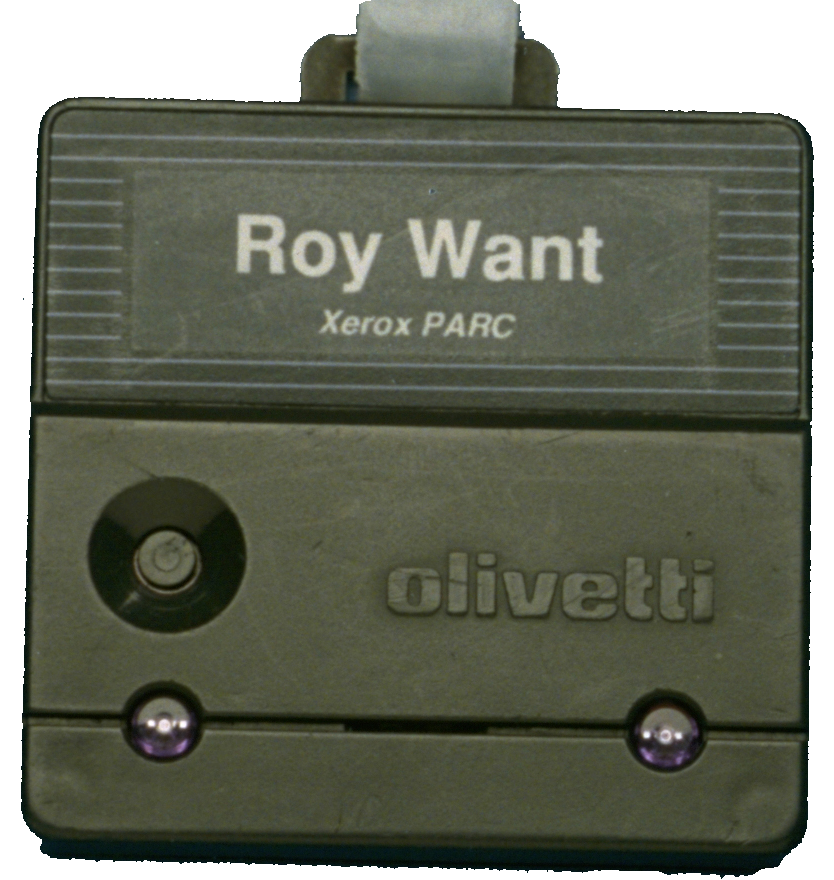
The Xerox PARC Active Badge (1992) was one of the first ubicomp devices, designed by Roy Want. It embodied calm technology principles:
- Ambient awareness: Badge broadcast location via infrared every 15 seconds
- Peripheral information: System knew where people were without explicit interaction
- Calm operation: No buttons to press, no screens to check - just wear the badge
- Social norms respected: Visible badge indicated participation in location system
This pioneering device demonstrated that technology could be present without demanding attention - the core principle of calm computing that remains essential for IoT design today.
Source: Carnegie Mellon University - Building User-Focused Sensing Systems
The Goal: IoT systems should enhance our environment while remaining unobtrusive, providing information at the periphery of our attention until needed.
1485.4.1 The 8 Principles of Calm Technology
%% fig-alt: "Mind map of calm technology's 8 principles radiating from central node labeled Calm Technology. Principles include: require minimum attention (smart thermostat learns preferences), inform and create calm (ambient light shows security status), use the periphery (smart speaker light ring), amplify best of humanity (video doorbell preserves interaction), communicate without speaking (haptic feedback), work when it fails (smart lock with key backup), minimum needed technology (simple on/off vs complex schedules), and respect social norms (camera privacy LEDs)."
mindmap
  root((Calm<br/>Technology))
    1. Minimum Attention
      Smart thermostat
      learns preferences
      no daily input needed
    2. Inform & Create Calm
      Ambient light shows
      home security status
      green = secure
    3. Use the Periphery
      Smart speaker
      light ring shows
      it's listening
    4. Amplify Best
      Video doorbell
      enhances security
      preserves interaction
    5. Communicate Silently
      Haptic feedback
      in wearables
      vibration alerts
    6. Work When It Fails
      Smart lock with
      physical key backup
      graceful degradation
    7. Minimum Technology
      Simple on/off
      vs complex scheduling
      for most users
    8. Respect Social Norms
      Camera privacy
      LED when recording
      visible indicators
1485.4.1.1 Principle 1: Technology should require the smallest possible amount of attention
Principle: IoT devices should operate effectively with minimal user intervention.
IoT Example: A smart thermostat learns your temperature preferences over 2-3 weeks by observing when you manually adjust it. After the learning period, it automatically maintains your preferred temperature without daily input. You interact with it only for major changes (switching to vacation mode), not routine operation.
Poor Implementation: A “smart” thermostat that requires users to program 28 time blocks per week (7 days x 4 periods) and sends notifications asking “Are you comfortable?” three times per day.
1485.4.1.2 Principle 2: Technology should inform and create calm
Principle: Status information should reduce anxiety, not create it.
IoT Example: A smart home security system uses ambient lighting–a soft green glow near the front door indicates “all sensors armed, no alerts.” Users glance at the light when entering/leaving and feel reassured. No notifications, no app checking, just calm confirmation.
Poor Implementation: Security system that sends push notifications every time a sensor is triggered (“Motion detected in hallway 3:47 AM”), creating anxiety rather than calm. Users disable notifications, defeating the purpose.
1485.4.1.3 Principle 3: Technology should make use of the periphery
Principle: Information should be available at the periphery of attention, moving to the center only when needed.
IoT Example: Amazon Echo’s light ring provides peripheral awareness–blue spinning indicates processing your request, red indicates microphone is muted. You don’t need to look at it constantly; the light enters your peripheral vision when state changes matter.
Poor Implementation: Smart speaker that requires you to open an app and check status every time to confirm it heard your command. This forces the interaction to the center of attention unnecessarily.
1485.4.1.4 Principle 4: Technology should amplify the best of technology and the best of humanity
Principle: IoT should enhance human capabilities and interactions, not replace them.
IoT Example: A video doorbell amplifies security (you can see who’s at the door from anywhere) while preserving human interaction (you can have a conversation with the visitor). It enhances the doorbell’s purpose–facilitating communication–rather than replacing human judgment.
Poor Implementation: Automated door entry system that uses facial recognition to admit people without any human confirmation, removing personal interaction and introducing privacy concerns.
1485.4.1.5 Principle 5: Technology can communicate but doesn’t need to speak
Principle: Not all feedback requires explicit language or notifications.
IoT Example: Fitness trackers use haptic feedback (vibrations) to signal goal achievement or inactivity reminders. A gentle buzz communicates “you’ve been sitting for an hour” without interrupting your work with a screen notification or voice alert.
Poor Implementation: Smart watch that announces via voice “YOU HAVE BEEN SITTING FOR 60 MINUTES. PLEASE STAND UP AND MOVE AROUND” during a meeting.
1485.4.1.6 Principle 6: Technology should work even when it fails
Principle: Graceful degradation–devices maintain core functionality when connectivity or power fails.
IoT Example: August Smart Lock includes a physical key slot. If the battery dies, Bluetooth fails, or the app malfunctions, you can still unlock your door with a traditional key. The smart features enhance convenience, but the fundamental function (securing/unlocking the door) never fails.
Poor Implementation: Smart door lock with no physical backup. When batteries die or Wi-Fi fails, you’re locked out of your home. Core functionality depends entirely on technology working perfectly.
1485.4.1.7 Principle 7: The right amount of technology is the minimum needed to solve the problem
Principle: Avoid feature bloat–implement only what users actually need.
IoT Example: Philips Hue smart bulbs offer simple on/off, dimming, and color temperature control–the features most users want daily. Advanced features (scheduling, scenes, API integration) exist but are optional, hidden in settings for users who need them.
Poor Implementation: Smart light bulb that requires users to create an account, set up 15 default “scenes,” configure scheduling rules, and complete a 12-step setup wizard before they can turn on a light. The complexity overwhelms the simple need: “turn the light on/off.”
1485.4.2 Calm vs. Annoying IoT: A Comparison
| Calm Technology | Annoying Technology |
|---|---|
| Ambient glow shows system status at a glance | Constant notifications demand immediate attention |
| Learns preferences silently over time | Requires daily configuration and manual inputs |
| Works offline with core functionality intact | “Can’t connect to server” renders device useless |
| Graceful degradation when connectivity fails | Complete failure without perfect conditions |
| Peripheral awareness (light ring, haptic feedback) | Center-of-attention demands (popups, voice alerts) |
| Inferred actions based on context and patterns | Explicit commands required for every action |
| Privacy-respecting with visible indicators | Opaque surveillance with hidden monitoring |
| Minimal setup (works out of box with sane defaults) | Complex configuration before basic functionality |
1485.4.3 Real-World Applications of Calm Technology
1485.4.3.1 Case Study 1: Nest Thermostat (Calm Design)
How it embodies calm principles:
- Minimum attention (#1): Learns schedule in 1-2 weeks, operates autonomously thereafter
- Informs and creates calm (#2): Displays current temperature and target simply, no alerts unless anomalies
- Uses periphery (#3): Ambient display shows status at a glance, detail on approach
- Amplifies best (#4): Enhances comfort while reducing energy waste (23% average savings)
- Communicates silently (#5): Uses color and motion to indicate heating/cooling, not voice alerts
- Works when it fails (#6): Functions as manual thermostat if connectivity lost
- Minimum technology (#7): Installation is simple (replaces existing thermostat), app is optional
- Respects norms (#8): No cameras, no microphones, only temperature/motion sensing
Result: Market-leading smart thermostat with 40+ million units sold, praised for seamless user experience.
1485.4.4 Applying Calm Technology Principles to Your IoT Design
TipDesign Exercise: Evaluate Your IoT Product Against All 8 Principles
For each principle, score your design: 0 (violates principle), 1 (partially meets), 2 (fully embodies principle).
| Principle | Score (0-2) | Evidence | Improvement Needed |
|---|---|---|---|
| 1. Minimum attention required | ___ | How often does user interact? | Can you automate more? |
| 2. Informs and creates calm | ___ | Does status reduce or increase anxiety? | Can you simplify feedback? |
| 3. Uses periphery effectively | ___ | Is information available without focus? | Can you add ambient indicators? |
| 4. Amplifies best of both | ___ | Does it enhance human capability/interaction? | Are you replacing humans unnecessarily? |
| 5. Communicates without speaking | ___ | Can it use haptics, lights instead of voice/text? | Can you reduce explicit alerts? |
| 6. Works even when it fails | ___ | What’s the fallback if connectivity/power fails? | Can you add manual backup? |
| 7. Minimum technology needed | ___ | Are all features necessary for core value? | Can you simplify setup/operation? |
| 8. Respects social norms | ___ | Are privacy/interaction norms honored? | Do you need visible indicators? |
Target Score: 12+ out of 16 indicates strong calm technology alignment.
Scores < 10: Your IoT product may create frustration rather than value. Identify lowest-scoring principles and redesign those aspects.
1485.4.5 Calm Technology Design Patterns
Pattern 1: Ambient Display
- Use case: Status information that doesn’t require active attention
- Implementation: LED color indicators, e-ink displays with persistent state, ambient light patterns
- Example: Hue lights gradually shift to warm tones before bedtime, signaling it’s time to wind down
Pattern 2: Graceful Degradation
- Use case: Maintain core functionality when advanced features fail
- Implementation: Local processing fallback, manual overrides, battery backup, physical controls
- Example: Smart irrigation controller stores schedules locally, continues watering even if internet fails
Pattern 3: Progressive Disclosure
- Use case: Simple by default, advanced features hidden until needed
- Implementation: Sane defaults out-of-box, optional advanced settings, wizard for complex config
- Example: Smart speaker works immediately after power-on, advanced routines/skills available through app
Pattern 4: Inferred Action
- Use case: System learns and acts on patterns without explicit commands
- Implementation: Machine learning on usage patterns, context-aware triggers, occupancy-based automation
- Example: Smart lights learn “bedtime is 10:30 PM weekdays” and start dimming at 10:15 PM automatically
WarningCommon Anti-Pattern: Notification Overload
The Problem: IoT devices that send excessive notifications create anxiety and lead users to disable all alerts, missing critical information.
Example: Smart home system that notifies you:
- “Front door opened” (10x per day as family enters/exits)
- “Motion detected in living room” (50x per day)
- “Temperature changed to 22C” (every thermostat adjustment)
- “Device firmware update available” (monthly, for 15 devices)
Users receive 100+ notifications per day. Within a week, they disable all notifications and miss “Water leak detected in basement.”
Calm Solution:
- Default silence: No notifications for normal events (doors opening during expected times, typical motion)
- Anomaly alerts only: Notify for unusual events (door opened at 3 AM, motion when house should be empty)
- Consolidated summaries: Daily digest “15 devices received firmware updates. Tap to install.”
- Escalating urgency: Water leak gets SMS + push notification + audible alarm, low battery gets weekly app notice
Result: Users trust the system to alert them when it matters, ignore routine operation. This is calm technology–present in the periphery, moving to center of attention only when necessary.
1485.5 Summary
This chapter presented user-centered frameworks for IoT system design:
Key Takeaways:
8 Facets of IoT Design: Address all dimensions from visible UI design to invisible platform architecture–80% of good design is below the surface
The Iceberg Principle: Bottom facets (Platform, Productization, Service) determine long-term success; top facets (UI, Interaction, Industrial) determine first impressions
Calm Technology: Apply Weiser & Brown’s 8 principles to create IoT systems that inform without demanding attention
Measure by Attention: Success is measured by how little interaction is required, not how many features are offered
Graceful Degradation: Core functionality must survive connectivity/power failures–IoT devices must work even when they fail
Design Patterns: Ambient displays, progressive disclosure, and inferred actions reduce user burden
Notification Design: Default to silence for routine events, alert only for anomalies–users must trust the system to alert them when it matters
Design Principle: If your IoT product requires daily interaction to maintain basic functionality, it’s not calm–it’s demanding. Calm IoT should fade into the background, working for you without needing you.
1485.6 What’s Next
The next chapter explores Design Thinking for IoT, examining how to apply human-centered design methodology to IoT product development through empathize, define, ideate, prototype, and test phases.
NoteRelated Chapters
Design Model Series:
- IoT Reference Architectures - Layered architecture patterns
- Design Thinking for IoT - Human-centered development process
- Design Patterns and Components - Implementation patterns
Human Factors:
- User Experience Design - UX principles for IoT
- Interface Design - Interaction patterns
- Understanding People - User research