%%{init: {'theme': 'base', 'themeVariables': {'primaryColor':'#2C3E50','primaryTextColor':'#fff','primaryBorderColor':'#16A085','lineColor':'#16A085','secondaryColor':'#E67E22','tertiaryColor':'#7F8C8D'}}}%%
flowchart TD
    subgraph TEMP["Temperature Testing"]
        T1[Operating range<br/>-40°C to +85°C typical]
        T2[Temperature cycling<br/>Tests solder joints, seals]
        T3[Thermal shock<br/>Rapid change stress]
    end

    subgraph MOISTURE["Moisture Testing"]
        M1[Humidity: 85% RH at 85°C<br/>Checks condensation, corrosion]
        M2[IP rating tests<br/>Water spray, immersion]
        M3[Salt spray<br/>Coastal/marine corrosion]
    end

    subgraph MECHANICAL["Mechanical Testing"]
        ME1[Vibration<br/>Transport, operational]
        ME2[Shock/drop<br/>Handling, accidents]
        ME3[Pressure cycling<br/>Seal integrity]
    end

    subgraph EXPOSURE["Exposure Testing"]
        E1[UV exposure<br/>Plastic degradation]
        E2[Chemical resistance<br/>Cleaning agents, industrial]
        E3[EMC/EMI<br/>Radiated/conducted emissions]
    end

    TEMP --> PASS{All Tests<br/>Pass?}
    MOISTURE --> PASS
    MECHANICAL --> PASS
    EXPOSURE --> PASS

    PASS -->|Yes| PRODUCTION[Ready for Production]
    PASS -->|No| REDESIGN[Redesign Required]

    style TEMP fill:#2C3E50,stroke:#16A085,color:#fff
    style MOISTURE fill:#E67E22,stroke:#2C3E50,color:#fff
    style MECHANICAL fill:#16A085,stroke:#2C3E50,color:#fff
    style EXPOSURE fill:#7F8C8D,stroke:#2C3E50,color:#fff
1497 Connected Devices - Lifecycle Management
1497.1 Learning Objectives
After completing this chapter, you will be able to:
- Implement device lifecycle management strategies from provisioning to decommissioning
- Address environmental and durability requirements through testing
- Design robust over-the-air (OTA) update systems
- Implement secure device provisioning workflows
- Plan for device maintenance and end-of-life scenarios
1497.2 Prerequisites
Before diving into this chapter, you should be familiar with:
- Connected Devices - Fundamentals: Device categories and design principles
- Connected Devices - Form Factors: IP ratings and environmental protection
- Connected Devices - Power Management: Power constraints for OTA updates
1497.3 Introduction
IoT devices don’t exist in isolation—they have a complete lifecycle from manufacturing through deployment, operation, maintenance, and eventual retirement. Successful IoT products plan for this entire journey, not just the “happy path” of normal operation. This chapter covers environmental testing, firmware updates, device provisioning, and lifecycle management strategies.
1497.4 Environmental Testing
IoT devices must survive their deployment environment throughout their operational lifetime.
1497.4.1 Critical Environmental Tests
{fig-alt=“Four-category diagram of environmental tests: Temperature (operating range, cycling, shock), Moisture (humidity, IP rating, salt spray), Mechanical (vibration, shock, pressure), and Exposure (UV, chemical, EMC). All must pass before production.”}
1497.4.2 Test Standards
| Test Type | Standard | Description |
|---|---|---|
| Temperature | IEC 60068-2-1/2 | Cold/dry heat tests |
| Humidity | IEC 60068-2-78 | Damp heat, steady state |
| Vibration | IEC 60068-2-6 | Sinusoidal vibration |
| Shock | IEC 60068-2-27 | Mechanical shock |
| IP Rating | IEC 60529 | Ingress protection |
| UV Exposure | ASTM G154 | Accelerated weathering |
| EMC | IEC 61000-4 series | Electromagnetic compatibility |
| Salt Spray | IEC 60068-2-11 | Corrosion resistance |
TipTest in Representative Conditions
Common mistake: Testing devices on an open bench (ideal conditions) then deploying in challenging environments (inside metal cabinets, buried underground, exposed to weather). Always test in conditions that match actual deployment.
1497.4.3 Temperature Impact on Components
%%{init: {'theme': 'base', 'themeVariables': {'primaryColor':'#2C3E50','primaryTextColor':'#fff','primaryBorderColor':'#16A085','lineColor':'#16A085','secondaryColor':'#E67E22','tertiaryColor':'#7F8C8D'}}}%%
flowchart LR
    subgraph COLD["Cold Effects (-40°C to 0°C)"]
        C1[Battery capacity drops 20-50%]
        C2[LCD displays slow/fail]
        C3[Plastics become brittle]
        C4[Lubricants thicken]
    end

    subgraph HOT["Heat Effects (+60°C to +85°C)"]
        H1[Battery swelling/degradation]
        H2[Electrolytic capacitor failure]
        H3[Thermal throttling]
        H4[Seal degradation]
    end

    subgraph CYCLING["Temperature Cycling"]
        TC1[Solder joint fatigue]
        TC2[Seal leakage]
        TC3[Connector loosening]
        TC4[PCB delamination]
    end

    style COLD fill:#2C3E50,stroke:#16A085,color:#fff
    style HOT fill:#E67E22,stroke:#2C3E50,color:#fff
    style CYCLING fill:#7F8C8D,stroke:#2C3E50,color:#fff
{fig-alt=“Three-column comparison of temperature effects: Cold (battery capacity drop, slow LCD, brittle plastic, thick lubricants), Heat (battery swelling, capacitor failure, thermal throttling, seal degradation), Cycling (solder fatigue, seal leakage, connector loosening, PCB delamination)”}
1497.5 Over-the-Air (OTA) Updates
OTA updates are essential for security patches, bug fixes, and feature additions throughout device lifetime.
1497.5.1 Robust OTA Architecture
%%{init: {'theme': 'base', 'themeVariables': {'primaryColor':'#2C3E50','primaryTextColor':'#fff','primaryBorderColor':'#16A085','lineColor':'#16A085','secondaryColor':'#E67E22','tertiaryColor':'#7F8C8D'}}}%%
flowchart TD
    subgraph SERVER["Update Server"]
        S1[Firmware repository]
        S2[Version management]
        S3[Rollout control]
        S4[Device targeting]
    end

    subgraph DEVICE["Device Architecture"]
        BOOT[Protected Bootloader<br/>Never updated, read-only]
        BANK_A[Firmware Bank A<br/>Active]
        BANK_B[Firmware Bank B<br/>Update target]
        CONFIG[Configuration<br/>Preserved across updates]
    end

    subgraph PROCESS["Update Process"]
        P1[1. Check for update]
        P2[2. Download to Bank B]
        P3[3. Verify signature]
        P4[4. Mark pending, reboot]
        P5[5. Boot test Bank B]
        P6[6. Mark active if success]
        P7[7. Rollback if fail]
    end

    SERVER --> P1
    P1 --> P2 --> P3 --> P4 --> P5
    P5 -->|Success| P6
    P5 -->|Fail| P7
    P7 --> BANK_A

    style BOOT fill:#16A085,stroke:#2C3E50,color:#fff
    style BANK_A fill:#E67E22,stroke:#2C3E50,color:#fff
    style BANK_B fill:#7F8C8D,stroke:#2C3E50,color:#fff
{fig-alt=“OTA update architecture showing: Server (firmware repo, version management, rollout control), Device with dual banks (protected bootloader, active Bank A, update Bank B, preserved config), and 7-step update process with automatic rollback on boot failure”}
1497.5.2 OTA Implementation Example
#include <WiFi.h>
#include <HTTPClient.h>
#include <Update.h>
#include <ArduinoJson.h>
const char* DEVICE_ID = "sensor_node_001";
const char* CURRENT_VERSION = "1.2.3";
const char* UPDATE_SERVER = "https://updates.example.com";
// Secure storage for update certificates
const char* UPDATE_CA_CERT = \
"-----BEGIN CERTIFICATE-----\n" \
"...\n" \
"-----END CERTIFICATE-----\n";
void setup() {
Serial.begin(115200);
// Connect to Wi-Fi
WiFi.begin("SSID", "PASSWORD");
while (WiFi.status() != WL_CONNECTED) delay(500);
// Check for updates periodically
checkForUpdate();
// Normal operation...
}
void checkForUpdate() {
Serial.println("Checking for firmware update...");
HTTPClient http;
// Build update check URL
String url = String(UPDATE_SERVER) + "/api/check-update";
url += "?device_id=" + String(DEVICE_ID);
url += "¤t_version=" + String(CURRENT_VERSION);
url += "&hardware_version=esp32";
http.begin(url, UPDATE_CA_CERT);
http.addHeader("Content-Type", "application/json");
int httpCode = http.GET();
if (httpCode == HTTP_CODE_OK) {
String payload = http.getString();
// Parse JSON response
StaticJsonDocument<512> doc;
deserializeJson(doc, payload);
bool update_available = doc["update_available"];
if (update_available) {
String new_version = doc["version"];
String download_url = doc["download_url"];
String checksum = doc["sha256"];
int size_bytes = doc["size"];
Serial.printf("Update available: %s -> %s (%d bytes)\n",
CURRENT_VERSION, new_version.c_str(), size_bytes);
// Check battery level before updating
float battery = readBatteryVoltage();
if (battery < 3.5) {
Serial.println("Battery too low for update. Postponing.");
return;
}
// Perform update
performOTAUpdate(download_url, checksum);
} else {
Serial.println("Firmware is up to date");
}
} else {
Serial.printf("Update check failed: %d\n", httpCode);
}
http.end();
}
void performOTAUpdate(String url, String expected_checksum) {
Serial.println("Starting OTA update...");
HTTPClient http;
http.begin(url, UPDATE_CA_CERT);
int httpCode = http.GET();
if (httpCode == HTTP_CODE_OK) {
int contentLength = http.getSize();
bool canBegin = Update.begin(contentLength);
if (canBegin) {
WiFiClient * client = http.getStreamPtr();
// Write firmware
size_t written = Update.writeStream(*client);
if (written == contentLength) {
Serial.println("Written: " + String(written) + " successfully");
} else {
Serial.println("Written only: " + String(written) + "/" + String(contentLength));
}
if (Update.end()) {
if (Update.isFinished()) {
Serial.println("Update successfully completed. Rebooting.");
delay(1000);
ESP.restart();
} else {
Serial.println("Update not finished. Something went wrong!");
}
} else {
Serial.println("Error Occurred. Error #: " + String(Update.getError()));
}
} else {
Serial.println("Not enough space to begin OTA");
}
} else {
Serial.println("Download failed");
}
http.end();
}
void loop() {
// Check for updates once per day
static unsigned long lastCheck = 0;
unsigned long now = millis();
if (now - lastCheck > 24 * 60 * 60 * 1000UL) { // 24 hours
checkForUpdate();
lastCheck = now;
}
// Normal operation
delay(1000);
}
WarningOTA Failures Brick Devices Without Dual Banking
Without dual firmware banks, any interruption during firmware write (power loss, connectivity drop, corrupt download) corrupts the device, requiring physical return for repair. Always implement dual-bank architecture with automatic rollback.
1497.6 Device Provisioning
Device provisioning is the process of preparing devices for deployment and associating them with user accounts or networks.
1497.6.1 Provisioning Workflow
%%{init: {'theme': 'base', 'themeVariables': {'primaryColor':'#2C3E50','primaryTextColor':'#fff','primaryBorderColor':'#16A085','lineColor':'#16A085','secondaryColor':'#E67E22','tertiaryColor':'#7F8C8D'}}}%%
flowchart TD
    MFG[Manufacturing] --> FLASH[Flash firmware<br/>Burn unique ID/certs]
    FLASH --> TEST[Functional test<br/>RF calibration]
    TEST --> SHIP[Ship to customer]

    SHIP --> UNBOX[User unboxes device]
    UNBOX --> APP[Download companion app]
    APP --> SCAN[Scan QR code or<br/>discover via BLE]

    SCAN --> WIFI{Wi-Fi<br/>provisioning?}
    WIFI -->|SoftAP| SOFTAP[Device creates AP<br/>User connects, enters creds]
    WIFI -->|BLE| BLE_PROV[BLE pairing<br/>Send creds over BLE]
    WIFI -->|SmartConfig| SMART[App broadcasts creds<br/>Device listens]

    SOFTAP --> CONNECT[Device connects to home Wi-Fi]
    BLE_PROV --> CONNECT
    SMART --> CONNECT

    CONNECT --> CLOUD[Register with cloud<br/>Associate with user account]
    CLOUD --> CONFIG[User configures<br/>timezone, thresholds, etc.]
    CONFIG --> ACTIVE[Device active<br/>Normal operation]

    style MFG fill:#7F8C8D,stroke:#2C3E50,color:#fff
    style ACTIVE fill:#16A085,stroke:#2C3E50,color:#fff
{fig-alt=“Complete provisioning flow: Manufacturing (flash, test, ship), User setup (unbox, app download, device discovery), Wi-Fi provisioning (SoftAP, BLE, or SmartConfig methods), then cloud registration, user configuration, and active operation”}
1497.6.2 Provisioning Methods Comparison
| Method | Advantages | Disadvantages | Best For |
|---|---|---|---|
| SoftAP | Works universally, no BLE needed | Requires user to switch Wi-Fi networks | Devices without BLE |
| BLE Provisioning | Seamless UX, stays on home Wi-Fi | Requires BLE hardware, app complexity | Premium consumer devices |
| SmartConfig | Fast, no mode switching | May not work through all routers | Simple sensors |
| QR Code | Easy device association | Camera required, not for credentials | Device identification |
| WPS | One-button pairing | Security concerns, router support varies | Legacy compatibility |
1497.6.3 Key Provisioning Steps
- Manufacturing Provisioning: Flash firmware, burn unique device ID/certificates, test functionality
- Network Provisioning: Configure Wi-Fi credentials, MQTT broker, API endpoints
- User Association: Link device to user account via QR code scan, Bluetooth pairing, or web portal
- Configuration: Set device parameters (timezone, sampling rate, thresholds)
- Verification: Confirm device can communicate with cloud and appears in user’s dashboard
1497.7 Comprehensive Knowledge Check
Question 1: Your IoT device includes OTA firmware update capability. During a failed update due to power loss, thousands of devices in the field become bricked (non-functional). What critical design feature was missing?
Explanation: Safe OTA requires failsafe bootloader architecture. Robust OTA design: (1) Dual banking: active firmware in Bank A, download to Bank B, only switch after verification, (2) Atomic updates: firmware marked “pending”, tested on boot, reverted if fail, (3) Bootloader protection: read-only, cannot be overwritten, (4) Power monitoring: defer updates if battery low, (5) Cryptographic verification: sign firmware, verify before install.
Question 2: An IoT temperature sensor uses a DHT22 sensor, which has ±0.5°C accuracy according to the datasheet. However, users report readings that are consistently 3-5°C higher than actual temperature. What is the most likely cause?
Explanation: Self-heating is a common IoT sensor design mistake. Even milliwatts of power dissipation raises internal temperature above ambient. Solutions: (1) Mount sensor outside main enclosure, (2) Add ventilation, (3) Insulate sensor from heat-producing components, (4) Duty cycle to allow thermal equilibration, (5) Always validate sensors in deployment conditions, not just bare sensors on bench.
Question 3: Your IoT device passed initial CE/FCC compliance testing but fails when retested after you add a new sensor with switching power supply. What electromagnetic compatibility (EMC) issue likely occurred?
Explanation: Switching regulators operate at high frequencies (100kHz-2MHz), generating broadband electromagnetic noise. EMC design practices: (1) Input filtering: LC filters on power input, (2) PCB layout: minimize switch node area, tight ground plane, (3) Shielding: ferrite beads, metal enclosure if needed, (4) Component selection: switching regulators with integrated shielding, spread-spectrum operation, (5) Early testing: pre-compliance EMC testing during development.
Question 4: You’re designing a wearable IoT device that contacts skin. What regulatory and safety considerations must be addressed?
Explanation: Skin-contact devices require biocompatibility testing even for consumer products. Requirements: (1) Avoid allergenic materials (nickel causes dermatitis in 10-20% of population), (2) ISO 10993 testing for prolonged skin contact, (3) Smooth surface finish, rounded corners, (4) Breathable designs to prevent moisture trapping, (5) Design for cleaning. Budget 6-12 months for biocompatibility testing.
Question 5: A fitness tracker’s heart rate sensor works perfectly when tested on fair-skinned individuals but fails frequently on dark-skinned users. What technical limitation causes this, and how should it be addressed?
Explanation: Photoplethysmography (PPG) measures heart rate by illuminating skin and detecting reflected light variations. Melanin absorbs more light, reducing signal-to-noise ratio. Inclusive design solutions: (1) Higher intensity LEDs (brighter green or infrared), (2) Adaptive algorithms that increase LED power for darker skin, (3) Multi-wavelength sensors, (4) Diverse testing on representative user population, (5) Algorithm bias auditing. This exemplifies how “universal” devices often work only for dominant demographics without explicit inclusivity design.
IoT Accessibility Design
NoteIoT Accessibility Design
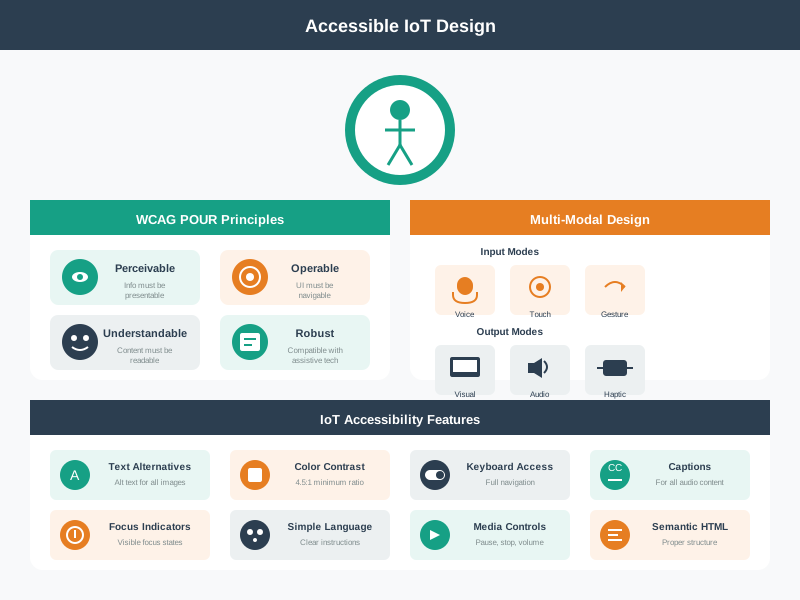
Accessible IoT design ensures connected devices work for users with diverse abilities and in varied contexts. This framework covers the key accessibility dimensions: physical affordances for users with motor limitations, multi-sensory feedback for users with visual or auditory impairments, and simplified interfaces for cognitive accessibility. Importantly, accessible design benefits everyone - large buttons help when wearing gloves, audio feedback helps in bright sunlight, and simple interfaces reduce frustration for all users.
AI-Generated Visualization - Modern Style
1497.8 Summary
This chapter covered device lifecycle management:
Key Takeaways:
Environmental Testing: Test devices in representative conditions across temperature, humidity, mechanical stress, and exposure factors
OTA Updates: Always implement dual-bank architecture with automatic rollback to prevent bricked devices
Provisioning: Plan the complete user journey from unboxing through network configuration to cloud registration
Biocompatibility: Skin-contact devices require ISO 10993 testing and hypoallergenic materials
Inclusive Design: Test with diverse user populations to ensure devices work for everyone
Self-Heating: Mount temperature sensors away from heat-generating electronics to avoid measurement errors
1497.9 What’s Next
The next chapter explores Connecting Together, examining how IoT devices discover, pair, and communicate with each other to form functional ecosystems.
1497.10 Resources
Standards and Testing: - IEC 60068 - Environmental testing standards - ISO 10993 - Biological evaluation of medical devices - IEC 60529 - IP ratings (Ingress Protection)
OTA Frameworks: - Mender.io - Open-source OTA framework - AWS IoT Device Management - Azure IoT Hub Device Provisioning Service
Design Resources: - Autodesk Fusion 360 - Mechanical CAD - KiCad / Altium Designer - Electronics design
NoteRelated Chapters & Resources
Device Architecture: - Architectural Enablers - IoT building blocks - Networking Fundamentals - Device connectivity - Prototyping Hardware - Building devices
Design Considerations: - Energy Aware Considerations - Power design - Reading Spec Sheets - Component selection