%%{init: {'theme': 'base', 'themeVariables': {'primaryColor': '#2C3E50', 'primaryTextColor': '#fff', 'primaryBorderColor': '#16A085', 'lineColor': '#16A085', 'secondaryColor': '#E67E22', 'tertiaryColor': '#7F8C8D'}}}%%
graph LR
    subgraph BEFORE["BEFORE Watching"]
        B1["Preview chapter<br/>text (5 min)"]
        B2["Set up<br/>note-taking"]
        B3["Define learning<br/>goals"]
    end

    subgraph DURING["DURING Watching"]
        D1["Pause every<br/>3-5 minutes"]
        D2["Write 1-sentence<br/>summaries"]
        D3["Redraw diagrams<br/>yourself"]
        D4["Rewind unclear<br/>parts immediately"]
    end

    subgraph AFTER["AFTER Watching"]
        A1["Summarize in<br/>3 bullets"]
        A2["Identify 1<br/>confusion point"]
        A3["Complete<br/>quiz"]
        A4["Apply in<br/>simulation"]
    end

    BEFORE --> DURING --> AFTER

    B1 --> B2 --> B3
    D1 --> D2 --> D3 --> D4
    A1 --> A2 --> A3 --> A4

    style BEFORE fill:#2C3E50,stroke:#16A085,stroke-width:2px,color:#fff
    style DURING fill:#E67E22,stroke:#16A085,stroke-width:2px,color:#fff
    style AFTER fill:#16A085,stroke:#2C3E50,stroke-width:2px,color:#fff
30 Video Gallery
30.1 Learning Objectives
By using this video gallery, you will be able to:
- Access multimedia content: Find video explanations for complex IoT topics
- Reinforce text learning: Use visual walkthroughs to complement written chapters
- Learn at your pace: Pause, rewind, and revisit difficult concepts
- Explore different formats: Choose between lecture highlights, demos, and tutorials
NoteKey Takeaway
In one sentence: Active video learning with pauses, notes, and reflection achieves 60-80% retention versus 10-20% for passive watching.
Remember this rule: Pause every 3-5 minutes to write a one-sentence summary, and always complete the related quiz within 24 hours of watching.
Short, focused videos to reinforce the written material. Most clips embed directly in the relevant chapters—this page collects them for quick access.
30.2 Prerequisites
Technical Requirements: - Stable internet connection for streaming - YouTube access (some institutions may block) - Optional: Note-taking setup for active viewing
Before Watching: For each video category, we recommend completing the corresponding chapter first:
| Video Category | Read First |
|---|---|
| Architecture | IoT Reference Models |
| Networking | Networking Fundamentals |
| Security | Security Overview |
| Data Analytics | Edge Computing |
| Sensing | Sensor Fundamentals |
Effective Video Learning: 1. Preview - Skim related chapter first 2. Watch actively - Take notes, pause to reflect 3. Review - Complete Knowledge Check after watching 4. Apply - Try related simulation or lab
Video Duration Guide: - 🟢 Short (< 10 min): Quick concept explanations - 🟡 Medium (10-30 min): Detailed tutorials - 🔴 Long (> 30 min): Deep dives and lectures
TipHow to Use This Gallery
Recommended Learning Path: 1. Preview - Watch videos before reading detailed chapters 2. Reinforce - Re-watch after studying to solidify understanding 3. Explore - Use videos to discover new topics of interest 4. Practice - Follow along with hands-on demonstrations
Video Categories: - 🏗️ Architecture - System design, reference models, edge/fog computing - 📊 Data - Analytics, edge computing, databases, big data - 🔐 Security - Encryption, privacy, vulnerabilities, threats - 🌐 Networking - Protocols (MQTT, CoAP, LPWAN), wireless, routing - 📡 Sensing - Sensors, actuators, signal processing
Video Embedding: All videos are embedded in their corresponding chapters using #videos anchors. For example: - chapter-name.qmd#videos links to the video section in that chapter - This gallery provides a centralized index for quick discovery
Difficulty Levels: - ⭐ Foundational - Introductory concepts, no prerequisites - ⭐⭐ Intermediate - Assumes basic IoT knowledge - ⭐⭐⭐ Advanced - Technical deep dives
30.3 Video Learning Workflow
Understanding how to use videos effectively enhances your learning experience:

30.4 Video Content Categories

%%{init: {'theme': 'base', 'themeVariables': {'primaryColor': '#2C3E50', 'primaryTextColor': '#2C3E50', 'primaryBorderColor': '#16A085', 'lineColor': '#16A085'}}}%%
graph TD
    subgraph ORDER["Recommended Viewing Order by Category"]
        direction LR
        O1["1. Architecture<br/>3 videos<br/>System context first"] --> O2["2. Networking<br/>12 videos<br/>Connectivity foundation"]
        O2 --> O3["3. Security<br/>5 videos<br/>After network understanding"]
        O3 --> O4["4. Data Analytics<br/>3 videos<br/>Processing patterns"]
        O4 --> O5["5. Sensing<br/>2 videos<br/>Can watch anytime"]
    end

    subgraph PARALLEL["Can Watch in Parallel"]
        P1["Sensing basics<br/>standalone"]
        P2["Architecture overview<br/>standalone"]
    end

    style O1 fill:#2C3E50,stroke:#16A085,stroke-width:2px,color:#fff
    style O2 fill:#16A085,stroke:#2C3E50,stroke-width:2px,color:#fff
    style O3 fill:#E67E22,stroke:#2C3E50,stroke-width:2px,color:#fff
    style O4 fill:#1B4F72,stroke:#16A085,stroke-width:2px,color:#fff
    style O5 fill:#7F8C8D,stroke:#2C3E50,stroke-width:2px,color:#fff
    style P1 fill:#E8F4F8,stroke:#16A085,stroke-width:1px
    style P2 fill:#E8F4F8,stroke:#16A085,stroke-width:1px
| Category | Videos Available |
|---|---|
| 🏗️ Architecture | Edge/Fog Computing, Cloud Computing, Reference Models |
| 📊 Data Analytics | Data at Edge, Data in Cloud, Big Data |
| 🔐 Security | Overview, Encryption, Threats, Device Security |
| 🌐 Networking | Protocols Overview, MQTT, CoAP, LPWAN, LoRaWAN, NB-IoT |
| 📡 Sensing | Sensors, Actuators, Signal Processing |
30.5 Video Learning Paths by Difficulty
Choose your path based on your current knowledge level:

%%{init: {'theme': 'base', 'themeVariables': {'primaryColor': '#2C3E50', 'primaryTextColor': '#fff', 'primaryBorderColor': '#16A085', 'lineColor': '#16A085', 'secondaryColor': '#E67E22', 'tertiaryColor': '#7F8C8D'}}}%%
flowchart TD
    START([What brings you here?]) --> Q1{Current IoT Experience?}

    Q1 -->|Complete Beginner| PATH1[Foundational Path<br/>2-3 hours]
    Q1 -->|Some Technical Background| PATH2[Intermediate Path<br/>3-4 hours]
    Q1 -->|Working on Project| Q2{Project Domain?}

    PATH1 --> F1[1. IoT Overview]
    F1 --> F2[2. Networking Basics]
    F2 --> F3[3. Security Overview]
    F3 --> F4[4. Choose Specialization]

    PATH2 --> I1[1. MQTT + CoAP]
    I1 --> I2[2. LoRaWAN or NB-IoT]
    I2 --> I3[3. Edge/Fog Computing]

    Q2 -->|Smart Home| SH[Zigbee + Thread Videos]
    Q2 -->|Industrial/Agriculture| IND[LPWAN + Security Videos]
    Q2 -->|Wearables/Health| WEAR[BLE + Edge Videos]

    style START fill:#2C3E50,stroke:#16A085,stroke-width:2px,color:#fff
    style Q1 fill:#E67E22,stroke:#2C3E50,stroke-width:2px,color:#fff
    style Q2 fill:#E67E22,stroke:#2C3E50,stroke-width:2px,color:#fff
    style PATH1 fill:#16A085,stroke:#2C3E50,stroke-width:2px,color:#fff
    style PATH2 fill:#1B4F72,stroke:#2C3E50,stroke-width:2px,color:#fff
    style SH fill:#9B59B6,stroke:#2C3E50,stroke-width:1px,color:#fff
    style IND fill:#9B59B6,stroke:#2C3E50,stroke-width:1px,color:#fff
    style WEAR fill:#9B59B6,stroke:#2C3E50,stroke-width:1px,color:#fff
WarningMisconception Alert: Passive vs Active Video Learning
Common Mistake: Many students treat educational videos like entertainment - watching passively without engagement.
The Problem: - Passive watching = 10-20% retention after 24 hours - Active engagement = 60-80% retention after 24 hours - Simply watching without note-taking creates an “illusion of understanding”
Active Learning Behaviors: - ✅ Pause frequently to reflect and take notes - ✅ Rewind unclear sections immediately (don’t wait until the end) - ✅ Try examples yourself before seeing the solution - ✅ Complete Knowledge Checks after each video - ❌ Don’t watch at 2× speed for complex technical content - ❌ Don’t multitask while watching (checking email, scrolling social media)
Research Shows: Students who pause 3+ times per 10-minute video score 28% higher on comprehension tests.
TipActive Watching Guide: Maximize Your Learning
Before Pressing Play: 1. Set up note-taking - Open a document or notebook 2. Preview the chapter - Skim the related text (5 minutes) 3. Eliminate distractions - Close unnecessary tabs, silence phone
While Watching: - 0:00-1:00 - Note the main topic and learning objectives - Every 3-5 minutes - Pause and write a one-sentence summary of what you just learned - When you see an example - Pause at the setup (before the solution), try it yourself, then compare - When confused - Rewind immediately, don’t hope it will make sense later - When you see a diagram - Pause and redraw it yourself (forces deeper processing)
Specific Pause Points (Example - MQTT Deep Dive): - 3:45 - Before QoS levels are explained, predict: “What quality levels might IoT need?” - 8:20 - Before publish/subscribe demo, sketch your own architecture first - 15:30 - Before retained messages, try: “How would I notify late-joining clients?”
After Watching: - Summarize in 3 bullets - What were the key takeaways? - Identify 1 confusion point - What’s still unclear? - Complete the Knowledge Check - Validate your understanding - Apply in simulation - Practice what you learned
Pro Tip: If you can’t explain a concept in your own words, you don’t understand it yet - rewatch that section.
NoteCross-Hub Connections: Complete Your Learning Loop
Videos are most effective when integrated with other learning resources:
After Watching a Video:
- Test Your Understanding → Quiz Hub
- Every video topic has corresponding quizzes
- Complete the quiz within 24 hours for best retention
- Example: After MQTT video → MQTT Quiz
- Practice Hands-On → Simulations Hub
- Apply concepts in interactive environments
- Example: After Networking video → Network Topology Visualizer
- Fill Knowledge Gaps → Knowledge Gaps Hub
- If a concept was confusing, check common misconceptions
- Example: Confused about QoS levels? → MQTT Common Mistakes
- Explore the Knowledge Map → Knowledge Map Hub
- See how the topic connects to the broader IoT ecosystem
- Example: How does MQTT relate to edge computing, security, and applications?
Recommended Learning Sequence:
Read Chapter → Watch Video → Take Notes → Quiz → Simulation → Review GapsEfficiency Tips: - Short on time? Watch video first (overview) → Read chapter (details) → Quiz (validation) - Deep learning? Read → Video → Quiz → Simulation → Re-watch unclear sections - Exam prep? Video speed review → Quiz → Knowledge Gaps → Knowledge Map
TipSample Video Notes Template
Use this template to take effective notes while watching videos:
Video Title: ___________________________ Date Watched: // Duration: minutes Related Chapter: [Chapter Link]
30.5.1 Pre-Watch (2 minutes)
30.6 What I already know about this topic:
30.7 What I want to learn:
30.7.1 While Watching (Main Notes)
| Timestamp | Key Concept | My Summary | Questions/Confusion |
|---|---|---|---|
| 0:00 | Introduction | ||
Important Diagrams/Examples (Sketch or Describe): 1. 2. 3.
Technical Terms I Need to Review: - Term: _____________ → Definition: _____________ - Term: _____________ → Definition: _____________
30.7.2 Post-Watch Reflection (5 minutes)
3 Key Takeaways: 1. 2. 3.
30.8 1 Confusing Point (to revisit):
How This Relates to Previous Topics: - Connects to [Chapter X] because… - Builds on [Concept Y] by adding…
Action Items: - [ ] Complete quiz: [Link] - [ ] Try simulation: [Link] - [ ] Review chapter section: [Page #] - [ ] Rewatch timestamp: :
Quiz Score (after video): / Simulation Completed: ☐ Yes ☐ No
30.8.1 Example: Filled Template (MQTT Video)
Video Title: MQTT Deep Dive Date Watched: 12/16/2025 Duration: 18 minutes Related Chapter: MQTT Fundamentals
While Watching:
| Timestamp | Key Concept | My Summary | Questions/Confusion |
|---|---|---|---|
| 0:00 | MQTT Overview | Lightweight pub/sub for IoT, 1999 by IBM | Why “Message Queue” if it doesn’t queue? |
| 3:45 | QoS Levels | 0=fire-forget, 1=at-least-once, 2=exactly-once | When to use QoS 2? High overhead? |
| 8:20 | Pub/Sub Demo | Clients publish to topics, broker routes | How does wildcard subscription work? |
| 15:30 | Retained Messages | Last message stored, sent to new subscribers | How long does broker retain? Forever? |
3 Key Takeaways: 1. MQTT is ideal for constrained devices (low bandwidth, battery-powered sensors) 2. QoS levels trade reliability for overhead - choose based on use case 3. Topics use hierarchy (home/bedroom/temperature) for organized routing
1 Confusing Point: - Still unclear on “session persistence” - what happens if client disconnects?
Action Items: - [x] Complete quiz: MQTT Quiz - [x] Try simulation: MQTT Broker Setup - [ ] Review chapter section: “Session Management” (Page 4) - [ ] Rewatch timestamp: 12:15 (session persistence explanation)
Quiz Score: 8/10 (missed questions on Last Will Testament and Keep-Alive)
30.9 Featured Playlists
- Start Here – IoT Overview
- Protocols in Practice – MQTT Deep Dive · LoRaWAN Explained
- Design & Prototyping – Rapid Prototyping Workflow
- Security Focus – Threat Modeling Walkthrough
30.10 Browse by Topic
30.10.1 Architecture
- Edge/Fog Computing ⭐⭐ 🟡
- Cloud Computing ⭐⭐ 🟢
30.10.2 Data
- Data at the Edge ⭐⭐ 🟡
- Data in the Cloud ⭐⭐ 🟢
30.10.3 Security
30.10.4 Networking & Protocols
- IoT Protocols Overview ⭐ 🟢
- Application Protocols Overview ⭐⭐ 🟡
- Layered Network Models ⭐ 🟢
- Networking Basics ⭐ 🟢
- MQTT ⭐⭐ 🟡
- CoAP ⭐⭐ 🟡
- AMQP ⭐⭐⭐ 🟡
- XMPP ⭐⭐ 🟢
- LPWAN Introduction ⭐ 🟢
- LoRaWAN ⭐⭐ 🟡
- Sigfox ⭐⭐ 🟢
- NB-IoT ⭐⭐ 🟡
- Weightless ⭐⭐ 🟢
30.10.5 Sensing & Actuation
30.11 Video Coverage Map
The following table shows which book parts currently have video support:
| Book Part | Video Support | Topics Covered |
|---|---|---|
| Part 1: Learning Hubs | ✅ Full | Hub navigation, learning strategies |
| Part 2: Fundamentals | ⚠️ Partial | Protocols, signal processing (gaps: data formats, packet structure) |
| Part 3: Applications | ⚠️ Partial | IoT overview (gaps: use cases, business models) |
| Part 4-5: Architectures | ✅ Good | Edge/fog computing, cloud (gaps: WSN, M2M, UAV) |
| Part 6: Sensing & Actuation | ✅ Good | Sensors, actuators |
| Part 7-9: Networking | ✅ Excellent | Protocols (MQTT, CoAP, LPWAN, LoRaWAN, NB-IoT) |
| Part 10: Data Analytics | ✅ Good | Edge data, cloud data |
| Part 11: Privacy & Security | ✅ Excellent | Overview, encryption, threats, device security |
| Part 12: Human Factors | ❌ None | Future content planned |
| Part 13: Design Strategies | ⚠️ Partial | Prototyping (gaps: simulation, optimization) |
| Part 14: Product Analysis | ❌ None | Future content planned |
Legend: - ✅ Full/Excellent: Comprehensive video coverage (4+ videos) - ✅ Good: Solid coverage (2-3 videos) - ⚠️ Partial: Limited coverage (1 video or gaps) - ❌ None: No videos yet
30.12 Upcoming Releases
We’re continuously adding new video content. Planned releases include:
- Live coding sessions for MQTT client/server builds
- Walkthrough of the simulator integration toolkit
- Student project showcase series
- Deep dives on hardware prototyping with ESP32/Arduino
- Business models and monetization strategies
- Human factors and UX design for IoT
Check back regularly for new video content, or watch for announcements in course updates.
30.13 Quick Index
Complete listing of all embedded videos with difficulty and duration:
| Chapter | Video Title | Difficulty | Duration | Anchor |
|---|---|---|---|---|
| Architecture | ||||
| Edge/Fog Computing | IoT Gateways and Fog/Edge Overview | ⭐⭐ | 🟡 | View |
| Cloud Computing | Cloud Platforms for IoT | ⭐⭐ | 🟢 | View |
| Data Analytics | ||||
| Edge Data | Data Processing at the Edge | ⭐⭐ | 🟡 | View |
| Cloud Data | Data in the Cloud Platforms | ⭐⭐ | 🟢 | View |
| Security | ||||
| Security Overview | IoT Security Fundamentals | ⭐ | 🟢 | View |
| Encryption | Encryption Labs and Implementation | ⭐⭐ | 🟡 | View |
| Threat Modeling | Threat Analysis and Mitigation | ⭐⭐⭐ | 🟡 | View |
| Secure Software | Secure Data and Software Practices | ⭐⭐ | 🟢 | View |
| Device Security | IoT Device and Network Security | ⭐⭐ | 🟡 | View |
| Networking Fundamentals | ||||
| IoT Protocols | Protocols Overview | ⭐ | 🟢 | View |
| Application Protocols | Application Layer Protocols | ⭐⭐ | 🟡 | View |
| Layered Models | OSI and TCP/IP Models | ⭐ | 🟢 | View |
| Networking Basics | Networking Fundamentals | ⭐ | 🟢 | View |
| Short-Range Protocols | ||||
| MQTT | MQTT Deep Dive | ⭐⭐ | 🟡 | View |
| CoAP | CoAP Fundamentals | ⭐⭐ | 🟡 | View |
| AMQP | Advanced Message Queuing | ⭐⭐⭐ | 🟡 | View |
| XMPP | Extensible Messaging Protocol | ⭐⭐ | 🟢 | View |
| Long-Range Protocols | ||||
| LPWAN Introduction | LPWAN Overview | ⭐ | 🟢 | View |
| LoRaWAN | LoRaWAN Explained | ⭐⭐ | 🟡 | View |
| Sigfox | Sigfox Technology | ⭐⭐ | 🟢 | View |
| NB-IoT | Cellular IoT Fundamentals | ⭐⭐ | 🟡 | View |
| Weightless | Weightless in LPWAN Landscape | ⭐⭐ | 🟢 | View |
| Sensing & Actuation | ||||
| Sensors | Sensor Types and Implementation | ⭐ | 🟢 | View |
| Actuators | Actuator Fundamentals | ⭐ | 🟢 | View |
Duration Key: - 🟢 Short (< 10 min): Quick concept explanations - 🟡 Medium (10-30 min): Detailed tutorials - 🔴 Long (> 30 min): Deep dives and lectures
Difficulty Key: - ⭐ Foundational: No prerequisites required - ⭐⭐ Intermediate: Basic IoT knowledge assumed - ⭐⭐⭐ Advanced: Technical background required
30.14 Visual Reference Gallery
NoteAI-Generated Figure Variants: Video Content Topics
These AI-generated SVG figures illustrate key concepts covered in the video content. Each represents a major topic area available through the video gallery.
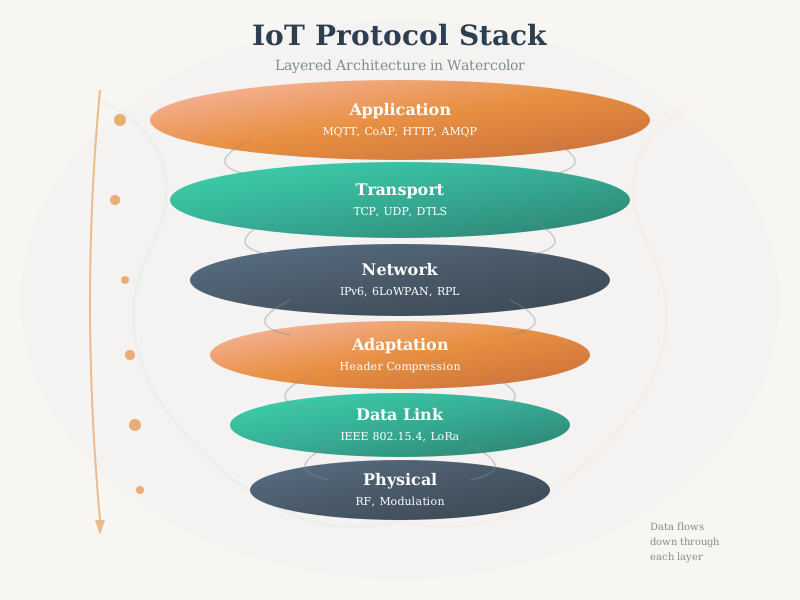
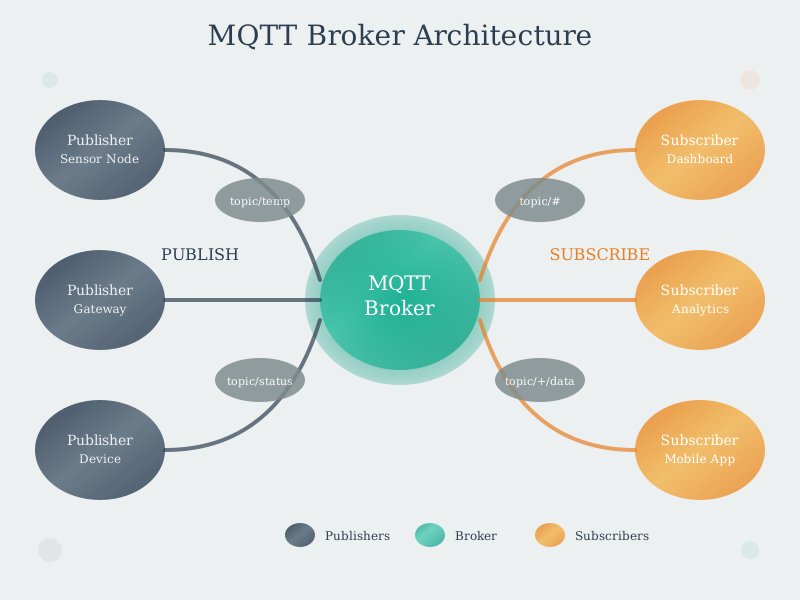
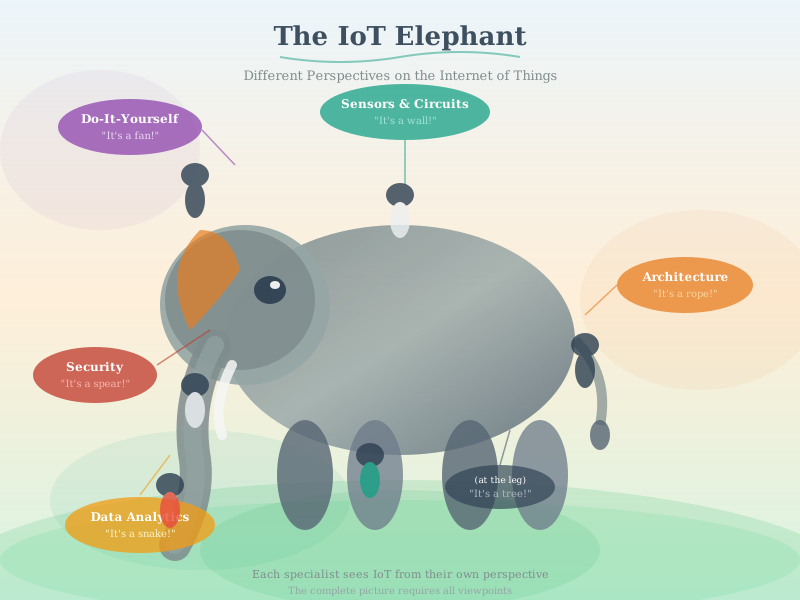
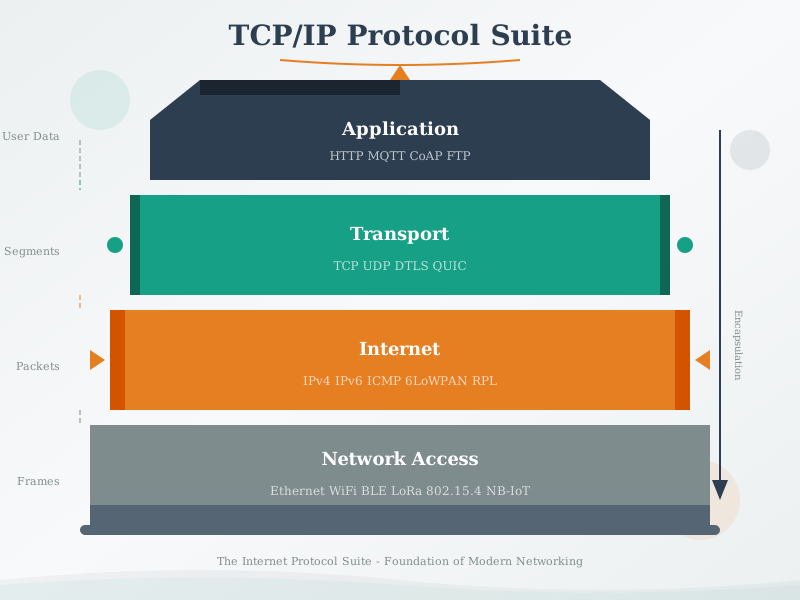
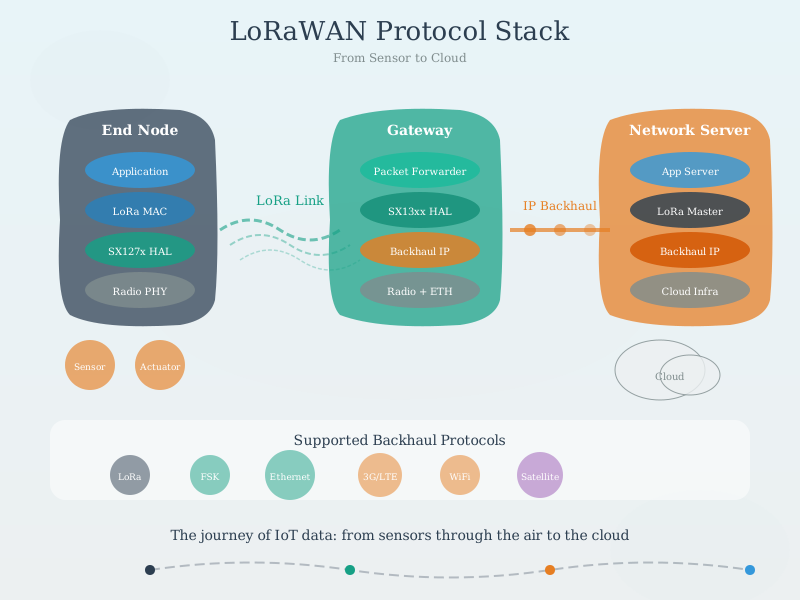
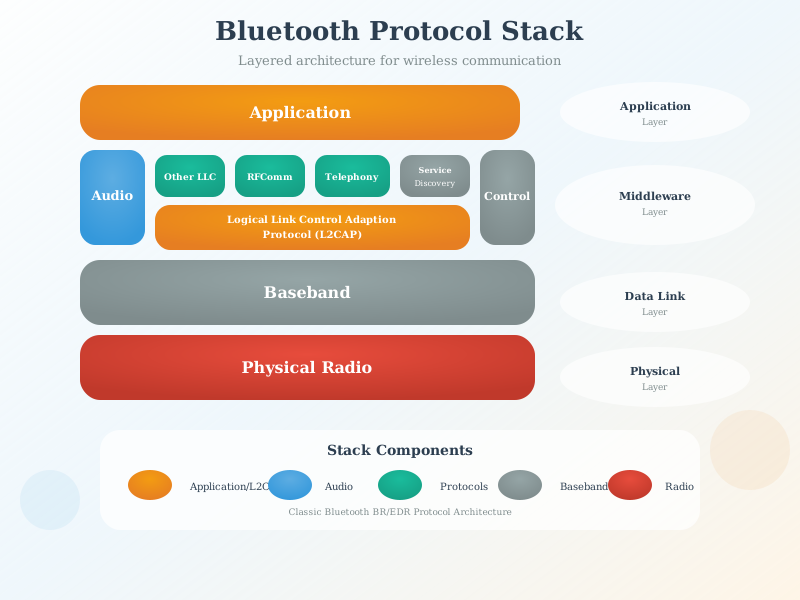
Figure Styles Available: These AI-generated figures come in multiple styles (artistic, modern, geometric) - access alternatives via the image version switcher when viewing in the book.
30.15 Summary
This video gallery provides multimedia support for your IoT learning journey:
30.15.1 Key Features
- 25+ Videos: Comprehensive coverage across Architecture, Data, Security, Networking, and Sensing
- Featured Playlists: Curated collections for getting started and deep dives
- Difficulty Indicators: Clear marking of beginner (⭐), intermediate (⭐⭐), and advanced (⭐⭐⭐) content
- Duration Guides: Color-coded duration indicators (🟢 short, 🟡 medium, 🔴 long)
30.15.2 Organization
- Topic-Based Browsing: Videos organized by 5 main categories (Architecture, Data, Security, Networking, Sensing)
- Quick Index: Complete listing with difficulty and duration metadata
- Coverage Map: Shows which book parts have strong video support vs gaps
- Chapter Integration: Every video embedded in its corresponding text chapter via
#videosanchors
30.15.3 Learning Support
- Active Learning Workflow: Preview → Watch → Note → Reflect → Quiz → Apply
- Prerequisites Guide: Recommended chapters to read before watching each category
- Cross-Hub Integration: Videos work seamlessly with Quizzes and Simulations hubs
30.16 Knowledge Check
30.17 What’s Next
- Start with the IoT Overview video if you’re new
- After watching, test your understanding with Quizzes
- Try hands-on practice in the Simulation Playground