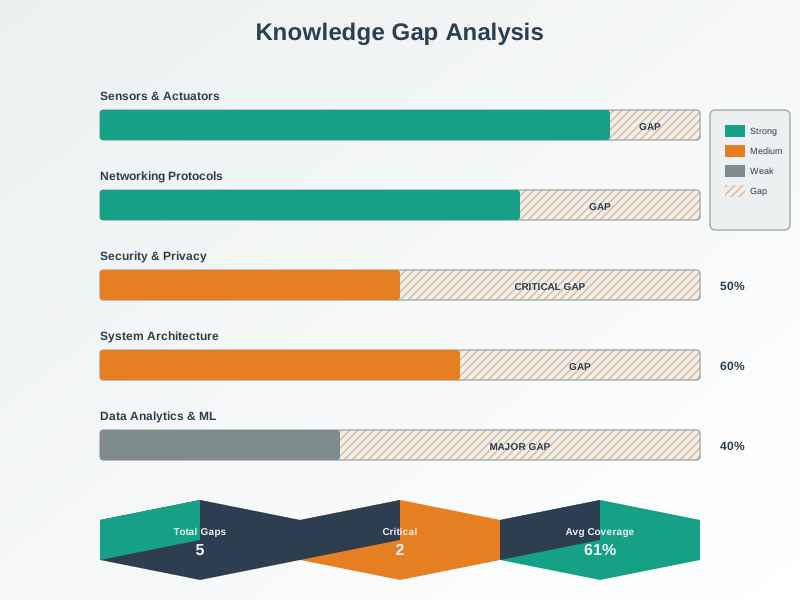
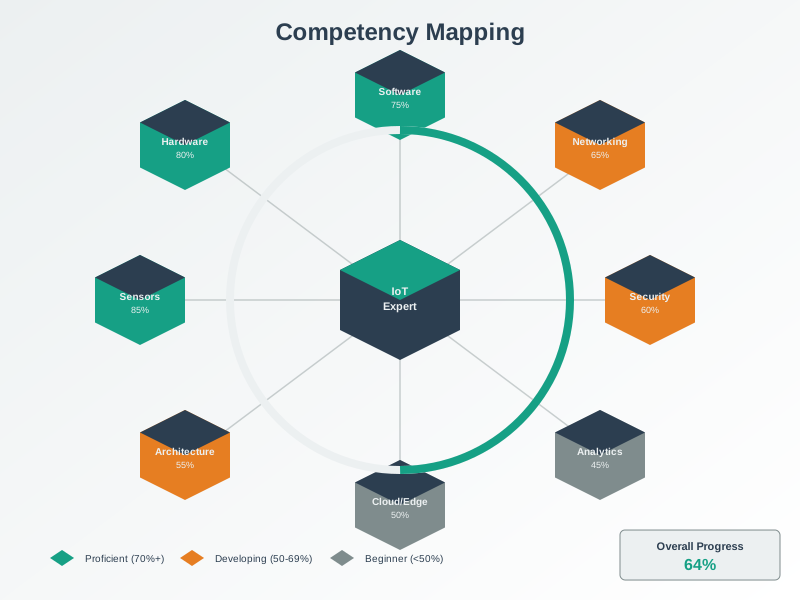
Use the Knowledge Assessment Matrix to visualize your progress across domains
Apply the 5-step self-assessment process to systematically identify and close gaps
Track your progress using the provided template
Get personalized recommendations through the interactive assessment tool
29.2 How to Track Your Progress
⏱️ ~10 min | ⭐⭐ Intermediate | 📋 P01.C04.U06
Skill Progression Framework
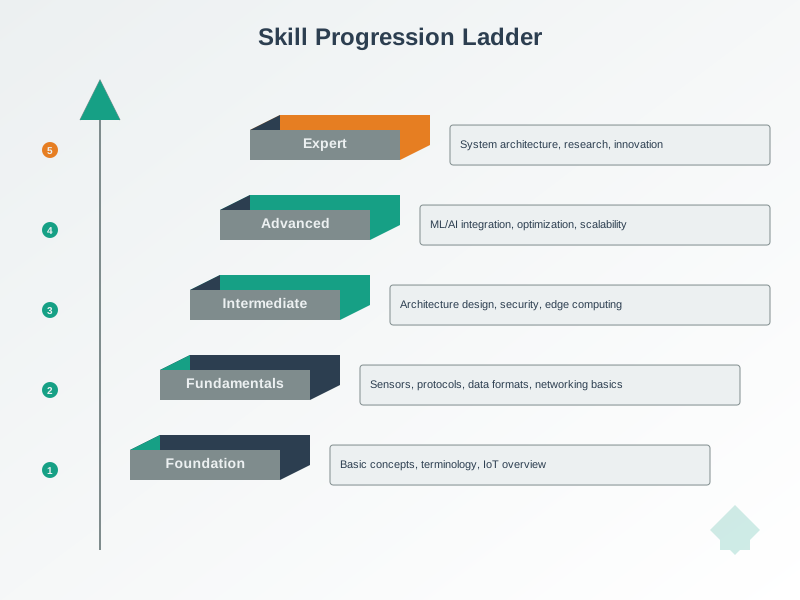
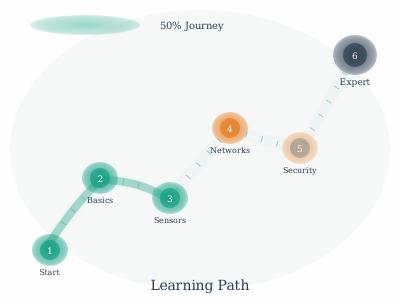
Figure 29.1: Skill progression follows predictable patterns. Understanding these stages helps you set realistic expectations and recognize when you are ready to advance to more challenging material or apply knowledge in projects.
TipVisual Progress Tracker
Use the Knowledge Assessment Matrix below to visualize your progress across all domains. Rate yourself 1-5 for each category, then track improvement over time.
%%{init: {'theme': 'base', 'themeVariables': {'primaryColor': '#E8F4F8', 'primaryTextColor': '#2C3E50', 'primaryBorderColor': '#16A085', 'lineColor': '#16A085', 'secondaryColor': '#FEF5E7', 'tertiaryColor': '#FDEBD0'}}}%%
graph LR
    subgraph Assessment["Knowledge Assessment Matrix"]
        direction TB
        N["Networking<br/>☐☐☐☐☐"]
        P["IoT Protocols<br/>☐☐☐☐☐"]
        W["Wireless<br/>☐☐☐☐☐"]
        S["Sensing & Data<br/>☐☐☐☐☐"]
        SEC["Security<br/>☐☐☐☐☐"]
        A["Architecture<br/>☐☐☐☐☐"]
        H["Human Factors<br/>☐☐☐☐☐"]
    end

    subgraph Legend["Proficiency Scale"]
        direction TB
        L1["☐ = 1: Unfamiliar"]
        L2["☐ = 2: Aware"]
        L3["☐ = 3: Understand"]
        L4["☐ = 4: Apply"]
        L5["☐ = 5: Master"]
    end

    Assessment -.->|"Rate yourself<br/>1-5 for each"| Legend

    style N fill:#E8F4F8,stroke:#16A085,stroke-width:2px
    style P fill:#E8F4F8,stroke:#16A085,stroke-width:2px
    style W fill:#E8F4F8,stroke:#16A085,stroke-width:2px
    style S fill:#E8F4F8,stroke:#16A085,stroke-width:2px
    style SEC fill:#FADBD8,stroke:#E74C3C,stroke-width:2px
    style A fill:#E8F4F8,stroke:#16A085,stroke-width:2px
    style H fill:#E8F4F8,stroke:#16A085,stroke-width:2px
    style L1 fill:#FADBD8,stroke:#E74C3C,stroke-width:1px
    style L2 fill:#FEF5E7,stroke:#E67E22,stroke-width:1px
    style L3 fill:#FEF9E7,stroke:#F39C12,stroke-width:1px
    style L4 fill:#E8F8F5,stroke:#16A085,stroke-width:1px
    style L5 fill:#D5F4E6,stroke:#27AE60,stroke-width:2px
Figure 29.2: Knowledge Assessment Matrix: self-rate your proficiency (1-5) in each domain to identify priority gaps
Figure 29.3: Alternative View: Competency Radar Profile - This pie chart representation shows a sample student’s knowledge profile. Larger slices indicate stronger areas (Networking, Wireless at 4/5), while smaller slices reveal gaps (Security at 1/5, Sensing at 2/5). Use this visual approach to quickly identify your priority study areas. A balanced learner would have roughly equal slice sizes. This student should prioritize Security and Sensing/Data before advancing to complex integration projects.
How to Use This Matrix: - Rate yourself 1-5 for each domain (1 = unfamiliar, 5 = mastery) - Focus first on domains rated 1-2 (unfamiliar/aware) - Domains rated 3 need reinforcement before advancing - Domains rated 4-5 indicate readiness for advanced topics - Re-assess monthly to track improvement
29.2.1 Self-Assessment Checklist
Interactive Exercise Framework
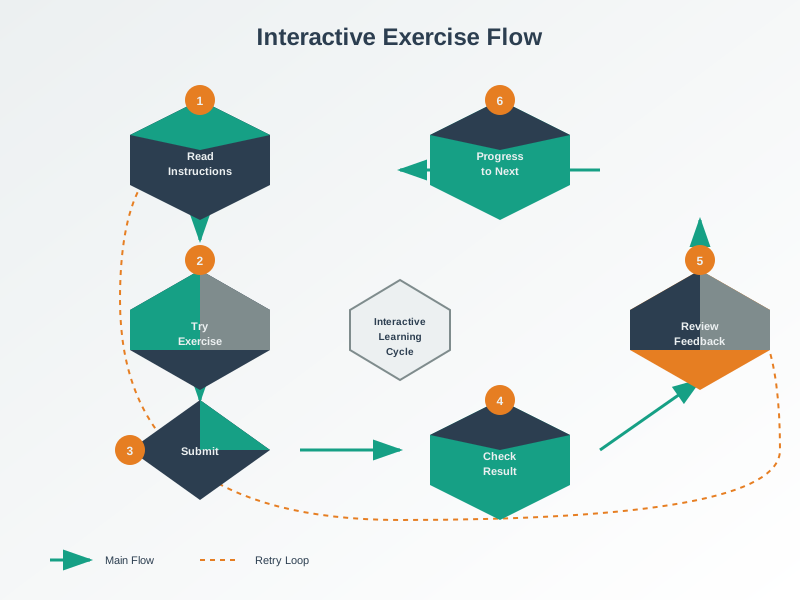
Figure 29.4: Interactive exercises provide immediate feedback that accelerates learning. Unlike passive reading, active problem-solving engages deeper cognitive processes and reveals gaps that self-assessment alone might miss.
Assessment Rubric
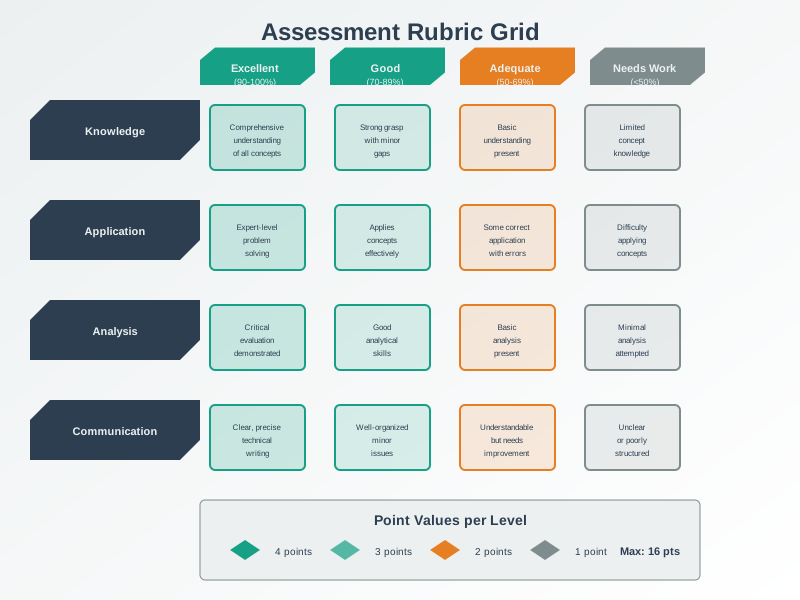
Figure 29.5: Assessment rubrics provide clear criteria for evaluating your understanding. Each criterion describes what mastery looks like, helping you identify specific areas needing improvement rather than receiving vague feedback.
Use this systematic approach to identify and close knowledge gaps:
Step 1: Identify Gaps - [ ] Complete diagnostic quizzes for each major topic area - [ ] Note topics where you scored below 70% - [ ] Review quiz explanations for incorrect answers - [ ] Identify patterns (e.g., “I struggle with wireless protocols”)
Step 2: Prioritize - [ ] List all identified gaps in order of importance - [ ] Consider: What topics are prerequisites for others? - [ ] Consider: What topics are most relevant to your projects? - [ ] Create a study schedule with specific dates
Step 3: Study & Practice - [ ] Read the “Refresh” chapter linked in the Knowledge Categories - [ ] Watch related videos from the Videos Hub - [ ] Try hands-on practice in the Simulations Hub - [ ] Take notes on key concepts
Step 4: Validate Understanding - [ ] Retake the practice quiz for each topic - [ ] Aim for 80% or higher - [ ] If score is below 80%, return to Step 3 - [ ] Mark topic as “mastered” when consistently scoring 80%+
Step 5: Maintain Mastery - [ ] Review mastered topics monthly - [ ] Apply concepts to projects when possible - [ ] Help peers understand topics you’ve mastered - [ ] Revisit if quiz scores drop below 70%
29.2.2 Progress Tracking Template
Copy this template to your notes to track progress:
KNOWLEDGE GAPS TRACKER
======================

Date Started: __________

Priority Topics:
1. _________________ | Status: [ ] Not Started [ ] In Progress [ ] Mastered
2. _________________ | Status: [ ] Not Started [ ] In Progress [ ] Mastered
3. _________________ | Status: [ ] Not Started [ ] In Progress [ ] Mastered

Current Focus: _________________
Last Quiz Score: _____%
Target Date: __________

Notes:
-
-
We will continue to expand this tracker as more assessments roll out. Contributions welcome!
29.3 Interactive Self-Assessment
⏱️ ~15 min | ⭐⭐ Intermediate | 📋 P01.C04.U07
ImportantSign In Required for Progress Tracking
The interactive self-assessment below requires authentication to save your progress. Sign in with GitHub to track your knowledge gaps over time and receive personalized recommendations.
Use this interactive tool to assess your knowledge across all IoT domains. Rate yourself honestly on a 1-5 scale, set your target level, and the system will identify your priority gaps and recommend content to address them.
Show code
KnowledgeGapsAPI = {// Wait for the global to be availableawaitnewPromise(resolve => {if (window.KnowledgeGapsAPI) {resolve(); } else {const check =setInterval(() => {if (window.KnowledgeGapsAPI) {clearInterval(check);resolve(); } },100);// Timeout after 5 secondssetTimeout(() => {clearInterval(check);resolve(); },5000); } });returnwindow.KnowledgeGapsAPI||null;}// Check authentication statusisAuthenticated = {if (typeof Auth !=='undefined'&& Auth.isUserAuthenticated) {return Auth.isUserAuthenticated(); }returnfalse;}currentUser = {if (isAuthenticated &&typeof Auth !=='undefined') {return Auth.getCurrentUser(); }returnnull;}