%%{init: {'theme': 'base', 'themeVariables': {'primaryColor': '#2C3E50', 'primaryTextColor': '#fff', 'primaryBorderColor': '#1A252F', 'lineColor': '#16A085', 'secondaryColor': '#E67E22', 'tertiaryColor': '#ECF0F1', 'fontSize': '14px'}}}%%
flowchart TD
    subgraph Questions["Key Propagation Questions"]
        Q1["How much power<br/>do I need to transmit?"]
        Q2["How far can my<br/>signal reach?"]
        Q3["What data rate<br/>can I achieve?"]
        Q4["How reliable will<br/>the connection be?"]
    end

    subgraph Factors["Propagation Factors"]
        F1["Frequency Band"]
        F2["Path Loss"]
        F3["Fading & Multipath"]
        F4["Interference"]
    end

    Q1 --> F2
    Q2 --> F1
    Q2 --> F2
    Q3 --> F1
    Q3 --> F4
    Q4 --> F3
    Q4 --> F4

    style Questions fill:#2C3E50,stroke:#1A252F
    style Factors fill:#16A085,stroke:#0D6655
79 Radio Wave Basics for IoT
79.1 Learning Objectives
By the end of this chapter, you will be able to:
- Explain the relationship between frequency, wavelength, and the speed of light
- Identify the key frequency bands used in IoT applications
- Compare the trade-offs between different frequency bands (sub-GHz, 2.4 GHz, 5 GHz)
- Understand why radio waves propagate differently through various environments
79.2 Prerequisites
Before diving into this chapter, you should be comfortable with:
- Basic algebra and logarithms (dB math): Mathematical Foundations
- Core networking vocabulary (links, range, reliability): Networking Basics
TipFor Beginners: What is Wireless Propagation?
Think of wireless communication like shouting across a field. The farther away your friend is, the harder it is to hear you. Several things affect how well your message gets through:
- Distance - Farther = weaker signal
- Obstacles - Walls, buildings, and trees block or absorb some energy
- Interference - Other people shouting (other radio signals) make it harder to hear
- Frequency - Like pitch in sound; higher frequencies travel differently than lower ones
Radio waves follow similar principles, but we can measure and predict their behavior mathematically. This chapter gives you the tools to: - Estimate how far your wireless devices can communicate - Understand why some technologies work better indoors vs outdoors - Choose the right wireless technology for your application
NoteKey Takeaway
In one sentence: Radio signal strength decreases with distance and frequency, and a link budget calculation tells you whether your wireless system will work before you deploy it.
Remember this rule: Every 3 dB of antenna gain doubles your effective range (or lets you halve transmit power), and lower frequencies (sub-GHz) travel farther and penetrate walls better than higher frequencies (2.4/5 GHz) at the cost of data rate.
79.3 Why Propagation Matters for IoT
Every wireless IoT system must answer a fundamental question: Will my devices be able to communicate reliably?
The answer depends on understanding:
Alternative View:
%%{init: {'theme': 'base', 'themeVariables': {'primaryColor': '#2C3E50', 'primaryTextColor': '#fff', 'primaryBorderColor': '#16A085', 'lineColor': '#16A085', 'secondaryColor': '#E67E22', 'tertiaryColor': '#7F8C8D'}}}%%
flowchart TB
    subgraph DESIGN["Design Stage"]
        D1["Select Frequency Band"]
        D2["Choose Transmit Power"]
        D3["Select Antenna Type"]
    end

    subgraph PHYSICS["Physical Phenomena"]
        P1["Path Loss<br/>(distance attenuation)"]
        P2["Multipath Fading<br/>(reflections)"]
        P3["Interference<br/>(other signals)"]
    end

    subgraph OUTCOMES["System Outcomes"]
        O1["Coverage Range"]
        O2["Link Reliability"]
        O3["Data Rate Achieved"]
    end

    D1 --> P1
    D2 --> P1
    D3 --> P1
    D1 --> P2
    D3 --> P2
    D1 --> P3

    P1 --> O1
    P2 --> O2
    P3 --> O2
    P1 --> O3
    P2 --> O3
    P3 --> O3

    style D1 fill:#16A085,stroke:#2C3E50,stroke-width:2px,color:#fff
    style D2 fill:#16A085,stroke:#2C3E50,stroke-width:2px,color:#fff
    style D3 fill:#16A085,stroke:#2C3E50,stroke-width:2px,color:#fff
    style P1 fill:#E67E22,stroke:#2C3E50,stroke-width:2px,color:#fff
    style P2 fill:#E67E22,stroke:#2C3E50,stroke-width:2px,color:#fff
    style P3 fill:#E67E22,stroke:#2C3E50,stroke-width:2px,color:#fff
    style O1 fill:#2C3E50,stroke:#16A085,stroke-width:2px,color:#fff
    style O2 fill:#2C3E50,stroke:#16A085,stroke-width:2px,color:#fff
    style O3 fill:#2C3E50,stroke:#16A085,stroke-width:2px,color:#fff
%%{init: {'theme': 'base', 'themeVariables': {'primaryColor': '#2C3E50', 'primaryTextColor': '#fff', 'primaryBorderColor': '#16A085', 'lineColor': '#16A085', 'secondaryColor': '#E67E22', 'tertiaryColor': '#7F8C8D'}}}%%
graph TB
    subgraph RADIO["Radio Communication"]
        R1["How loud<br/>to shout?"]
        R2["How far<br/>will it carry?"]
        R3["Can they<br/>understand me?"]
        R4["Is it<br/>reliable?"]
    end

    subgraph SHOUTING["Analogy: Shouting Across a Field"]
        S1["Volume = <br/>Transmit Power"]
        S2["Distance depends on<br/>obstacles, terrain"]
        S3["Speaking rate =<br/>Data rate"]
        S4["Background noise =<br/>Interference"]
    end

    R1 -.-> S1
    R2 -.-> S2
    R3 -.-> S3
    R4 -.-> S4

    style R1 fill:#2C3E50,stroke:#16A085,stroke-width:2px,color:#fff
    style R2 fill:#2C3E50,stroke:#16A085,stroke-width:2px,color:#fff
    style R3 fill:#2C3E50,stroke:#16A085,stroke-width:2px,color:#fff
    style R4 fill:#2C3E50,stroke:#16A085,stroke-width:2px,color:#fff
    style S1 fill:#16A085,stroke:#2C3E50,stroke-width:1px,color:#fff
    style S2 fill:#16A085,stroke:#2C3E50,stroke-width:1px,color:#fff
    style S3 fill:#16A085,stroke:#2C3E50,stroke-width:1px,color:#fff
    style S4 fill:#16A085,stroke:#2C3E50,stroke-width:1px,color:#fff
79.4 Radio Wave Basics
79.4.1 The Electromagnetic Spectrum
Radio waves are part of the electromagnetic spectrum, characterized by frequency (cycles per second, measured in Hz) or wavelength (distance between wave peaks).
Key relationship: \[c = f \times \lambda\]
Where: - \(c\) = speed of light (3 x 10^8 m/s) - \(f\) = frequency (Hz) - \(\lambda\) = wavelength (meters)
79.4.2 IoT Frequency Bands
| Band | Frequency | Wavelength | IoT Technologies |
|---|---|---|---|
| Sub-GHz | 433 MHz, 868/915 MHz | ~0.3-0.7 m | LoRa, Sigfox, Z-Wave |
| ISM 2.4 GHz | 2.4-2.485 GHz | ~12 cm | Wi-Fi, Bluetooth, Zigbee, Thread |
| ISM 5 GHz | 5.15-5.85 GHz | ~6 cm | Wi-Fi 5/6 |
| mmWave | 24-86 GHz | ~3-12 mm | 5G, Radar sensing |
NoteThe Frequency Trade-off
Lower frequencies (Sub-GHz): - Travel farther (less path loss) - Penetrate walls and obstacles better - BUT: Lower data rates, larger antennas
Higher frequencies (2.4 GHz, 5 GHz): - Higher data rates possible - Smaller antennas - BUT: Shorter range, blocked by obstacles
79.4.3 Band Comparison Table
| Factor | Sub-GHz (868/915) | 2.4 GHz | 5 GHz |
|---|---|---|---|
| Range (open) | 5-15 km | 50-200m | 30-100m |
| Range (indoor) | 500m-2km | 20-50m | 10-30m |
| Wall penetration | Excellent | Good | Poor |
| Data rate | 0.3-50 kbps | Up to 2 Mbps | Up to 1 Gbps |
| Interference | Low | High | Medium |
| Antenna size | 8-17 cm | 3 cm | 1.5 cm |
| Power efficiency | Excellent | Good | Moderate |
| Regulations | Region-specific | Global (ISM) | Global (mostly) |
79.5 Visual Reference Gallery
NoteStatic Diagram: Key Propagation Questions and Factors

This diagram illustrates how fundamental IoT wireless questions map to propagation factors that must be considered during system design.
NoteStatic Diagram: Wireless Protocol Evolution Timeline
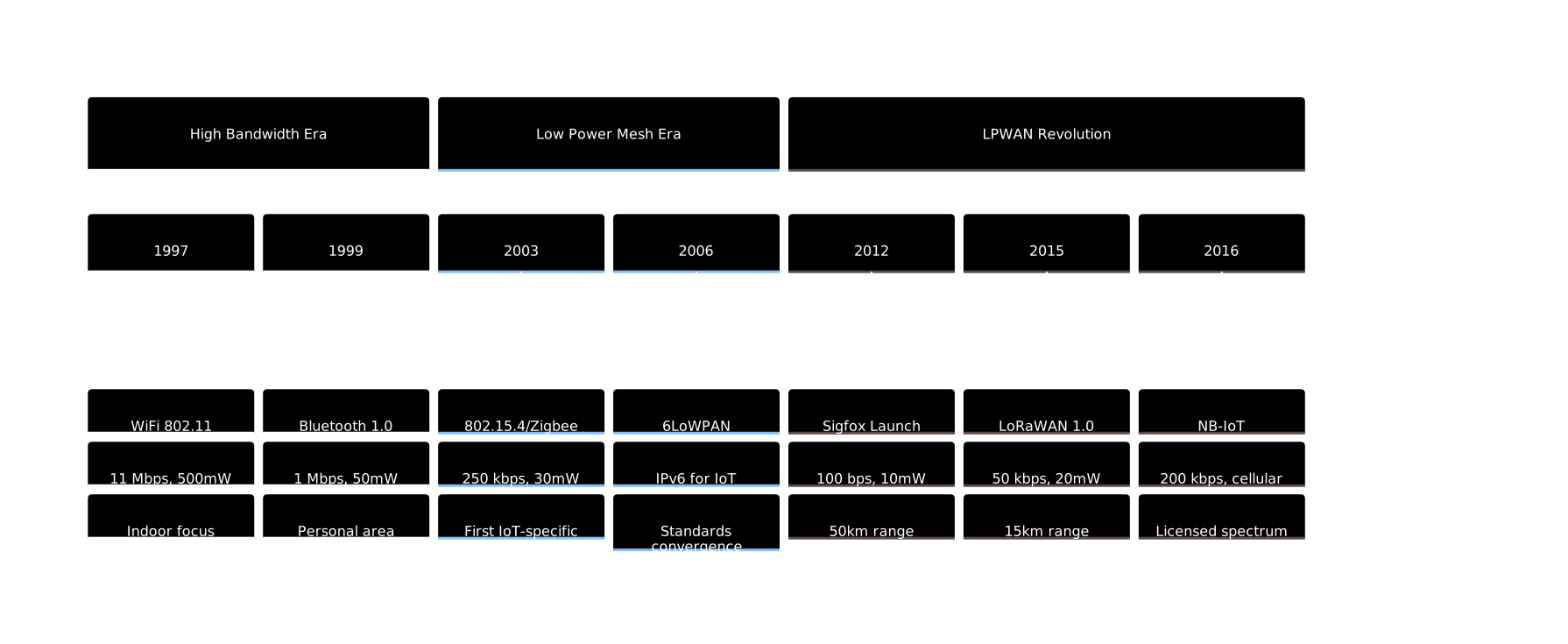
Historical timeline showing the evolution of wireless protocols for IoT, from high-bandwidth technologies through low-power mesh networks to modern LPWAN solutions.
79.6 Summary
| Concept | Key Points |
|---|---|
| Frequency-Wavelength Relationship | \(c = f \times \lambda\); higher frequency = shorter wavelength |
| Sub-GHz Bands | Best range and wall penetration, lower data rates |
| 2.4 GHz Band | Balanced range/speed, crowded spectrum |
| 5 GHz Band | Highest data rates, shortest range |
| The Trade-off | Lower frequency = more range, less speed; Higher frequency = less range, more speed |
79.7 What’s Next
With radio wave basics understood, continue to:
- Path Loss and Link Budgets - Calculate whether your wireless link will work
- Fading, Multipath, and Interference - Understand real-world signal variations
- Practical Wireless Lab - Hands-on experiments with RSSI and packet loss
NoteRelated Chapters
- LPWAN Introduction - Long-range IoT technologies
- Signal Processing Essentials - Deeper dive into signal handling
- Mathematical Foundations - Logarithms and dB calculations explained