%%{init: {'theme': 'base', 'themeVariables': {'primaryColor': '#2C3E50', 'primaryTextColor': '#fff', 'primaryBorderColor': '#16A085', 'lineColor': '#16A085', 'secondaryColor': '#E67E22', 'tertiaryColor': '#ecf0f1', 'clusterBkg': '#fff', 'clusterBorder': '#2C3E50', 'edgeLabelBackground':'#fff'}}}%%
gantt
    title Power Consumption Timeline (One Measurement Cycle)
    dateFormat X
    axisFormat %L ms

    section Sleep
    Deep Sleep (50 µA)    :done, sleep1, 0, 299500

    section Sample
    ADC Sampling (5 mA)   :active, sample, 299500, 300000

    section Process
    CPU Processing (30 mA) :active, process, 300000, 300050

    section Transmit
    Wi-Fi TX (300 mA)      :crit, tx, 300050, 300150

    section Sleep
    Return to Sleep (50 µA) :done, sleep2, 300150, 300200
60 Pipeline Transmission and Optimization
60.1 Learning Objectives
By the end of this chapter, you will be able to:
- Understand Network Transmission: Compare wireless technologies for IoT applications
- Trace the Complete Journey: Follow sensor data from physical measurement to cloud dashboard
- Analyze Latency and Energy: Identify where time and power are spent in the pipeline
- Optimize Pipeline Design: Apply design frameworks for latency, power, and bandwidth requirements
NoteRelated Chapters
This Series: - Sensor Pipeline Index - Series overview - Pipeline Overview and Signal Acquisition - Stages 1-3 - Processing and Formatting - Stages 4-6
Networking: - Networking Fundamentals - Network basics - IoT Protocols Overview - Protocol selection
Architecture: - Edge Computing - Data processing at the edge - Energy Management - Power optimization
60.2 Prerequisites
Before diving into this chapter, you should be familiar with:
- Processing and Formatting: Stages 4-6 of the pipeline
- Packet Structure and Framing: How data is packaged for transmission
TipFor Beginners: The Final Mile
Your sensor data is now processed, formatted, and wrapped in protocol headers. The final stage is transmission - actually sending it through the air to a gateway or directly to the cloud.
This is where the pipeline meets the physical world: - Radio waves carry your data through walls, across fields, or up to satellites - Power consumption spikes dramatically during transmission - Latency accumulates as packets travel through networks
Understanding transmission completes your knowledge of the full pipeline, enabling you to optimize where it matters most.
TipMVU: Transmission Dominates Everything
Core Concept: Network transmission typically consumes 60-70% of total pipeline latency and 80-90% of energy in battery-powered IoT devices. This single stage determines battery life more than all other stages combined.
Why It Matters: A common mistake is optimizing local processing speed when the real bottleneck is network transmission. Spending weeks improving ADC conversion by 10μs is pointless when transmission takes 41ms. Focus optimization efforts proportionally to where time and energy are actually spent.
Key Takeaway: Always design your pipeline for the bottleneck - which is almost always network transmission. The IEEE defines efficient IoT systems as those achieving >95% data reduction before transmission through edge processing.
60.3 Stage 7: Network Transmission
60.3.1 Wireless Transmission
Physical transmission over wireless medium:
- Wi-Fi: 2.4 GHz radio, CSMA/CA protocol
- LoRa: Sub-GHz, chirp spread spectrum modulation
- BLE: 2.4 GHz, frequency hopping
Power consumption varies dramatically: - Wi-Fi: 200-500 mW transmit, drains 1000 mAh battery in 8 hours - BLE: 10-20 mW transmit, battery lasts weeks - LoRa: 20-40 mW transmit, battery lasts years (due to duty cycle)
60.3.2 Wireless Technology Comparison
| Technology | Range | Power | Data Rate | Best For |
|---|---|---|---|---|
| Wi-Fi | 50m | High | 11-600 Mbps | Wall-powered, high data |
| BLE | 10-100m | Low | 1-2 Mbps | Wearables, beacons |
| LoRa | 2-15 km | Very Low | 0.3-50 kbps | Remote, battery |
| NB-IoT | 10 km | Medium | 250 kbps | Cellular, outdoor |
60.4 The Complete Journey: Sensor to Cloud and Back
60.4.1 Following a Single Temperature Reading
Let’s trace one measurement from a smart home temperature sensor all the way to appearing on your smartphone dashboard and back.
Starting Point: Temperature sensor reads 23.5°C Ending Point: Value appears on dashboard 500 milliseconds later Question: What happened in between?
%%{init: {'theme': 'base', 'themeVariables': {'primaryColor': '#2C3E50', 'primaryTextColor': '#fff', 'primaryBorderColor': '#16A085', 'lineColor': '#16A085', 'secondaryColor': '#E67E22', 'tertiaryColor': '#ecf0f1', 'clusterBkg': '#fff', 'clusterBorder': '#2C3E50', 'edgeLabelBackground':'#fff'}}}%%
sequenceDiagram
    participant S as Sensor<br/>(TMP36)
    participant M as MCU<br/>(ESP32)
    participant G as Gateway<br/>(Wi-Fi Router)
    participant C as Cloud<br/>(AWS IoT)
    participant D as Dashboard<br/>(Mobile App)

    Note over S: Reads 23.5°C
    S->>M: Raw ADC (2 bytes)<br/>⏱️ 10µs
    Note over M: Calibrate + Encode
    M->>G: JSON payload (32 bytes)<br/>⏱️ 5ms
    Note over G: Protocol bridge
    G->>C: MQTT publish (200 bytes)<br/>⏱️ 50-200ms
    Note over C: Store + Process
    C->>D: WebSocket update<br/>⏱️ 100ms
    Note over D: Render chart

    rect rgb(230, 126, 34, 0.1)
        Note over S,D: Total Journey: 500ms<br/>Data Growth: 2 bytes → 200 bytes (100×)
    end
60.4.2 Step-by-Step Breakdown with Timing
| Step | Location | Operation | Time | Data Size | Notes |
|---|---|---|---|---|---|
| 1 | Sensor | ADC conversion | 10µs | 2 bytes | Raw voltage → digital value |
| 2 | MCU | Calibration + JSON encode | 100µs | 32 bytes | {"temp":23.5,"unit":"C"} |
| 3 | Radio TX | Wi-Fi 802.11 frame | 5ms | 127 bytes | Add MAC headers, CRC |
| 4 | Gateway | Protocol conversion | 20ms | 200 bytes | Wi-Fi → MQTT/TCP/IP |
| 5 | Internet | TCP/IP routing | 50-200ms | ~250 bytes | Variable network latency |
| 6 | Cloud | Parse, store, process | 50ms | DB write | Store in time-series DB |
| 7 | Dashboard | Query, render | 100ms | HTTP response | WebSocket push to client |
| TOTAL | ~500ms | 2 → 250 bytes | 125× size growth |
60.4.3 Where Time is Spent
Understanding latency distribution helps you optimize the right part of the pipeline:
%%{init: {'theme': 'base', 'themeVariables': {'primaryColor': '#2C3E50', 'primaryTextColor': '#fff', 'primaryBorderColor': '#16A085', 'lineColor': '#16A085', 'secondaryColor': '#E67E22', 'tertiaryColor': '#ecf0f1'}}}%%
pie title Latency Distribution (500ms Total)
    "Network Transmission (Steps 3-5)" : 65
    "Cloud Processing (Step 6)" : 20
    "Gateway Processing (Step 4)" : 10
    "Local Processing (Steps 1-2)" : 5
Key Insight: Network Optimization Has Biggest Impact
- Network transmission: 60-70% of latency (325ms)
- Cloud processing: 20-25% (100ms)
- Local processing: 5-10% (25ms)
Optimization Strategy: Reduce network round-trips first! Moving from cloud to edge processing can cut latency from 500ms → 50ms (10× improvement).
60.4.4 Where Bytes are Added (Encapsulation Overhead)
Watch how a simple 2-byte temperature reading grows to 250 bytes:
%%{init: {'theme': 'base', 'themeVariables': {'primaryColor': '#2C3E50', 'primaryTextColor': '#fff', 'primaryBorderColor': '#16A085', 'lineColor': '#16A085', 'secondaryColor': '#E67E22', 'tertiaryColor': '#ecf0f1', 'clusterBkg': '#fff', 'clusterBorder': '#2C3E50', 'edgeLabelBackground':'#fff'}}}%%
%%{init: {'themeVariables': {'xyChart': {'backgroundColor': '#ffffff'}}}}%%
xychart-beta horizontal
    title "Data Size Growth Through Pipeline (bytes)"
    x-axis ["Original Data", "After JSON", "After Wi-Fi", "After TCP/IP"]
    y-axis "Total Size (bytes)" 0 --> 300
    bar [2, 32, 127, 250]
| Stage | Data Size | Growth Factor | What Was Added? |
|---|---|---|---|
| Original sensor data | 2 bytes | 1× | Raw temperature value |
| After JSON encoding | 32 bytes | 16× | {"temp":23.5,"unit":"C","time":1702834567} |
| After Wi-Fi frame | 127 bytes | 4× | MAC addresses (12B), frame control (4B), CRC (4B) |
| After TCP/IP headers | 250 bytes | 2× | IP header (20B), TCP header (20B), MQTT header (5B) |
Key Insight: Protocol Efficiency Matters for Constrained Devices
- JSON overhead: 2 bytes → 32 bytes (16× increase)
- Protocol headers: 32 bytes → 250 bytes (8× increase)
- Total overhead: 2 bytes → 250 bytes (125× increase)
Real Impact on Battery-Powered Sensor: - Transmitting 2 bytes @ 20mW for 1ms = 20 µJ - Transmitting 250 bytes @ 20mW for 125ms = 2,500 µJ (125× more energy!)
60.5 Optimization Comparison
Let’s compare three pipeline designs for the same temperature sensor:
| Design | Format | Protocol | Latency | Energy/Reading | Battery Life (2000mAh) |
|---|---|---|---|---|---|
| Cloud-First | JSON (32B) | Wi-Fi + TCP/IP | 500ms | 15 mJ | 6 months (1 reading/min) |
| Edge-Optimized | CBOR (12B) | BLE + MQTT-SN | 50ms | 1.2 mJ | 6 years (10× better) |
| Ultra-Efficient | Binary (2B) | LoRa + CoAP | 1-2s | 0.8 mJ | 12 years (20× better) |
Key Tradeoffs:
- Cloud-First: Fast development, easy debugging, but short battery life
- Edge-Optimized: Best balance - good latency, 10× battery improvement
- Ultra-Efficient: Maximum battery life, but higher latency (acceptable for slow-changing temperature)
ImportantDesign Decision Framework
When optimizing your sensor-to-cloud pipeline, ask:
- What’s the latency budget?
- Real-time control (< 100ms)? → Edge processing + fast protocol
- Monitoring (1-60s)? → Cloud is fine
- Historical logging (> 1 min)? → Optimize for battery, not speed
- What’s the data rate?
- High frequency (> 1 Hz)? → Edge processing to reduce cloud traffic
- Low frequency (< 0.1 Hz)? → Cloud direct is acceptable
- What’s the power budget?
- Wall-powered? → Use Wi-Fi, JSON, cloud - simplicity wins
- Battery (< 1 year)? → Needs optimization
- Battery (> 5 years)? → Requires BLE/LoRa + binary + edge processing
- What’s the bandwidth cost?
- Cellular IoT (paid per MB)? → Aggressive compression essential
- Wi-Fi/Ethernet (fixed cost)? → Bandwidth is free
Example Decisions: - Smart thermostat (wall-powered, 1 reading/min, 100ms latency OK) - → Wi-Fi + JSON + Cloud = Simple, maintainable
- Soil moisture sensor (battery, 1 reading/hour, 1-hour latency OK)
- → LoRa + Binary + Edge gateway = 10-year battery
- Industrial vibration monitor (battery, 1000 readings/sec, 10ms latency required)
- → Edge FFT processing + alert-only transmission = Real-time + efficient
60.5.1 The Return Journey: Cloud to Dashboard
Don’t forget the data also needs to travel back to the user!
Dashboard Update Flow (additional 200-300ms):
- Database query: Cloud fetches latest reading (10-20ms)
- WebSocket push: Server pushes to connected clients (50-100ms)
- Client rendering: Browser/app updates chart (50-100ms)
- Display refresh: Screen shows new value (16ms @ 60fps)
Total round-trip (sensor → cloud → dashboard): ~700-800ms
Optimization: Use WebSocket for live updates instead of HTTP polling (reduces latency from 5-30s to < 1s)
60.6 Knowledge Check Scenarios
NoteScenario 1: Smart Agriculture Deployment
You’re deploying 500 soil moisture sensors across a vineyard. Each sensor measures moisture every 15 minutes and transmits via LoRaWAN.
Current design: - Sensor outputs 12-bit ADC value (2 bytes) - JSON payload: {"sensor_id": "V001", "moisture": 2847, "battery": 3.72, "timestamp": 1704067200} - Payload size: 72 bytes after LoRaWAN headers
Question: The sensors are draining batteries in 8 months instead of the target 2 years. What pipeline optimizations would you recommend?
Question: Switching from a 72-byte JSON payload to an 8-byte binary payload reduces payload size by approximately what percentage?
Explanation: C. (72 - 8) / 72 ≈ 0.889 → ~89% reduction.
TipAnswer
Recommended optimizations (potential 3-4x battery life improvement):
1. Switch from JSON to Binary Format (Stage 5) - Current: 72 bytes JSON - Optimized: 8 bytes binary - Sensor ID: 2 bytes (uint16) - Moisture: 2 bytes (uint16) - Battery: 1 byte (0-255 mapped to 2.5-4.2V) - Timestamp: 3 bytes (delta from gateway time) - Savings: 89% payload reduction
2. Implement Change-Based Transmission (Stage 4) - Soil moisture changes slowly (hours, not minutes) - Only transmit when moisture changes by >2% - Reduces transmissions from 96/day to ~5-10/day - Savings: 90% transmission reduction
3. Optimize Sampling (Stage 3) - 12-bit ADC is overkill for soil moisture (±5% accuracy) - Use 10-bit ADC or average 4 samples - Reduce ADC power by 25%
Combined Impact: - Original: 72 bytes × 96 TX/day × 20mW = significant power - Optimized: 8 bytes × 8 TX/day × 20mW = ~90% power reduction - New battery life: 8 months × 3-4 = 24-32 months (exceeds target!)
Key insight: The biggest wins come from reducing transmission frequency (edge processing) and payload size (binary encoding), not from optimizing individual stages.
NoteScenario 2: Real-Time Industrial Monitoring
A factory uses vibration sensors on 20 critical motors. The maintenance team needs alerts within 500ms of detecting abnormal vibration patterns.
Current design: - Accelerometer samples at 10 kHz - Raw data streamed to cloud via Wi-Fi - Cloud performs FFT analysis - Alert pushed back to factory floor
Problem: End-to-end latency is 2-3 seconds, missing the 500ms requirement.
Question: Where in the pipeline is latency being added, and how would you fix it?
Question: Which stage is the dominant contributor to the 2–3s end-to-end latency in the current design?
Explanation: D. The cloud FFT/queueing dominates the latency budget, so moving analysis to the edge is the key fix.
TipAnswer
Latency breakdown analysis:
| Stage | Current Latency | Bottleneck |
|---|---|---|
| Sampling (Stage 3) | 10ms | 1024 samples at 10kHz |
| Processing (Stage 4) | 5ms | Minimal (just packaging) |
| Formatting (Stage 5) | 2ms | JSON encoding |
| Network (Stage 6-7) | 50-200ms | Wi-Fi + Internet |
| Cloud Processing | 1000-2000ms | FFT analysis, queuing |
| Return Path | 500-1000ms | Alert routing |
| Total | 2-3 seconds | Cloud processing dominates |
Solution: Move FFT to Edge (Stage 4)
Redesigned pipeline: 1. Sensor → 10 kHz sampling (unchanged) 2. MCU → Perform FFT locally (100ms for 1024-point FFT on ESP32) 3. MCU → Analyze frequency spectrum for known defect signatures 4. MCU → Only transmit if anomaly detected (not raw data) 5. Alert → Direct MQTT publish to local display
New latency breakdown:
| Stage | New Latency | Notes |
|---|---|---|
| Sampling | 100ms | Collect 1024 samples |
| Local FFT | 100ms | ESP32 FFT processing |
| Local Analysis | 50ms | Pattern matching |
| Local Alert | 50ms | MQTT to local broker |
| Display Update | 100ms | Render on screen |
| Total | 400ms | Meets 500ms requirement! |
Additional benefits: - Bandwidth reduction: 10 kHz × 2 bytes × 20 sensors = 400 KB/s → alert-only = 1 KB/day - Cloud cost reduction: No real-time streaming charges - Reliability: Works even if internet connection fails
Key insight: For real-time requirements, move processing as close to the sensor as possible. Network latency is often the bottleneck that can’t be optimized—you must reduce the number of network hops.
NoteScenario 3: Protocol Overhead Analysis
You’re comparing two designs for a wearable health monitor that sends heart rate every second via BLE to a smartphone app.
Design A (Simple): - Payload: JSON {"hr": 72} = 10 bytes - BLE characteristic write
Design B (Optimized): - Payload: Single byte (heart rate 30-285 BPM mapped to 0-255) - BLE notification
Question: Calculate the total bytes transmitted per second for each design, including BLE protocol overhead.
Question: Approximately how many bytes/second does Design B (1-byte payload + BLE notification) transmit in total?
Explanation: B. The answer totals the 1-byte payload plus BLE overhead to ~17 bytes per packet, once per second.
TipAnswer
Design A - JSON over BLE Write:
| Layer | Overhead | Notes |
|---|---|---|
| Payload | 10 bytes | {"hr": 72} |
| ATT Write Request | 3 bytes | Opcode + handle |
| L2CAP Header | 4 bytes | Length + channel ID |
| LL Data PDU | 2 bytes | Header |
| Access Address | 4 bytes | BLE preamble |
| CRC | 3 bytes | Error checking |
| Total per packet | 26 bytes |
Plus acknowledgment packet: ~10 bytes
Total Design A: ~36 bytes/second
Design B - Binary over BLE Notification:
| Layer | Overhead | Notes |
|---|---|---|
| Payload | 1 byte | Heart rate value |
| ATT Notification | 3 bytes | Opcode + handle |
| L2CAP Header | 4 bytes | Length + channel ID |
| LL Data PDU | 2 bytes | Header |
| Access Address | 4 bytes | BLE preamble |
| CRC | 3 bytes | Error checking |
| Total per packet | 17 bytes |
No acknowledgment needed (notifications are unconfirmed)
Total Design B: ~17 bytes/second
Comparison:
| Metric | Design A | Design B | Improvement |
|---|---|---|---|
| Bytes/second | 36 | 17 | 53% reduction |
| Daily data | 3.1 MB | 1.5 MB | 1.6 MB saved |
| Radio airtime | ~3 ms | ~1.5 ms | 50% less |
| Battery impact | Higher | Lower | ~20% longer battery |
Key insight: Protocol overhead often exceeds payload size in IoT! A 10-byte JSON payload requires 36 bytes total (3.6x overhead), while a 1-byte binary payload requires 17 bytes (17x overhead ratio but less absolute overhead). For frequently transmitted small payloads, binary format and notifications provide significant efficiency gains.
60.7 Additional Knowledge Check
Knowledge Check: Pipeline Optimization Quick Check
Concept: Understanding pipeline bottlenecks and optimization strategies.
Question: Which pipeline stage has the highest power consumption in a typical battery-powered IoT sensor?
Explanation: B is correct. Radio transmission typically consumes 10-100x more power than other stages. A LoRa TX at 20 dBm uses ~120mA, while the entire MCU processing chain uses 1-10mA. This is why reducing transmission frequency (through edge processing) is the most effective battery optimization.
Question: A sensor transmits 100-byte payloads every minute over cellular. What is the most effective optimization for reducing data costs?
Explanation: C is correct. Change-based transmission can reduce transmissions by 80-95% for slowly-changing values like temperature or soil moisture. While binary encoding and compression help, reducing transmission frequency provides the largest savings. Sensors often transmit unchanged or near-identical data repeatedly.
Question: Where should FFT vibration analysis be performed to achieve <100ms latency in an industrial monitoring system?
Explanation: A is correct. Edge processing at Stage 4 eliminates network latency (50-200ms) and cloud processing delays (500-2000ms). Modern MCUs can perform 1024-point FFT in 5-10ms. For real-time alerts, the decision must be made locally—only anomaly summaries are sent to the cloud for logging and trending.
60.8 Visual Reference Gallery
NoteSensor-to-Cloud Pipeline Overview (Alternative View)
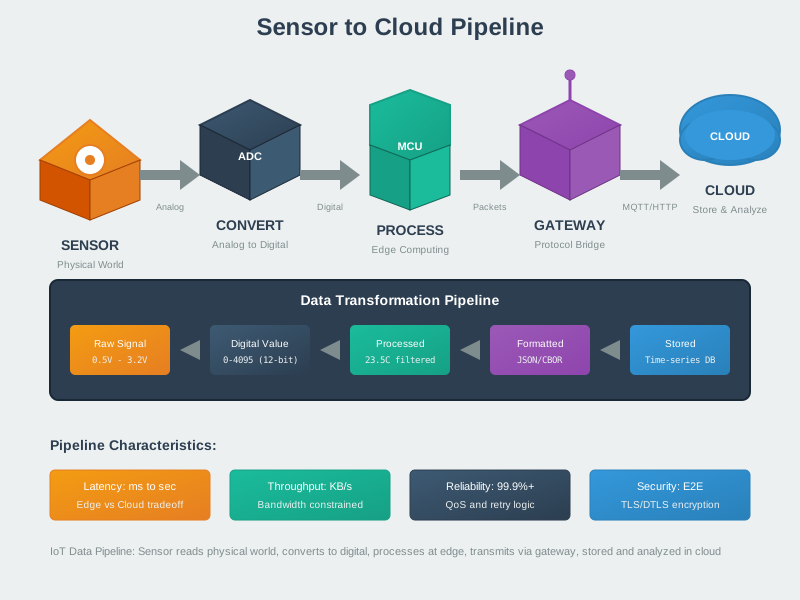
This visualization captures the complete journey of sensor data from physical measurement to cloud analytics. Each stage introduces latency, power consumption, and potential error sources. Understanding this pipeline enables engineers to optimize at every level.
NoteEdge-Cloud Computing Spectrum (Alternative View)
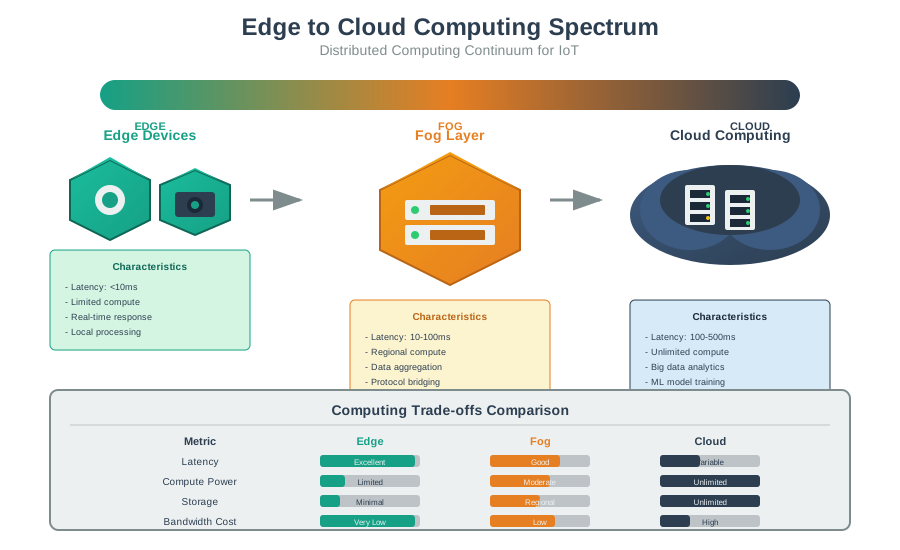
Modern IoT systems must decide where to process data along the edge-cloud spectrum. This visualization shows the computing continuum: far edge (sensor MCU), near edge (gateway), fog layer (local servers), and cloud. Each location offers different trade-offs.
60.9 Summary
The complete sensor-to-network pipeline transforms physical phenomena into transmitted packets:
- Physical Measurement (Stage 1): Sensor converts phenomenon to electrical signal
- Signal Conditioning (Stage 2): Amplify, filter, and offset analog signals
- ADC Conversion (Stage 3): Transform continuous analog to discrete digital
- Digital Processing (Stage 4): Calibrate, filter, and apply edge intelligence
- Data Formatting (Stage 5): Encode as JSON, CBOR, or binary
- Packet Assembly (Stage 6): Wrap in protocol headers
- Network Transmission (Stage 7): Send over wireless medium
Key Takeaways: - Network transmission dominates latency (60-70%) and energy consumption (80-90%) - Edge processing provides the biggest optimization opportunity - Protocol overhead can exceed payload size for small data - Design for your bottleneck: latency, power, or bandwidth - Understanding the full pipeline reveals cost-saving opportunities at every stage
60.10 What’s Next
Now that you understand the complete sensor-to-network pipeline, explore these related topics:
- Signal Processing Essentials: Deep dive into ADC conversion, sampling, and filtering
- Data Formats for IoT: Detailed comparison of JSON, CBOR, Protocol Buffers, and custom binary
- Edge Computing: When and how to process data at the edge