%%{init: {'theme': 'base', 'themeVariables': {'primaryColor': '#2C3E50', 'primaryTextColor': '#fff', 'primaryBorderColor': '#16A085', 'lineColor': '#16A085', 'secondaryColor': '#E67E22', 'tertiaryColor': '#7F8C8D'}}}%%
graph TB
    subgraph SENSOR["Sensor Reading: 23.5C"]
        DATA["Temperature: 23.5<br/>Humidity: 65%<br/>Status: OK"]
    end

    subgraph JSON["JSON Format"]
        J1["{'temp':23.5,'hum':65,'ok':true}"]
        J2["<b>32 bytes</b><br/>Human readable<br/>High overhead"]
    end

    subgraph CBOR["CBOR Format"]
        C1["A3 64 74656D70 FB... 62 68756D 18 41 62 6F6B F5"]
        C2["<b>18 bytes</b><br/>Binary JSON<br/>44% smaller"]
    end

    subgraph BINARY["Raw Binary"]
        B1["00 EB 41 01"]
        B2["<b>4 bytes</b><br/>Most compact<br/>87% smaller"]
    end

    subgraph COMPARE["IoT Impact"]
        COMP1["100 devices x 10 msgs/hr"]
        COMP2["JSON: 77 KB/day"]
        COMP3["CBOR: 43 KB/day"]
        COMP4["Binary: 10 KB/day"]
    end

    DATA --> JSON
    DATA --> CBOR
    DATA --> BINARY

    JSON --> COMPARE
    CBOR --> COMPARE
    BINARY --> COMPARE

    style J1 fill:#E67E22,stroke:#2C3E50,stroke-width:1px,color:#fff
    style J2 fill:#E67E22,stroke:#2C3E50,stroke-width:1px,color:#fff
    style C1 fill:#16A085,stroke:#2C3E50,stroke-width:1px,color:#fff
    style C2 fill:#16A085,stroke:#2C3E50,stroke-width:1px,color:#fff
    style B1 fill:#2C3E50,stroke:#16A085,stroke-width:2px,color:#fff
    style B2 fill:#2C3E50,stroke:#16A085,stroke-width:2px,color:#fff
    style COMP4 fill:#2C3E50,stroke:#16A085,stroke-width:2px,color:#fff
47 Text Encoding for IoT
47.1 Learning Objectives
By the end of this chapter, you will be able to:
- Work with text encoding: Describe ASCII, Unicode, and UTF-8 for IoT applications
- Choose efficient formats: Compare JSON, CBOR, and binary encodings for bandwidth-constrained IoT
- Avoid encoding pitfalls: Handle multi-byte characters and buffer sizing correctly
- Understand sensor data formats: Distinguish between integer and floating-point representations
NoteRelated Chapters, Products, and Tools
Foundation Topics: - Data Representation Fundamentals - Overview and index - Number Systems and Data Units - Binary, decimal, hexadecimal - Bitwise Operations and Endianness - Bit manipulation and byte ordering - Data Formats for IoT - JSON, CBOR, and binary formats
Apply These Concepts: - Packet Structure and Framing - How data is packaged - Sensor to Network Pipeline - End-to-end data flow - Protocol Selection Framework - Choosing the right protocol
Learning Hubs: - Quiz Navigator - Test your understanding - Simulation Playground - Interactive tools
47.2 Prerequisites
Before reading this chapter, you should understand:
- Basic number systems (binary, decimal, hexadecimal) from Number Systems and Data Units
- What bytes are and how they store data
47.3 Text Encoding for IoT
Text must be converted to numbers for computers to process. This is critical for: - Device names and identifiers - Configuration files and JSON messages - Serial monitor output and debugging - MQTT topics and CoAP URIs
47.3.1 ASCII - The Original Standard
ASCII (American Standard Code for Information Interchange) uses 7 bits to encode 128 characters:
| Range | Characters | Examples |
|---|---|---|
| 0-31 | Control codes | NULL (0), LF (10), CR (13) |
| 32-47 | Punctuation/symbols | Space (32), ! (33), / (47) |
| 48-57 | Digits | ‘0’ (48), ‘5’ (53), ‘9’ (57) |
| 65-90 | Uppercase letters | ‘A’ (65), ‘Z’ (90) |
| 97-122 | Lowercase letters | ‘a’ (97), ‘z’ (122) |
Example: The string "IoT" in ASCII: - ‘I’ = 73 = 0x49 = 0b01001001 - ‘o’ = 111 = 0x6F = 0b01101111 - ‘T’ = 84 = 0x54 = 0b01010100
Limitation: ASCII only covers English. No accents (e, n), no emojis, no Chinese/Arabic characters.
47.3.2 Unicode and UTF-8
Unicode assigns a unique number to every character across all languages (143,000+ characters): - Latin: A-Z, a-y - Cyrillic: A-Ya - Chinese: characters - Emojis: thermometer, antenna, battery
UTF-8 (Universal Transformation Format-8) is the most common Unicode encoding:
| Characters | Bytes Used | Example |
|---|---|---|
| ASCII (A-Z, 0-9) | 1 byte | ‘A’ = 0x41 |
| Latin extended (e, n) | 2 bytes | ‘e’ = 0xC3 0xA9 |
| Most other (Chinese, Hebrew) | 3 bytes | Chinese character = 0xE4 0xB8 0xAD |
| Emojis | 4 bytes | Thermometer emoji = 0xF0 0x9F 0x8C 0xA1 |
Why UTF-8 for IoT? - Backward compatible with ASCII: 1 byte = 1 character for English - Efficient: No wasted space for common characters - Universal: Works with MQTT, JSON, HTTP - Example: Device name “Sensor_01” = 10 bytes, “Capteur_01” = 11 bytes (e adds 1)
47.4 Data Format Efficiency
NoteAlternative View: Format Selection by IoT Scenario
This variant shows which format to choose based on your specific IoT deployment:
%%{init: {'theme': 'base', 'themeVariables': {'primaryColor': '#2C3E50', 'primaryTextColor': '#fff', 'primaryBorderColor': '#16A085', 'lineColor': '#16A085', 'secondaryColor': '#E67E22', 'tertiaryColor': '#7F8C8D'}}}%%
graph TB
    subgraph HOME["Home Automation<br/>(Wi-Fi)"]
        H1["Use: JSON"]
        H2["Why: Plenty bandwidth<br/>Easy debugging<br/>curl friendly"]
    end

    subgraph WEAR["Wearable Fitness<br/>(Bluetooth LE)"]
        W1["Use: CBOR"]
        W2["Why: 20-byte MTU<br/>Still parseable<br/>Good compromise"]
    end

    subgraph FARM["Agricultural Sensor<br/>(LoRaWAN)"]
        F1["Use: Raw Binary"]
        F2["Why: 51-byte limit!<br/>Every byte counts<br/>Schema in firmware"]
    end

    subgraph FACTORY["Industrial SCADA<br/>(Ethernet)"]
        I1["Use: Modbus/Binary"]
        I2["Why: Legacy systems<br/>Real-time critical<br/>Proven reliability"]
    end

    CENTER["Choose format<br/>by bandwidth<br/>+ debug needs"]

    CENTER --> HOME
    CENTER --> WEAR
    CENTER --> FARM
    CENTER --> FACTORY

    style CENTER fill:#2C3E50,stroke:#16A085,stroke-width:2px,color:#fff
    style H1 fill:#E67E22,stroke:#2C3E50,stroke-width:2px,color:#fff
    style H2 fill:#ECF0F1,stroke:#E67E22,stroke-width:1px,color:#000
    style W1 fill:#16A085,stroke:#2C3E50,stroke-width:2px,color:#fff
    style W2 fill:#ECF0F1,stroke:#16A085,stroke-width:1px,color:#000
    style F1 fill:#2C3E50,stroke:#16A085,stroke-width:2px,color:#fff
    style F2 fill:#ECF0F1,stroke:#2C3E50,stroke-width:1px,color:#000
    style I1 fill:#7F8C8D,stroke:#2C3E50,stroke-width:2px,color:#fff
    style I2 fill:#ECF0F1,stroke:#7F8C8D,stroke-width:1px,color:#000
Why this variant helps: The original shows abstract byte counts. This diagram answers “which format should I use for MY project?” by mapping real IoT scenarios (home, wearable, agriculture, industrial) to appropriate format choices. Students can identify their use case and immediately know which format to consider.
47.5 Common Misconceptions
WarningCommon Misconception: “All Sensors Use Floating Point Numbers”
Myth: “Sensors output floating-point temperature readings like 23.456C”
Reality: Most IoT sensors output integers, and floating point is computed later!
Example: DHT22 Temperature Sensor - Sensor output: 16-bit integer = 2345 (raw value) - Actual temperature: 2345 / 100 = 23.45C (integer arithmetic) - Why? Floating point math is slow and power-hungry on microcontrollers
BME280 Pressure Sensor: - Raw output: 24-bit integer (adc_P = 415148) - Conversion formula: Uses integer arithmetic with calibration constants - Final pressure: 101325 Pa (computed from integer compensation formula)
Practical rule: - Sensor to MCU: Use integers (fast, efficient, no rounding errors) - MCU to Cloud: Convert to float/JSON for human readability - MCU to MQTT: Use binary formats like CBOR to avoid float overhead
Energy impact: Integer-only math can save 10-30% power compared to floating point operations on an 8-bit AVR Arduino.
WarningText Encoding Pitfall in IoT
If your IoT device expects ASCII but receives UTF-8 with accented characters, you’ll see: - Garbled display: “Temperature” becomes “TempA(c)rature” - Buffer overflows: 10-character buffer but UTF-8 string takes 12 bytes - Protocol errors: MQTT topic with emoji fails parsing
Solution: Always use UTF-8 for text in modern IoT systems, and allocate buffers with extra space (1.5x character count).
47.6 Knowledge Check
NoteScenario: Choosing Data Formats
You’re designing a battery-powered environmental sensor that transmits data via LoRaWAN (51-byte payload limit). The sensor measures temperature (range: -40 to +85C, resolution 0.1C) and humidity (range: 0-100%, resolution 1%).
Question: Which data format and encoding strategy would maximize battery life while fitting within the payload limit?
Question: What is the most efficient encoding for this sensor?
Explanation: C is correct. Binary encoding uses only 3 bytes total: - Temperature: int16 (2 bytes) storing value x10 (e.g., 235 for 23.5C) - Humidity: uint8 (1 byte) storing 0-100
JSON would use ~30 bytes, CBOR ~15 bytes, CSV ~7 bytes. With 3 bytes, you can fit 17 readings per LoRaWAN message instead of just 1-2 with text formats, dramatically reducing transmission count and battery consumption.
47.7 Visual Reference Gallery
NoteData Representation Systems (Alternative View)
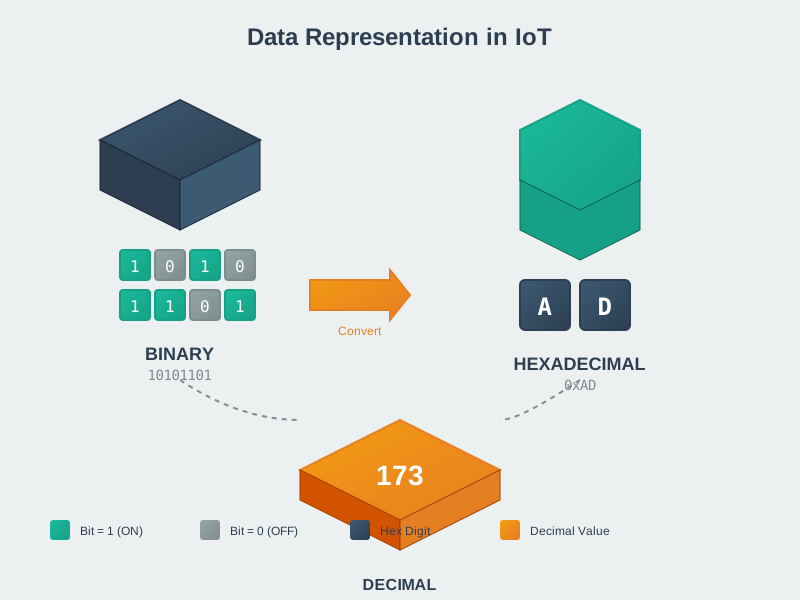
The three number systems used in IoT programming each serve different purposes. Binary represents how data actually exists in memory and registers. Decimal is human-readable for debugging and display. Hexadecimal provides a compact notation where each digit represents exactly 4 binary bits, making it ideal for memory addresses, register values, and MAC addresses. Understanding the relationships between these systems is fundamental to embedded programming.
NoteADC Resolution Comparison (Alternative View)

ADC resolution determines how finely an analog signal can be discretized. This visualization compares common IoT ADC resolutions: 8-bit (256 levels, simple monitoring), 10-bit (1024 levels, Arduino default), 12-bit (4096 levels, precision sensing), and 16-bit (65536 levels, audio/scientific). Higher resolution captures smaller signal changes but requires more processing time, memory, and often consumes more power. Choosing the right resolution balances precision requirements against power and cost constraints.
47.8 Summary
Text encoding is essential for IoT communication:
- ASCII: 7-bit encoding for 128 characters (English only, 1 byte per character)
- Unicode: 143,000+ characters across all languages
- UTF-8: Variable-width Unicode encoding, backward compatible with ASCII
- Format Selection: JSON (verbose, debuggable), CBOR (compact, parseable), Binary (smallest, schema-required)
- Sensor Data: Most sensors output integers, not floats - compute decimals later
Key Takeaways:
- UTF-8 is the standard for modern IoT text - always use it
- Buffer sizing: allocate 1.5x character count for UTF-8 safety
- Data format choice impacts bandwidth, battery life, and debugging ease
- Match format complexity to your connectivity constraints
47.9 What’s Next
Continue learning about data representation:
- Bitwise Operations and Endianness - Master bit manipulation and byte ordering for hardware programming
- Data Formats for IoT - Deep dive into JSON, CBOR, Protocol Buffers, and MessagePack
Or return to the Data Representation overview for the complete topic map.