1544  Online Hardware Simulators

1544.1 Learning Objectives

By the end of this chapter, you will be able to:

  • Use Wokwi for Arduino and ESP32 simulation with sensors and Wi-Fi
  • Navigate Tinkercad Circuits for beginner-friendly visual programming
  • Understand SimulIDE for desktop-based real-time simulation
  • Evaluate Proteus Design Suite for professional embedded development
  • Choose the right simulator based on your project requirements

1544.2 Prerequisites

Before diving into this chapter, you should be familiar with:

1544.3 Wokwi

Estimated time: ~20 min | Intermediate | P13.C03.U02

Description: Free online simulator for Arduino, ESP32, Raspberry Pi Pico, and other microcontrollers with extensive component library.

Key Features:

  • Web-based (no installation)
  • Real-time simulation
  • Visual circuit editor
  • Extensive component library (LEDs, sensors, displays, motors)
  • Wi-Fi simulation (ESP32)
  • Serial monitor and plotter
  • Debugging support (GDB)
  • Shareable links

Supported Platforms:

  • Arduino (Uno, Mega, Nano)
  • ESP32 (Wi-Fi + Bluetooth)
  • Raspberry Pi Pico (RP2040)
  • STM32
  • Attiny85

1544.3.2 Interactive Simulator: ESP32 Wi-Fi + DHT22 Sensor

This simulation demonstrates ESP32 Wi-Fi connectivity with a real sensor! Click Start Simulation to see it work:

NoteAdvanced Features Demonstrated

What this simulation shows:

  • ESP32 Wi-Fi connection (connects to Wokwi-GUEST network automatically)
  • DHT22 sensor reading (temperature and humidity)
  • Serial monitor output (view real-time readings)
  • Real firmware execution (actual ESP32 code running)

Code Explanation:

#include <WiFi.h>
#include <DHTesp.h>

const char* ssid = "Wokwi-GUEST";     // Wokwi test network (free)
const char* password = "";            // No password needed

DHTesp dht;                           // DHT22 sensor object

void setup() {
  Serial.begin(115200);               // Start serial communication
  dht.setup(15, DHTesp::DHT22);       // DHT22 on pin 15

  WiFi.begin(ssid, password);         // Connect to Wi-Fi
  while (WiFi.status() != WL_CONNECTED) {
    delay(500);
    Serial.print(".");                // Print dots while connecting
  }
  Serial.println("\nWi-Fi connected");
  Serial.print("IP address: ");
  Serial.println(WiFi.localIP());     // Show assigned IP
}

void loop() {
  float temp = dht.getTemperature();       // Read temperature
  float humidity = dht.getHumidity();      // Read humidity

  Serial.printf("Temp: %.1f°C, Humidity: %.1f%%\n", temp, humidity);
  delay(2000);                             // Update every 2 seconds
}

Circuit Wiring:

  • DHT22 VCC -> ESP32 3.3V
  • DHT22 DATA -> ESP32 GPIO 15
  • DHT22 GND -> ESP32 GND

Try This:

  1. Open serial monitor (click “Serial Monitor” tab)
  2. Watch Wi-Fi connection messages
  3. See temperature/humidity readings every 2 seconds
  4. Change delay(2000) to delay(5000) for slower updates
  5. Adjust virtual DHT22 temperature slider to see readings change

Real-World Application: This is the foundation for IoT weather stations, greenhouse monitors, and smart home climate control systems. Next step: Send data to cloud (MQTT, HTTP) for remote monitoring!

Strengths:

  • Free and unlimited
  • Fast simulation
  • Great for learning and sharing
  • Active community
  • Regular updates

Limitations:

  • Some advanced peripherals not available
  • Network simulation simplified
  • Timing not cycle-accurate

Typical Use Cases:

  • Learning embedded programming
  • Prototyping IoT devices
  • Code sharing and troubleshooting
  • Remote teaching

1544.3.3 Interactive Simulator: Arduino Ultrasonic Distance Sensor

Practical Application: Parking sensor, obstacle detection robot, smart trash bin level monitor

NoteUltrasonic Sensor Explained

How it works:

  1. Send ultrasonic pulse (40 kHz sound wave) via TRIGGER pin
  2. Sound wave bounces off object
  3. ECHO pin receives reflected wave
  4. Measure time delay
  5. Calculate distance: distance = (time x speed_of_sound) / 2

Code to add to simulator:

const int TRIG_PIN = 9;
const int ECHO_PIN = 10;
const int LED_PIN = 13;

void setup() {
  Serial.begin(9600);
  pinMode(TRIG_PIN, OUTPUT);
  pinMode(ECHO_PIN, INPUT);
  pinMode(LED_PIN, OUTPUT);
}

void loop() {
  // Send 10μs pulse
  digitalWrite(TRIG_PIN, LOW);
  delayMicroseconds(2);
  digitalWrite(TRIG_PIN, HIGH);
  delayMicroseconds(10);
  digitalWrite(TRIG_PIN, LOW);

  // Measure echo time (microseconds)
  long duration = pulseIn(ECHO_PIN, HIGH);

  // Calculate distance (cm)
  // Speed of sound = 343 m/s = 0.0343 cm/μs
  float distance = (duration * 0.0343) / 2;

  Serial.print("Distance: ");
  Serial.print(distance);
  Serial.println(" cm");

  // Turn on LED if object < 10 cm (proximity alert)
  if (distance < 10) {
    digitalWrite(LED_PIN, HIGH);
  } else {
    digitalWrite(LED_PIN, LOW);
  }

  delay(500);
}

Circuit Wiring:

  • HC-SR04 VCC -> Arduino 5V
  • HC-SR04 TRIG -> Arduino pin 9
  • HC-SR04 ECHO -> Arduino pin 10
  • HC-SR04 GND -> Arduino GND
  • LED -> Arduino pin 13

Real-World Projects:

  • Smart trash bin: Alert when full (distance < threshold)
  • Parking sensor: Beep when car too close to wall
  • Obstacle avoidance robot: Turn when object detected
  • Water level monitor: Measure tank depth (ultrasonic sensor above water)

1544.3.4 Interactive Simulator: ESP32 Multi-Sensor IoT Station

Advanced Example: Weather station with temperature, humidity, and light sensors

NoteMulti-Sensor Integration

This simulation combines:

  • DHT22 (temperature and humidity)
  • LDR photoresistor (light level)
  • OLED display (real-time data visualization)
  • Wi-Fi (ready for cloud integration)

Complete code for simulator:

#include <Wire.h>
#include <Adafruit_GFX.h>
#include <Adafruit_SSD1306.h>
#include <DHTesp.h>

#define SCREEN_WIDTH 128
#define SCREEN_HEIGHT 64
#define OLED_RESET -1

Adafruit_SSD1306 display(SCREEN_WIDTH, SCREEN_HEIGHT, &Wire, OLED_RESET);
DHTesp dht;

const int DHT_PIN = 15;
const int LDR_PIN = 34;  // Analog pin

void setup() {
  Serial.begin(115200);

  // Initialize DHT22
  dht.setup(DHT_PIN, DHTesp::DHT22);

  // Initialize OLED
  if(!display.begin(SSD1306_SWITCHCAPVCC, 0x3C)) {
    Serial.println("OLED init failed!");
    for(;;);
  }

  display.clearDisplay();
  display.setTextSize(1);
  display.setTextColor(SSD1306_WHITE);
  display.setCursor(0,0);
  display.println("IoT Station Ready!");
  display.display();
  delay(2000);
}

void loop() {
  // Read sensors
  float temp = dht.getTemperature();
  float humidity = dht.getHumidity();
  int lightLevel = analogRead(LDR_PIN);
  int lightPercent = map(lightLevel, 0, 4095, 0, 100);

  // Display on OLED
  display.clearDisplay();
  display.setCursor(0,0);
  display.setTextSize(1);
  display.println("IoT Weather Station");
  display.println("-------------------");

  display.print("Temp: ");
  display.print(temp, 1);
  display.println(" C");

  display.print("Humidity: ");
  display.print(humidity, 1);
  display.println(" %");

  display.print("Light: ");
  display.print(lightPercent);
  display.println(" %");

  display.display();

  // Serial output for debugging
  Serial.printf("T:%.1fC H:%.1f%% L:%d%%\n", temp, humidity, lightPercent);

  delay(2000);
}

Circuit Components:

  • ESP32 DevKit v1
  • DHT22 on GPIO 15
  • LDR (photoresistor) on GPIO 34 (ADC)
  • SSD1306 OLED display (I2C: SDA=GPIO21, SCL=GPIO22)

Scaling to Production:

  1. Add MQTT publishing -> Send data to cloud
  2. Add deep sleep -> Battery-powered operation (1-year battery life)
  3. Add SD card logging -> Local data storage
  4. Add web server -> Local dashboard access
  5. Add OTA updates -> Remote firmware updates

Real-World Deployment:

  • Greenhouse monitoring
  • Smart home environmental control
  • Outdoor weather station network
  • Office climate tracking

1544.4 Tinkercad Circuits

Description: Autodesk’s free online circuit simulator with Arduino support and educational focus.

Key Features:

  • Visual circuit builder (drag-and-drop)
  • Arduino simulation
  • Block-based and text coding
  • Component library (breadboard, resistors, sensors, etc.)
  • Interactive simulation
  • Circuit export
  • Educational tutorials

Example Workflow:

  1. Drag Arduino Uno to canvas
  2. Add LED and resistor
  3. Wire components
  4. Write code (blocks or text)
  5. Start simulation

Code Blocks vs. Text: Tinkercad offers visual block-based programming (like Scratch) for beginners and text-based Arduino code for advanced users.

Strengths:

  • Very beginner-friendly
  • Visual block programming
  • Good tutorials
  • Free (Autodesk account required)

Limitations:

  • Arduino-focused (limited ESP32 support)
  • Slower simulation than Wokwi
  • Basic component library
  • No Wi-Fi simulation

Typical Use Cases:

  • K-12 and higher education
  • Absolute beginners
  • Quick circuit validation

1544.5 SimulIDE

Description: Open-source real-time electronic circuit simulator with microcontroller support.

Key Features:

  • Desktop application (Windows, Linux, macOS)
  • Real-time simulation
  • PIC, AVR, Arduino support
  • Circuit schematic editor
  • Oscilloscope, voltmeter, logic analyzer
  • VHDL/Verilog support

Installation:

Download from: https://simulide.com

Strengths:

  • Real-time fast simulation
  • Advanced measurement tools
  • Open source
  • Detailed analog simulation

Limitations:

  • Desktop only (no web)
  • Steeper learning curve
  • Limited modern MCU support (no ESP32)

Typical Use Cases:

  • Circuit design and validation
  • Electronics education
  • AVR/PIC development

1544.6 Network and IoT Simulation Visualizations

The following AI-generated diagrams illustrate advanced simulation tools and concepts for IoT development.
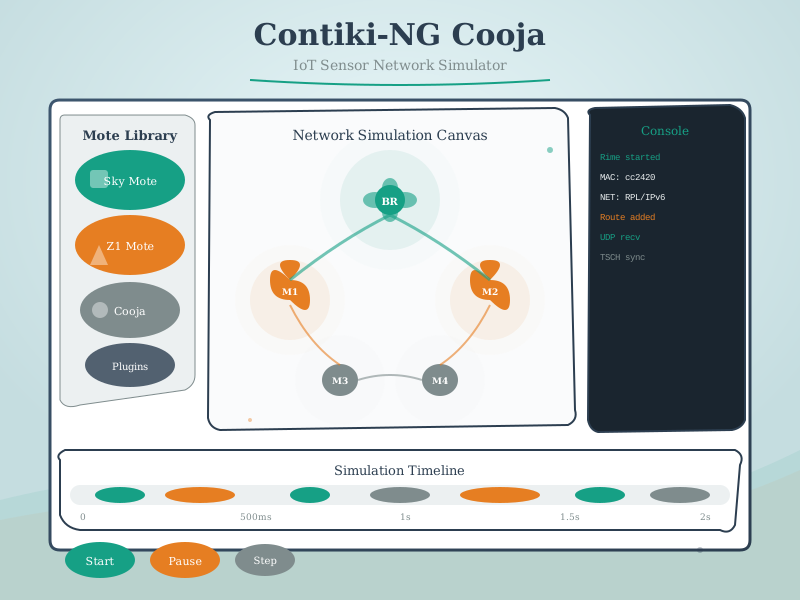
Contiki-NG operating system and Cooja network simulator architecture showing multiple simulated sensor nodes running 6LoWPAN and RPL protocols, timeline visualization of packet transmissions, and radio medium modeling for realistic wireless communication testing.

Contiki-NG and Cooja Simulator
Figure 1544.1: Contiki-NG and Cooja enable testing of complete wireless sensor networks before hardware deployment. This visualization shows how Cooja simulates multiple sensor nodes with realistic radio propagation, enabling protocol debugging and performance analysis of mesh networking code.

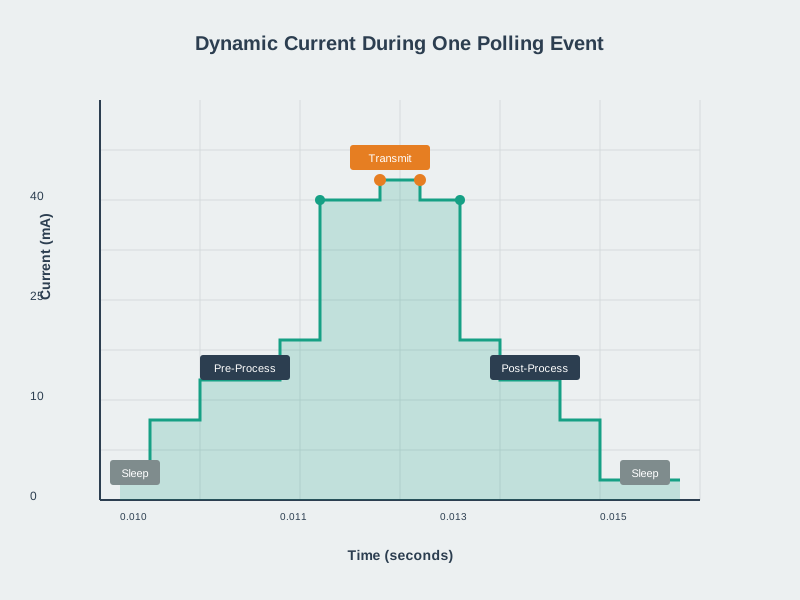
Duty cycle timing diagram showing wake periods for sensing and transmission separated by long sleep intervals, with power consumption overlay demonstrating how 1 percent duty cycle extends battery life from days to years while maintaining required data collection rates.

Duty Cycle Simulation
Figure 1544.2: Duty cycle simulation enables battery life prediction. This visualization shows the timing relationship between wake and sleep periods, demonstrating how a 1% duty cycle (10 seconds active per 1000 seconds) reduces average current by 99%, extending battery life proportionally.

Interactive battery sizing worksheet showing step-by-step calculation from sensor reading frequency through average current calculation to battery capacity selection, with worked example for a soil moisture sensor targeting 2-year operation.

Battery Sizing Exercise
Figure 1544.3: Battery sizing exercises bridge theory and practice. This visualization provides a systematic approach to calculating required battery capacity from sensor duty cycle, transmission frequency, and target lifetime, enabling students to validate designs before hardware investment.

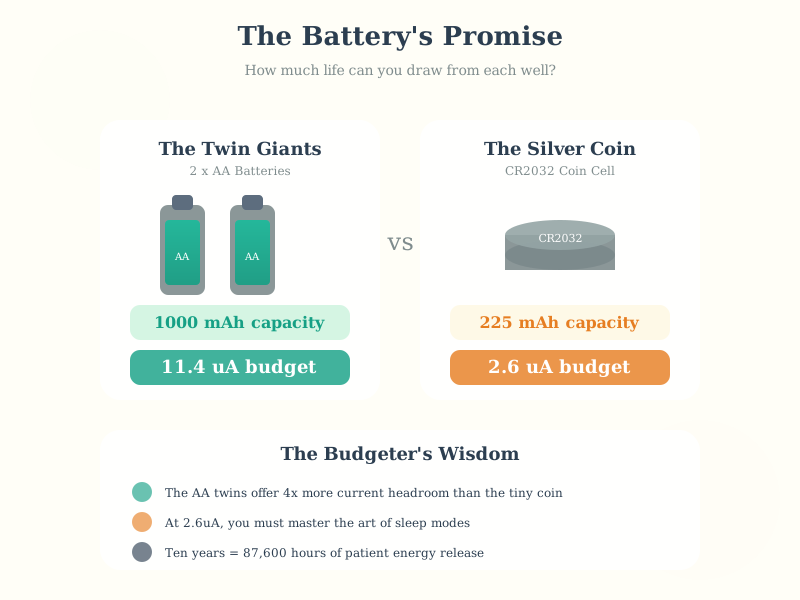
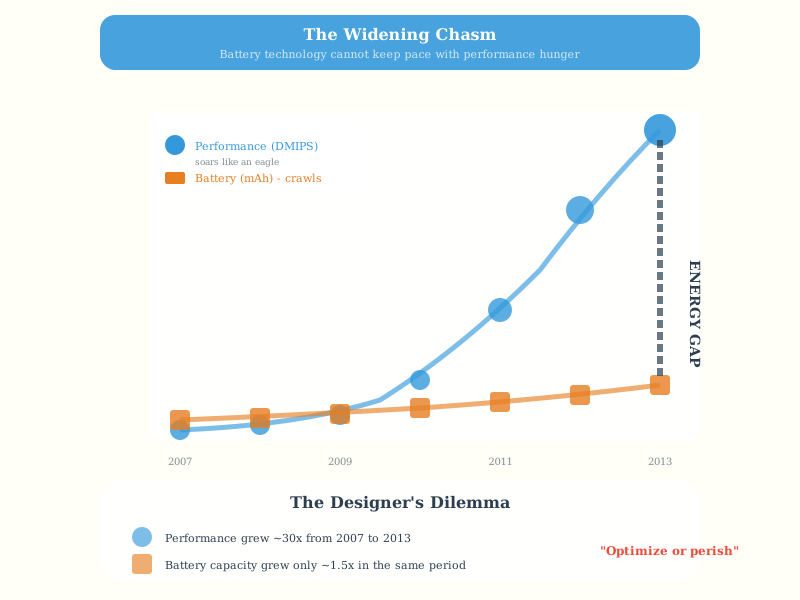
Historical graph of battery energy density improvement showing approximately 5-8 percent annual improvement for lithium-ion technology compared to Moore's Law doubling every 18 months, emphasizing why energy efficiency in firmware is more impactful than waiting for better batteries.

Battery Technology Evolution
Figure 1544.4: Battery technology improves slowly compared to computing. This visualization shows the 5-8% annual energy density improvement for lithium-ion, emphasizing that firmware efficiency gains of 50-90% through duty cycling and optimization are more impactful than waiting for battery improvements.

1544.7 Proteus Design Suite

Description: Professional electronic design automation (EDA) software with simulation.

Key Features:

  • Schematic capture
  • PCB layout
  • Mixed-mode SPICE simulation
  • Microcontroller simulation (8051, PIC, AVR, ARM)
  • VSM (Virtual System Modeling)
  • Component library (50,000+ parts)

Strengths:

  • Professional-grade
  • Extensive library
  • PCB design integration
  • Accurate simulation

Limitations:

  • Expensive (licenses start at ~$200)
  • Windows only
  • Complex interface
  • Steep learning curve

Typical Use Cases:

  • Professional embedded development
  • PCB design with simulation validation
  • Commercial product development

1544.8 Video Resources

Learn the basics of Tinkercad for circuit design, 3D modeling, and Arduino simulation - all in your browser without installing software.

Build and simulate a practical parking sensor system using Tinkercad’s Arduino simulator and ultrasonic sensors.

Learn how to simulate accelerometer sensors in Tinkercad for motion detection and orientation sensing applications.

Build a tilt sensor project in Tinkercad that logs timestamps, demonstrating sensor data collection and time-based logging.

1544.9 Summary

  • Wokwi is the recommended starting point for Arduino and ESP32 simulation with Wi-Fi support, extensive component libraries, and shareable project links
  • Tinkercad Circuits provides beginner-friendly visual block programming ideal for K-12 education and absolute beginners
  • SimulIDE offers desktop-based real-time simulation with advanced measurement tools for AVR/PIC development
  • Proteus Design Suite serves professional needs with PCB integration and accurate SPICE simulation
  • All simulators complement each other: start with browser-based tools, graduate to professional tools as projects mature

1544.10 What’s Next

Continue to Platform-Specific Emulation to learn about QEMU for Raspberry Pi emulation, Renode for multi-architecture simulation, and advanced debugging techniques including breakpoints, serial monitoring, and GDB integration.