1593 Prototyping Kits: Selection and Best Practices
1593.1 Learning Objectives
By the end of this chapter, you will be able to:
- Apply Selection Criteria: Systematically evaluate prototyping kits based on application domain, skill level, budget, and connectivity needs
- Avoid Vendor Lock-In: Use standard protocols and abstraction layers to maintain platform flexibility
- Plan Production Transitions: Understand pathways from kit-based prototypes to custom hardware for manufacturing
- Evaluate Total Cost of Ownership: Calculate complete project costs including kit, components, shipping, tools, and cloud services
- Follow Best Practices: Apply proven strategies for documentation, incremental development, and community engagement
1593.2 Prerequisites
Before diving into this chapter, you should be familiar with:
- Specialized Prototyping Kits Overview: Understanding the kit ecosystem architecture provides context for selection decisions
- Smart Home and Environmental Kits: Knowledge of specific kit categories helps evaluate selection criteria
- Prototyping Hardware: Understanding hardware fundamentals enables informed kit comparisons
1593.3 Introduction
Selecting the right prototyping kit requires balancing multiple factors: application requirements, budget constraints, skill level, connectivity needs, and long-term scalability. This chapter provides frameworks and best practices for making informed kit selection decisions and avoiding common pitfalls.
Choosing the wrong kit wastes time and money: - Too simple: Outgrow it quickly, must restart with new platform - Too complex: Spend weeks learning instead of building - Wrong connectivity: Wi-Fi kit for a cellular application - Vendor lock-in: Proprietary cloud, can’t migrate later
Good selection matches kit capabilities to your specific project, skill level, and future plans. The cheapest kit isn’t always the best value, and the most powerful kit isn’t always the right choice.
1593.4 Selection Criteria
1593.4.1 Choosing the Right Kit
Application Domain: - Smart home → SmartThings, Philips Hue - Environmental → Feather, FarmBeats - Robotics → TurtleBot, mBot, Romeo - Industrial → IOT2050, Arduino Opta - AI/Vision → Jetson Nano, OpenMV - Wearable → LilyPad, Maxim Health
Skill Level: - Beginner → mBot, LilyPad, Adafruit kits - Intermediate → Arduino kits, Particle - Advanced → TurtleBot, Jetson, IOT2050
Budget: - <$100: mBot, OpenMV, Arduino kits - $100-$500: Most specialized kits - >$500: TurtleBot, IOT2050, industrial
Connectivity Needs: - Local: Bluetooth, Wi-Fi kits - Long-range: LoRa, cellular - Mesh: XBee, Zigbee - Cloud: Particle, SmartThings
Power Requirements: - Mains-powered: Industrial kits - Battery: Most consumer kits - Energy harvesting: EnOcean, SparkFun
Scalability: - Prototype only: Educational kits - Prototype to production: Particle, industrial - Production-ready: Siemens, professional platforms
1593.4.2 Kit Selection Decision Guide

This decision guide helps systematically evaluate kit options based on project constraints and requirements, ensuring selection of platforms that match both technical needs and budget limitations.
1593.5 Best Practices
1593.5.1 Starting with Specialized Kits
Read Documentation First: Understand kit capabilities and limitations before purchase.
Start with Examples: Work through provided examples to understand platform.
Join Community: Leverage forums and user groups for support.
Experiment Incrementally: Build complexity gradually, testing each component.
Document Your Work: Keep notes on configurations, issues, and solutions.
1593.5.2 Avoiding Vendor Lock-In
Use Standard Protocols: Prefer kits supporting industry standards (MQTT, HTTP, Modbus).
Open Source Options: Choose platforms with open hardware/software when possible.
Data Portability: Ensure you can export data from proprietary clouds.
Abstraction Layers: Build abstraction to ease platform migration if needed.
Be cautious of kits that: - Require proprietary cloud with no data export - Use non-standard communication protocols - Have no open-source alternative libraries - Charge ongoing subscription fees with no alternatives - Discontinue products without migration path
Mitigation: Use MQTT/HTTP for cloud communication, store data in standard formats, maintain abstraction layers in code.
1593.5.3 Transitioning to Production
Evaluate Production Variants: Many kits have production-grade equivalents.
Custom PCB Integration: Extract learnings from kit to inform custom design.
Component Selection: Identify individual components for BOM.
Certification Planning: Consider regulatory requirements early.
Manufacturing Partners: Connect with manufacturers supporting kit ecosystem.
1593.5.4 Production Transition Checklist
| Phase | Tasks | Timeline |
|---|---|---|
| Validation | Confirm kit meets requirements | Week 1-2 |
| Prototype | Build functional prototype | Week 3-6 |
| Integration | Test all components together | Week 7-8 |
| BOM Analysis | Identify production components | Week 9-10 |
| PCB Design | Design custom board | Week 11-18 |
| Certification | Regulatory submissions | Week 19-30 |
| Manufacturing | Production setup | Week 31-40 |
1593.6 Kit Selection and Evaluation Framework
A kit selection framework helps evaluate and compare specialized IoT prototyping kits based on application requirements, budget, and learning objectives. Key concepts include:
Kit Categories: Smart home (home automation, security), environmental monitoring (weather, air quality), robotics (mobile robots, drones), industrial IoT (sensors, PLCs), wearables (fitness, health), agriculture (soil, irrigation), energy management (solar, battery), smart city (traffic, parking), and educational kits.
Component Inventory: Track included sensors, actuators, microcontrollers, communication modules, power supplies, cables, and documentation quality.
Requirements Matching: Filter kits by application domain, required sensors, connectivity options (Wi-Fi, Bluetooth, LoRa, cellular), programming language support, and price range.
Learning Curve Assessment: Evaluate documentation quality, tutorial availability, community support, and prerequisite knowledge (beginner, intermediate, advanced).
Cost Analysis: Compare upfront kit cost, expansion module costs, replacement component availability, and total cost of ownership.
Vendor Comparison: Track kit manufacturers, regional availability, shipping costs, warranty terms, and customer support quality.
1593.6.1 Multi-Criteria Evaluation
Score kits across 5 dimensions:
- Price score (25% weight): Cost relative to budget
- Feature score (30% weight): Category, connectivity, production path, special features
- Ease of use (20% weight): Skill level match, language support
- Community score (15% weight): Documentation quality + community size
- Power efficiency (10% weight): Power consumption vs. budget
1593.6.2 Cost Analysis Framework
Complete project cost estimation includes:
| Cost Category | Typical Range | Notes |
|---|---|---|
| Kit Purchase | $50-500 | Base development kit |
| Additional Components | 20% of kit cost | Sensors, cables, enclosures |
| Shipping | $10-50 | International varies |
| Tools | $50-200 | Soldering, multimeter |
| Cloud Services | $0-50/month | Tiered pricing |
| Total Initial | $150-800 | One-time costs |
| Monthly Recurring | $0-50 | Cloud, cellular data |
1593.6.3 Development Path Planning
Five-phase planning from learning to production:
- Phase 1: Learning and Setup (1 week, $50) - Documentation review, environment setup
- Phase 2: Proof of Concept (4 weeks, kit + $100) - Basic functionality demonstration
- Phase 3: System Integration (3 weeks, $200) - Full feature implementation
- Phase 4: Testing and Refinement (2 weeks, $100) - Bug fixes, optimization
- Phase 5: Production Preparation (8 weeks, $5,000) - Custom PCB, certifications (if applicable)
1593.7 Knowledge Check
1593.8 Key Concepts Summary
Kit Categories: - Smart Home: Automation, security, comfort - Industrial IoT: Monitoring, control, predictive maintenance - Robotics: Mobile platforms, manipulation, sensing - Environmental: Weather, air quality, soil monitoring - Wearables: Health, activity, biometric tracking - AI/ML: Edge inference, computer vision, audio processing
Selection Criteria: - Skill level: Beginner vs. advanced - Application domain: Specific use case fit - Connectivity: Wi-Fi, Bluetooth, cellular, LoRa - Sensors: Matching measurement requirements - Actuators: Motor, relay, LED control - Extensibility: Add custom components - Support: Documentation, community - Cost: Initial kit, expansion, per-unit production
Evaluation Methods: - Feature comparison matrix - Cost analysis (kit, expanded, production) - Development timeline estimation - Scalability assessment - Learning curve evaluation
Development Path: - Phase 1: Proof of concept with kit - Phase 2: Feature development and testing - Phase 3: System integration and optimization - Phase 4: Scaling to production
1593.8.1 Development Board Features Taxonomy

This taxonomy provides a comprehensive framework for evaluating and comparing development boards across multiple dimensions, enabling informed selection based on project-specific requirements and constraints.
1593.9 Comprehensive Review Quiz
1593.10 Summary
- Kit selection requires systematic evaluation of application domain, skill level, budget, connectivity needs, power requirements, and scalability goals
- Selection decision trees guide users from requirements through constraints to optimal kit recommendations, avoiding analysis paralysis
- Best practices include reading documentation first, starting with examples, joining communities, experimenting incrementally, and documenting work
- Vendor lock-in avoidance requires using standard protocols (MQTT, HTTP), choosing open-source options, ensuring data portability, and building abstraction layers
- Production transition planning should consider production variants, custom PCB design, component BOM, certification requirements, and manufacturing partnerships
- Cost analysis must include kit purchase, additional components, shipping, tools, cloud services, and ongoing operational costs for accurate project budgeting
- Multi-criteria evaluation across price, features, ease of use, community support, and power efficiency enables objective kit comparison
1593.11 What’s Next
With the specialized prototyping kits series complete, the next chapter covers Energy-Aware Considerations, addressing how to design IoT systems that operate efficiently within power constraints - critical knowledge for the battery-powered devices prototyped with these kits.
Kit Categories: - Specialized Prototyping Kits Overview - Complete ecosystem - Smart Home and Environmental Kits - Home automation - Robotics and Agricultural Kits - Mobile and outdoor - Industrial and Wearable Kits - Professional domains - AI, Wireless, and Energy Kits - Advanced capabilities
Hardware Development: - Prototyping Hardware - Hardware fundamentals - Software Platforms - Software for kits
Production: - Testing and Validation - Quality assurance - CI/CD for IoT - Continuous integration
1593.12 Visual Reference Gallery
The following AI-generated visualizations provide alternative perspectives on kit selection and development platforms.
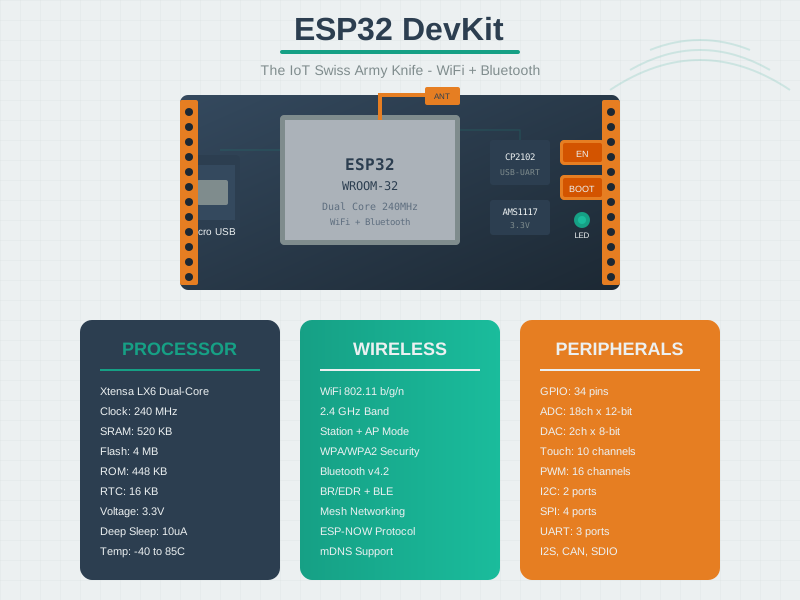
The ESP32 ecosystem provides everything needed for connected IoT prototyping, from dev boards to cloud integration.
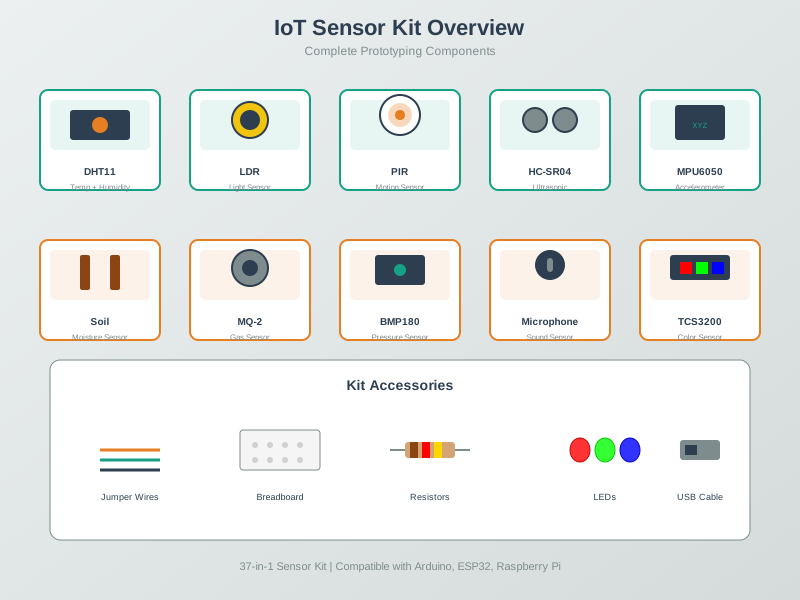
Sensor kits with standardized connectors dramatically accelerate prototyping by providing pre-wired modules that plug directly into development boards.
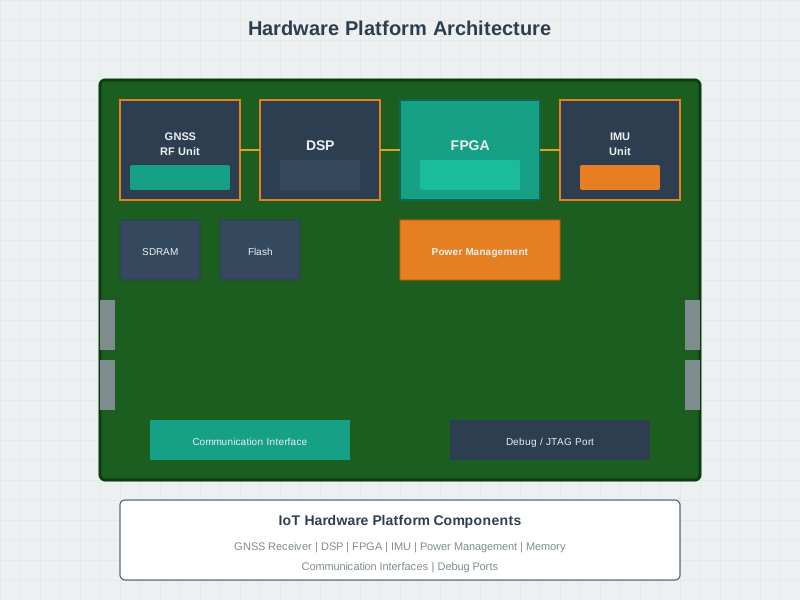
Transitioning from a development kit prototype to a custom hardware platform requires systematic design, testing, and iteration.