1549 IoT Programming: Complete Code Examples
1549.1 Learning Objectives
By the end of this chapter, you will be able to:
- Implement OOP Sensor Libraries: Build reusable, extensible sensor management systems using object-oriented design
- Create Functional Data Pipelines: Process sensor data through pure function transformations with predictable behavior
- Configure Professional Workflows: Set up Git branching strategies, PlatformIO configurations, and CI/CD pipelines
- Apply Paradigm Combinations: Integrate multiple programming paradigms in complete, working IoT applications
1549.2 Prerequisites
Before diving into this chapter, you should be familiar with:
- Programming Paradigms: Understanding of OOP, functional, and event-driven approaches
- Development Tools: Familiarity with IDEs, Git, and PlatformIO
- Best Practices: Guidelines for paradigm and tool selection
1549.3 Introduction
This chapter demonstrates how different programming paradigms are applied in real Arduino/ESP32 projects. Each example is complete and runnable, helping you choose the right approach for your IoT applications.
1549.4 Example 1: Object-Oriented Sensor Library Architecture
Building a reusable, extensible sensor library using OOP principles for a multi-sensor IoT device.
Key concepts demonstrated: - Abstract base classes and inheritance - Polymorphism for sensor interface - Encapsulation of sensor-specific logic - Factory pattern for sensor creation - Clean separation of concerns
// ============================================
// Abstract Sensor Base Class
// ============================================
class Sensor {
protected:
  String name;
  float lastReading;
  unsigned long lastReadTime;
  bool initialized;

public:
  Sensor(String sensorName)
    : name(sensorName), lastReading(0.0),
      lastReadTime(0), initialized(false) {}

  virtual ~Sensor() {}  // Virtual destructor for proper cleanup

  // Pure virtual functions - must be implemented by derived classes
  virtual bool begin() = 0;
  virtual float read() = 0;
  virtual String getUnit() = 0;

  // Common functionality
  String getName() const { return name; }
  float getLastReading() const { return lastReading; }
  bool isInitialized() const { return initialized; }

  unsigned long getTimeSinceLastRead() const {
    return millis() - lastReadTime;
  }

  void printStatus() {
    Serial.print(name);
    Serial.print(": ");
    if (initialized) {
      Serial.print(lastReading, 2);
      Serial.print(" ");
      Serial.println(getUnit());
    } else {
      Serial.println("Not initialized");
    }
  }
};

// ============================================
// Concrete Sensor Implementations
// ============================================

// DHT22 Temperature/Humidity Sensor
class DHT22Sensor : public Sensor {
private:
  int pin;
  DHT* dht;
  bool readTemperature;  // true=temp, false=humidity

public:
  DHT22Sensor(String name, int dataPin, bool isTemp)
    : Sensor(name), pin(dataPin), readTemperature(isTemp) {
    dht = new DHT(pin, DHT22);
  }

  ~DHT22Sensor() {
    delete dht;
  }

  bool begin() override {
    dht->begin();
    delay(2000);  // DHT22 needs time to stabilize

    // Test reading
    float test = dht->readTemperature();
    initialized = !isnan(test);

    if (initialized) {
      Serial.print(name);
      Serial.println(" initialized successfully");
    } else {
      Serial.print("ERROR: ");
      Serial.print(name);
      Serial.println(" initialization failed");
    }

    return initialized;
  }

  float read() override {
    if (!initialized) return NAN;

    float reading = readTemperature ?
                    dht->readTemperature() :
                    dht->readHumidity();

    if (!isnan(reading)) {
      lastReading = reading;
      lastReadTime = millis();
    }

    return reading;
  }

  String getUnit() override {
    return readTemperature ? "°C" : "%";
  }
};

// Analog Sensor (e.g., LDR light sensor)
class AnalogSensor : public Sensor {
private:
  int pin;
  float calibrationMultiplier;
  float calibrationOffset;
  int numSamples;

public:
  AnalogSensor(String name, int analogPin,
               float multiplier = 1.0, float offset = 0.0,
               int samples = 10)
    : Sensor(name), pin(analogPin),
      calibrationMultiplier(multiplier),
      calibrationOffset(offset), numSamples(samples) {}

  bool begin() override {
    pinMode(pin, INPUT);

    // Test reading
    int test = analogRead(pin);
    initialized = (test >= 0 && test <= 4095);  // Valid ESP32 ADC range

    if (initialized) {
      Serial.print(name);
      Serial.println(" initialized successfully");
    }

    return initialized;
  }

  float read() override {
    if (!initialized) return NAN;

    // Average multiple readings for stability
    long sum = 0;
    for (int i = 0; i < numSamples; i++) {
      sum += analogRead(pin);
      delay(10);
    }

    float average = sum / (float)numSamples;

    // Apply calibration
    lastReading = (average * calibrationMultiplier) + calibrationOffset;
    lastReadTime = millis();

    return lastReading;
  }

  String getUnit() override {
    return "ADC";
  }

  // Custom method for this sensor type
  void setCalibration(float multiplier, float offset) {
    calibrationMultiplier = multiplier;
    calibrationOffset = offset;
  }
};

// I2C Sensor (e.g., BME280)
class BME280Sensor : public Sensor {
private:
  Adafruit_BME280* bme;
  uint8_t i2cAddress;
  enum ReadingType { TEMPERATURE, HUMIDITY, PRESSURE };
  ReadingType type;

public:
  BME280Sensor(String name, uint8_t addr, ReadingType readType)
    : Sensor(name), i2cAddress(addr), type(readType) {
    bme = new Adafruit_BME280();
  }

  ~BME280Sensor() {
    delete bme;
  }

  bool begin() override {
    initialized = bme->begin(i2cAddress);

    if (initialized) {
      // Configure for weather monitoring
      bme->setSampling(Adafruit_BME280::MODE_NORMAL,
                       Adafruit_BME280::SAMPLING_X2,
                       Adafruit_BME280::SAMPLING_X2,
                       Adafruit_BME280::SAMPLING_X2,
                       Adafruit_BME280::FILTER_X16,
                       Adafruit_BME280::STANDBY_MS_500);

      Serial.print(name);
      Serial.println(" initialized successfully");
    } else {
      Serial.print("ERROR: ");
      Serial.print(name);
      Serial.println(" not found");
    }

    return initialized;
  }

  float read() override {
    if (!initialized) return NAN;

    switch (type) {
      case TEMPERATURE:
        lastReading = bme->readTemperature();
        break;
      case HUMIDITY:
        lastReading = bme->readHumidity();
        break;
      case PRESSURE:
        lastReading = bme->readPressure() / 100.0F;  // hPa
        break;
    }

    lastReadTime = millis();
    return lastReading;
  }

  String getUnit() override {
    switch (type) {
      case TEMPERATURE: return "°C";
      case HUMIDITY: return "%";
      case PRESSURE: return "hPa";
      default: return "";
    }
  }
};

// ============================================
// Sensor Manager Class
// ============================================
class SensorManager {
private:
  Sensor** sensors;
  int sensorCount;
  int maxSensors;

public:
  SensorManager(int max = 10) : sensorCount(0), maxSensors(max) {
    sensors = new Sensor*[maxSensors];
  }

  ~SensorManager() {
    for (int i = 0; i < sensorCount; i++) {
      delete sensors[i];
    }
    delete[] sensors;
  }

  bool addSensor(Sensor* sensor) {
    if (sensorCount >= maxSensors) {
      Serial.println("ERROR: Maximum sensors reached");
      return false;
    }

    sensors[sensorCount++] = sensor;
    return true;
  }

  void initializeAll() {
    Serial.println("\n=== Initializing Sensors ===");
    for (int i = 0; i < sensorCount; i++) {
      sensors[i]->begin();
    }
    Serial.println("=== Initialization Complete ===\n");
  }

  void readAll() {
    Serial.println("\n--- Reading All Sensors ---");
    for (int i = 0; i < sensorCount; i++) {
      sensors[i]->read();
      sensors[i]->printStatus();
    }
    Serial.println("--- End of Readings ---\n");
  }

  Sensor* getSensor(int index) {
    if (index >= 0 && index < sensorCount) {
      return sensors[index];
    }
    return nullptr;
  }

  int getCount() const {
    return sensorCount;
  }
};

// ============================================
// Main Program
// ============================================

SensorManager sensorMgr;

void setup() {
  Serial.begin(115200);
  delay(1000);

  Serial.println("\n\n=== OOP Sensor System Starting ===\n");

  // Create sensors using polymorphism
  sensorMgr.addSensor(new DHT22Sensor("Living Room Temp", 4, true));
  sensorMgr.addSensor(new DHT22Sensor("Living Room Humidity", 4, false));
  sensorMgr.addSensor(new AnalogSensor("Light Level", 34, 0.024, 0, 20));
  sensorMgr.addSensor(new BME280Sensor("Outdoor Temp", 0x76, BME280Sensor::TEMPERATURE));
  sensorMgr.addSensor(new BME280Sensor("Outdoor Pressure", 0x76, BME280Sensor::PRESSURE));

  // Initialize all sensors
  sensorMgr.initializeAll();
}

void loop() {
  // Read all sensors
  sensorMgr.readAll();

  // Access individual sensors if needed
  Sensor* tempSensor = sensorMgr.getSensor(0);
  if (tempSensor && tempSensor->isInitialized()) {
    float temp = tempSensor->getLastReading();

    if (temp > 30.0) {
      Serial.println("HIGH TEMPERATURE ALERT!");
    }
  }

  delay(10000);  // Read every 10 seconds
}- Extensibility: Add new sensor types by inheriting from
Sensor - Polymorphism: Treat all sensors uniformly through base class interface
- Maintainability: Each sensor encapsulates its own logic
- Reusability: Sensor classes can be used in multiple projects
- Testability: Easy to mock sensors for testing
How to extend: 1. Create new sensor class inheriting from Sensor 2. Implement begin(), read(), and getUnit() 3. Add sensor to manager: sensorMgr.addSensor(new YourSensor(...))
1549.5 Example 2: Functional Programming Data Pipeline
Processing sensor data through a functional pipeline with immutable data transformations, perfect for reliable data analytics.
Key concepts demonstrated: - Pure functions (no side effects) - Function composition - Immutable data structures - Pipeline architecture - Predictable data transformations
#include <vector>
#include <functional>

// ============================================
// Immutable Data Structures
// ============================================
struct SensorReading {
  float value;
  unsigned long timestamp;
  bool valid;

  // Constructor
  SensorReading(float v = 0.0, unsigned long t = 0, bool isValid = true)
    : value(v), timestamp(t), valid(isValid) {}
};

struct ProcessedData {
  float rawValue;
  float calibratedValue;
  float filteredValue;
  float normalizedValue;
  unsigned long timestamp;
  bool anomaly;

  ProcessedData()
    : rawValue(0), calibratedValue(0), filteredValue(0),
      normalizedValue(0), timestamp(0), anomaly(false) {}
};

// ============================================
// Pure Functions - No Side Effects
// ============================================

// Create a reading (factory function)
SensorReading createReading(float value, bool performValidation = true) {
  bool isValid = true;

  if (performValidation) {
    isValid = !isnan(value) && value >= -40.0 && value <= 125.0;
  }

  return SensorReading(value, millis(), isValid);
}

// Calibration function (pure - same input always gives same output)
float applyCalibration(float rawValue, float offset, float scale = 1.0) {
  return (rawValue + offset) * scale;
}

// Temperature conversion (pure function)
float celsiusToFahrenheit(float celsius) {
  return celsius * 9.0 / 5.0 + 32.0;
}

float fahrenheitToCelsius(float fahrenheit) {
  return (fahrenheit - 32.0) * 5.0 / 9.0;
}

// Validation (pure function)
bool isValidReading(SensorReading reading, float min, float max) {
  return reading.valid &&
         reading.value >= min &&
         reading.value <= max;
}

// Moving average filter (pure function)
float movingAverage(const std::vector<float>& values) {
  if (values.empty()) return 0.0;

  float sum = 0.0;
  for (float value : values) {
    sum += value;
  }

  return sum / values.size();
}

// Exponential moving average filter
float exponentialMovingAverage(float newValue, float oldEMA, float alpha) {
  return alpha * newValue + (1.0 - alpha) * oldEMA;
}

// Median filter (pure function)
float medianFilter(std::vector<float> values) {
  if (values.empty()) return 0.0;

  // Sort values
  std::sort(values.begin(), values.end());

  size_t n = values.size();
  if (n % 2 == 0) {
    return (values[n/2 - 1] + values[n/2]) / 2.0;
  } else {
    return values[n/2];
  }
}

// Normalize to 0-1 range
float normalize(float value, float min, float max) {
  if (max <= min) return 0.0;
  return (value - min) / (max - min);
}

// Detect anomalies using standard deviation
bool isAnomaly(float value, float mean, float stdDev, float threshold = 2.0) {
  float zScore = abs(value - mean) / stdDev;
  return zScore > threshold;
}

// Calculate standard deviation (pure function)
float calculateStdDev(const std::vector<float>& values, float mean) {
  if (values.size() < 2) return 0.0;

  float sumSquaredDiff = 0.0;
  for (float value : values) {
    float diff = value - mean;
    sumSquaredDiff += diff * diff;
  }

  return sqrt(sumSquaredDiff / (values.size() - 1));
}

// ============================================
// Function Composition - Pipeline Pattern
// ============================================

class DataPipeline {
private:
  std::vector<float> recentReadings;
  const int windowSize = 10;
  float calibrationOffset;
  float calibrationScale;
  float emaValue;
  float emaAlpha;

public:
  DataPipeline(float offset = 0.0, float scale = 1.0, float alpha = 0.3)
    : calibrationOffset(offset),
      calibrationScale(scale),
      emaValue(0.0),
      emaAlpha(alpha) {}

  // Process a raw reading through the complete pipeline
  ProcessedData process(float rawValue) {
    ProcessedData result;
    result.timestamp = millis();
    result.rawValue = rawValue;

    // Step 1: Calibration
    result.calibratedValue = applyCalibration(
      rawValue,
      calibrationOffset,
      calibrationScale
    );

    // Step 2: Add to recent readings buffer
    recentReadings.push_back(result.calibratedValue);
    if (recentReadings.size() > windowSize) {
      recentReadings.erase(recentReadings.begin());
    }

    // Step 3: Apply filter (using median for robustness)
    result.filteredValue = medianFilter(recentReadings);

    // Step 4: Update EMA
    if (recentReadings.size() == 1) {
      emaValue = result.filteredValue;
    } else {
      emaValue = exponentialMovingAverage(
        result.filteredValue,
        emaValue,
        emaAlpha
      );
    }

    // Step 5: Normalization (assuming 0-50°C range)
    result.normalizedValue = normalize(result.filteredValue, 0.0, 50.0);

    // Step 6: Anomaly detection
    if (recentReadings.size() >= 3) {
      float mean = movingAverage(recentReadings);
      float stdDev = calculateStdDev(recentReadings, mean);
      result.anomaly = isAnomaly(result.filteredValue, mean, stdDev, 2.5);
    }

    return result;
  }

  void reset() {
    recentReadings.clear();
    emaValue = 0.0;
  }

  float getEMA() const { return emaValue; }
  int getBufferSize() const { return recentReadings.size(); }
};

// ============================================
// Higher-Order Functions
// ============================================

// Function that takes another function as parameter
void processReadings(
  const std::vector<SensorReading>& readings,
  std::function<float(float)> transform,
  std::function<void(float)> output
) {
  for (const auto& reading : readings) {
    if (reading.valid) {
      float transformed = transform(reading.value);
      output(transformed);
    }
  }
}

// ============================================
// Main Program
// ============================================

DataPipeline tempPipeline(-2.5, 1.02, 0.3);  // Offset, scale, alpha
std::vector<SensorReading> readings;

void setup() {
  Serial.begin(115200);
  delay(1000);

  Serial.println("\n=== Functional Programming Data Pipeline ===\n");
  Serial.println("Demonstrating pure functions and immutable data\n");
}

void loop() {
  // Read raw sensor value
  int rawADC = analogRead(34);
  float rawTemp = rawADC * 0.0322;  // Convert ADC to °C

  // Process through functional pipeline
  ProcessedData result = tempPipeline.process(rawTemp);

  // Display results
  Serial.println("\n--- Processing Results ---");
  Serial.printf("Raw:         %.2f °C\n", result.rawValue);
  Serial.printf("Calibrated:  %.2f °C (%.2f °F)\n",
                result.calibratedValue,
                celsiusToFahrenheit(result.calibratedValue));
  Serial.printf("Filtered:    %.2f °C\n", result.filteredValue);
  Serial.printf("EMA:         %.2f °C\n", tempPipeline.getEMA());
  Serial.printf("Normalized:  %.3f (0-1 range)\n", result.normalizedValue);
  Serial.printf("Anomaly:     %s\n", result.anomaly ? "YES!" : "No");
  Serial.printf("Buffer size: %d/%d\n", tempPipeline.getBufferSize(), 10);

  // Store reading for batch processing
  readings.push_back(createReading(result.filteredValue));

  // Limit storage
  if (readings.size() > 100) {
    readings.erase(readings.begin());
  }

  // Example of higher-order function usage
  if (readings.size() >= 10) {
    Serial.println("\n--- Batch Statistics (last 10) ---");

    std::vector<SensorReading> recent(
      readings.end() - 10,
      readings.end()
    );

    // Calculate average using higher-order function
    float sum = 0.0;
    int count = 0;

    processReadings(
      recent,
      [](float value) { return value; },  // Identity transform
      [&](float value) { sum += value; count++; }  // Accumulator
    );

    float average = sum / count;
    Serial.printf("Average: %.2f °C\n", average);

    // Convert all to Fahrenheit using higher-order function
    Serial.print("Fahrenheit values: ");
    processReadings(
      recent,
      celsiusToFahrenheit,  // Transform function
      [](float value) { Serial.printf("%.1f ", value); }  // Output function
    );
    Serial.println();
  }

  delay(5000);
}- Predictability: Pure functions always return same output for same input
- Testability: Easy to unit test without mocking hardware
- Reliability: No hidden side effects or state mutations
- Composability: Build complex pipelines from simple functions
- Debugging: Easier to trace data transformations
Real-world applications: - Edge analytics and data preprocessing - Sensor fusion algorithms - Digital signal processing - Machine learning feature engineering - Data quality validation
1549.6 Example 3: Git Workflow and PlatformIO Professional Setup
Setting up a professional development environment with version control, continuous integration, and multi-developer collaboration.
Key concepts demonstrated: - Git branching strategy for firmware - PlatformIO configuration management - Continuous integration with GitHub Actions - Dependency management - Environment-specific builds
Directory structure:
iot-weather-station/
├── .github/
│   └── workflows/
│       └── platformio.yml          # CI/CD configuration
├── include/
│   ├── config.h                    # Project configuration
│   ├── sensors.h                   # Sensor interfaces
│   └── mqtt_client.h               # MQTT wrapper
├── src/
│   ├── main.cpp                    # Main application
│   ├── sensors.cpp                 # Sensor implementations
│   └── mqtt_client.cpp             # MQTT implementation
├── test/
│   └── test_sensors.cpp            # Unit tests
├── lib/
│   └── custom_libraries/           # Project-specific libraries
├── .gitignore                      # Git ignore rules
├── platformio.ini                  # PlatformIO configuration
└── README.md                       # Project documentation
platformio.ini - Multi-Environment Configuration:
; PlatformIO Project Configuration File
; Professional setup for IoT development

[platformio]
default_envs = esp32_dev

; ============================================
; Global Settings
; ============================================
[env]
platform = espressif32
framework = arduino
monitor_speed = 115200
lib_deps =
    adafruit/Adafruit BME280 Library @ ^2.2.2
    knolleary/PubSubClient @ ^2.8
    bblanchon/ArduinoJson @ ^6.21.3
build_flags =
    -D VERSION=1.0.0
    -D DEBUG_LEVEL=2
lib_ldf_mode = deep+

; ============================================
; Development Environment
; ============================================
[env:esp32_dev]
board = esp32dev
build_type = debug
build_flags =
    ${env.build_flags}
    -D ENV_DEV
    -D ENABLE_SERIAL_DEBUG
    -D WIFI_SSID=\"DevNetwork\"
    -D MQTT_SERVER=\"test.mosquitto.org\"
monitor_filters = esp32_exception_decoder

; ============================================
; Production Environment
; ============================================
[env:esp32_prod]
board = esp32dev
build_type = release
build_flags =
    ${env.build_flags}
    -D ENV_PROD
    -O2                              ; Optimize for size
upload_speed = 921600
; Production config from secrets file
extra_scripts = pre:scripts/load_secrets.py

; ============================================
; Testing Environment (faster build)
; ============================================
[env:native]
platform = native
test_build_src = yes
build_flags =
    -D UNIT_TEST
    -std=c++11

; ============================================
; OTA Update Environment
; ============================================
[env:esp32_ota]
extends = env:esp32_prod
upload_protocol = espota
upload_port = 192.168.1.100
upload_flags =
    --port=3232
    --auth=otapassword
Git Workflow (.gitignore):
# PlatformIO
.pio/
.pioenvs/
.piolibdeps/

# Secrets and credentials
include/secrets.h
include/config_prod.h
*.pem
*.key

# Build artifacts
*.bin
*.elf
*.map

# IDE files
.vscode/
.idea/
*.code-workspace

# OS files
.DS_Store
Thumbs.db

# Keep templates
!include/secrets.h.template
include/secrets.h.template:
#ifndef SECRETS_H
#define SECRETS_H

// Wi-Fi Credentials
#define WIFI_SSID "your_ssid_here"
#define WIFI_PASSWORD "your_password_here"

// MQTT Configuration
#define MQTT_SERVER "mqtt.example.com"
#define MQTT_PORT 1883
#define MQTT_USER "your_username"
#define MQTT_PASSWORD "your_password"

// API Keys
#define API_KEY "your_api_key_here"

#endif
GitHub Actions CI/CD (.github/workflows/platformio.yml):
name: PlatformIO CI

on:
  push:
    branches: [ main, develop ]
  pull_request:
    branches: [ main ]

jobs:
  build:
    runs-on: ubuntu-latest
    strategy:
      matrix:
        environment: [esp32_dev, esp32_prod]

    steps:
    - uses: actions/checkout@v3

    - name: Cache PlatformIO
      uses: actions/cache@v3
      with:
        path: |
          ~/.platformio
          .pio
        key: ${{ runner.os }}-pio-${{ hashFiles('**/platformio.ini') }}

    - name: Set up Python
      uses: actions/setup-python@v4
      with:
        python-version: '3.9'

    - name: Install PlatformIO Core
      run: pip install --upgrade platformio

    - name: Build firmware
      run: pio run -e ${{ matrix.environment }}

    - name: Run tests
      run: pio test -e native

    - name: Upload firmware artifacts
      uses: actions/upload-artifact@v3
      with:
        name: firmware-${{ matrix.environment }}
        path: .pio/build/${{ matrix.environment }}/firmware.bin
        retention-days: 30

  release:
    needs: build
    runs-on: ubuntu-latest
    if: startsWith(github.ref, 'refs/tags/v')

    steps:
    - uses: actions/checkout@v3

    - name: Create Release
      uses: softprops/action-gh-release@v1
      with:
        files: |
          .pio/build/*/firmware.bin
        draft: false
        prerelease: false
Git Branching Strategy:
# Initialize repository
git init
git add .
git commit -m "Initial commit: Weather station firmware"

# Create develop branch for active development
git checkout -b develop

# Feature development workflow
git checkout -b feature/mqtt-reconnect
# ... make changes ...
git add src/mqtt_client.cpp
git commit -m "Add MQTT reconnection logic with exponential backoff"
git push origin feature/mqtt-reconnect

# Create pull request for code review
# After approval, merge to develop
git checkout develop
git merge feature/mqtt-reconnect
git push origin develop

# Release workflow
git checkout main
git merge develop
git tag -a v1.0.0 -m "Release version 1.0.0"
git push origin main --tags

# Hotfix workflow
git checkout -b hotfix/sensor-timeout main
# ... fix critical bug ...
git commit -m "Fix sensor timeout causing device crash"
git checkout main
git merge hotfix/sensor-timeout
git tag v1.0.1
git checkout develop
git merge hotfix/sensor-timeout
Professional Git commit messages:
# Good commit messages follow this format:
# <type>(<scope>): <subject>
#
# Types: feat, fix, docs, style, refactor, test, chore

git commit -m "feat(mqtt): add QoS 1 support with message acknowledgment"
git commit -m "fix(sensor): correct BME280 I2C address detection"
git commit -m "refactor(power): extract sleep logic into PowerManager class"
git commit -m "docs(readme): add wiring diagram and setup instructions"
git commit -m "test(wifi): add unit tests for connection retry logic"
Using PlatformIO CLI:
# Build for development
pio run -e esp32_dev

# Upload to device
pio run -e esp32_dev -t upload

# Monitor serial output
pio device monitor

# Run unit tests
pio test

# Clean build
pio run -t clean

# Update libraries
pio pkg update

# Build and upload in one command
pio run -e esp32_dev -t upload && pio device monitor

# OTA update to remote device
pio run -e esp32_ota -t upload- Reproducible Builds: platformio.ini locks dependency versions
- CI/CD: Automated testing catches bugs before deployment
- Code Review: Pull requests ensure code quality
- Rollback: Git tags enable quick rollback to previous versions
- Team Collaboration: Clear branching strategy prevents conflicts
- Environment Separation: Dev/staging/prod configurations isolated
Real-world benefits: - A team of 5 developers can work on same codebase without conflicts - Automated builds run on every commit, catching integration issues early - Firmware versions are traceable to specific git commits - Production secrets never committed to repository - OTA updates deployed with confidence after CI tests pass
1549.7 Visual Reference Gallery

Event-driven programming enables responsive, low-power IoT systems by reacting to events rather than continuously polling, ideal for battery-powered devices.
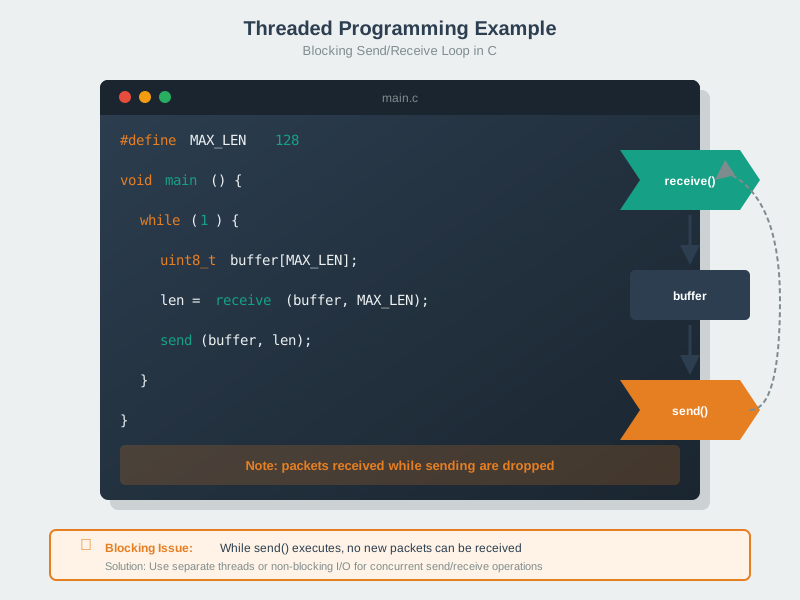
Multi-threaded programming using an RTOS enables complex IoT applications with concurrent tasks, proper resource sharing, and predictable timing behavior.

Proper interrupt handling is fundamental to responsive embedded systems, enabling immediate response to hardware events while maintaining code reliability.
1549.8 Summary
- OOP Sensor Libraries provide extensible, maintainable sensor management through inheritance, polymorphism, and encapsulation—ideal for multi-sensor systems
- Functional Data Pipelines enable predictable, testable data processing through pure functions, immutable data, and composition—perfect for edge analytics
- Professional Git Workflows with feature branches, pull requests, and semantic versioning enable team collaboration and traceable firmware releases
- PlatformIO Configuration supports multi-environment builds (dev/prod/test/OTA) with locked dependencies and CI/CD integration
- Combining Paradigms is the norm—use OOP for structure, functional for data processing, event-driven for responsiveness
- CI/CD Automation catches bugs early, ensures consistent builds, and enables confident OTA deployments
1549.9 What’s Next
Now that you’ve seen complete implementations, explore Network Design and Simulation to understand how to architect IoT networks for scalability, reliability, and performance.
Programming Series: - Programming Paradigms - Paradigm concepts - Development Tools - IDEs, debuggers, build systems - Best Practices - Selection guidelines
Software Development: - Software Platforms - Frameworks - Simulating Hardware - Development tools
Protocols: - MQTT - Messaging protocol - CoAP - RESTful IoT
Learning Hubs: - Simulations - Interactive tools