%% fig-cap: "IoT Network Topology Comparison"
%% fig-alt: "Comparison diagram of four IoT network topologies: Star topology shows central hub with 4 sensor nodes connected directly, offering simple design and low latency but creating single point of failure. Mesh topology displays 4 interconnected sensor nodes with multiple paths between each, providing self-healing capability and extended range through multi-hop routing but with higher complexity. Tree topology illustrates hierarchical structure with gateway at top connecting to routers which connect to sensors, enabling efficient data aggregation but vulnerable to parent node failures. Hybrid topology combines mesh clusters connected via backbone network to gateway, balancing flexibility with complexity for large deployments. Each topology suited for different IoT application requirements based on scale, reliability, latency, and power constraints."
%%{init: {'theme': 'base', 'themeVariables': {'primaryColor': '#2C3E50', 'primaryTextColor': '#fff', 'primaryBorderColor': '#1a252f', 'lineColor': '#16A085', 'secondaryColor': '#E67E22'}}}%%
flowchart TB
    subgraph Star["Star Topology"]
        SH[Hub/Gateway]
        S1((Sensor 1))
        S2((Sensor 2))
        S3((Sensor 3))
        S4((Sensor 4))
        S1 --> SH
        S2 --> SH
        S3 --> SH
        S4 --> SH
    end

    subgraph Mesh["Mesh Topology"]
        M1((Node 1))
        M2((Node 2))
        M3((Node 3))
        M4((Node 4))
        M1 <--> M2
        M2 <--> M3
        M3 <--> M4
        M4 <--> M1
        M1 <--> M3
        M2 <--> M4
    end

    subgraph Tree["Tree Topology"]
        TG[Gateway]
        TR1[Router 1]
        TR2[Router 2]
        TS1((Sensor))
        TS2((Sensor))
        TS3((Sensor))
        TS4((Sensor))
        TG --> TR1
        TG --> TR2
        TR1 --> TS1
        TR1 --> TS2
        TR2 --> TS3
        TR2 --> TS4
    end

    subgraph Hybrid["Hybrid Topology"]
        HG[Gateway]
        HC1[Cluster 1]
        HC2[Cluster 2]
        HG --> HC1
        HG --> HC2
        HC1 <-.-> HC2
    end

    style SH fill:#2C3E50,stroke:#16A085,color:#fff
    style TG fill:#2C3E50,stroke:#16A085,color:#fff
    style HG fill:#2C3E50,stroke:#16A085,color:#fff
    style TR1 fill:#E67E22,stroke:#2C3E50,color:#fff
    style TR2 fill:#E67E22,stroke:#2C3E50,color:#fff
    style HC1 fill:#E67E22,stroke:#2C3E50,color:#fff
    style HC2 fill:#E67E22,stroke:#2C3E50,color:#fff
    style M1 fill:#16A085,stroke:#2C3E50,color:#fff
    style M2 fill:#16A085,stroke:#2C3E50,color:#fff
    style M3 fill:#16A085,stroke:#2C3E50,color:#fff
    style M4 fill:#16A085,stroke:#2C3E50,color:#fff
1556 Network Design Fundamentals
1556.1 Network Design Fundamentals
This section covers the foundational concepts of IoT network design, including topology selection and requirements analysis.
1556.2 Learning Objectives
By the end of this chapter, you will be able to:
- Understand fundamental IoT network design principles and topologies
- Identify key network requirements and constraints for IoT applications
- Compare and contrast star, mesh, tree, and hybrid topologies
- Select appropriate network topologies based on application requirements
- Analyze trade-offs between latency, throughput, reliability, and energy consumption
1556.3 Prerequisites
Before diving into this chapter, you should be familiar with:
- Networking Basics: Understanding network fundamentals including IP addressing, routing, protocols, and the OSI model is essential for designing IoT networks
- Wireless Communication Protocols: Knowledge of IoT communication protocols (Wi-Fi, Zigbee, LoRaWAN, BLE) provides context for selecting appropriate technologies
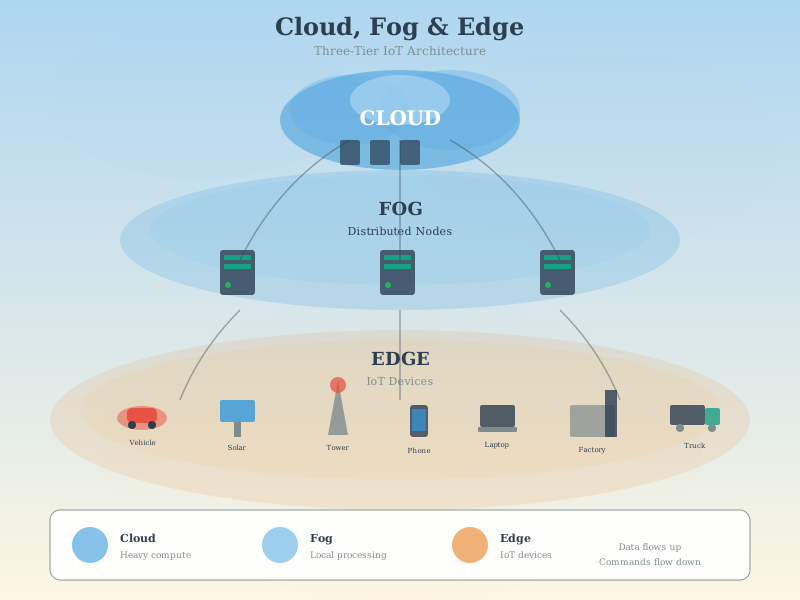
- IoT Reference Models: Understanding IoT architectures including edge, fog, and cloud layers helps design network topologies that match application deployment patterns
TipFor Beginners: What is Network Design?
Think of network design like planning the roads for a city.
Before you build roads, you need to ask: How many cars will use them? Where are people going? Should we have one main highway or many small streets? Network design is the same—planning how devices will communicate before you build anything.
Why does network design matter for IoT?
| Without Design | With Design |
|---|---|
| Devices can’t reach each other | Every device connected reliably |
| Messages get lost | 99%+ delivery rate |
| Batteries die in weeks | Batteries last years |
| Adding devices breaks network | Network scales smoothly |
Key decisions in network design:
| Decision | Options | Impact |
|---|---|---|
| Topology | Star, Mesh, Tree, Hybrid | Coverage, reliability, complexity |
| Protocol | Wi-Fi, Zigbee, LoRa, BLE | Range, power, data rate |
| Gateway placement | Central, distributed | Coverage, latency |
| Redundancy | Single path, multiple paths | Reliability vs cost |
Real-world analogy: Airport designers don’t just build runways randomly—they study traffic patterns, weather, and growth projections. IoT network designers do the same: study communication patterns, interference, and scalability before deploying thousands of devices.
Key takeaway: Good network design saves money, improves reliability, and enables future growth. Always design before you deploy!
TipFor Kids: Meet the Sensor Squad!
Network Design is like planning a treasure hunt with your friends!
Imagine you’re organizing a treasure hunt in a huge park. You need to figure out: - How will everyone communicate? (Walkie-talkies? Flags? Runners?) - Where should the team captains stand? (Near the center? At different corners?) - What happens if someone gets lost? (Backup plan!)
That’s exactly what network designers do for IoT devices!
1556.3.1 The Sensor Squad Adventure: Planning the Perfect Network
The Sensor Squad had an exciting mission: connect all the animal exhibits at the zoo! But where should they put the message towers (gateways)?
“Let’s put one big tower in the middle!” suggested Sammy the Sensor.
“But what if it breaks?” worried Bella the Battery. “Then NO messages get through!”
Max the Microcontroller had an idea: “What about three smaller towers that can help each other?”
They drew different plans on paper:
Plan A - Star (one center): Fast and simple, but risky if the center breaks.
Plan B - Mesh (everyone connected): Super reliable, but uses more battery.
Plan C - Tree (groups with leaders): Good for organizing, but leaders are extra important.
After testing with toy blocks, they chose Plan C for the zoo—with extra backup paths just in case!
1556.3.2 Key Words for Kids
| Word | What It Means |
|---|---|
| Topology | The shape or map of how things connect (like a family tree) |
| Star | Everything connects to one center (like spokes on a bicycle wheel) |
| Mesh | Everything connects to everything nearby (like a fishing net) |
| Gateway | A big helper that passes messages between areas |
| Redundancy | Having a backup plan (like bringing an extra snack!) |
1556.3.3 Try This at Home!
Play Network Designer!
- Get 10 small objects (toys, blocks, or coins)
- Pick one to be the “gateway” (make it bigger or different color)
- Arrange in a STAR: all objects point to the center gateway
- Now try MESH: connect each object to 2-3 neighbors
- Ask yourself: What happens if you remove the gateway in each design?
You’re thinking like a real network engineer!
1556.3.4 Network Simulation Tool Visualizations
The following visualizations provide insights into network design concepts for IoT systems.
1556.4 Introduction
Network design is a critical phase in IoT system development that enables architects to plan network topology, select appropriate protocols, and optimize configurations before physical deployment. Unlike traditional IT networks, IoT networks present unique challenges including massive scale (thousands to millions of devices), resource constraints (limited power and bandwidth), diverse communication patterns, and stringent reliability requirements.
TipDefinition
IoT Network Design is the systematic process of planning network topology, protocol selection, gateway placement, and addressing schemes to meet application requirements for performance, reliability, and cost. Good design prevents costly rework and enables successful large-scale deployments.
1556.4.1 Why Network Design Matters for IoT
Cost Reduction: Proper planning prevents deploying too many gateways or choosing protocols that don’t scale. Design decisions made early can save thousands of dollars.
Risk Mitigation: Identifying coverage gaps, single points of failure, and capacity bottlenecks during design phase prevents production issues.
Performance Optimization: Topology selection and gateway placement directly impact latency, throughput, and battery life. Design enables optimization before deployment.
Scalability Planning: Networks that work with 100 devices may fail at 1,000. Design validates that architecture can handle projected growth.
Reliability Engineering: Mesh topologies, redundant gateways, and failover mechanisms must be planned during design, not retrofitted after deployment.
1556.5 IoT Network Design Fundamentals
1556.5.1 Network Topology Patterns
IoT networks employ various topologies based on application requirements, scale, and communication patterns. The following diagram compares the four primary IoT network topologies:
NoteAlternative View: Topology Selection Decision Tree
%%{init: {'theme': 'base', 'themeVariables': {'primaryColor': '#2C3E50', 'primaryTextColor': '#fff', 'primaryBorderColor': '#16A085', 'lineColor': '#16A085', 'secondaryColor': '#E67E22', 'tertiaryColor': '#7F8C8D'}}}%%
flowchart TD
    START(["Select Network<br/>Topology"]) --> Q1{"Network<br/>Scale?"}

    Q1 -->|"< 50 devices"| Q2{"Single point<br/>of failure OK?"}
    Q1 -->|"50-500 devices"| Q3{"Need self-<br/>healing?"}
    Q1 -->|"500+ devices"| HYBRID["HYBRID<br/>Mesh clusters + backbone"]

    Q2 -->|"Yes"| STAR["STAR<br/>Simple, low latency<br/>Wi-Fi, BLE"]
    Q2 -->|"No"| Q4{"Range<br/>extension needed?"}

    Q3 -->|"Yes"| MESH["MESH<br/>Self-healing, extended range<br/>Zigbee, Thread"]
    Q3 -->|"No"| TREE["TREE<br/>Data aggregation<br/>Building automation"]

    Q4 -->|"Yes"| MESH
    Q4 -->|"No"| TREE

    STAR --> PROTO1["Protocols:<br/>Wi-Fi, BLE, Zigbee"]
    MESH --> PROTO2["Protocols:<br/>Zigbee, Thread, Z-Wave"]
    TREE --> PROTO3["Protocols:<br/>BACnet, Modbus, 6LoWPAN"]
    HYBRID --> PROTO4["Protocols:<br/>Mix of above"]

    style START fill:#2C3E50,stroke:#16A085,color:#fff
    style STAR fill:#16A085,stroke:#2C3E50,color:#fff
    style MESH fill:#E67E22,stroke:#2C3E50,color:#fff
    style TREE fill:#16A085,stroke:#2C3E50,color:#fff
    style HYBRID fill:#7F8C8D,stroke:#2C3E50,color:#fff
    style PROTO1 fill:#7F8C8D,stroke:#2C3E50,color:#fff
    style PROTO2 fill:#7F8C8D,stroke:#2C3E50,color:#fff
    style PROTO3 fill:#7F8C8D,stroke:#2C3E50,color:#fff
    style PROTO4 fill:#7F8C8D,stroke:#2C3E50,color:#fff
1556.5.1.1 Star Topology
Description: All devices connect to a central hub or gateway. Most common for short-range protocols like Wi-Fi, Bluetooth, and Zigbee.
Advantages:
- Simple to design and implement
- Easy troubleshooting and device management
- Hub provides centralized security and control
- Low device complexity (nodes only talk to hub)
Disadvantages:
- Single point of failure at hub
- Limited range (all devices must reach hub)
- Hub becomes bottleneck as network scales
- No device-to-device communication
IoT Applications:
- Smart home systems (devices to hub to cloud)
- Bluetooth Low Energy sensor networks
- Wi-Fi-connected IoT devices
Design Considerations:
- Hub capacity (maximum concurrent connections)
- Radio coverage area (ensure all devices within range)
- Hub redundancy for critical applications
- Bandwidth allocation per device
1556.5.1.2 Mesh Topology
Description: Devices form peer-to-peer connections, enabling multi-hop routing where messages can relay through intermediate nodes.
Advantages:
- Self-healing (automatic rerouting around failures)
- Extended range through multi-hop
- No single point of failure
- Scalable to large areas
Disadvantages:
- Complex routing protocols
- Higher latency (multi-hop delays)
- Increased power consumption (routing duties)
- Network instability if nodes frequently join/leave
IoT Applications:
- Zigbee and Thread networks
- Smart city street lighting
- Industrial sensor networks
- Agricultural monitoring across large fields
Design Considerations:
- Maximum hop count limits
- Routing protocol selection (AODV, RPL, etc.)
- Network density (enough nodes for connectivity)
- Power budget for routing overhead
1556.5.1.3 Tree/Hierarchical Topology
Description: Organized in parent-child relationships, forming a hierarchical structure often used in industrial and building automation.
Advantages:
- Scalable organization
- Clear data aggregation paths
- Efficient for many-to-one traffic patterns
- Simplified addressing schemes
Disadvantages:
- Parent node failure affects all children
- No path diversity (no alternate routes)
- Unbalanced trees create hotspots
- Limited flexibility
IoT Applications:
- Building automation systems (floors to wings to building to campus)
- Industrial control hierarchies
- Wireless sensor network clusters
Design Considerations:
- Tree depth (impacts latency)
- Balancing branches (avoid hotspots)
- Parent node reliability requirements
- Aggregation strategies
1556.5.1.4 Hybrid Topologies
Description: Combination of topologies to leverage strengths of each. For example, mesh clusters connected via backbone, or star networks linked through gateways.
Advantages:
- Optimized for specific requirements
- Flexibility in design
- Can combine best features of multiple topologies
Disadvantages:
- Increased design complexity
- More complex management
- Potential interoperability challenges
IoT Applications:
- Smart city infrastructure (mesh zones + backbone)
- Campus IoT deployments
- Multi-protocol IoT systems
1556.5.2 Network Design Requirements
1556.5.2.1 Scale and Density
Device Count: How many devices must the network support simultaneously?
- Small: <100 devices (home/office)
- Medium: 100-10,000 devices (building/campus)
- Large: 10,000-1M+ devices (city/industrial)
Spatial Density: How many devices per unit area?
- Sparse: <1 device/100m² (agriculture)
- Medium: 1-10 devices/100m² (office)
- Dense: >10 devices/100m² (factory, stadium)
Design Impact: Dense networks require modeling collision avoidance, channel contention, and interference. Sparse networks focus on coverage and routing efficiency.
1556.5.2.2 Latency Requirements
Real-Time (< 10ms): Industrial control, robotics, autonomous vehicles requiring immediate response.
Near Real-Time (10-100ms): Interactive applications like smart home controls, gaming, AR/VR.
Soft Real-Time (100ms-1s): Environmental monitoring, health tracking with timely but not critical updates.
Batch/Delay-Tolerant (>1s): Data logging, firmware updates, analytics where delay is acceptable.
Design Impact: Latency requirements affect topology choice (star for low latency vs mesh for reliability), routing protocol selection, and edge processing decisions.
1556.5.2.3 Bandwidth and Throughput
Data Rate Per Device:
- Ultra-low: <1 kbps (temperature sensor reporting hourly)
- Low: 1-100 kbps (sensor streams)
- Medium: 100 kbps-1 Mbps (video doorbell, audio)
- High: >1 Mbps (HD camera, bulk transfers)
Aggregate Network Throughput: Total bandwidth = devices x per-device rate x duty cycle
Example: 1,000 sensors x 10 kbps x 10% duty = 1 Mbps aggregate
Design Impact: Model channel capacity, collision probability, retransmission overhead, and bandwidth allocation strategies.
1556.5.2.4 Reliability and Availability
Packet Delivery Ratio (PDR):
- Critical: >99.99% (medical, safety systems)
- High: 95-99.99% (industrial monitoring)
- Medium: 90-95% (smart home)
- Low: <90% (delay-tolerant sensor networks)
Mean Time Between Failures (MTBF): Network uptime requirements drive redundancy needs.
Design Impact: Model packet loss, retransmission mechanisms, error correction, and redundancy strategies.
1556.5.2.5 Energy Constraints
Battery-Powered Devices: Lifetime requirements (months to years) dictate duty cycling, transmission power, and protocol efficiency.
Energy Harvesting: Variable power availability requires buffering and adaptive protocols.
Mains-Powered: No energy constraint but may still optimize to reduce infrastructure load.
Design Impact: Model transmission energy costs, sleep/wake cycles, and battery lifetime under various traffic patterns.
1556.6 Key Concepts
Network Topologies:
- Star: Central hub with spoked connectivity
- Mesh: Full or partial interconnection
- Tree: Hierarchical multi-hop structure
- Hybrid: Combination approaches (mesh + tree)
Design Requirements:
- Scale: Device count and spatial density
- Latency: Real-time to delay-tolerant
- Bandwidth: Data rate per device and aggregate
- Reliability: PDR and availability targets
- Energy: Battery constraints and lifetime goals
Design Factors:
- Radio characteristics: Range, power, data rate
- Coverage: Ensure all devices reachable
- Redundancy: Failover for critical applications
- Scalability: Performance as network grows
1556.7 Summary
- Network Topology Selection: Choose star topology for simplicity and low latency (under 50 devices), mesh for self-healing and extended range, tree for hierarchical aggregation, or hybrid for large-scale deployments requiring flexibility
- Requirements Analysis: Systematically define device count, spatial density, latency requirements, bandwidth needs, reliability targets, and energy constraints before selecting topology and protocols
- Trade-off Understanding: Network design involves balancing competing requirements where improving one metric (like reliability through mesh) may impact another (like latency or power consumption)
- Scalability Planning: Design networks with headroom for growth (2-3x initial capacity) to avoid costly redesigns as deployments expand
NoteRelated Chapters & Resources
Continue Learning:
- Network Simulation Tools - Simulation tools for validating designs
- Network Design Methodology - Systematic design process
- Network Design Exercises - Hands-on practice
Network Fundamentals:
- Networking Fundamentals - Network basics
- Topologies - Network topologies
- Routing - Routing protocols
1556.8 What’s Next
The next section covers Network Simulation Tools, which examines the software tools available for validating your network designs before deployment. You’ll learn about NS-3, Cooja, OMNeT++, and other simulators to test your topology and protocol choices.