%%{init: {'theme': 'base', 'themeVariables': { 'primaryColor': '#2C3E50', 'primaryTextColor': '#fff', 'primaryBorderColor': '#16A085', 'lineColor': '#16A085', 'secondaryColor': '#E67E22', 'tertiaryColor': '#ecf0f1'}}}%%
flowchart LR
    subgraph Mobile["Mobile/Wearable Sensing"]
        M1[General Purpose<br/>Sensors]
        M2[Multi-tasking OS]
        M3[Low Deployment<br/>Cost]
        M4[Human Activity<br/>Monitoring]
    end

    subgraph Network["Sensor Networks"]
        N1[Specialized<br/>Sensors]
        N2[Dedicated<br/>Resources]
        N3[High Deployment<br/>Cost]
        N4[Environmental<br/>Monitoring]
    end

    style M1 fill:#2C3E50,stroke:#16A085,color:#fff
    style M2 fill:#2C3E50,stroke:#16A085,color:#fff
    style M3 fill:#27AE60,stroke:#2C3E50,color:#fff
    style M4 fill:#16A085,stroke:#2C3E50,color:#fff
    style N1 fill:#16A085,stroke:#2C3E50,color:#fff
    style N2 fill:#16A085,stroke:#2C3E50,color:#fff
    style N3 fill:#E67E22,stroke:#2C3E50,color:#fff
    style N4 fill:#2C3E50,stroke:#16A085,color:#fff
1349 Mobile Sensing and Activity Recognition
1349.1 Learning Objectives
By the end of this chapter, you will be able to:
- Compare Sensing Approaches: Differentiate between mobile/wearable sensing and traditional sensor networks
- Design Activity Recognition Pipelines: Implement human activity recognition using accelerometer/gyroscope data
- Understand Transportation Mode Detection: Apply multi-sensor fusion for detecting transportation modes
- Address Mobile Sensing Challenges: Handle heterogeneity, noise, and resource constraints
1349.2 Prerequisites
- ML Fundamentals: Understanding training vs inference and feature extraction
- Basic understanding of smartphone sensors (accelerometer, gyroscope, GPS)
NoteChapter Series: Modeling and Inferencing
This is part 2 of the IoT Machine Learning series:
- ML Fundamentals - Core concepts
- Mobile Sensing & Activity Recognition (this chapter)
- IoT ML Pipeline - 7-step pipeline
- Edge ML & Deployment - TinyML, quantization
- Audio Feature Processing - MFCC
- Feature Engineering - Feature design
- Production ML - Monitoring
1349.3 Mobile/Wearable Sensing vs. Sensor Networks
| Aspect | Mobile Sensing | Sensor Networks |
|---|---|---|
| Use Case | Well suited for human activities | Well suited for sensing the environment |
| Sensors | General purpose sensors, often not well suited for accurate sensing | Specialized sensors, designed to accurately monitor specific phenomena |
| Resources | Multi-tasking OS. Main purpose is to support various applications | All resources dedicated to sensing |
| Cost | Low cost of deployment and maintenance (millions of users charge their devices) | High cost deployment and maintenance |
1349.4 Mobile Sensing Applications
%%{init: {'theme': 'base', 'themeVariables': { 'primaryColor': '#2C3E50', 'primaryTextColor': '#fff', 'primaryBorderColor': '#16A085', 'lineColor': '#16A085', 'secondaryColor': '#E67E22', 'tertiaryColor': '#ecf0f1'}}}%%
flowchart TB
    subgraph Individual["Individual Sensing"]
        I1[Fitness Apps<br/>Steps, Calories]
        I2[Health Tracking<br/>Sleep, Activity]
        I3[Behavior Change<br/>Wellness Coaching]
    end

    subgraph Group["Group/Community Sensing"]
        G1[Neighborhood Safety<br/>Assessment]
        G2[Environmental<br/>Monitoring]
        G3[Collective Goals<br/>Recycling, Fitness]
    end

    subgraph Urban["Urban-Scale Sensing"]
        U1[Disease Tracking<br/>Across City]
        U2[Traffic & Pollution<br/>Monitoring]
        U3[Infrastructure<br/>Health]
    end

    style I1 fill:#2C3E50,stroke:#16A085,color:#fff
    style I2 fill:#2C3E50,stroke:#16A085,color:#fff
    style I3 fill:#2C3E50,stroke:#16A085,color:#fff
    style G1 fill:#16A085,stroke:#2C3E50,color:#fff
    style G2 fill:#16A085,stroke:#2C3E50,color:#fff
    style G3 fill:#16A085,stroke:#2C3E50,color:#fff
    style U1 fill:#E67E22,stroke:#2C3E50,color:#fff
    style U2 fill:#E67E22,stroke:#2C3E50,color:#fff
    style U3 fill:#E67E22,stroke:#2C3E50,color:#fff
1349.4.1 Individual Sensing
- Fitness applications: Step counting, calorie tracking, workout monitoring
- Behavior intervention applications: Sleep tracking, habit formation, wellness coaching
1349.4.2 Group/Community Sensing
- Groups to sense common activities and help achieving group goals
- Examples: Assessment of neighborhood safety, environmental sensing, collective recycling efforts
1349.4.3 Urban-Scale Sensing
- Large scale sensing, where large number of people have the same application installed
- Examples: Tracking speed of disease across a city, congestion and pollution monitoring
1349.5 Human Activity Recognition (HAR)
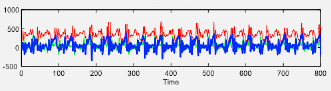
Sensors Used: - Accelerometer (3-axis linear acceleration) - Gyroscope (3-axis angular velocity)
Example Inferences: - Walking, running, biking - Climbing up/down stairs - Sitting, standing, lying down
Applications: - Health and behavior intervention - Fitness monitoring - Sharing within a community - Fall detection for elderly care
1349.6 Activity Recognition Implementation
The activity recognition pipeline processes sensor data through several stages:
- Data Collection: Gather accelerometer/gyroscope samples at 50-100 Hz
- Windowing: Segment continuous stream into 1-3 second overlapping windows
- Feature Extraction: Calculate time-domain (mean, variance) and frequency-domain (FFT peaks) features
- Classification: Apply trained ML model (Random Forest, SVM, or Neural Network)
- Post-Processing: Smooth predictions using majority voting or temporal filtering
Typical Feature Set (per window): - Time-domain: Mean, std, min, max, zero-crossings (6 features × 3 axes = 18) - Frequency-domain: Dominant frequency, spectral energy, FFT peaks (3 features × 3 axes = 9) - Total: ~27 features per window → ML classifier → Activity label
Performance: Random Forest achieves 85-92% accuracy on common activities with 100ms inference latency on smartphones.
1349.7 Case Study: Human Activity Recognition Pipeline
This case study demonstrates a complete end-to-end machine learning pipeline for HAR using wearable accelerometer sensors.
1349.7.1 End-to-End HAR Pipeline
%%{init: {'theme': 'base', 'themeVariables': { 'primaryColor': '#2C3E50', 'primaryTextColor': '#fff', 'primaryBorderColor': '#16A085', 'lineColor': '#16A085', 'secondaryColor': '#E67E22', 'tertiaryColor': '#ecf0f1'}}}%%
flowchart LR
    Raw[Raw Accelerometer<br/>50 Hz sampling<br/>3-axis x,y,z] --> Window[Windowing<br/>2-second windows<br/>100 samples each]
    Window --> Features[Feature Extraction<br/>45 features/window<br/>Time + Freq domain]
    Features --> ML[ML Model<br/>Random Forest<br/>100 trees]
    ML --> Activity[Activity Label<br/>Walk/Run/Sit<br/>Stairs/Stand]

    style Raw fill:#2C3E50,stroke:#16A085,color:#fff
    style Window fill:#16A085,stroke:#2C3E50,color:#fff
    style Features fill:#E67E22,stroke:#2C3E50,color:#fff
    style ML fill:#9B59B6,stroke:#2C3E50,color:#fff
    style Activity fill:#27AE60,stroke:#2C3E50,color:#fff
Pipeline Parameters: - Sampling Rate: 50 Hz (20ms between samples) - Window Size: 2 seconds (100 samples per window) - Window Overlap: 50% (1-second slide for smooth transitions) - Features per Window: 45 features (15 per axis) - Model: Random Forest with 100 decision trees - Output: 5 activity classes (Walk/Run/Sit/Stairs/Stand)
1349.7.2 Feature Engineering for HAR
1349.7.2.1 Time Domain Features (per axis: x, y, z)
| Feature Category | Features Extracted | What It Captures |
|---|---|---|
| Statistical | Mean, Standard Deviation, Min, Max | Overall motion intensity and variability |
| Signal Shape | Zero Crossings | Frequency of direction changes |
| Energy | Signal Magnitude Area (SMA) | Total energy expenditure across axes |
1349.7.2.2 Frequency Domain Features (FFT-based)
| Feature | Calculation | Activity Insight |
|---|---|---|
| Dominant Frequency | Peak FFT bin | Walking ~2Hz, Running ~3-4Hz |
| Spectral Energy | Sum of FFT magnitudes | High for running, low for sitting |
| Frequency Entropy | Shannon entropy of FFT | Regular patterns (walk) vs irregular (stairs) |
NoteWhy These Features Matter
Time-domain features capture the overall intensity and variability of motion: - Mean acceleration: Sitting has low mean (~9.8 m/s² from gravity), running has high mean - Standard deviation: Walking has regular patterns (low std), stairs have irregular patterns (high std)
Frequency-domain features reveal periodic patterns: - Dominant frequency: Walking has a clear 2Hz peak (2 steps/second), running has 3-4Hz - Spectral energy: High-intensity activities have more energy spread across frequencies
1349.7.3 Duty Cycling Trade-offs: Energy vs Accuracy

| Sampling Strategy | Battery Life | Accuracy | Use Case |
|---|---|---|---|
| 50 Hz (always on) | 8 hours | 98% | Research studies |
| 10 Hz continuous | 24 hours | 94% | Fitness trackers |
| 50 Hz, 50% duty | 16 hours | 95% | Smartwatches (optimal) |
| 10 Hz, 25% duty | 4 days | 88% | Long-term monitoring |
Key Insights:
The 50% Duty Cycle Sweet Spot: Sampling at 50Hz for 1 second, then sleeping for 1 second, achieves 95% accuracy with 16 hours of battery life.
Lower Sampling Rate Trade-off: Reducing from 50Hz to 10Hz saves 3× battery but loses only 4% accuracy because most activities have motion patterns below 5Hz.
Context-Aware Duty Cycling: Modern wearables use adaptive duty cycling—sampling at 50Hz during motion and 1Hz during rest. This achieves 3-day battery life with 96% accuracy.
1349.7.4 Classification Results
| Activity | Precision | Recall | F1-Score | Notes |
|---|---|---|---|---|
| Walking | 97% | 96% | 96.5% | Regular 2Hz gait pattern |
| Running | 95% | 97% | 96.0% | High-energy, high-frequency |
| Sitting | 94% | 92% | 93.0% | Low signal magnitude |
| Standing | 91% | 90% | 90.5% | Similar to sitting |
| Stairs | 87% | 83% | 85.0% | Confused with walking |
Overall Model Performance: - Macro-Average Accuracy: 92.3% - Inference Latency: 8ms per window (on smartphone CPU) - Model Size: 2.4 MB (100 trees, 45 features)
TipImproving Classification Performance
For Stairs Detection (currently 83% recall): - Add barometer sensor to detect altitude changes - Extract step irregularity features - Result: Stairs recall improves from 83% → 91%
For Sitting vs Standing (currently 8% confusion): - Add gyroscope data to measure postural sway - Use context features (sitting episodes last longer) - Result: Confusion drops from 8% → 3%
1349.8 Transportation Mode Detection
%%{init: {'theme': 'base', 'themeVariables': { 'primaryColor': '#2C3E50', 'primaryTextColor': '#fff', 'primaryBorderColor': '#16A085', 'lineColor': '#16A085', 'secondaryColor': '#E67E22', 'tertiaryColor': '#ecf0f1'}}}%%
flowchart LR
    subgraph Sensors["Multi-Sensor Input"]
        ACC[Accelerometer/<br/>Gyroscope<br/>Motion patterns]
        GPS[GPS<br/>Speed &<br/>Location]
        WiFi[Wi-Fi<br/>Indoor/<br/>Outdoor]
    end

    subgraph Fusion["Sensor Fusion"]
        Combine[Combine<br/>Features]
    end

    subgraph Mode["Transport Mode"]
        Walk[Walking]
        Bike[Biking]
        Bus[Bus]
        Train[Train]
        Car[Car]
    end

    ACC & GPS & WiFi --> Combine
    Combine --> Walk & Bike & Bus & Train & Car

    style ACC fill:#2C3E50,stroke:#16A085,color:#fff
    style GPS fill:#16A085,stroke:#2C3E50,color:#fff
    style WiFi fill:#E67E22,stroke:#2C3E50,color:#fff
    style Combine fill:#E67E22,stroke:#2C3E50,color:#fff
Sensors Used: - Accelerometer/Gyroscope for motion patterns - GPS for speed and location tracking - Wi-Fi localization for indoor/outdoor context
Example Inferences: - Bus, bike, tram, train, car, walking
Applications: - Intelligent transportation systems - Smart commuting recommendations - Carbon footprint tracking - Urban mobility planning
1349.9 Challenges in Mobile Sensing
%%{init: {'theme': 'base', 'themeVariables': { 'primaryColor': '#2C3E50', 'primaryTextColor': '#fff', 'primaryBorderColor': '#16A085', 'lineColor': '#16A085', 'secondaryColor': '#E67E22', 'tertiaryColor': '#ecf0f1'}}}%%
flowchart TB
    subgraph Challenges["Mobile Sensing Challenges"]
        C1[Complex Heterogeneity<br/>Different devices,<br/>sensors, OS]
        C2[Energy Constraints<br/>Battery life<br/>limitations]
        C3[Privacy Concerns<br/>Location & behavior<br/>tracking]
        C4[Data Quality<br/>Noise, missing data,<br/>inconsistency]
        C5[User Participation<br/>Opt-in, engagement,<br/>retention]
    end

    subgraph Solutions["Mitigation Strategies"]
        S1[Adaptive Sampling<br/>Context-aware]
        S2[On-Device ML<br/>TinyML, EdgeAI]
        S3[Privacy-Preserving<br/>Differential privacy]
        S4[Quality Filters<br/>Outlier detection]
    end

    C2 --> S1
    C2 --> S2
    C3 --> S3
    C4 --> S4

    style C1 fill:#E67E22,stroke:#2C3E50,color:#fff
    style C2 fill:#E67E22,stroke:#2C3E50,color:#fff
    style C3 fill:#E67E22,stroke:#2C3E50,color:#fff
    style C4 fill:#E67E22,stroke:#2C3E50,color:#fff
    style C5 fill:#E67E22,stroke:#2C3E50,color:#fff
    style S1 fill:#27AE60,stroke:#2C3E50,color:#fff
    style S2 fill:#27AE60,stroke:#2C3E50,color:#fff
    style S3 fill:#27AE60,stroke:#2C3E50,color:#fff
    style S4 fill:#27AE60,stroke:#2C3E50,color:#fff
Complex Heterogeneity: - Sensors vary in sampling frequency and sensitivity - Different device models and manufacturers - Inconsistent calibration
Noisy Measurements: - Environmental interference - Sensor drift over time - Motion artifacts
Resource Constraints: - Limited processing power - Battery life concerns - Storage limitations
Balance Required: - Amount of resources needed vs. accuracy of detection - Continuous sensing vs. duty cycling - Local processing vs. cloud offloading
WarningTradeoff: Population Models vs Personalized Models
Option A: Population model trained on diverse user data (works for everyone)
Option B: Personalized model fine-tuned for individual users
Decision Factors: Population models achieve ~92% accuracy across all users with zero user effort. Personalized models can reach ~96% accuracy but require 15-30 minutes of user calibration.
Choose population models for consumer apps where ease-of-use matters; choose personalization for medical or professional applications where accuracy is critical.
1349.10 Knowledge Check
Question 1: A mobile activity recognition system uses a sliding window of 2 seconds with 50% overlap, sampling at 50 Hz. How many samples per window and how often are windows generated?
Explanation: Samples per window = sample rate × window duration = 50 Hz × 2 sec = 100 samples. Window step = window duration × (1 - overlap) = 2 sec × 0.5 = 1 second. So every 1 second, collect new window of 100 samples.
Question 2: Which feature fusion strategy is most effective for transportation mode detection using accelerometer, GPS, and Wi-Fi?
Explanation: Early fusion combines features from all sensors before classification, enabling the model to learn cross-sensor patterns. Example: “IF GPS_speed > 50 km/h AND accel_variance < 0.5 THEN car” distinguishes car from bus by smooth ride. Achieves 92% accuracy vs 75% for GPS-only.
1349.11 Summary
This chapter covered mobile sensing and human activity recognition:
- Mobile vs Sensor Networks: Mobile sensing is cost-effective for human activities; dedicated networks excel for environmental monitoring
- HAR Pipeline: Raw data → Windowing → Feature extraction → Classification → Post-processing
- Feature Engineering: Time-domain (mean, variance) and frequency-domain (FFT peaks) features capture motion patterns
- Duty Cycling: Balance energy savings (60-80%) with detection accuracy through adaptive sampling
- Transportation Detection: Multi-sensor fusion combines accelerometer, GPS, and Wi-Fi for mode classification
1349.12 What’s Next
Continue to IoT ML Pipeline to learn the systematic 7-step approach for building production ML models for IoT applications.