%%{init: {'theme': 'base', 'themeVariables': { 'primaryColor': '#2C3E50', 'primaryTextColor': '#fff', 'primaryBorderColor': '#16A085', 'lineColor': '#16A085', 'secondaryColor': '#E67E22', 'tertiaryColor': '#7F8C8D'}}}%%
graph TB
    subgraph MCU["Microcontroller (All-in-One Chip)"]
        CPU["CPU<br/>240 MHz"]
        RAM["RAM<br/>520 KB"]
        Flash["Flash<br/>4 MB"]
        GPIO["GPIO Pins<br/>30+"]
        ADC["ADC<br/>12-bit"]
        Wi-Fi["Wi-Fi/BLE<br/>Built-in"]
    end

    Sensor["Temperature<br/>Sensor"] --> GPIO
    Button["Button"] --> GPIO
    GPIO --> LED["LED"]

    Power["Power: 0.05W<br/>Cost: $4<br/>Battery: Years"]

    style MCU fill:#2C3E50,stroke:#16A085,color:#fff
    style CPU fill:#16A085,stroke:#2C3E50,color:#fff
    style RAM fill:#16A085,stroke:#2C3E50,color:#fff
    style Flash fill:#16A085,stroke:#2C3E50,color:#fff
    style GPIO fill:#E67E22,stroke:#2C3E50,color:#fff
    style ADC fill:#E67E22,stroke:#2C3E50,color:#fff
    style Wi-Fi fill:#E67E22,stroke:#2C3E50,color:#fff
    style Power fill:#7F8C8D,stroke:#2C3E50,color:#fff
183 MCU vs MPU Selection for IoT
183.1 Learning Objectives
By the end of this chapter, you will be able to:
- Compare MCUs and MPUs: Distinguish microcontrollers from microprocessors and select appropriate processors for IoT applications
- Evaluate Hardware Specifications: Interpret processor datasheets including clock speed, memory, and I/O capabilities
- Select IoT Platforms: Choose between Arduino, ESP32, Raspberry Pi, and other platforms based on requirements
- Apply Decision Frameworks: Use systematic criteria to match processor capabilities to application requirements
183.2 Prerequisites
Before diving into this chapter, you should be familiar with:
- Basic Electronics: Understanding of voltage, current, resistance, and digital logic (HIGH/LOW states) is helpful for comprehending GPIO operations and power calculations
- Networking Basics for IoT: Familiarity with communication protocols helps understand connectivity options and how devices communicate in IoT systems
- Edge, Fog, and Cloud Overview: Understanding where edge devices fit in the IoT architecture provides context for MCU vs MPU selection based on processing requirements
183.3 Getting Started (For Beginners)
183.3.1 What’s Inside an IoT Device? (Simple Explanation)
Analogy: Think of IoT hardware like different types of workers:
| Worker Type | IoT Equivalent | What They Do |
|---|---|---|
| Specialist (does one job well) | Microcontroller (MCU) | Simple tasks: read sensor, send data |
| Manager (handles complex work) | Microprocessor (MPU) | Complex tasks: run apps, process video |
183.3.2 The Two Main Types of “Brains”
Microcontroller (MCU) — The “Swiss Army Knife”
{fig-alt=“Microcontroller architecture diagram showing single integrated chip containing CPU (240MHz), RAM (520KB), Flash (4MB), GPIO pins, 12-bit ADC, and Wi-Fi/BLE, with external connections to sensors and actuators, emphasizing low power (0.05W), low cost ($4), and multi-year battery life”}
Alternative View:
%%{init: {'theme': 'base', 'themeVariables': {'primaryColor': '#2C3E50', 'primaryTextColor': '#fff', 'primaryBorderColor': '#16A085', 'lineColor': '#16A085', 'secondaryColor': '#E67E22', 'tertiaryColor': '#7F8C8D', 'fontSize': '14px'}}}%%
timeline
    title MCU Evolution: From Basic to IoT-Optimized
    section 8-bit Era (1980s-2000s)
        ATmega328 : Arduino Uno
                  : 16MHz, 2KB RAM
                  : $3, 15mA active
                  : Good for: LED, basic sensors
    section 32-bit Cortex-M (2010s)
        STM32L0 : Ultra-low power
                : 32MHz, 8KB RAM
                : $2, 0.29µA stop
                : Good for: Battery sensors
    section Wi-Fi SoC (2015+)
        ESP32 : Wi-Fi + BLE integrated
              : 240MHz, 520KB RAM
              : $4, 10µA deep sleep
              : Good for: Connected IoT
    section AI-Enabled (2020s+)
        ESP32-S3 : Vector instructions
                 : 240MHz, 512KB + PSRAM
                 : $5, TensorFlow Lite
                 : Good for: Edge AI, voice
Microprocessor (MPU) — The “Desktop Computer”
%%{init: {'theme': 'base', 'themeVariables': { 'primaryColor': '#2C3E50', 'primaryTextColor': '#fff', 'primaryBorderColor': '#16A085', 'lineColor': '#16A085', 'secondaryColor': '#E67E22', 'tertiaryColor': '#7F8C8D'}}}%%
graph TB
    CPU["ARM CPU<br/>1.5 GHz<br/>Quad-Core"]

    ExtRAM["External RAM<br/>4 GB DDR4"]
    ExtSD["External Storage<br/>32 GB SD Card"]
    ExtGPIO["External GPIO<br/>40-pin Header"]
    ExtUSB["External USB<br/>Ports"]
    ExtHDMI["External HDMI<br/>Display"]
    ExtEth["External Ethernet<br/>Gigabit"]

    CPU --> ExtRAM
    CPU --> ExtSD
    CPU --> ExtGPIO
    CPU --> ExtUSB
    CPU --> ExtHDMI
    CPU --> ExtEth

    Camera["Camera<br/>Module"] --> ExtGPIO
    ExtGPIO --> Motor["Motor<br/>Driver"]

    Power["Power: 3-5W<br/>Cost: $55<br/>Battery: Hours"]

    style CPU fill:#2C3E50,stroke:#16A085,color:#fff
    style ExtRAM fill:#E67E22,stroke:#2C3E50,color:#fff
    style ExtSD fill:#E67E22,stroke:#2C3E50,color:#fff
    style ExtGPIO fill:#16A085,stroke:#2C3E50,color:#fff
    style ExtUSB fill:#E67E22,stroke:#2C3E50,color:#fff
    style ExtHDMI fill:#E67E22,stroke:#2C3E50,color:#fff
    style ExtEth fill:#E67E22,stroke:#2C3E50,color:#fff
    style Power fill:#7F8C8D,stroke:#2C3E50,color:#fff
{fig-alt=“Microprocessor architecture diagram showing standalone ARM CPU (1.5GHz quad-core) requiring external components: 4GB DDR4 RAM, 32GB SD storage, 40-pin GPIO header, USB ports, HDMI display, and Gigabit Ethernet, with camera and motor connections, emphasizing higher power (3-5W), higher cost ($55), and battery life measured in hours”}
MCU vs MPU Architecture: Microcontrollers integrate all components on one chip for simplicity and low power. Microprocessors use separate chips for more power and flexibility.
183.3.3 When to Use Which?
| Scenario | Best Choice | Why |
|---|---|---|
| Temperature sensor reporting hourly | MCU (ESP32) | Simple task, needs 10-year battery life |
| Security camera with AI | MPU (Raspberry Pi) | Complex processing, runs Linux |
| Smart light switch | MCU (Arduino) | Simple on/off, ultra-low cost |
| Voice assistant | MPU | Needs to run speech recognition |
| Soil moisture sensor in field | MCU | Solar-powered, sends tiny data |
183.3.4 Real-World Example: Smart Thermostat
A Nest thermostat uses BOTH:
%%{init: {'theme': 'base', 'themeVariables': { 'primaryColor': '#2C3E50', 'primaryTextColor': '#fff', 'primaryBorderColor': '#16A085', 'lineColor': '#16A085', 'secondaryColor': '#E67E22', 'tertiaryColor': '#7F8C8D'}}}%%
graph TB
    subgraph Nest["Nest Thermostat (Hybrid Design)"]
        MCU["MCU<br/>Low-Power Chip"]
        MPU["MPU<br/>ARM Processor"]
    end

    TempSensor["Temperature<br/>Sensor"] --> MCU
    HumiditySensor["Humidity<br/>Sensor"] --> MCU
    MotionSensor["Motion<br/>Sensor"] --> MCU

    MCU -->|"Wakeup Signal<br/>(motion detected)"| MPU
    MCU -->|"Sensor Data<br/>(every 1 sec)"| MPU

    MPU --> Display["Color Display<br/>480x480"]
    MPU --> Wi-Fi["Wi-Fi<br/>Cloud Sync"]
    MPU --> ML["Machine Learning<br/>(schedule prediction)"]
    MPU -->|"HVAC Control"| Relay["Relay<br/>(Heating/Cooling)"]

    Tasks["MCU: Continuous monitoring (1mW)<br/>MPU: Complex tasks when needed (500mW)"]

    style Nest fill:#2C3E50,stroke:#16A085,color:#fff
    style MCU fill:#16A085,stroke:#2C3E50,color:#fff
    style MPU fill:#E67E22,stroke:#2C3E50,color:#fff
    style Tasks fill:#7F8C8D,stroke:#2C3E50,color:#fff
{fig-alt=“Nest Thermostat hybrid architecture diagram showing low-power MCU continuously monitoring temperature, humidity, and motion sensors (1mW), sending wakeup signals and sensor data to ARM MPU which handles complex tasks (color display, Wi-Fi cloud sync, machine learning schedule prediction, HVAC relay control) when needed (500mW), illustrating power-efficient division of labor”}
Nest Thermostat Architecture: Combines a low-cost MCU for continuous sensor monitoring with an MPU for complex tasks like machine learning and Wi-Fi connectivity.
- MCU handles: Reading temperature every second
- MPU handles: Learning your schedule, pretty display, Wi-Fi
183.3.5 The Key Numbers to Know
| Spec | MCU (ESP32) | MPU (Raspberry Pi 4) | Your Laptop |
|---|---|---|---|
| Clock Speed | 240 MHz | 1.5 GHz | 3+ GHz |
| RAM | 520 KB | 4 GB | 16 GB |
| Storage | 4 MB | 32 GB SD | 512 GB SSD |
| Power | 0.05 W | 3-5 W | 45 W |
| Cost | $4 | $55 | $1000+ |
| Battery Life | Years | Hours | Hours |
183.3.6 Self-Check Questions
Before continuing, make sure you understand:
- What makes an MCU different from an MPU? (Answer: MCU has everything on one chip; MPU needs external RAM/storage)
- Why use an MCU for a battery-powered sensor? (Answer: Much lower power consumption—years vs hours of battery life)
- When would you choose an MPU over an MCU? (Answer: When you need to run an OS, do complex processing, or display video)
Ready for the technical details? Continue below!
NoteKey Takeaway
In one sentence: Choose microcontrollers (MCUs) for battery-powered sensors that need years of life on a coin cell; choose microprocessors (MPUs) only when you need an operating system, video processing, or machine learning.
Remember this: If your device runs on batteries and does one simple job, use an MCU - if it needs to run Linux or Docker, use an MPU. Getting this wrong wastes money (10x cost) or kills batteries (1000x power difference).
183.4 Microcontrollers and Microprocessors
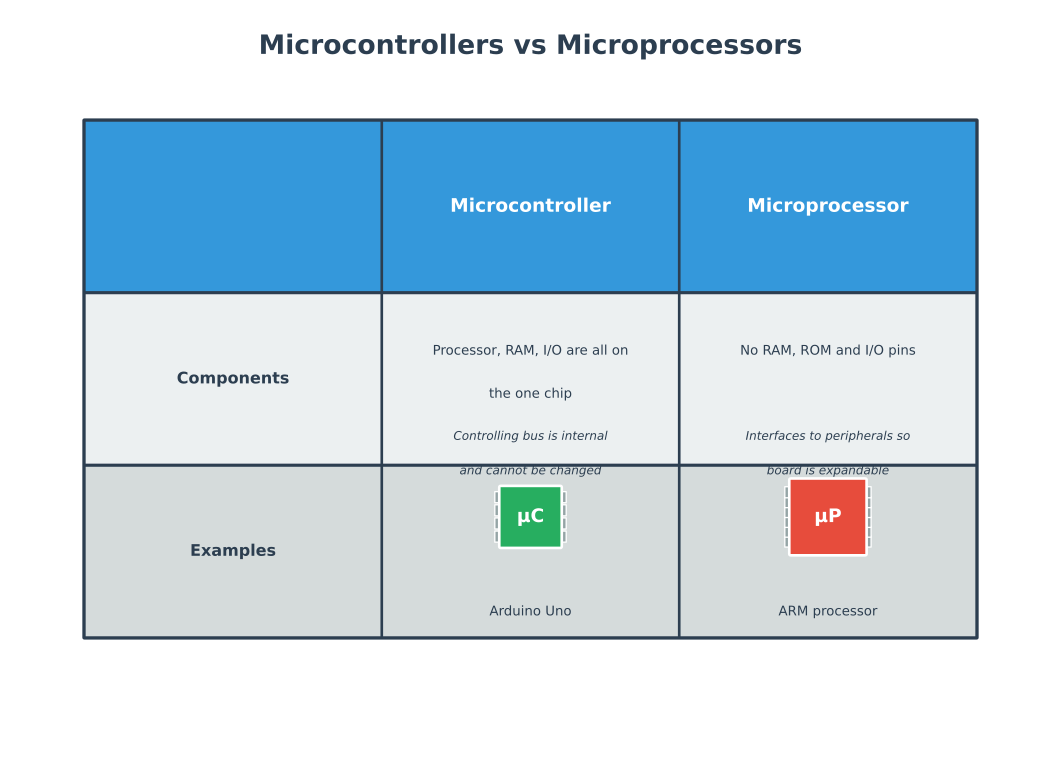
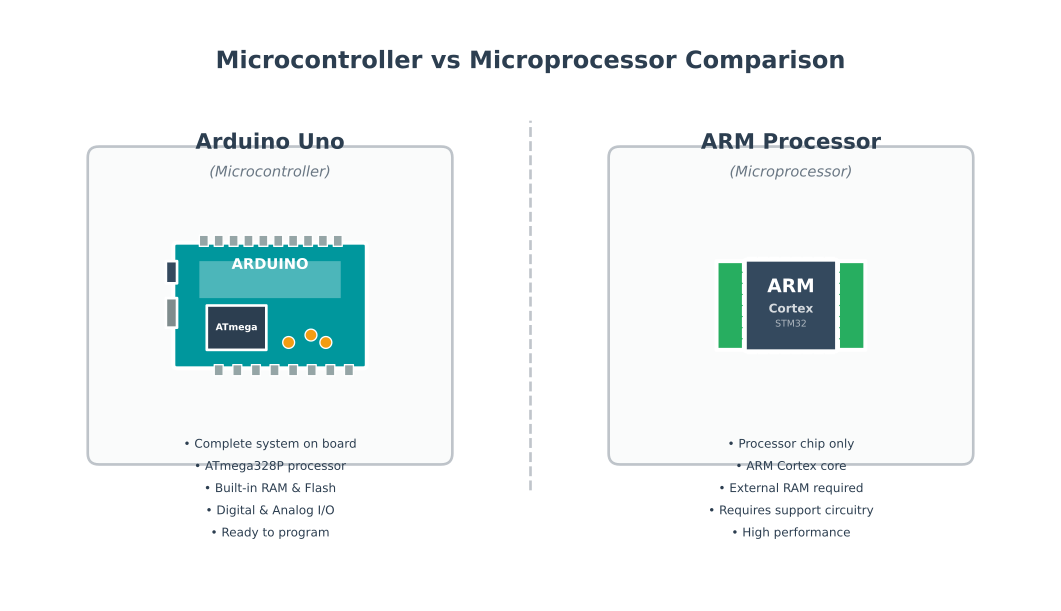
Almost all electronics equipment contains either a microcontroller or microprocessor. Understanding the differences between these two types of processors is crucial for IoT system design.
183.4.1 What are Microcontrollers?
A microcontroller (MCU) is a compact integrated circuit designed to govern a specific operation in an embedded system. A typical microcontroller includes a processor, memory, and input/output (I/O) peripherals on a single chip.
Examples: Digital watches contain microcontrollers that continually loop and count time. Washing machines use microcontrollers to control operations from on/off switches to different wash phases.
If the engine is the heart of a car, the microcontroller is the heart of an electronic device.
183.4.2 Advantages of Microcontrollers in IoT
Most IoT systems utilize microcontroller units (MCUs) to collect data and transfer it to processing units through the Internet:
- Simplicity: MCUs do not require an operating system to function and are easy to interface with external components such as sensors
- Cost-effectiveness: An MCU is usually sufficient to provide processing power and functionality in most IoT systems
- Security: Due to their simplicity, MCUs are less vulnerable to security attacks
183.4.3 What are Microprocessors?
A microprocessor is a micro version of our computers. Generally, if an application requires a form of Operating System, a microprocessor is normally used. Examples include ARM microprocessors used in smartphones.
183.4.4 Key Differences
Microprocessors can be thought of as more advanced embedded systems than microcontrollers:
| Aspect | Microcontroller | Microprocessor |
|---|---|---|
| Integration | All-in-one: processor, RAM, and I/O all on one chip | Uses external RAM, ROM, and I/O peripherals |
| Expandability | Fixed configuration - cannot increase RAM or I/O | Expandable at the board level |
| Bus | Internal bus not available to designer | External bus for interfacing with peripherals |
| Power Consumption | Very low (tens of mW) | Higher (hundreds of mW to watts) |
| Cost | Low cost ($1-10) | Higher cost ($10-100+) |
| Operating System | Usually bare-metal or RTOS | Typically runs full OS (Linux, Windows) |
| Examples | Arduino, ESP32, STM32 | Raspberry Pi, BeagleBone |
%%{init: {'theme': 'base', 'themeVariables': { 'primaryColor': '#2C3E50', 'primaryTextColor': '#fff', 'primaryBorderColor': '#16A085', 'lineColor': '#16A085', 'secondaryColor': '#E67E22', 'tertiaryColor': '#7F8C8D'}}}%%
flowchart TD
    Start{{"IoT Application<br/>Requirements"}}

    Start --> Q1["Need Operating<br/>System?"]

    Q1 -->|"Yes<br/>(Linux, Python, GUI)"| MPU["Choose MPU<br/>Raspberry Pi<br/>BeagleBone"]
    Q1 -->|"No<br/>(bare-metal)"| Q2["Battery<br/>Powered?"]

    Q2 -->|"Yes<br/>(years of life)"| MCU1["Choose MCU<br/>ESP32, nRF52<br/>STM32L"]
    Q2 -->|"No<br/>(wall power)"| Q3["Complex<br/>Processing?"]

    Q3 -->|"Yes<br/>(AI, video)"| MPU2["Consider MPU<br/>Higher performance"]
    Q3 -->|"No<br/>(sensors, control)"| MCU2["Choose MCU<br/>Arduino, ESP32<br/>STM32"]

    MCU1 --> Features1["✓ 10µA sleep<br/>✓ Years battery<br/>✓ Low cost"]
    MCU2 --> Features2["✓ Simple code<br/>✓ Fast boot<br/>✓ Real-time"]
    MPU --> Features3["✓ Full OS<br/>✓ Libraries<br/>✓ Connectivity"]
    MPU2 --> Features3

    style Start fill:#2C3E50,stroke:#16A085,color:#fff
    style MCU1 fill:#16A085,stroke:#2C3E50,color:#fff
    style MCU2 fill:#16A085,stroke:#2C3E50,color:#fff
    style MPU fill:#E67E22,stroke:#2C3E50,color:#fff
    style MPU2 fill:#E67E22,stroke:#2C3E50,color:#fff
    style Features1 fill:#7F8C8D,stroke:#2C3E50,color:#fff
    style Features2 fill:#7F8C8D,stroke:#2C3E50,color:#fff
    style Features3 fill:#7F8C8D,stroke:#2C3E50,color:#fff
%%{init: {'theme': 'base', 'themeVariables': { 'primaryColor': '#2C3E50', 'primaryTextColor': '#fff', 'primaryBorderColor': '#16A085', 'lineColor': '#16A085', 'secondaryColor': '#E67E22', 'tertiaryColor': '#7F8C8D'}}}%%
graph TB
    subgraph Cloud["CLOUD LAYER"]
        CLOUD_SRV[Cloud Server<br/>Multi-core Xeon<br/>TB RAM, PB Storage]
    end

    subgraph Fog["FOG / GATEWAY LAYER"]
        GW[Gateway MPU<br/>Raspberry Pi 4<br/>1.5GHz, 4GB RAM<br/>$55, 3-5W]
        EDGE_AI[Edge AI Server<br/>Jetson Nano<br/>GPU + ARM<br/>$99, 5-10W]
    end

    subgraph Edge["EDGE / SENSOR LAYER"]
        MCU1[ESP32 MCU<br/>240MHz, 520KB<br/>$5, 50mW<br/>Wi-Fi + Sensor]
        MCU2[STM32L MCU<br/>80MHz, 256KB<br/>$3, 10mW<br/>LoRa + Sensor]
        MCU3[ATtiny MCU<br/>8MHz, 512B<br/>$0.50, 1mW<br/>Basic GPIO]
    end

    subgraph Devices["SENSORS & ACTUATORS"]
        S1[Temp Sensor]
        S2[Motion Sensor]
        S3[Door Lock]
        A1[Motor]
    end

    S1 --> MCU1
    S2 --> MCU2
    S3 --> MCU3
    MCU3 --> A1

    MCU1 -->|Wi-Fi| GW
    MCU2 -->|LoRa| GW
    MCU3 -->|Serial| GW

    GW -->|Process locally| EDGE_AI
    GW -->|Wi-Fi/Ethernet| CLOUD_SRV
    EDGE_AI -->|Insights only| CLOUD_SRV

    style Cloud fill:#2C3E50,color:#fff
    style Fog fill:#E67E22,color:#fff
    style Edge fill:#16A085,color:#fff
    style Devices fill:#7F8C8D,color:#fff
%%{init: {'theme': 'base', 'themeVariables': { 'primaryColor': '#2C3E50', 'primaryTextColor': '#fff', 'primaryBorderColor': '#16A085', 'lineColor': '#16A085', 'secondaryColor': '#E67E22', 'tertiaryColor': '#7F8C8D'}}}%%
graph TB
    subgraph Scale["DEPLOYMENT SCALE: 1,000 IoT DEVICES"]
        direction TB
    end

    subgraph Option1["OPTION A: All Raspberry Pi (MPU)"]
        P1_Cost["Hardware: $55 × 1000<br/><strong>=  $55,000</strong>"]
        P1_Power["Power: 3W × 1000<br/>= 3,000W continuous"]
        P1_Battery["Battery Life: 6 hours<br/>(with 10,000mAh pack)"]
        P1_Maint["Maintenance: OS updates,<br/>security patches monthly"]
    end

    subgraph Option2["OPTION B: All ESP32 (MCU)"]
        E1_Cost["Hardware: $5 × 1000<br/><strong>=  $5,000</strong>"]
        E1_Power["Power: 0.05W × 1000<br/>= 50W continuous"]
        E1_Battery["Battery Life: 2 years<br/>(with 2,000mAh)"]
        E1_Maint["Maintenance: OTA firmware<br/>updates quarterly"]
    end

    subgraph Savings["COST COMPARISON"]
        S1["Hardware Savings:<br/>$55,000 - $5,000 =<br/><strong>$50,000 (91%)</strong>"]
        S2["Power Savings:<br/>3000W - 50W =<br/><strong>2,950W (98%)</strong>"]
        S3["Battery Cost:<br/>Replace monthly vs yearly<br/><strong>$12,000/year savings</strong>"]
    end

    Option1 --> Savings
    Option2 --> Savings

    style Option1 fill:#E74C3C,color:#fff
    style Option2 fill:#16A085,color:#fff
    style Savings fill:#2C3E50,color:#fff
{fig-alt=“Decision flowchart for selecting MCU versus MPU in IoT applications: starts with OS requirement (if yes, choose MPU like Raspberry Pi); if no OS needed, checks battery power (if yes, choose ultra-low-power MCU like ESP32/nRF52 with 10µA sleep for years of battery life); if wall-powered, checks processing complexity (if complex AI/video needed, consider MPU; if simple sensors/control, choose MCU like Arduino/STM32); shows key features for each path including power, cost, OS capabilities, and real-time performance”}
183.4.5 Choosing: Microcontroller or Microprocessor?
The first choice when designing an IoT solution is whether to use a microcontroller or microprocessor. In many cases, this comes down to the question: “Do I need an Operating System?”
When operating systems are used for IoT hardware, they are often categorized into two groups:
- End devices (nodes): Small, low-power devices (energy and processing)
- Gateways: Control communication to the cloud or handle significant processing
As more processing is pushed to the network’s edges (Fog and Edge computing), traditional applications and devices that previously ran without an operating system are taking advantage of the ease of development, maintenance, and automation an operating system brings.
WarningCommon Misconception: “More Power is Always Better”
Myth: “I should always choose the most powerful processor available to future-proof my IoT device.”
Reality: Overspeccing processors wastes money, power, and can reduce reliability. A $55 Raspberry Pi 4 running a simple temperature sensor that a $4 ESP32 could handle consumes 100x more power (3W vs 30mW average), drains batteries in hours instead of years, and costs 13.75x more per unit. At scale, this matters: deploying 1,000 sensors costs $55,000 instead of $4,000—a $51,000 waste. Worse, the complexity of managing a full Linux OS (updates, security patches, boot time) introduces failure modes that don’t exist with simple MCUs.
Correct approach: Match processor capability to actual requirements. Use MCUs for simple sensor reading, threshold detection, and periodic reporting. Reserve MPUs for applications genuinely requiring OS features: local AI inference, video processing, protocol gateways, or complex data fusion. A battery-powered temperature sensor needs an MCU; a security camera with local face recognition needs an MPU.
CautionPitfall: Selecting Hardware Based on Peak Performance Specs
The Mistake: Choosing a microcontroller because its datasheet advertises “240 MHz clock speed” or “520 KB RAM” without considering that these maximum specifications come with maximum power consumption unsuitable for battery operation.
Why It Happens: Marketing emphasizes peak performance numbers. Developers compare headline specs across products, selecting the “most powerful” option. They discover later that running at 240 MHz drains batteries in hours, and the advertised RAM includes PSRAM that draws significant standby current.
The Fix: Evaluate hardware at your actual operating point. For battery devices, compare sleep current (often buried in datasheets) and power consumption at your required clock speed. An ESP32 at 80 MHz with Wi-Fi disabled uses far less power than at 240 MHz. Check which peripherals draw power when disabled. Read application notes for “low power design” - vendors often hide realistic battery figures there. Calculate total energy per operation (wake, sense, transmit, sleep) rather than peak current alone.
CautionPitfall: Insufficient Flash/RAM Margin for Firmware Updates
The Mistake: Selecting a microcontroller with “just enough” flash memory for initial firmware, then being unable to add features, fix security vulnerabilities, or implement OTA updates because memory is exhausted.
Why It Happens: Developers optimize for unit cost, choosing the smallest (cheapest) MCU that fits the initial code. They do not account for OTA requiring space for both current and new firmware images, or for inevitable feature growth and bug fixes over the product lifetime.
The Fix: Budget at least 2x flash for OTA-capable devices (current image + new image + bootloader). Reserve 30-50% RAM headroom for stack growth, future features, and security patches. Consider that SSL/TLS libraries alone consume 30-80KB flash. The $0.50 savings per unit from a smaller MCU evaporates when you cannot push a critical security update to 10,000 deployed devices, requiring expensive field recalls instead.
TipUnderstanding Fleet Management
Core Concept: Fleet management is the operational discipline of monitoring, updating, and maintaining large numbers of IoT devices as a unified system rather than individual units, enabling visibility into aggregate health, coordinated firmware updates, and efficient troubleshooting at scale. Why It Matters: Managing 10,000 devices individually is impossible. Fleet management provides the abstraction layer that transforms thousands of independent devices into a controllable system. Without it, you cannot answer basic questions like “How many devices are running outdated firmware?” or “Which devices have battery levels below 20%?” or “What percentage of devices successfully completed the latest update?” Fleet management enables proactive maintenance (replace batteries before failure), efficient support (identify affected devices when customers report issues), and data-driven decisions (retire underperforming hardware revisions). Key Takeaway: Implement fleet management from your first 100 devices, not your first 10,000. Choose platforms that support device grouping (by region, hardware version, customer), fleet-wide queries (device twins/shadows), bulk operations (OTA updates to device cohorts), and aggregate dashboards showing fleet health distribution rather than individual device status.
CautionPitfall: Health Monitoring Relies Only on “Last Seen” Timestamp
The Mistake: Device health monitoring checks only whether the device has reported to the cloud within the last N minutes. A device sending corrupted data, stuck in a reboot loop, or operating with failed sensors appears “healthy” as long as any message arrives, masking critical failures until customers complain.
Why It Happens: “Last seen” is the easiest health metric to implement - just compare current time to last message timestamp. Teams assume that if a device is communicating, it must be working. This conflates “device is alive” with “device is functioning correctly,” ignoring degraded states between fully operational and completely dead.
The Fix: Implement multi-dimensional health scoring with specific thresholds. Each heartbeat must include: (1) Uptime counter - detect reboot loops (>3 reboots in 1 hour = degraded); (2) Sensor validity flags - each sensor reports OK/ERROR/STALE status; (3) Battery voltage - alert at 20% remaining, critical at 10%; (4) Free memory - detect memory leaks trending toward crash; (5) Error counters - track I2C failures, network retries, watchdog triggers. Define health states: HEALTHY (all metrics nominal), DEGRADED (any metric outside warning threshold), CRITICAL (any metric outside error threshold), OFFLINE (no message in 2x expected interval). Use device shadow/twin to store last known health state. Dashboard should show fleet breakdown: “4,982 healthy, 15 degraded (low battery), 2 critical (sensor failure), 1 offline” rather than just “4,999 online, 1 offline.”
CautionPitfall: No Baseline Telemetry for “Normal” Device Behavior
The Mistake: Teams deploy 10,000 devices without capturing baseline telemetry, then cannot distinguish abnormal behavior from expected variation. When devices report 85% CPU usage, 2.3V battery, or 15-second response latency, engineers have no reference to determine if these values indicate a problem or are perfectly normal for that device model and deployment environment.
Why It Happens: During development, focus is on making devices work at all, not on characterizing normal operating ranges. Lab conditions differ from field conditions (temperature, network quality, usage patterns). Teams assume published specifications (e.g., “3.0-4.2V battery range”) define healthy operation without measuring actual device behavior in deployment.
The Fix: Establish quantitative baselines during pilot deployment (first 100-500 devices for 30 days). Capture: (1) Statistical distributions - mean, median, P95, P99 for each metric (e.g., battery drain rate: mean 0.5%/day, P95 0.8%/day); (2) Environmental correlations - CPU usage vs ambient temperature, battery drain vs transmission frequency; (3) Temporal patterns - normal daily/weekly cycles (higher activity during business hours). Define alerting thresholds as deviations from baseline: alert if battery drain >2x P95 baseline for that device’s cohort. Store per-device baselines for anomaly detection (device 00042 typically sleeps 23.5 hours/day; sudden 20-hour sleep indicates behavior change). Update baselines quarterly as firmware evolves. For new device models, require 30-day burn-in period collecting baselines before enabling production alerting. Use baseline data to set SLOs: “P95 response latency < 500ms” is meaningless without knowing P95 is normally 120ms.
TipMatch Processing Power to Task Complexity
A common mistake is over-engineering edge nodes with powerful microprocessors when simpler microcontrollers suffice, or under-engineering with MCUs when processing demands require more. Use this decision framework: choose MCUs for simple sensor reading, threshold detection, and periodic reporting (temperature monitors, door sensors); choose microprocessors for local AI inference, video processing, protocol gateways, or applications requiring full OS features. Example: A smart thermostat reading temperature every 30 seconds needs only a $2 MCU consuming 10mW, while a security camera performing local face recognition requires a $35 processor consuming 2-5W. Overspec costs multiply across hundreds of devices; underspec leads to field failures requiring expensive replacements.
NoteThe Two Costs That Dominate Embedded Design
Two fundamental cost considerations push IoT designs toward minimal MCUs with optimized code:
1. Energy Cost
- Embedded systems have an expected workload—the goal is to minimize energy required to handle that workload (longer battery life, more efficient operation)
- Counterintuitive insight: More powerful MCUs can be more power efficient (completing tasks faster with less energy per operation), but they often consume more total energy for a given workload due to higher baseline power draw
| MCU Class | Active Current | Sleep Current | Example | Trade-off |
|---|---|---|---|---|
| 8-bit | 5 mA @ 8 MHz | 0.5 µA | ATtiny85 | Slow but sips power |
| 32-bit ARM | 15 mA @ 48 MHz | 2 µA | STM32L0 | Fast but higher baseline |
| 32-bit + Wi-Fi | 80 mA @ 240 MHz | 10 µA | ESP32 | Very fast, much higher energy |
2. Money Cost
- Many embedded markets operate with tight margins (cars, appliances, consumer electronics)
- More powerful MCUs cost more—not just the chip itself, but also supporting components (larger flash, more RAM, better power supply)
- At scale, even $0.50 savings per unit translates to $50,000 savings on 100,000 devices
Design Conclusion: Both costs push designs toward picking the minimal MCU capable of the task and optimizing code for it, rather than over-provisioning hardware and writing inefficient code.
WarningTradeoff: RTOS vs Bare-Metal Firmware for IoT Devices
Option A (RTOS - Real-Time Operating System): FreeRTOS, Zephyr, or ThreadX provide task scheduling, memory management, and driver abstractions. Development time: 30-50% faster due to reusable components. RAM overhead: 4-32KB. Latency: deterministic but with scheduler overhead (10-100us context switch). Power: slightly higher due to tick interrupts.
Option B (Bare-Metal / Super-Loop): Direct hardware access without OS abstraction. Minimal RAM (512B-2KB for stack), lowest power consumption (no scheduler overhead), fastest interrupt response (<1us). Development time: 50-100% longer for complex applications. Debugging: requires logic analyzers and hardware skills.
Decision Factors:
Choose RTOS when: Application requires multiple concurrent tasks (sensor sampling + Wi-Fi + display), code portability across MCU families is valued, team lacks embedded expertise (RTOS abstracts hardware), or project timeline is tight (reuse existing drivers and middleware). FreeRTOS adds ~8KB flash, 4KB RAM to ESP32 projects.
Choose Bare-Metal when: Extreme power optimization is required (sub-microamp sleep currents), hard real-time response under 10us is mandatory, RAM is severely constrained (8-bit MCUs with <1KB RAM), or simple single-task applications (read sensor, transmit, sleep). Bare-metal achieves 10-20% lower power consumption for simple duty-cycled applications.
Cost-power tradeoff: For battery-powered sensors waking every 10 minutes, bare-metal saves ~15% energy per wake cycle. Over 5-year device lifetime with 2000mAh battery, this translates to 3-6 additional months of operation. For mains-powered devices, RTOS development speed advantage (weeks saved) outweighs negligible power difference.
183.5 Summary
This chapter covered the fundamental distinction between microcontrollers and microprocessors for IoT applications:
- MCU vs MPU Selection: Microcontrollers (MCUs) integrate processor, memory, and I/O on a single chip for simple, low-power applications; microprocessors (MPUs) use external components for expandability and full OS support
- Processing Trade-offs: Choose MCUs ($1-10, 10mW) for sensor reading and basic logic; choose MPUs ($10-100+, 2-5W) for local AI inference, video processing, and complex applications requiring operating systems
- Platform Comparison: ESP32 ($5) provides Wi-Fi+BLE with 240MHz/520KB RAM; nRF52840 ($6) optimizes ultra-low power BLE with 0.4µA sleep; Arduino Uno ($3) offers simplicity for basic GPIO applications
- Cost at Scale: Choosing MCUs over MPUs for simple sensor tasks saves $50,000 hardware + $12,000/year battery costs + 98% power consumption for 1,000-device deployments
- Decision Framework: Ask “Do I need an OS?” first—if yes, use MPU; if battery-powered, use ultra-low-power MCU; if wall-powered and simple, use standard MCU
183.6 What’s Next
The next chapter covers Power Management and Device Interfaces, exploring power budgets, sleep modes, GPIO configurations, PWM control, and sensor interfacing for IoT devices.