%%{init: {'theme': 'base', 'themeVariables': { 'primaryColor': '#2C3E50', 'primaryTextColor': '#fff', 'primaryBorderColor': '#16A085', 'lineColor': '#16A085', 'secondaryColor': '#E67E22', 'tertiaryColor': '#7F8C8D', 'fontSize': '14px'}}}%%
graph LR
    Start[Start Bit<br/>0]
    D0[Data Bit 0]
    D1[Data Bit 1]
    D2[...]
    D7[Data Bit 7]
    Parity[Parity<br/>Optional]
    Stop[Stop Bit<br/>1-2 bits]

    Start --> D0 --> D1 --> D2 --> D7 --> Parity --> Stop

    style Start fill:#E67E22,stroke:#16A085,color:#fff
    style Stop fill:#E67E22,stroke:#16A085,color:#fff
    style Parity fill:#16A085,stroke:#2C3E50,color:#fff
    style D0 fill:#2C3E50,stroke:#16A085,color:#fff
    style D1 fill:#2C3E50,stroke:#16A085,color:#fff
    style D7 fill:#2C3E50,stroke:#16A085,color:#fff
157 IoT Communications Technology
157.1 Learning Objectives
By the end of this chapter, you will be able to:
- Classify Network Types: Distinguish between PAN, LAN, MAN, and WAN network classifications and their IoT applications
- Evaluate Communication Technologies: Compare protocols like Bluetooth LE, Zigbee, Wi-Fi, LoRaWAN, and cellular based on range, power, and data rate
- Match Technologies to Applications: Select appropriate communication technologies for specific IoT verticals
- Understand UART: Explain how UART serial communication works and its role in IoT device interfaces
NoteKey Concepts
- Personal Area Network (PAN): Short-range networks (up to 10 meters) for wearables and personal devices using Bluetooth, Zigbee, NFC
- Local Area Network (LAN): Medium-range networks (up to 100 meters) for homes and offices using Wi-Fi and Ethernet
- Metropolitan Area Network (MAN): Wide-range networks (up to several kilometers) for cities using LoRaWAN and NB-IoT
- Wide Area Network (WAN): Very wide-range networks (thousands of kilometers) using cellular and satellite
- UART: Universal Asynchronous Receiver-Transmitter, a fundamental hardware protocol for serial communication between microcontrollers and peripherals
157.2 Prerequisites
Before diving into this chapter, you should be familiar with:
- IoT Evolution and Enablers Overview: Understanding the four core enablers provides context for why diverse communication options exist
- Networking Basics: Fundamental networking concepts help understand protocol characteristics
NoteChapter Position in Series
This is the second chapter in the Architectural Enablers series:
- IoT Evolution and Enablers Overview - History and convergence
- IoT Communications Technology (this chapter) - Protocols and network types
- Technology Selection and Energy - Decision frameworks
- Labs and Assessment - Hands-on practice
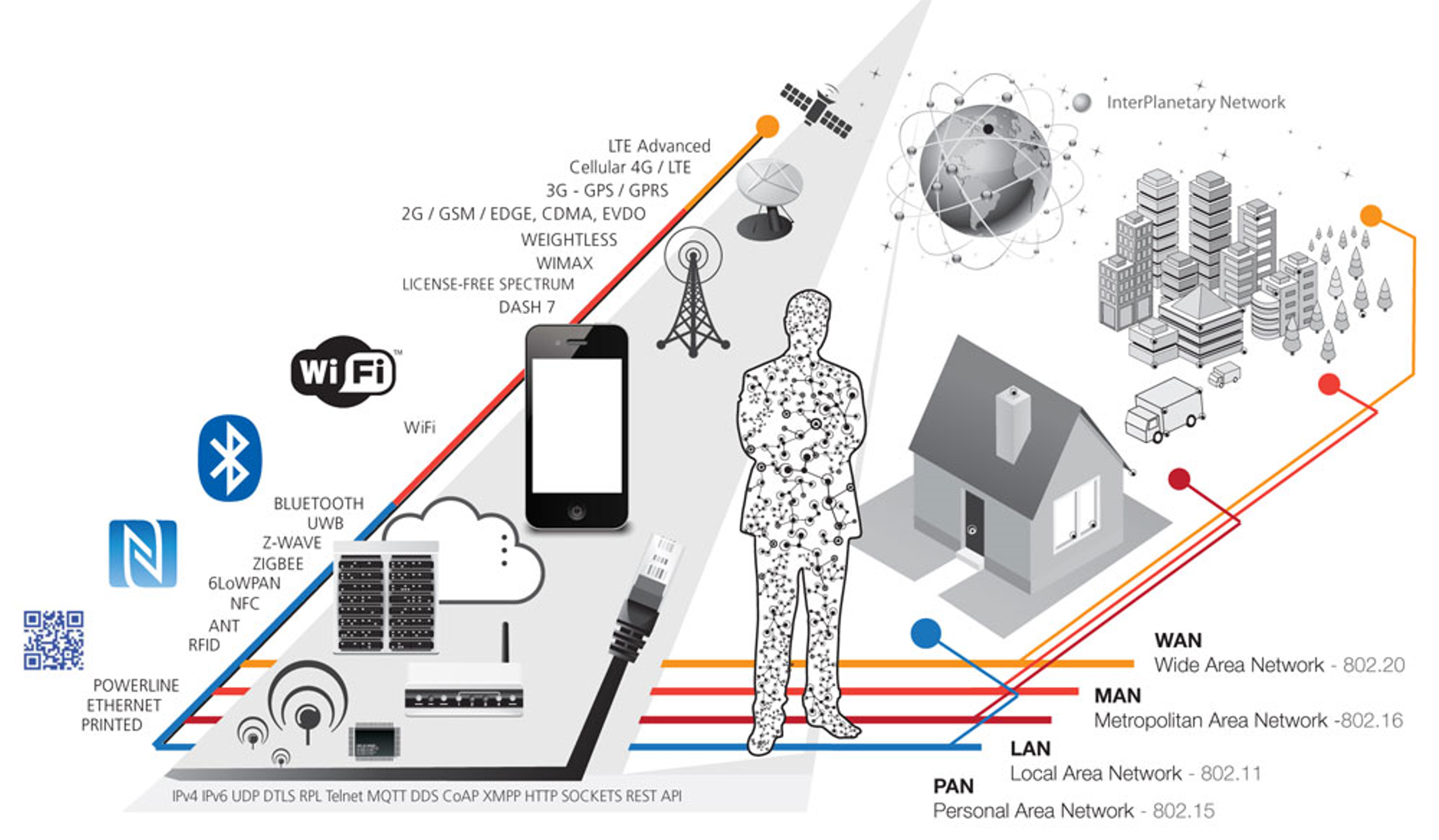
157.3 Communications Technology Overview
Communication technologies are critical to the functioning of IoT systems. They enable the connectivity and data exchange between IoT devices, ensuring that information flows smoothly from sensors and devices to data processing units and end-users.
157.3.1 Personal Area Networks (PAN)
- Examples: Bluetooth, Zigbee, NFC, Z-Wave
- Range: Short (up to 10 meters)
- Data Rate: Low to moderate
- Power Consumption: Low
- Applications: Wearable devices, home automation, personal health monitoring
157.3.2 Local Area Networks (LAN)
- Examples: Wi-Fi, Ethernet, Powerline communication
- Range: Medium (up to 100 meters)
- Data Rate: High
- Power Consumption: Moderate to high
- Applications: Smart homes, offices, building automation
157.3.3 Metropolitan Area Networks (MAN)
- Examples: LoRaWAN, NB-IoT
- Range: Wide (up to several kilometers)
- Data Rate: Low to moderate
- Power Consumption: Low to moderate
- Applications: Smart cities, industrial IoT, agriculture
157.3.4 Wide Area Networks (WAN)
- Examples: Cellular (2G, 3G, 4G, LTE), Satellite
- Range: Very wide (up to thousands of kilometers)
- Data Rate: High
- Power Consumption: High
- Applications: Connected vehicles, remote monitoring, global asset tracking
157.3.5 Choosing the Right Technology
When selecting a communication technology for an IoT application, several factors must be considered:
- Range: The distance over which the data needs to be transmitted.
- Power Consumption: The amount of power the communication module consumes, which affects the battery life of the device.
- Data Rate: The volume of data that needs to be transmitted within a specific timeframe.
- Network Topology: The structure of the network, whether it’s a star, mesh, or point-to-point configuration.
- Cost: The cost of implementing and maintaining the communication technology.
157.4 Communication Technologies and Application Domains
Selecting the right communication technology for a specific IoT vertical is crucial to ensure optimal performance, efficiency, and cost-effectiveness. The following table outlines the applicability of various communication technologies across key IoT verticals.
| Key IoT Verticals | LPWAN (Star) | Cellular (Star) | Zigbee (Mostly Mesh) | BLE (Star & Mesh) | Wi-Fi (Star & Mesh) | RFID (Point-to-point) |
|---|---|---|---|---|---|---|
| Industrial IoT | O | O | ||||
| Smart Meter | * | |||||
| Smart City | * | |||||
| Smart Building | * | O | O | |||
| Smart Home | * | * | * | O | ||
| Wearables | O | * | ||||
| Connected Car | * | |||||
| Connected Health | * | |||||
| Smart Retail | O | * | * | |||
| Logistics & Asset Tracking | O | * | * | |||
| Smart Agriculture | * |
- Legend:
- * Highly applicable
- O Moderately applicable
157.4.1 LPWAN (Low-Power Wide-Area Network)
- Highly applicable for Smart Meter, Smart City, Smart Building, and Smart Agriculture.
- Moderately applicable for Logistics & Asset Tracking.
- Description: LPWAN is ideal for applications requiring long-range communication with low power consumption. It is particularly suited for large-scale deployments in smart cities and agriculture where devices are dispersed over wide areas.
157.4.2 Cellular
- Highly applicable for Connected Car.
- Moderately applicable for Industrial IoT, Wearables, Smart Retail, and Logistics & Asset Tracking.
- Description: Cellular networks offer extensive coverage and high data rates, making them suitable for mobile and wide-area applications such as connected cars and wearables.
157.4.3 Zigbee
- Highly applicable for Smart Home and Logistics & Asset Tracking.
- Moderately applicable for Smart Building.
- Description: Zigbee’s low power consumption and mesh networking capabilities make it ideal for home automation and asset tracking within buildings.
157.4.4 Bluetooth Low Energy (BLE)
- Highly applicable for Smart Home, Wearables, Connected Health, and Smart Retail.
- Description: BLE is designed for low power consumption, making it suitable for devices that require frequent communication but need to conserve battery life, such as health monitors and wearable devices.
157.4.5 Wi-Fi
- Highly applicable for Smart Home.
- Moderately applicable for Smart Building.
- Description: Wi-Fi provides high data rates and is widely available, making it ideal for home automation and smart building applications where power consumption is less of a concern.
157.4.6 RFID
- Highly applicable for Smart Retail and Logistics & Asset Tracking.
- Moderately applicable for Industrial IoT and Smart Home.
- Description: RFID is used for point-to-point communication and is suitable for applications involving tracking and identification of items, such as in logistics and retail environments.
The choice of communication technology in IoT systems should be guided by the specific requirements of the application, such as range, power consumption, data rate, and network topology.
157.5 Universal Asynchronous Receiver-Transmitter (UART)
Universal Asynchronous Receiver-Transmitter (UART) is a fundamental hardware communication protocol used in many IoT devices for serial communication between microcontrollers and peripherals. UART enables asynchronous serial communication, meaning data is transmitted without a shared clock signal between the transmitter and receiver.
157.5.1 How UART Works
UART communication uses two wires: - TX (Transmit): Sends data from the device - RX (Receive): Receives data to the device
Both devices must agree on: - Baud rate: Speed of data transmission (e.g., 9600, 115200 bps) - Data bits: Typically 8 bits per frame - Parity: Error checking (none, even, odd) - Stop bits: End-of-frame markers (1 or 2 bits)
157.5.2 UART Frame Structure
%%{init: {'theme': 'base', 'themeVariables': { 'primaryColor': '#2C3E50', 'primaryTextColor': '#fff', 'primaryBorderColor': '#16A085', 'lineColor': '#16A085', 'secondaryColor': '#E67E22', 'tertiaryColor': '#7F8C8D'}}}%%
sequenceDiagram
    participant TX as Transmitter
    participant RX as Receiver

    Note over TX,RX: Idle State (Line HIGH)

    TX->>RX: Start Bit (LOW)<br/>Signals: New frame begins

    Note over RX: RX starts sampling<br/>at baud rate intervals

    TX->>RX: Bit 0 (LSB)
    TX->>RX: Bit 1
    TX->>RX: ...
    TX->>RX: Bit 7 (MSB)

    TX->>RX: Parity Bit (optional)<br/>Error detection

    TX->>RX: Stop Bit(s) (HIGH)<br/>Frame complete

    Note over TX,RX: Return to Idle<br/>Ready for next byte

    rect rgb(22, 160, 133, 0.1)
    Note over TX,RX: Key: No shared clock!<br/>Both must use same baud rate<br/>(e.g., 115200 bits/sec)
    end
157.5.3 Advantages of UART
- Simple two-wire interface (plus ground)
- Well-established and widely supported
- No clock signal required
- Full-duplex communication (simultaneous TX and RX)
157.5.4 Limitations of UART
- Limited to point-to-point communication
- No standardized voltage levels (RS-232, TTL, etc.)
- Maximum distance typically limited to ~15 meters
- Speed limited by baud rate agreement
UART is commonly used for: - Debugging and logging from microcontrollers - GPS module communication - Bluetooth module interfaces - Sensor data collection - Programming and configuration of IoT devices
157.6 Knowledge Check
Test your understanding of communication technologies.
157.7 Technology Comparison Reference
Quick reference table for exam and design decisions:
| Technology | Range | Power (Active) | Data Rate | Best Use Case |
|---|---|---|---|---|
| BLE | 10-30m | 10-20mW | 1-2 Mbps | Wearables, smartphones |
| Zigbee | 10-100m | 30-50mW | 250 kbps | Home automation, mesh |
| Wi-Fi | 30-100m | 200-400mW | 1-100 Mbps | High data, power available |
| LoRaWAN | 2-15km | 30-50mW | 0.3-50 kbps | Smart cities, agriculture |
| NB-IoT | 10-15km | 50-100mW | 20-200 kbps | Asset tracking, meters |
| Cellular | 1-50km | 500-2000mW | 1-100 Mbps | Connected vehicles, mobile |
Power consumption pattern: BLE < Zigbee < LoRa < NB-IoT < Wi-Fi < Cellular
Range pattern: BLE < Zigbee/Wi-Fi < LoRa/NB-IoT < Cellular
157.8 Chapter Summary
This chapter examined the communication technologies that enable IoT connectivity:
- Network Classifications: PAN (personal), LAN (local), MAN (metropolitan), and WAN (wide area) each serve different range and power requirements
- Technology Selection: Match protocol capabilities to application requirements - range, power budget, data rate, and cost
- Application Mapping: Different IoT verticals (smart home, agriculture, vehicles) align with specific communication technologies
- UART Fundamentals: Serial communication remains essential for device interfaces, debugging, and peripheral connectivity
Understanding these communication options enables informed selection when designing IoT systems.
157.9 What’s Next?
The next chapter presents decision frameworks for technology selection and explores energy management strategies for IoT deployments.