%%{init: {'theme': 'base', 'themeVariables': { 'primaryColor': '#2C3E50', 'primaryTextColor': '#fff', 'primaryBorderColor': '#16A085', 'lineColor': '#16A085', 'secondaryColor': '#E67E22', 'tertiaryColor': '#7F8C8D'}}}%%
graph TB
    Start{Hardware<br/>Requirements?}

    Start --> Power{Power<br/>Budget?}

    Power --> |Battery| MCU["Microcontroller<br/>(Arduino, ESP32)<br/>- Low power<br/>- Simple tasks<br/>- Real-time"]
    Power --> |Mains| SBC_Check{Complex<br/>Processing?}

    SBC_Check --> |Yes| SBC["Single-Board Computer<br/>(Raspberry Pi)<br/>- Linux OS<br/>- Computer vision<br/>- AI/ML"]
    SBC_Check --> |No| MCU_Power["Microcontroller<br/>(Higher performance)"]

    style MCU fill:#16A085,stroke:#2C3E50,color:#fff
    style SBC fill:#E67E22,stroke:#2C3E50,color:#fff
    style MCU_Power fill:#2C3E50,stroke:#16A085,color:#fff
197 Hardware Platform Selection
197.1 Learning Objectives
By the end of this chapter, you will be able to:
- Compare Hardware Platforms: Evaluate microcontrollers vs single-board computers for IoT applications
- Apply Selection Criteria: Use power, cost, and complexity factors to choose appropriate hardware
- Implement Device Selection Logic: Build automated systems for matching requirements to hardware
- Calculate Power Budgets: Determine battery life and energy requirements for IoT deployments
197.2 Prerequisites
Before diving into this chapter, you should be familiar with:
- Edge, Fog, and Cloud Overview: Understanding the differences between microcontrollers (edge nodes), single-board computers (fog nodes), and cloud platforms helps inform hardware selection decisions based on processing requirements
- Wireless Sensor Networks: Familiarity with sensor node characteristics, energy constraints, and network requirements provides context for choosing low-power MCUs versus more capable processors
NoteCross-Hub Connections
Enhance your learning by exploring related resources:
- Simulations Hub: Try interactive tools for protocol comparison, power budget calculations, and ADC resolution analysis
- Videos Hub: Watch development environment setup tutorials, Arduino programming guides, and Raspberry Pi configuration videos
- Knowledge Gaps Hub: Clarify common misconceptions about MCU vs SBC selection and power budget calculations
TipFor Beginners: IoT Development Platforms
Imagine building a smart home project. You need to choose between different “brains” for your devices - like choosing between a basic calculator (microcontroller) or a laptop (single-board computer). The right choice depends on what you’re trying to do.
Everyday Analogy: Think of IoT development platforms as different types of vehicles. An Arduino (microcontroller) is like a bicycle - simple, energy-efficient, perfect for basic tasks like reading a temperature sensor. A Raspberry Pi (single-board computer) is like a car - more powerful, can run complex applications, but needs more energy. Your choice depends on the journey ahead.
| Term | Simple Explanation |
|---|---|
| Microcontroller (MCU) | A tiny computer on a chip, runs one program at a time (like Arduino, ESP32) |
| Single-Board Computer (SBC) | A complete computer on one board that runs an OS like Linux (like Raspberry Pi) |
| ADC (Analog-to-Digital Converter) | Converts real-world signals (temperature, light) into digital numbers the computer understands |
| GPIO Pins | General-purpose input/output connections where you attach sensors and actuators |
| Power Budget | How much battery life you have - every feature uses energy |
Why This Matters for IoT: A temperature sensor reading every minute needs only a $5 Arduino running on batteries for years. But a security camera analyzing video for face detection needs a $50 Raspberry Pi with constant power. Choosing the wrong platform wastes money, power, or performance - understanding the trade-offs is crucial for successful IoT projects.
WarningCommon Misconception: “More Processing Power is Always Better”
Misconception: Many beginners assume that choosing the most powerful processor (like Raspberry Pi) is always the best choice for IoT projects.
Reality: The optimal hardware depends on your specific requirements - power consumption, cost, and complexity matter as much as processing capability.
Why This Matters:
- Battery Life Impact: A Raspberry Pi consumes 2.5W (500mA @ 5V), while an ESP32 in deep sleep uses only 10μA - that’s a 250,000× difference! For battery-powered sensors, an MCU lasting 5 years beats a powerful SBC lasting 5 days.
- Cost at Scale: Deploying 1,000 door sensors with $5 ESP32s costs $5,000. Using $50 Raspberry Pis costs $50,000 - a 10× difference that makes or breaks commercial IoT deployments.
- Unnecessary Complexity: Running Linux on a sensor that just reads temperature every minute adds boot time, security vulnerabilities, and maintenance overhead with no benefit.
Example: A smart agriculture project tried using Raspberry Pis for soil moisture sensors. Battery life was only 3 days. Switching to ESP32 MCUs extended battery life to 2+ years and reduced per-node cost from $50 to $8 - same functionality, drastically better economics.
Rule of Thumb: Use MCUs (Arduino, ESP32) for simple, battery-powered sensors and actuators. Use SBCs (Raspberry Pi) only when you need an operating system, computer vision, AI/ML, or serve as a gateway aggregating data from multiple sensors.
CautionPitfall: Testing Only on Development Board USB Power
The Mistake: Developers test their IoT firmware exclusively with the development board powered via USB, then deploy to battery-powered production devices expecting identical behavior.
Why It Happens: USB provides stable 5V at 500mA+ regardless of load. During development, brownout resets, voltage sags during Wi-Fi transmission, and low-battery conditions never occur. The code “works perfectly” in the lab.
The Fix: Test with actual deployment power source early and often. Use a variable power supply to simulate battery voltage drop (4.2V fresh to 3.0V depleted for LiPo). Add brownout detection handlers in firmware. Test Wi-Fi/BLE transmission at minimum battery voltage - radios often fail before the MCU does. Include voltage monitoring in telemetry to catch field issues before complete failure.
NoteKey Takeaway
In one sentence: Match the development platform to your power and complexity needs - a $5 ESP32 running for years on batteries beats a $50 Raspberry Pi that dies in days, unless you actually need Linux.
Remember this: For 1,000 battery sensors, choosing ESP32 over Raspberry Pi saves $45,000 in hardware and potentially millions in battery replacement labor over 5 years.
197.3 Device Selection Decision Tree
197.4 Platform Evolution by Project Phase
NoteAlternative View: Platform Selection by Project Phase
This variant shows how development platform choices evolve from prototype to production, helping practitioners understand when to upgrade hardware.
%%{init: {'theme': 'base', 'themeVariables': { 'primaryColor': '#2C3E50', 'primaryTextColor': '#fff', 'primaryBorderColor': '#16A085', 'lineColor': '#16A085', 'secondaryColor': '#E67E22', 'tertiaryColor': '#7F8C8D', 'fontSize': '11px'}}}%%
graph LR
    subgraph Proto["PROTOTYPE<br/>1-10 units"]
        P1["Arduino/ESP32<br/>DevKit<br/>$5-15/unit"]
        P2["Breadboard<br/>wiring<br/>Minutes to modify"]
        P3["USB powered<br/>No battery"]
    end

    subgraph Pilot["PILOT<br/>10-100 units"]
        L1["Custom shields<br/>ESP32-WROOM<br/>$3-8/unit"]
        L2["Enclosure design<br/>3D printed"]
        L3["Battery test<br/>Sleep modes"]
    end

    subgraph Prod["PRODUCTION<br/>1000+ units"]
        R1["Custom PCB<br/>MCU direct<br/>$1-3/unit"]
        R2["Injection mold<br/>enclosures"]
        R3["Certified<br/>FCC/CE"]
    end

    Proto -->|"Validate concept"| Pilot
    Pilot -->|"Scale economics"| Prod

    style P1 fill:#16A085,stroke:#2C3E50,color:#fff
    style L1 fill:#E67E22,stroke:#2C3E50,color:#fff
    style R1 fill:#2C3E50,stroke:#16A085,color:#fff
197.5 Hands-On Lab: IoT Device Selection for Smart Home
Objective: Select appropriate processors for various smart home devices.
Scenario: You are designing a smart home system with the following devices:
- Door Sensor: Detects door open/close, sends alert via Wi-Fi
- Requirements: Very low power (battery), Wi-Fi, simple logic, 5 GPIO pins
- Budget: $5, 50mW average power
- Smart Thermostat: Controls HVAC, displays temperature, connects to cloud
- Requirements: Display interface, Wi-Fi, temperature sensing, moderate processing
- Budget: $20, 500mW power
- Security Camera: Video processing, motion detection, cloud storage
- Requirements: Video encoding, AI for motion detection, Ethernet/Wi-Fi
- Budget: $50, 2W power
Tasks:
- For each device, define an
IoTApplicationProfile - Use the
IoTDeviceSelectorto find suitable processors - Compare the top 2 candidates for each device
- Calculate total system cost
- Identify any common processors that could be reused
Deliverables: - Selection justification for each device - Cost comparison table - Power budget spreadsheet
197.6 Hands-On Lab: Power Budget Optimization
Objective: Optimize power consumption for battery-operated IoT device.
Real-World Context: This lab is based on actual deployments by The Things Network (TTN) and Helium Network where environmental sensor nodes must operate for 2-5 years on battery power. Real deployments in smart cities (Barcelona, Amsterdam) and agriculture (California vineyards, Australian farms) demonstrate these exact power optimization techniques save millions in maintenance costs by eliminating frequent battery replacements.
Scenario: Environmental sensor node powered by 2x AA batteries (3000mAh @ 3.0V).
Components: - ESP32 MCU: 160mA active, 10μA sleep - BME280 sensor: 3.6mA active, 0.1μA sleep - LoRa radio: 120mA TX, 15mA RX, 1μA sleep - Status LED: 20mA when on
Operating modes: - Mode 1 (Always-on): MCU always active, sensor reads every second, transmit every 10 seconds - Mode 2 (Power-saving): MCU deep sleep, wake every 5 minutes, sensor read + transmit, LED blinks on transmit - Mode 3 (Ultra-low-power): Wake every 30 minutes, quick sensor read, transmit, no LED
Tasks:
Model all three modes using
PowerBudgetCalculatorCalculate for each mode:
- Average current consumption
- Battery lifetime (days/months)
- Data transmission frequency
Create power profile showing:
- Component breakdown (pie chart)
- Timeline of current consumption over typical day
Design hybrid mode:
- Normal operation: Mode 2
- Alert condition: Switch to Mode 1 for 1 hour
- Calculate impact on battery life
Solar panel sizing:
- What panel size maintains battery charge in Mode 2?
- Assume 4 hours effective sunlight per day
Deliverables: - Power budget table for all modes - Battery lifetime comparison - Solar panel recommendation - Operational mode recommendation
197.7 Visual Reference Gallery
NoteVisual: Basic Sensor Node Components
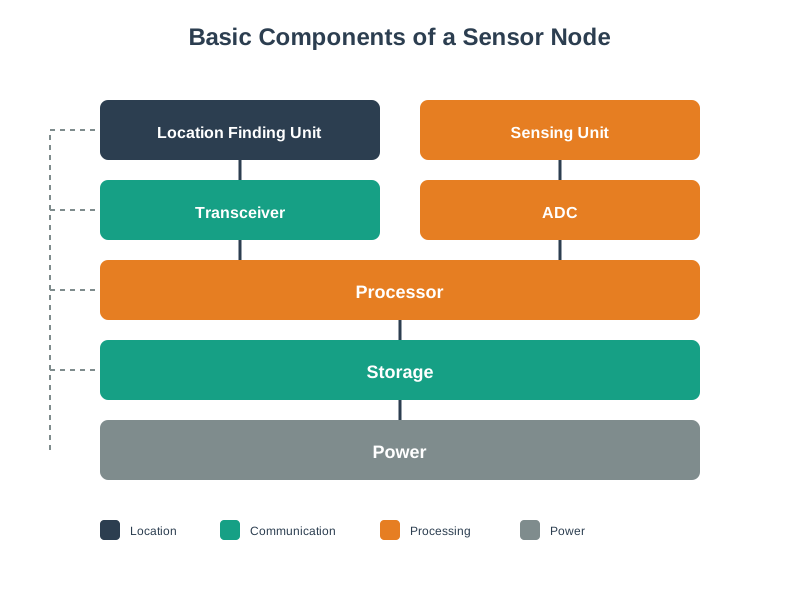
This visualization shows the essential components that make up an IoT sensor node, providing context for hardware selection decisions covered in this chapter.
197.8 Summary
This chapter explored hardware platform selection for IoT systems:
- Microcontrollers (MCU): Arduino, ESP32, and similar platforms excel for battery-powered, single-purpose devices with simple logic and real-time requirements. Deep sleep modes enable multi-year battery life.
- Single-Board Computers (SBC): Raspberry Pi and similar platforms are appropriate when you need a full operating system, computer vision, AI/ML, or gateway functionality aggregating multiple sensors.
- Selection Criteria: Power budget, cost at scale, processing requirements, and connectivity needs drive hardware decisions. A $5 ESP32 often outperforms a $50 Raspberry Pi for simple sensor applications.
- Project Phase Evolution: Hardware choices evolve from development boards (prototyping) through custom shields (pilot) to custom PCBs (production) as projects mature and scale requirements increase.
- Power Budget Planning: Understanding component power consumption across active, transmit, and sleep states is critical for battery-powered deployments.
NoteRelated Chapters
Deep Dives: - Prototyping Hardware - Arduino, ESP32, Raspberry Pi guides - Specialized Kits - Development boards comparison - Energy-Aware Design - Power budget planning
Comparisons: - Edge-Fog-Cloud Overview - MCU vs SBC vs cloud processing - Sensor Fundamentals - ADC and sensor interfaces
197.9 What’s Next
Having covered hardware platform selection, the next chapter examines Serial Communication Protocols, exploring I2C, SPI, and UART interfaces for connecting sensors and peripherals to your chosen hardware platform.