%% fig-alt: "SaaS IoT platform architecture showing IoT devices sending data to SaaS platform while developers configure via web UI"
%%{init: {'theme': 'base', 'themeVariables': { 'primaryColor': '#2C3E50', 'primaryTextColor': '#fff', 'primaryBorderColor': '#16A085', 'lineColor': '#16A085', 'secondaryColor': '#E67E22', 'tertiaryColor': '#7F8C8D', 'fontSize': '14px'}}}%%
graph TB
    User[IoT Developer]
    SaaS[SaaS Platform<br/>ThingSpeak/Losant]
    Devices[IoT Devices]

    Devices -->|Sensor Data| SaaS
    User -->|Configure via Web UI| SaaS
    SaaS -->|Dashboards & Alerts| User

    style User fill:#E67E22,stroke:#16A085,color:#fff
    style SaaS fill:#16A085,stroke:#2C3E50,color:#fff
    style Devices fill:#2C3E50,stroke:#16A085,color:#fff
271 Cloud Service Models for IoT
271.1 Learning Objectives
By the end of this chapter, you will be able to:
- Distinguish Service Models: Compare IaaS, PaaS, and SaaS and their IoT applications
- Select Appropriate Models: Choose the right service model based on team capabilities and requirements
- Understand Shared Responsibility: Know what you manage vs. what the provider manages in each model
- Evaluate Trade-offs: Assess serverless vs. container-based and monolithic vs. microservices architectures
271.2 Prerequisites
Before diving into this chapter, you should be familiar with:
- Cloud Computing Fundamentals: Understanding of NIST cloud model and essential characteristics
- Networking Basics: Knowledge of network protocols for cloud connectivity
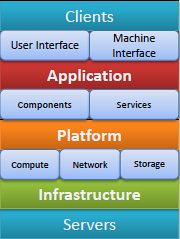
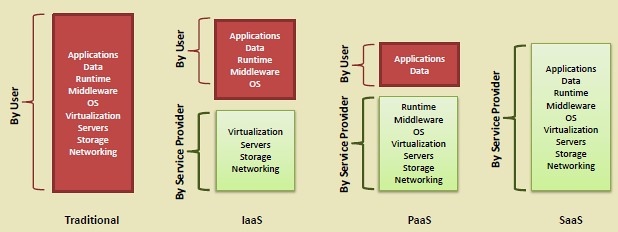
271.3 The Three Service Models (Overview)
Think of cloud service models like pizza:
| Service Model | Pizza Analogy | What You Manage |
|---|---|---|
| IaaS (Infrastructure) | Make at home (buy ingredients, oven) | You manage: OS, apps, data |
| PaaS (Platform) | Take-and-bake (pre-made, your oven) | You manage: Just your app |
| SaaS (Software) | Delivery (ready to eat) | You manage: Just your data |
IoT Examples:
- IaaS: Rent virtual servers (EC2) to run your own IoT platform
- PaaS: Use AWS IoT Core - they handle servers, you handle device code
- SaaS: Use a ready-made dashboard (Ubidots) - just connect your sensors
271.4 Pitfall: Choosing IaaS When PaaS Would Suffice
CautionCommon Pitfall: Over-Engineering with IaaS
The Mistake: Teams default to IaaS (renting VMs and managing everything) for their IoT platform because it feels more “professional” or gives more control, when a managed PaaS offering would be faster, cheaper, and more reliable.
Why It Happens: Engineers enjoy building infrastructure and underestimate the ongoing maintenance burden. Management assumes “owning” servers means better security. The true cost of patching, scaling, and monitoring custom infrastructure is not calculated upfront.
The Fix: Start with PaaS (AWS IoT Core, Azure IoT Hub) unless you have a specific technical requirement that PaaS cannot meet. Common legitimate IaaS reasons include: custom protocols not supported by PaaS, regulatory requirements for data residency on specific hardware, or extreme cost optimization at massive scale (more than 1 million devices). For prototypes and production up to 100,000 devices, PaaS typically saves 50-70% in total cost of ownership.
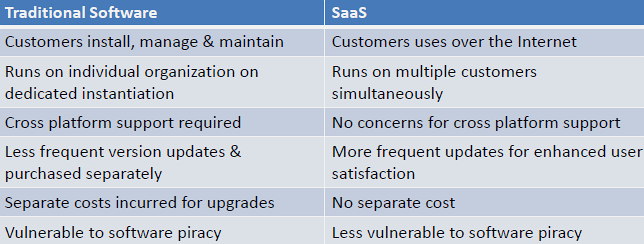
271.5 Software as a Service (SaaS)
Definition: Complete applications delivered over the internet, managed entirely by the provider.
Characteristics:
- No software installation required
- Accessed via web browser or thin client
- Automatic updates and patches
- Multi-tenant architecture
- Subscription-based pricing
IoT-Specific SaaS Examples:
- ThingSpeak: IoT analytics platform
- Losant: IoT application enablement
- Particle: IoT device management
- Ubidots: IoT dashboards and alerts
271.6 Serverless vs. Container-Based IoT Backend
WarningTradeoff: Serverless (Lambda/Functions) vs Container-Based
Option A: Serverless Functions - Event-driven compute that scales automatically to zero. Pay only for execution time. No infrastructure management.
Option B: Container-Based (ECS/Kubernetes) - Long-running containers with predictable capacity. Better for sustained workloads but requires capacity planning.
Decision Factors:
Choose Serverless when: IoT messages arrive in unpredictable bursts, cold start latency of 100-500ms is acceptable, individual function execution completes in under 15 minutes, or team lacks container orchestration expertise.
Choose Containers when: Sustained high throughput exceeds 100 requests/second continuously, cold start latency must be under 50ms, stateful processing requires persistent connections, or workloads run longer than 15 minutes.
Cost crossover point: At 1-3M requests/month with average 200ms execution, costs are roughly equivalent. Below this, serverless wins. Above 10M requests/month, containers are 40-60% cheaper.
TipMinimum Viable Understanding: Event-Driven Architecture
Core Concept: Event-driven architecture processes IoT data as discrete events (sensor reading, state change, threshold breach) that trigger downstream actions, rather than continuously polling.
Why It Matters: IoT systems generate data unpredictably - a motion sensor may fire 100 times per minute during activity then remain silent for hours. Event-driven patterns handle this naturally, scaling to zero during quiet periods.
Key Takeaway: Use serverless functions for event-driven IoT when messages arrive in bursts, cold start latency under 500ms is acceptable, and monthly volume is under 3M events. Switch to containers for sustained throughput or sub-50ms latency.
TipFor Kids: Meet the Sensor Squad - Event Edition
Event-driven architecture is like having friends who only speak up when something important happens!
271.6.1 The Sensor Squad Adventure: The Quiet Heroes
Once upon a time in Smart Home Town, the Sensor Squad had a big problem. Thermo the temperature sensor, Lumi the light sensor, Speedy the motion detector, and Droplet the humidity sensor were ALL talking at the same time, every single second!
“The temperature is 72 degrees!” shouted Thermo. “The light is bright!” yelled Lumi. “Nobody is moving!” announced Speedy.
They did this EVERY. SINGLE. SECOND. The Smart Home Computer was SO tired!
That’s when wise old Gatekeeper Gloria had an idea. “What if you only speak up when something IMPORTANT happens?”
Now Thermo stays quiet until the temperature changes by more than 2 degrees. Speedy waits until someone actually walks by. The Computer could rest most of the time, then spring into action exactly when needed!
271.6.2 Key Words for Kids
| Word | What It Means |
|---|---|
| Event | Something important that happens, like a door opening |
| Trigger | What makes something start, like motion triggering a light |
| Idle | Resting quietly when nothing important is happening |
271.7 Platform as a Service (PaaS)
Definition: Development and deployment platform for building cloud applications without managing underlying infrastructure.
Characteristics:
- Operating system and middleware provided
- Development tools and frameworks
- Automated scaling and load balancing
- Integrated CI/CD pipelines
- Database and storage services
IoT PaaS Examples:
- AWS IoT Core: End-to-end IoT platform
- Microsoft Azure IoT Hub: PaaS for IoT solutions
- IBM Watson IoT Platform: AI-enabled IoT
- AWS IoT Greengrass: Edge computing platform
%% fig-alt: "PaaS IoT development workflow showing developer deploying code to PaaS platform which auto-scales the IoT application"
%%{init: {'theme': 'base', 'themeVariables': { 'primaryColor': '#2C3E50', 'primaryTextColor': '#fff', 'primaryBorderColor': '#16A085', 'lineColor': '#16A085', 'secondaryColor': '#E67E22', 'tertiaryColor': '#7F8C8D', 'fontSize': '14px'}}}%%
graph TB
    Dev[Developer]
    PaaS[PaaS Platform<br/>AWS IoT / Azure IoT]
    App[IoT Application]
    Devices[IoT Devices]

    Dev -->|Deploy Code| PaaS
    PaaS -->|Auto-scales| App
    Devices <-->|MQTT| App

    style Dev fill:#E67E22,stroke:#16A085,color:#fff
    style PaaS fill:#16A085,stroke:#2C3E50,color:#fff
    style App fill:#7F8C8D,stroke:#16A085,color:#fff
    style Devices fill:#2C3E50,stroke:#16A085,color:#fff
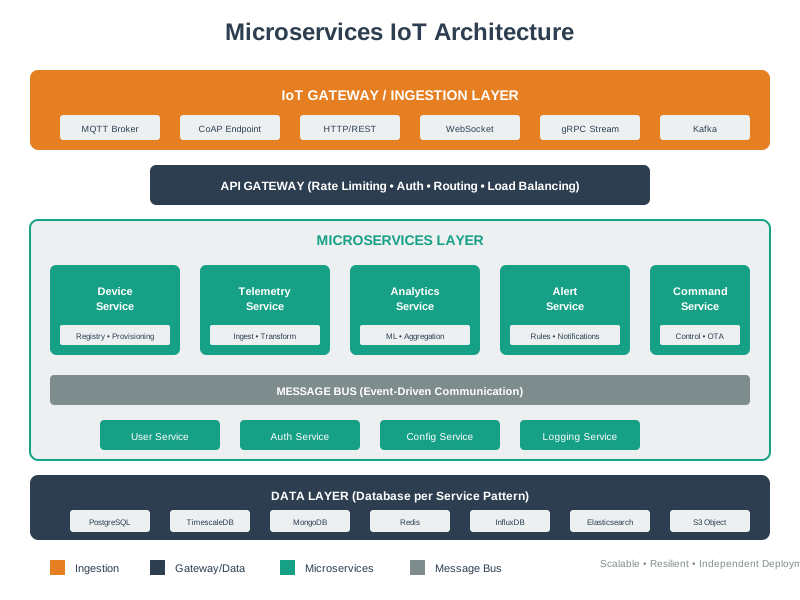
271.8 Monolithic vs. Microservices IoT Backend
WarningTradeoff: Monolithic vs Microservices Architecture
Option A (Monolithic): Single deployable unit containing device management, data ingestion, analytics, and alerting. Simpler deployment, easier debugging, lower operational overhead.
Option B (Microservices): Independent services for each function, communicating via API gateway and message queues. Independent scaling, technology flexibility, fault isolation.
Decision Factors:
Choose Monolithic when: Team size is under 10 developers, device count is under 50,000, release frequency is monthly or less, or time-to-market is critical (monolith ships 3-6 months faster).
Choose Microservices when: Multiple teams (3+) need independent deployment cycles, different services have vastly different scaling needs, or system must handle 100,000+ devices with varying load patterns.
Migration path: Start monolithic for MVP (3-6 months faster). Refactor to microservices when you hit team coordination bottlenecks or scaling limits.
TipFor Kids: Meet the Sensor Squad - Microservices Edition
Microservices is like having a team where each friend has ONE special job they do really well!
271.8.1 The Sensor Squad Adventure: The Super Specialist Team
At first, Thermo the temperature sensor tried to do EVERYTHING - measure temperature, send alerts, save data, AND make reports. Poor Thermo was exhausted!
Then wise old Gateway Greg had an idea. “What if we split up the jobs?”
So they formed the Microservices Team: - Thermo ONLY measures temperature - Alert Annie ONLY sends warnings - Data Dave ONLY saves information - Report Ruby ONLY makes charts
Everyone does ONE thing really well, and if Alert Annie gets sick, the others keep working!
271.8.2 Try This at Home!
Get your family to help with a chore using the microservices way! Instead of one person doing ALL the dishes (wash, dry, put away), split it up: one person ONLY washes, one ONLY dries, one ONLY puts away. Notice how it goes faster?
271.9 Infrastructure as a Service (IaaS)
Definition: Virtualized computing resources over the internet, providing fundamental infrastructure components.
Characteristics:
- Virtual machines, storage, networks
- Full control over OS and applications
- Pay-per-use for compute/storage/bandwidth
- Programmatic resource provisioning
- Geographic distribution options
IoT IaaS Use Cases:
- Custom IoT platform deployment
- High-performance data processing
- Large-scale data lake storage
- Network infrastructure for IoT gateways
%% fig-alt: "IaaS infrastructure provisioning showing admin configuring virtual machines and storage"
%%{init: {'theme': 'base', 'themeVariables': { 'primaryColor': '#2C3E50', 'primaryTextColor': '#fff', 'primaryBorderColor': '#16A085', 'lineColor': '#16A085', 'secondaryColor': '#E67E22', 'tertiaryColor': '#7F8C8D', 'fontSize': '14px'}}}%%
graph TB
    User[System Admin]
    IaaS[IaaS Provider<br/>AWS EC2 / Azure VMs]
    VM1[Virtual Machine 1<br/>Custom IoT Platform]
    VM2[Virtual Machine 2<br/>Database Server]
    Storage[Object Storage<br/>S3/Azure Blob]

    User -->|Provision & Configure| IaaS
    IaaS --> VM1
    IaaS --> VM2
    IaaS --> Storage

    style User fill:#E67E22,stroke:#16A085,color:#fff
    style IaaS fill:#16A085,stroke:#2C3E50,color:#fff
    style VM1 fill:#2C3E50,stroke:#16A085,color:#fff
    style VM2 fill:#2C3E50,stroke:#16A085,color:#fff
    style Storage fill:#7F8C8D,stroke:#16A085,color:#fff
WarningTradeoff: IaaS vs PaaS for IoT Platform Deployment
Option A: IaaS (EC2, Azure VMs) - Rent virtual machines and manage OS, runtime, scaling, and security yourself. Full control but high operational burden.
Option B: PaaS (AWS IoT Core, Azure IoT Hub) - Managed platform handles infrastructure while you focus on application code. Less control but faster deployment.
Decision Factors:
Choose IaaS when: Custom protocols not supported by PaaS are required, regulatory requirements mandate specific OS configurations, or extreme cost optimization at scale (1M+ devices) justifies engineering investment.
Choose PaaS when: Time-to-market is critical (weeks vs months), team lacks infrastructure expertise, device count is under 100,000, or automatic scaling and security patching are valued over customization.
Default recommendation: Start with PaaS. Migrate to IaaS only when you hit specific platform limitations.
271.10 Service Model Selection Decision Tree
%%{init: {'theme': 'base', 'themeVariables': { 'primaryColor': '#2C3E50', 'primaryTextColor': '#fff', 'primaryBorderColor': '#16A085', 'lineColor': '#16A085', 'secondaryColor': '#E67E22', 'tertiaryColor': '#7F8C8D', 'fontSize': '14px'}}}%%
flowchart TB
    Start([IoT Cloud<br/>Service Selection]) --> Q1{Do you have<br/>DevOps team?}

    Q1 -->|Yes| Q2{Need custom<br/>OS/networking?}
    Q1 -->|No| Q3{Have developers<br/>to write code?}

    Q2 -->|Yes| IaaS["IaaS: Full Control<br/>AWS EC2 + IoT Core<br/>You manage: OS, runtime,<br/>scaling, security<br/>Cost: $100-500/month<br/>Time: 2-4 weeks setup"]

    Q2 -->|No| PaaS["PaaS: Managed Platform<br/>AWS IoT Core + Lambda<br/>You manage: Just your code<br/>Cost: $50-200/month<br/>Time: 1-2 weeks setup"]

    Q3 -->|Yes| PaaS
    Q3 -->|No| SaaS["SaaS: Ready-Made<br/>ThingSpeak, Losant<br/>You manage: Config only<br/>Cost: $20-100/month<br/>Time: 1-2 days setup"]

    style IaaS fill:#2C3E50,stroke:#16A085,color:#fff
    style PaaS fill:#16A085,stroke:#2C3E50,color:#fff
    style SaaS fill:#E67E22,stroke:#2C3E50,color:#fff
271.12 Summary
This chapter covered cloud service models for IoT:
- SaaS: Fastest deployment, least control - ideal for dashboards and analytics
- PaaS: Balance of speed and customization - ideal for custom IoT applications
- IaaS: Maximum control, most management - ideal for custom infrastructure
- Serverless vs. Containers: Choose based on traffic patterns and latency requirements
- Monolithic vs. Microservices: Start simple, evolve when needed
271.13 What’s Next?
Now that you understand service models, continue with:
- Cloud Deployment Models - Learn about public, private, and hybrid clouds
- Cloud Platforms and Message Queues - Compare AWS, Azure, and messaging technologies