%% fig-alt: "Diagram showing IoT architecture components and their relationships with data flow and processing hierarchy."
%%{init: {'theme': 'base', 'themeVariables': { 'primaryColor': '#2C3E50', 'primaryTextColor': '#fff', 'primaryBorderColor': '#16A085', 'lineColor': '#16A085', 'secondaryColor': '#E67E22', 'tertiaryColor': '#7F8C8D'}}}%%

graph TB
    Participants[Participants<br/>Mobile Devices] -->|Collect Data| App[Sensing<br/>Application]
    App -->|Geo-tagged<br/>Timestamped| Server[Server<br/>Aggregation]

    Server --> Validate[Data<br/>Validation]
    Validate --> Storage[Data<br/>Storage]
    Storage --> Analysis[Analytics &<br/>Visualization]

    Analysis -->|Insights| Community[Community<br/>Access]
    Analysis -->|Alerts| Users[User<br/>Notifications]

    style Participants fill:#16A085,stroke:#2C3E50,color:#fff
    style App fill:#16A085,stroke:#2C3E50,color:#fff
    style Server fill:#2C3E50,stroke:#16A085,color:#fff
    style Validate fill:#E67E22,stroke:#2C3E50,color:#fff
    style Analysis fill:#2C3E50,stroke:#16A085,color:#fff
426 Participatory Sensing: Platforms and Applications
426.1 Learning Objectives
By the end of this chapter, you will be able to:
- Design Participatory Platforms: Architect mobile sensing systems with data validation and community access
- Implement Data Verification: Apply cross-validation and geo-tagging for authentic crowdsourced data
- Build Environmental Monitoring: Deploy citizen science applications for air quality, noise, and water monitoring
- Create Urban Sensing Apps: Design infrastructure reporting systems like FixMyStreet for civic engagement
426.2 Prerequisites
Before diving into this chapter, you should be familiar with:
- Human-Centric Sensing: Roles and Paradigms: Understanding of human roles as targets, operators, and data sources, plus the distinction between participatory and opportunistic sensing
- Mobile Phones as Sensors: Knowledge of smartphone sensor capabilities (GPS, accelerometer, microphone, camera) and mobile sensing constraints
- Networking Basics: Familiarity with networking fundamentals for understanding data upload and synchronization
TipFor Beginners: What is Participatory Sensing?
Imagine thousands of citizens walking around a city, each carrying a smartphone that can measure noise levels, take photos, and record their location. Participatory sensing harnesses this collective power - ordinary people become data collectors for scientific and civic purposes.
The FixMyStreet Example:
Think about potholes on city streets: 1. A citizen sees a pothole while walking 2. They open the FixMyStreet app on their phone 3. They take a photo of the pothole 4. The app automatically records GPS coordinates and timestamp 5. They submit the report to the city 6. Multiple citizens report the same pothole, confirming it’s real 7. City dispatches repair crew to fix highest-priority issues 8. Original reporters get notification when fixed
Why It Works Better Than Traditional Methods:
| Traditional Approach | Participatory Approach |
|---|---|
| City inspectors drive set routes | Citizens everywhere, all the time |
| Limited coverage | Complete city coverage |
| Expensive ($50/hour/inspector) | Nearly free (volunteers) |
| Weekly updates | Real-time reports |
| No photos/evidence | Photos + exact location |
Real Applications You Might Use: - Waze: Traffic and road hazard reports - iNaturalist: Plant and animal identification - NoiseTube: Noise pollution mapping - PurpleAir: Air quality monitoring with citizen sensors - OpenStreetMap: Community-built maps
The Key Insight: Billions of smartphones carried by billions of people represent the largest sensor network ever deployed - we just need to build the right apps to harness it.
426.3 Participatory Sensing
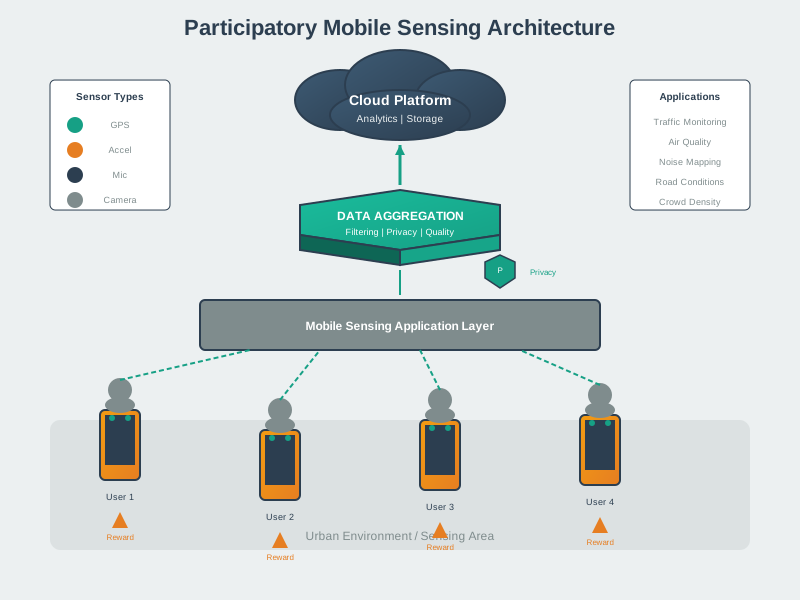
Participatory sensing, proposed by Burke et al. in 2006, is a distributed sensing paradigm where individuals use their mobile devices to collect and share data about their surroundings.
426.3.1 Core Principles
1. Democratic Data Collection - Common people contribute to data collection - Not limited to expert scientists - Leverages crowd intelligence
2. Data Sharing and Access - Collected data is accessible to community - Promotes transparency and collaboration - Enables collective knowledge building
3. Authenticity and Verification - Geo-tagging provides spatial context - Timestamps provide temporal context - Multiple reports can cross-validate
426.3.2 Architecture
Participatory sensing architecture workflow diagram: Linear flow from participants to community: Participants with mobile devices actively collect data through sensing application (smartphone sensors, cameras), app geo-tags and timestamps submissions ensuring spatial and temporal context, server performs aggregation combining multiple reports, validation layer cross-checks data quality and filters anomalies, data storage preserves historical records, analytics and visualization platform processes aggregated data, outputs split to community access providing public insights and user notifications sending alerts to participants completing feedback loop for democratic environmental and urban monitoring.
426.3.3 Platform Components
A complete participatory sensing platform requires several integrated components:
1. Mobile Application Layer - Sensor access (GPS, camera, microphone, accelerometer) - Local data preprocessing and filtering - Privacy controls and user consent management - Offline data caching for poor connectivity - Background sensing capabilities
2. Data Collection Layer - Secure data transmission (HTTPS/TLS) - Batch upload optimization - Data format standardization (JSON/Protocol Buffers) - Metadata enrichment (device type, OS version) - Rate limiting and spam prevention
3. Server Processing Layer - Data ingestion and parsing - Quality validation and anomaly detection - Spatial clustering and de-duplication - Cross-validation with reference data - Multi-source data fusion
4. Analytics and Visualization Layer - Real-time dashboards and maps - Historical trend analysis - Anomaly alerting - API for third-party integration - Open data export formats
%% fig-alt: "Four-layer participatory sensing platform architecture showing mobile app layer with sensor access and privacy controls, data collection layer with secure transmission and batching, server processing layer with validation and clustering, and analytics layer with dashboards and APIs."
%%{init: {'theme': 'base', 'themeVariables': { 'primaryColor': '#2C3E50', 'primaryTextColor': '#fff', 'primaryBorderColor': '#16A085', 'lineColor': '#16A085', 'secondaryColor': '#E67E22', 'tertiaryColor': '#7F8C8D'}}}%%

graph TB
    subgraph Mobile["Mobile Application Layer"]
        Sensors[Sensor Access<br/>GPS, Camera, Mic]
        Local[Local Processing<br/>Filtering]
        Privacy[Privacy Controls<br/>Consent]
        Cache[Offline Cache<br/>Sync Queue]
    end

    subgraph Collection["Data Collection Layer"]
        Secure[HTTPS/TLS<br/>Transmission]
        Batch[Batch Upload<br/>Optimization]
        Format[JSON/Protobuf<br/>Standardization]
        Meta[Metadata<br/>Enrichment]
    end

    subgraph Server["Server Processing Layer"]
        Ingest[Data Ingestion<br/>Parsing]
        Quality[Quality Validation<br/>Anomaly Detection]
        Cluster[Spatial Clustering<br/>De-duplication]
        Fusion[Multi-source<br/>Data Fusion]
    end

    subgraph Analytics["Analytics & Visualization"]
        Dashboard[Real-time<br/>Dashboards]
        Trends[Historical<br/>Trend Analysis]
        Alerts[Anomaly<br/>Alerting]
        API[Third-party<br/>API Access]
    end

    Sensors --> Local --> Privacy --> Cache
    Cache --> Secure --> Batch --> Format --> Meta
    Meta --> Ingest --> Quality --> Cluster --> Fusion
    Fusion --> Dashboard --> Trends --> Alerts --> API

    style Mobile fill:#16A085,stroke:#2C3E50,color:#fff
    style Collection fill:#E67E22,stroke:#2C3E50,color:#fff
    style Server fill:#2C3E50,stroke:#16A085,color:#fff
    style Analytics fill:#7F8C8D,stroke:#2C3E50,color:#fff
426.3.4 Example Applications
1. Environmental Monitoring - Air quality (CO2, PM2.5, ozone) - Noise pollution - Water quality - Temperature mapping
2. Urban Sensing - Traffic conditions - Parking availability - Infrastructure problems (potholes, graffiti) - Public transport delays
3. Health and Wellness - Pollen levels for allergy sufferers - Disease outbreak detection - Food safety (restaurant hygiene) - Mental health indicators
4. Social Sensing - Event detection (concerts, protests) - Crowd density - Public opinion - Local recommendations
%% fig-alt: "Diagram showing IoT architecture components and their relationships with data flow and processing hierarchy."
%%{init: {'theme': 'base', 'themeVariables': {'primaryColor': '#2C3E50', 'secondaryColor': '#16A085', 'tertiaryColor': '#E67E22'}}}%%

graph TB
    User[Citizen with<br/>Smartphone]

    User -->|1. Observe| Issue[Infrastructure Issue<br/>Pothole on Street]
    Issue -->|2. Capture| Photo[Take Photo<br/>+ GPS Location]

    Photo -->|3. Submit| App[FixMyStreet<br/>Mobile App]
    App -->|4. Validate| Server[City Server<br/>Geo-tagged Report]

    Server -->|5. Verify| Cluster[Cross-validate<br/>Multiple Reports]
    Cluster -->|6. Priority| Queue[Work Queue<br/>High Traffic Areas]

    Queue -->|7. Dispatch| Crew[Repair Crew<br/>Assignment]
    Crew -->|8. Fix| Repair[Physical Repair<br/>Fill Pothole]

    Repair -->|9. Confirm| Complete[Mark Complete<br/>Notify Reporter]
    Complete -->|10. Feedback| User

    style User fill:#16A085,stroke:#2C3E50,color:#fff
    style Issue fill:#E67E22,stroke:#2C3E50,color:#fff
    style App fill:#16A085,stroke:#2C3E50,color:#fff
    style Server fill:#2C3E50,stroke:#16A085,color:#fff
    style Cluster fill:#E67E22,stroke:#2C3E50,color:#fff
    style Queue fill:#2C3E50,stroke:#16A085,color:#fff
    style Crew fill:#16A085,stroke:#2C3E50,color:#fff
    style Complete fill:#16A085,stroke:#2C3E50,color:#fff
Real-world participatory sensing example - FixMyStreet infrastructure reporting: (1-2) Citizen observes pothole and captures photo with GPS location, (3-4) submits geo-tagged report through mobile app to city server, (5-6) system cross-validates multiple reports and prioritizes high-traffic areas, (7-8) dispatches repair crew to fix infrastructure issue, (9-10) marks complete and provides feedback to original reporter completing participatory loop enabling democratic urban maintenance.
426.3.5 Data Quality Challenges
Participatory sensing faces unique data quality challenges that require systematic solutions:
Challenge 1: Sensor Heterogeneity - Different phone models have different sensor accuracy - Camera quality varies (1MP old phone vs. 12MP flagship) - Microphone calibration differs by manufacturer - GPS accuracy varies (3m outdoors to 50m indoors)
Solution: Device-aware calibration and quality weighting
Challenge 2: User Error - Misidentification (reporting speed bump as pothole) - Incorrect location (GPS drift, manual pin placement) - Incomplete submissions (no photo, no description) - Accidental submissions
Solution: Multi-report validation and structured input forms
Challenge 3: Malicious Submissions - Fake reports to manipulate priorities - Spam submissions - Vandalism of community data - Gaming incentive systems
Solution: Reputation systems, CAPTCHA, anomaly detection
Challenge 4: Spatial-Temporal Bias - More reports from populated areas (downtown vs. suburbs) - More reports during commute hours - Volunteer demographics skew coverage - “Cold start” problem in new areas
Solution: Targeted recruitment, coverage incentives, interpolation
%% fig-alt: "Data quality challenges and solutions matrix for participatory sensing showing four challenge categories (sensor heterogeneity, user error, malicious submissions, spatial-temporal bias) with corresponding solution strategies."
%%{init: {'theme': 'base', 'themeVariables': { 'primaryColor': '#2C3E50', 'primaryTextColor': '#fff', 'primaryBorderColor': '#16A085', 'lineColor': '#16A085', 'secondaryColor': '#E67E22', 'tertiaryColor': '#7F8C8D'}}}%%

graph LR
    subgraph Challenges["Data Quality Challenges"]
        C1["Sensor<br/>Heterogeneity<br/>━━━━━━━━━━<br/>Different phone<br/>sensor accuracy"]
        C2["User<br/>Error<br/>━━━━━━━━━━<br/>Misidentification<br/>Wrong location"]
        C3["Malicious<br/>Submissions<br/>━━━━━━━━━━<br/>Fake reports<br/>Gaming system"]
        C4["Spatial-Temporal<br/>Bias<br/>━━━━━━━━━━<br/>Coverage gaps<br/>Population skew"]
    end

    subgraph Solutions["Quality Solutions"]
        S1["Device-aware<br/>calibration +<br/>quality weighting"]
        S2["Multi-report<br/>validation +<br/>structured forms"]
        S3["Reputation +<br/>CAPTCHA +<br/>anomaly detection"]
        S4["Targeted recruit +<br/>coverage incentives +<br/>interpolation"]
    end

    C1 --> S1
    C2 --> S2
    C3 --> S3
    C4 --> S4

    style C1 fill:#E67E22,stroke:#2C3E50,color:#fff
    style C2 fill:#E67E22,stroke:#2C3E50,color:#fff
    style C3 fill:#E67E22,stroke:#2C3E50,color:#fff
    style C4 fill:#E67E22,stroke:#2C3E50,color:#fff
    style S1 fill:#16A085,stroke:#2C3E50,color:#fff
    style S2 fill:#16A085,stroke:#2C3E50,color:#fff
    style S3 fill:#16A085,stroke:#2C3E50,color:#fff
    style S4 fill:#16A085,stroke:#2C3E50,color:#fff
426.3.6 Case Study: NoiseTube
NoiseTube is a participatory sensing application for urban noise pollution monitoring:
How It Works: 1. Users download smartphone app 2. App samples microphone every few seconds 3. GPS coordinates attached to each measurement 4. Data uploaded to central server 5. Community noise map generated in real-time 6. Users can view noise levels on their route
Technical Implementation: - Calibration: Reference measurements against professional sound meters - Privacy: Spatial cloaking to 100m grid resolution - Quality: Discard readings during phone calls, music playback - Validation: Cross-reference with 10 fixed monitoring stations
Results (Brussels Deployment): - 500+ active contributors - 2 million noise measurements collected - Identified 47 previously unknown noise hotspots - Data used to plan new quiet zones - Correlation with fixed monitors: r = 0.89
426.3.7 Case Study: Waze
Waze demonstrates large-scale participatory sensing for traffic:
Data Sources: - Passive: GPS tracks from driving users (opportunistic) - Active: User-reported incidents (participatory) - Accidents, hazards, police, road closures - Speed trap warnings - Fuel prices at gas stations
Scale: - 150+ million monthly active users - Billions of data points per day - Real-time traffic in 185 countries
Validation Mechanisms: - Multiple independent reports required - User reputation scoring - Automatic expiration of time-sensitive events - Cross-validation with traffic authority data
Impact: - Average 5-minute commute time savings per trip - Emergency response routing partnerships - Road authority data sharing agreements
426.4 Knowledge Check
Test your understanding of participatory sensing platforms.
426.5 Summary
This chapter covered participatory sensing platforms and applications:
- Core Principles: Democratic data collection, community data sharing, and authenticity through geo-tagging and cross-validation form the foundation of participatory sensing
- Platform Architecture: Four-layer design with mobile application (sensors, privacy, caching), data collection (secure transmission, batching), server processing (validation, clustering), and analytics (dashboards, APIs)
- Application Domains: Environmental monitoring (air, noise, water), urban sensing (traffic, infrastructure), health (pollen, outbreaks), and social sensing (events, crowds)
- Data Quality Solutions: Device-aware calibration for sensor heterogeneity, multi-report validation for user error, reputation systems for malicious submissions, and targeted recruitment for coverage bias
- Case Studies: NoiseTube achieved 0.89 correlation with professional monitors using smartphone microphones; Waze demonstrates 150+ million user scale with multi-layer validation
426.6 What’s Next
The next chapter explores Delay-Tolerant Networks for IoT, covering store-carry-forward mechanisms, DTN routing protocols (Epidemic, Spray-and-Wait, PRoPHET), and applications in wildlife tracking, disaster recovery, and rural connectivity where continuous network access is unavailable.
NoteVisual Reference Gallery
426.6.1 Participatory Mobile Sensing
Participatory sensing using mobile devices as ubiquitous sensor platforms.
NoteRelated Chapters
Human-Centric Sensing: - Human-Centric Sensing: Roles and Paradigms - Human roles and sensing paradigms - Delay-Tolerant Networks for IoT - Store-carry-forward networking - Mobile Phones as Sensors - Smartphone sensing platforms
Privacy & Security: - Introduction to Privacy - Privacy fundamentals - Mobile Privacy - Mobile data protection
Architecture: - WSN Overview: Fundamentals - WSN basics - Wireless Sensor Networks - Network topologies
Learning Hubs: - Simulations Hub - Interactive simulations - Videos Hub - Tutorial videos