%% fig-alt: "Area coverage model showing how multiple sensor coverage areas combine to cover monitored region, with complete coverage or coverage holes outcome"
%%{init: {'theme': 'base', 'themeVariables': {'primaryColor': '#2C3E50', 'primaryTextColor': '#fff', 'primaryBorderColor': '#16A085', 'lineColor': '#16A085', 'secondaryColor': '#E67E22', 'tertiaryColor': '#ECF0F1', 'fontSize': '16px'}}}%%
graph TD
    subgraph "Area Coverage Model"
        AREA["Monitored<br/>Area A"]

        S1["Sensor 1<br/>Coverage C1"]
        S2["Sensor 2<br/>Coverage C2"]
        S3["Sensor 3<br/>Coverage C3"]
        S4["Sensor 4<br/>Coverage C4"]

        UNION["Union of Coverage<br/>Union Ci"]

        CHECK{"A subset Union Ci ?"}

        COMPLETE["Complete<br/>Coverage"]
        GAP["Coverage<br/>Holes"]
    end

    AREA --> S1
    AREA --> S2
    AREA --> S3
    AREA --> S4

    S1 --> UNION
    S2 --> UNION
    S3 --> UNION
    S4 --> UNION

    UNION --> CHECK

    CHECK -->|"Yes"| COMPLETE
    CHECK -->|"No"| GAP

    COMPLETE -.->|"Minimize active<br/>sensors"| OPT["Optimization:<br/>Duty cycling<br/>Rotation schedules"]
    GAP -.->|"Add sensors or<br/>adjust placement"| FIX["Coverage<br/>Repair"]

    style AREA fill:#2C3E50,stroke:#16A085,stroke-width:3px,color:#fff
    style S1 fill:#16A085,stroke:#2C3E50,stroke-width:2px,color:#fff
    style S2 fill:#16A085,stroke:#2C3E50,stroke-width:2px,color:#fff
    style S3 fill:#16A085,stroke:#2C3E50,stroke-width:2px,color:#fff
    style S4 fill:#16A085,stroke:#2C3E50,stroke-width:2px,color:#fff
    style UNION fill:#E67E22,stroke:#2C3E50,stroke-width:3px,color:#fff
    style CHECK fill:#3498DB,stroke:#2C3E50,stroke-width:3px,color:#fff
    style COMPLETE fill:#D5F4E6,stroke:#16A085,stroke-width:3px
    style GAP fill:#FADBD8,stroke:#E74C3C,stroke-width:3px
    style OPT fill:#ECF0F1,stroke:#2C3E50,stroke-width:2px
    style FIX fill:#ECF0F1,stroke:#2C3E50,stroke-width:2px
365 WSN Coverage Types
NoteKey Concepts
- Area Coverage: Monitoring every point in a continuous 2D region with sensor coverage
- Point Coverage: Monitoring discrete critical locations (doors, valves, junctions)
- Barrier Coverage: Detecting intruders crossing a border or perimeter
- K-Coverage: Redundancy where every point is covered by at least k sensors
- Weak vs Strong Barrier: Path-intersection detection vs continuous path monitoring
365.1 Learning Objectives
By the end of this chapter, you will be able to:
- Differentiate Coverage Types: Distinguish area, point, and barrier coverage applications
- Calculate Sensor Requirements: Compute minimum sensors for each coverage type
- Design K-Coverage Systems: Select appropriate redundancy levels for fault tolerance
- Choose Barrier Strategies: Decide between weak and strong barrier coverage based on requirements
TipMVU: Minimum Viable Understanding
Core concept: Coverage problems fall into three categories: area (monitor continuous region), point (monitor discrete locations), and barrier (detect crossings). Why it matters: Choosing the wrong coverage type wastes sensors - area coverage for sparse valve monitoring costs 5-10x more than point coverage. Key takeaway: Match coverage type to application: area for environmental monitoring, point for infrastructure, barrier for security.
365.2 Prerequisites
Before diving into this chapter, you should be familiar with:
- WSN Coverage Fundamentals: Understanding of coverage definitions, connectivity, and deployment strategies
- Sensor Fundamentals and Types: Knowledge of sensing range characteristics
NoteRelated Chapters
Fundamentals: - WSN Coverage Fundamentals - Coverage basics and connectivity
Algorithms: - WSN Coverage Algorithms - OGDC and coverage maintenance
Implementations: - WSN Coverage Implementations - Hands-on labs and Python code
Review: - WSN Coverage Review - Comprehensive coverage quiz and summary
365.3 Coverage Problem Types
365.3.1 Area Coverage
Objective: Monitor every point in a continuous 2D region.
Applications: - Environmental monitoring (temperature, humidity) - Precision agriculture (soil conditions) - Indoor climate control - Pollution tracking
Challenge: Minimize number of active sensors while ensuring complete coverage.
Mathematical Formulation:
Let A be the region to monitor, and Ci be the coverage disk of sensor i with radius Rs:
\[ A \subseteq \bigcup_{i \in \text{Active}} C_i \]
Energy-Efficient Approach:
Deploy redundant sensors (many more than needed), then use duty cycling.
Rotation Schedule:
To maximize lifetime, rotate active sensors:
Round 1: Sensors {1, 3, 5, 7} active (cover 100%)
Round 2: Sensors {2, 4, 6, 8} active (cover 100%)
Round 3: Back to {1, 3, 5, 7}
...
Lifetime Improvement: If 50% of sensors needed for coverage, lifetime doubles through rotation.
365.3.2 Point Coverage
Objective: Monitor a discrete set of critical points (not continuous area).
%% fig-alt: "Point coverage model showing discrete critical points monitored by sensors within sensing range, illustrating set cover problem"
%%{init: {'theme': 'base', 'themeVariables': {'primaryColor': '#2C3E50', 'primaryTextColor': '#fff', 'primaryBorderColor': '#16A085', 'lineColor': '#16A085', 'secondaryColor': '#E67E22', 'tertiaryColor': '#ECF0F1', 'fontSize': '16px'}}}%%
graph TD
    subgraph "Point Coverage Model"
        POINTS["Points of Interest<br/>P = {p1, p2, ..., pn}"]

        P1["Point p1<br/>(Door)"]
        P2["Point p2<br/>(Window)"]
        P3["Point p3<br/>(Valve)"]
        P4["Point p4<br/>(Junction)"]

        S1["Sensor s1<br/>Range Rs"]
        S2["Sensor s2<br/>Range Rs"]
        S3["Sensor s3<br/>Range Rs"]

        CHECK{"All points<br/>covered?"}

        SUCCESS["Point Coverage<br/>Achieved"]
        FAIL["Add sensors"]
    end

    POINTS --> P1
    POINTS --> P2
    POINTS --> P3
    POINTS --> P4

    S1 -.->|"d(p1,s1) <= Rs"| P1
    S1 -.->|"d(p2,s1) <= Rs"| P2
    S2 -.->|"d(p2,s2) <= Rs"| P2
    S2 -.->|"d(p3,s2) <= Rs"| P3
    S3 -.->|"d(p3,s3) <= Rs"| P3
    S3 -.->|"d(p4,s3) <= Rs"| P4

    P1 --> CHECK
    P2 --> CHECK
    P3 --> CHECK
    P4 --> CHECK

    CHECK -->|"Yes"| SUCCESS
    CHECK -->|"No"| FAIL

    SUCCESS -.-> KCOV["K-Coverage:<br/>Each point covered<br/>by >= k sensors"]

    style POINTS fill:#2C3E50,stroke:#16A085,stroke-width:3px,color:#fff
    style P1 fill:#E67E22,stroke:#2C3E50,stroke-width:2px,color:#fff
    style P2 fill:#E67E22,stroke:#2C3E50,stroke-width:2px,color:#fff
    style P3 fill:#E67E22,stroke:#2C3E50,stroke-width:2px,color:#fff
    style P4 fill:#E67E22,stroke:#2C3E50,stroke-width:2px,color:#fff
    style S1 fill:#16A085,stroke:#2C3E50,stroke-width:3px,color:#fff
    style S2 fill:#16A085,stroke:#2C3E50,stroke-width:3px,color:#fff
    style S3 fill:#16A085,stroke:#2C3E50,stroke-width:3px,color:#fff
    style CHECK fill:#3498DB,stroke:#2C3E50,stroke-width:3px,color:#fff
    style SUCCESS fill:#D5F4E6,stroke:#16A085,stroke-width:3px
    style FAIL fill:#FADBD8,stroke:#E74C3C,stroke-width:3px
    style KCOV fill:#ECF0F1,stroke:#2C3E50,stroke-width:2px
Applications: - Building access monitoring (doors, windows) - Pipeline monitoring (junctions, valves) - Bridge structural health monitoring (stress points) - Smart grid (critical substations)
Mathematical Formulation:
Let P = {p1, p2, …, pn} be points to cover:
\[ \forall p_i \in P, \exists s_j \in \text{Active} : d(p_i, s_j) \leq R_s \]
Minimum Sensor Placement:
This is the classic set cover problem (NP-hard).
365.3.3 K-Coverage and Redundancy
Critical applications require k-coverage: every point covered by at least k sensors (fault tolerance).
%% fig-alt: "K-coverage hierarchy showing 1-coverage (basic monitoring), 2-coverage (fault-tolerant with 1 failure tolerance), and 3-coverage (high reliability with 2 failure tolerance) with applications and cost trade-offs"
%%{init: {'theme': 'base', 'themeVariables': {'primaryColor': '#2C3E50', 'primaryTextColor': '#fff', 'primaryBorderColor': '#16A085', 'lineColor': '#16A085', 'secondaryColor': '#E67E22', 'tertiaryColor': '#ECF0F1', 'fontSize': '16px'}}}%%
graph TD
    subgraph "K-Coverage Hierarchy"
        KCOV["K-Coverage<br/>Redundancy"]

        K1["1-Coverage<br/>(Basic)"]
        K2["2-Coverage<br/>(Redundant)"]
        K3["3-Coverage<br/>(High Reliability)"]

        K1_DESC["Each point monitored<br/>by >= 1 sensor"]
        K2_DESC["Each point monitored<br/>by >= 2 sensors<br/>(Tolerates 1 failure)"]
        K3_DESC["Each point monitored<br/>by >= 3 sensors<br/>(Tolerates 2 failures)"]

        K1_APP["Applications:<br/>Environmental monitoring<br/>Non-critical sensing"]
        K2_APP["Applications:<br/>Industrial monitoring<br/>Smart buildings"]
        K3_APP["Applications:<br/>Critical infrastructure<br/>Security systems"]
    end

    KCOV --> K1
    KCOV --> K2
    KCOV --> K3

    K1 --> K1_DESC
    K2 --> K2_DESC
    K3 --> K3_DESC

    K1_DESC -.-> K1_APP
    K2_DESC -.-> K2_APP
    K3_DESC -.-> K3_APP

    K1_APP -.->|"Cost: N sensors"| COST1["Lowest cost"]
    K2_APP -.->|"Cost: 2N sensors"| COST2["Medium cost<br/>2x reliability"]
    K3_APP -.->|"Cost: 3N sensors"| COST3["High cost<br/>3x reliability"]

    style KCOV fill:#2C3E50,stroke:#16A085,stroke-width:3px,color:#fff
    style K1 fill:#16A085,stroke:#2C3E50,stroke-width:3px,color:#fff
    style K2 fill:#E67E22,stroke:#2C3E50,stroke-width:3px,color:#fff
    style K3 fill:#E74C3C,stroke:#2C3E50,stroke-width:3px,color:#fff
    style K1_DESC fill:#D5F4E6,stroke:#2C3E50,stroke-width:2px
    style K2_DESC fill:#FADBD8,stroke:#2C3E50,stroke-width:2px
    style K3_DESC fill:#F5B7B1,stroke:#2C3E50,stroke-width:2px
    style K1_APP fill:#ECF0F1,stroke:#2C3E50,stroke-width:1px
    style K2_APP fill:#ECF0F1,stroke:#2C3E50,stroke-width:1px
    style K3_APP fill:#ECF0F1,stroke:#2C3E50,stroke-width:1px
    style COST1 fill:#D5F4E6,stroke:#16A085,stroke-width:2px
    style COST2 fill:#FADBD8,stroke:#E67E22,stroke-width:2px
    style COST3 fill:#F5B7B1,stroke:#E74C3C,stroke-width:2px
K-Coverage Levels:
1-coverage: Each point monitored by >= 1 sensor
2-coverage: Each point monitored by >= 2 sensors (tolerates 1 failure)
k-coverage: Each point monitored by >= k sensors (tolerates k-1 failures)365.3.4 Barrier Coverage
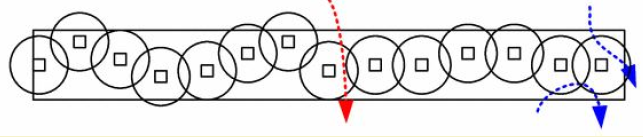
Objective: Detect intruders crossing a barrier (line or belt).
%% fig-alt: "Barrier coverage model showing sensors deployed along border to detect intruder crossings with overlapping sensing zones"
%%{init: {'theme': 'base', 'themeVariables': {'primaryColor': '#2C3E50', 'primaryTextColor': '#fff', 'primaryBorderColor': '#16A085', 'lineColor': '#16A085', 'secondaryColor': '#E67E22', 'tertiaryColor': '#ECF0F1', 'fontSize': '16px'}}}%%
graph LR
    subgraph "Barrier Coverage Model"
        BORDER_START["Border<br/>Start"]

        S1["Sensor 1<br/>Range Rs"]
        S2["Sensor 2<br/>Range Rs"]
        S3["Sensor 3<br/>Range Rs"]
        S4["Sensor 4<br/>Range Rs"]

        BORDER_END["Border<br/>End"]

        INTRUDER["Intruder Path<br/>(Any crossing)"]
    end

    BORDER_START --> S1
    S1 --> S2
    S2 --> S3
    S3 --> S4
    S4 --> BORDER_END

    INTRUDER -.->|"Must cross >= k<br/>sensor ranges"| S2
    INTRUDER -.->|"Detection"| S3

    S1 -.->|"Sensing coverage"| COV1["Coverage<br/>zone"]
    S2 -.->|"Sensing coverage"| COV2["Coverage<br/>zone"]
    S3 -.->|"Sensing coverage"| COV3["Coverage<br/>zone"]
    S4 -.->|"Sensing coverage"| COV4["Coverage<br/>zone"]

    style BORDER_START fill:#2C3E50,stroke:#16A085,stroke-width:3px,color:#fff
    style BORDER_END fill:#2C3E50,stroke:#16A085,stroke-width:3px,color:#fff
    style S1 fill:#16A085,stroke:#2C3E50,stroke-width:3px,color:#fff
    style S2 fill:#16A085,stroke:#2C3E50,stroke-width:3px,color:#fff
    style S3 fill:#16A085,stroke:#2C3E50,stroke-width:3px,color:#fff
    style S4 fill:#16A085,stroke:#2C3E50,stroke-width:3px,color:#fff
    style INTRUDER fill:#E74C3C,stroke:#2C3E50,stroke-width:3px,color:#fff
    style COV1 fill:#D5F4E6,stroke:#2C3E50,stroke-width:1px
    style COV2 fill:#D5F4E6,stroke:#2C3E50,stroke-width:1px
    style COV3 fill:#D5F4E6,stroke:#2C3E50,stroke-width:1px
    style COV4 fill:#D5F4E6,stroke:#2C3E50,stroke-width:1px
Applications: - Border surveillance - Perimeter security (military bases, critical infrastructure) - Wildlife corridor monitoring - Pipeline intrusion detection
365.3.5 K-Barrier Coverage Levels
%% fig-alt: "K-barrier coverage hierarchy showing 1-barrier, 2-barrier, and k-barrier levels with weak and strong variants and their applications"
%%{init: {'theme': 'base', 'themeVariables': {'primaryColor': '#2C3E50', 'primaryTextColor': '#fff', 'primaryBorderColor': '#16A085', 'lineColor': '#16A085', 'secondaryColor': '#E67E22', 'tertiaryColor': '#ECF0F1', 'fontSize': '16px'}}}%%
graph TD
    subgraph "K-Barrier Coverage Hierarchy"
        ROOT["Barrier<br/>Coverage"]

        LEVEL1["1-Barrier<br/>Coverage"]
        LEVEL2["2-Barrier<br/>Coverage"]
        LEVELK["K-Barrier<br/>Coverage"]

        WEAK["Weak k-Barrier:<br/>Path intersects<br/>>= k sensor ranges"]
        STRONG["Strong k-Barrier:<br/>Every point on path<br/>covered by >= k sensors"]

        APP1["Basic detection<br/>Perimeter monitoring"]
        APP2["Redundant detection<br/>Critical infrastructure"]
        APPK["High security<br/>Military borders"]
    end

    ROOT --> LEVEL1
    ROOT --> LEVEL2
    ROOT --> LEVELK

    LEVEL1 --> APP1
    LEVEL2 --> APP2
    LEVELK --> APPK

    LEVEL2 -.-> WEAK
    LEVEL2 -.-> STRONG

    WEAK -.->|"Fewer sensors<br/>Lower cost"| WEAK_TRADE["Detection at<br/>k points"]
    STRONG -.->|"More sensors<br/>Higher cost"| STRONG_TRADE["Continuous<br/>tracking"]

    style ROOT fill:#2C3E50,stroke:#16A085,stroke-width:3px,color:#fff
    style LEVEL1 fill:#16A085,stroke:#2C3E50,stroke-width:3px,color:#fff
    style LEVEL2 fill:#E67E22,stroke:#2C3E50,stroke-width:3px,color:#fff
    style LEVELK fill:#E74C3C,stroke:#2C3E50,stroke-width:3px,color:#fff
    style WEAK fill:#AED6F1,stroke:#2C3E50,stroke-width:2px
    style STRONG fill:#F9E79F,stroke:#2C3E50,stroke-width:2px
    style APP1 fill:#D5F4E6,stroke:#2C3E50,stroke-width:2px
    style APP2 fill:#FADBD8,stroke:#2C3E50,stroke-width:2px
    style APPK fill:#F5B7B1,stroke:#2C3E50,stroke-width:2px
    style WEAK_TRADE fill:#ECF0F1,stroke:#2C3E50,stroke-width:1px
    style STRONG_TRADE fill:#ECF0F1,stroke:#2C3E50,stroke-width:1px
365.3.6 Weak vs. Strong Barrier
Weak k-Barrier:
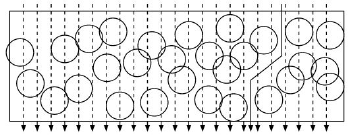
Every path crossing the barrier intersects sensing ranges of at least k sensors.
Strong k-Barrier:
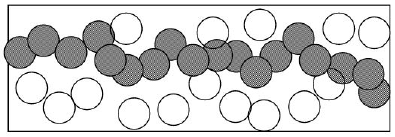
Every point on every path crossing the barrier is within sensing range of at least k sensors simultaneously.
Deployment Strategy:
For a barrier of length L with sensors of range Rs:
Minimum sensors for 1-barrier: ceil(L / (2 x Rs))
Minimum sensors for k-barrier: Approximately k x ceil(L / (2 x Rs))
365.4 Coverage Type Comparison
| Coverage Type | Goal | Sensors Needed | Applications |
|---|---|---|---|
| Area | Monitor every point in 2D region | High (full coverage) | Environmental, agriculture |
| Point | Monitor discrete critical locations | Low (targeted) | Infrastructure, access control |
| Barrier | Detect border crossings | Medium (linear) | Security, wildlife |
| K-Coverage | Redundancy for fault tolerance | K x base sensors | Critical systems |
365.5 Summary
This chapter covered the three main types of WSN coverage problems:
Key Takeaways:
Area Coverage - Monitor continuous 2D regions using rotation scheduling to maximize lifetime. Best for environmental monitoring where events can occur anywhere.
Point Coverage - Monitor discrete critical locations using set cover algorithms. Dramatically reduces sensor count compared to area coverage for sparse infrastructure.
Barrier Coverage - Detect crossings using weak (path-intersection) or strong (continuous monitoring) strategies. Choose based on detection vs tracking requirements.
K-Coverage - Provides (k-1) failure tolerance. Match k to reliability requirements: k=1 for basic, k=2 for fault tolerance, k=3+ for critical systems.
365.6 What’s Next?
Now that you understand coverage types, the next chapter explores algorithms for maintaining coverage efficiently.
Continue to WSN Coverage Algorithms - Learn about crossing theory, OGDC, and virtual force algorithms for coverage optimization.