%% fig-alt: "Scalable data pipeline architecture showing left-to-right flow: Data Ingestion in navy (API gateway supporting REST/MQTT/WebSocket, message broker using Kafka/Kinesis), Stream Processing in teal (data filtering, data enrichment, aggregation, validation), Data Storage in orange (hot storage in Redis cache, warm storage in InfluxDB, cold storage in S3/archive), Analytics Layer in gray (real-time analytics with Apache Flink, batch processing with Spark, ML pipeline with TensorFlow). Data flows from ingestion through processing to storage, then to analytics."
%%{init: {'theme': 'base', 'themeVariables': {'primaryColor': '#2C3E50', 'primaryTextColor': '#fff', 'primaryBorderColor': '#16A085', 'lineColor': '#16A085', 'secondaryColor': '#E67E22', 'tertiaryColor': '#7F8C8D'}}}%%
graph LR
    subgraph Ingestion["Data Ingestion"]
        GW[API Gateway<br/>REST/MQTT/WS]
        BROKER[Message Broker<br/>Kafka/Kinesis]
    end

    subgraph Processing["Stream Processing"]
        FILTER[Data Filtering]
        ENRICH[Data Enrichment]
        AGG[Aggregation]
        VALIDATE[Validation]
    end

    subgraph Storage["Data Storage"]
        HOT[Hot Storage<br/>Redis Cache]
        WARM[Warm Storage<br/>InfluxDB]
        COLD[Cold Storage<br/>S3/Archive]
    end

    subgraph Analytics["Analytics Layer"]
        RT[Real-time Analytics<br/>Apache Flink]
        BATCH[Batch Processing<br/>Spark]
        ML[ML Pipeline<br/>TensorFlow]
    end

    GW --> BROKER
    BROKER --> FILTER
    FILTER --> ENRICH
    ENRICH --> AGG
    AGG --> VALIDATE

    VALIDATE --> HOT
    VALIDATE --> WARM
    VALIDATE --> COLD

    HOT --> RT
    WARM --> BATCH
    COLD --> ML

    style Ingestion fill:#2C3E50,color:#fff
    style Processing fill:#16A085,color:#fff
    style Storage fill:#E67E22,color:#fff
    style Analytics fill:#7F8C8D,color:#fff
499 S2aaS Implementation: Deployment Considerations
499.1 Learning Objectives
By the end of this chapter, you will be able to:
- Design scalable data pipelines: Build ingestion, processing, and storage architectures for high-volume sensor streams
- Implement SLA management: Define service tiers, monitor compliance, and automate remediation
- Apply security frameworks: Implement multi-layered authentication, authorization, and encryption
- Configure pricing models: Design pay-per-use, subscription, and tiered billing systems
- Scale horizontally: Build stateless services, distributed queues, and sharded storage
499.2 Prerequisites
- S2aaS Real-World Platforms: Understanding of commercial platform architectures
- S2aaS Deployment Models: Knowledge of centralized vs federated architectures
499.3 Deployment Considerations
499.3.1 Data Pipeline Architecture
A robust S2aaS implementation requires a scalable data pipeline capable of handling high-volume sensor streams:
Scalable data pipeline architecture for high-volume sensor data ingestion, processing, and storage
Key Design Decisions:
| Decision Point | Options | Recommendation |
|---|---|---|
| Message Broker | RabbitMQ vs. Kafka vs. AWS Kinesis | Kafka for high throughput (>10K msgs/sec), RabbitMQ for complex routing |
| Time-Series DB | InfluxDB vs. TimescaleDB vs. Prometheus | InfluxDB for IoT (optimized for sensor data), TimescaleDB if using PostgreSQL ecosystem |
| Processing | Apache Flink vs. Spark Streaming vs. Serverless | Flink for true real-time (<1s latency), Spark for batch + streaming hybrid |
| Cache Layer | Redis vs. Memcached | Redis for richer data structures and pub/sub capabilities |
499.3.2 Service Level Agreement (SLA) Management
S2aaS platforms must define and enforce SLAs to guarantee service quality across tiers:
%% fig-alt: "SLA management framework: Service Tiers in navy (Premium 99.99% availability with less than 1s latency at $50/sensor/month, Standard 99.5% availability with less than 5s latency at $10/sensor/month, Basic 95% availability with less than 60s latency at $2/sensor/month) feed to SLA Monitoring in orange (metrics collection using Prometheus, SLA verification at 5-minute intervals, alert manager with threshold detection). When violations detected, Automated Response in teal activates: auto-scale adding resources, failover to backup systems, service credits with automated billing, and customer notification via email/SMS."
%%{init: {'theme': 'base', 'themeVariables': {'primaryColor': '#2C3E50', 'primaryTextColor': '#fff', 'primaryBorderColor': '#16A085', 'lineColor': '#16A085', 'secondaryColor': '#E67E22', 'tertiaryColor': '#7F8C8D'}}}%%
graph TB
    subgraph Tiers["Service Tiers"]
        PREM[Premium<br/>99.99% availability<br/><1s latency<br/>$50/sensor/mo]
        STAN[Standard<br/>99.5% availability<br/><5s latency<br/>$10/sensor/mo]
        BASIC[Basic<br/>95% availability<br/><60s latency<br/>$2/sensor/mo]
    end

    subgraph Monitor["SLA Monitoring"]
        COLLECT[Metrics Collection<br/>Prometheus]
        CHECK[SLA Verification<br/>5min intervals]
        ALERT[Alert Manager<br/>Threshold detection]
    end

    subgraph Response["Automated Response"]
        SCALE[Auto-Scale<br/>Add resources]
        FAILOVER[Failover<br/>Backup systems]
        CREDIT[Service Credits<br/>Automated billing]
        NOTIFY[Customer Notification<br/>Email/SMS]
    end

    PREM --> COLLECT
    STAN --> COLLECT
    BASIC --> COLLECT

    COLLECT --> CHECK
    CHECK --> ALERT

    ALERT -->|Violation detected| SCALE
    ALERT -->|Violation detected| FAILOVER
    ALERT -->|SLA breach| CREDIT
    ALERT -->|Incident| NOTIFY

    style Tiers fill:#2C3E50,color:#fff
    style Monitor fill:#E67E22,color:#fff
    style Response fill:#16A085,color:#fff
SLA management framework with tiered service levels, monitoring, and automated remediation
SLA Enforcement Implementation:
SLA Definition Example:
{
  "tier": "PREMIUM",
  "guarantees": {
    "availability": {
      "target": 99.99,
      "measurement": "monthly_uptime_percentage",
      "penalty": "10% credit if < 99.9%, 25% if < 99%, 100% if < 95%"
    },
    "latency": {
      "target": "1s",
      "percentile": "p99",
      "penalty": "5% credit per 1s above target"
    },
    "dataQuality": {
      "accuracy": "+/-0.5C for temperature sensors",
      "completeness": "99% of expected readings received"
    }
  },
  "monitoring": {
    "interval": "5 minutes",
    "alertThreshold": "3 consecutive violations"
  }
}
499.3.3 Security and Access Control
Multi-tenant S2aaS platforms require robust security across all layers:
%% fig-alt: "Multi-layered security architecture: Clients/Applications (user applications, IoT devices) connect to Authentication Layer in orange (OAuth 2.0 provider, JWT token validation, X.509 certificate mTLS for devices), then to Authorization Layer in teal (role-based access with admin/user/viewer roles, attribute-based access for location/time/resource, policy engine for per-sensor permissions), then to Data Security layer in gray (TLS 1.3 transport encryption, AES-256 data-at-rest encryption, data masking for PII protection, audit logging for access trails), and finally to S2aaS Platform (sensor API, sensor data). Security layers protect data flow from clients to platform."
%%{init: {'theme': 'base', 'themeVariables': {'primaryColor': '#2C3E50', 'primaryTextColor': '#fff', 'primaryBorderColor': '#16A085', 'lineColor': '#16A085', 'secondaryColor': '#E67E22', 'tertiaryColor': '#7F8C8D'}}}%%
graph TB
    subgraph Clients["Clients/Applications"]
        USER[User Applications]
        DEVICE[IoT Devices]
    end

    subgraph AuthN["Authentication Layer"]
        OAUTH[OAuth 2.0 Provider]
        JWT[JWT Token Validation]
        CERT[X.509 Certificate<br/>mTLS for devices]
    end

    subgraph AuthZ["Authorization Layer"]
        RBAC[Role-Based Access<br/>Admin/User/Viewer]
        ABAC[Attribute-Based<br/>Location/Time/Resource]
        POLICY[Policy Engine<br/>Per-sensor permissions]
    end

    subgraph DataSec["Data Security"]
        TLS[TLS 1.3<br/>Transport encryption]
        ENC[AES-256<br/>Data-at-rest encryption]
        MASK[Data Masking<br/>PII protection]
        AUDIT[Audit Logging<br/>Access trails]
    end

    subgraph Platform["S2aaS Platform"]
        API[Sensor API]
        DATA[Sensor Data]
    end

    USER --> OAUTH
    DEVICE --> CERT

    OAUTH --> JWT
    JWT --> RBAC
    CERT --> RBAC

    RBAC --> ABAC
    ABAC --> POLICY

    POLICY --> TLS
    TLS --> ENC
    ENC --> MASK
    MASK --> AUDIT

    AUDIT --> API
    API --> DATA

    style Clients fill:#2C3E50,color:#fff
    style AuthN fill:#E67E22,color:#fff
    style AuthZ fill:#16A085,color:#fff
    style DataSec fill:#7F8C8D,color:#fff
    style Platform fill:#2C3E50,color:#fff
Multi-layered security architecture for S2aaS platforms with authentication, authorization, and data encryption
Access Control Policy Example:
{
  "policy": {
    "principalId": "user_hvac_company_123",
    "resource": "virtualsensor:vs_temp_bldgA_*",
    "permissions": {
      "read": true,
      "write": false,
      "configure": true,
      "delete": false
    },
    "conditions": {
      "ipWhitelist": ["203.0.113.0/24"],
      "timeWindow": {
        "start": "08:00",
        "end": "18:00",
        "timezone": "UTC"
      },
      "rateLimit": {
        "requests": 1000,
        "period": "hour"
      }
    },
    "dataFilters": {
      "fields": ["temperature", "timestamp"],
      "excludeFields": ["sensorId", "location"],
      "aggregationOnly": false
    }
  }
}
499.3.4 Pricing and Billing Models
Flexible pricing strategies enable different customer segments:
Pricing Model Comparison:
| Model | Description | Best For | Example Pricing |
|---|---|---|---|
| Pay-Per-Use | Charge per sensor reading | Variable workloads, research projects | $0.001 per reading |
| Subscription | Fixed monthly fee for sensor access | Predictable costs, production apps | $10/sensor/month |
| Tiered Subscription | Volume discounts at higher tiers | Large deployments | Tier 1-10: $10/each; Tier 11-100: $8/each; Tier 100+: $5/each |
| Freemium | Free tier with paid upgrades | User acquisition, community building | Free: 1K readings/day; Pro: $50/month unlimited |
| Revenue Share | Platform takes % of data value | Data marketplaces | 30% platform fee on transactions |
Billing Implementation Pattern:
%% fig-alt: "Automated billing pipeline showing left-to-right flow: Usage Tracking in navy (API gateway with request counter, metering service with real-time tracking, usage database in PostgreSQL), Pricing Engine in teal (pricing rules for per-use/subscription models, tier calculator for volume discounts, pro-rating for partial periods), Billing System in orange (invoice calculator, invoice generator, SLA credits with automatic deduction), Payment Processing in gray (payment gateway using Stripe/PayPal, email notification, receipt generation). Data flows from usage tracking through pricing and billing to payment processing."
%%{init: {'theme': 'base', 'themeVariables': {'primaryColor': '#2C3E50', 'primaryTextColor': '#fff', 'primaryBorderColor': '#16A085', 'lineColor': '#16A085', 'secondaryColor': '#E67E22', 'tertiaryColor': '#7F8C8D'}}}%%
graph LR
    subgraph Usage["Usage Tracking"]
        API[API Gateway<br/>Request counter]
        METER[Metering Service<br/>Real-time tracking]
        STORE[Usage DB<br/>PostgreSQL]
    end

    subgraph Pricing["Pricing Engine"]
        RULES[Pricing Rules<br/>Per-use/Subscription]
        TIER[Tier Calculator<br/>Volume discounts]
        PRORATE[Pro-rating<br/>Partial periods]
    end

    subgraph Billing["Billing System"]
        CALC[Invoice Calculator]
        GEN[Invoice Generator]
        CREDIT[SLA Credits<br/>Automatic deduction]
    end

    subgraph Payment["Payment Processing"]
        STRIPE[Payment Gateway<br/>Stripe/PayPal]
        NOTIFY[Email Notification]
        RECEIPT[Receipt Generation]
    end

    API --> METER
    METER --> STORE

    STORE --> RULES
    RULES --> TIER
    TIER --> PRORATE

    PRORATE --> CALC
    CALC --> CREDIT
    CREDIT --> GEN

    GEN --> STRIPE
    STRIPE --> NOTIFY
    STRIPE --> RECEIPT

    style Usage fill:#2C3E50,color:#fff
    style Pricing fill:#16A085,color:#fff
    style Billing fill:#E67E22,color:#fff
    style Payment fill:#7F8C8D,color:#fff
Automated billing pipeline with usage metering, pricing rule application, and payment processing
499.3.5 Scalability Patterns
Horizontal Scaling Strategy:
%% fig-alt: "Horizontal scaling architecture: Load balancer (nginx/HAProxy) distributes requests to API Gateway Cluster in navy (API Gateway 1, 2, N), which connect to Stateless Services in teal (auth service with 3 replicas, sensor service with 5 replicas, data service with 5 replicas), flowing to Distributed Message Queue in orange (Kafka Partition 1, 2, N), and finally to Distributed Storage in gray (Redis cluster for hot data, InfluxDB cluster for time-series, S3 object store for cold archive). Architecture shows horizontal scaling at every layer."
%%{init: {'theme': 'base', 'themeVariables': {'primaryColor': '#2C3E50', 'primaryTextColor': '#fff', 'primaryBorderColor': '#16A085', 'lineColor': '#16A085', 'secondaryColor': '#E67E22', 'tertiaryColor': '#7F8C8D'}}}%%
graph TB
    LB[Load Balancer<br/>nginx/HAProxy]

    subgraph APILayer["API Gateway Cluster"]
        API1[API Gateway 1]
        API2[API Gateway 2]
        API3[API Gateway N]
    end

    subgraph ServiceLayer["Stateless Services"]
        SVC1[Auth Service<br/>Replicas: 3]
        SVC2[Sensor Service<br/>Replicas: 5]
        SVC3[Data Service<br/>Replicas: 5]
    end

    subgraph MessageBroker["Distributed Message Queue"]
        K1[Kafka Partition 1]
        K2[Kafka Partition 2]
        K3[Kafka Partition N]
    end

    subgraph DataLayer["Distributed Storage"]
        REDIS[Redis Cluster<br/>Hot data]
        INFLUX[InfluxDB Cluster<br/>Time-series]
        S3[S3 Object Store<br/>Cold archive]
    end

    LB --> API1
    LB --> API2
    LB --> API3

    API1 --> SVC1
    API2 --> SVC2
    API3 --> SVC3

    SVC1 --> K1
    SVC2 --> K2
    SVC3 --> K3

    K1 --> REDIS
    K2 --> INFLUX
    K3 --> S3

    style APILayer fill:#2C3E50,color:#fff
    style ServiceLayer fill:#16A085,color:#fff
    style MessageBroker fill:#E67E22,color:#fff
    style DataLayer fill:#7F8C8D,color:#fff
Horizontally scalable architecture with load balancing, stateless services, and distributed storage
Scaling Metrics:
- API Gateway: Auto-scale based on request rate (>1000 req/sec -> add node)
- Kafka: Partition topics by sensor type or geographic region
- InfluxDB: Shard by sensor ID hash for even distribution
- Cache: Use Redis Cluster with consistent hashing
499.4 Knowledge Check
499.5 Visual Reference Gallery
Explore these AI-generated visualizations that complement the S2aaS implementation concepts covered in this chapter. Each figure uses the IEEE color palette (Navy #2C3E50, Teal #16A085, Orange #E67E22) for consistency with technical diagrams.
NoteVisual: Sensing as a Service Model
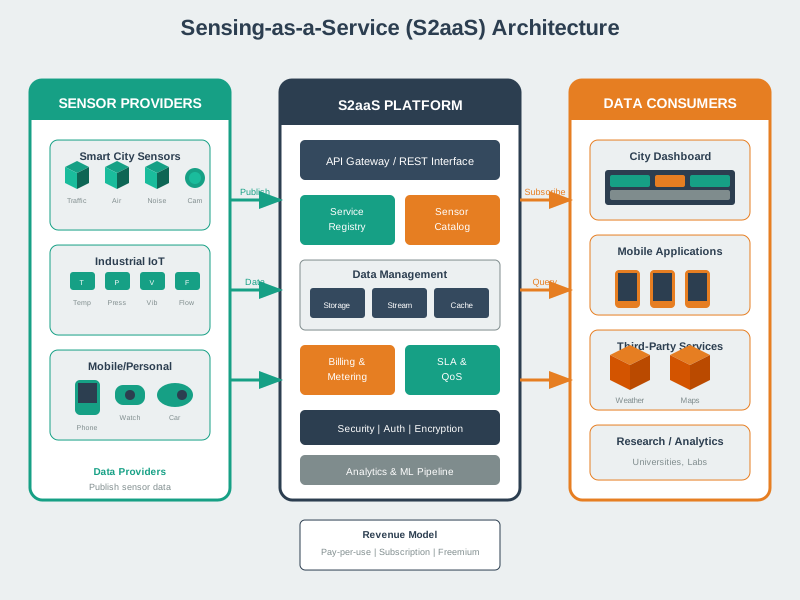
This visualization illustrates the multi-layered S2aaS architecture covered in this chapter, from physical sensors through virtualization to application access.
NoteVisual: Sensor Cloud Architecture
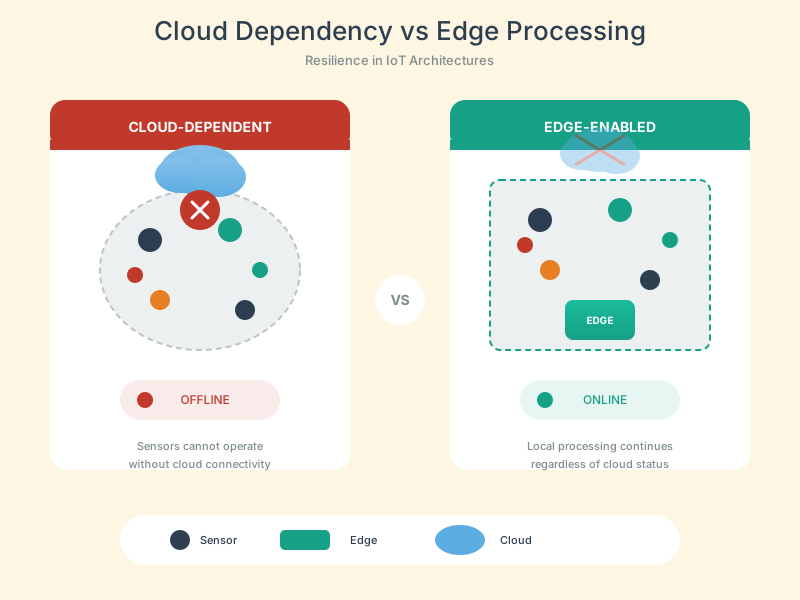
This figure depicts the cloud platform components discussed in the ThingSpeak, AWS IoT Core, and Azure IoT Hub implementations analyzed in this chapter.
NoteVisual: Pricing in Sensor Cloud
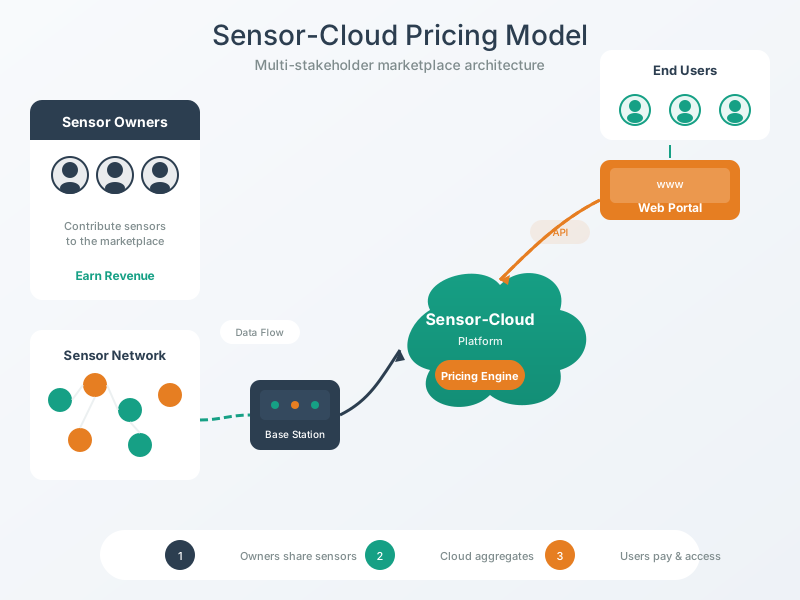
This visualization illustrates the pricing models covered in the implementation section, including pay-per-use, subscription, and tiered volume discount strategies.
NoteVisual: SaaS Business Advantages
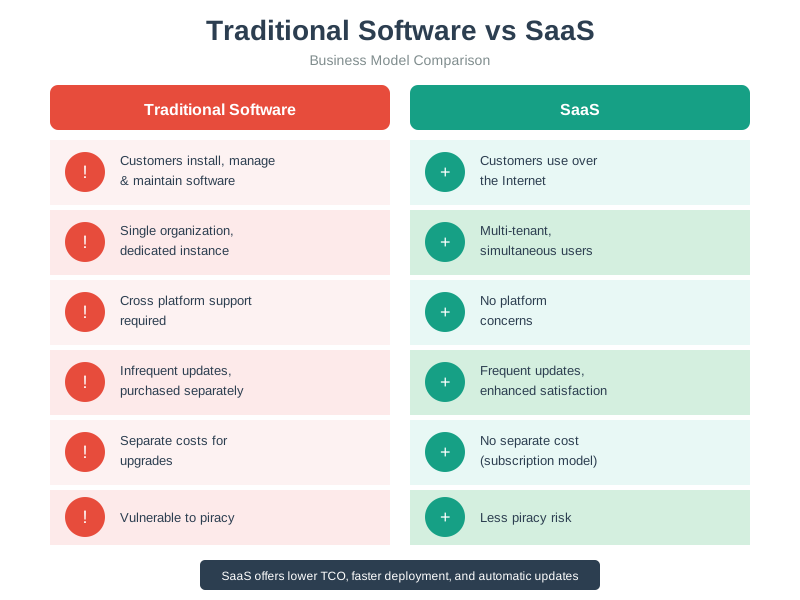
This figure highlights the business advantages of the S2aaS model discussed in the deployment considerations section, explaining why organizations adopt sensing services.
NoteRelated Chapters
Foundation: - S2aaS Fundamentals - Core concepts and business models - S2aaS Review - Comprehensive review and assessment
Cloud Architecture: - Cloud Computing - Cloud infrastructure fundamentals - Edge Computing - Edge and fog processing
Protocols: - MQTT - Lightweight messaging protocol - CoAP - Constrained application protocol - HTTP/REST - RESTful APIs
Data Management: - Data Storage - Time-series and databases - Data in Cloud - Cloud data platforms
Security: - Encryption - Authentication and encryption - Device Security - IoT device protection
Learning Resources: - Knowledge Gaps Hub - S2aaS concept reinforcement
499.6 Summary
This chapter provided comprehensive coverage of deployment considerations for production S2aaS platforms:
- Data Pipeline Architecture: Scalable ingestion using Apache Kafka, stream processing with Apache Flink, time-series storage in InfluxDB, and caching with Redis for high-volume sensor streams
- SLA Management: Premium/Standard/Basic tier definitions with latency guarantees (<1s, <5s, <60s), availability targets (99.99%, 99.5%, 95%), and automated SLA monitoring with service credits
- Security Framework: Multi-layered approach with OAuth 2.0/JWT authentication, RBAC/ABAC authorization, X.509 certificates for device connections, and TLS 1.3 encryption
- Pricing Models: Pay-per-use ($0.001/reading), subscription ($10/sensor/month), tiered volume discounts, and freemium strategies with automated billing pipelines
- Horizontal Scaling: Stateless services, distributed message queues (Kafka partitions), and sharded storage (Redis Cluster, InfluxDB shards)
499.7 What’s Next
Having explored S2aaS implementation architectures and platforms, the next chapter examines S2aaS Review with comprehensive knowledge checks, production framework patterns, pricing calculations, ROI analysis, and quality management systems for deploying enterprise-grade sensing services.