Time: ~12 min | Level: Intermediate | Unit: P03.C03.U12
134.2 Learning Objectives
By the end of this section, you will be able to:
Understand the Matter protocol and its value proposition for smart home interoperability
Design smart home ecosystems with appropriate protocol selection
Calculate energy savings from smart thermostat deployments
Analyze privacy implications of consumer IoT devices
134.3 Smart Home Automation Overview
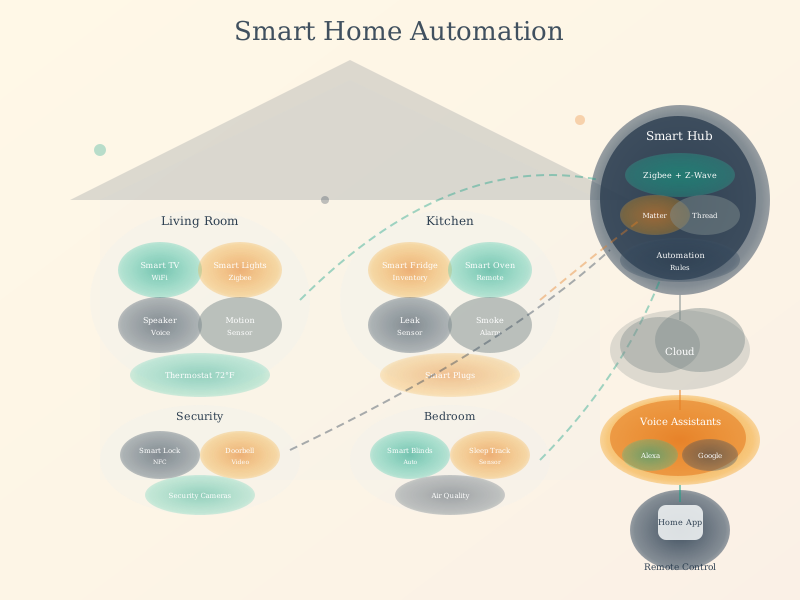
Smart Home Automation
Figure 134.1: Smart building automation integrates multiple subsystems into a cohesive experience. Modern implementations achieve 30-70% energy savings through occupancy-aware HVAC, daylight harvesting, and learned scheduling patterns.
134.4 Matter: The Interoperability Solution
The Problem Matter Solves:
Before Matter, smart home fragmentation created significant consumer and developer pain:
Challenge
Impact
Example
Protocol silos
Devices from different ecosystems cannot communicate
Philips Hue (Zigbee) cannot trigger August Lock (Z-Wave) directly
Platform lock-in
Once committed to Alexa, Google, or HomeKit, switching is costly
Moving from Google Home to Apple HomeKit requires replacing incompatible devices
Developer burden
Supporting 5+ ecosystems requires 5x development effort
Small manufacturers cannot afford certification for Apple, Google, Amazon, and Samsung
Consumer confusion
“Works with Alexa” does not mean “Works with Google”
47% of consumers have abandoned purchases due to compatibility concerns
What Matter Delivers:
Feature
Technical Implementation
User Benefit
Single protocol
IP-based (Wi-Fi, Thread, Ethernet)
Buy any Matter device, use with any platform
Local control
No cloud required for basic operations
Works during internet outages, lower latency
Multi-admin
Device can be controlled by multiple ecosystems simultaneously
Use Alexa in kitchen, Google in bedroom, Apple everywhere
Unified commissioning
Standard QR code and setup flow
Consistent setup experience across devices
134.5 Matter Technical Architecture
Protocol Stack:
Layer
Matter Implementation
Purpose
Application
Matter device types (lighting, locks, sensors)
Standardized device behaviors
Data Model
Clusters, attributes, commands
Common language for device capabilities
Interaction
Read, write, subscribe, invoke
How controllers talk to devices
Security
CASE/PASE, certificates
End-to-end encryption, device attestation
Transport
TCP/UDP over IP
Reliable message delivery
Network
Wi-Fi, Thread, Ethernet
Physical connectivity
Key Architectural Decisions:
IP-Based: Matter runs over standard IP networks, enabling integration with existing home networking infrastructure
Thread for Low-Power: Battery-powered devices use Thread mesh networking for months/years of battery life
Local First: Core functionality works without internet; cloud integration is optional for advanced features
Open Standard: Connectivity Standards Alliance (CSA) manages the specification; implementation is open-source
134.6 Device Categories in Matter 1.0+
Category
Device Types
Matter Version
Lighting
Bulbs, switches, dimmers, color controls
1.0
HVAC
Thermostats, room AC, fans
1.0
Security
Door locks, sensors, cameras
1.0 (locks), 1.3 (cameras)
Window Coverings
Blinds, shades, shutters
1.0
Sensors
Motion, contact, temperature, humidity
1.0
Appliances
Refrigerators, washers, ovens
1.2+
Robots
Vacuums
1.2+
Energy Management
EV chargers, solar inverters, batteries
1.3+
134.7 Migration Strategy: Legacy to Matter
For Existing Smart Home Users:
Current Setup
Migration Path
Investment Level
Wi-Fi only devices
Replace with Matter-certified versions
High (replace devices)
Zigbee ecosystem
Many Zigbee bridges add Matter support via firmware
Low (firmware update)
Z-Wave ecosystem
Hub-based bridge to Matter (limited availability)
Medium (new hub)
HomeKit devices
Many receive Matter update; Thread devices ready
Low (firmware update)
Platform-specific
Check manufacturer roadmap; may require replacement
Varies
Recommended Migration Approach:
Don’t replace working devices - Wait until natural end-of-life
Buy Matter for new purchases - Future-proof new devices
Upgrade hub first - Apple HomePod, Google Nest Hub, Amazon Echo 4th gen support Matter
Start with lighting - Highest interoperability benefit, lowest risk
134.8 Worked Example: Smart Home Device Ecosystem Migration
Scenario: A homeowner with a mixed smart home ecosystem wants to migrate to Matter for improved interoperability and simplified management.
Given: - Current devices: 12 Philips Hue bulbs (Zigbee), 4 WeMo switches (Wi-Fi), 2 August locks (Z-Wave), 1 Nest thermostat, 3 Ring cameras - Current hubs: Hue Bridge v2, SmartThings Hub, Ring Bridge - Voice assistants: Amazon Echo (3), Google Nest Mini (2) - Pain points: Automations don’t work across ecosystems; 4 different apps required - Budget: $500 for migration - Goal: Unified control, reduce apps to 1-2, maintain all functionality
Steps:
Audit Matter upgrade paths for existing devices:
Philips Hue: Hue Bridge v2 will receive Matter update (free)
WeMo switches: No Matter roadmap - will need replacement ($25 each x 4 = $100)
August locks: August WiFi Smart Lock has Matter firmware (free update)
Nest thermostat: Google adding Matter to Nest Thermostat (free update)
Ring cameras: Amazon Ring 4 Pro received Matter update (free)
SmartThings Hub: Has Matter controller update (free)
Week 1: Update SmartThings Hub firmware, verify Matter controller active
Week 2: Commission Hue Bridge to SmartThings via Matter
Week 3: Update August locks, commission to SmartThings
Week 4: Update Nest thermostat, verify Google Home Matter sync
Week 5: Replace WeMo switches with Matter alternatives
Week 6: Update Ring cameras, verify Alexa Matter sync
Verify unified control:
Test: “Alexa, turn on living room lights” (triggers Hue via Matter)
Test: Automation - Motion detected -> Unlock door + Turn on lights (cross-vendor)
Test: Google Home app shows all devices including Ring cameras
Result: Homeowner achieves unified ecosystem with SmartThings as primary controller, 2 apps (SmartThings + voice platform), and full cross-platform automations. Budget used: $150 (70% under budget). All original functionality preserved, plus new cross-ecosystem automations enabled.
Key Insight: Matter migration is not about replacing devices - it is about upgrading controllers and hubs that act as Matter bridges for existing ecosystems. Most consumers can achieve significant interoperability improvement for under $200 by strategically updating firmware on hubs and adding one Matter-certified controller.
134.9 Worked Example: Smart Thermostat Energy Savings
Scenario: A homeowner is evaluating smart thermostat options to reduce heating/cooling costs in a 2,400 sq ft home. They want to calculate realistic energy savings based on their family’s irregular schedule.
Given: - Home: 2,400 sq ft, built 2005, average insulation - Climate: St. Louis, MO (hot summers, cold winters) - Current thermostat: Programmable, set to 72F constant - Family: 2 adults working hybrid (home 3 days/week), 2 kids in school - HVAC: Gas furnace (80 AFUE) + central AC (14 SEER) - Current annual energy cost: $2,800 (gas) + $1,100 (electric cooling) = $3,900 total - Smart thermostat options: Nest Learning ($250), Ecobee Premium ($250), basic smart ($100)
Steps:
Analyze occupancy patterns:
Weekdays (school days): Empty 8 AM - 3 PM (7 hours) x 5 days = 35 hours/week
Weekdays (WFH days): Occupied all day, but concentrated in home office
Weekends: Variable - home mornings, often out afternoons
Current approach: House conditioned 24/7 regardless of occupancy
Calculate setback potential:
Heating setback (winter): 72F -> 62F when away
Cooling setback (summer): 72F -> 78F when away
Rule of thumb: Each 1F setback for 8 hours = 1% energy savings
Potential heating savings: 10F x 1% x (35/56 hours empty) = 6.25%
Potential cooling savings: 6F x 1% x (35/56 hours empty) = 3.75%
Model learning thermostat additional savings:
Nest/Ecobee learn actual patterns, pre-condition before arrival
Result: Learning thermostat with room sensors provides best ROI for this family’s irregular schedule, saving $645/year with 6-month payback. The occupancy-aware approach captures 2x more savings than simple programmable setback because it adapts to their hybrid work pattern.
Key Insight: Smart thermostat savings depend heavily on the gap between current schedule and actual occupancy. Homes with irregular schedules (work-from-home days, shift workers, retirees) see larger savings from learning algorithms than homes with predictable 9-to-5 patterns. Room sensors provide the biggest incremental benefit in homes with multi-floor layouts or unused rooms.
134.10 Worked Example: Consumer IoT Privacy Impact Assessment
Scenario: A family is evaluating privacy implications of a smart speaker purchase. They want to understand what data is collected, where it goes, and what controls exist.
Network data: Connected device inventory, Wi-Fi network information
Location: IP-based location, explicit location if shared
Assess data destinations and retention:
Voice recordings: AWS servers, retained until manually deleted
Transcripts: Retained indefinitely unless user deletes
Usage analytics: Aggregated, pseudonymized, retained for product improvement
Third-party skill data: Skill developers may receive voice transcripts when skill invoked
Evaluate privacy controls available:
Voice history deletion: Can delete via app or voice (“Alexa, delete what I just said”)
Auto-delete: Option to auto-delete recordings older than 3 or 18 months
Human review opt-out: Can opt out of recordings being reviewed for quality
Microphone mute: Hardware button disables microphone (verified by indicator)
Drop-in controls: Can disable or restrict intercom-style calling
Kid skills: Separate privacy controls for child-directed content
Identify household-specific risks:
Children’s voices recorded (COPPA implications if under 13)
Accidental wake word activations capture private conversations
Third-party skills may have weaker privacy practices
Guest conversations recorded without explicit consent
Develop privacy configuration plan:
Enable auto-delete (3-month retention)
Opt out of human review of recordings
Review and revoke unused skill permissions quarterly
Use microphone mute during sensitive conversations
Create child profile with appropriate controls
Inform regular guests about voice assistant presence
Result: Family proceeds with smart speaker purchase after implementing privacy configuration: auto-delete enabled, human review disabled, skills minimized. Quarterly privacy review scheduled. Children educated about wake word sensitivity.
Key Insight: Smart speaker privacy is manageable but requires active configuration. Default settings favor Amazon’s data collection. The most privacy-preserving approach: auto-delete enabled, human review disabled, skills minimized, microphone muted when privacy is critical. Total elimination of data collection is not possible while maintaining functionality - the tradeoff is convenience vs. privacy.
134.11 Knowledge Check
Show code
{const container =document.getElementById('kc-usecase-smarthome');if (container &&typeof InlineKnowledgeCheck !=='undefined') { container.innerHTML=''; container.appendChild(InlineKnowledgeCheck.create({question:"A homeowner has 12 Philips Hue bulbs (Zigbee), 4 WeMo switches (Wi-Fi), and 2 August locks (Z-Wave) controlled through 3 different apps. They want to unify control through Matter. What is the most cost-effective migration strategy?",options: [ {text:"Replace all devices with Matter-certified versions for full compatibility",correct:false,feedback:"Replacement is expensive and unnecessary. Many existing devices will receive Matter support through hub/bridge firmware updates. The Hue Bridge v2, for example, adds Matter support via software update at no cost."}, {text:"Update Hue Bridge and August firmware, replace only WeMo switches, use SmartThings as Matter controller",correct:true,feedback:"Correct! This is the optimal strategy. Hue Bridge v2 and August locks are receiving free Matter firmware updates. Only WeMo (no Matter roadmap) needs replacement. SmartThings Hub provides Matter controller plus legacy Zigbee/Z-Wave support. Total cost ~$150 vs. $800+ for full replacement."}, {text:"Wait until all manufacturers support Matter natively before making any changes",correct:false,feedback:"Waiting indefinitely means continued ecosystem fragmentation. Strategic migration now - updating hubs that support Matter while keeping working devices - delivers immediate interoperability benefits."}, {text:"Add a dedicated Matter hub and run both ecosystems in parallel",correct:false,feedback:"Running parallel ecosystems increases complexity rather than simplifying. The goal is unified control through a single Matter-capable controller that also bridges legacy protocols."} ],difficulty:"medium",topic:"iot-use-cases-smarthome" })); }}
134.12 Smart Home Privacy Tradeoffs
WarningTradeoff: Cloud-Connected vs. Local-Only Smart Home
Option A: Cloud-connected devices (Alexa, Google Home, Ring) - Voice control, remote access, automatic updates, AI-powered features. Risk: Data collection, privacy concerns, dependency on vendor services, potential outages. Option B: Local-only systems (Home Assistant, Hubitat) - Privacy-preserving, works offline, no vendor lock-in. Trade-off: Complex setup, limited voice assistant integration, manual updates, fewer “smart” features. Decision factors: Privacy sensitivity level, technical expertise, importance of voice control, tolerance for setup complexity, and whether remote access is needed.
134.13 Summary
Smart home and Matter protocol represent the future of consumer IoT:
Matter solves fragmentation by enabling single protocol for all major platforms
Migration strategy: Update hubs first, replace only non-upgradable devices
Energy savings: Learning thermostats save $450-650/year for irregular schedules
Privacy management: Active configuration required; default settings favor data collection
Thread networking: Low-power mesh for battery-powered devices
134.14 What’s Next
Complete the IoT Use Cases series with real-world case studies: