26 Z-Wave Architecture and Devices
More
Depth: Practitioner
Progress saves as you read. Mark sections complete as you go; your progress appears in the sidebar.
26.1 Start With the Story
This section: Start With the Story — A Z-Wave network has an identity story before it has an automation story.
A Z-Wave network has an identity story before it has an automation story. Home IDs, Node IDs, controller roles, command classes, security state, repeaters, sleeping endpoints, and Long Range devices decide who belongs and how commands travel.
Use this chapter to make that structure visible. Follow one included device through role, route, security, and repair evidence so the network is more than a list of paired products.
26.2 In 60 Seconds
This section: In 60 Seconds — Z-Wave architecture is built around a network boundary, device addresses, and device roles.
Z-Wave architecture is built around a network boundary, device addresses, and device roles. In a classic Z-Wave mesh, a controller owns the Home ID, assigns Node IDs, and uses route evidence to reach devices through mains-powered repeaters. Battery devices are usually sleepy endpoints: they report events and receive queued configuration updates when awake, but they do not form the routing backbone. Z-Wave Long Range adds a star option with larger address space, but it changes the topology decision rather than replacing the need to understand classic mesh behavior.
26.3 Learning Objectives
This section: Learning Objectives
By the end of this chapter, you should be able to:
- Explain how Home IDs and Node IDs define the boundary of a Z-Wave network.
- Classify controllers, routing endpoints, sleeping endpoints, and Z-Wave Long Range endpoints by their network responsibilities.
- Distinguish classic Z-Wave mesh behavior from Z-Wave Long Range star behavior.
- Explain why mains-powered devices, not battery sensors, form the classic mesh backbone.
- Diagnose route failures using route evidence, acknowledgements, neighbor information, and repair actions.
- Design a small Z-Wave deployment plan that avoids stale routes, weak repeater placement, and regional-frequency mistakes.
26.4 Quick Check: Z-Wave Architecture
This section: Quick Check: Z-Wave Architecture
26.5 Core Ideas
This section: Core Ideas
- Home ID: the network identifier shared by devices in one classic Z-Wave network.
- Node ID: the per-device address assigned inside that network.
- Controller: the gateway or hub that includes devices, maintains network state, and coordinates route repair.
- Routing endpoint: a mains-powered, always-listening device that can repeat classic Z-Wave mesh traffic.
- Sleeping endpoint: a battery device that wakes for events or periodic checks and normally does not repeat traffic.
- Source routing: a route model where the path is selected before transmission instead of discovered independently at each hop.
- Explorer frame: a route-discovery mechanism used when stored routes no longer work.
- Z-Wave Long Range: a Z-Wave mode that uses direct gateway-to-device star links and a larger address space rather than classic mesh repeating.
26.6 Why Architecture Matters
This section: Why Architecture Matters — Z-Wave is often described as a smart-home mesh, but the word “mesh” is not enough to design a reliable installation.
Z-Wave is often described as a smart-home mesh, but the word “mesh” is not enough to design a reliable installation. A useful design answers four questions:
- Which devices belong to the same Home ID?
- Which devices are always listening and can repeat classic mesh traffic?
- Which battery devices are sleepy and must be treated as endpoints?
- Which route evidence proves the installed network is healthy after devices move, fail, or get added?
Many poor Z-Wave deployments fail because the device count looks high while the repeater count is low. Fifty battery sensors do not create fifty repeaters. A hallway smart plug, in-wall switch, or mains-powered thermostat can improve a classic mesh; a sleeping contact sensor cannot.
Figure 26.1 places included devices inside one logical Z-Wave network.
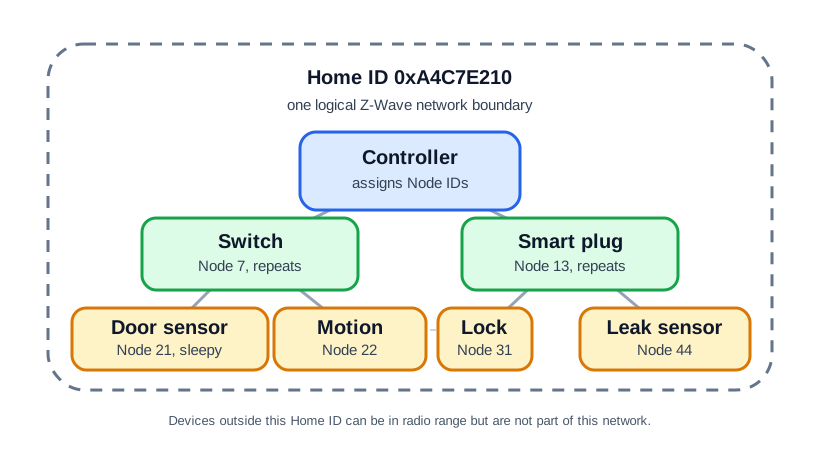
The controller assigns Node IDs under the shown Home ID. Mains-powered switch and plug nodes can repeat frames and give a lock or distant sensor path diversity, while a sleepy door sensor has a different availability pattern. Devices outside that Home ID may still be within radio range but are not members of this network. Keep inclusion and interview records with the installed locations and routes. A heard radio signal is not proof that a device belongs to the right controller or that a sleepy node will deliver the required event through its chosen path.
26.7 Home ID and Node ID
This section: Home ID and Node ID — A classic Z-Wave network uses a network identifier plus per-device addresses.
A classic Z-Wave network uses a network identifier plus per-device addresses.
Home ID
- Defines the logical network boundary.
- Is shared by devices that belong to the same network.
- Prevents neighboring Z-Wave networks from treating each other’s packets as their own traffic.
- Is assigned during inclusion by the controller that owns the network.
Node ID
- Identifies one device inside a Home ID.
- Is assigned during inclusion.
- Is local to that Home ID; the same Node ID number can exist in a neighboring network without creating a conflict.
- In classic Z-Wave, the practical network capacity is 232 nodes because the 8-bit node space reserves some values.
Do not treat radio range as permission to communicate. A controller may hear a neighboring network’s traffic at the RF layer, but a different Home ID means the packet is outside its network boundary.
26.8 Command Classes and Security Context
This section: Command Classes and Security Context — A Z-Wave device is described by the command classes it supports.
A Z-Wave device is described by the command classes it supports. These standardized capability modules, such as Binary Switch, Multilevel Sensor, Door Lock, and Battery, are how one controller can drive many product types without a custom driver for every SKU. Inclusion is therefore not just “the device appeared.” A usable inclusion record says which command classes were interviewed, which ones failed, and whether the resulting device role matches the installed purpose.
Security wraps that device model. Modern Z-Wave deployments should prefer Security 2 (S2) over legacy S0 because S2 fixes the inclusion-time weakness that made S0 risky during pairing. For architecture review, that security result belongs beside Home ID, Node ID, role, and location. A lock with the right Node ID but the wrong security class is not ready; a sensor with a clean interview but no route evidence is also not ready.
Counts can be misleading unless they separate identity from routing responsibility. If a house has 1 controller, 8 mains-powered switches, 3 smart plugs, and 22 battery sensors, the network has 34 nodes, but only 11 mains-powered end devices are useful as classic repeaters. The 22 battery sensors increase measurement coverage, not route coverage. A smaller installation with 1 controller, 10 mains-powered switches, 4 plug-in modules, and 1 battery sensor has only 16 nodes, but 14 always-listening endpoints that can help carry classic routes.
That distinction prevents a common design error. A device count of 34 sounds healthy, but an upstairs contact sensor may still have only one practical route if the nearest repeater is a plug behind a metal appliance. The acceptance record should list node identity, command-class interview state, device role, security class, installed location, whether the device repeats, and the route evidence that proves each critical endpoint has a working path.
26.9 Device Roles
This section: Device Roles — Z-Wave architecture is easier to reason about if you classify devices by network responsibility instead of product category.
Z-Wave architecture is easier to reason about if you classify devices by network responsibility instead of product category.
Figure 26.2 classifies nodes by identity, power, and routing duty.
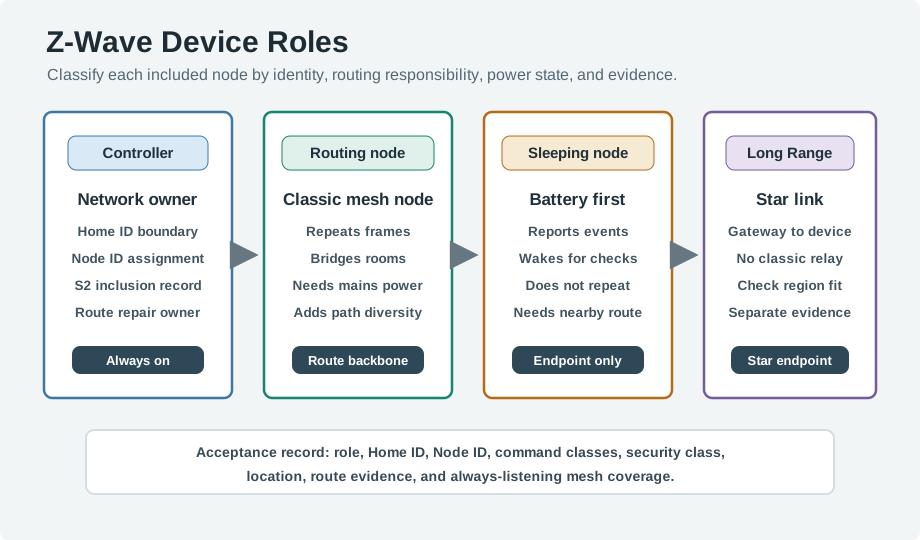
The roles in Figure 26.2 start with the controller, which owns the Home ID, Node IDs, S2 inclusion record, and route repair. An always-on classic node can repeat frames and build the mesh backbone. A sleeping battery sensor reports events but does not repeat, so it needs a nearby usable route. A Long Range endpoint uses a direct star link and must be checked for region and hub support, not counted as a classic relay. For each included device, record identity, command classes, security class, installed place, and reachability. These roles require different acceptance evidence even when they share one controller.
26.10 Controller
This section: Controller — The controller is the administrative anchor for the network.
The controller is the administrative anchor for the network. In consumer systems it is usually a hub, USB stick attached to an automation server, or embedded gateway.
Controller responsibilities include:
- creating or joining the network identity;
- including and excluding devices;
- assigning Node IDs;
- maintaining route and neighbor evidence;
- coordinating security inclusion and command-class interviews;
- queuing commands for sleeping devices when supported by the device class;
- exposing device state to an automation platform.
A controller failure does not always mean every existing device stops switching immediately, but it does remove the normal place where inclusion, route repair, interviews, automation logic, and observability happen. Treat controller backup and migration as part of the architecture, not as an afterthought.
26.11 Classic Mesh Routing Endpoint
This section: Classic Mesh Routing Endpoint — A routing endpoint is an end device that also helps the network carry traffic.
A routing endpoint is an end device that also helps the network carry traffic. In a classic mesh, this role is usually held by mains-powered devices such as switches, plugs, in-wall modules, thermostats, or dedicated repeaters.
Routing endpoints matter because they:
- listen continuously enough to receive relayed frames;
- can forward frames for other nodes;
- provide alternate paths around RF shadows and failed devices;
- make edge rooms, garages, basements, and exterior doors reachable;
- give the controller more route choices during repair.
The best repeaters are not always the devices with the strongest direct signal to the controller. They are the devices placed where they connect two useful areas of the home.
26.12 Sleeping Endpoint
This section: Sleeping Endpoint — Most battery sensors are endpoints.
Most battery sensors are endpoints. They wake for local events, periodic reports, or manual wake actions. Their radios are off most of the time, so they cannot be relied on as repeaters.
Sleeping endpoint design rules:
- Place at least one good routing endpoint near each critical battery sensor.
- Prefer two independent classic mesh paths for door locks, security sensors, and hard-to-reach devices.
- Expect configuration updates to wait until the device wakes or is manually awakened.
- Do not judge mesh health by total device count; judge it by always-listening route coverage.

26.13 Z-Wave Long Range Endpoint
This section: Z-Wave Long Range Endpoint — Z-Wave Long Range is different from classic mesh repeating.
Z-Wave Long Range is different from classic mesh repeating. It uses direct gateway-to-device star communication and a larger address space. It can coexist in a broader Z-Wave ecosystem, but an LR endpoint is not a classic mesh repeater.
Use the distinction in design reviews:
- Classic Z-Wave mesh: useful when several mains-powered repeaters can create local path diversity.
- Z-Wave Long Range: useful when direct gateway reach, simplified route behavior, or larger address space is the main need.
- Mixed deployments: require checking controller support, device support, regional frequency, and which devices are mesh nodes versus LR star nodes.
26.14 Classic Mesh vs Z-Wave Long Range
This section: Classic Mesh vs Z-Wave Long Range — The important decision is not “old versus new”; it is topology fit.
The important decision is not “old versus new”; it is topology fit.
Classic mesh is a good fit when:
- the building has many mains-powered devices distributed through rooms;
- devices need local path diversity around walls, metal, appliances, or RF dead zones;
- the deployment is within classic network capacity;
- existing devices and controllers are classic Z-Wave or Z-Wave Plus.
Z-Wave Long Range is a good fit when:
- direct gateway-to-device communication is preferred;
- endpoints are spread beyond the practical classic mesh backbone;
- a large address space is required;
- the controller and devices explicitly support LR in the deployment region.
Mixed deployments need records. For every device, record whether it is classic mesh or LR, whether it can repeat, what security class it used during inclusion, and what evidence proves it is reachable after installation.
26.15 S0, S2, and the DSK
This section: S0, S2, and the DSK — Security inclusion is part of architecture because it decides whether the controller knows and trusts the physical device it just added.
Security inclusion is part of architecture because it decides whether the controller knows and trusts the physical device it just added. S0 is legacy. S2 is the current security model used for sensitive devices such as locks, access-control devices, and many modern certified products.
| Review item | S0 legacy behavior | S2 current behavior |
|---|---|---|
| Encryption primitive | AES-128 after inclusion | AES-128 after inclusion |
| Inclusion key exchange | Network key sent under a hardcoded temporary key | ECDH key agreement, commonly described with Curve25519 in Z-Wave S2 material |
| Device authentication | No useful defense against a sniffer during pairing | Device Specific Key (DSK) confirmed by QR scan or PIN entry |
| Practical weakness | Sniffing inclusion can reveal the network key | Resists inclusion-time interception and man-in-the-middle substitution when DSK verification is followed |
The Device Specific Key is the linchpin. It is printed on the device, encoded in its QR code, and represented as a PIN for manual confirmation. During S2 inclusion, the installer confirms part of the DSK so the controller authenticates the exact physical device rather than a nearby impostor. S2 also separates keys by security class; a door lock can use an access-control class key that is distinct from ordinary sensor traffic.
Tie security inclusion back to physical role. Suppose a front-door lock, two in-wall switches, one plug-in repeater, and four contact sensors are added during a renovation. The lock is critical, the two switches and plug may form the local classic mesh backbone, and the contact sensors are sleepy endpoints. The acceptance checklist should confirm the lock’s S2 class, DSK verification method, controller backup, and at least two useful classic route choices where practical. If the plug-in repeater is the only route to the lock, record that risk instead of treating the lock as secure merely because S2 inclusion succeeded.
Inclusion order also matters. Include mains-powered routing endpoints first, verify they are alive at their installed locations, then include sleeping endpoints and wake them when interviews or configuration updates are needed. That sequence gives battery devices a real backbone during inclusion and gives later route repair useful evidence.
26.16 Source Routing and Route Repair
This section: Source Routing and Route Repair — Classic Z-Wave uses source-routed behavior: a selected path is placed in the transmission rather than requiring each repeater to independently decide the next hop.
Classic Z-Wave uses source-routed behavior: a selected path is placed in the transmission rather than requiring each repeater to independently decide the next hop. This keeps normal delivery predictable, but it also means route evidence can become stale when devices move or the RF environment changes.
Figure 26.3 treats a missing acknowledgment as stale route evidence.
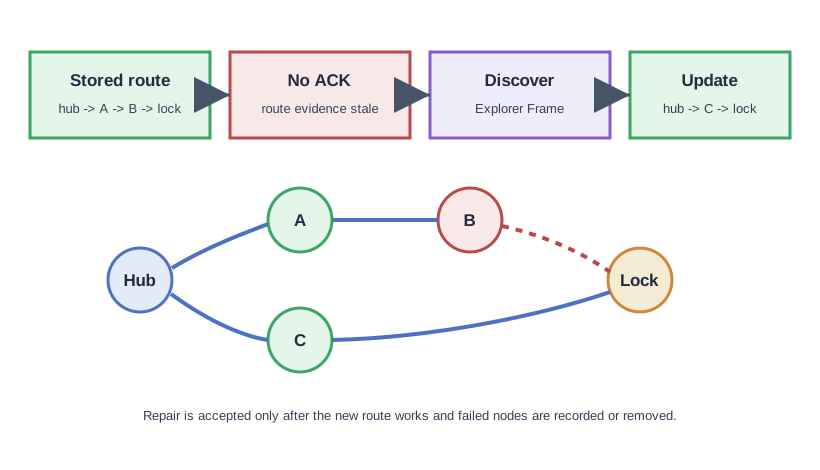
The stored route from hub through A and B to the lock has failed to receive an acknowledgment. An explorer frame can find another reachable path, shown through C, but the new route is only accepted after the lock responds under the installed conditions. Keep the failed nodes and attempted paths in the record before clearing or replacing them. A route repair is a measured change to the network state, not simply a controller redraw. Repeat the lock action and check the receiver result after moving a repeater or changing the enclosure.
A healthy route-repair loop has four parts:
- Stored route. The controller or transmitting node has a preferred path based on previous neighbor and route evidence.
- Failure signal. A command does not receive the expected acknowledgement, or retries exceed the acceptable threshold.
- Discovery. Explorer frames or controller repair operations discover an alternate path.
- Evidence update. The route table, neighbor view, or device diagnostics are updated and the command is retried.
Route repair should be visible in operations records. A network that “eventually works” but has repeated retries, stale routes, or hidden failed nodes still needs attention.
26.17 SmartStart and Architecture Acceptance
This section: SmartStart and Architecture Acceptance — S0’s weakness was concrete: to bootstrap encryption, the new device and controller exchanged the network key protected by a temporary key that was effectively public.
S0’s weakness was concrete: to bootstrap encryption, the new device and controller exchanged the network key protected by a temporary key that was effectively public. An attacker recording that brief inclusion window could recover the network key, so security depended on nobody listening during pairing. S2 removes that pattern by deriving a shared secret through ECDH, where each side contributes public material but the resulting key is not transmitted in recoverable form, and by authenticating the physical device with its DSK.
SmartStart makes secure onboarding easier to operate. The installer scans the device QR code, which carries the DSK, into the controller before powering the device. When the device comes online, the controller can include it over S2 without the same manual pairing window. That can produce better security and better deployment evidence, provided the installer records which physical device was scanned and where it was installed.
Architecture acceptance has two loops: identity and reachability. Identity asks whether the DSK, security class, command classes, and controller record match the intended physical device. Reachability asks whether the node has a working route after installation. A door lock that included with S2 but depends on one removable plug still has an architecture risk; a battery sensor with a perfect command-class interview still cannot repeat for other nodes.
Put that into a route-review example. A controller reaches a lock through Switch A and Plug B. If Plug B is unplugged, the stored route fails and the system may need Explorer frames or route repair to find a new path. The minimum acceptance evidence is not “lock included.” It is: S2 inclusion succeeded, command classes interviewed, the installed route was tested, a second route exists where practical, and failed-node cleanup or repeater movement has a recorded owner.
Capacity should also be treated carefully. Classic Z-Wave’s practical 232-node limit is much higher than most homes need, so a 45-device installation is usually not an addressing problem. If 38 of those devices are sleepy battery endpoints, the likely issue is that only 7 nodes can form the always-listening backbone. Security, routing, and device-role evidence must be reviewed together.
Accept a Z-Wave architecture only when Home ID, Node ID, device role, security inclusion, repeater placement, and route evidence are all recorded.
26.18 Check S2 Inclusion Evidence
This section: Check S2 Inclusion Evidence
26.19 Design Review Checklist
This section: Design Review Checklist — Figure 26.4 checks whether installed routes match the chosen topology.
Figure 26.4 checks whether installed routes match the chosen topology.
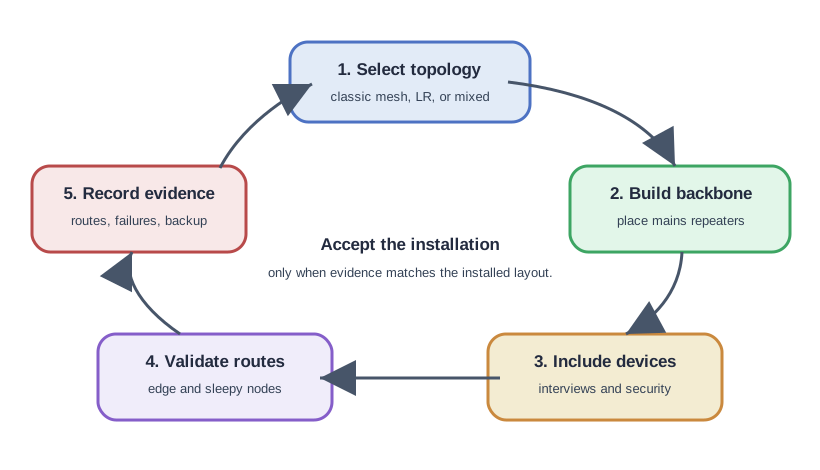
The design review in Figure 26.4 first selects classic mesh, Long Range, or a mixed layout. Place mains repeaters where classic routes need a backbone, then include devices and retain interview and security results. Route validation must exercise edge nodes and sleeping devices from their installed positions, not merely from a bench near the hub. The final record keeps routes, failures, and a controller backup. Acceptance depends on the observed layout matching the plan. If a repeater is moved or a battery node changes its wake behavior, repeat the route and delivery checks before claiming the same coverage.
Use this checklist before accepting a Z-Wave design:
Network boundary
- The Home ID boundary is clear.
- Multiple buildings or units have a deliberate plan: one network, multiple networks, or a higher-level integration platform.
- Regional frequency and controller support match the devices being purchased.
Backbone
- Mains-powered routing endpoints are placed before edge battery devices are installed.
- Important endpoints have more than one practical path where possible.
- Repeaters are not hidden behind metal appliances, low outlets in shielded rooms, or power strips that may be unplugged.
Inclusion and security
- Devices are included from their installed location when practical, or route repair is run after relocation.
- Security classes and device-specific keys are recorded where the controller exposes them.
- Device interviews finish successfully; missing command classes are not ignored.
Validation
- The farthest and most critical devices are tested after the full device set is installed.
- Battery devices are manually awakened when configuration or interview evidence is needed.
- Route repair is run after moving repeaters, excluding failed nodes, or adding major backbone devices.
Operating record
- Record the controller, backup method, network size, critical repeaters, failed-node cleanup process, and known RF risk areas.
- Recheck health after renovations, new appliances, hub migration, or repeated unexplained latency.
26.20 Troubleshooting Patterns
This section: Troubleshooting Patterns — A battery sensor reports events but ignores configuration changes.
A battery sensor reports events but ignores configuration changes.
The device may be sleeping. Wake it manually or wait for its wake interval. Do not add repeaters expecting them to buffer configuration commands for a sleeping endpoint.
A lock or sensor at the edge works sometimes.
Check whether the nearby always-listening device actually repeats, whether it is powered, and whether it is on the same Z-Wave network. Add a mains-powered routing endpoint between the controller and the edge device if the route evidence is weak.
A room became unreliable after moving a smart plug.
The plug may have been part of a stored route. Run route repair or network heal and verify that the affected devices use a new path.
A newly purchased device will not include.
Check regional frequency, controller generation, security support, exclusion state, and whether the device was already included in another Home ID.
The network has many devices but poor reach.
Count only always-listening classic mesh repeaters when judging backbone strength. Battery sensors and LR endpoints do not increase classic mesh path diversity.
26.21 Knowledge Check
This section: Knowledge Check
26.22 Match the Concepts
This section: Match the Concepts
26.23 Order the Setup Steps
This section: Order the Setup Steps
26.24 Worked Example
This section: Worked Example — A three-floor home has a controller in the first-floor utility room, a smart lock at the front door, six in-wall switches, three smart plugs, ten contact sensors, and four motion sensors.
A three-floor home has a controller in the first-floor utility room, a smart lock at the front door, six in-wall switches, three smart plugs, ten contact sensors, and four motion sensors.
Start by classifying devices:
- Controller: utility-room hub.
- Routing endpoints: six in-wall switches and three smart plugs.
- Sleeping endpoints: ten contact sensors and four motion sensors.
- Critical endpoint: smart lock, because delayed or unreliable control affects physical access.
Review the architecture:
- Put at least one routing endpoint near the front door and one between the door and the controller.
- Avoid making the lock depend on a single removable smart plug.
- Include mains-powered devices before the battery sensors so the backbone exists when edge devices join.
- Include the lock from its installed location if possible; otherwise run route repair after installation.
- Record which repeaters are critical so someone does not unplug or relocate them without checking routes.
The acceptance evidence is not “all devices appeared in the app.” Better evidence is that the lock responds after route repair, sensors report from installed locations, sleeping devices finish their interviews after wake-up, and the route table has no failed or unknown nodes.
26.25 Common Pitfalls
This section: Common Pitfalls — Counting endpoints instead of repeaters.
Counting endpoints instead of repeaters. A large number of battery sensors does not create a stronger classic mesh.
Buying the wrong regional device. Z-Wave frequency plans vary by region, and devices are not interchangeable just because the product name looks similar.
Moving a repeater without repair. A moved smart plug can leave stored route evidence pointing through a location where the repeater no longer exists.
Assuming certification removes all design work. Certification improves interoperability, but you still need to check command classes, security support, controller compatibility, and installed RF behavior.
Treating Z-Wave Long Range as a repeater upgrade. LR uses star communication. It may solve reach or capacity problems, but it does not add classic mesh repeating paths.
The route-healing sequence in Figure 26.5 makes the value of powered, static relays concrete around one failed hop.

In Figure 26.5, the initial route advances from Controller through Relay A and Relay B until Relay C · failed produces NO ACK. The healed green path uses Relay D · alternate to reach Door lock, showing why stable powered relays make discovery results reusable while acknowledgement evidence still has to age a broken route.
26.26 Summary
This section: Summary — Z-Wave architecture starts with a Home ID boundary and Node IDs inside that boundary.
Z-Wave architecture starts with a Home ID boundary and Node IDs inside that boundary. Classic Z-Wave mesh reliability depends on always-listening routing endpoints, while sleeping battery endpoints conserve power and usually do not repeat traffic. Source routing makes normal delivery predictable, but route evidence can become stale after devices move, fail, or get excluded. Z-Wave Long Range adds a star-topology option with larger address space; it should be selected deliberately rather than mixed into the design without records.
26.27 Key Takeaway
This section: Key Takeaway — Z-Wave architecture review should include controller role, device classes, mesh routing, inclusion, security, interoperability, and home-automation ownership.
Z-Wave architecture review should include controller role, device classes, mesh routing, inclusion, security, interoperability, and home-automation ownership.
26.28 Concept Relationships
This section: Concept Relationships
Builds on:
- Z-Wave Overview and Fundamentals: protocol purpose, regional bands, and ecosystem context.
- Networking Basics: addressing, topology, and path behavior.
- Network Topologies: mesh, star, and hybrid network tradeoffs.
Prepares for:
- Z-Wave Routing and Healing: route selection, source routing, network healing, and diagnostics.
- Z-Wave Network Planning and Design: placement exercises and acceptance checks.
- Z-Wave Simulation and Quiz: hands-on experiments with routes and failures.
Compares with:
- Zigbee Fundamentals and Architecture: another low-power smart-home mesh model.
- Thread Network Architecture: an IPv6-based mesh architecture used with Matter.
26.29 References
This section: References
26.30 Try It Yourself
This section: Try It Yourself — Sketch your home or lab as a simple floor plan.
Sketch your home or lab as a simple floor plan. Mark the controller, every mains-powered Z-Wave device, and every battery endpoint. Then answer:
- Which devices are true classic mesh repeaters?
- Which battery endpoints depend on a single repeater?
- Which devices would become risky if one smart plug was unplugged?
- Which devices are classic mesh and which, if any, are Z-Wave Long Range?
- What route or health evidence would you record before accepting the installation?
26.31 What’s Next?
This section: What’s Next?
- Z-Wave Routing and Healing: study how source routes, failed acknowledgements, Explorer frames, and repair actions work.
- Z-Wave Network Planning and Design: turn architecture rules into a concrete placement plan.
- Z-Wave Simulation and Quiz: test route behavior and failure recovery.
- Zigbee Fundamentals and Architecture: compare Z-Wave’s architecture with another smart-home mesh.
Find help
3 reviewed answers.
Where should I start in a module?
Open the module page from the sidebar to see its chapters in order. Use the module map to return to a topic you need.
Modules and pathsReviewed
What can I try when a project does not work?
Check the symptom, then work through the diagnostic steps. Keep the error message and the smallest example that reproduces it.
When you are stuckReviewed
How do interactive examples work?
Use the interactive guide to check how examples and simulations work before changing your project.
Interactive examples guideReviewed