24 ISA100.11a vs WirelessHART
More
Depth: Practitioner
Progress saves as you read. Mark sections complete as you go; your progress appears in the sidebar.
-

Which network path should this pressure sensor use?
24.1 Start With the Story
This section: Start With the Story — Picture a pressure sensor in a plant.
Compare the Whole Industrial Path
Picture a pressure sensor in a plant. Its reading must cross a shared wireless site, reach the right system, and remain useful when one route is blocked. Choosing the radio alone does not prove that whole path.
A protocol is a shared set of rules for communication. An industrial stack joins several rule sets, from the radio link up to device data and management. ISA100.11a is one such stack for industrial wireless systems.
Begin with the plant task. State the update time, loss limit, power plan, area, safety role, and owner. Then compare each layer by its job. Check how devices join, how routes change, how time is kept, how messages are protected, and how the reading reaches existing plant tools.
Test the installed form. Block a path. Add traffic. Restart a device. Change a key. Keep the evidence that shows which layer recovered and which did not.
Check one small flow first. Name the source. Name the final user. Mark each hand-off. Set the allowed wait. Set the loss limit. Record the route. Record the time source. Record the key state. Break one path. Watch the repair. Confirm the final value. Save the proof.
The simple stack view has limits. Similar radio parts do not make two systems equal in operations or trust.
Use Practitioner for side-by-side design evidence. Use Under the Hood for packet, time, route, and security details.
ISA100.11a and WirelessHART can both support industrial wireless monitoring, so the decision cannot stop at “industrial mesh.” The practical difference is where management, routing, security, interoperability, and gateway ownership sit.
Use this chapter as a comparison record. Start with the plant constraint, then ask which stack makes the needed responsibility more visible, more testable, and easier to operate over time.
24.2 Learning Objectives
This section: Learning Objectives
By the end of this chapter, you should be able to:
- Compare ISA100.11a and WirelessHART by layer without treating shared radio hardware as protocol compatibility.
- Explain where IPv6, 6LoWPAN, gateway translation, routing, security, and management ownership affect deployment risk.
- Separate application compatibility from wireless link behavior.
- Identify which flows benefit from ISA100.11a flexibility and which flows benefit from HART-native operation.
- Build a protocol-selection record that includes evidence, owners, constraints, and retest triggers.
24.3 Quick Check: ISA100 Stack
This section: Quick Check: ISA100 Stack
24.4 Minimum Viable Understanding
This section: Minimum Viable Understanding
- Shared PHY does not mean shared stack. The standards diverge in network behavior, management model, application model, and gateway expectations.
- ISA100.11a is more integration-oriented. Its IPv6 and 6LoWPAN fit can help with plant-network integration, but only when gateway, diagnostic, and ownership records are clear.
- WirelessHART is more HART-oriented. Its strongest fit is a plant that already depends on HART instruments, tools, and command workflows.
- Security is a boundary question. Link protection, payload protection, management keys, route visibility, and gateway trust boundaries are not the same thing.
- Protocol choice is an evidence decision. Device availability, owner skill, diagnostics, coexistence, gateway support, and replacement workflow matter as much as layer diagrams.
24.5 Same Radio, Different Operating Model
This section: Same Radio, Different Operating Model — The real difference is operating philosophy.
ISA100.11a and WirelessHART are the two dominant industrial wireless standards, and at the radio they can look similar: both use the IEEE 802.15.4 2.4 GHz PHY, both rely on scheduled channel-hopping behavior, both build centrally managed mesh networks, both use AES-128 security, and both have IEC standard status. WirelessHART is standardized as IEC 62591. ISA100.11a is standardized as IEC 62734.
The real difference is operating philosophy. WirelessHART is a single prescriptive profile built around HART. ISA100.11a is a configurable, IP-oriented framework built to carry several industrial protocol patterns. That one choice explains most of the tradeoffs, because the shared radio does not mean shared engineering. A WirelessHART pressure transmitter and an ISA100 vibration monitor may both wake on scheduled slots, hop away from noisy channels, and authenticate with symmetric keys, but they do not join the same manager, use the same application model, or expose diagnostics through the same gateway.
Figure 24.1 shows where WirelessHART and ISA100.11a share a radio foundation and diverge above it.
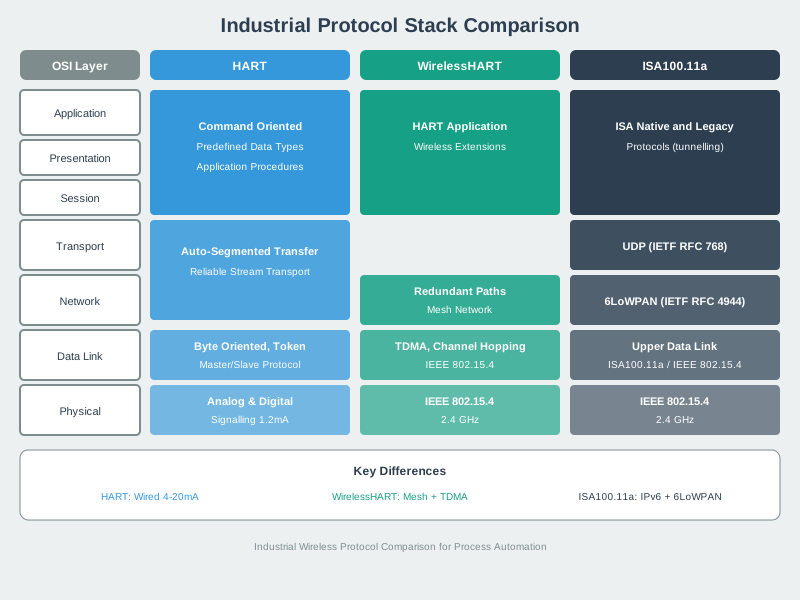
The WirelessHART side follows a set HART application workflow. ISA100.11a offers a configurable IP path. The comparison should follow a real plant value from application meaning through routing, security, and gateway translation, because similar radios do not imply interchangeable host integration. An installed HART toolset may make one path easier to operate. Mixed payloads or an IPv6 path may favor another. Record the gateway and manager behavior actually tested before selecting a stack for the plant.
Use a brownfield example. A process unit has 40 wired-HART pressure and temperature instruments that report slowly, plus 8 newer condition-monitoring devices that publish richer diagnostics. If the main job is to add wireless access to the HART instruments without redesigning the control data path, WirelessHART usually fits the first group because the HART command model is already the plant language. If the condition-monitoring devices need IP-style integration, object data, or non-HART tunneling, ISA100.11a may fit that second group better.
The standards can coexist in the same site, but the boundary must be explicit. Each mesh has its own manager, keys, gateway mapping, alarm behavior, and maintenance evidence. The practical comparison should ask what payload must cross the gateway, who owns the schedule, how stale values are reported, how replacement devices receive credentials, and which diagnostics the maintenance team can see during a bad RF week.
24.6 Comparison Map
This section: Comparison Map — Use this map to keep the comparison at the correct level: layer behavior, management ownership, gateway boundary, and release evidence.
Use this map to keep the comparison at the correct level: layer behavior, management ownership, gateway boundary, and release evidence.
Figure 24.2 frames protocol choice around four evidence boundaries.
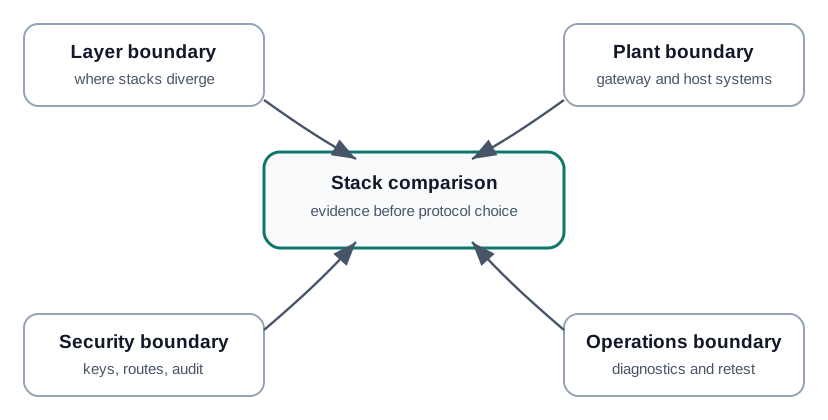
The layer boundary asks where the two stacks differ above their wireless foundation. The plant boundary checks gateway translation and host-system expectations. Security needs a record of key handling, routes, and audit, while operations needs diagnostics and a retest plan. Compare the same device value and fault case through each candidate path so the decision reflects what the plant can operate. A protocol name or radio compatibility claim cannot answer who owns a failed join, a stale value, or a gateway mapping error.
24.7 Stack Boundaries
This section: Stack Boundaries — Layer diagrams are useful only when they show which team owns each boundary.
Layer diagrams are useful only when they show which team owns each boundary. Avoid saying that one stack is simply “better” because it has more familiar protocol names.
Figure 24.3 locates the two stacks’ application and network differences.
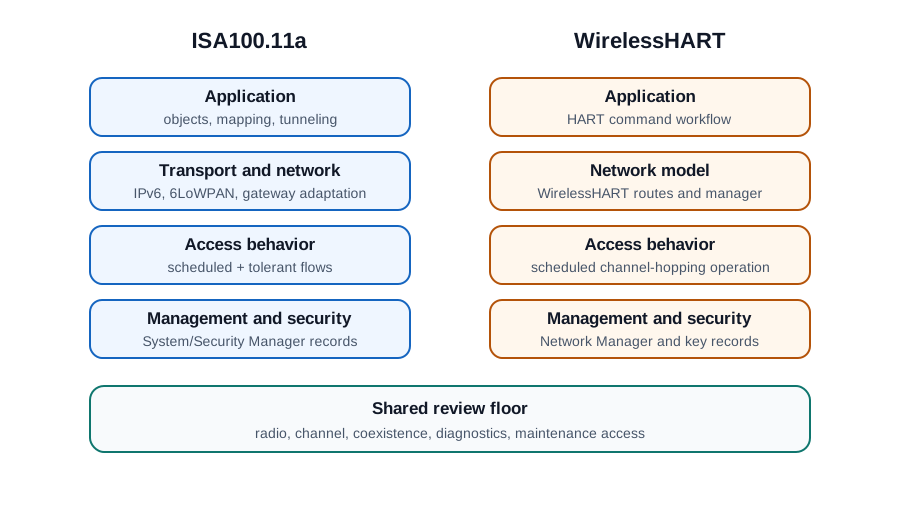
WirelessHART uses a HART command workflow above its managed routes and scheduled channel-hopping access. ISA100.11a shows application objects or tunneling with an IPv6 and gateway adaptation path. Both need management and security decisions, but those decisions appear in different operating models. Follow one process value through application mapping, network route, gateway, and plant host in each candidate. The layer drawing explains what must be tested; it does not establish that an existing instrument or host accepts both paths without translation work.
24.8 Head-to-Head Stack Tradeoffs
This section: Head-to-Head Stack Tradeoffs — Neither standard is better in isolation; they optimize different release risks.
| Aspect | WirelessHART (IEC 62591) | ISA100.11a (IEC 62734) |
|---|---|---|
| TDMA slot | Fixed 10 ms | Configurable slot timing |
| Network layer | HART-specific | 6LoWPAN and IPv6 |
| Application layer | HART commands and wired-HART compatibility | Object-oriented model; can tunnel HART, Modbus, Foundation Fieldbus, and Profibus patterns through gateways |
| Management | Central Network Manager plus Security Manager | Central System Manager plus Security Manager |
| Character | Prescriptive, strong out-of-box interoperability inside HART practice | Flexible, with more configuration to engineer and validate |
| Best fit | Plants already standardized on HART instruments and tools | Mixed protocols, non-HART payloads, and tight IT integration needs |
Neither standard is better in isolation; they optimize different release risks. If a unit has 24 HART pressure transmitters and 12 HART temperature transmitters reporting every 30 seconds, WirelessHART gives the team a familiar application model and a small number of configuration choices. The acceptance test can stay concrete: each tag joins, receives a route, publishes on schedule, fails over through a neighbor, and appears at the host as the expected HART data.
If the same site adds 6 vibration monitors with larger diagnostic payloads and a requirement to integrate through an IP-addressable gateway, the calculus changes. ISA100.11a’s configurable slot timing, IPv6 and 6LoWPAN layer, and object model create more engineering work, but they also give the integrator more room to carry non-HART data cleanly. The price of that flexibility is test scope. The release package should record the chosen slot policy, update rates, route graphs, gateway object mapping, payload limits, and replacement-device procedure, not just a statement that the radio uses channel hopping.
A mixed plant should avoid pretending one comparison table decides every area. A good selection note names the standard per network segment, lists the device families assigned to each mesh, and records who owns the gateway and security manager. It also names retest triggers: adding a high-rate diagnostic device, changing a reporting interval, replacing a gateway, modifying key rotation policy, or moving a router should all reopen capacity and route evidence.
24.9 ISA100.11a Stack Review
This section: ISA100.11a Stack Review — Review ISA100.11a by asking what each layer makes easier and what each layer makes harder to operate.
Review ISA100.11a by asking what each layer makes easier and what each layer makes harder to operate.
24.10 WirelessHART Stack Review
This section: WirelessHART Stack Review — Review WirelessHART by asking whether its HART-native model matches the plant’s installed instruments, work practices, and diagnostic expectations.
Review WirelessHART by asking whether its HART-native model matches the plant’s installed instruments, work practices, and diagnostic expectations.
24.11 Routing, Access, and Security
This section: Routing, Access, and Security — The most important differences appear when the wireless network is under maintenance pressure: a route changes, a device is replaced, a key expires, a gateway restarts, or a flow becomes urgent.
The most important differences appear when the wireless network is under maintenance pressure: a route changes, a device is replaced, a key expires, a gateway restarts, or a flow becomes urgent.
Figure 24.4 compares access, route, key, and gateway evidence for one flow.
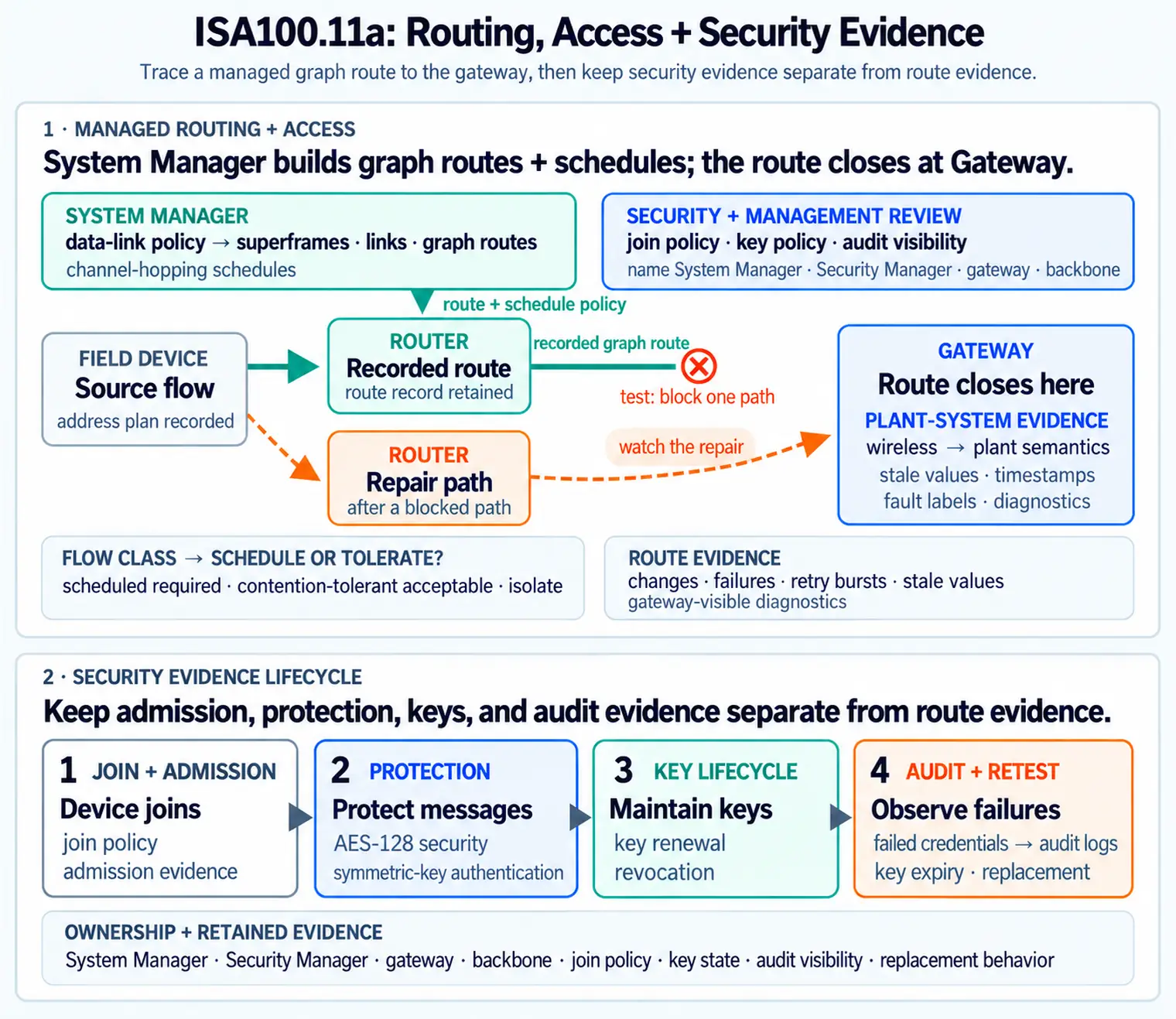
Begin with the flow class: a control value, alarm, and log have different urgency and retry needs. Access evidence tests whether the schedule or tolerant path matches that class. Route evidence records changes and failures, key evidence records renewal, revocation, and audit, and the gateway record labels missing or stale values. Apply the same fault and receiver question to each candidate stack. If the gateway hides a route failure or a key change silently stops data, a successful radio link test is not enough to support the protocol choice.

24.12 Prescriptive vs. Configurable Failure Modes
This section: Prescriptive vs. Configurable Failure Modes — WirelessHART fixes many decisions so devices interoperate with little engineering: a 10 ms slot, a HART application layer, and a narrower way to express the application boundary.
WirelessHART fixes many decisions so devices interoperate with little engineering: a 10 ms slot, a HART application layer, and a narrower way to express the application boundary. That rigidity is a feature in a HART plant because there are fewer parameters to get wrong, but it also means the network speaks HART and little else.
That design choice changes the failure modes. With WirelessHART, the Network Manager can plan around a common slot model and a common payload expectation. A rough capacity discussion can start with counts: 60 devices, two scheduled transmit opportunities per reporting cycle for primary and retry paths, and a 10 ms slot means at least 60 x 2 x 10 ms = 1.2 s of raw slot time before acknowledgements, management traffic, route diversity, and guard margins are considered. The exact schedule is manager-specific, but the integrator is not deciding the slot duration or inventing the application boundary.
ISA100.11a leaves more of that shape open: configurable slot timing, multiple hopping modes, IPv6 addressing, and an object model that can tunnel other protocols. That flexibility is powerful for a heterogeneous plant and for connecting to IT systems, but every open parameter is one an integrator must configure and validate. If a Modbus diagnostic payload crosses an ISA100 gateway, the team has to prove gateway mapping, payload-fragmentation behavior, route stability, update interval, stale-data indication, and security provisioning.
This is why the correct comparison lives at layer boundaries. Below the MAC, both standards benefit from scheduled access and channel diversity. Above it, WirelessHART reduces degrees of freedom so HART interoperability is the default outcome. ISA100.11a exposes degrees of freedom so multi-protocol integration is possible. Many sites run both, chosen per area by which tradeoff fits. The defensible engineering decision names that tradeoff, then backs it with route tables, key records, gateway screenshots, failover observations, and a maintenance procedure that explains what to check when the plant changes.
24.13 Selection Evidence
This section: Selection Evidence — Do not choose a protocol from a feature checklist alone.
Do not choose a protocol from a feature checklist alone. Build a selection record that explains the evidence behind the choice.
Figure 24.5 connects protocol fit to installed assets and support.
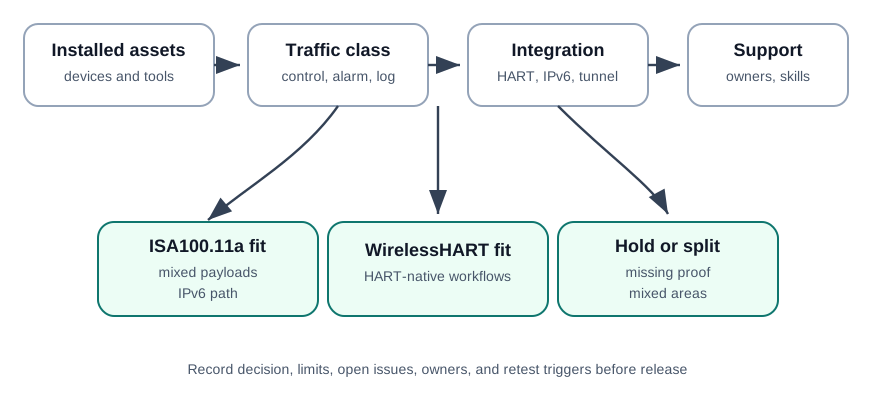
Existing devices and tools set one boundary; traffic classes and gateway integration set another. HART-native workflows may fit a WirelessHART path, while mixed payloads and an IPv6 route may support an ISA100.11a choice. The operations entry asks who can diagnose, renew keys, and retest after a gateway or topology change. If different plant areas have different needs, a split or hold may be more honest than one global answer. Record the chosen scope, limits, open issues, owners, and retest triggers before release.
Example selection record:
installed base: HART pressure devices plus non-HART vibration monitors
critical flows: alarm and supervision need named freshness rules
candidate fit: WirelessHART for HART-native pressure devices
candidate fit: ISA100.11a for non-HART payloads needing gateway mapping
evidence required: route diagnostics, gateway stale-value behavior, key revocation, replacement workflow
decision state: hold until gateway diagnostics and support ownership are verified
24.14 Worked Example
This section: Worked Example
A plant wants one wireless plan for HART pressure transmitters, non-HART vibration monitors, and storage-tank level sensors. The mistake would be to select a standard only from a layer diagram.
The comparison review should ask:
- Which devices already have HART command workflows that operators and maintenance staff depend on?
- Which non-HART payloads need translation, tunneling, object mapping, or a separate gateway path?
- Which flows require scheduled behavior, and which can tolerate delayed or retried updates?
- Which team owns join policy, route policy, key policy, gateway mapping, and diagnostics?
- What happens when a gateway restarts, a router is replaced, a key is revoked, or a tunneled payload grows?
The review may select one standard, split the deployment by area, or hold the decision. The acceptable answer is the one backed by evidence, not the one with the longer feature list.
24.15 Common Pitfalls
This section: Common Pitfalls
- Shared radio shortcut: assuming that common IEEE 802.15.4 radio behavior makes ISA100.11a and WirelessHART interoperable above the PHY layer.
- Feature-list selection: choosing the standard with more options without proving who will operate those options.
- HART fit ignored: overlooking existing HART tools, command workflows, gateway support, and operator practice.
- IPv6 fit overstated: assuming IPv6 naming alone solves gateway translation, diagnostics, fragmentation, or ownership problems.
- Tunneling blind spot: accepting a legacy payload because one message worked, without checking stale values, retries, diagnostics, or replacement behavior.
- No retest policy: failing to reopen the comparison after firmware, gateway, key-policy, route, enclosure, or interference changes.
24.16 Knowledge Check
This section: Knowledge Check
24.17 Check the Stack Comparison
This section: Check the Stack Comparison
24.18 Check ISA100 vs. WirelessHART Fit
This section: Check ISA100 vs. WirelessHART Fit
24.19 Match the Stack Evidence
This section: Match the Stack Evidence
24.20 Order a Stack Review
This section: Order a Stack Review
24.21 Summary
This section: Summary — ISA100.11a and WirelessHART should be compared as complete operating models, not as radio-only alternatives.
ISA100.11a and WirelessHART should be compared as complete operating models, not as radio-only alternatives. ISA100.11a tends to fit when IPv6 adaptation, multiple payload types, gateway mapping, and flexible flow handling are important and support ownership is clear. WirelessHART tends to fit when HART-native instruments, tools, host-system integration, and scheduled operation dominate the deployment. The right decision is the one backed by layer-specific evidence, operational ownership, gateway diagnostics, replacement workflow, and retest triggers.
24.22 Key Takeaway
This section: Key Takeaway — ISA100 protocol-stack comparison should focus on industrial requirements: deterministic scheduling, mesh routing, security, coexistence, gateway boundaries, and operational support.
ISA100 protocol-stack comparison should focus on industrial requirements: deterministic scheduling, mesh routing, security, coexistence, gateway boundaries, and operational support.
24.23 See Also
This section: See Also
- ISA100.11a Fundamentals: roles, management, topology, traffic, and evidence foundations.
- ISA100.11a Labs and Security: secure join, key lifecycle, gateway, and release evidence.
- WirelessHART Fundamentals: competing industrial wireless foundation.
- WirelessHART Network Management: management, provisioning, and route diagnostics.
- 6LoWPAN Fundamentals: IPv6 adaptation for constrained links.
24.24 What’s Next
This section: What’s Next — Continue with WirelessHART network management when comparing management-plane behavior, or move into the later NFC and Z-Wave chapters when returning to short-range identity and automation networks.
Continue with WirelessHART network management when comparing management-plane behavior, or move into the later NFC and Z-Wave chapters when returning to short-range identity and automation networks.
Find help
3 reviewed answers.
Where should I start in a module?
Open the module page from the sidebar to see its chapters in order. Use the module map to return to a topic you need.
Modules and pathsReviewed
What can I try when a project does not work?
Check the symptom, then work through the diagnostic steps. Keep the error message and the smallest example that reproduces it.
When you are stuckReviewed
How do interactive examples work?
Use the interactive guide to check how examples and simulations work before changing your project.
Interactive examples guideReviewed