15 NFC Tags and NDEF Format
More
Depth: Practitioner
Progress saves as you read. Mark sections complete as you go; your progress appears in the sidebar.
15.1 Start With the Story
This section: Start With the Story — Picture a maintenance tag that opens the wrong asset page after it is mounted.
Read Back One Record Before You Lock It
Picture a maintenance tag that opens the wrong asset page after it is mounted. A successful tap does not show that the stored record, app rule, and physical label agree.
Near Field Communication, or NFC, is a short-range radio system used for taps. A payload means the useful data carried inside a message or record.
Write one record, read it with two devices, corrupt one field, test the fallback, and only then test locking. Keep tag family, capacity, type, value, state, reader, and result.
This runway does not prove that a nearby tag is trusted or authorized. The deeper sections explain tag families, NDEF records, capacity, permissions, locking, validation, and release checks.
An NFC tag is often treated like a tiny label, but the design problem is a record lifecycle. The tag has a family, memory size, write state, lock policy, payload format, validation rule, and fallback behavior.
Read this chapter as a release checklist for tag data. Plan the NDEF message, prove it fits, read it back, validate it before trusting it, and make clear what the tag does not authorize on its own.
15.2 Learning Objectives
This section: Learning Objectives
By the end of this chapter, you should be able to:
- Review NFC tag family fit for simple NDEF records, file-style NDEF storage, vicinity-style labels, and application-specific credential behavior.
- Explain the relationship among tag memory, NDEF TLV containers, NDEF messages, record headers, record types, and payloads.
- Choose URI, Text, MIME, External, or composite record patterns for a practical IoT tag workflow.
- Validate capacity, write state, lock or protection behavior, parser output, application policy, fallback, and read-back evidence.
- Separate public NDEF payloads from secrets, credentials, private data, and authorization decisions.
15.3 Quick Check: NFC NDEF
This section: Quick Check: NFC NDEF
15.4 Checkpoint: Minimum Viable Understanding
This section: Checkpoint: Minimum Viable Understanding
- Tag type is not the payload. A tag family defines memory layout and commands; NDEF defines an interoperable payload format that may be stored on compatible tags.
- NDEF is structured input. A message contains records; each record has header flags, type information, optional ID, and a payload that the application still needs to validate.
- Capacity includes overhead. The usable payload must fit alongside TLV, record headers, type fields, language fields, terminator bytes, and any app-specific metadata.
- Write success is not release evidence. Read the tag back, decode the final NDEF, validate it in the target application, test fallback, and record retest triggers.
15.5 Tag Capability Review
This section: Tag Capability Review — Use tag-family names as review hints, not as proof that a tag fits the job.
Use tag-family names as review hints, not as proof that a tag fits the job.
Figure 15.1 checks a maintenance tag before any write is released.
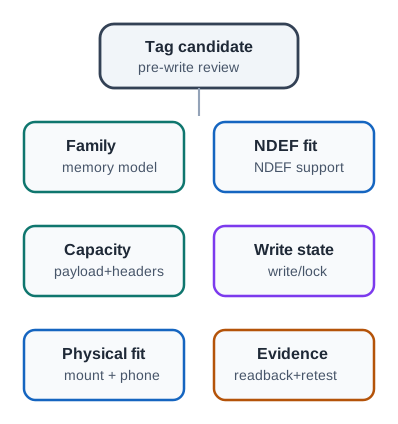
The PUMP-014 label is a candidate, so first verify its family, NDEF support, capacity, and write state on the actual part. The planned payload and headers must fit, and the mounting surface can change read behavior. Write and read back the record, compare it with the approved content, and only then apply any lock or protection policy. Keep the batch and fallback route with the result. A Type 2 or other family name suggests possible uses, but it does not prove that this tag supports the required payload or placement.
15.6 Tag-Family Prompts
This section: Tag-Family Prompts
15.7 Tag Types and Discovery Path
This section: Tag Types and Discovery Path — NDEF is the data; the NFC Forum tag types are the chips that hold it, and they differ in memory, speed, and underlying technology.
NDEF is the data; the NFC Forum tag types are the chips that hold it, and they differ in memory, speed, and underlying technology.
| Tag type | Based on | Typical chip or use |
|---|---|---|
| Type 1 (T1T) | ISO 14443A | Topaz; simple, small tags |
| Type 2 (T2T) | ISO 14443A | MIFARE Ultralight or NTAG21x; common low-cost labels |
| Type 3 (T3T) | FeliCa (NFC-F) | Higher-memory labels and platform-specific deployments |
| Type 4 (T4T) | ISO 14443A/B plus ISO 7816-4 | DESFire-style file systems, larger data, and secured applets |
| Type 5 (T5T) | ISO 15693 (NFC-V) | ICODE-style vicinity labels and longer-range inventory contexts |
The bare tag in Figure 15.2 shows the chip and antenna coil that packaged labels conceal.

The silicon holds the tag functions while the surrounding coil couples to the reader field. Packaging can put that pair in a sticker or card, but a photograph of the bare part cannot identify its exact tag family, memory size, security features, or final read range. Those properties need a part record and a read test on the intended surface. Inspect capacity and write state before encoding NDEF, then test the packaged tag after mounting. The image helps explain the physical boundary behind a capability table; it is not release evidence for a specific label.
Regardless of type, a reader first discovers whether an NDEF mapping is present. On small labels this can mean reading a Capability Container or TLV-style metadata that declares NDEF memory size and access state. On file-oriented tags it can mean selecting and reading an NDEF file. That discovery step is what lets one phone handle a small NTAG poster sticker and a multi-kilobyte DESFire card with the same NDEF parsing logic.
Choosing a tag type is a memory, security, and reader-support decision. Choosing NDEF records is a behavior decision. Keep those decisions separate: a Type 2 NTAG label can be right for a public URL sticker, while a Type 4 DESFire tag can be right for a secured, file-structured credential.
Use the family names as deployment prompts, not as a simple ranking. Type 1 and Type 2 labels fit small public records such as one-time provisioning hints, read-only business-card data, URL redirects, and Bluetooth or Wi-Fi handover references when the payload is short and the lifecycle is controlled. Type 3/FeliCa belongs in a reader-support review for Japanese and wider Asian transit, e-money, membership, and ID workflows. Type 4 is the family to evaluate when a ticket, credential, or access workflow needs ISO 7816-style files, access conditions, or secured applet behavior. Type 5 maps to ISO 15693/NFC-V vicinity behavior, so library labels, product packaging, and healthcare or medication labels need placement and reader evidence before the longer coupling distance is trusted.
15.8 Quick Check: Tag Type Fit
This section: Quick Check: Tag Type Fit
15.9 NDEF Message Structure
This section: NDEF Message Structure — NDEF turns tag bytes into records that many NFC devices can parse.
NDEF turns tag bytes into records that many NFC devices can parse. It does not make the payload trustworthy by itself.
Inspect Figure 15.3 and ask how a parser discovers record boundaries, payload length, and the meaning of the type field.
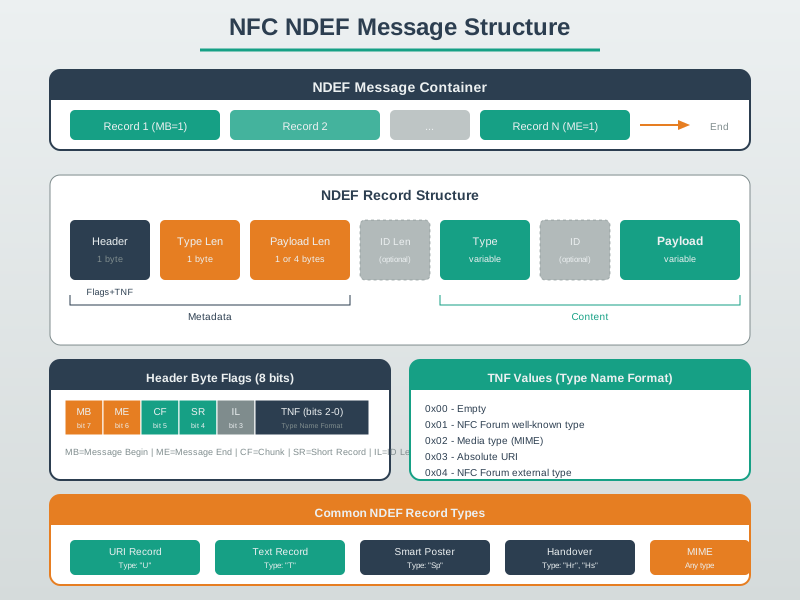
Follow Figure 15.3 from the URI and text records into one expanded short URI record. MB and ME delimit the ordered message; SR selects the one-byte payload-length form for a payload under 256 bytes, and IL determines whether an ID-length field follows. TNF occupies three bits, so it encodes possible values that tell the parser how to interpret the type field. Those flags are parsing instructions, not application content, and malformed combinations must be rejected.
15.10 NDEF Record Planning
This section: NDEF Record Planning — A tag that seems to open a URL, join Wi-Fi, or show text when you tap it is usually storing data as NDEF (NFC Data Exchange Format), the common format NFC readers understand.
A tag that seems to open a URL, join Wi-Fi, or show text when you tap it is usually storing data as NDEF (NFC Data Exchange Format), the common format NFC readers understand. An NDEF message is a list of NDEF records, and each record is a typed container with a type, optional ID, and payload.
The record type is what lets a reader choose an action. A URI record says “this is a link”; a Text record says “this is text”; a MIME or External record says “this is app-specific structured data.” The tag is not running the workflow. It is presenting structured input that the phone and application decide how to handle.
For a maintenance label, a safe NDEF plan might use one URI record and one Text record. The URI record points to a controlled route such as https://ops.example.invalid/asset/PUMP-014. The Text record stores a short printed fallback such as PUMP-014, so support can compare the phone result with the visible label. The tag still does not authorize work; it only selects the asset and gives the application structured input to validate.
The release decision starts with capacity and lifecycle. If the selected Type 2 sticker has about 144 user bytes, a compact URI record plus a short fallback text record can fit comfortably. If the team later adds a JSON blob, long instructions, a signature, or multilingual fallback text, the payload can outgrow the tag even though the workflow idea is unchanged.
15.11 Record Patterns
This section: Record Patterns — Choose the simplest record pattern that carries the workflow safely.
Choose the simplest record pattern that carries the workflow safely.
15.12 Type Name Format and Byte Budget
This section: Type Name Format and Byte Budget — Each NDEF record header carries a 3-bit TNF (Type Name Format) value that tells the parser how to interpret the type field.
Each NDEF record header carries a 3-bit TNF (Type Name Format) value that tells the parser how to interpret the type field.
| TNF | Meaning | Example |
|---|---|---|
| Well-Known Type | NFC Forum record type definition | U for URI, T for Text, Sp for Smart Poster |
| MIME media type | Internet media type | text/vcard, application/json |
| Absolute URI | Full URI used as the record type | https://example.invalid/schema |
| External Type | Vendor-namespaced type | android.com:pkg or a domain-owned app type |
Header flags frame the message: MB and ME mark message begin and message end, SR marks a short record with a payload under 256 bytes, and IL signals an ID field is present. A well-formed URI record can be compact because common prefixes such as https://www. can be represented with a prefix code instead of repeated text.
Do the byte budget before writing. In a short URI record, the record overhead includes a header byte, type-length byte, payload-length byte, the one-byte type field U, and the URI payload. A short Text record is similar: it has a header byte, type length, payload length, the one-byte type field T, a status byte, language code, and text. The message may also sit inside an NDEF TLV container with its own type, length, and terminator bytes on Type 2 style tags.
For the maintenance label, the URI tail after an abbreviated https:// prefix is roughly ops.example.invalid/asset/PUMP-014, and the fallback text is only PUMP-014. That plan leaves room for normal NDEF overhead on a small public tag. A plan that adds ?user=..., a long free-text location, or a serialized access policy should be rejected or moved to the backend.
15.13 Capacity, Write State, and Locking
This section: Capacity, Write State, and Locking — Capacity and write state are release criteria, not cleanup details.
Capacity and write state are release criteria, not cleanup details.
15.14 Validation and Security Boundary
This section: Validation and Security Boundary — Public NDEF is useful because it is easy to read.
Public NDEF is useful because it is easy to read. That also means it should not carry authority.
Figure 15.4 keeps public NDEF data outside credential authority.
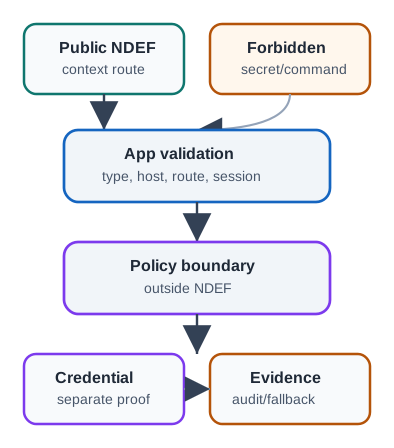
A public NDEF record can route a phone to an object or setup reference; it should not carry a secret or a direct protected command. The app validates record type, host, route, and session before policy decides whether to allow any action. A credential flow needs separate proof and a verifier, while the audit and fallback record show what happened when the tap failed or was denied. Test a copied public record and a malformed link to confirm that neither bypasses policy. The tag helps select context, and the application owns the trust decision.
The same layering explains the security boundary. Type 2 and Type 5 labels are often excellent public pointers, but ordinary readable NDEF does not hide secrets from a phone. Type 4 tags can support file access conditions and larger payloads, but an NDEF file is still only one part of a credential system.
If a copied NDEF message can trigger the final action, the tag has been given too much authority. If it only opens a validated asset lookup that still checks user, device, state, and audit policy, the tag remains a replaceable pointer. When a maintenance label must prove authenticity, the NDEF record can carry a signed pointer or short token while the application verifies signature, freshness, asset state, and user policy outside the tag.
15.15 Write and Release Loop
This section: Write and Release Loop — A release loop prevents a tag from being treated as done just because a writer app returned success.
A release loop prevents a tag from being treated as done just because a writer app returned success.
Figure 15.5 keeps planned URI and text records tied to read-back evidence.
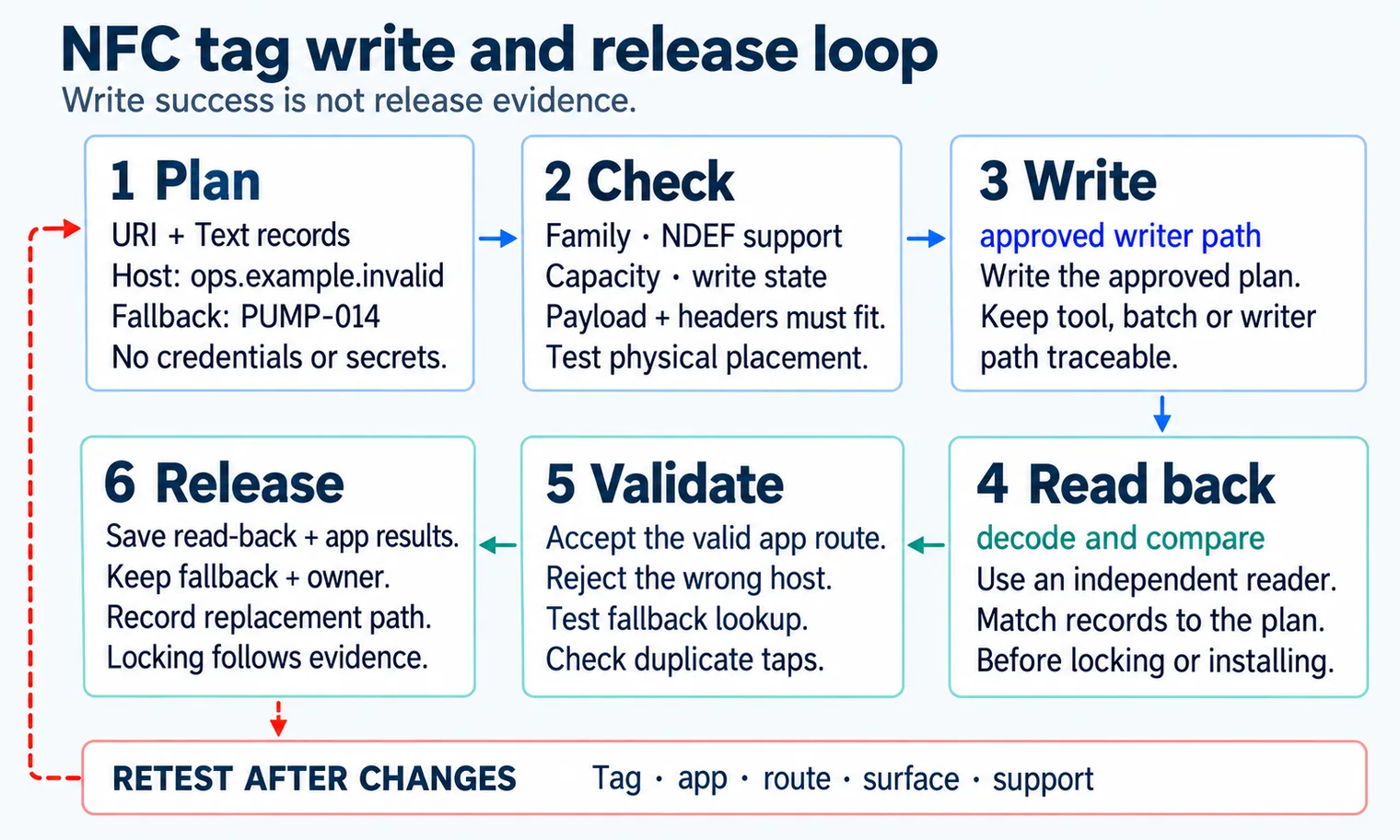
The release loop in Figure 15.5 begins with a plan for URI and Text records, the allowed host, and the PUMP-014 fallback. Check NDEF support, capacity, write state, and the physical placement before using an approved writer. Then read the same tag with an independent reader and compare decoded records with the plan. App validation must accept the intended route, reject a wrong host, and test duplicate taps and fallback lookup. Save the read-back, app result, owner, and replacement path before locking. A successful write only proves a command completed; it cannot substitute for those later checks.
15.16 Common Review Findings
This section: Common Review Findings
15.17 Knowledge Check
This section: Knowledge Check
15.18 Quick Check: Releasing an NDEF Tag
This section: Quick Check: Releasing an NDEF Tag
15.19 Matching Quiz: NDEF Review Artifacts
This section: Matching Quiz: NDEF Review Artifacts
15.20 Ordering Quiz: Safe NDEF Tag Release
This section: Ordering Quiz: Safe NDEF Tag Release
15.21 Checkpoint: Summary
This section: Checkpoint: Summary
- NFC tag review starts with family, NDEF support, usable capacity, write state, physical fit, and release evidence.
- NDEF messages are structured as records with header flags, type information, optional IDs, and payloads that applications must validate.
- URI, Text, MIME, External, and composite records are useful when each record has a clear workflow role.
- Ordinary NDEF should carry context and routing data, not credentials, private data, unlock commands, long-lived secrets, or policy decisions.
- A tag is not ready for release until it has been written from the approved plan, read back, decoded, validated, field-tested, and tied to fallback and retest evidence.
15.22 Key Takeaway
This section: Key Takeaway — NFC tag and NDEF choices should be based on memory, write protection, lifecycle, reader compatibility, and the action the encoded data should trigger.
NFC tag and NDEF choices should be based on memory, write protection, lifecycle, reader compatibility, and the action the encoded data should trigger.
15.23 Related Chapters: What’s Next
This section: Related Chapters: What’s Next
Find help
3 reviewed answers.
Where should I start in a module?
Open the module page from the sidebar to see its chapters in order. Use the module map to return to a topic you need.
Modules and pathsReviewed
What can I try when a project does not work?
Check the symptom, then work through the diagnostic steps. Keep the error message and the smallest example that reproduces it.
When you are stuckReviewed
How do interactive examples work?
Use the interactive guide to check how examples and simulations work before changing your project.
Interactive examples guideReviewed