Practice: ISA100.11a Security
More
Depth: Practitioner
Progress saves as you read. Mark sections complete as you go; your progress appears in the sidebar.
This lab belongs to ISA100.11a vs WirelessHART
Start With the Story
This section: Start With the Story — Picture a new field device asking to join a plant network.
Make Secure Join Fail Safely
Picture a new field device asking to join a plant network. Its label looks right, but the key record belongs to a retired unit. A quick success would admit the wrong identity; a silent failure would leave the installer guessing beside live equipment.
A gateway is the device that joins the field network to another system. A payload is the useful data carried in a message. Before the test, record the expected device identity, allowed network, key state, time, installer role, and exact sign that a join is accepted or rejected.
Run the valid join once. Then use an unknown identity, an old key, the wrong time, a repeated request, and a restart during joining. The device and gateway should fail closed, leave a clear audit record, and allow a bounded recovery that does not expose secret material.
One lab cannot prove the whole plant is secure. Radio conditions, key storage, staff access, and later updates still matter. The deeper sections connect join evidence, key life, message checks, and recovery so the release decision states what was and was not tested.
A security lab is useful when it turns invisible trust into artifacts. For ISA100.11a, that means secure join evidence, key lifecycle records, traffic checks, coexistence observations, and a release decision that says what remains unproven.
Use this chapter as a small audit. Follow a device from admission through protected communication, capture the records that prove each step, and mark which failure or change would force the review to run again.
Learning Objectives
This section: Learning Objectives
By the end of this chapter, you should be able to:
- Design an ISA100.11a lab that tests security ownership rather than only packet delivery.
- Trace secure join, role assignment, key lifecycle, diagnostics, and replacement evidence.
- Separate hop security, payload confidentiality, routing visibility, and gateway trust boundaries.
- Review tunneled industrial traffic without relying on brittle overhead shortcuts.
- Turn lab observations into a release decision with retest triggers and ownership records.
- Identify security mistakes that make an otherwise connected wireless network unsafe to operate.
Quick Check: ISA100 Lab Security
This section: Quick Check: ISA100 Lab Security
Checkpoint: Minimum Viable Understanding
This section: Checkpoint: Minimum Viable Understanding
- A lab is an evidence record. Screenshots, packet traces, join logs, route changes, and release notes matter more than synthetic performance scores.
- Security is operational. The System Manager and Security Manager must be part of join, key, revocation, audit, and replacement workflows.
- Encryption scope matters. Link protection, payload protection, routing metadata, and gateway translation protect different boundaries.
- Tunneling needs evidence. A legacy payload that works once may still fragment, retry, expose ownership gaps, or fail diagnostics under load.
- Release requires retest triggers. A topology, firmware, gateway, key-policy, or plant-network change can invalidate a previous lab result.
Lab Review Map
This section: Lab Review Map — Use this map to keep the lab focused on the decisions a deployment team must defend.
Use this map to keep the lab focused on the decisions a deployment team must defend.
Figure 1 orders the lab record from join evidence to release decision.
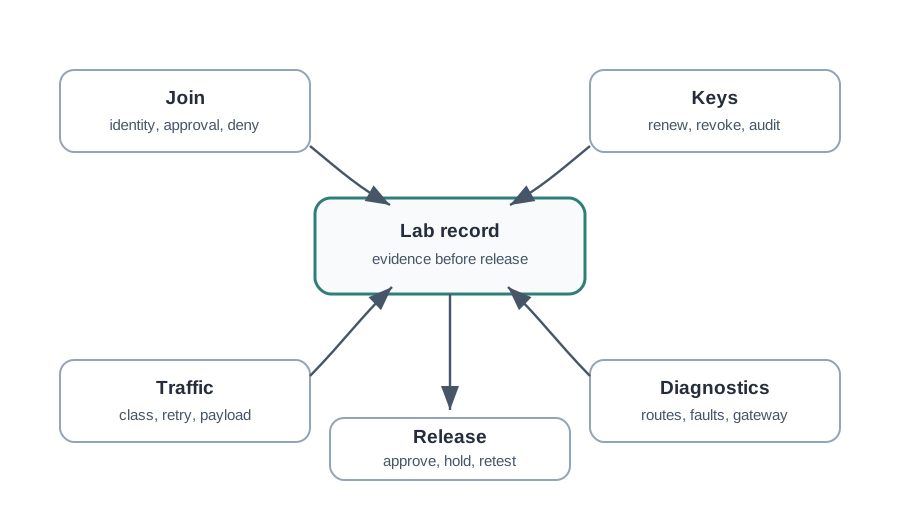
The lab map in Figure 1 begins with a timed secure join test. Record the device identity, allowed network, key state, and installer role before the request. The Security Manager authorizes the planned device and provisions session keys; capture its accepted join, role, and route state. Then try an unknown identity or old key and retain the rejection log. Traffic, diagnostics, and release review use those same records. A working data path does not prove denied joins fail closed, so the release file needs both the accepted path and the negative test with their owners and times.
Lab Scope
This section: Lab Scope — The chapter does not need a board-specific demo or a generic encryption exercise.
The chapter does not need a board-specific demo or a generic encryption exercise. The useful lab is a controlled review of ISA100.11a behavior at the boundaries where industrial deployments fail.
Secure Join and Key Lifecycle
This section: Secure Join and Key Lifecycle — Secure join is not a one-time success message.
Secure join is not a one-time success message. It is a reviewable chain from device identity to policy, keys, roles, and later removal.
Figure 2 follows identity approval through key renewal and revocation.
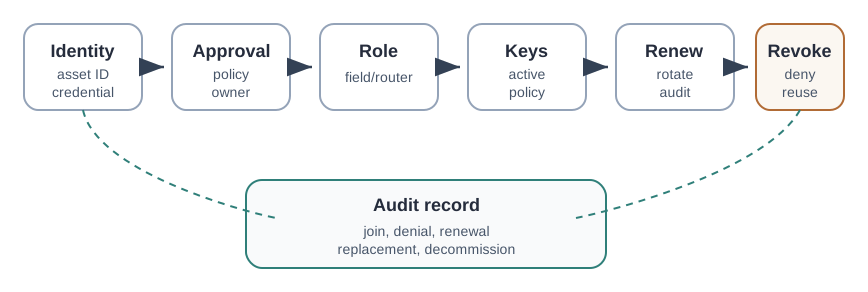
The lifecycle in Figure 2 gives each device a trace from asset identity to decommission. Check the join key and approved work order before the Security Manager authorizes the device. Record the assigned role and active keys, then capture renewals and rotation. The replacement drill shows PT-17 giving way to PT-17B; the new device needs the intended non-routing role and application point, while the old credential must be rejected. A successful new join alone is insufficient. The audit record must also show denial, revocation, and who owned each step, so a retired device cannot quietly return.
Joining and Key Management Evidence
This section: Joining and Key Management Evidence — A device becomes a trusted member through a managed join overseen by the Security Manager.
A device becomes a trusted member through a managed join overseen by the Security Manager. The lab task is to turn that abstract join into a repeatable commissioning, renewal, replacement, and removal procedure.
Figure 3 names the records needed at each key-management step.
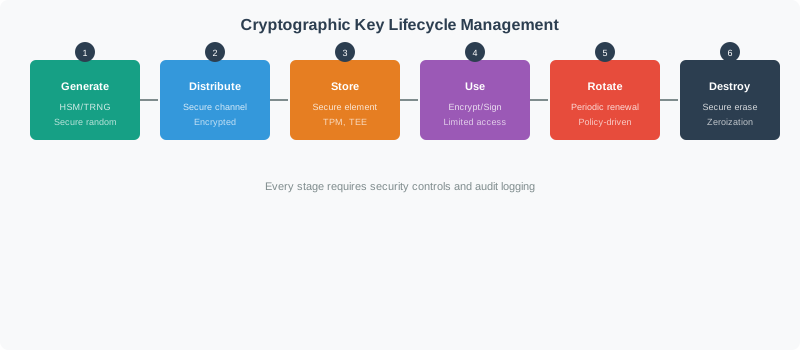
Generation creates or derives keys for a stated purpose. Distribution through the Security Manager places the required data-link and transport keys on an approved device, and protected storage records which key is active or pending renewal. Use should show that protected traffic still works under the active key. Renewal or revocation must then leave an audit record and a way to deny a removed device, followed by replacement or decommissioning proof. A packet trace alone cannot show that the credential lifecycle is controlled; join, key-state, traffic, and audit records need to agree.
The lifecycle view keeps the lab from stopping at a successful join. Generation, provisioning, protected storage, use, derived purpose keys, rotation or revocation, destruction, and key inventory evidence each need an owner and an audit record.
- The new device authenticates using a pre-configured join key, proving it is allowed onto this network.
- The Security Manager authorizes it and provisions session keys for its links and end-to-end associations.
- The Security Manager handles ongoing lifecycle work: distribution, rotation, and revocation for a device that must be removed.
| Key | Scope | Purpose |
|---|---|---|
| Join key | Device to network | Authenticate a device at join time |
| DLL key | Per hop between neighboring devices | Protect each radio hop |
| TL session key | Source to destination | Protect the message end to end |
Because keys are centrally managed, revoking one compromised device does not force re-keying the whole plant. The Security Manager rotates the affected keys while the rest of the network keeps running. The lab should still prove this with a replacement drill. If tank transmitter PT-17 is retired and PT-17B replaces it, the release record should show that the old device was decommissioned, the old credential no longer joins, PT-17B joined under the approved work order, PT-17B received the intended non-routing role, and the gateway mapped the replacement to the correct application point.
A clean drill has at least one positive test and two negative tests: the new device works, the old credential is rejected, and an unapproved role change is denied or flagged. In a 12-device pilot with two line-powered routing devices and ten battery leaf devices, a minimal security evidence set might include 12 approved joins, 12 role records, two explicit routing approvals, one denied-join test per device class, one key-renewal record, one revocation record, and one replacement drill. Count the records explicitly: 12 + 12 + 2 = 26 join, role, and routing-approval records, then add the denied-join tests, renewal, revocation, and replacement drill. That is at least 30 named records before traffic performance is even discussed.
Practitioners should also separate scheduled process traffic from maintenance traffic during the key exercise. A key renewal, gateway restart, or replacement event must not be hidden inside a generic “normal operation” claim. Record which values became stale, which diagnostics changed, and which owner can tell whether a fault came from credentials, routing, gateway translation, or the application endpoint.
Security Boundaries
This section: Security Boundaries — ISA100.11a security review should avoid vague statements such as “the network is encrypted.” The question is which boundary is protected, who can inspect metadata, and where trust changes.
ISA100.11a security review should avoid vague statements such as “the network is encrypted.” The question is which boundary is protected, who can inspect metadata, and where trust changes.
Figure 4 shows where wireless, gateway, and plant trust decisions sit.
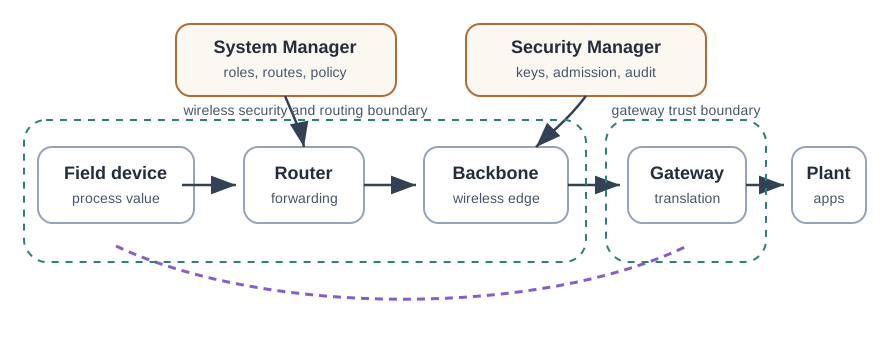
A field device produces a process value and a router forwards it across the wireless area. The backbone and gateway carry the value toward plant applications, where translation and acceptance become separate checks. The System Manager controls roles and routes, while the Security Manager controls admission, keys, and audit. A missing value can therefore come from radio delivery, management policy, or gateway handling. Test one valid reading and one denied or failed device path, then keep the network and gateway records together. That evidence shows which boundary accepted or stopped the flow.
Security at Two Layers, Not One
This section: Security at Two Layers, Not One — Inspect Figure 5 and ask which security duties remain even when traffic urgency changes scheduling and expiry.
Inspect Figure 5 and ask which security duties remain even when traffic urgency changes scheduling and expiry.
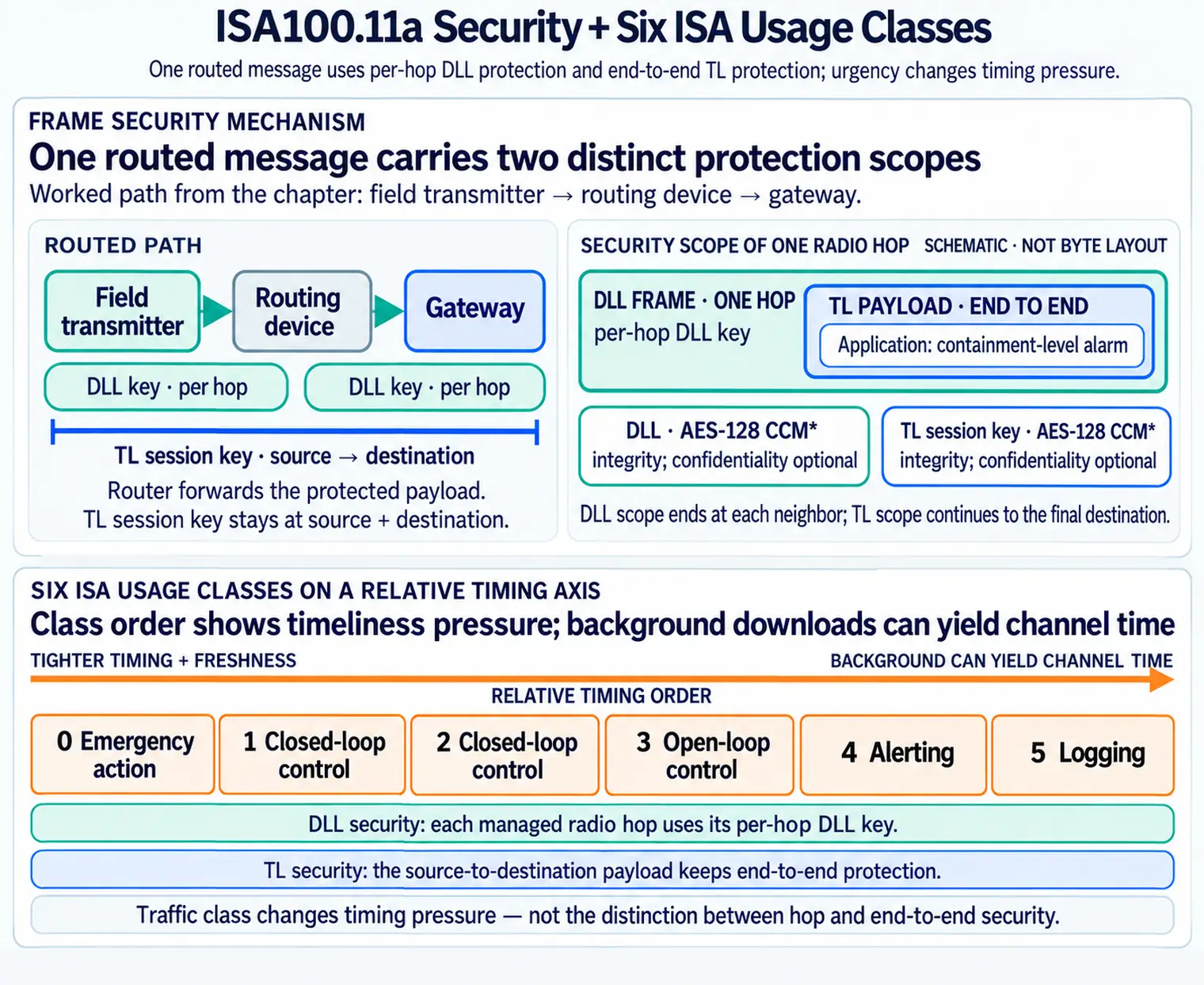
Read Figure 5 from emergency action through closed-loop control, open-loop control, alerting, and logging. Urgent classes demand tighter timing and freshness, while background downloads can yield channel time, but neither end of the stack abandons integrity or confidentiality. The two-layer rule then separates managed-hop protection from end-to-end payload protection. A router may validate and forward its radio frame without receiving authority to read or alter the process value carried between the true endpoints.
ISA100.11a protects traffic at two layers at once. The data-link layer (DLL) secures each radio hop between neighbors, and the transport layer (TL) secures the message end to end from source to final destination. Both use AES-128 in CCM* mode for message integrity and optional confidentiality.
A single-layer scheme would force a choice: protect each hop, or protect the whole path. ISA100.11a does both, so a relay node in the middle can forward a message it cannot read or forge. In a lab, that distinction should be visible in the evidence rather than treated as a diagram label. A field transmitter might send a containment-level alarm through one routing device to a gateway. The transmitter and router need a protected radio hop, the router and gateway need another protected hop, and the transmitter-to-gateway payload still needs end-to-end protection so the routing device is not trusted with the process value.
Use a small worked lab to make the boundary concrete. Join two approved devices, one leaf transmitter and one line-powered routing device, then attempt one denied join with a credential or device record that should not be accepted. The minimum useful evidence is not just “two joins passed.” It is six records: approved join for device A, approved join for device B, role assignment for each device, the denied-join audit event, the key or policy state after joining, and the route or gateway record that shows which device is allowed to forward. If the denied join produces no operator-visible log, the lab has found a release issue even if normal traffic works.
The security lab therefore sits between protocol theory and plant operations. It proves that the System Manager, Security Manager, gateway owner, maintenance owner, and operations owner can explain what happened. If a later device replacement changes a routing role, if a gateway update changes translation behavior, or if a key policy changes, the same evidence set becomes the retest checklist.
What Each Layer Defends Against
This section: What Each Layer Defends Against — The two layers stop different attacks.
The two layers stop different attacks. DLL hop-by-hop security means every relay checks the integrity of each frame it receives before forwarding, so an attacker cannot inject or alter frames on a single radio link without detection. Hop-by-hop alone would still let a compromised router read and rewrite the payload it forwards, because it necessarily holds the link key.
TL end-to-end security closes that gap. The payload is protected with a session key shared only by the true source and destination, so an intermediate router forwards ciphertext it cannot decrypt and cannot forge. Put together, DLL stops link-level tampering and TL stops a malicious relay from reading or altering the data. A compromised middle node becomes an untrusted forwarder rather than a man in the middle.
Run the attack model as a table during review.
| Scenario | Expected defensive evidence |
|---|---|
| Outsider injects a frame near the pipe rack | The receiving neighbor rejects it because the hop integrity check fails. |
| Routing device is allowed to forward but later becomes suspect | The device may still pass frames, but it lacks the end-to-end session key needed to read or alter the payload. |
| Gateway translation is wrong | Neither DLL nor TL proves the application value is correct; the lab needs gateway diagnostics and timestamp evidence. |
| Retired device tries to rejoin | Admission policy and revocation evidence reject it before transport security becomes relevant. |
A routed, tunneled example exposes why diagnostics matter. Suppose a maintenance request produces a two-fragment tunneled response across field device, router, and gateway. The wireless path might report per-hop retries, the tunnel might report a translation error, and the plant application might show only a stale value. Security review should require all three views to line up: frame integrity or retry counters at the wireless layer, tunnel and gateway status at the boundary, and stale-value handling at the application.
The conservative conclusion is that cryptography gives the deployment a defendable boundary, but the lab must prove the boundary is operated correctly. A release-ready ISA100.11a security lab shows accepted joins, denied joins, role assignment, key renewal, revocation, routed-path diagnostics, gateway translation evidence, and retest triggers.
Check Two-Layer Security
This section: Check Two-Layer Security
Lab Activity 1: Secure Join Review
This section: Lab Activity 1: Secure Join Review — Run the join process once for a planned device and once for a deliberately unapproved device.
Run the join process once for a planned device and once for a deliberately unapproved device. The goal is not to make the lab difficult; it is to prove the approval and denial paths are visible.
Example evidence record:
device: pressure-transmitter-area-b
expected role: field device, not routing
approved by: maintenance change record
join result: accepted
assigned policy: monitoring traffic, diagnostics enabled
denied test: unknown device rejected and logged
replacement test: retired credential rejected after decommission
open issue: route diagnostic label not visible in gateway export
release decision: hold until diagnostic label is corrected
Lab Activity 2: Key Lifecycle Review
This section: Lab Activity 2: Key Lifecycle Review — The lab should prove that keys are managed as lifecycle objects, not as hidden setup details.
The lab should prove that keys are managed as lifecycle objects, not as hidden setup details.
Evidence that is usually enough for a chapter lab:
- A join log for an approved device.
- A rejected-join log for an unapproved device.
- A key renewal or replacement record.
- A decommissioning record proving old credentials are not reused.
- A clear owner for key policy and audit review.
Lab Activity 3: Traffic and Tunneling Review
This section: Lab Activity 3: Traffic and Tunneling Review — Legacy protocol tunneling can be useful, but it is not automatically a good fit.
Legacy protocol tunneling can be useful, but it is not automatically a good fit. The lab should test how a tunneled flow behaves when payload size, retry behavior, gateway translation, and diagnostics matter.
Inspect Figure 6 and ask where a valid wireless message can still fail while crossing into a legacy industrial endpoint.
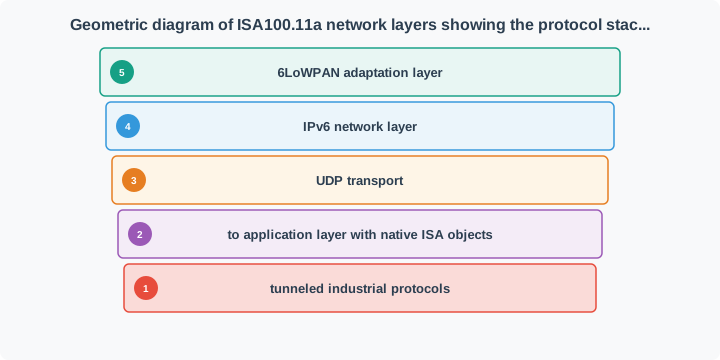
Follow Figure 6 from the traffic purpose to the radio path. A command, alarm, log, or history record passes through UDP, IPv6, and 6LoWPAN. The gateway then maps the tunnelled industry protocol for the old endpoint. That edge owns more than byte form. Its error map and time rules can change the meaning seen by the app. A good packet trace proves only that the data reached the gateway. The lab must also force a map fault and check the result shown to the app.
Avoid treating a single successful tunneled message as a release result. Repeat the review with realistic response payloads, diagnostic payloads, route changes, and a gateway restart or replacement event.
Lab Activity 4: Coexistence and Diagnostics Review
This section: Lab Activity 4: Coexistence and Diagnostics Review — Security can fail operationally when the network cannot explain why messages are missing.
Security can fail operationally when the network cannot explain why messages are missing. Capture enough diagnostics to separate interference, route movement, gateway translation, key failure, and application failure.
Run it: The diagnostics you capture here come from the DLMO schedule and routes — configure them in the workbench below. Set the Schedule Controls to 16, 32, or 64 slots and read the Superframe Slot Map to see how airtime is laid out for coexistence, then switch the route between Graph redundant, Source route, and Single path and watch the Diagnosis panel change. Graph-redundant routing gives an alternate path when one link fails, which is the route-and-retry observation this activity asks operators to be able to explain.
Release Notes
This section: Release Notes — The final lab output should be a release decision that a plant engineer can review later.
The final lab output should be a release decision that a plant engineer can review later.
Figure 7 connects lab observations to approval, hold, and retest choices.
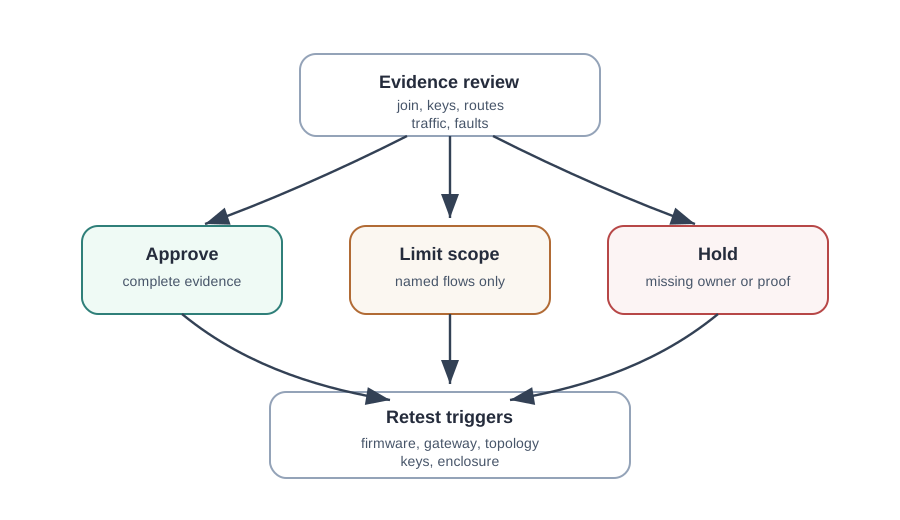
The release evidence in Figure 7 connects secure admission to scheduled traffic. Its teaching superframe marks advertisement, join, management, acknowledgement, and first report opportunities; these slots are a workbench model, not a fixed deployed schedule. The join and key steps make a device eligible, while installed links make its data traffic possible. Compare accepted and denied join records with schedule, route, and application results before approval. If keys, enclosure, or a negative test remains open, limit scope and name a retest trigger. The release decision should state what was proved and what remains conditional.
Worked Example
This section: Worked Example
A site wants to add wireless monitoring for secondary containment levels. The sensors are not used for shutdown control, but missed alarms create environmental and maintenance risk. The team wants to tunnel an existing register-based application through a gateway.
The lab review should produce:
- A secure join record for each device and one denied-join record.
- A key renewal and revocation record.
- A traffic classification for alarm, status, maintenance, and diagnostic flows.
- A gateway translation record naming who owns register mapping and stale-value behavior.
- A route and coexistence record from the installed location, not a bench location.
- A replacement workflow proving retired credentials and old mappings do not remain active.
The release decision should be hold if operators cannot distinguish a stale gateway value from a real process value, even if every test message was delivered during the lab.
Common Pitfalls
This section: Common Pitfalls
- Connected equals secure: a successful join does not prove identity approval, denied-join logging, key renewal, or revocation behavior.
- Encryption scope confusion: link protection, payload protection, route visibility, and gateway trust boundaries are different review items.
- Hidden management ownership: no one can explain who changes roles, keys, schedules, routes, or gateway translation rules.
- Tunneling blind spot: a legacy payload works in a small test but diagnostics, retries, fragmentation, or stale-value behavior are not reviewed.
- Bench-only evidence: lab results are accepted without installed-location coexistence, enclosure, route, and maintenance constraints.
- No replacement proof: the team never proves what happens when a device is retired, replaced, or recommissioned.
Knowledge Check
This section: Knowledge Check
Check the Security Review
This section: Check the Security Review
Match the Evidence
This section: Match the Evidence
Order a Release Review
This section: Order a Release Review
Checkpoint: Summary
This section: Checkpoint: Summary — ISA100.11a lab work should produce security and operations evidence that survives beyond the lab bench.
ISA100.11a lab work should produce security and operations evidence that survives beyond the lab bench. The key review items are secure join, denied-join logging, role assignment, key lifecycle, routing visibility, gateway trust boundaries, tunneled traffic behavior, coexistence, diagnostics, replacement, and retest triggers. A chapter lab is clean only when a future reviewer can see what was tested, what failed, who owns the fix, and what change would require another review.
Key Takeaway
This section: Key Takeaway — ISA100 lab and security work should prove joining, scheduling, routing, key handling, coexistence, and maintenance evidence before treating the network as production-ready.
ISA100 lab and security work should prove joining, scheduling, routing, key handling, coexistence, and maintenance evidence before treating the network as production-ready.