25 Thread Network Architecture

More
Depth: Practitioner
Progress saves as you read. Mark sections complete as you go; your progress appears in the sidebar.
25.1 Thread Network Architecture Evidence
This section: Thread Network Architecture Evidence
25.1.1 Assign Roles Before Trusting the Mesh
A school has mains-powered room units, small battery buttons, and two bridge units that connect the building network to other services. The plan calls all of them mesh devices. That label hides different duties. Some can pass traffic, some may take on more work, and some sleep and depend on a parent.
Make a role record for the installed units. Name which devices form the always-ready backbone, which may become helpers, which remain children, and which bridge to an adjacent network. Record each child’s parent and the service boundary claimed beyond the bridge. Keep network management separate from application control; an elected network role does not own the building’s business decision.
Then break the expected structure. Power off one backbone unit. Move a child. Restart a bridge. Create a temporary split. Restore the site with two bridges present. Check parent changes, route repair, sleepy-device delay, duplicate service paths, and the evidence shown to the operator. Record when the role map becomes stale.
This review does not prove that every device can route or that a bridge proves the remote service works. It proves named roles and boundaries. The deeper sections explain leaders, routers, eligible devices, sleepy children, partitions, bridge duties, and the retest triggers needed as the installed network changes.
Thread architecture is best reviewed as a set of roles and boundaries, not as a product diagram or a promise that every device will behave the same way. A Thread mesh contains devices that can route, devices that can become routers, and devices that only communicate through a parent; it may also include one or more Border Routers to connect to adjacent IP networks.
The architectural question is therefore evidence based: which devices carry network responsibility, which devices depend on a parent, which service boundary is being claimed, and what retest trigger would make the architecture record stale?
25.2 In 60 Seconds
This section: In 60 Seconds
- Thread uses an IPv6 mesh architecture for constrained IoT devices.
- Routers form the always-available mesh backbone and can host child devices.
- A Leader is an elected router role for network management inside a partition; it is not the same as an application controller.
- A Border Router connects the Thread mesh to another IP network, but it does not prove every cloud, Matter, dashboard, or support path.
- REED, FED, MED, and SED roles express different routing, listening, latency, and power responsibilities.
- Architecture review should record role evidence, parent-child evidence, Border Router boundary evidence, application boundary evidence, and retest triggers.
25.3 Learning Objectives
This section: Learning Objectives
By the end of this chapter, you will be able to:
- Separate Thread Border Router, Leader, Router, REED, FED, MED, and SED responsibilities.
- Explain why parent-child evidence is different from mesh-routing evidence.
- Identify what a Border Router proves and what it does not prove.
- Build a role evidence record for a small Thread deployment.
- Catch common architecture overclaims before they become deployment assumptions.
25.4 Start With the Architecture Claim
This section: Start With the Architecture Claim — A useful Thread architecture claim names the behavior being reviewed.
A useful Thread architecture claim names the behavior being reviewed. It should not start with a product list, a device count, or a general phrase such as “Thread is self healing.” Start with a bounded claim.
Device responsibility
Does the device route, only communicate for itself, sleep, stay ready for promotion, or bridge to another network?
Network boundary
Is the claim mesh-local, parent-child, Border Router, local controller, Matter, dashboard, or cloud-facing?
Evidence source
Which observation proves the role, path, parent, prefix, service boundary, or recovery behavior?
Retest trigger
Which change would make the architecture record stale: moved routers, changed Border Router, new firmware, new application path, or new power state?
The same physical device may be involved in several claims. For example, a Border Router can also participate as a router inside the Thread mesh, while the external service path still needs separate evidence.
25.5 What Each Role Proves
This section: What Each Role Proves — Thread role names are useful only when they are tied to evidence.
Thread role names are useful only when they are tied to evidence. The goal is not to memorize labels; the goal is to know what each label proves about the network.
Border Router
Routes between the Thread mesh and another IP network. Evidence should show the specific boundary, service behavior, and owner of the off-mesh path.
Leader
Maintains management state for a connected Thread partition. Evidence should show that leadership is a network role, not an application controller or single permanent device.
Router
Participates in mesh forwarding and may host child devices. Evidence should show that it is awake enough to support routing responsibilities.
REED
Is eligible to become a router when the network needs and permits that role. Evidence should avoid assuming that eligible means currently routing.
FED
Is an end device that remains ready to receive without acting as a mesh router. Evidence should separate low-latency reception from routing responsibility.
MED or SED
Communicates through a parent and may trade response timing for power. Evidence should show parent choice, queued-message behavior, and whether the application can tolerate the delay.
25.6 Full and Minimal Device Boundary
This section: Full and Minimal Device Boundary — The first architecture split is capability based.
The first architecture split is capability based. A Full Thread Device (FTD) keeps enough radio and protocol state active to route traffic and act as a parent. A Minimal Thread Device (MTD) is a leaf device: it attaches to a parent, communicates for itself, and does not forward traffic for neighbors.
That distinction keeps role evidence honest. Figure 25.1 places a Leader as an elected router role inside a partition, Routers as traffic forwarders and possible parents, REEDs as FTDs waiting as end devices until promotion is useful, and a Border Router at the off-mesh IP boundary. Those labels should be tied to observed responsibility, not inferred from product names.
Before full and Minimal Device Boundary, inspect Figure 25.1 to compare “Test discovery” with “Router A”. Their juxtaposition makes A Thread mesh combines full-function routers with full, minimal, and sleepy end devices, bridged to IP by a border router visible.
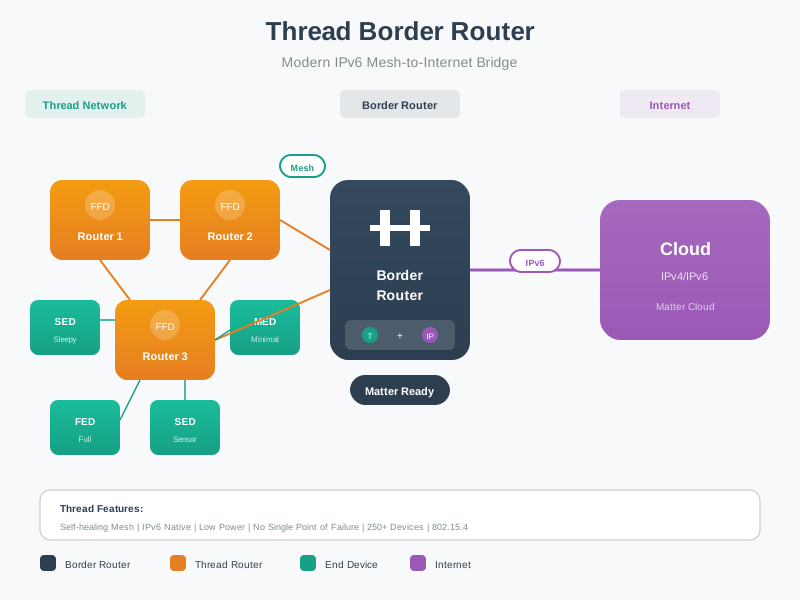
Read Figure 25.1 from “Test discovery” to “Router A”. Taken together, “Test discovery” and “Router A” express A Thread mesh combines full-function routers with full, minimal, and sleepy end devices, bridged to IP by a border router. For full and Minimal Device Boundary, the observed relationship between “Test discovery” and “Router A” is evidence that “Test discovery” carries into the next decision.
Figure 25.1 separates mesh links, parent-child links, and off-mesh Border Router evidence so a reviewer does not approve a role claim from the wrong observation.
25.7 Knowledge Check: Full Thread Device
This section: Knowledge Check: Full Thread Device
25.8 Router Cap and REED Promotion
This section: Router Cap and REED Promotion — Thread deliberately caps the number of active Routers at 32.
Thread deliberately caps the number of active Routers at 32. That limit bounds routing state and control traffic so constrained devices do not have to maintain an unbounded mesh backbone. A network can contain many more than 32 devices, but only the active router set carries mesh-routing responsibility.
REEDs exist because capability and current role are different. A Router-Eligible End Device is an FTD acting as an end device until the network needs more routing capacity and promotion is permitted. Review evidence should therefore say whether a device is currently routing, merely eligible, or intentionally left as an end device.
| Role | Architecture evidence | Review question |
|---|---|---|
| Leader | Elected partition-management role | Is this network management evidence, not application-controller evidence? |
| Router | Active forwarding and parent responsibility | Does the device actually route and host children for this claim? |
| REED | FTD capability without current router assignment | Is the device eligible for promotion or already routing? |
| MED, SED, or SSED | Parent-dependent end-device behavior | Does polling, sleep, and latency match the application claim? |
25.9 Knowledge Check: REED Promotion
This section: Knowledge Check: REED Promotion
25.10 Border Router Boundary
This section: Border Router Boundary — A Border Router is the most common place where architecture claims become too broad.
A Border Router is the most common place where architecture claims become too broad. A mesh-local test can show that devices inside the Thread network communicate. It does not automatically prove that an off-mesh service, cloud path, Matter controller, support dashboard, or remote user workflow is correct.
Review the Border Router boundary in layers:
Which Thread devices can reach the Border Router inside the mesh, and which roles are involved?
Which prefix, route, discovery, or translation behavior is needed for the off-mesh claim?
Which controller, Matter fabric, local service, dashboard, or remote endpoint is part of the claim?
Who owns retest when the Border Router, network policy, application service, or device role changes?
This keeps the Border Router from becoming a magic gateway in the documentation. It is an IP routing and service boundary that should be named, observed, and retested.
25.11 Knowledge Check: Border Router Evidence
This section: Knowledge Check: Border Router Evidence
25.12 Parent-Child Evidence
This section: Parent-Child Evidence — End devices depend on parents.
End devices depend on parents. That relationship is architectural, not just operational. A parent must be available for the child communication pattern, and the child must be configured for the latency and power behavior the application expects.
Child role claim: battery contact sensor reports local state without routing traffic.
Parent evidence: attached to a nearby router with an observed parent-child relationship.
Application boundary: local event delivery is accepted; immediate inbound commands are not part of the claim.
Retest trigger: parent moved, wall power changed, firmware changed, or alert latency requirement changed.
For a low-power child, the architecture record should not say “the mesh heals itself” and stop. It should say which parent-child assumption was observed, what happens if the parent is unavailable, and what application behavior is still acceptable.
Thread parent selection narrated tour
Narrated audio tour. The full transcript is below.
Play the tour to open the simulator. Pause, replay a beat, or read the full transcript below.
Some beats explain situations this teaching model cannot show; those beats keep the existing frame and provide captions only.
Full transcript — Thread parent selection (8 beats)
B1 — Battery sensor
You are setting up a battery contact sensor in a building. Your job is to get its local state reports delivered. The sensor depends on a parent router, so choosing the parent matters to the communication you are trying to support.
Model caption: You are installing a battery contact sensor. Local state delivery depends on a parent router.
B2 — Parent Request
In Thread, the parent carries the child's ordinary network traffic. Parent selection means finding an acceptable router for the job. Our sensor already has the network credentials it needs. It begins by sending a Parent Request to neighboring routers.
Model caption: The child has network credentials and sends a Parent Request to neighboring routers. Its selected parent will carry ordinary network traffic.
B3 — Parent Responses
The routers send Parent Responses with link margin and connectivity information. Link margin measures how far the received signal is above the minimum level needed to receive it. It is expressed in decibels; a larger margin gives more room for the signal to weaken. Connectivity describes how routers connect to the network. The child compares acceptable candidates. The workbench uses an explanatory teaching score for the comparison, with lower scores ranked first.
Model caption: Parent Responses supply link margin in decibels and connectivity evidence. The teaching model ranks acceptable candidates by ascending score.
B4 — Balanced comparison
Take the balanced example. Hall Router has a link margin of twenty-four decibels and five children out of a maximum of twelve. Kitchen Router has eighteen decibels and nine children out of twelve. For Hall, the model adds a connectivity penalty of seven to a load penalty of six to get thirteen. For Kitchen, it adds a radio penalty of thirty-two, a connectivity penalty of three, and a load penalty of eleven, then subtracts a priority bonus of ten to get thirty-six. Lower scores rank first, so the model selects Hall.
Model caption: Balanced: Hall 24 dB, 5/12 children, score 13; Kitchen 18 dB, 9/12, score 36. Hall is selected.
B5 — Capacity limit
Now add seven children to Hall while keeping the radio conditions unchanged. Five plus seven makes twelve. Hall has reached its limit of twelve children, so the model excludes it from the acceptable candidates. Its twenty-four decibels of link margin have stayed exactly the same.
Model caption: Hall: 5 + 7 = 12 children, at its 12-child limit. Its 24 dB margin is unchanged, but capacity excludes it.
B6 — Child ID handshake
Kitchen still has nine children out of twelve, with a link margin of eighteen decibels. Its score remains thirty-six, and it becomes the selected parent. The child then completes the final request and response with the chosen parent to establish their link. For your sensor, the choice is Kitchen.
Model caption: Kitchen: 18 dB, 9/12 children, score 36. Kitchen wins among acceptable candidates; the final request and response establish the child-parent link.
B7 — Radio and capacity
A common mistake is to assume Hall can accept another child because its signal is unchanged, but Hall has the higher link margin and no free child slot. Kitchen wins the model's comparison among candidates able to accept the child. Link margin and available capacity both matter when choosing the sensor's parent.
Model caption: Stronger radio evidence alone does not win: Hall has 24 dB but no room; Kitchen has 18 dB and available capacity.
B8 — Usable link and room
Choose a parent with a usable link and room for the child.
Model caption: Choose a parent with a usable link and room for the child.
25.13 RLOC16 and Mesh-Local Identity
This section: RLOC16 and Mesh-Local Identity — Thread gives each device a Routing Locator (RLOC), a mesh-local IPv6 address whose lower bits contain a 16-bit RLOC16.
Thread gives each device a Routing Locator (RLOC), a mesh-local IPv6 address whose lower bits contain a 16-bit RLOC16. The RLOC16 encodes the device’s current routing position: a 6-bit Router ID, a one-bit reserved field, and a 9-bit Child ID.
RLOC16 = [ Router ID : 6 bits ] [ Reserved : 1 bit ] [ Child ID : 9 bits ]

A Router's own RLOC16 has Child ID = 0.
Its children get Child IDs assigned under that Router ID.
Routing uses the Router ID to choose the next hop.
Because the RLOC reflects where the device currently sits, it can change when topology changes. A child that switches to a new parent gets a new RLOC16, and a REED promoted to Router gets its own Router ID. Applications should not treat that locator as stable identity. The Mesh-Local EID (ML-EID) gives the device a stable mesh-local address that does not move with the topology.
25.14 Knowledge Check: RLOC16 and ML-EID
This section: Knowledge Check: RLOC16 and ML-EID
25.15 Role Selection Evidence
This section: Role Selection Evidence — Good role selection starts with responsibility, then verifies capability.
Good role selection starts with responsibility, then verifies capability. Avoid assuming that all mains-powered devices route, all battery devices sleep correctly, or all router-eligible devices are currently routers.
Power state
Can this device remain awake enough to carry the responsibility being assigned?
Routing need
Does the local area need this device to forward traffic or host children, or is it only an endpoint?
Reception need
Does the application require prompt inbound messages, or can it tolerate parent polling behavior?
Promotion assumption
Is the device currently routing, merely eligible to route, or intentionally kept as an end device?
Boundary claim
Is the claim inside the mesh, across the Border Router, or above Thread in Matter or another application layer?
Retest owner
Who checks the architecture again after role, placement, power, firmware, or service changes?
Inspect Figure 25.2 to ask which mesh observations prove the claimed role and which site, code, parent, or route change forces a new test.
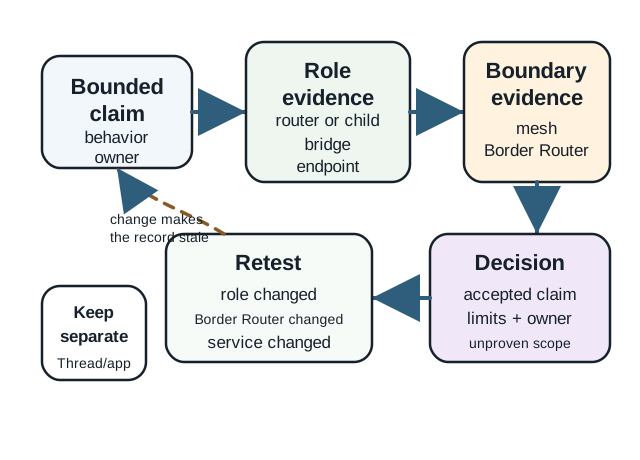
Read Figure 25.2 from the claimed role to the mesh review. A router, child, leader, and border router each has a different job when a path is up or must heal. The worked record tests the chosen role on a normal path and a failed one. Move to the choice only when the seen network shape and service result match the claim. Follow the new-test branch last. A new site, code build, full parent, network record, or border route can reopen the role. One successful join proves setup, not a stable design.
25.16 Worked Architecture Records
This section: Worked Architecture Records — Use short records rather than broad slogans.
Use short records rather than broad slogans. Each record should name the role, the boundary, the evidence, the limit, and the retest trigger.
Record A: hallway plug as mesh support
Claim: the plug can support local mesh forwarding and child attachment in the hallway.
Evidence: observed as a router or router-capable device with stable power, local neighbors, and child capacity appropriate to the claim.
Limit: does not prove cloud access or application automation.
Retest: plug moved, unplugged, firmware changed, or nearby child devices added.
Record B: battery sensor as sleepy child
Claim: the sensor can report events while conserving power and without routing traffic.
Evidence: observed child attachment, parent relationship, event delivery path, and acceptable application delay.
Limit: does not host other devices and should not be counted as mesh backbone.
Retest: parent changes, latency requirement changes, battery profile changes, or firmware changes.
Record C: Border Router for local controller access
Claim: Thread devices can be reached by a local controller through the Border Router boundary.
Evidence: observed mesh-side reachability, Border Router service behavior, controller-side reachability, and policy ownership.
Limit: does not prove every remote cloud workflow unless that path is separately tested.
Retest: Border Router replaced, controller changed, network policy changed, or service discovery behavior changed.
25.17 Knowledge Check: Role Responsibility
This section: Knowledge Check: Role Responsibility
25.18 Common Architecture Mistakes
This section: Common Architecture Mistakes
Mixing Leader and controller
The Thread Leader manages network state. A Matter controller, app, or dashboard manages application behavior.
Counting every device as mesh backbone
End devices can be Thread members without forwarding traffic for others.
Treating REED as current router
Router eligible means capable of promotion, not proof that the device is currently routing.
Overclaiming Border Router success
The Border Router boundary needs evidence for the exact route, service, and policy being claimed.
Ignoring sleepy-device latency
Power-saving behavior must match the application response requirement.
Using product names as evidence
A product capability list is not the same as observing this deployment’s role and boundary behavior.
25.19 Architecture Review Checklist
This section: Architecture Review Checklist
Before accepting a Thread architecture claim, confirm that the record answers these questions:
- Which devices are carrying mesh-routing responsibility?
- Which devices are end devices, and which parent assumptions do they depend on?
- Which device or devices provide the Border Router boundary for this claim?
- Which parts of the claim are Thread network evidence and which are application evidence?
- Which role, route, service, placement, power, or firmware change triggers retest?
- Which chapter owns the next detail: architecture, operations, deployment, security, Matter, or comparison?
25.20 Match Thread Roles
This section: Match Thread Roles
25.21 Order a Thread Architecture Review
This section: Order a Thread Architecture Review
25.22 Summary
This section: Summary — Thread network architecture is a role-and-boundary review.
Thread network architecture is a role-and-boundary review. Routers, router-eligible devices, full end devices, minimal end devices, sleepy end devices, Leaders, and Border Routers each prove different things. A strong chapter record does not simply say that Thread is a mesh. It explains which devices are carrying mesh responsibility, which devices depend on parents, which Border Router boundary is being claimed, and which evidence would need retest after a change.
Keep architecture separate from operations and application behavior. Architecture explains responsibilities and boundaries; operations verifies runtime behavior; Matter or another application layer verifies user-facing behavior.
25.23 Key Takeaway
This section: Key Takeaway — Thread Network Architecture Evidence should validate Thread topology with leader, router, end-device, border-router, partition, route, power, and deployment evidence.
Thread Network Architecture Evidence should validate Thread topology with leader, router, end-device, border-router, partition, route, power, and deployment evidence.
25.24 Concept Relationships
This section: Concept Relationships
Thread architecture
Connects roles, parent-child relationships, mesh routing, Border Router boundaries, and evidence ownership.
Router
Provides mesh-forwarding responsibility and may host child devices.
End device
Communicates through a parent and should not be counted as mesh backbone unless promoted to a routing role.
Border Router
Connects a Thread mesh to another IP network, with service and policy evidence reviewed separately.
Leader
Coordinates Thread network state inside a partition and can change without changing the application owner.
Architecture record
Captures claim, evidence, limits, owner, and retest trigger.
25.25 What’s Next
This section: What’s Next
Next, continue from roles and boundaries into runtime behavior:
- Thread Operation and Implementation reviews how Thread behavior is introduced across the implementation chapter set.
- Thread Network Operations Evidence reviews formation, role behavior, parent-child behavior, addressing, low-power operation, and recovery evidence.
- Thread Implementation Deployment Evidence reviews Border Router, release, staging, and deployment evidence.
- Thread Protocol Comparison compares Thread with nearby IoT networking choices while keeping claims bounded.
- Matter Overview separates Thread network evidence from Matter application interoperability evidence.
Find help
3 reviewed answers.
Where should I start in a module?
Open the module page from the sidebar to see its chapters in order. Use the module map to return to a topic you need.
Modules and pathsReviewed
What can I try when a project does not work?
Check the symptom, then work through the diagnostic steps. Keep the error message and the smallest example that reproduces it.
When you are stuckReviewed
How do interactive examples work?
Use the interactive guide to check how examples and simulations work before changing your project.
Interactive examples guideReviewed