30 Thread Development and Integration

More
Depth: Practitioner
Progress saves as you read. Mark sections complete as you go; your progress appears in the sidebar.
30.1 Start With the IPv6 Mesh Claim
This section: Start With the IPv6 Mesh Claim — Picture a building team adding window units that report open or closed.
Prove One Small Network Before Growing It
Picture a building team adding window units that report open or closed. Two units work on a desk. Fifty units across several rooms must still join the right network, keep their identity, reach the controller, and recover after power loss.
The developer should begin with one complete path. Add one unit through an approved setup step. Send a known state. Confirm which device and time reached the application. Restart the unit and the local network leader, then prove that the state returns without a false change.
Grow the network in measured steps. Record join time, missed reports, route changes, battery use, and the owner of each failure. Test a new software version on a small group before the whole building.
Keep a known check for every growth step. Open one marked window and confirm the same device, state, and time at the application. Remove power from a helper unit and repeat. A larger network is ready only when ordinary faults do not change the meaning.
Plan removal as well as joining. A lost or retired unit should lose access, leave a clear record, and be replaceable without copying a shared secret by hand. The support guide should tell a new worker how to repeat these steps.
Use clear names on the device, network record, and application. A worker should not need to compare long hidden codes during a fault. Keep the secure identity underneath, but give the person a safe label tied to the real window.
Finish with a release drill. Turn off one helper, replace one end unit, and restart the service. Check old, missing, and new states at the screen. Record who decides that the network may return to use.
This simple path does not cover every shared-radio rule. Practitioner turns it into a release plan. Under the Hood explains network roles, addressing, route repair, keys, and constrained internet messages.
Start with the claim that a low-power mesh device can speak IP directly enough for the product need. Thread Development and Integration should help prove where IPv6 is native, where mesh behavior is managed, and where the border or application layer still sets limits.
The simple review path is join, address, route, recover, and observe. Once those steps are clear, Thread roles, security, implementation, and Matter relationships can be checked without treating the mesh as magic.
30.2 Thread Development and Integration Evidence
This section: Thread Development and Integration Evidence — This chapter replaces command lists and sample-code walkthroughs with a development review record.
Thread development work becomes useful when it can be reviewed as evidence: what behavior was built, which network role it requires, which application boundary it crosses, how commissioning is handled, and how the team knows the implementation still behaves after a change.
This chapter replaces command lists and sample-code walkthroughs with a development review record. The goal is to help learners decide whether a Thread implementation is ready for integration, not to memorize a particular SDK command or hardware setup.
30.3 In 60 Seconds
This section: In 60 Seconds
- Start every development review with a bounded implementation claim.
- Separate Thread stack behavior from application behavior, Matter behavior, cloud behavior, and device UI behavior.
- Treat role configuration as evidence: the chosen role must match power, latency, and routing responsibility.
- Review commissioning and credential flow before treating a device as ready for release.
- Use diagnostics and test records to decide whether a failure belongs to mesh attachment, application integration, or service handoff.
- Keep release approval tied to the evidence, not to a successful demo.
30.4 Learning Objectives
This section: Learning Objectives
By the end of this chapter, you will be able to:
- Write a Thread development claim that can be reviewed and tested.
- Identify the evidence needed for router, router-eligible, full end device, and sleepy end device behavior.
- Separate Thread networking evidence from Matter application evidence.
- Review commissioning, dataset custody, and integration handoff without relying on product-specific setup steps.
- Build a release record that captures diagnostics, tests, limits, and retest triggers.
30.5 Quick Check: Thread Development
This section: Quick Check: Thread Development
30.6 Development Claim Before Code
This section: Development Claim Before Code — Start with the behavior being implemented.
Start with the behavior being implemented. A useful claim names the device behavior, network role, application boundary, and release owner.
Device behavior
Telemetry, actuation, event notification, local control, commissioning support, diagnostic reporting, or bridge handoff.
Thread role
Router, router-eligible device, full end device, sleepy end device, Border Router dependency, or commissioning participant.
Integration boundary
Thread-only service, Matter application model, local controller, gateway service, cloud path, or operations dashboard.
Release owner
The person or team that accepts the evidence, approves changes, and owns retest after defects or upgrades.
Avoid claims such as “the Thread code works.” That statement is too broad. A better claim says what behavior is expected, which role supports it, and which integration boundary must be observed.
30.7 Development Evidence Map
This section: Development Evidence Map — The development evidence map keeps the implementation claim separate from role evidence, Thread evidence, application or Matter boundaries, commissioning, diagnostics, tests, and release decisions.
The development evidence map keeps the implementation claim separate from role evidence, Thread evidence, application or Matter boundaries, commissioning, diagnostics, tests, and release decisions.
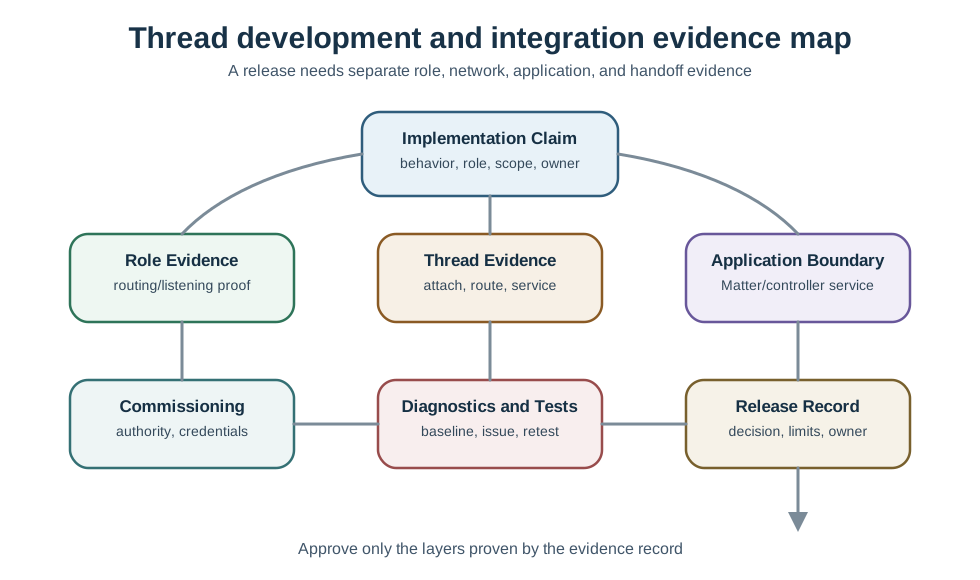
Use that separation when a demo looks successful. A demo might prove one application path but leave role configuration, commissioning custody, diagnostics, or release limits unreviewed.
30.8 Role Configuration Evidence
This section: Role Configuration Evidence — Role configuration should be reviewed by behavior, not by copied code.
Role configuration should be reviewed by behavior, not by copied code. The key question is whether the device role matches the duty it will perform in the deployment.
Routing responsibility
The record says whether the device is expected to forward for others or only communicate for itself.
Listening behavior
The record explains whether the device must be reachable immediately or can sleep between communication opportunities.
Network data need
The record shows whether the device needs complete network data or only the stable information required for its behavior.
Repair control
The record identifies who can change role configuration after a defect is found.
Battery-powered devices, always-on devices, and bridge-like devices should not share one default configuration. The review should show why the selected role is correct for the device behavior and deployment boundary.
30.9 Thread Stack and Application Boundary
This section: Thread Stack and Application Boundary — Thread provides IP networking over a low-power mesh.
Thread provides IP networking over a low-power mesh. The application decides what messages mean. A development review should keep those layers separate.
Thread evidence: The device can attach, keep the intended role, exchange network traffic through the expected mesh path, and expose diagnostics that explain attachment or route failures.
Application evidence: The service payload, command, state change, event, or telemetry record has the intended meaning and is handled by the correct application endpoint.
Do not treat application success as proof of robust mesh behavior, and do not treat mesh attachment as proof that the application is correct.
30.10 OpenThread, CoAP, and Service Discovery
This section: OpenThread, CoAP, and Service Discovery — Thread development usually builds on a real IPv6/UDP stack, often the open-source OpenThread implementation.
Thread development usually builds on a real IPv6/UDP stack, often the open-source OpenThread implementation. Above that network stack, CoAP provides compact REST-like request and response behavior over UDP, while SRP, the Service Registration Protocol, lets a device register the services it offers.
SRP matters because service discovery should not depend on every sleepy device being awake for every lookup. A device registers its service name, type, and address with an SRP server, commonly on the border router. A controller can then use DNS-SD to resolve that registered service and communicate with the device, often through CoAP or a higher application protocol that depends on the same name-based discovery path.
| Protocol | Development evidence | Review question |
|---|---|---|
| OpenThread | Stack APIs, role configuration, diagnostics, and network behavior | Does the implementation prove the selected Thread behavior, not just a sample build? |
| CoAP | Request, response, Observe, and secured request behavior over UDP | Does the application interaction match the release claim? |
| SRP | Host and service registration with the registry | Can other devices discover this service by name after commissioning and recovery? |
| DNS-SD | Query and resolution of registered services | Does discovery use the registry evidence instead of brittle hard-coded addresses? |
30.11 Knowledge Check: SRP Registration
This section: Knowledge Check: SRP Registration
30.12 Service Discovery Path
This section: Service Discovery Path — A controller should not have to broadcast blindly or rely on a hard-coded IPv6 address to find a Thread light, lock, or sensor.
A controller should not have to broadcast blindly or rely on a hard-coded IPv6 address to find a Thread light, lock, or sensor. The device registers its service with SRP, the registry answers DNS-SD queries, and the controller resolves the service name to the current address before sending application traffic.
This name-based discovery path is also important for Matter over Thread. Matter controllers still need bounded evidence that the device can be found and reached through the correct registry and application path, not just proof that a single hard-coded address worked during a demo.
30.13 Knowledge Check: Service Lookup
This section: Knowledge Check: Service Lookup
30.14 Registry Instead of Plain Multicast
This section: Registry Instead of Plain Multicast — Plain multicast mDNS is a poor fit for a constrained Thread mesh because multicast must reach many nodes and sleepy devices may not be listening when a query arrives.
Plain multicast mDNS is a poor fit for a constrained Thread mesh because multicast must reach many nodes and sleepy devices may not be listening when a query arrives. SRP changes the evidence model from “the sleeping device answered live” to “the device registered once, and the always-on registry can answer discovery queries on its behalf.”
That registry model is not a shortcut around validation. The review record should still prove registration, update, removal, and recovery behavior. A stale registry entry can be just as misleading as a stale hard-coded address if the team never tests replacement, failed commissioning, or service withdrawal.
30.15 Knowledge Check: SRP and mDNS
This section: Knowledge Check: SRP and mDNS
30.16 Matter Integration Boundary
This section: Matter Integration Boundary — Matter can run over Thread, but Matter readiness is not the same as Thread readiness.
Matter can run over Thread, but Matter readiness is not the same as Thread readiness. A Thread development review should say which layer each item proves.
Thread layer
Attachment, roles, addressing, routes, Border Router service, and mesh diagnostics.
Matter layer
Device type, endpoint model, clusters, attributes, commands, events, fabrics, and multi-admin behavior.
Controller layer
User-facing control, automation behavior, setup flow, and operational visibility.
Service layer
Remote access, notifications, analytics, dashboards, cloud handoff, or support tooling.
If the release claim says “Matter over Thread,” the record should include both Thread evidence and Matter evidence. If the claim is Thread-only telemetry, Matter evidence may not be required.
30.17 Commissioning and Credential Flow Evidence
This section: Commissioning and Credential Flow Evidence — Commissioning is part of development quality because it controls who can add the device and how the network accepts it.
Commissioning is part of development quality because it controls who can add the device and how the network accepts it. A development review should capture the intended commissioning flow and the failure behavior.
Reviewers should ask:
- Who authorizes the device to join?
- Which setup artifact or credential is used, protected, and retired?
- What happens if commissioning fails partway through?
- How is a replaced, returned, or suspicious device removed?
- Which team owns changes to commissioning behavior after release?
Commissioning evidence should be visible enough for support and security teams to understand the device lifecycle without reading implementation source.
30.18 Diagnostics and Test Evidence
This section: Diagnostics and Test Evidence — Diagnostics should answer release questions.
Diagnostics should answer release questions. A long command transcript is weaker than a short record that connects observation to decision.
Baseline
The expected role, attachment state, service path, and application behavior before the test.
Observation
What changed during the test or failure, described without assuming the cause too early.
Layer diagnosis
Whether the issue belongs to role configuration, mesh path, Border Router service, commissioning, Matter, or application logic.
Retest result
The evidence that the repair changed the behavior and the release decision.
Good tests include ordinary behavior and at least one boundary behavior. For example, a review might test attachment after restart, application reporting after parent change, or commissioning failure recovery.
30.19 Integration Review Record
This section: Integration Review Record — The second figure shows how development evidence becomes an integration record.
The second figure shows how development evidence becomes an integration record.
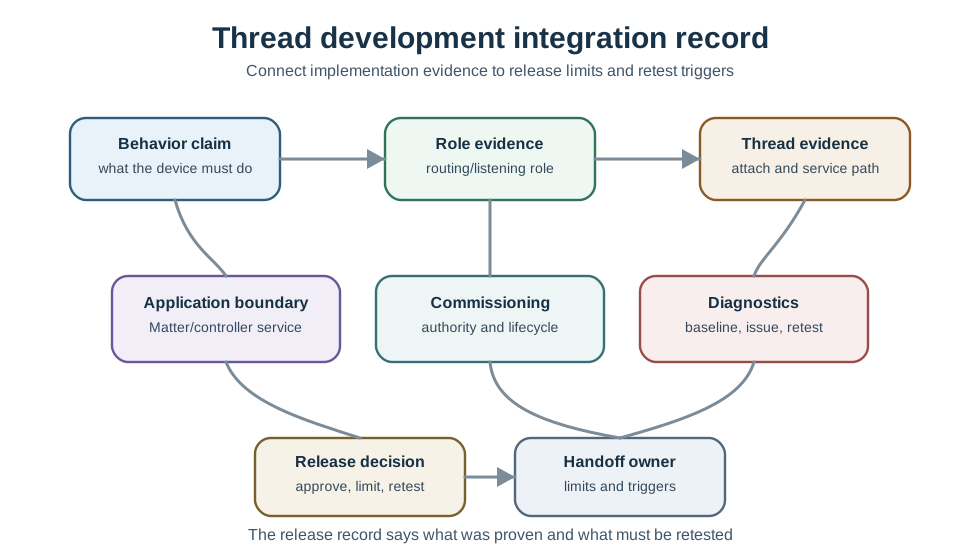
One record should cover one release claim. If the same device has a sensing path, a control path, and a commissioning repair path, each path may need separate evidence.
30.20 Review Sequence
This section: Review Sequence — The sequence matters because it keeps code, network, application, and operations evidence from blurring together.
The sequence matters because it keeps code, network, application, and operations evidence from blurring together.
30.21 Worked Development Records
This section: Worked Development Records
Sleepy sensor integration
Claim: the sensor can report environmental telemetry through a Thread mesh while preserving low-power behavior. Evidence: role configuration shows sleepy attachment, telemetry is accepted by the application, and diagnostics identify the parent and retest trigger. Decision: approve the telemetry path for the pilot. Limit: command-response behavior is not included in this approval.
Local control endpoint
Claim: an actuator can receive local control messages over Thread. Evidence: the device stays reachable for the required control path, the application command changes the expected state, and a restart test confirms reattachment. Decision: approve local control. Limit: remote cloud control is a separate service review.
Matter boundary review
Claim: the device exposes a Matter application model over Thread. Evidence: Thread attachment and Border Router service are reviewed separately from endpoint, cluster, command, and event behavior. Decision: approve integration test readiness. Limit: certification or ecosystem behavior is not implied by this internal review.
30.22 Common Mistakes
This section: Common Mistakes
-

Wrong: Copy one role setting to every device. Match the role to power, sleep, and gateway duties.
Copying role settings blindly
A role that is correct for an always-on device can be wrong for a sleepy sensor or a gateway-like device.
Confusing Matter and Thread evidence
Matter behavior and Thread mesh behavior are both important, but each proves a different layer.
Treating a demo as release approval
A demo usually proves one happy path. Release evidence also needs diagnostics, limits, and retest triggers.
Hiding commissioning ownership
If setup artifacts, removal behavior, and recovery are unclear, support cannot safely operate the device lifecycle.
Keeping only raw logs
Raw logs help debugging, but review records need interpretation and a decision.
Approving beyond the tested boundary
Thread-only telemetry, Matter control, remote service, and bridge behavior should be approved separately when their evidence differs.
30.23 Development Release Checklist
This section: Development Release Checklist
Before approving a Thread development release, confirm that the record includes:
- A bounded behavior claim, role, integration boundary, and owner.
- Role configuration evidence tied to routing, listening, network data, and repair responsibility.
- Thread attachment and diagnostics evidence separated from application evidence.
- Matter, controller, service, or bridge evidence only when the claim depends on those layers.
- Commissioning and credential flow evidence, including removal and recovery expectations.
- Test evidence for a normal path and at least one boundary condition.
- Release decision, explicit limits, retest triggers, and handoff owner.
30.24 Knowledge Check: Layer Boundary
This section: Knowledge Check: Layer Boundary
30.25 Knowledge Check: Role Evidence
This section: Knowledge Check: Role Evidence
30.26 Match Development Evidence
This section: Match Development Evidence
30.27 Order the Development Review
This section: Order the Development Review
30.28 Summary
This section: Summary — Thread development and integration should be reviewed as a set of evidence records.
Thread development and integration should be reviewed as a set of evidence records. The important question is not whether a sample runs, but whether the selected role, network behavior, commissioning flow, application boundary, diagnostics, and release limits are visible and testable.
Keep Thread and Matter boundaries clear. Thread proves the network behavior. Matter proves an application model. Controller and service layers prove user-facing or remote behavior. A strong release record says which of those layers is included and which needs separate review.
30.29 Key Takeaway
This section: Key Takeaway — Thread Development and Integration Evidence should turn Thread planning into deployment evidence for commissioning, role changes, border routing, diagnostics, repair, and operational ownership.
Thread Development and Integration Evidence should turn Thread planning into deployment evidence for commissioning, role changes, border routing, diagnostics, repair, and operational ownership.
30.30 Concept Relationships
This section: Concept Relationships
Implementation claim
Connects device behavior, Thread role, integration boundary, and release owner.
Role configuration
Connects routing responsibility, listening behavior, power assumptions, and repair control.
Thread evidence
Connects attachment, route behavior, Border Router service, and diagnostics.
Matter boundary
Connects device models, endpoints, clusters, commands, events, and fabric behavior when required.
Commissioning flow
Connects join authority, setup artifacts, credential custody, removal, and recovery.
Release record
Connects test evidence to approval, limits, retest triggers, and operations handoff.
30.31 What’s Next
This section: What’s Next
- Thread Implementation Deployment Evidence - Use deployment evidence to move development records into staged release and operations.
- Thread Network Operations - Review ongoing network behavior, recovery, and monitoring evidence.
- Thread Deployment Evidence Guide - Review site scope, placement, Border Router service, and rollout records.
- Thread Comprehensive Evidence Review - Tie development, deployment, security, and Matter boundaries together.
- Matter Protocol Overview - Continue into application-layer interoperability after Thread integration evidence is bounded.
Find help
3 reviewed answers.
Where should I start in a module?
Open the module page from the sidebar to see its chapters in order. Use the module map to return to a topic you need.
Modules and pathsReviewed
What can I try when a project does not work?
Check the symptom, then work through the diagnostic steps. Keep the error message and the smallest example that reproduces it.
When you are stuckReviewed
How do interactive examples work?
Use the interactive guide to check how examples and simulations work before changing your project.
Interactive examples guideReviewed