28 Advanced Thread Features

More
Depth: Practitioner
Progress saves as you read. Mark sections complete as you go; your progress appears in the sidebar.
28.1 Start With the IPv6 Mesh Claim
This section: Start With the IPv6 Mesh Claim — Picture a care home moving its low-power devices away from a noisy channel.
Change the Mesh Without Losing Quiet Devices
Picture a care home moving its low-power devices away from a noisy channel. Wall units can hear the change at once, but sleepy room sensors wake only now and then. The site owner must prove that the whole mesh moves together and that no alarm source is left behind.
Write the change as a timed plan. Name the old and new settings, when they take effect, which devices relay the update, how sleeping children receive it, who watches the move, and how to return. Keep each device result tied to its role and last known parent.
Test a late child, a lost leader, two network parts, a failed border unit, a weak link, and a return to the old setting. Check join, address, route, group traffic, and alarm delivery after each fault. A few healthy routers do not prove that every child is reachable.
Keep each local alarm able to enter a safe state while the mesh repairs. A cloud view can help review the fleet, but it must not be the only place that notices a failed move.
This opening does not approve a product or change plan. Practitioner turns the claim into staged evidence. Under the Hood examines shared settings, roles, partitions, group scope, border behavior, and the records used to explain recovery.
Start with the claim that a low-power mesh device can speak IP directly enough for the product need. Advanced Thread Features should help prove where IPv6 is native, where mesh behavior is managed, and where the border or application layer still sets limits.
The simple review path is join, address, route, recover, and observe. Once those steps are clear, Thread roles, security, implementation, and Matter relationships can be checked without treating the mesh as magic.
28.2 Thread Advanced Evidence Reference
This section: Thread Advanced Evidence Reference — Advanced Thread review is not about memorizing a feature list.
Advanced Thread review is not about memorizing a feature list. It is about proving that a network can change keys, change channels, survive topology changes, carry group traffic, expose useful diagnostics, and keep low-power children reachable without turning every device into a router.
This chapter turns advanced Thread topics into evidence records. It keeps the focus on what a reviewer can observe, what the claim means for a deployment, and what should be handed to implementation, operations, or certification work.
28.3 In 60 Seconds
This section: In 60 Seconds
- Advanced Thread claims should name the specific network behavior being approved, not only the protocol version.
- Operational Dataset changes need staged parameters, activation timing, rollback expectations, and evidence that sleepy children can receive the change.
- Partition and Leader events are mesh-control behavior; they are not application failover, cloud failover, or Matter fabric changes.
- Border Router evidence should cover prefix, route, service-discovery, and external-network behavior separately.
- Multicast and group behavior need scope evidence because broad group traffic can stress constrained links.
- Diagnostics are useful only when they connect symptoms to reviewable records such as neighbor quality, child attachment, route visibility, and service advertisement state.
28.4 Learning Objectives
This section: Learning Objectives
By the end of this chapter, you will be able to:
- Review advanced Thread claims without relying on stale version, product, or timing promises.
- Separate Operational Dataset changes from application configuration changes.
- Explain how partition, Leader, router, parent, and child evidence fit together.
- Evaluate Border Router redundancy claims without confusing Border Routers with Thread Leaders or Matter bridges.
- Record multicast, service-discovery, and diagnostics evidence in a form that supports deployment decisions.
- Build a review handoff that preserves the limits and assumptions behind an advanced Thread decision.
28.5 Quick Check: Thread Advanced
This section: Quick Check: Thread Advanced
28.6 What Counts as Advanced Evidence
This section: What Counts as Advanced Evidence — Advanced evidence starts where basic connectivity ends.
Advanced evidence starts where basic connectivity ends. A device that joins once is not enough. A reviewed Thread deployment needs evidence for change, failure, scale, and operations.
Dataset change evidence
Active and pending Operational Dataset records, activation policy, expected receivers, sleepy-child reachability, and rollback expectations.
Topology evidence
Leader, partition, router, child, and parent-state records that explain how the mesh behaves when links or routers change.
Border Router evidence
External prefixes, routes, service discovery, NAT64 or DNS64 use when relevant, and behavior when one gateway path disappears.
Group traffic evidence
Multicast scope, listener population, message purpose, retry expectations, and proof that group traffic is not replacing required unicast confirmation.
Low-power evidence
Child timeout, polling or listening behavior, parent buffering expectations, wake latency, and the application impact of missed windows.
Operational evidence
Diagnostic snapshots, incident records, configuration custody, update authority, and the exact boundary between Thread behavior and application behavior.
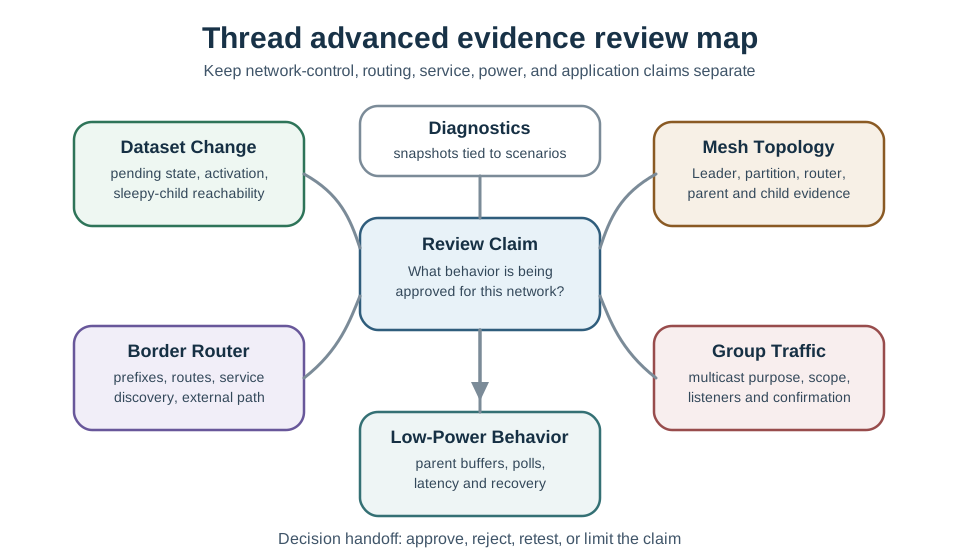
28.7 Advanced Review Map
This section: Advanced Review Map — The advanced evidence families should stay separate during review.
The advanced evidence families should stay separate during review. When a review record mixes all advanced topics into one answer, it becomes hard to tell whether the network, the Border Router, the controller, or the application is responsible for a failure.
28.8 Address Scope and Address Lifetime
This section: Address Scope and Address Lifetime — Advanced Thread evidence often turns on which IPv6 address is being used.
Advanced Thread evidence often turns on which IPv6 address is being used. The same device can hold several addresses at once, and each address has a different reach and lifetime.
Link-local address
Reaches only a direct neighbor and is useful for one-hop control exchanges.
Mesh-local EID
Stays stable within the Thread mesh and is the safer choice for long-lived on-mesh application connections.
RLOC
Reflects the device’s current routing position and can change after parent changes or router promotion.
Global unicast address
Comes from a Border Router advertised prefix when the device must be reachable beyond the mesh.
The common failure is pinning long-lived on-mesh behavior to the RLOC. That can work during a snapshot and then fail silently after the device changes parent, a router-eligible end device is promoted, or topology shifts after a recovery event. A review record should name the intended reach and lifetime, then check that the address scope matches that claim.
28.9 Knowledge Check: Address Scope Choice
This section: Knowledge Check: Address Scope Choice
28.10 Operational Dataset Change Control
This section: Operational Dataset Change Control — The Operational Dataset is the network’s control plane for parameters such as network identity, channel, PAN identifiers, security material references, and other network operating state.
The Operational Dataset is the network’s control plane for parameters such as network identity, channel, PAN identifiers, security material references, and other network operating state. It is not a storage area for application preferences, lighting scenes, building zones, or product configuration.
A dataset-change record should answer:
- What parameter is changing and why the change is needed.
- Which devices must receive the pending state before activation.
- How sleepy children are expected to learn about the change.
- What evidence shows that routers, children, and Border Routers agree after activation.
- What rollback or recovery action is available if part of the mesh misses the transition.
Treat dataset changes as staged operations. The reviewer should not approve a change only because a commissioner accepted the request. The evidence must show that the resulting network state is visible to the mesh and consistent with the deployment intent.
28.11 Partition, Leader, and Router Evidence
This section: Partition, Leader, and Router Evidence — Thread can continue operating through normal control-plane changes, but the names are easy to misuse.
Thread can continue operating through normal control-plane changes, but the names are easy to misuse.
Leader
The Leader manages router-id allocation and partition data for a connected Thread partition. It is not the cloud gateway and it is not the Matter controller.
Partition
A partition is a connected Thread mesh segment with its own control-plane state. Partition merge evidence matters when physical connectivity returns after a split.
Router
Routers forward mesh traffic and can provide parent service to end devices. Router count alone does not prove good coverage or stable parent choices.
Child
Children depend on a parent for message buffering and reachability. Their evidence must include attachment state and the application tolerance for delayed delivery.
Good topology evidence avoids two shortcuts. First, it does not treat a Leader change as an application outage by itself. Second, it does not treat a dense router count as proof of reliability unless neighbor quality, parent distribution, and route visibility support the claim.
28.12 Parent Selection and Sleepy Children
This section: Parent Selection and Sleepy Children — Low-power Thread devices trade responsiveness for energy conservation.
Low-power Thread devices trade responsiveness for energy conservation. The right review question is not “How long will the battery last?” without context. The useful question is: “Does the parent, child, and application behavior match the required response time and maintenance model?”
Review the following evidence:
- Child role and configured sleep behavior.
- Parent selection reason, including nearby routers and observed link quality.
- Buffering expectation for messages sent while the child sleeps.
- Application behavior when the child responds later than expected.
- Recovery behavior when the parent disappears or becomes poor.
Sleepy-child evidence should be scenario specific. A door sensor, a water-leak alarm, a temperature logger, and a maintenance beacon do not have the same latency risk, even if all can be built on the same Thread stack.
For low-power review, separate a Sleepy End Device from a Synchronized Sleepy End Device. A SED keeps its radio off and polls its parent for buffered traffic. An SSED agrees on brief listening windows with its parent, so the parent transmits when the child is awake. The evidence should state which mode is used, the expected delivery delay, and whether the application can tolerate that delay during normal operation and recovery.
-
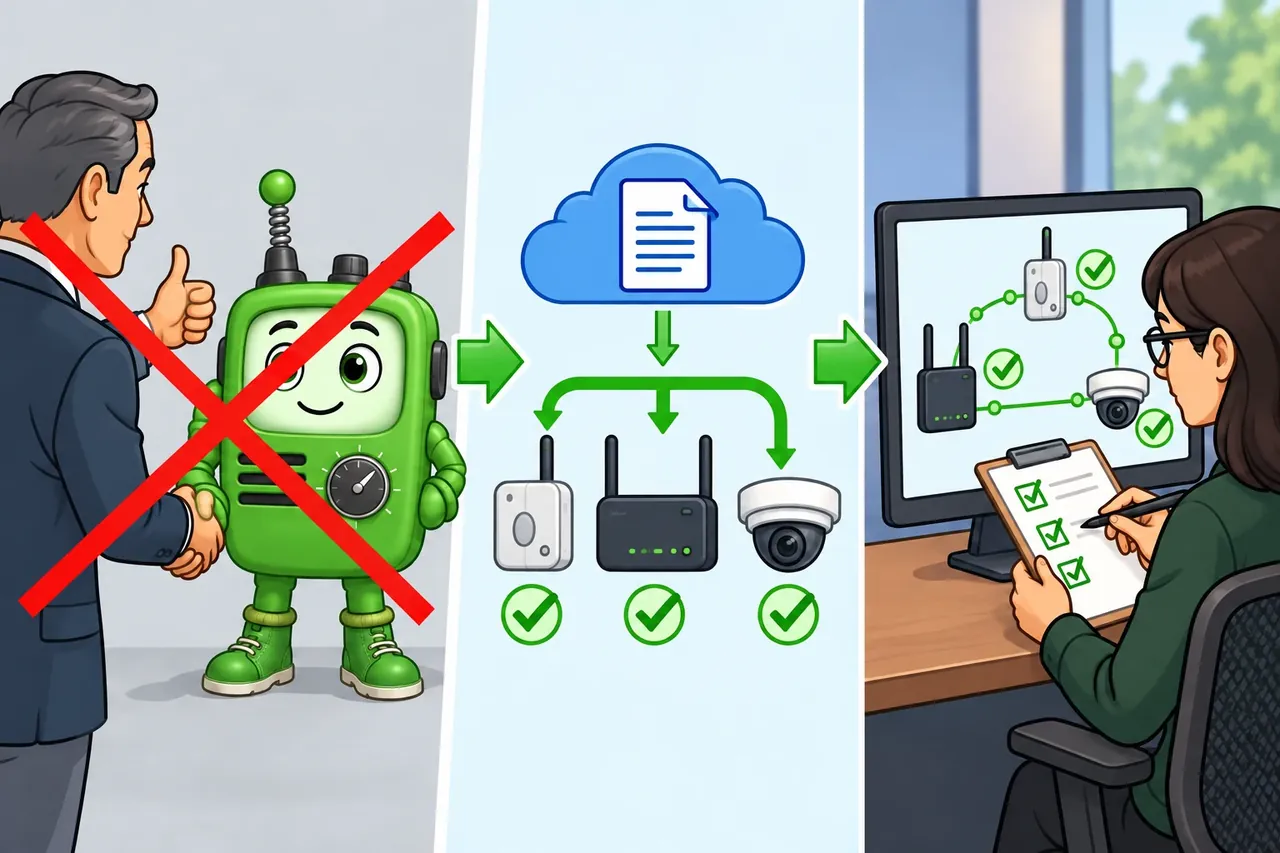
Wrong idea: commissioner approval proves a new Thread channel is live. It fails because the team must show that devices received the pending data and share the new active state.
28.13 Border Router Service Evidence
This section: Border Router Service Evidence — A Border Router connects the Thread mesh to other IP networks.
A Border Router connects the Thread mesh to other IP networks. That makes it important, but it does not make it the same thing as a Thread Leader, a commissioner, a Matter bridge, or a cloud service.
Keep these claims separate:
- Mesh claim: Devices can route inside the Thread partition.
- External route claim: Thread devices can reach the intended IP network beyond the mesh.
- Service-discovery claim: Services are advertised and resolved across the intended boundary.
- Resilience claim: Another eligible path exists when a Border Router or its backhaul fails.
- Matter claim: Matter controllers and fabrics behave as intended over the available transport path.
For redundancy, review the evidence rather than a slogan. Confirm that multiple Border Routers are in the same intended Thread network, that their external-network paths are not the same hidden single point of failure, and that service discovery and routing return to the desired state after a gateway path changes.
28.14 Multicast and Service Discovery
This section: Multicast and Service Discovery — Thread can support multicast and service-discovery behavior, but constrained mesh traffic still needs disciplined scope.
Thread can support multicast and service-discovery behavior, but constrained mesh traffic still needs disciplined scope. A group command can be appropriate for discovery, membership, or local group behavior. It should not become a substitute for evidence that every required endpoint completed a critical action.
Use this review pattern:
This keeps multicast from becoming a hidden reliability claim. Group traffic can reduce repeated requests, but critical actions still need a confirmation strategy suited to the application.
28.15 Diagnostics Without Tool Drift
This section: Diagnostics Without Tool Drift — Advanced diagnostics should explain a network condition, not teach a command manual.
Advanced diagnostics should explain a network condition, not teach a command manual. The reviewer can ask for diagnostic snapshots, but the chapter should preserve the evidence categories rather than one vendor’s current command output.
Useful diagnostic records include:
- Neighbor and link-quality trend for the devices involved in the claim.
- Child table or attachment evidence for sleepy devices.
- Router and Leader state before and after a topology event.
- Border Router route, prefix, and service advertisement evidence.
- Multicast listener or service-discovery evidence when group behavior is being reviewed.
- Time-bounded incident notes that connect symptoms to network evidence.
Diagnostic records should include the observation window and the reason for collecting the evidence. A snapshot without a question often turns into data hoarding; a snapshot tied to a claim supports a defensible decision.
28.16 Review Record Template
This section: Review Record Template — The second figure shows a compact record format for advanced Thread decisions.
The second figure shows a compact record format for advanced Thread decisions.
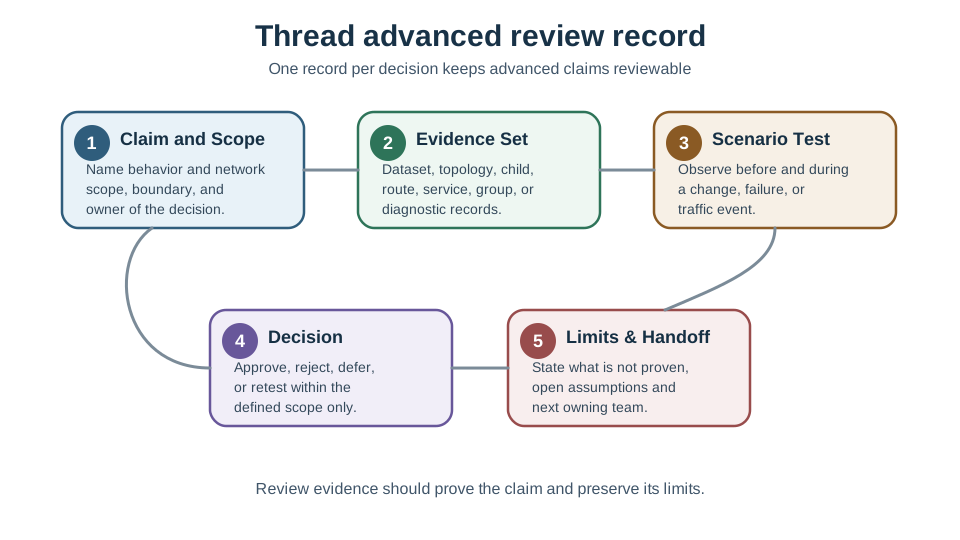
Use one record per decision. If a single record tries to approve dataset migration, Border Router redundancy, multicast behavior, and low-power latency at the same time, split it.
28.17 Worked Review Records
This section: Worked Review Records
Record: Pending dataset change for an occupied building
Claim: The network can accept a channel change without a full device recommissioning event.
Evidence: Pending dataset prepared, activation window selected, sleepy-child reachability considered, routers and Border Routers observed after activation, and application alarms monitored during the window.
Decision: Approve only for the named network segment and only with rollback responsibility assigned.
Limit: This does not approve unrelated application configuration changes.
Record: Partition recovery after a floor outage
Claim: The mesh recovers when one floor loses power and returns.
Evidence: Pre-event topology, surviving partition state, returned-router attachment, partition merge observation, child reattachment, and application state after recovery.
Decision: Accept the design if critical devices remain reachable through an alternate path or have a documented local fallback.
Limit: This does not prove cloud or Matter-controller availability unless Border Router and controller evidence is also reviewed.
Record: Border Router resilience review
Claim: The deployment does not depend on one Border Router for external connectivity.
Evidence: Multiple Border Routers in the intended network, distinct power or backhaul assumptions where practical, route and service-discovery state before and after a failure drill, and application behavior during recovery.
Decision: Accept only if the failure drill matches the required user experience and the remaining path is not a hidden single point of failure.
Limit: A second Border Router does not make a weak mesh or a missing controller policy correct.
Record: Low-power child response review
Claim: A battery sensor can meet the application’s response expectation while remaining a child device.
Evidence: Role, parent options, sleep or listening behavior, parent buffering expectation, observed delivery delay, and recovery after parent loss.
Decision: Accept the role only if the application can tolerate the observed delay and the parent-loss path is tested.
Limit: This record does not predict battery lifetime without workload and hardware evidence.
28.18 Common Mistakes
This section: Common Mistakes
Treating version labels as evidence
A protocol version can identify capability scope, but approval still needs deployment-specific behavior and logs.
Using the Operational Dataset for app settings
Dataset mechanisms are for network operation. Application configuration needs its own distribution and rollback model.
Confusing Border Router and bridge roles
A Border Router routes IP traffic between Thread and another IP network. A Matter bridge exposes non-Matter devices into a Matter fabric.
Approving multicast without confirmation
Group traffic can be efficient, but critical behavior still needs a confirmation or reconciliation path.
Ignoring sleepy-child timing
Low-power children can miss immediate delivery windows. The application must tolerate or explicitly handle that delay.
Overreading one diagnostic snapshot
A single snapshot is useful only when tied to a scenario, time window, and decision question.
28.19 Advanced Review Checklist
This section: Advanced Review Checklist
Use this checklist before approving an advanced Thread claim:
28.20 Match Advanced Evidence
This section: Match Advanced Evidence
28.21 Order the Advanced Review
This section: Order the Advanced Review
28.22 Summary
This section: Summary — Advanced Thread review is evidence review, not feature collecting.
Advanced Thread review is evidence review, not feature collecting. Dataset changes, Leader changes, partition merges, router promotion, sleepy-child behavior, Border Router services, multicast scope, and diagnostic snapshots all answer different questions.
A strong record keeps those questions separate. It names the claim, states the layer boundary, gathers scenario-specific evidence, tests the relevant event, and hands off the decision with limits intact.
28.23 Key Takeaway
This section: Key Takeaway — Thread Advanced Evidence Reference should connect Thread IPv6 mesh roles, routing, commissioning, border routers, security, power behavior, and deployment evidence.
Thread Advanced Evidence Reference should connect Thread IPv6 mesh roles, routing, commissioning, border routers, security, power behavior, and deployment evidence.
28.24 Concept Relationships
This section: Concept Relationships
- Thread network architecture: Provides the roles used here: Leader, Router, Border Router, REED, and sleepy children.
- Thread deployment: Turns these records into placement, redundancy, and maintenance decisions.
- 6LoWPAN and Thread mesh routing: Explain IPv6 adaptation and Thread’s MLE-based distance-vector routing; RPL is a separate IPv6 routing protocol, not Thread’s mesh-routing mechanism.
- Matter over Thread: Uses Thread as an IP transport, but Matter fabric and application behavior still require separate evidence.
- Zigbee comparison: Helps explain why gateway, bridge, and native-IP claims must stay distinct.
28.25 What’s Next
This section: What’s Next
- Thread Operation and Implementation reviews network formation and operational behavior in more detail.
- Thread Network Architecture explains the device roles referenced in this chapter.
- Thread Deployment Guide applies these evidence records to placement and redundancy decisions.
- Matter Transport and Platform Evidence connects Thread transport evidence to Matter platform review.
- 6LoWPAN Fundamentals and Architecture Evidence reviews the IPv6 adaptation layer underneath Thread.
Find help
3 reviewed answers.
Where should I start in a module?
Open the module page from the sidebar to see its chapters in order. Use the module map to return to a topic you need.
Modules and pathsReviewed
What can I try when a project does not work?
Check the symptom, then work through the diagnostic steps. Keep the error message and the smallest example that reproduces it.
When you are stuckReviewed
How do interactive examples work?
Use the interactive guide to check how examples and simulations work before changing your project.
Interactive examples guideReviewed