18 Common Zigbee Mistakes
More
Depth: Practitioner
Progress saves as you read. Mark sections complete as you go; your progress appears in the sidebar.
18.1 In 60 Seconds
This section: In 60 Seconds — Imagine a battery room sensor that worked on a bench.
Imagine a battery room sensor that worked on a bench. In the real room it joins, reports once, and then goes quiet. Calling the whole network bad will not find the fault. Trace the failed job and test one boundary at a time.
Zigbee is a low-power radio system in which nearby devices can pass messages through a mesh. A gateway is the boundary device that links that mesh to another network or service. First ask whether the sensor has power and can wake. Then check the radio path, the mesh path, and the command path. A join proves only that setup worked once. It does not prove that a sleepy device can hear a later command. A working app path does not prove that direct device binding works. A quiet channel during setup does not prove that the site stays quiet.
Use short fault questions:
- Which action failed?
- Which device was involved?
- What path worked before?
- What changed at the site?
- Is mains power present?
- Can a router stay awake?
- Is the coordinator state backed up?
- Can the owner restore that state?
- Are join rights closed after setup?
- Did the fix pass the same hard case?
The Overview finds the weak boundary. Practitioner records the site test, owner, fix, and retest trigger. Under the Hood explains sleep timing, radio overlap, route repair, key custody, and scale. Those details can narrow the first diagnosis. They do not make one successful join proof of long-term service.
Retell the fault in five moves. Name the failed action. Trace its real path. Test the weak boundary. Record the owner. Repeat the hard case.
Most Zigbee mistakes are boundary mistakes. A device can join but still lose its route, a command can work through a gateway but fail through direct binding, a radio channel can look quiet during setup but become noisy under normal site use, and a coordinator can run for a long time without a tested recovery record.
This chapter reviews recurring Zigbee failures by asking which evidence boundary is weak: power, RF coexistence, mesh routing, application profile, coordinator recovery, permit-join security, sleepy-device behavior, scale segmentation, or physical custody. The goal is not to memorize a list of rules. The goal is to approve only the behavior that has been observed, documented, and retested.
18.2 Learning Objectives
This section: Learning Objectives
By the end of this chapter, you will be able to:
- separate Zigbee failure observations from unsupported assumptions,
- map common deployment mistakes to evidence boundaries,
- review power, RF, routing, application, security, and recovery evidence without brittle numeric rules,
- identify when a gateway, coordinator, or operations process is part of the approved behavior, and
- build a mistake review record with owner, fix, and retest trigger.

18.3 Quick Check: Zigbee Mistake Review
This section: Quick Check: Zigbee Mistake Review
18.4 Start With the Observed Failure
This section: Start With the Observed Failure — “Zigbee is unreliable” is too broad to approve or fix.
Common-mistake review starts with a narrow observation:
- which device, group, or automation failed,
- what was expected to happen,
- what actually happened,
- whether the failure repeats under a known condition,
- which path carried the behavior when it worked, and
- what changed before the failure appeared.
“Zigbee is unreliable” is too broad to approve or fix. A better statement says which behavior failed and which evidence boundary is under review.
Most recurring Zigbee failures come from design decisions rather than isolated bad devices. Common families include powered-path gaps, 2.4 GHz RF coexistence, a sparse router backbone, profile or cluster mismatch, missing coordinator or Trust Center backup, weak join custody, sleepy-device polling mismatch, and scale without segmentation. Each family can appear to a user as “a device is unreliable,” but each needs different evidence and a different fix.
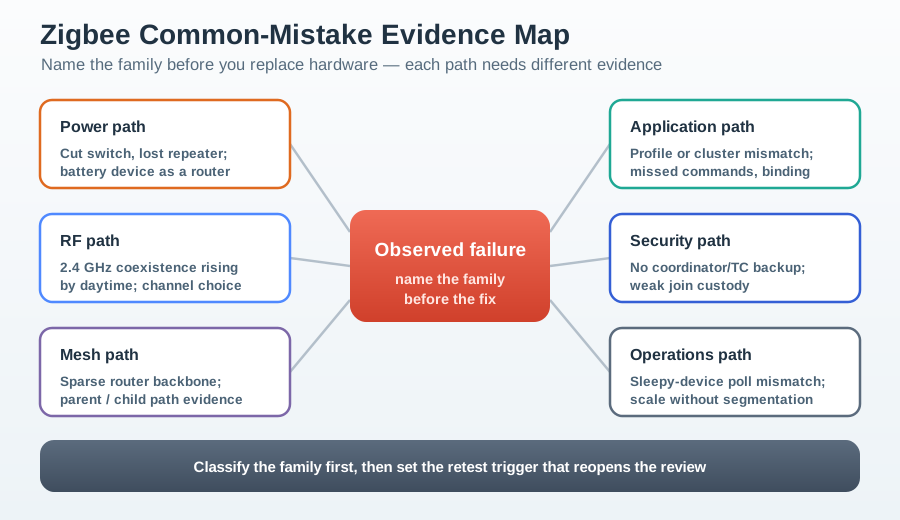
Use the observed failure to name the family before replacing hardware. A device that disappears after a wall switch is cut off points first at the power and mesh path. A device that joins cleanly but misses commands points first at sleepy polling or application delivery. A network that works until the coordinator is replaced points first at recovery evidence.
| Mistake family | Typical symptom | Evidence to review first |
|---|---|---|
| Battery device expected to route | Paths disappear or battery drains quickly | Device role, parent/child path, and always-on router evidence. |
| No coordinator or Trust Center backup | Coordinator loss becomes full re-commissioning | Backup contents, restore steps, network identity, and security material custody. |
| Sleepy poll mismatch | Reports arrive but commands are missed | Poll interval, parent buffer timeout, and downlink command timing. |
18.5 Power-Path Mistakes
This section: Power-Path Mistakes — Many Zigbee devices that use mains power also act as routers.
Many Zigbee devices that use mains power also act as routers. If a wall switch, plug, breaker, or user habit removes power from that device, the routing path can disappear with it.
Review evidence for:
- which powered devices act as routers,
- which end devices use those routers as parents or preferred paths,
- whether a manual switch can remove power from a router,
- whether replacement devices keep the same routing role,
- whether nighttime, cleaning, maintenance, or room-use patterns change the mesh, and
- which fallback paths exist when a powered router is unavailable.
Approve the fix only after the route remains stable under the real operating habit. A smart switch, dedicated powered router, or operations instruction can be valid, but the record should say which one was verified.
A battery-powered device should not be treated as a reliable router. Routers need an awake radio so they can relay frames and parent end devices. If a battery device is configured or assumed to act like a router, it either drains quickly or sleeps and silently breaks dependent paths. The review should confirm that routing roles are assigned to stable powered devices and that battery devices are reviewed as end devices with parent, reporting, and rejoin evidence.
18.6 RF Coexistence Mistakes
This section: RF Coexistence Mistakes — Zigbee shares crowded unlicensed spectrum with other local systems.
Zigbee shares crowded unlicensed spectrum with other local systems. RF mistakes happen when a deployment assumes that a clean join event proves a clean operating channel.
Review evidence for:
- site survey observations during normal load,
- coordinator channel choice and neighboring radio activity,
- whether failures align with busy periods,
- retry, loss, or link-quality indicators before and after a channel change,
- whether the change requires device recovery work, and
- whether the new channel plan is recorded for future additions.
Do not approve a channel from a generic rule. Approve it from the site evidence and the retest result.
18.7 Mesh-Path Mistakes
This section: Mesh-Path Mistakes — Mesh mistakes usually appear when end devices depend on too few stable paths or when routing assumptions are copied from one building to another.
Mesh mistakes usually appear when end devices depend on too few stable paths or when routing assumptions are copied from one building to another.
Review evidence for:
- router placement relative to the devices being supported,
- whether end devices have stable parents,
- whether critical paths rely on a single powered device,
- whether building materials or equipment block the route,
- whether a route recovers after a router is removed, and
- whether a fix improves the exact behavior being released.
Avoid fixed density rules as approval evidence. The right question is whether the observed mesh has enough stable, powered paths for the release behavior.
18.8 Application-Profile Mistakes
This section: Application-Profile Mistakes — Application mistakes happen when a reviewer treats a successful join as proof of application compatibility.
Application mistakes happen when a reviewer treats a successful join as proof of application compatibility.
Check whether the release claim depends on:
- endpoint selection,
- device type,
- cluster presence,
- command direction,
- attribute reporting,
- binding or group behavior,
- scene behavior,
- controller rule behavior, or
- gateway translation.
If two devices work only through a controller or gateway, approve that gateway-mediated behavior. Do not describe it as direct device compatibility unless endpoint, cluster, and binding evidence proves the direct path.
18.9 Coordinator-Recovery Mistakes
This section: Coordinator-Recovery Mistakes — Coordinator mistakes become visible during replacement, migration, or disaster recovery.
Coordinator mistakes become visible during replacement, migration, or disaster recovery. A working network is not a recovery plan.
Review evidence for:
- backup existence,
- restore procedure,
- network identity and security material custody,
- device table and binding preservation,
- recovery owner,
- tested replacement steps, and
- retest triggers after coordinator, firmware, or platform changes.
The recovery record should state what can be restored, what must be repaired manually, and which behavior was tested after restoration.
A useful backup is more than an exported settings file. It should preserve enough network identity and security material to make the restore claim true: network key, extended PAN ID or equivalent network identity, coordinator or Trust Center state, device table where the platform supports it, binding or group state where the platform supports it, owner, storage location, and a tested restore path. If a platform cannot restore one of those pieces, the release claim should name the manual repair work instead of implying seamless recovery.
18.10 Security-Custody Mistakes
This section: Security-Custody Mistakes — Security mistakes often come from convenience.
Security mistakes often come from convenience. Permit-join windows stay open too broadly, unexpected joins are not reviewed, coordinator hardware is treated as ordinary equipment, or key custody is not assigned.
Review evidence for:
- who can open joining,
- how long joining remains open,
- how the expected joining device is verified,
- how unexpected join events are logged,
- where the coordinator is physically located,
- who can access backups and security material, and
- what retest is required after security or ownership changes.
Security approval should describe custody and monitoring, not only the protocol feature.
18.11 Sleepy-Device Mistakes
This section: Sleepy-Device Mistakes — Battery-powered end devices sleep, wake, report, poll, and rejoin differently from powered routers.
Battery-powered end devices sleep, wake, report, poll, and rejoin differently from powered routers. Mistakes happen when a reviewer expects them to behave like powered devices.
Review evidence for:
- whether the device is event-driven, polled, or both,
- whether the parent router buffers messages as expected,
- whether battery-saving settings still meet the release behavior,
- whether the controller waits for sleepy-device response correctly,
- whether missed reports are visible to operations, and
- which setting changes reopen the review.
Do not approve a sleepy-device behavior from a single instant response. Review the normal reporting path and the failure path.
A sleepy end device periodically sends a MAC data poll to its parent to collect buffered downlink. The parent holds downlink for a finite indirect-transmission timeout, so the poll interval must be short enough for commands to be collected before they expire and long enough to preserve battery life. This is different from uplink reporting: a device can report readings reliably on its own schedule while still missing commands that expired before its next poll.
Frame-counter persistence is a separate under-the-hood failure mode. Zigbee security rejects replayed frames, so a device that loses frame-counter state after a reboot or power interruption can have frames rejected until it rejoins or repairs state. That symptom looks like a device that worked and then vanished after a power event, not simply a weak radio.
18.12 Scale and Segmentation Mistakes
This section: Scale and Segmentation Mistakes — Large deployments fail when one network is asked to carry too many roles, paths, or operational responsibilities without segmentation evidence.
Large deployments fail when one network is asked to carry too many roles, paths, or operational responsibilities without segmentation evidence.
Review evidence for:
- coordinator and router load,
- channel reuse between nearby networks,
- route table pressure,
- commissioning and replacement workflow,
- failure isolation,
- application-layer bridging,
- monitoring ownership, and
- whether each segment can be supported independently.
Segmentation is not only a capacity choice. It is also an operations boundary and a recovery boundary.
18.13 Knowledge Check: Power and Routing Evidence
This section: Knowledge Check: Power and Routing Evidence
18.14 Build a Mistake Review Record
This section: Build a Mistake Review Record — Generic “best practice” is not enough to close a fault.
Use a record that keeps the review anchored to evidence:
Observed failure: State the exact behavior that failed and the condition under which it failed.
Boundary under review: Choose power, RF, mesh, application, recovery, security, sleepy-device, scale, or physical custody.
Evidence collected: Record site observations, join/path/application/security/recovery logs, and the before/after retest result.
Approved fix: Describe the change that was tested, not a generic best practice.
Owner and retest trigger: Name who owns the record and what change reopens it.
Generic “best practice” is not enough to close a fault. Figure 18.2 shows how to bind one observed failure to the tested change that resolved it.
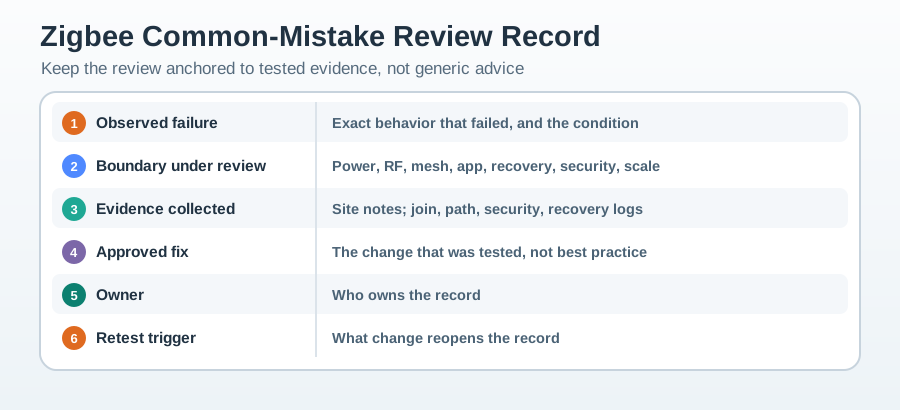
Figure 18.2 starts with 1 Observed failure, including the exact behaviour and condition. 2 Boundary under review forces a choice among power, RF, mesh, application, recovery, security, or scale instead of blaming “Zigbee” as a whole. 3 Evidence collected then retains site notes and the relevant join, path, security, or recovery logs. Only a tested change belongs in 4 Approved fix; an untried recommendation does not qualify. 5 Owner assigns custody, and 6 Retest trigger names the change that reopens the record. The mistake cases below can therefore be closed individually without turning one successful repair into a universal rule.
18.15 Worked Review: Unstable Room Sensors
This section: Worked Review: Unstable Room Sensors — Scenario: Room sensors join successfully, then later appear offline after people use manual switches in nearby rooms.
Scenario: Room sensors join successfully, then later appear offline after people use manual switches in nearby rooms.
Review path:
- State the release behavior: room sensors must report reliably during occupied and unoccupied periods.
- Check whether powered lighting devices or plugs are used as parent routers.
- Observe the mesh before and after the manual switch pattern.
- Add or preserve a stable powered route and repeat the same operating pattern.
- Record the approved fix and the condition that reopens review.
Approval answer: Approve only after the sensor behavior survives the same power-use pattern that previously caused the failure.
18.16 Worked Review: Gateway-Only Compatibility
This section: Worked Review: Gateway-Only Compatibility — Scenario: A switch event can trigger a light through the gateway, but direct binding between the switch and light fails.
Scenario: A switch event can trigger a light through the gateway, but direct binding between the switch and light fails.
Review path:
- State whether the release claim requires direct operation or gateway-mediated operation.
- Record endpoint, device type, cluster, command direction, and binding evidence.
- Test with the gateway rule enabled and disabled.
- Document unsupported direct behavior rather than hiding it.
- Add gateway rule changes as retest triggers.
Approval answer: Approve gateway-mediated behavior if that is what was proven. Do not approve direct compatibility from a gateway success.
18.17 Common Drift During Mistake Review
This section: Common Drift During Mistake Review — Each error turns a real observation into an overbroad claim.
Watch for these review errors:
- treating a successful join as proof of application behavior,
- treating one clean test as proof of all operating conditions,
- applying generic channel advice without a site observation,
- replacing the coordinator without a recovery record,
- leaving joining open because it is convenient,
- blaming battery devices before checking parent and reporting evidence,
- describing gateway translation as direct binding,
- approving scale without operations and segmentation evidence, and
- fixing the visible failure without recording the retest trigger.
Each error turns a real observation into an overbroad claim.
18.18 Knowledge Check: Security-Custody Evidence
This section: Knowledge Check: Security-Custody Evidence
18.19 Match the Mistake to the Evidence Boundary
This section: Match the Mistake to the Evidence Boundary
18.20 Order the Mistake Review
This section: Order the Mistake Review
18.21 Mistake Review Checklist
This section: Mistake Review Checklist
Before approving a Zigbee mistake fix, confirm:
- the failure statement is narrow enough to test,
- power and routing evidence are separated from application evidence,
- RF evidence comes from the site condition being approved,
- gateway-mediated behavior is not described as direct behavior,
- coordinator recovery is tested or explicitly bounded,
- join control and coordinator custody have owners,
- sleepy-device behavior is reviewed under normal reporting conditions,
- scale decisions include operations and segmentation evidence, and
- the record names the retest trigger.
18.22 Summary
This section: Summary — Zigbee mistakes are usually not isolated facts to memorize.
Zigbee mistakes are usually not isolated facts to memorize. They are evidence gaps. A reviewer should ask which boundary is weak, collect evidence for that boundary, approve only the tested behavior, and record what change reopens the review.
The strongest fixes are specific. They say which path, device role, channel plan, gateway rule, security process, recovery step, or operations boundary was corrected and retested.
18.23 Key Takeaway
This section: Key Takeaway — Approve a Zigbee mistake fix only when the record names the observed failure, the weak evidence boundary, the tested fix, the owner, and the retest trigger.
Approve a Zigbee mistake fix only when the record names the observed failure, the weak evidence boundary, the tested fix, the owner, and the retest trigger.
18.24 Concept Relationships
This section: Concept Relationships
- Network-formation evidence explains join behavior before mistake review begins.
- Zigbee routing evidence explains parent, router, and route recovery assumptions.
- Application-profile evidence explains endpoint, cluster, binding, and gateway mistakes.
- Zigbee security evidence explains joining, Trust Center, and custody review.
- Industrial deployment evidence applies the same review pattern at larger operational boundaries.
18.25 What’s Next
This section: What’s Next
- Zigbee Industrial Deployment - Apply mistake review to larger operational deployments.
- Zigbee Security Architecture - Deepen join control, Trust Center, and custody evidence.
- Zigbee Network Formation - Review commissioning and join evidence.
- Zigbee Routing and Self-Healing - Review mesh path and recovery evidence.
- Zigbee Network Topologies - Connect mistakes to topology planning.
- Zigbee Knowledge Checks - Practice troubleshooting decisions.
Find help
3 reviewed answers.
Where should I start in a module?
Open the module page from the sidebar to see its chapters in order. Use the module map to return to a topic you need.
Modules and pathsReviewed
What can I try when a project does not work?
Check the symptom, then work through the diagnostic steps. Keep the error message and the smallest example that reproduces it.
When you are stuckReviewed
How do interactive examples work?
Use the interactive guide to check how examples and simulations work before changing your project.
Interactive examples guideReviewed