40 Matter Device Commissioning

More
Depth: Practitioner
Progress saves as you read. Mark sections complete as you go; your progress appears in the sidebar.
Matter commissioning: earn each fabric’s approval
Narrated audio tour. The full transcript is below.
Full transcript — Matter commissioning (8 beats)
B1 — Household handoff
You are the household administrator sharing a Matter lighting device with a second administrator. The light already belongs to your home. Your decision is about trust: who is allowed to control it, and which successful control tests support giving another controller authority?
Model caption: An administrator is sharing an already commissioned light with a second administrator; the decision concerns authority to control it.
B2 — Fabric membership
Matter commissioning takes an untrusted device into approved fabric membership. Think of a fabric as a home or building group in which the device has an identity and defined controller permissions. The commissioner is the controller bringing the device into the group. Sharing with another administrator adds another fabric and a separate approval decision.
Model caption: Matter commissioning grants approved fabric membership: device identity and controller permissions. An additional administrator joins through an additional fabric.
B3 — Protected setup and attestation
Begin with the protected setup session. The commissioner and device use the setup passcode to establish a temporary protected channel without sending the passcode itself. Then comes device attestation: checking the device's identity and certification before trusting it with credentials for normal operation.
Model caption: The setup passcode establishes the temporary protected channel without being sent. The commissioner checks device identity and certification evidence before trusting the device with operational credentials.
B4 — Credentials and operational checks
The commissioner installs credentials giving the device its identity within the fabric. Network settings provide the intended network path. The device must then demonstrate a working normal protected session. A failed check blocks approval. Write down what failed, how it was fixed, and when to test again, even after a reset and retry.
Model caption: The commissioner installs fabric credentials; the device receives network settings and proves its normal protected session. A failed check blocks approval. Record what failed, how it was fixed, and when to test again, even after a reset and retry.
B5 — Separate fabric paths
Take the chapter's household lighting handoff. The first administrator opens a commissioning window so another controller can join the device to a fabric. The second commissioner adds a separate fabric. Both controllers find the device and establish protected connections, each within its own fabric. Each administrator performs the approved on and off interaction within their permissions. The successful tests support the handoff decision.
Model caption: Both controllers find the device and establish protected connections, each within its own fabric. Each administrator demonstrates permitted on and off control.
B6 — Scoped approval
Count the scope of the result: one lighting device, two fabrics, and two controllers. Both administrators have demonstrated the approved on and off control. The decision approves commissioning for the lighting device across the two fabrics and two controllers. The tested on and off interaction defines the approved behavior.
Model caption: Approve commissioning for the reviewed lighting device, two fabrics, two controllers, and the demonstrated on and off interaction.
B7 — Approval does not transfer
A common mistake is to assume the first fabric's control tests suffice for the handoff, but adding a second fabric requires separate approval. Each fabric has its own credentials and permissions. Each controller needs successful connection and control tests. Your handoff succeeds because the second fabric passes its own tests, including the approved interaction.
Model caption: The second fabric earns approval through its own credentials, permissions, and operational evidence, including the approved interaction.
B8 — Earned approval
Commissioning earns a device its place in a fabric; each added fabric earns its own approval through demonstrated control.
Model caption: Commissioning earns a device its place in a fabric; each added fabric earns its own approval through demonstrated control.
40.1 Start With the Trust Boundary
This section: Start With the Trust Boundary — Picture a new door sensor appearing in a home app.
Picture a new door sensor appearing in a home app. Seeing it is only the first step. The owner must know which device it is, why it is trusted, which home it joins, and what happens if setup fails.
A payload is the useful data carried in a setup code or message. Matter commissioning is the controlled path from an untrusted device to an approved member of a home or building fabric. Start with the setup code and nearby discovery. Protect the first session. Check product identity before trust is granted. Give the device network settings and a new working identity. Then prove that its normal protected session works.
Keep the steps separate:
- Which device is being added?
- Who is allowed to add it?
- Is the setup code in scope?
- Is the first session protected?
- Did product identity pass its check?
- Which network will the device use?
- Which fabric will own it?
- Which rights does it receive?
- Did the first normal session work?
- What record explains a failed step?
An app icon does not prove the whole trust path. One owner also does not prove a later shared-owner handoff. Practitioner records each step, fault, and release choice. Under the Hood covers the initial and normal sessions, trust chains, fabric scope, and several owners. Those details can stop approval. They never make discovery proof of permission.
Retell the trust path from start to finish. The device begins outside the fabric. Its setup code has a small scope. A commissioner begins the process. Nearby discovery finds the device. Finding is not trust. The first protected session begins. The setup secret supports that session. The device proves product facts. The commissioner checks those facts. A failed check stops release.
Then give the device a network path. Thread needs its network data. Wi-Fi needs its network data. Ethernet has another path. The chosen path is recorded. A network join is checked. A failed join has a reason. The device still lacks normal fabric rights. Setup state stays separate from daily state.
Then give it fabric identity. The fabric is named. The node identity is named. The controller trust is named. Working credentials are installed. Allowed rights are recorded. The first normal session is tested. The first device act is checked. Its result is fresh. The release record keeps the full path.
Then test failure. A wrong code must fail. Bad product proof must fail. Lost network setup must fail. A full fabric must fail clearly. A repeated attempt must stay safe. A reset must have an owner. Logs must avoid secret leaks. Support needs a useful reason. The owner needs a recovery path.
Finish with later change. A new controller may join. A second owner has a clear scope. Old access can be removed. A sold device can leave the fabric. A reset clears the right state. New trust starts a new review. One app icon never stands for all this proof.
Start with the trust boundary in Matter Device Commissioning: who is allowed to join, who can carry keys or credentials, and which record proves that the decision was made correctly. A short-range protocol is only as useful as the join, identity, and recovery evidence around it.
The start-simple move is to follow one device from discovery through approval to ordinary traffic. Once that path is visible, the deeper material can test replay protection, credential custody, fabric scope, and operational exceptions.
40.2 Matter Device Commissioning Evidence
This section: Matter Device Commissioning Evidence — Matter commissioning is the process that turns an untrusted, uncommissioned device into a fabric member that can be reached through operational Matter sessions.
Matter commissioning is the process that turns an untrusted, uncommissioned device into a fabric member that can be reached through operational Matter sessions. A reviewer should not treat “the device appeared in an app” as enough evidence. The commissioning record needs to show the setup scope, discovery path, PASE session, device attestation, network commissioning, operational credentials, ACLs, CASE readiness, and failure handling that support the final approval.
This chapter reviews commissioning as evidence. It explains what to prove, what not to overclaim, and how to write a bounded release decision for a Matter device onboarding path.
40.3 In 60 Seconds
This section: In 60 Seconds
- Matter commissioning starts with a setup payload and uncommissioned discovery, then uses PASE to protect the initial commissioning session.
- PASE uses the setup passcode for onboarding. It is not the same evidence as later CASE operational sessions.
- Device attestation evidence checks product identity and certification signals before the device is trusted into a fabric.
- Network commissioning evidence depends on the transport: Thread, Wi-Fi, and Ethernet do not require the same proof.
- Operational credentials make the device a fabric member with a node identity, fabric scope, and controller trust boundary.
- CASE readiness proves the device can be reached after commissioning through an operational secure session.
- Multi-admin review treats each additional administrator as a separate fabric-scoped onboarding claim.
- A strong approval states what was commissioned, by which commissioner, onto which fabric and network path, with which failures and retest triggers.
40.4 Learning Objectives
This section: Learning Objectives
By the end of this chapter, you will be able to:
- Separate setup payload, discovery, PASE, device attestation, network commissioning, operational credentials, and CASE evidence.
- Explain why PASE success does not prove operational fabric readiness by itself.
- Review device attestation without turning it into a broad product-quality or network-health claim.
- Scope Thread, Wi-Fi, Ethernet, and multi-admin commissioning evidence correctly.
- Identify commissioning failures that should block release or trigger retest.
- Write bounded commissioning approval records for Matter devices and controllers.
40.5 Quick Check: Matter Commissioning
This section: Quick Check: Matter Commissioning
40.6 Prerequisites
This section: Prerequisites
This chapter assumes you have reviewed:
- Matter Overview, for Matter’s purpose and smart-home context.
- Matter Fragmentation Evidence, for the interoperability problem commissioning helps address.
- Matter Architecture Evidence, for nodes, fabrics, controllers, bridges, and endpoint boundaries.
- Matter Fabric Security Evidence, for fabric trust, operational credentials, PASE, CASE, and ACL boundaries.
- Matter Interaction Evidence, for secure session and interaction evidence after commissioning.
- Matter Device Types and Clusters Evidence, for endpoint and behavior approval after onboarding.
40.7 Commissioning Review Claim
This section: Commissioning Review Claim — The claim is deliberately narrow.
Use a claim that can be tested against records:
Matter commissioning review claim: A Matter device is approved for commissioning only when the setup payload, discovery path, PASE session, attestation result, network onboarding, operational credential installation, ACL scope, CASE reachability, failure handling, and retest triggers all support the same device, commissioner, fabric, and transport claim.
The claim is deliberately narrow. Commissioning evidence proves onboarding into a fabric under reviewed conditions. It does not automatically prove every cluster, automation, controller UI, remote access feature, bridge behavior, or future firmware state.
40.8 Commissioning Evidence Flow
This section: Commissioning Evidence Flow — The first figure shows the review path from an uncommissioned device to an operational fabric member.
The first figure shows the review path from an uncommissioned device to an operational fabric member.
Before commissioning Evidence Flow, inspect Figure 40.1 to compare “Attestation” with “Setup Payload”. Their juxtaposition makes matter commissioning evidence flow visible.
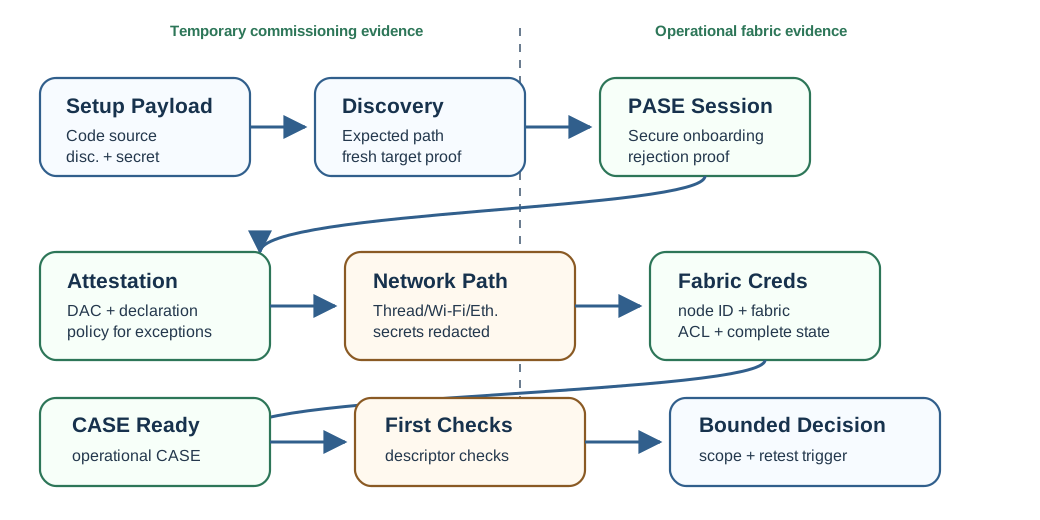
Read Figure 40.1 from “Attestation” to “Setup Payload”. Taken together, “Attestation” and “Setup Payload” express matter commissioning evidence flow. For commissioning Evidence Flow, the observed relationship between “Attestation” and “Setup Payload” is evidence that “Attestation” carries into the next decision.
The flow separates temporary onboarding evidence from operational evidence. PASE protects the commissioning session. CASE proves the later operational session after credentials and fabric membership are in place.
40.9 Commissioning Sequence Trace
This section: Commissioning Sequence Trace — The commissioning sequence starts with setup evidence and ends with operational Matter evidence.
The commissioning sequence starts with setup evidence and ends with operational Matter evidence. Treat each step as a separate checkpoint, because skipping one can make a device appear onboarded before it is a fabric member that can operate through CASE.
Before commissioning Sequence Trace, inspect Figure 40.2 to compare “configures” with “establishes PASE”. Their juxtaposition makes matter commissioning sequence from setup code through PASE, credentials, network join, and ACL evidence visible.
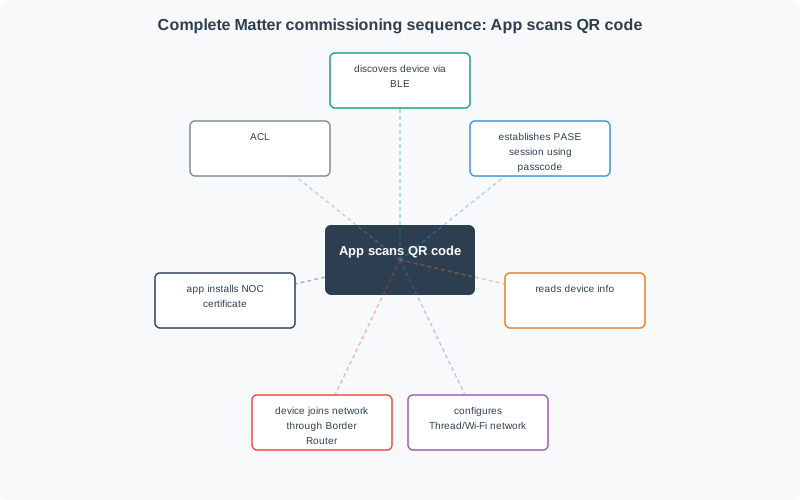
Read Figure 40.2 from “configures” to “establishes PASE”. Taken together, “configures” and “establishes PASE” express matter commissioning sequence from setup code through PASE, credentials, network join, and ACL evidence. For commissioning Sequence Trace, the observed relationship between “configures” and “establishes PASE” is evidence that “configures” carries into the next decision.
40.10 Evidence Families
This section: Evidence Families — Commissioning review combines several evidence families.
Commissioning review combines several evidence families.
40.11 Interactive Commissioning Flow
This section: Interactive Commissioning Flow
40.12 What Commissioning Proves
This section: What Commissioning Proves — Successful commissioning can prove that a commissioner could securely onboard a specific device into a specific fabric under reviewed conditions.
Successful commissioning can prove that a commissioner could securely onboard a specific device into a specific fabric under reviewed conditions. It can also prove that the selected network path and operational credentials allowed the device to move from temporary onboarding to normal Matter operation.
The approval can include:
- The setup payload was accepted only through the intended commissioning flow.
- The commissioner established a PASE session with the expected device.
- Device attestation was verified or handled according to an explicit release policy.
- Network commissioning completed for the reviewed transport.
- Operational credentials were installed for the reviewed fabric.
- The commissioned device was reachable through CASE after commissioning completed.
- ACLs and controller scope matched the approved use.
- Failure paths were captured with retest triggers.
40.13 What Commissioning Does Not Prove Alone
This section: What Commissioning Does Not Prove Alone — Commissioning is necessary, but it is not the whole product review.
Commissioning is necessary, but it is not the whole product review.
- It does not prove every device type, cluster, attribute, command, event, scene, or automation.
- It does not prove every controller will show the same UI or expose the same optional feature.
- It does not prove remote access, cloud services, account linking, notifications, or firmware update behavior.
- It does not prove all future multi-admin fabrics will have the same permissions or user experience.
- It does not prove bridge child endpoints unless the bridge mapping and child endpoint behavior were reviewed.
- It does not prove network resilience beyond the Thread, Wi-Fi, Ethernet, border-router, or local-routing conditions tested.
40.14 Setup Payload and Discovery Evidence
This section: Setup Payload and Discovery Evidence — The setup payload is the first boundary in the commissioning record.
The setup payload is the first boundary in the commissioning record. It tells the commissioner how to find the device and establish the first secure onboarding session. A review should record the source of the setup payload and whether the device being discovered matches the expected identity and commissioning state.
Good setup evidence answers:
- Was the setup payload from the correct device, batch, packaging, label, or test fixture?
- Was the discriminator used to identify the intended commissionee rather than a nearby stale device?
- Was the passcode handled as a secret and excluded from public screenshots or logs?
- Was the device in an open commissioning window at the time of discovery?
- Was the discovered transport path expected for this product state?
Discovery evidence should avoid a common mistake: treating a visible device advertisement as proof that onboarding succeeded. Discovery only starts the review.
40.15 PASE Session Evidence
This section: PASE Session Evidence — PASE protects the initial commissioning session using the setup passcode.
PASE protects the initial commissioning session using the setup passcode. It is temporary onboarding evidence, not operational fabric evidence.
For PASE, record:
PASE success should be followed by attestation, network commissioning when needed, operational credential installation, and CASE verification. If that transition is not recorded, the approval is incomplete.
40.16 PASE Passcode Proof
This section: PASE Passcode Proof — PASE uses SPAKE2+, a password-authenticated key exchange, so the commissioner and device can prove knowledge of the setup passcode without transmitting the passcode over the air.
PASE uses SPAKE2+, a password-authenticated key exchange, so the commissioner and device can prove knowledge of the setup passcode without transmitting the passcode over the air. Capturing the exchange should not reveal the passcode. A useful review record therefore distinguishes “PASE established with the intended device” from weaker evidence such as “a passcode appeared in a UI.”
PASE also has strict scope. It protects temporary onboarding before operational credentials exist. It does not prove the device has joined the intended network, received a Node Operational Certificate, entered the intended fabric, or become reachable through CASE. Those later transitions need separate evidence.
40.17 Device Attestation Evidence
This section: Device Attestation Evidence — Device attestation helps the commissioner decide whether the device has acceptable product identity and certification evidence before operational trust is granted.
Device attestation helps the commissioner decide whether the device has acceptable product identity and certification evidence before operational trust is granted. The review should record the attestation result and the policy used to handle exceptions.
Attestation evidence normally includes:
- Device attestation certificate chain evidence.
- Certification declaration evidence.
- A nonce-bound attestation response, so the record is tied to the reviewed session.
- Verification result against the accepted attestation trust policy.
- Release decision for failed, missing, unknown, or development attestation material.
Do not inflate attestation into a claim it cannot support. Attestation does not prove radio quality, power behavior, controller UI quality, bridge mapping, cluster conformance, or long-term operational reliability. It supports the device identity and certification portion of the commissioning decision.
40.18 Attestation Trust Chain
This section: Attestation Trust Chain — The step that separates Matter onboarding from simple password pairing is device attestation.
The step that separates Matter onboarding from simple password pairing is device attestation. Before installing operational credentials, the commissioner verifies the Device Attestation Certificate, usually abbreviated DAC, and checks that it chains through a Product Attestation Intermediate, or PAI, to an accepted root. A valid chain supports the claim that the device is a genuine certified Matter product from the expected manufacturer, not only a device that displayed a plausible setup code.
This matters because the setup code is not a high-value long-term secret. It may be printed on a label or packaging, so it can be photographed or copied. Attestation adds a device-held authenticity proof that a fake device should not be able to forge. Only after attestation passes or an explicit exception policy accepts the case should the commissioner install the NOC and provide network credentials.
40.19 PASE and CASE Boundary Check
This section: PASE and CASE Boundary Check
40.20 Network Commissioning Evidence
This section: Network Commissioning Evidence — Network commissioning evidence depends on the transport and device state.
Network commissioning evidence depends on the transport and device state. The reviewer should state what path was actually used.
For Thread devices, the record should show that the device received the intended Thread network information, joined the expected local mesh, and became reachable through the expected border-router path. Sensitive operational datasets should be redacted.
For Wi-Fi devices, the record should show that credentials were provided securely, the device joined the expected local network, and local reachability matched the commissioning claim. Passwords and account-specific identifiers should not appear in published evidence.
For Ethernet devices, the record may not include wireless credential transfer, but it still needs local IP reachability, operational discovery, fabric membership, and CASE evidence.
Do not approve a general “network works” claim unless the transport, local path, border-router or access-network dependency, and failure state were all reviewed.
40.21 Operational Credentials and Fabric Evidence
This section: Operational Credentials and Fabric Evidence — Operational credentials are the point where the device becomes a Matter fabric member.
Operational credentials are the point where the device becomes a Matter fabric member. The review should tie credentials to the device, commissioner, fabric, and operational identity being approved.
Record:
- Which commissioner installed credentials.
- Which trusted root and fabric scope were used.
- Which operational node identity and fabric index were assigned.
- Whether commissioning completed cleanly.
- Which ACL entries or privileges were applied for the approved controller role.
- Whether operational discovery and CASE succeeded after commissioning.
- Which fabric removal, factory reset, or credential replacement events require retest.
Credentials are fabric-scoped. Evidence from one fabric should not be reused as proof for another administrator, controller, or fabric unless that second scope was reviewed.
40.22 CASE and First Operational Checks
This section: CASE and First Operational Checks — After commissioning completes, the reviewer should prove that the device can operate outside the temporary commissioning channel.
After commissioning completes, the reviewer should prove that the device can operate outside the temporary commissioning channel. This is where CASE and first operational interactions matter.
The first operational check should include:
The first operational check does not need to become a full conformance campaign. It should be just enough to prove that commissioning completed into operational Matter behavior.
40.23 Multi-Admin Commissioning Evidence
This section: Multi-Admin Commissioning Evidence — Multi-admin commissioning lets a commissioned device be shared with another administrator through an additional fabric.
Multi-admin commissioning lets a commissioned device be shared with another administrator through an additional fabric. A review should treat that as a second commissioning claim, not as an automatic consequence of the first one.
Multi-admin evidence should answer:
- Who opened the commissioning window and under what authority?
- Which second commissioner used the window?
- Which fabric was added, and how was it kept separate from the first fabric?
- Which ACLs and privileges apply on each fabric?
- Which endpoint and interaction evidence was checked from each administrator?
- What happens when one fabric is removed, rotated, or no longer authorized?
The safest wording is specific: “The reviewed device joined the second fabric and completed the approved operational checks for the named controller.” Avoid saying that the device now works the same way for every ecosystem.
40.24 Commissioning Failure Handling
This section: Commissioning Failure Handling — Commissioning failures are evidence, not noise.
Commissioning failures are evidence, not noise. A release review should preserve enough failure detail to decide whether the issue blocks approval, requires retest, or stays outside the approved scope.
Important failure categories include:
A failed commissioning path should not be hidden by a later factory reset and retry unless the record explains the cause, fix, and retest trigger.
40.25 Worked Review Records
This section: Worked Review Records
40.26 Record 1: Thread Sensor Onboarding
This section: Record 1: Thread Sensor Onboarding
Scenario: A battery sensor is commissioned onto a Thread network through a mobile commissioner.
Evidence found: The setup payload matched the expected device, PASE succeeded during the open window, attestation passed the release policy, Thread network information was delivered with secrets redacted from the review record, operational credentials were installed, CASE succeeded, and the descriptor endpoint read matched the approved sensor endpoint.
Decision: Approve commissioning for the reviewed sensor, commissioner, fabric, Thread path, and first operational read. Keep battery-life, full sensor accuracy, remote access, and other controllers outside the commissioning approval.
40.27 Record 2: Attestation Hold
This section: Record 2: Attestation Hold
Scenario: A development plug can complete PASE and network commissioning, but device attestation does not match the release policy.
Evidence found: PASE, Wi-Fi join, and operational credential installation were repeatable in a lab build, but the attestation record was marked development-only and not acceptable for production release.
Decision: Hold production commissioning approval. Accept the lab path only for internal testing with a clear retest trigger when production attestation material is provisioned.
40.28 Record 3: Multi-Admin Handoff
This section: Record 3: Multi-Admin Handoff
Scenario: A commissioned lighting device is shared with a second administrator for household control.
Evidence found: The first administrator opened a commissioning window, the second commissioner added a separate fabric, operational discovery and CASE succeeded on both fabrics, and each administrator performed the approved on/off interaction within its ACL scope.
Decision: Approve multi-admin commissioning for the reviewed device, two fabrics, two controllers, and on/off interaction. Retest after ACL changes, fabric removal, controller replacement, or firmware changes affecting commissioning.
40.29 Common Mistakes
This section: Common Mistakes
- Treating QR-code scanning or device discovery as proof of completed commissioning.
- Treating PASE success as proof of CASE readiness.
- Ignoring device attestation failures because later network steps appear to work.
- Publishing setup passcodes, network credentials, operational datasets, or other commissioning secrets in review evidence.
- Reusing one fabric’s operational evidence as proof for another fabric or administrator.
- Treating a Thread border router, Wi-Fi access point, or Ethernet link as proof of Matter fabric membership.
- Approving every endpoint or cluster after only a basic commissioning check.
- Hiding failed attempts instead of recording cause, fix, and retest trigger.
40.30 Match the Commissioning Evidence
This section: Match the Commissioning Evidence
40.31 Order the Commissioning Review
This section: Order the Commissioning Review
40.32 Commissioning Review Record
This section: Commissioning Review Record — The second figure shows the minimum review record needed before accepting a commissioning claim.
The second figure shows the minimum review record needed before accepting a commissioning claim.
Before commissioning Review Record, inspect Figure 40.3 to compare “Failure Policy” with “Session Evidence”. Their juxtaposition makes matter commissioning review record visible.
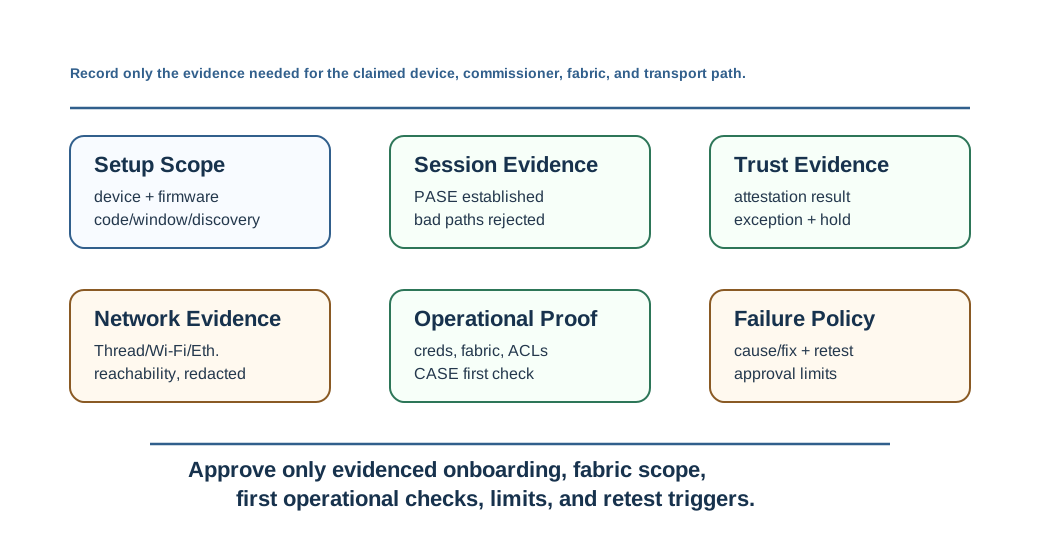
Read Figure 40.3 from “Failure Policy” to “Session Evidence”. Taken together, “Failure Policy” and “Session Evidence” express matter commissioning review record. For commissioning Review Record, the observed relationship between “Failure Policy” and “Session Evidence” is evidence that “Failure Policy” carries into the next decision.
Use this record when a team asks whether a device is ready for release, certification preparation, pilot deployment, or multi-admin sharing. The record keeps onboarding evidence, operational evidence, and open limitations visible.
40.33 Release Checklist
This section: Release Checklist — Use this checklist before accepting a Matter commissioning claim.
Use this checklist before accepting a Matter commissioning claim.
40.34 Release Decision Check
This section: Release Decision Check
40.35 Summary
This section: Summary — Matter commissioning is a trust transition.
Matter commissioning is a trust transition. The device begins as an uncommissioned node discovered through a setup path, establishes PASE for onboarding, passes or fails attestation policy, joins the intended network path, receives operational credentials, and then proves CASE-based operational reachability on a fabric.
The review discipline is separation. Keep setup payload, PASE, attestation, network commissioning, operational credentials, ACLs, CASE, multi-admin, and failure handling distinct. Then approve only the device, commissioner, fabric, transport, and first operational behaviors that the evidence supports.
40.36 Key Takeaway
This section: Key Takeaway — Matter Device Commissioning Evidence should prove commissioning through identity, fabric membership, credential exchange, network setup, recovery paths, and deployment evidence.
Matter Device Commissioning Evidence should prove commissioning through identity, fabric membership, credential exchange, network setup, recovery paths, and deployment evidence.
40.37 Concept Relationships
This section: Concept Relationships
- Matter Fabric Security Evidence explains the fabric, PASE, CASE, operational credential, and ACL boundaries behind commissioning.
- Matter Interaction Evidence shows how post-commissioning reads, writes, subscribes, invokes, and timed interactions are reviewed.
- Matter Device Types and Clusters Evidence explains how endpoint behavior is approved after a device has joined a fabric.
- Matter Fragmentation Evidence explains why secure commissioning and multi-admin matter for ecosystem interoperability.
40.38 What’s Next
This section: What’s Next — Next, Matter SDK and Development Environment Evidence reviews how implementation environment evidence should be scoped before building or modifying a Matter device.
Next, Matter SDK and Development Environment Evidence reviews how implementation environment evidence should be scoped before building or modifying a Matter device. Later, Matter Implementation Evidence connects commissioning readiness to firmware, endpoint behavior, and release discipline.
Find help
3 reviewed answers.
Where should I start in a module?
Open the module page from the sidebar to see its chapters in order. Use the module map to return to a topic you need.
Modules and pathsReviewed
What can I try when a project does not work?
Check the symptom, then work through the diagnostic steps. Keep the error message and the smallest example that reproduces it.
When you are stuckReviewed
How do interactive examples work?
Use the interactive guide to check how examples and simulations work before changing your project.
Interactive examples guideReviewed