38 Matter Transport and Platform

More
Depth: Practitioner
Progress saves as you read. Mark sections complete as you go; your progress appears in the sidebar.
38.1 Start With the Device Experience
This section: Start With the Device Experience — Picture a tenant adding a new window sensor to a home controller.
Prove the Whole Device Path, Not a Brand Label
Picture a tenant adding a new window sensor to a home controller. Setup succeeds beside the controller, yet the sensor stops reporting after it is moved upstairs. The support team must find whether the break is in setup, network reach, the border device, account state, or the controller’s view.
Matter is a shared application model for connected devices from different makers. Record one device story from discovery and approval through ordinary use. Name the device, controller, home trust group, network path, software versions, owner, and final command or reading.
Move the device to its real location. Restart the controller and border device, remove the outside link, change the home router, and try an old controller. Check local use, recovery time, and the evidence shown to the resident and support worker.
Bluetooth Low Energy is a short-range radio method often used during setup. It does not carry normal Matter use after setup. Thread, Wi-Fi, and wired Ethernet can carry ordinary traffic, but reachability alone does not grant trust or prove correct device behavior.
Practitioner builds the platform fit record. Under the Hood explains addresses, setup channels, border routing, trust-group membership, bridges, and the limits that appear when platforms or versions differ.
Use this one-device path check:
- Label the device before setup.
- Record the controller and owner.
- Record the home trust group.
- Note the setup radio path.
- Note the normal network path.
- Move to the final room.
- Test one read and command.
- Restart each boundary device.
- Remove the outside link.
- Try an old controller version.
- Show the fault to support staff.
- Record the final recovery time.
- Remove the device and retry.
- Add it back from scratch.
- Check use from each controller.
- End with one clear owner.
Start with a user expecting a Matter device to join, advertise, and respond through a controller without caring which vendor built each piece. Matter Transport and Platform is the evidence route for deciding whether that expectation is realistic.
Keep one device story in view: commissioning, fabric membership, interaction model, transport, and certification all have to line up. The advanced details are useful when they explain where that story can break.
38.2 Matter Transport and Platform Evidence
This section: Matter Transport and Platform Evidence — Matter is easiest to review when transport, commissioning, platform, and fabric claims are kept separate.
Matter is easiest to review when transport, commissioning, platform, and fabric claims are kept separate. A device can use the same Matter application model over different IP networks, but each transport still has different power, reach, deployment, and platform evidence.
This chapter replaces transport folklore with review records. The goal is not to rank vendors, predict future platform releases, or memorize throughput numbers. The goal is to decide whether a transport and platform choice fits the device, the home network, the controller set, the commissioning path, and the evidence needed before implementation or certification work.
38.3 In 60 Seconds
This section: In 60 Seconds
- Matter operational traffic uses IP-based paths over Thread, Wi-Fi, or Ethernet.
- Bluetooth Low Energy is a commissioning channel for many devices, not a normal operational transport for Matter fabric traffic.
- Thread needs a border router to route IPv6 packets between the Thread mesh and the rest of the home IP network.
- Wi-Fi and Ethernet can be strong choices for powered devices, controllers, bridges, appliances, and infrastructure, but they do not automatically solve platform or fabric readiness.
- A platform claim should name controller support, commissioner support, border-router availability when Thread is used, multi-admin behavior, local operation, and update responsibility.
- A bridge claim should say which legacy behavior is exposed as Matter and which behavior remains outside the native Matter model.
38.4 Learning Objectives
This section: Learning Objectives
By the end of this chapter, you will be able to:
- Separate Matter application behavior from operational transport behavior.
- Choose between Thread, Wi-Fi, and Ethernet using evidence about power, workload, installation, and network role.
- Explain why BLE commissioning is not the same thing as operational Matter transport.
- Review Thread border-router evidence without confusing a border router with a Matter bridge.
- Evaluate platform readiness without relying on a stale vendor support table.
- Record multi-admin, bridge, and local-control limits before approving a deployment claim.
- Route unresolved transport and platform risks to implementation, commissioning, and testing review.
38.5 Quick Check: Matter Transport
This section: Quick Check: Matter Transport
38.6 Prerequisites
This section: Prerequisites
This chapter assumes you have reviewed:
- Matter Protocol Overview Evidence, for Matter’s application-layer role.
- Matter Architecture Evidence, for nodes, fabrics, controllers, and bridges.
- Matter Interaction Evidence, for read, write, subscribe, invoke, and status evidence.
- Matter Device Commissioning Evidence, for onboarding and operational trust.
- Thread Network Architecture, for Thread roles and border-router context.
38.7 Transport Review Claim
This section: Transport Review Claim — The claim protects against two common mistakes: treating Matter as one physical network, and treating platform compatibility as proof that the chosen transport is suitable.
Use a claim that can be checked against evidence:
Matter transport and platform review claim: A Matter transport choice is ready to approve only when the device workload, power source, installation path, operational transport, commissioning path, border-router need, controller and platform support, fabric and multi-admin behavior, bridge boundaries, failure cases, and retest triggers are recorded separately.
The claim protects against two common mistakes: treating Matter as one physical network, and treating platform compatibility as proof that the chosen transport is suitable.
38.8 Transport Boundary Map
This section: Transport Boundary Map — The first figure shows the boundary that should stay visible during review.
The first figure shows the boundary that should stay visible during review.
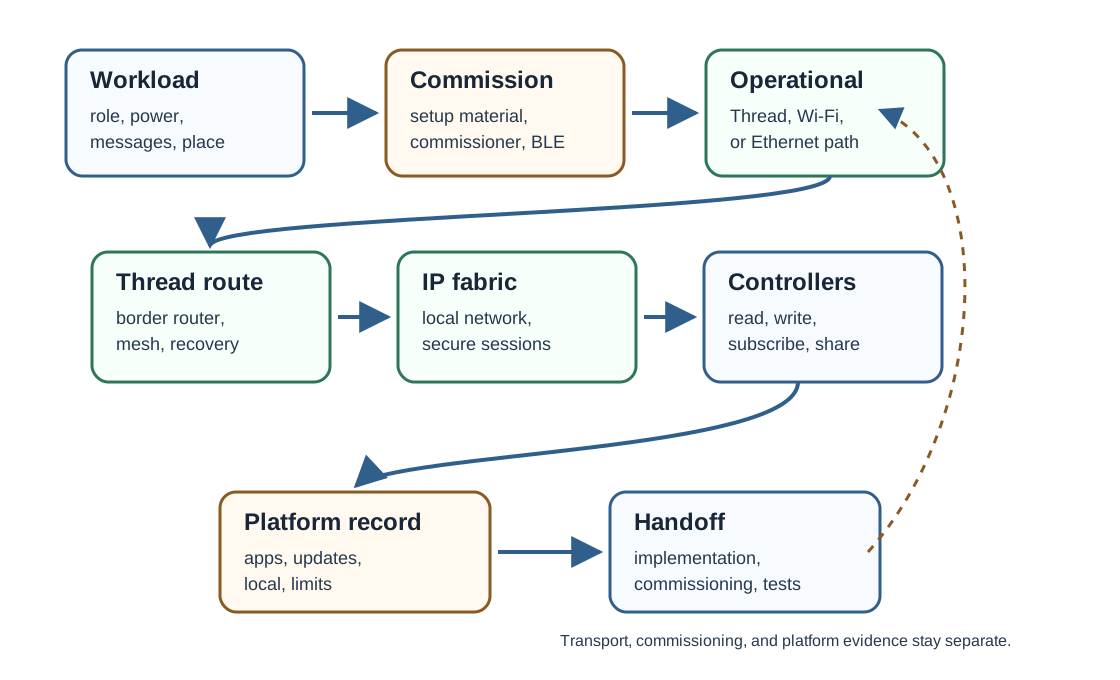
The operational transport carries normal Matter traffic after commissioning. The commissioning channel helps establish the device on a fabric. The platform record explains which controllers, commissioners, border routers, apps, updates, and sharing flows are actually available in the deployment.
38.9 IPv6 Application Boundary
This section: IPv6 Application Boundary — Matter is an application layer that runs over IP.
Matter is an application layer that runs over IP. Operationally it uses IPv6 over Thread, Wi-Fi, or Ethernet, while many devices use Bluetooth Low Energy only as a commissioning channel to receive setup material and network credentials.
Because Matter sits above IPv6, the same application behavior can be exposed by a Thread door lock, a Wi-Fi plug, or an Ethernet bridge. The transport is therefore an evidence lane in the review record, not the identity of the device or proof that every deployment condition has been met.
38.10 Knowledge Check: Matter Transport Set
This section: Knowledge Check: Matter Transport Set
38.11 Operational Transports
This section: Operational Transports — Matter operational traffic is IP-based.
Matter operational traffic is IP-based. The practical transport choice usually comes from the device role and deployment environment.
Matter gives these transports a common application model, not identical physical behavior. A Thread contact sensor, a Wi-Fi appliance, and an Ethernet bridge can share Matter concepts while still having different network evidence.
38.12 Transport Boundary Check
This section: Transport Boundary Check
38.13 Thread Evidence
This section: Thread Evidence — Thread is a strong candidate when the device has a small message workload, power constraints, and a deployment that benefits from mesh reach.
Thread is a strong candidate when the device has a small message workload, power constraints, and a deployment that benefits from mesh reach. The review should still prove the Thread path rather than assuming it.
Check:
- The device role and message pattern fit a low-data mesh path.
- The device can join the expected Thread network.
- A suitable Thread border router exists and remains available for cross-network communication.
- The device can be reached by the intended controller after commissioning.
- Sleepy or battery-aware behavior is tested without losing required state, events, or subscriptions.
- Router-capable devices, if used, are placed and powered in a way that supports mesh health.
- Failure behavior is recorded for border-router loss, partition changes, device reset, and stale subscriptions.
A Thread border router routes between Thread and the rest of the IP network. It is not automatically a Matter controller, and it is not the same thing as a Matter bridge for legacy devices.
38.14 Wi-Fi Evidence
This section: Wi-Fi Evidence — Wi-Fi is often appropriate for powered devices, higher-data workloads, products that already require Wi-Fi, and devices that need direct LAN reach.
Wi-Fi is often appropriate for powered devices, higher-data workloads, products that already require Wi-Fi, and devices that need direct LAN reach. It should not be chosen just because Wi-Fi is familiar.
Check:
- The device has a power budget that fits Wi-Fi behavior.
- Network coverage, roaming, sleep, reconnection, and update behavior are part of the test record.
- The device remains locally controllable when the scenario claims local control.
- The platform controller can discover and control the device on the intended LAN path.
- The device handles network changes, credential rotation, access-point restarts, and controller restarts.
- Bandwidth-heavy or media-heavy behavior is kept separate from the Matter control claim.
- Cloud account, app, and firmware-update dependencies are stated rather than hidden.
Wi-Fi evidence is strongest when it includes recovery paths, not only the first successful commissioning run.
38.15 Ethernet Evidence
This section: Ethernet Evidence — Ethernet is useful when a device is fixed, powered, and expected to provide infrastructure-like reliability.
Ethernet is useful when a device is fixed, powered, and expected to provide infrastructure-like reliability. It is common for controllers, bridges, panels, hubs, gateways, and other always-on equipment.
Check:
- The deployment has a cable path, power, and expected installation permanence.
- The device works on the intended LAN segment and discovery scope.
- Local control and controller reachability are tested without relying on a mobile app screenshot alone.
- Failover, restart, power-loss recovery, and IP addressing behavior are recorded.
- Bridge or controller roles are separated from ordinary endpoint behavior.
- The claim says whether the Ethernet device is a Matter device, a controller, a commissioner, a bridge, a border router, or more than one role.
Ethernet can improve deployment stability, but it does not by itself prove fabric readiness, bridge correctness, or platform integration.
38.16 Platform Evidence
This section: Platform Evidence — Platform support changes over time, so the review should avoid static vendor tables.
Platform support changes over time, so the review should avoid static vendor tables. Use evidence categories instead.
A platform is “ready” for a deployment only when these evidence lanes match the device and household or operational scenario.
38.17 Decision Record
This section: Decision Record — A transport and platform decision record is intentionally short.
A transport and platform decision record is intentionally short. A long vendor list can become stale; a bounded decision record stays useful because it captures the evidence lanes, decision, and next review trigger.
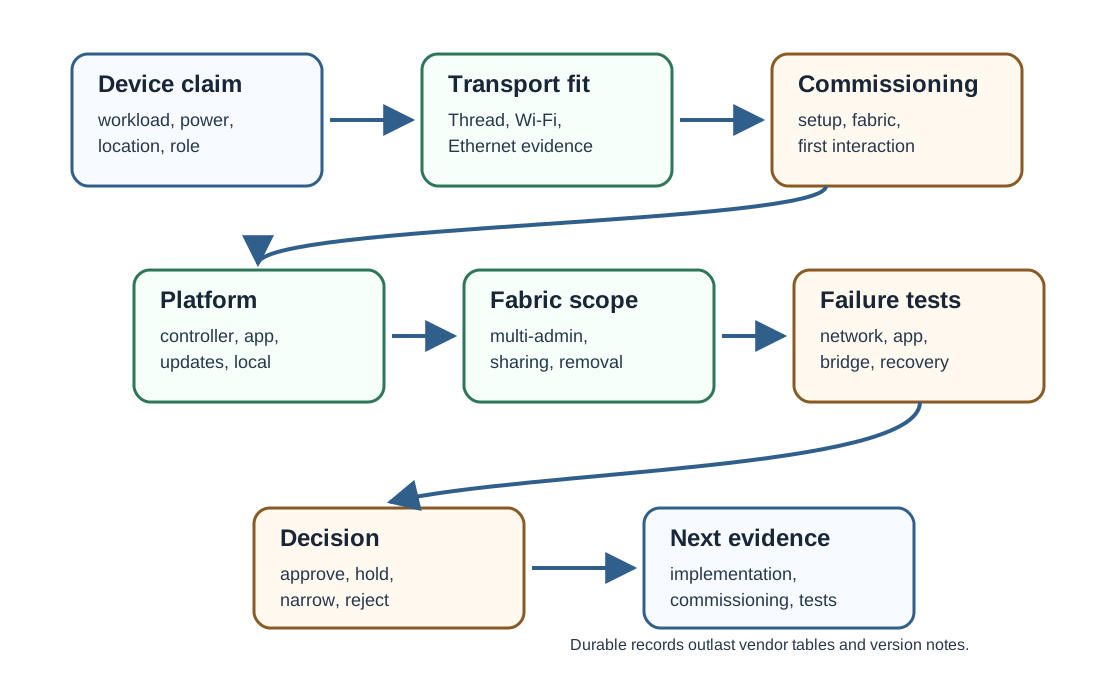
| Evidence lane | Review question |
|---|---|
| Thread | Does the low-power mesh fit the workload, and is a Thread border router available and tested? |
| Wi-Fi | Does the powered device need direct LAN reach, and are coverage, reconnection, and local-control paths tested? |
| Ethernet | Is the device fixed infrastructure, and are wired reachability, restart recovery, and role boundaries recorded? |
| Commissioning | Which commissioner, setup material, onboarding channel, fabric creation, and first operational interaction were proved? |
38.18 Knowledge Check: Transport Fit
This section: Knowledge Check: Transport Fit
38.19 Selection Path
This section: Selection Path — Use a repeatable path for each device or deployment claim.
Use a repeatable path for each device or deployment claim.
This path keeps transport selection from drifting into product recommendations or stale compatibility claims.
38.20 Platform Readiness Check
This section: Platform Readiness Check
38.21 Multi-Admin and Fabric Scope
This section: Multi-Admin and Fabric Scope — Multi-admin can let more than one ecosystem administer the same device, but it should be reviewed as fabric evidence, not as a transport feature.
Multi-admin can let more than one ecosystem administer the same device, but it should be reviewed as fabric evidence, not as a transport feature.
Each platform ecosystem, such as Apple Home, Google Home, Amazon Alexa, or SmartThings, runs a Matter fabric: a trust domain with its own credentials. Multi-admin lets a single device belong to several fabrics at once, so one lock can be controlled from more than one ecosystem without changing its operational transport.
Two edge roles are easy to confuse. A Thread border router is an IPv6 router between the Thread mesh and the LAN; it is not automatically a Matter controller and does not decide device policy. A Matter bridge exposes non-Matter devices, such as Zigbee lights, as Matter endpoints. Naming these separately keeps a routing edge, a translation edge, and a trust domain from being collapsed into one vague platform claim.
38.22 Knowledge Check: Border Router and Fabric Scope
This section: Knowledge Check: Border Router and Fabric Scope — Do not use the phrase “works with every platform” unless the exact platform set and tested behavior are recorded.
Record:
- Which fabric commissioned the device first.
- Which additional fabric was added and by which commissioner.
- Which controller can read, write, subscribe, invoke, and remove the device.
- Whether fabric removal blocks future commands from that fabric.
- Which automations, scenes, groups, and device features are platform-specific.
- Which failure paths were tested when one controller, app, or account is unavailable.
Do not use the phrase “works with every platform” unless the exact platform set and tested behavior are recorded.
38.23 Bridge and Legacy Boundaries
This section: Bridge and Legacy Boundaries — Matter can expose some legacy devices through a bridge, but a bridge claim is narrower than a native-device claim.
Matter can expose some legacy devices through a bridge, but a bridge claim is narrower than a native-device claim.
Check:
- Which legacy protocol or device class sits behind the bridge.
- Which endpoints and clusters the bridge exposes as Matter.
- Which attributes, commands, events, diagnostics, scenes, groups, and fault states are omitted.
- Whether local control depends on the bridge staying powered and connected.
- Whether multi-admin sharing applies to the bridged Matter exposure, the legacy device, or both.
- Whether reset, replacement, and ownership transfer behavior is documented.
A bridge can be valuable without being equivalent to a native Matter device.
38.24 Failure Evidence
This section: Failure Evidence — Transport and platform reviews should include controlled failure cases.
Transport and platform reviews should include controlled failure cases.
Failure evidence helps decide whether to approve the transport choice, narrow the platform claim, or send the issue to implementation and testing.
38.25 Worked Review Records
This section: Worked Review Records
38.26 Record 1: Battery Contact Sensor
This section: Record 1: Battery Contact Sensor
Scenario: A battery contact sensor is proposed for Matter over Thread with two household controllers.
Evidence found: The workload is small and event-driven. The record names the Thread network, border router, commissioner, first read, contact-state event, subscription behavior after sleep, and second-fabric sharing path.
Decision: Approve the Thread direction for design review. Retest border-router restart, fabric removal, low-battery reporting, and device reset before implementation sign-off.
38.27 Record 2: Powered Display Device
This section: Record 2: Powered Display Device
Scenario: A powered display needs Matter control plus other high-data product features.
Evidence found: Wi-Fi fits the powered installation and LAN reach. The Matter claim is limited to control and status. Media, account services, and firmware update behavior are recorded as separate product evidence.
Decision: Approve Wi-Fi for the Matter control path. Do not claim that Matter proves the unrelated high-data product behavior.
38.28 Record 3: Legacy Lighting Bridge
This section: Record 3: Legacy Lighting Bridge
Scenario: A bridge exposes legacy lights to Matter controllers.
Evidence found: The bridge is powered and wired. It exposes on/off and level behavior but not every diagnostic, scene, or vendor-specific legacy feature.
Decision: Approve the bounded bridge exposure. Do not describe the legacy lights as native Matter devices.
38.29 Common Mistakes
This section: Common Mistakes
- Treating BLE commissioning as normal operational Matter transport.
- Confusing a Thread border router with a Matter bridge.
- Approving a transport because a device category usually uses it, without deployment evidence.
- Publishing vendor support tables that become stale quickly.
- Treating one app screenshot as proof of platform readiness.
- Claiming multi-admin success without fabric-add, fabric-removal, and authority evidence.
- Claiming local control without testing the local path separately from cloud or account features.
- Treating a bridged legacy device as equivalent to a native Matter device.
- Using brittle speed, latency, range, battery-life, cost, or version claims as general evidence.
38.30 Match the Evidence
This section: Match the Evidence
38.31 Order the Transport Review
This section: Order the Transport Review
38.32 Evidence Template
This section: Evidence Template
A concise transport and platform record should include:
38.33 Summary
This section: Summary — Matter transport review is not a ranking table.
Matter transport review is not a ranking table. It is an evidence record that separates the device workload, operational transport, commissioning channel, platform support, fabric scope, bridge boundary, failure behavior, and next test responsibility.
Thread, Wi-Fi, and Ethernet can all carry Matter operational traffic in the right deployment. BLE can support commissioning, but it should not be counted as normal operational fabric transport. A platform claim should be proved through controller, commissioner, border-router, sharing, update, and local-control evidence instead of vendor assumptions.
38.34 Key Takeaway
This section: Key Takeaway — Matter Transport and Platform Evidence should align Matter protocol stack, fabrics, commissioning, clusters, transports, interoperability, certification, and deployment evidence.
Matter Transport and Platform Evidence should align Matter protocol stack, fabrics, commissioning, clusters, transports, interoperability, certification, and deployment evidence.
38.35 Concept Relationships
This section: Concept Relationships
- Matter Protocol Overview Evidence: defines the application-layer boundary before transport review.
- Matter Architecture Evidence: explains nodes, controllers, fabrics, bridges, and role boundaries.
- Matter Interaction Evidence: defines the operational traces that transport evidence must carry.
- Matter Device Commissioning Evidence: reviews onboarding and operational trust evidence.
- Thread Network Architecture: provides the Thread role and border-router background needed for Thread transport review.
38.36 What’s Next
This section: What’s Next
- Matter Device Commissioning Evidence reviews setup and fabric onboarding evidence in more detail.
- Matter Interaction Evidence reviews read, write, subscribe, invoke, and status traces.
- Matter Device Types and Clusters Evidence reviews the endpoint and cluster claims carried over the chosen transport.
- Matter Implementation Evidence reviews how transport decisions become implementation records.
- Matter Testing and Certification Evidence reviews readiness evidence beyond design selection.
Find help
3 reviewed answers.
Where should I start in a module?
Open the module page from the sidebar to see its chapters in order. Use the module map to return to a topic you need.
Modules and pathsReviewed
What can I try when a project does not work?
Check the symptom, then work through the diagnostic steps. Keep the error message and the smallest example that reproduces it.
When you are stuckReviewed
How do interactive examples work?
Use the interactive guide to check how examples and simulations work before changing your project.
Interactive examples guideReviewed