39 Matter SDK Setup

More
Depth: Practitioner
Progress saves as you read. Mark sections complete as you go; your progress appears in the sidebar.
39.1 Start With the Device Experience
This section: Start With the Device Experience — Imagine building a smart light that should work with more than one controller.
Imagine building a smart light that should work with more than one controller. The software kit must build the same device behavior on every developer machine. A software development kit (SDK) is a set of code and tools for building that product.
Start with one supported device, one network path, and one controller. Record the SDK version, tool versions, board, and build steps. Then make the device join and answer one clear command. Test a clean machine, a wrong dependency, and a failed join. A setup is ready only when another person can repeat it and explain the result.
End the first setup with a simple handoff. Name what works. Name what failed. Name what remains untested. Link each claim to a build or device record. Set the event that forces a new clean run.
Keep a setup diary while the first build is fresh. Record each tool before installing it. Save one working command. Delete the build output and start again. Ask another person to repeat the steps. Treat every hidden file or manual fix as missing setup evidence. A clean repeat is more useful than a lucky first build.
Use a clean setup record. Pin the code version. Pin the toolchain. Name the target board. List the network support. Save the build command. Save the final image identity. Record the controller and device roles. Capture the first join. Capture one read or command. Record one expected failure. Give each result a date and owner.
Repeat the setup away from the first laptop. A missing hidden step should fail the review. Fix the record, start clean, and repeat. Only then use the environment for wider product evidence.
This small lab does not prove radio quality, memory limits, product safety, or certification. The Practitioner section builds a repeatable environment record. Under the Hood follows the build, commissioning, and release boundaries in detail.
Start with a user expecting a Matter device to join, advertise, and respond through a controller without caring which vendor built each piece. Matter SDK Setup is the evidence route for deciding whether that expectation is realistic.
Keep one device story in view: commissioning, fabric membership, interaction model, transport, and certification all have to line up. The advanced details are useful when they explain where that story can break.
39.2 Matter SDK and Development Environment Evidence
This section: Matter SDK and Development Environment Evidence — A Matter development environment is not approved because a sample app builds once on one laptop.
A Matter development environment is not approved because a sample app builds once on one laptop. It is approved when the SDK choice, hardware target, transport path, toolchain, dependencies, build artifacts, commissioning lab, test controller, and change process all support the same product claim.
This chapter reviews SDK setup as evidence. It does not prescribe a single vendor SDK or board. Instead, it shows how to decide whether a selected SDK and environment are ready for product work without drifting into a brittle installation tutorial.
39.3 In 60 Seconds
This section: In 60 Seconds
- Matter SDK setup starts with the product claim: device type, transport, power mode, security needs, certification path, manufacturing path, and maintenance owner.
- SDK selection is a fit decision, not a popularity contest. Evidence should connect the SDK to the target silicon, transport, device type, release cadence, and support boundary.
- A reproducible environment records SDK release or commit, toolchain versions, dependency sources, board support package, build options, and local patches.
- Sample applications are useful baselines, but they do not prove production readiness until changed behavior, credentials, storage, update, diagnostics, and tests are reviewed.
- The development lab must include the network and commissioning infrastructure needed for the selected transport.
- Build, flash, log, capture, commission, and first-interaction records are stronger evidence than screenshots of installed tools.
- A strong approval states the supported product scope, SDK baseline, lab scope, open gaps, owner, and retest trigger.
39.4 Learning Objectives
This section: Learning Objectives
By the end of this chapter, you will be able to:
- Review a Matter SDK choice without overclaiming platform or vendor support.
- Separate product requirements, SDK fit, toolchain reproducibility, hardware readiness, and lab infrastructure.
- Identify when a sample application is only a reference baseline rather than approved product evidence.
- Specify development environment records that survive workstation changes, SDK upgrades, and CI migration.
- Connect SDK setup evidence to commissioning, interaction, testing, certification, and release decisions.
- Write bounded environment approval records for Matter device implementation work.
39.5 Quick Check: Matter SDK
This section: Quick Check: Matter SDK
39.6 Prerequisites
This section: Prerequisites
This chapter assumes you have reviewed:
- Matter Overview, for Matter’s interoperability purpose and product context.
- Matter Architecture Evidence, for nodes, fabrics, controllers, bridges, and endpoint boundaries.
- Matter Protocol Stack Evidence, for transport, secure-session, interaction, and data-model evidence.
- Matter Fabric Security Evidence, for credential, PASE, CASE, ACL, and fabric boundaries.
- Matter Device Types and Clusters Evidence, for endpoint and cluster behavior expected after setup.
39.7 SDK Setup Review Claim
This section: SDK Setup Review Claim — The claim is intentionally bounded.
Use a claim that can be checked against records:
Matter SDK setup review claim: A Matter development environment is approved only when the product scope, SDK and silicon fit, toolchain version custody, hardware and transport lab, sample adaptation boundary, build artifacts, commissioning prerequisites, test evidence, and retest triggers all support the same implementation claim.
The claim is intentionally bounded. It does not say the product is certified, that every controller will work, or that a future SDK upgrade is safe. It says the environment is controlled enough to begin or continue reviewed implementation work.
39.8 SDK Environment Evidence Map
This section: SDK Environment Evidence Map — The first figure shows how a development environment moves from product intent to a bounded implementation baseline.
The first figure shows how a development environment moves from product intent to a bounded implementation baseline.
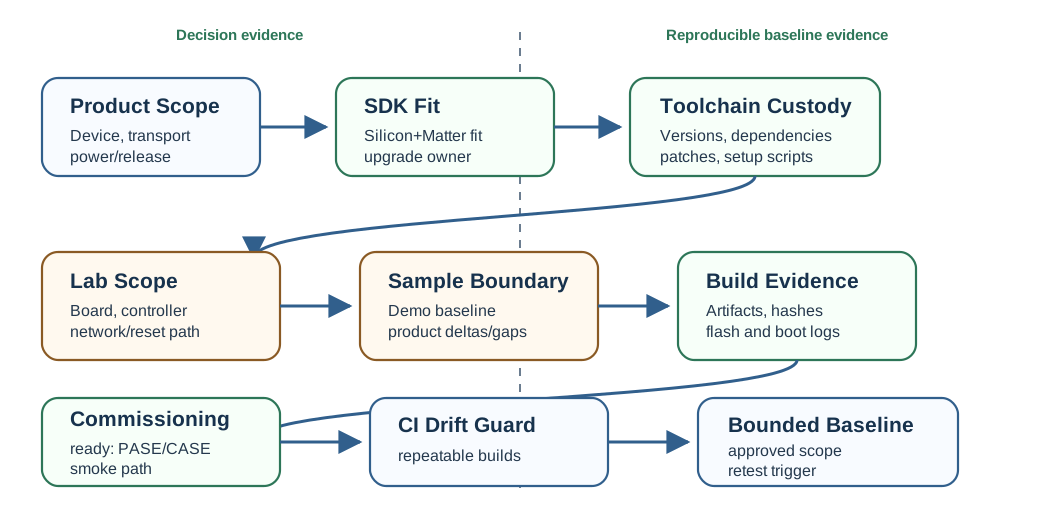
The map prevents a common mistake: starting with a demo board and then stretching the result into a product claim. Product scope should lead SDK and lab decisions, not the other way around.
39.9 Implementation Evidence Route
This section: Implementation Evidence Route — The SDK baseline is the start of an evidence route, not the end of it.
The SDK baseline is the start of an evidence route, not the end of it. A reviewer should be able to follow the route from product scope and SDK baseline through data model, application behavior, commissioning, provisioning, test evidence, release decision, and retest triggers.
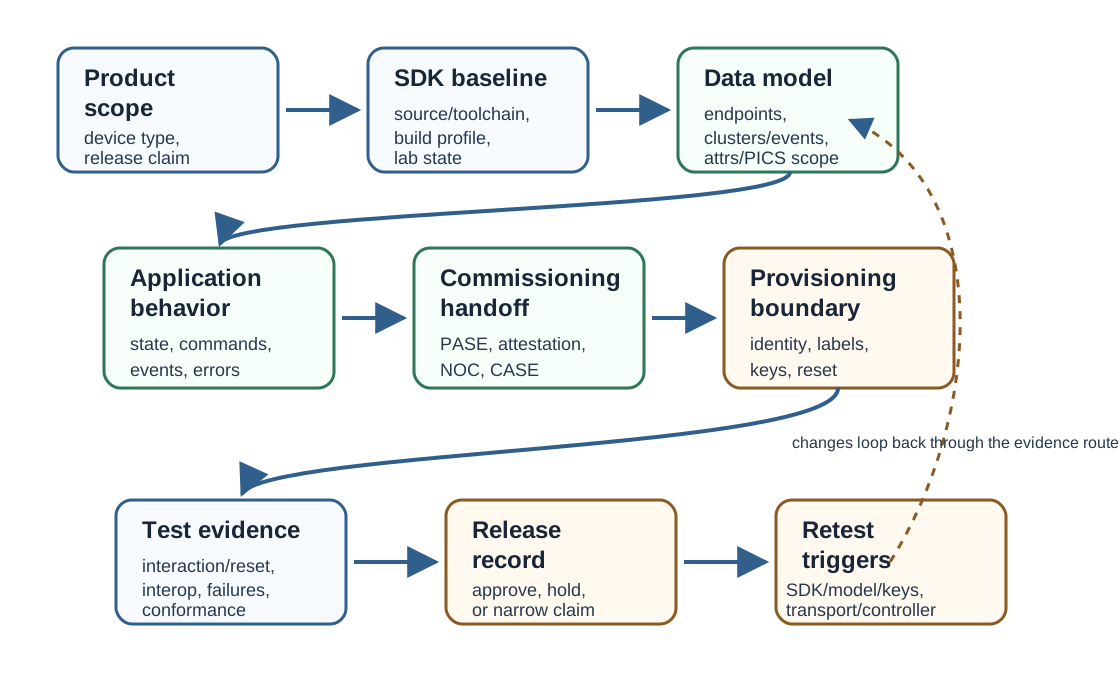
Use this route when a team says “the SDK is set up.” The next question is whether the same baseline can support the product data model, commissioning handoff, provisioning boundary, tests, and release record without hidden drift.
39.10 Evidence Families
This section: Evidence Families — SDK setup review combines several evidence families.
SDK setup review combines several evidence families.
39.11 Product Scope Before SDK Choice
This section: Product Scope Before SDK Choice — SDK selection should begin with the product claim.
SDK selection should begin with the product claim. A reviewer should ask what the environment must support before comparing SDK names.
Important scope questions include:
- Which Matter device type and endpoint behavior will be implemented first?
- Which transport path is in scope: Thread, Wi-Fi, Ethernet, bridge, or more than one path?
- Is the product mains powered, battery powered, always listening, sleepy, bridged, or controller-like?
- What credential, storage, factory-reset, and manufacturing requirements are expected?
- What debugging, packet capture, logging, and failure reproduction are needed?
- What certification, interoperability, field-update, and maintenance path is planned?
If those answers are missing, SDK selection becomes guesswork. A board that works for a sample light may not support the evidence needed for a sleepy sensor, bridge, lock, controller, or production credential flow.
39.12 SDK Fit Evidence
This section: SDK Fit Evidence — SDK fit is a bounded decision.
SDK fit is a bounded decision. A strong review does not say “this is the best Matter SDK.” It says the selected SDK is acceptable for the reviewed product scope and identifies the remaining limits.
Record:
Use vendor examples and upstream examples as evidence sources, not as the final product claim. The approval should name the exact SDK baseline and the product scope it supports.
39.13 Common Stack and Platform Port
This section: Common Stack and Platform Port — Matter development commonly starts from the open-source connectedhomeip SDK, also known as the CHIP project.
Matter development commonly starts from the open-source connectedhomeip SDK, also known as the CHIP project. That common stack provides Matter protocol code, example applications, and tools such as chip-tool, but it is not the whole environment for a product.
Real hardware needs a silicon-vendor platform port. The platform port connects the common Matter stack to the board support package, RTOS, radio drivers for Thread, Wi-Fi, or BLE, secure storage, flash layout, logging, and build system used by the target chip family. A review that names only “the Matter SDK” has not yet named the silicon boundary that will carry the product.
39.14 Reproducible Toolchain Evidence
This section: Reproducible Toolchain Evidence — A development environment should be rebuildable by another engineer or CI runner.
A development environment should be rebuildable by another engineer or CI runner. That means the record needs more than “installed successfully.”
Minimum evidence should include:
- SDK release, tag, commit, or package version.
- Toolchain versions and host operating-system assumptions.
- Dependency sources and lock files where the build system supports them.
- Board support package, configuration profile, and build options.
- Local patches, forks, generated files, and source provenance.
- Build and flash commands recorded as maintained project scripts or documented tasks.
- Output artifact names, hashes, and storage location.
This does not require freezing every experiment forever. It requires knowing which baseline was approved and what would trigger a retest.
39.15 Silicon, Toolchain, and Commissioning Infrastructure
This section: Silicon, Toolchain, and Commissioning Infrastructure — Product scope should drive silicon choice before detailed SDK configuration.
Product scope should drive silicon choice before detailed SDK configuration. A Thread device needs an IEEE 802.15.4 radio and a border-router test path. A Wi-Fi device needs Wi-Fi credential handling, access-network assumptions, and local reachability evidence. BLE is usually part of commissioning, even when the operational path is Thread or Wi-Fi. Memory, secure storage, debug access, and power mode can also decide whether a sample board is a real candidate or just a demo host.
| Decision | Evidence Needed |
|---|---|
| Silicon and transports | The chip has the radios, memory, storage, power behavior, and debug path required by the product scope. |
| Platform port | The vendor SDK, board support package, radio drivers, secure storage, and flash profile match the selected baseline. |
| Reproducible toolchain | SDK commit, vendor SDK version, compiler, Python or Node dependencies, and build options are pinned or recorded. |
| Commissioning lab | Controller, setup-payload handling, border router or access network, reset procedure, logs, and first operational check are available. |
Commissioning infrastructure is part of the SDK environment. A team cannot judge Matter device behavior if it cannot reproduce onboarding, operational credentials, CASE session establishment, and the first read or command in the same lab state.
39.16 SDK Selection Boundary Check
This section: SDK Selection Boundary Check
39.17 Hardware and Network Lab Evidence
This section: Hardware and Network Lab Evidence — The lab should match the transport and commissioning claims.
The lab should match the transport and commissioning claims. A Thread device, Wi-Fi device, Ethernet device, bridge, and controller-like product do not need identical lab records.
For Thread work, record the target board, radio support, expected Thread network, border-router path, packet-capture plan if available, reset procedure, and how operational datasets or credentials are protected.
For Wi-Fi work, record access-network assumptions, credential-handling rules, local reachability, interference or roaming limits if relevant, and how secrets are kept out of logs and screenshots.
For Ethernet work, record local IP reachability, network segmentation assumptions, operational discovery, and whether the device also needs a commissioning or fallback path.
For bridge work, record both sides of the boundary: the Matter endpoint evidence and the non-Matter child-device path being represented.
The lab record should make it possible to reproduce a failure. If a device commissions once but no one can recreate the network, controller, firmware, and reset state, the environment evidence is weak.
39.18 Sample-to-Product Boundary
This section: Sample-to-Product Boundary — Samples are valuable because they expose a known data model, build path, and commissioning flow.
Samples are valuable because they expose a known data model, build path, and commissioning flow. They are risky when they are mistaken for production behavior.
Preserve this boundary:
This boundary also helps learners avoid copying tutorial code into production claims. A tutorial can teach concepts, but release evidence needs maintained source, tests, credentials policy, and operational records.
39.19 Build, Flash, and Debug Evidence
This section: Build, Flash, and Debug Evidence — An approved environment should produce traceable artifacts.
An approved environment should produce traceable artifacts. Build logs are not enough by themselves, but they help when connected to source and device state.
Record:
- Source revision and SDK baseline used for the build.
- Build profile, feature flags, memory configuration, and target board.
- Generated image or package identity and hash.
- Flash or deployment method and result.
- Device boot log, firmware identity, reset state, and crash behavior.
- Debug and log collection path.
- Known warnings that are accepted, rejected, or assigned for follow-up.
The goal is not to make the chapter a command reference. The goal is to prove that build output is connected to the device behavior being reviewed.
39.20 Commissioning Infrastructure
This section: Commissioning Infrastructure — SDK setup is not complete if the team cannot commission and operate the device in the lab.
SDK setup is not complete if the team cannot commission and operate the device in the lab. The commissioning setup should be recorded before product behavior is judged.
Commissioning infrastructure evidence includes:
- Commissioner or controller used for initial onboarding.
- Setup payload and secret-handling rule.
- PASE, attestation policy, network commissioning, operational credential, and CASE checkpoints.
- Thread border-router, Wi-Fi access network, Ethernet segment, or bridge dependency as applicable.
- Logs, captures, and screenshots with secrets redacted.
- First operational read or command used as a smoke check.
- Factory reset and re-commissioning procedure.
This connects SDK setup to Matter Device Commissioning Evidence. The SDK page proves the environment is ready to perform commissioning work; the commissioning page proves the onboarding claim itself.
39.21 Version Control and CI Evidence
This section: Version Control and CI Evidence — Environment evidence should not live only on one workstation.
Environment evidence should not live only on one workstation. A project needs enough version control and CI evidence to detect drift.
Good records include:
CI does not replace hardware testing, commissioning, or certification. It protects the environment from unnoticed drift between human test sessions.
39.22 Security and Provisioning Boundaries
This section: Security and Provisioning Boundaries — SDK setup often touches secrets, certificates, manufacturing identifiers, and production credentials.
SDK setup often touches secrets, certificates, manufacturing identifiers, and production credentials. A review should separate development convenience from release policy.
Check that:
- Setup passcodes, operational datasets, Wi-Fi credentials, private keys, and account identifiers are not committed or published.
- Development attestation material is clearly marked and not approved for production by accident.
- Manufacturing data, secure storage, factory reset, and credential replacement plans are named even if not finished.
- Debug logs do not expose secrets needed to reproduce or attack a device.
- Release decisions state whether the environment is lab-only, pilot-ready, certification-prep, or production-prep.
The review should not block all early development because production provisioning is unfinished. It should prevent lab shortcuts from being described as production-ready evidence.
39.23 Attestation and Factory-Data Boundary
This section: Attestation and Factory-Data Boundary — A real Matter product needs device attestation and factory data.
A real Matter product needs device attestation and factory data. Each production device should have a Device Attestation Certificate (DAC) chained through the appropriate intermediate to a Product Attestation Authority, plus factory-provisioned setup data, private-key material, and secure-storage handling that match the release policy.
Development often uses test DACs, test passcodes, and a lab attestation root so engineers can commission prototypes freely. That is valid lab evidence, but it is not the same as field trust. A device that commissions on a bench with test credentials still needs production credential provisioning, secret-handling rules, reset behavior, and retest evidence before a field or certification claim is safe.
Factory-data review boundary: Treat test credentials as lab-only evidence. Production approval needs per-device DAC and key custody, setup payload policy, secure storage, manufacturing provenance, reset behavior, and a retest trigger for any SDK, platform-port, or provisioning-pipeline change.
39.24 Worked Review Records
This section: Worked Review Records
39.25 Record 1: Thread Sensor Baseline
This section: Record 1: Thread Sensor Baseline
Scenario: A team wants to start a battery sensor using a Thread-capable board and a vendor-supported Matter SDK.
Evidence found: The product scope names a sensor endpoint, sleepy behavior as an open issue, Thread transport, target board, SDK baseline, toolchain versions, build script, boot log, commissioning lab, border-router path, and first descriptor read after commissioning.
Decision: Approve the SDK environment for early sensor implementation. Keep battery behavior, final credentials, certification evidence, and production provisioning outside the approval until separately reviewed.
39.26 Record 2: Sample Light Adaptation
This section: Record 2: Sample Light Adaptation
Scenario: A sample lighting application is adapted into a product prototype.
Evidence found: The team records the original sample baseline, endpoint and cluster changes, persistent storage changes, build artifact hash, commissioning smoke check, and known warnings. The controller UI screenshot is retained only as supporting context.
Decision: Approve the adapted sample as a prototype baseline. Require retest after cluster changes, storage changes, SDK upgrades, controller changes, and credential policy changes.
39.27 Record 3: SDK Upgrade Hold
This section: Record 3: SDK Upgrade Hold
Scenario: A project wants to move to a newer SDK baseline during certification preparation.
Evidence found: The new baseline builds, but commissioning smoke tests show an operational discovery regression on the target network. The previous baseline remains reproducible.
Decision: Hold the SDK upgrade for release. Open an upgrade branch, capture the regression evidence, and keep the previous approved baseline until the network and commissioning retest passes.
39.28 Common Mistakes
This section: Common Mistakes
- Choosing an SDK before product scope, transport, power, and certification needs are written down.
- Treating a sample build as proof of production readiness.
- Recording tool installation steps but not SDK baseline, dependency versions, artifacts, or retest triggers.
- Hiding local patches, generated files, or board support changes outside source control.
- Testing only on one developer machine with no CI or reproducible setup path.
- Publishing setup passcodes, network credentials, operational datasets, or private keys in logs or screenshots.
- Treating controller UI success as proof of cluster, commissioning, security, or certification readiness.
- Upgrading SDK, toolchain, controller, or board support without defining what must be retested.
39.29 Match the SDK Setup Evidence
This section: Match the SDK Setup Evidence
39.30 Order the SDK Setup Review
This section: Order the SDK Setup Review
39.31 SDK Setup Review Record
This section: SDK Setup Review Record — The second figure shows the minimum record needed before treating an SDK environment as an approved implementation baseline.
The second figure shows the minimum record needed before treating an SDK environment as an approved implementation baseline.
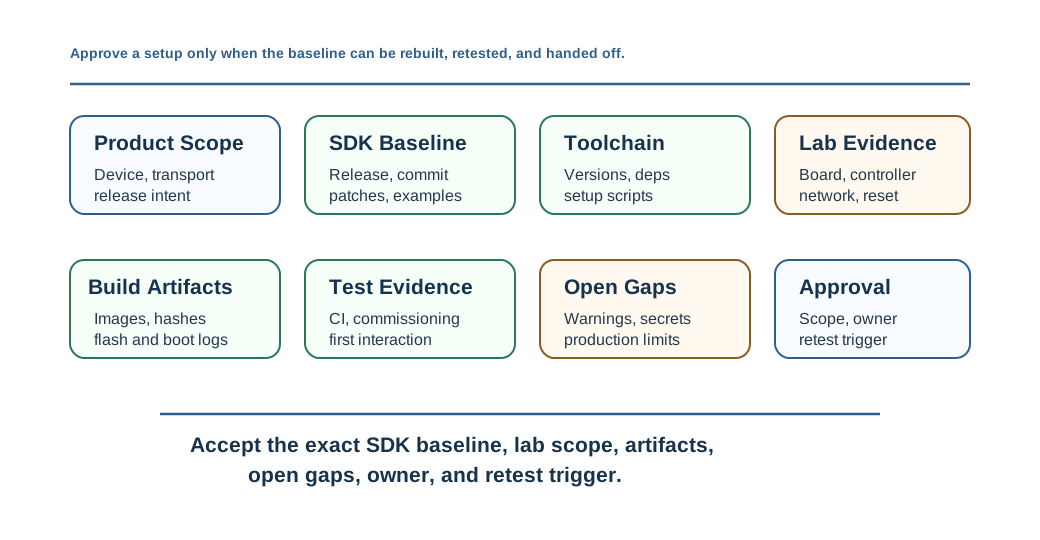
Use this record when a team starts implementation, changes silicon, moves from sample to product behavior, upgrades SDKs, or prepares for commissioning and certification work.
39.32 Release Checklist
This section: Release Checklist — Use this checklist before approving a Matter SDK setup.
Use this checklist before approving a Matter SDK setup.
39.33 Environment Approval Check
This section: Environment Approval Check
39.34 Summary
This section: Summary — Matter SDK setup is an evidence problem.
Matter SDK setup is an evidence problem. A reviewed environment connects product scope, SDK and silicon fit, toolchain custody, hardware and network lab, sample adaptation boundaries, build artifacts, commissioning infrastructure, security policy, CI, and retest triggers.
The review discipline is reproducibility. Do not approve a development environment because a demo worked once. Approve the specific baseline, lab scope, artifacts, and next retest triggers that let the team continue implementation without hidden drift.
39.35 Key Takeaway
This section: Key Takeaway — Matter SDK and Development Environment Evidence should leave deployment evidence for SDK setup, commissioning, clusters, interoperability, certification checks, failure recovery, and tested platforms.
Matter SDK and Development Environment Evidence should leave deployment evidence for SDK setup, commissioning, clusters, interoperability, certification checks, failure recovery, and tested platforms.
39.36 Concept Relationships
This section: Concept Relationships
- Matter Device Commissioning Evidence reviews the onboarding evidence that the SDK environment should be able to produce.
- Matter Implementation Evidence connects environment readiness to firmware behavior, endpoint implementation, and release decisions.
- Matter Testing and Certification Evidence explains how implementation evidence is prepared for interoperability and certification work.
- Matter Device Types and Clusters Evidence defines the endpoint and cluster behavior that SDK examples and product code must support.
39.37 What’s Next
This section: What’s Next
Next, Matter Device Commissioning Evidence reviews how the prepared environment proves onboarding: setup payload, discovery, PASE, attestation, network commissioning, operational credentials, CASE, multi-admin, and failure handling.
Find help
3 reviewed answers.
Where should I start in a module?
Open the module page from the sidebar to see its chapters in order. Use the module map to return to a topic you need.
Modules and pathsReviewed
What can I try when a project does not work?
Check the symptom, then work through the diagnostic steps. Keep the error message and the smallest example that reproduces it.
When you are stuckReviewed
How do interactive examples work?
Use the interactive guide to check how examples and simulations work before changing your project.
Interactive examples guideReviewed