41 Matter Testing and Certification

More
Depth: Practitioner
Progress saves as you read. Mark sections complete as you go; your progress appears in the sidebar.
41.1 Start With the Device Experience
This section: Start With the Device Experience — Picture a lamp that joins one app but fails when a second owner tries to use it.
Picture a lamp that joins one app but fails when a second owner tries to use it. One happy path is not enough to support the full product claim.
First, list the features and user paths the device says it supports. Tie each one to a test, result, build, and owner.
More tests can find more faults, but they also cost time and lab work. A narrow test is quick, yet it can miss real joins, updates, and mixed-device use.
Matter readiness requires the formal test scope, issue record, and release evidence for the implementation being certified.
Use the Practitioner sections to plan and review product tests.
Plain check
- Name the product build. Name the claimed feature. Name the user path. Name the test owner.
- Check first setup. Check repeat setup. Check a second owner. Check safe removal.
- Check each command. Check each report. Check each error. Save the full result.
- Test a lost link. Test a power loss. Test a wrong state. Test a failed update.
- Check one other brand. Check one old controller. Check one new controller. Record each gap.
- Keep test scope clear. Keep product scope clear. Do not merge the two. Mark open work.
- Save the lab state. Save each tool build. Save each device build. Save the result date.
- Retest after code change. Retest after part change. Retest after rule change. Keep old proof dated.
- Use Practitioner to plan. Use deeper trust checks. Test the weak edge. State every limit.
Start with a user expecting a Matter device to join, advertise, and respond through a controller without caring which vendor built each piece. Matter Testing and Certification is the evidence route for deciding whether that expectation is realistic.
Keep one device story in view: commissioning, fabric membership, interaction model, transport, and certification all have to line up. The advanced details are useful when they explain where that story can break.
41.2 Matter Testing and Certification Evidence
This section: Matter Testing and Certification Evidence — Matter testing is not a final ceremony after implementation.
Matter testing is not a final ceremony after implementation. It is an evidence system that connects the product claim, the implemented data model, the commissioning path, the security posture, interoperability behavior, declared PICS features, lab readiness, and release approval.
This chapter reviews testing and certification as a controlled decision process. It avoids fixed fee, schedule, and test-count claims because certification program details can change. The stable skill is knowing what evidence a team must collect before claiming that a Matter product is ready for formal review.
41.3 In 60 Seconds
This section: In 60 Seconds
- Certification readiness begins with a bounded product claim: device type, endpoints, clusters, transport, power mode, commissioning path, security scope, update path, and market region.
- PICS declarations drive the applicable test scope. Declaring features that are not implemented creates avoidable failures.
- Development tests, conformance tests, interoperability tests, commissioning tests, security tests, and manufacturing checks answer different questions.
- A passing happy path is not enough. Failure recovery, multi-admin behavior, reset behavior, access control, persistent storage, and transport disruption must be reviewed.
- Formal lab submission should happen only after local evidence explains what was tested, which claims remain open, and what retest triggers apply.
- A strong approval record says what is ready, what is not ready, which evidence was reviewed, and what would invalidate the decision.
41.4 Learning Objectives
This section: Learning Objectives
By the end of this chapter, you will be able to:
- Review Matter testing plans without drifting into tool manuals or unstable fee claims.
- Connect product scope, PICS declarations, device-type behavior, and certification evidence.
- Separate conformance, interoperability, commissioning, security, regression, and manufacturing readiness tests.
- Diagnose test failures by identifying which evidence layer failed.
- Define lab-submission records that reduce surprise without pretending that local tests replace official certification.
- Write bounded certification-readiness decisions for Matter device projects.
41.5 Quick Check: Matter Testing
This section: Quick Check: Matter Testing
41.6 Prerequisites
This section: Prerequisites
This chapter assumes you have reviewed:
- Matter SDK and Development Environment Evidence, for SDK baseline, toolchain, lab, and artifact custody.
- Matter Device Commissioning Evidence, for setup payload, PASE, attestation, network commissioning, operational credentials, and CASE readiness.
- Matter Protocol Stack Evidence, for transport, secure-session, interaction, and data-model boundaries.
- Matter Device Types and Clusters Evidence, for endpoint, cluster, attribute, command, and device-type review.
- Matter Fabric Security Evidence, for fabric, ACL, certificate, and multi-admin evidence.
41.7 Testing Review Claim
This section: Testing Review Claim — The claim is deliberately narrower than “this product will pass certification.” Local evidence can reduce risk, but the official decision belongs to the certification program and its authorized testing process.
Use a claim that can be checked against records:
Matter testing and certification review claim: A Matter product is ready for formal certification work only when product scope, PICS declarations, conformance results, interoperability evidence, commissioning and security evidence, manufacturing data readiness, failure triage, and retest triggers all support the same bounded release claim.
The claim is deliberately narrower than “this product will pass certification.” Local evidence can reduce risk, but the official decision belongs to the certification program and its authorized testing process. The reviewer approves readiness to submit or readiness to continue fixing, not a guaranteed outcome.
41.8 Certification Evidence Flow
This section: Certification Evidence Flow — The first figure shows how a Matter team moves from product intent to a bounded certification-readiness decision.
The first figure shows how a Matter team moves from product intent to a bounded certification-readiness decision.
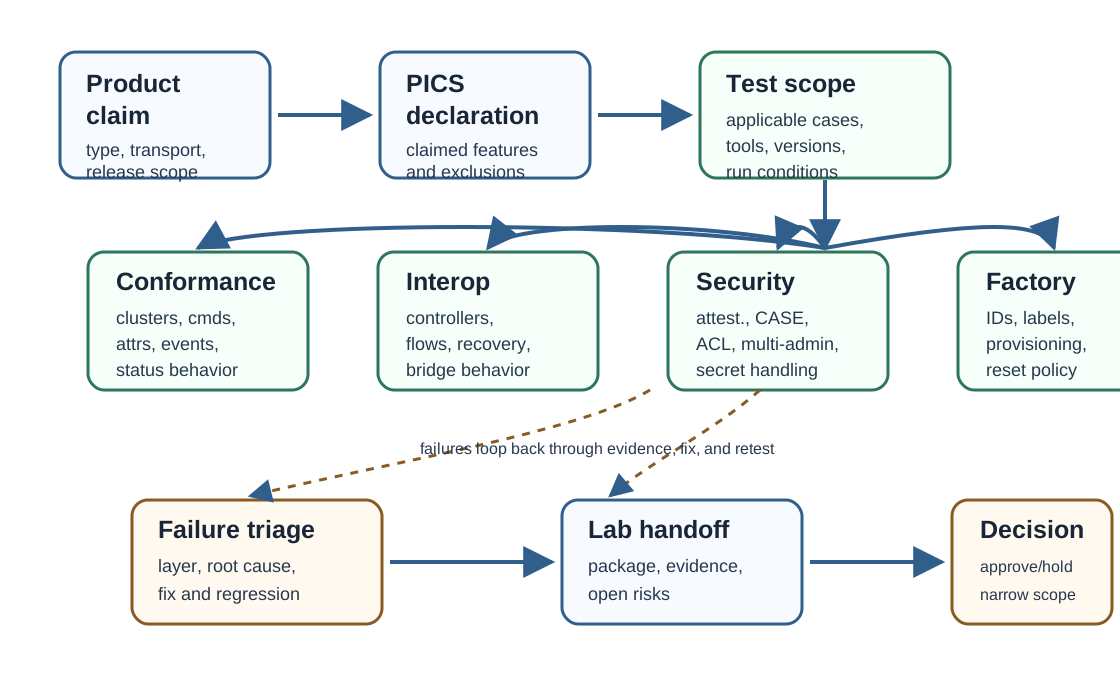
The important review habit is sequence. If the product claim is vague, the PICS declaration is unstable. If PICS is unstable, the test scope is unstable. If the test scope is unstable, a pass or failure result is hard to interpret.
41.9 Evidence Families
This section: Evidence Families — Testing readiness combines several evidence families.
Testing readiness combines several evidence families. Each one answers a different question.
41.10 Interactive Test Coverage Planner
This section: Interactive Test Coverage Planner
41.11 Product Scope Before Test Scope
This section: Product Scope Before Test Scope — A test plan should start with the product claim.
A test plan should start with the product claim. A team cannot know which tests matter until it knows what the device claims to be.
Review these questions before interpreting any pass result:
- Which Matter device type and endpoints are declared?
- Which required clusters, optional clusters, attributes, commands, events, and feature bits are claimed?
- Which transport is in scope: Thread, Wi-Fi, Ethernet, bridge, or more than one path?
- Which commissioning path and reset policy are supported?
- Which fabrics, administrators, ACL roles, and multi-admin scenarios are supported?
- Which update, diagnostics, manufacturing, and field-service features are included?
- Which features are intentionally out of scope for this release?
This scope work prevents false confidence. A device can pass a narrow smoke test while still failing the certification scope it declared.
41.12 PICS Is a Test Contract
This section: PICS Is a Test Contract — The Protocol Implementation Conformance Statement is not paperwork at the edge of the project.
The Protocol Implementation Conformance Statement is not paperwork at the edge of the project. It is a contract between the product claim and the test scope. If the PICS says the product supports a feature, the test plan should expect that feature to be exercised.
Strong PICS review checks:
PICS drift is one of the most expensive kinds of testing drift. It can make a team chase failures for behavior the product should never have claimed.
41.13 PICS Review Check
This section: PICS Review Check
41.14 Conformance Testing Evidence
This section: Conformance Testing Evidence — Conformance testing asks whether the device follows the specification for the behavior it declares.
Conformance testing asks whether the device follows the specification for the behavior it declares. It should be tied to the device type, endpoint model, clusters, attributes, commands, events, status codes, timing expectations, and error behavior.
Good conformance evidence records:
- Device under test identity: firmware, SDK baseline, build artifact, hardware revision, factory reset state, and test date.
- Device type, endpoints, clusters, features, and PICS version used for the run.
- Test harness or conformance tool version and configuration.
- Passed cases, failed cases, skipped cases, and reasons for skips.
- Logs, captures, and artifacts linked to each failure.
- Fix owner, root cause, regression scope, and retest result.
- Remaining exceptions and whether they block submission.
Avoid treating “all tests run” as the same as “the product is ready.” Readiness depends on whether the right tests ran against the right claim and whether the failures are understood.
41.15 Interoperability Evidence
This section: Interoperability Evidence — Interoperability testing asks whether the device behaves correctly with representative Matter controllers, ecosystems, bridges, fabrics, and user flows.
Interoperability testing asks whether the device behaves correctly with representative Matter controllers, ecosystems, bridges, fabrics, and user flows. It complements conformance testing because real controllers may exercise ordering, timing, UI expectations, persistence, and recovery paths differently.
Useful interoperability scenarios include:
- First commissioning and first operational read after reset.
- Multi-admin commissioning with more than one fabric when the product claims it.
- Attribute reads, subscriptions, commands, and events for the declared clusters.
- Controller removal, fabric removal, and re-commissioning.
- Network disruption and recovery for the transport under review.
- Firmware update or version-change behavior if the product claims it.
- Bridge child-device behavior if the product is a bridge.
Interoperability evidence should name what was tested and what was not tested. A screenshot from one app is supporting context, not proof that all controllers, fabrics, and failure paths are correct.
41.16 Commissioning and Security Evidence
This section: Commissioning and Security Evidence — Matter testing cannot be separated from commissioning and security.
Matter testing cannot be separated from commissioning and security. A device that accepts a command only after insecure shortcuts, stale credentials, or unreviewed provisioning is not ready for certification work.
Check these boundaries:
Security evidence is strongest when it includes negative tests. A product should reject the wrong actor, wrong fabric, wrong privilege, stale credential, malformed request, and invalid recovery path.
41.17 Failure Triage Evidence
This section: Failure Triage Evidence — The second figure shows how to turn a failed test into a useful release decision instead of a vague bug list.
The second figure shows how to turn a failed test into a useful release decision instead of a vague bug list.
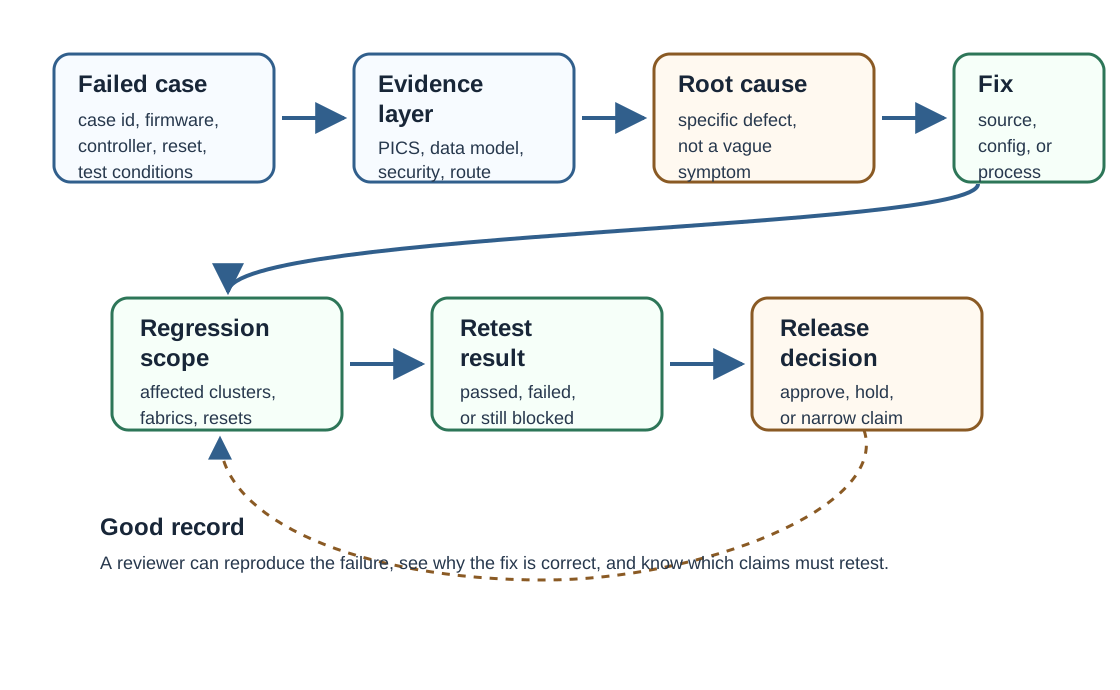
A failure record should be specific enough that another engineer can reproduce the problem. If the only evidence is “controller did not work,” the team has not yet created reviewable certification evidence.
41.18 Test Failure Boundary Check
This section: Test Failure Boundary Check
41.19 Failure Triage Path
This section: Failure Triage Path — Use a repeatable triage path when a test fails.
Use a repeatable triage path when a test fails.
The key is not speed. The key is avoiding ambiguous fixes that hide one failure while introducing another.
41.20 Manufacturing and Provisioning Readiness
This section: Manufacturing and Provisioning Readiness — Certification work touches more than firmware behavior.
Certification work touches more than firmware behavior. A product also needs a credible manufacturing and provisioning path.
A reviewer should look for:
- Per-device identity and attestation material handling.
- Secure private-key custody and injection process.
- Setup payload generation, label generation, and matching records.
- Firmware identity, build artifact, and hardware revision mapping.
- Factory reset behavior and commissioning-window behavior after manufacturing.
- Separation between development credentials and release credentials.
- Process for replacing, revoking, or rotating credentials if a defect is found.
- Evidence that logs, captures, and support records avoid exposing production secrets.
The chapter does not require learners to implement a factory. It requires them to understand that a lab device with shared test keys is not the same as a certifiable product unit.
41.21 Lab Submission Readiness
This section: Lab Submission Readiness — Formal lab work should be treated as an evidence handoff.
Formal lab work should be treated as an evidence handoff. Before submission, the team should be able to answer what the product claims, what was tested, what failed, what changed, and what still needs official confirmation.
Minimum handoff records include:
Submission readiness does not mean there are no risks. It means the risks are named, bounded, and supported by evidence.
41.22 Worked Review Records
This section: Worked Review Records
41.23 Record 1: PICS Mismatch Before Submission
This section: Record 1: PICS Mismatch Before Submission
Scenario: A smart plug declares an optional measurement capability, but local conformance tests show stale measurement attributes after reboot.
Evidence found: The PICS declaration includes the feature, the endpoint lists the cluster, command behavior works, but attribute persistence and reboot recovery fail. Interoperability evidence from one controller does not expose the problem.
Decision: Do not approve certification readiness. Either fix and retest the measurement behavior or remove the feature from the release declaration and update the product claim.
41.24 Record 2: Multi-Admin Regression
This section: Record 2: Multi-Admin Regression
Scenario: A lock works with the first controller but fails after a second administrator commissions it.
Evidence found: First commissioning, attestation, and basic commands pass. After multi-admin commissioning, one fabric loses access because session and ACL state are not restored consistently after reboot.
Decision: Hold release readiness. Preserve the failed run, fix fabric and ACL persistence, repeat commissioning, multi-admin, reset, CASE, and denied-access tests before lab submission.
41.25 Record 3: Lab-Ready Narrow Claim
This section: Record 3: Lab-Ready Narrow Claim
Scenario: A mains-powered sensor has a stable SDK baseline, current PICS, passing local conformance runs for declared scope, representative controller checks, reviewed commissioning records, and manufacturing identity records for pilot units.
Evidence found: Two optional features remain experimental and are explicitly excluded from the release declaration. The retest plan names SDK, endpoint, PICS, credential, controller, and manufacturing-data changes as triggers.
Decision: Approve readiness for formal certification work on the bounded release claim. Do not approve the excluded experimental features.
41.26 Common Mistakes
This section: Common Mistakes
- Treating a successful app pairing as proof of conformance, interoperability, security, and release readiness.
- Declaring optional PICS features before implementation and test evidence exist.
- Using one controller ecosystem as the only interoperability check.
- Testing only the happy path and skipping reset, removal, denied access, re-commissioning, and transport recovery.
- Mixing development attestation material with production-readiness claims.
- Changing SDK, cluster configuration, endpoint model, firmware build, or manufacturing data without updating retest scope.
- Sending a product to formal testing while local failures remain unexplained.
- Publishing logs or screenshots that expose setup codes, private keys, operational datasets, or account identifiers.
41.27 Match the Testing Evidence
This section: Match the Testing Evidence
41.28 Order the Certification Readiness Review
This section: Order the Certification Readiness Review
41.29 Readiness Record Template
This section: Readiness Record Template — The certification-readiness record should be concise enough to maintain and specific enough to audit.
The certification-readiness record should be concise enough to maintain and specific enough to audit.
41.30 Certification Contract Chain
This section: Certification Contract Chain — Matter certification, run under the Connectivity Standards Alliance, is what lets a product carry the Matter mark and enter the ecosystem interoperability program.
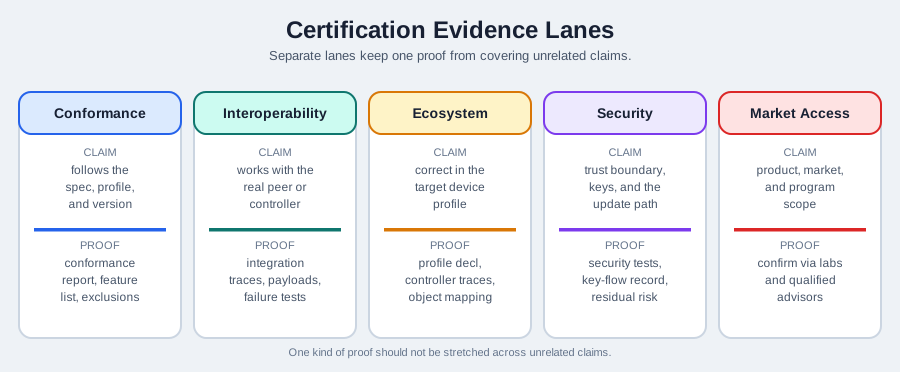
Matter certification, run under the Connectivity Standards Alliance, is what lets a product carry the Matter mark and enter the ecosystem interoperability program. The review chain is simple but strict: product scope defines the PICS, PICS selects applicable tests, and the test harness produces evidence for conformance, interoperability, commissioning, security, and failure recovery.
That makes certification a contract. What the product declares must match what the implementation does, and the test evidence must support the same claim.
41.31 Scope, PICS, and Evidence Lanes
This section: Scope, PICS, and Evidence Lanes — Settle product scope before choosing tests.
Settle product scope before choosing tests. The PICS derives from scope, and the applicable test set derives from PICS. Over-declare and the team will fail tests for features it does not actually support; under-declare and the product will not be certified for behavior it genuinely implements.
| Evidence type | What it checks |
|---|---|
| Conformance | Declared clusters, attributes, commands, events, statuses, and error behavior follow the specification. |
| Interoperability | The device works with representative certified controllers, fabrics, bridges, and user flows. |
| Commissioning | Onboarding, attestation, reset, fabric entry, and operational credential flows complete securely and repeatably. |
| Security | Access control, credential handling, secret custody, negative tests, and production readiness match the reviewed claim. |
A failure becomes useful only when it is tied to an evidence lane and given a defined retest scope. “It failed certification” is not a root cause; “the Level Control feature was over-declared in PICS and failed attribute persistence after reboot” is reviewable.
41.32 Conformance, Interoperability, and Retest
This section: Conformance, Interoperability, and Retest — Conformance and interoperability are related but distinct.
Conformance and interoperability are related but distinct. Conformance tests one device against the specification: mandatory clusters, attributes, commands, status behavior, timing, and error paths. Interoperability tests the device against real implementations: commissioning with representative controllers, cross-vendor control, multi-admin behavior, persistence, recovery, and user flows.
A device can pass conformance but still fail interoperability. For example, a spec-legal timing choice may expose a controller assumption. The fix should be scoped: change one cluster and retest that cluster’s conformance plus the interoperability paths it affects. Preserving what failed, what changed, and what was retested is the audit trail behind the certification-readiness claim.
41.33 Summary
This section: Summary — Matter testing and certification readiness is an evidence alignment problem.
Matter testing and certification readiness is an evidence alignment problem. Product scope defines the PICS declaration. PICS defines the relevant tests. Tests expose conformance, interoperability, commissioning, security, and provisioning evidence. Failures become useful only when they are tied to a layer, fixed with a retest scope, and preserved in a decision record.
The safest review posture is bounded approval. Approve the release claim that the evidence actually supports. Hold or exclude claims that are not implemented, not declared correctly, not retested after change, or not ready for formal certification work.
41.34 Key Takeaway
This section: Key Takeaway — Matter Testing and Certification Evidence should leave deployment evidence for SDK setup, commissioning, clusters, interoperability, certification checks, failure recovery, and tested platforms.
Matter Testing and Certification Evidence should leave deployment evidence for SDK setup, commissioning, clusters, interoperability, certification checks, failure recovery, and tested platforms.
41.35 Concept Relationships
This section: Concept Relationships
- Matter SDK and Development Environment Evidence: testing evidence depends on a reproducible SDK, toolchain, hardware, and lab baseline.
- Matter Device Commissioning Evidence: commissioning records are part of certification readiness, especially for PASE, attestation, network commissioning, operational credentials, and CASE.
- Matter Device Types and Clusters Evidence: PICS and conformance tests must match the endpoint and cluster behavior the product declares.
- Matter Fabric Security Evidence: multi-admin, ACL, fabric, and secure-session behavior shape security and interoperability evidence.
- Matter Implementation Evidence: implementation work converts the reviewed testing claim into maintained product behavior.
41.36 What’s Next
This section: What’s Next
- Matter Implementation Evidence connects certification readiness back to implementation decisions.
- Matter Overview reviews the broader interoperability problem Matter is designed to solve.
- Thread Network Architecture explains Thread roles and topology that affect Thread-based Matter testing.
- Thread Operation and Implementation reviews operational behavior that matters when Thread is the transport.
Find help
3 reviewed answers.
Where should I start in a module?
Open the module page from the sidebar to see its chapters in order. Use the module map to return to a topic you need.
Modules and pathsReviewed
What can I try when a project does not work?
Check the symptom, then work through the diagnostic steps. Keep the error message and the smallest example that reproduces it.
When you are stuckReviewed
How do interactive examples work?
Use the interactive guide to check how examples and simulations work before changing your project.
Interactive examples guideReviewed