37 Matter Device Types and Clusters

More
Depth: Practitioner
Progress saves as you read. Mark sections complete as you go; your progress appears in the sidebar.
37.1 Start With the Device Experience
This section: Start With the Device Experience — Start with a user expecting a Matter device to join, advertise, and respond through a controller without caring which vendor built each piece.
Start with a user expecting a Matter device to join, advertise, and respond through a controller without caring which vendor built each piece. Matter Device Types and Clusters is the evidence route for deciding whether that expectation is realistic.
Keep one device story in view: commissioning, fabric membership, interaction model, transport, and certification all have to line up. The advanced details are useful when they explain where that story can break.
37.2 Matter Device Types and Clusters Evidence
This section: Matter Device Types and Clusters Evidence — Matter device types are not product names.
Matter device types are not product names. They are conformance contracts for endpoints. A controller can only make a reliable decision when the endpoint descriptor, device type, cluster list, feature map, attributes, commands, events, and observed behavior all support the same bounded claim.
This chapter reviews Matter device types and clusters as evidence. It is intentionally narrower than a product catalog and broader than a command reference. The goal is to decide whether a reviewed endpoint actually exposes the device type and behavior being claimed.
37.3 In 60 Seconds
This section: In 60 Seconds
- A Matter node can expose several endpoints; endpoint 0 is the root endpoint, while application endpoints represent device functions.
- A device type identifies the expected function of an endpoint, such as a light, lock, thermostat, sensor, switch, fan, or bridge child device.
- Clusters are capability groups. Their server side usually exposes device behavior, while their client side usually consumes or initiates behavior.
- Required clusters prove the minimum device-type contract. Optional clusters and features need explicit evidence before they can be approved.
- FeatureMap, ClusterRevision, attribute lists, command lists, event lists, and interaction outcomes keep the claim specific.
- Bridge and multi-function devices need endpoint-by-endpoint evidence because one node can represent several logical devices.
- A good approval states the endpoint, device type, cluster direction, supported features, tested interactions, open gaps, and retest trigger.
37.4 Learning Objectives
This section: Learning Objectives
By the end of this chapter, you will be able to:
- Review a Matter endpoint without confusing node identity, endpoint identity, device type, and product category.
- Explain how Descriptor evidence supports device-type and cluster discovery.
- Distinguish required clusters, optional clusters, feature-gated behavior, and unsupported assumptions.
- Evaluate attributes, commands, events, FeatureMap, and ClusterRevision as conformance evidence.
- Scope bridge, multi-endpoint, and multi-function approvals to the reviewed endpoint and behavior.
- Write bounded device-type decisions that remain valid after firmware, bridge mapping, or controller changes.
37.5 Quick Check: Matter Device-Type
This section: Quick Check: Matter Device-Type
37.6 Prerequisites
This section: Prerequisites
This chapter assumes you have reviewed:
- Matter Overview, for Matter’s interoperability purpose and smart-home context.
- Matter Architecture Evidence, for nodes, fabrics, controllers, bridges, and endpoint boundaries.
- Matter Protocol Stack Evidence, for the data-model path from endpoint to cluster to interaction.
- Matter Interaction Evidence, for Read, Write, Subscribe, Invoke, and Timed Request outcomes.
- Matter Fabric Security Evidence, for fabric, session, and ACL boundaries.
37.7 Device Type Review Claim
This section: Device Type Review Claim — The claim does not say that a product works with every controller or every future feature.
Use a claim that can be tested against endpoint records:
Matter device-type review claim: An endpoint is approved for a Matter device type only when Descriptor evidence, required cluster evidence, feature and revision evidence, interaction results, and operational retest triggers all agree for that same endpoint and fabric.
The claim does not say that a product works with every controller or every future feature. It says the reviewed endpoint has enough evidence for the device type and cluster behavior being approved.
37.8 Device Type Evidence Map
This section: Device Type Evidence Map — The first figure shows the path from a device-type claim to a bounded approval.
The first figure shows the path from a device-type claim to a bounded approval.
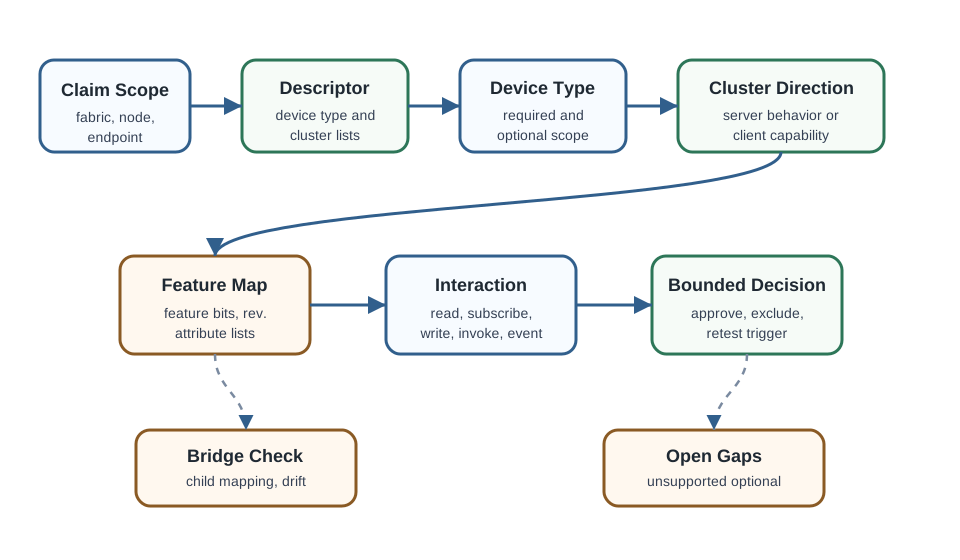
The map prevents a common review error: seeing a device appear in an app and treating that as proof of the entire data model. Discovery is the start of evidence, not the end of review.
37.9 Evidence Families
This section: Evidence Families — Device-type review combines several evidence families.
Device-type review combines several evidence families.
37.10 Why Device Types Are Evidence
This section: Why Device Types Are Evidence — A device type gives a controller a stable interpretation of an endpoint.
A device type gives a controller a stable interpretation of an endpoint. The controller does not need to guess whether endpoint 1 is a dimmable light, lock, thermostat, switch, or sensor. It reads descriptor evidence and then expects a cluster contract that matches the device type.
That contract has limits. A device type does not prove every optional feature, every vendor extension, every scene behavior, every controller UI, or every bridge child mapping. Those need separate evidence.
37.11 Product Category Is Not Enough
This section: Product Category Is Not Enough — Marketing names are often broader than Matter device types.
Marketing names are often broader than Matter device types. A product described as a “smart lamp” might be an On/Off Light, a Dimmable Light, a Color Temperature Light, or an Extended Color Light. The review needs endpoint evidence, not packaging text.
37.12 One Node Can Carry Many Functions
This section: One Node Can Carry Many Functions — A single Matter node can expose more than one application function.
A single Matter node can expose more than one application function. A ceiling fan with an integrated light may use separate endpoints for fan control and lighting. A bridge may expose many legacy child devices as separate endpoints. Approving one endpoint does not automatically approve the others.
37.13 Direction Matters
This section: Direction Matters — Cluster direction is part of the evidence.
Cluster direction is part of the evidence. A server cluster exposes behavior on the endpoint. A client cluster indicates that the endpoint can use or initiate that cluster’s behavior elsewhere. A review that ignores direction can approve the wrong capability.
37.14 Endpoint and Root Node Evidence
This section: Endpoint and Root Node Evidence — Every Matter node includes endpoint 0 for root and utility functions.
Every Matter node includes endpoint 0 for root and utility functions. Endpoint 0 carries node-level clusters such as Basic Information, Access Control, commissioning, operational credentials, and diagnostics. Application behavior usually belongs on application endpoints, not on endpoint 0.
The root endpoint can prove that a node is commissioned and managed. It cannot by itself prove that an application endpoint supports lock operation, dimming, occupancy sensing, fan speed, or thermostat behavior.
37.15 Descriptor Evidence
This section: Descriptor Evidence — The Descriptor cluster is the starting point for endpoint review.
The Descriptor cluster is the starting point for endpoint review. It tells the reviewer what the endpoint claims to be and which clusters are exposed.
Check these records together:
- The endpoint number and whether it is native, bridged, or part of a multi-function node.
- The device type list for the endpoint under review.
- The server cluster list for behavior the endpoint exposes.
- The client cluster list for behavior the endpoint may use elsewhere.
- The parts list or composition relationship when an endpoint represents another logical device.
- The firmware or bridge state at the time the descriptor was captured.
Descriptor evidence can become stale. Firmware updates, bridge reconfiguration, factory reset, fabric migration, and child-device replacement can change the endpoint map.
37.16 Cluster Evidence
This section: Cluster Evidence — Clusters organize Matter behavior.
Clusters organize Matter behavior. For review purposes, each cluster needs three questions.
For example, a lighting endpoint may expose On/Off, Level Control, and Color Control. The approval still needs to say which light device type is being claimed and which color-control features were evidenced.
37.17 Required and Optional Capabilities
This section: Required and Optional Capabilities — Matter device types describe minimum expected behavior, then allow optional additions.
Matter device types describe minimum expected behavior, then allow optional additions. That distinction is important for approval.
This is why “the app showed a slider” is weak evidence. A slider might come from controller inference, cached metadata, a vendor extension, or a partial cluster implementation. The review should connect the visible control back to endpoint, cluster, feature, and interaction records.
37.18 Device Type Scope Check
This section: Device Type Scope Check
37.19 FeatureMap and ClusterRevision Evidence
This section: FeatureMap and ClusterRevision Evidence — FeatureMap and ClusterRevision help prevent overclaiming.
FeatureMap and ClusterRevision help prevent overclaiming.
FeatureMap records which optional cluster features the endpoint says it supports. A cluster may exist while only a subset of its feature set is present. If the feature bit is not present, do not approve feature-dependent attributes, commands, events, or user-facing promises.
ClusterRevision records the cluster revision exposed by the endpoint. It does not by itself prove every behavior in a newer ecosystem expectation. It tells the reviewer which cluster definition the endpoint reports, then behavior must still be checked through interactions.
Good feature and revision evidence answers these questions:
- Which endpoint and cluster produced the FeatureMap and ClusterRevision values?
- Which feature-dependent attributes, commands, and events are expected by the claim?
- Which of those were read, written, subscribed, invoked, or observed?
- Did the controller handle unsupported features with clear status rather than hidden fallback?
- Which firmware, bridge mapping, or spec-revision change would require retest?
37.20 Attributes, Commands, and Events
This section: Attributes, Commands, and Events — Attributes, commands, and events are the parts of cluster evidence that usually prove the learner-facing behavior.
Attributes, commands, and events are the parts of cluster evidence that usually prove the learner-facing behavior.
The strongest record ties the visible result to a data-model path. For example, “endpoint 1 accepted the On command” is weaker than “fabric A controller invoked endpoint 1, On/Off server cluster, On command, received success, and subsequent read showed OnOff true.”
37.21 Device Type Families
This section: Device Type Families — Device type families help organize review work, but each endpoint still needs its own evidence.
Device type families help organize review work, but each endpoint still needs its own evidence.
37.22 Lighting
This section: Lighting — Lighting endpoints often progress from simple on/off behavior to brightness and color behavior.
Lighting endpoints often progress from simple on/off behavior to brightness and color behavior. The reviewer should avoid assuming that every light supports dimming or color temperature. Read the endpoint descriptor, confirm the relevant clusters, check feature bits where applicable, and test the expected interactions.
37.23 Sensors
This section: Sensors — Sensor endpoints often expose measured values, occupancy, contact state, pressure, humidity, temperature, or other state.
Sensor endpoints often expose measured values, occupancy, contact state, pressure, humidity, temperature, or other state. The review should check reporting behavior and subscription behavior, not only a single cached value in a controller app.
37.24 HVAC and Fans
This section: HVAC and Fans — Thermostats, room air conditioners, and fans need careful separation between temperature control, operating mode, fan behavior, and UI configuration.
Thermostats, room air conditioners, and fans need careful separation between temperature control, operating mode, fan behavior, and UI configuration. A thermostat claim does not automatically prove independent fan-speed control.
37.25 Locks and Access Devices
This section: Locks and Access Devices — Locks and access devices need stronger authorization evidence.
Locks and access devices need stronger authorization evidence. Device-type review should be paired with fabric, ACL, command status, event, and user-management scope. A visible lock tile does not prove every lock operation or user-code feature.
37.26 Switches and Controllers
This section: Switches and Controllers — Switch and controller endpoints can send or represent actions without directly exposing the controlled load.
Switch and controller endpoints can send or represent actions without directly exposing the controlled load. Reviewers should separate the device that initiates behavior from the device that performs the behavior.
37.27 Bridges
This section: Bridges — Bridge endpoints require identity and mapping evidence.
Bridge endpoints require identity and mapping evidence. A bridge node can stay healthy while one child endpoint changes device type, endpoint number, cluster list, or represented device association.
37.28 Worked Review Records
This section: Worked Review Records
37.29 Record 1: Color Temperature Lamp
This section: Record 1: Color Temperature Lamp
Scenario: A manufacturer claims that endpoint 1 is a color-temperature lamp for a bedroom deployment.
Evidence found: Endpoint 1 descriptor lists the claimed light device type and the expected lighting clusters. Attribute reads show FeatureMap and ClusterRevision for the relevant clusters, and interactions show on/off, level, and color-temperature behavior on the same endpoint.
Decision: Approve endpoint 1 for the reviewed color-temperature lighting behavior only. Keep full-color, scenes, vendor effects, and other endpoints outside the approval unless separately evidenced.
37.30 Record 2: Bridge Child Sensor
This section: Record 2: Bridge Child Sensor
Scenario: A bridge exposes a legacy contact sensor as endpoint 12. After a bridge update, the controller still shows the sensor in the same room.
Evidence found: The bridge node is reachable, but descriptor evidence shows the child sensor moved from endpoint 12 to endpoint 15. The old endpoint record is stale.
Decision: Hold approval until the new endpoint has descriptor, cluster, subscription, and event evidence. Retest any automation that used the old endpoint mapping.
37.31 Record 3: Thermostat With Optional Fan Control
This section: Record 3: Thermostat With Optional Fan Control
Scenario: A thermostat endpoint controls heating and cooling, and a product page says it has fan support.
Evidence found: Thermostat cluster evidence is present, but the endpoint does not expose Fan Control in the server cluster list. The UI can request fan-only operating mode, but not independent fan speed.
Decision: Approve thermostat behavior that was tested. Do not approve independent fan-speed control unless Fan Control cluster evidence and interaction results are added.
37.32 Common Mistakes
This section: Common Mistakes
- Approving a device type because the product name sounds similar.
- Treating endpoint 0 evidence as proof of application endpoint behavior.
- Approving all endpoints on a node because one endpoint passed review.
- Ignoring server and client cluster direction.
- Treating optional clusters as required behavior or required clusters as optional extras.
- Assuming feature-dependent attributes, commands, or events without FeatureMap evidence.
- Using a controller’s cached UI as proof that the endpoint still exposes the same descriptor.
- Approving bridge child devices without endpoint mapping, represented device, and retest records.
- Treating a successful command as proof that subscriptions, events, failure states, and access rights are also correct.
- Leaving the retest trigger vague after firmware, bridge, fabric, controller, or endpoint changes.
37.33 Match the Evidence
This section: Match the Evidence
37.34 Order the Device Type Review
This section: Order the Device Type Review
37.35 Cluster Conformance Record
This section: Cluster Conformance Record — The second figure shows the record a reviewer should leave behind after checking an endpoint.
The second figure shows the record a reviewer should leave behind after checking an endpoint.
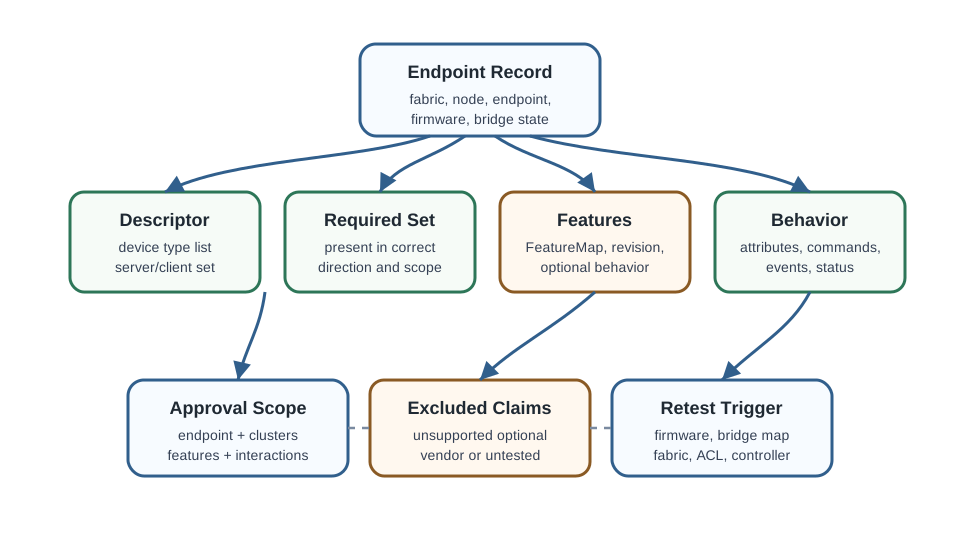
This record makes the review reusable. Another reviewer should be able to see exactly which endpoint was approved, which features were excluded, and what change would require retest.
37.36 Release Checklist
This section: Release Checklist — Use this checklist before approving a device type or cluster claim.
Use this checklist before approving a device type or cluster claim.
37.37 Approval Decision Check
This section: Approval Decision Check
37.38 Node, Endpoint, Cluster Taxonomy
This section: Node, Endpoint, Cluster Taxonomy — Matter describes every device with the same tree.
Matter describes every device with the same tree. A node is the device. It has one or more endpoints, each representing a function or instance. Each endpoint hosts clusters, and a cluster is a self-contained feature such as On/Off, Level Control, or Color Control. Clusters hold attributes for state, commands for actions, and events for notifications.
A device type such as “Dimmable Light” is a required cluster recipe on an endpoint. That recipe is what lets a controller reason about a light, lock, thermostat, sensor, or bridge child without first learning a vendor-specific product model.
Inspect Figure 37.3 to ask how a physical node, each endpoint, its device type, and its clusters narrow the behaviour that a test must prove.
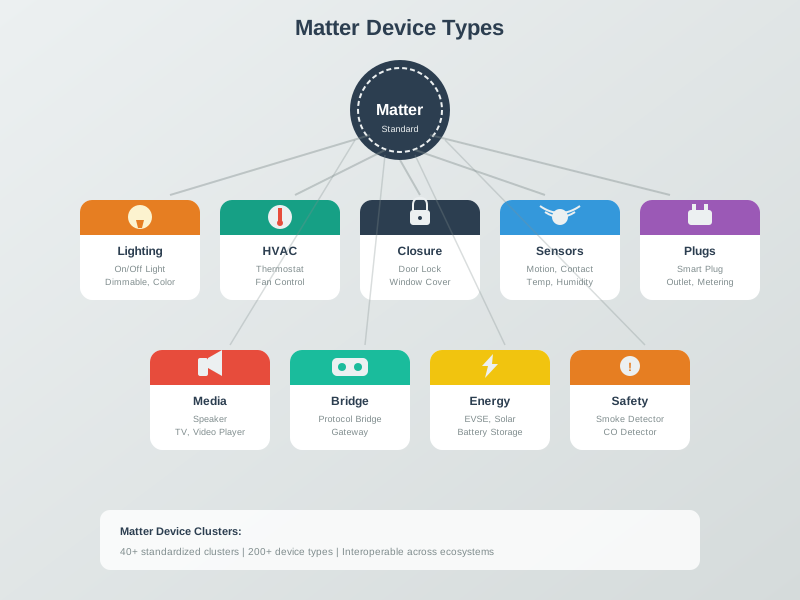
Read Figure 37.3 by separating the physical node from its endpoints and clusters. A single product may host several endpoints, and each endpoint declares a device type that constrains the server and client clusters it should expose. Compare energy, lighting, environmental, and closure families as capability groupings rather than names for whole products. The taxonomy helps a commissioner predict which controls and reports should exist. Implementation evidence still has to show the declared endpoint, required clusters, supported commands, attributes, and access rules on the actual device.
37.39 From Clusters to a Device-Type Claim
This section: From Clusters to a Device-Type Claim — The data model needs to be recorded at the same grain as the approval.
The data model needs to be recorded at the same grain as the approval. A product-level statement is weaker than an endpoint-level ledger because Matter behavior is exposed by endpoints and clusters.
| Element | What it is | Review example |
|---|---|---|
| Node | The whole commissioned device. | A smart light bulb or bridge node. |
| Endpoint | A function or instance on the node. | Endpoint 1 is the light; endpoint 0 is the root utility endpoint. |
| Cluster | A standardized feature with attributes, commands, and events. | On/Off cluster; Level Control cluster. |
| Device type | A required set of clusters on an endpoint. | Dimmable Light requires On/Off and Level Control. |
A conformant Dimmable Light endpoint carries the On/Off and Level Control clusters, so an authorized controller that supports those clusters can use their standard commands to turn the light on and set brightness, regardless of who made the device. A multi-function product such as a power strip simply exposes more endpoints, one per reviewed outlet or child function, each with its own cluster evidence.
37.40 Cluster Contract and Zigbee Heritage
This section: Cluster Contract and Zigbee Heritage — The reason a Matter light from one vendor behaves like a light from another is that a cluster is a strict interoperability contract.
The reason a Matter light from one vendor behaves like a light from another is that a cluster is a strict interoperability contract. A cluster specification fixes attribute identifiers, command identifiers, and semantics. “Current level” has the same Level Control meaning across conformant implementations, so a controller can read standardized attributes and invoke standardized commands without knowing the product name.
This model inherits concepts from the Zigbee Cluster Library, also known through Dotdot. That heritage is why Matter and Zigbee share cluster terminology and why a Zigbee-to-Matter bridge can often map device behavior between similar cluster concepts. The bridge still needs evidence, but the contract gives reviewers a concrete mapping target instead of a vague device category.
37.41 Summary
This section: Summary — Matter device-type review is an endpoint-scoped evidence exercise.
Matter device-type review is an endpoint-scoped evidence exercise. A reviewer starts with the claim, reads the descriptor, checks required and optional clusters, verifies feature and revision records, then ties attributes, commands, events, subscriptions, and status codes to the same endpoint.
The most important discipline is scope. A Matter node can contain several endpoints, a bridge can represent many child devices, and a controller UI can cache or infer behavior. Approval should say exactly which endpoint, cluster direction, feature set, and interaction behavior were proved.
37.42 Key Takeaway
This section: Key Takeaway — Matter Device Types and Clusters Evidence should map device types, clusters, attributes, commands, events, subscriptions, user behavior, and deployment evidence.
Matter Device Types and Clusters Evidence should map device types, clusters, attributes, commands, events, subscriptions, user behavior, and deployment evidence.
37.43 Concept Relationships
This section: Concept Relationships
- Matter Protocol Stack Evidence explains where endpoints, clusters, attributes, commands, and events sit in the Matter stack.
- Matter Interaction Evidence explains how Read, Write, Subscribe, Invoke, and Timed Request records prove behavior.
- Matter Architecture Evidence explains why node, fabric, controller, bridge, and endpoint boundaries matter.
- Matter Fabric Security Evidence explains why fabric, ACL, and secure-session evidence can change a device-type decision.
37.44 What’s Next
This section: What’s Next — Next, Matter Transport Platforms separates Matter application evidence from Thread, Wi-Fi, Ethernet, and bridge transport choices.
Next, Matter Transport Platforms separates Matter application evidence from Thread, Wi-Fi, Ethernet, and bridge transport choices. For implementation work, continue to Matter Implementation and Matter Testing and Certification.
Find help
3 reviewed answers.
Where should I start in a module?
Open the module page from the sidebar to see its chapters in order. Use the module map to return to a topic you need.
Modules and pathsReviewed
What can I try when a project does not work?
Check the symptom, then work through the diagnostic steps. Keep the error message and the smallest example that reproduces it.
When you are stuckReviewed
How do interactive examples work?
Use the interactive guide to check how examples and simulations work before changing your project.
Interactive examples guideReviewed