10 6LoWPAN Hands-On and Security

More
Depth: Practitioner
Progress saves as you read. Mark sections complete as you go; your progress appears in the sidebar.
Hands-on 6LoWPAN work should prove that a constrained IPv6 design can be built, observed, secured, and recovered. It is not enough to compile a demo or copy a border-router command. The lab must show which traffic was tested, which prefix and compression context were used, where packets were captured, which security boundary was trusted, and what happened when the network failed.
This chapter turns hands-on work into a security evidence workflow. It keeps the practical ideas from Contiki-NG, RIOT, border routers, UDP or CoAP messages, RPL routes, and IEEE 802.15.4 security, but removes brittle code listings and replaces them with checks that a learner can apply to real hardware, simulation, or a controlled lab.
10.1 Start With the Observable Result
This section: Start With the Observable Result — Picture a lab sensor sending one temperature reading through a small radio mesh to a local service.
Prove the Path, Then Mark the Trust Boundary
Picture a lab sensor sending one temperature reading through a small radio mesh to a local service. A screen shows the value, but that alone does not prove the address path, packet reconstruction, route, or protection that carried it.
A protocol means agreed rules for exchanging messages. 6LoWPAN is an adaptation method for carrying network packets across constrained low-power links. A payload means the useful content inside a message. Name the sensor, border device, address prefix, route root, final service, and the point where each protection starts and ends.
Capture one normal reading. Then change the prefix, remove a route, force a larger message, repeat a packet, use the wrong key, and restart the border device. Check route state, packet parts, final content, denied cases, recovery, and the operator record. A protected radio hop must not be reported as protection across every later service.
This lab does not prove production readiness. The deeper sections show setup custody, compression, splitting, routing, link and end-to-end protection, failure visibility, and retest triggers for a defensible release record.
Start with the result a learner should be able to show after 6LoWPAN Hands-On and Security: a packet trace, commissioning step, mesh behavior, security decision, or lab record that someone else can inspect. The exercise matters because it turns protocol vocabulary into evidence.
Keep the first run small. Make one device join, route, fragment, commission, or report; record what happened; then use the deeper sections to explain why the result is trustworthy and what would force a retest.
10.2 In 60 Seconds
This section: In 60 Seconds
- A hands-on 6LoWPAN lab needs a scoped claim, not just a working demo.
- Border-router evidence must include prefix ownership, route state, neighbor state, packet capture, and failure visibility.
- Packet checks should prove header compression, fragmentation boundaries, and application traffic behavior on the tested path.
- Link-layer security protects a radio hop or mesh boundary; end-to-end or object security protects payload meaning across untrusted infrastructure.
- The strongest lab record includes setup evidence, expected observations, actual observations, failure tests, and retest triggers.
10.3 Learning Objectives
This section: Learning Objectives
By the end of this chapter, you will be able to:
- Build a 6LoWPAN hands-on plan that names hardware or simulator roles, traffic classes, and acceptance evidence.
- Review border-router setup without relying on copied commands as proof of connectivity.
- Capture and interpret evidence for prefix consistency, IPHC compression, fragmentation behavior, RPL routing, and UDP or CoAP traffic.
- Choose link-layer, transport, or object security boundaries based on trust assumptions and packet-growth evidence.
- Produce a release record that separates lab success from production readiness.
10.4 Quick Check: 6LoWPAN Lab Security
This section: Quick Check: 6LoWPAN Lab Security
10.5 Prerequisites
This section: Prerequisites
This chapter assumes you have already reviewed:
- 6LoWPAN Fundamentals and Architecture Evidence, for the adaptation-layer boundary.
- 6LoWPAN Header Compression, for IPHC context and packet reconstruction.
- 6LoWPAN Fragmentation, for split-packet and reassembly risk.
- 6LoWPAN Routing with RPL, for route-over behavior and root duties.
- 6LoWPAN Deployment Evidence Framework, for pilot and release planning.
10.6 Hands-On Claim
This section: Hands-On Claim — The claim prevents two weak outcomes.
Use a claim that can be tested:
Hands-on claim: The lab proves the named 6LoWPAN traffic path because setup records, border-router custody, prefix and compression context, route state, packet captures, security boundary, failure behavior, and retest triggers are documented.
The claim prevents two weak outcomes. One is a code-only lab that compiles but does not explain the network behavior. The other is a security-only discussion that names encryption without showing where plaintext, keys, routes, and operator access actually exist.
10.7 Lab Evidence Path
This section: Lab Evidence Path — Use Figure 10.1 as the packet-evidence slice of the review path before accepting a hands-on result.
Use Figure 10.1 as the packet-evidence slice of the review path before accepting a hands-on result.
Inspect Figure 10.1 from tool output to log output: decode the captured IPHC base, rebuild the elided source address, then check that the reconstructed prefix and application evidence agree.
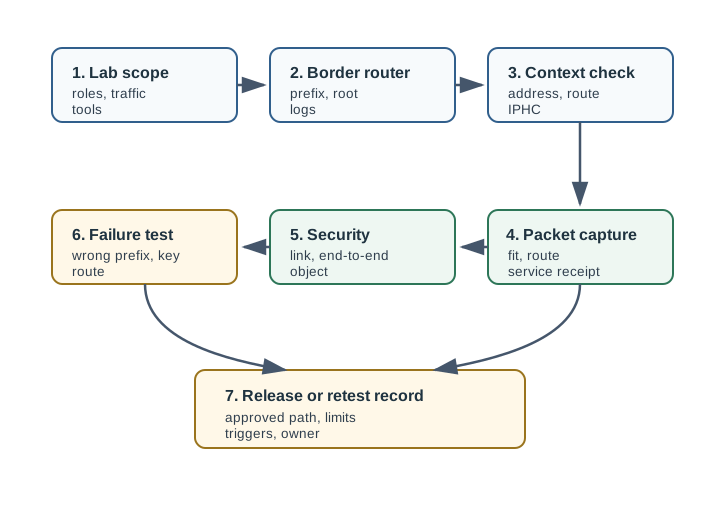
Read Figure 10.1 from TOOL OUTPUT to LOG OUTPUT. The packet bytes are useful evidence only when their control bits name authoritative reconstruction sources and the rebuilt IPv6 address matches the sender/receiver prefix and application receipt.
The path is intentionally ordered. A learner should not jump from “the node printed an address” to “the network is ready.” The lab should prove the address belongs to the intended prefix, the route exists, the packet is compressed or fragmented as expected, the security boundary matches the threat model, and failure is visible.
The figure proves one packet’s address reconstruction. The route, fragmentation, security, and failure sections that follow supply the remaining evidence before any broader hands-on result is accepted.
10.8 Lab Setup Evidence
This section: Lab Setup Evidence — A setup record should be short but precise.
A setup record should be short but precise. It should identify the tested environment without turning the chapter into a tool manual.
This record works whether the learner uses Contiki-NG, RIOT, OpenThread, a simulator, or a hardware testbed. The tool name matters less than the evidence trail.
10.9 Simulation Evidence Boundary
This section: Simulation Evidence Boundary — A simulator can make 6LoWPAN behavior observable, but it should be reviewed as a model with limits rather than proof of every deployment condition.
A simulator can make 6LoWPAN behavior observable, but it should be reviewed as a model with limits rather than proof of every deployment condition.
Simulation evidence is strongest when it teaches what to look for in captures and logs, then names the remaining field checks.
10.10 Border Router Evidence
This section: Border Router Evidence — The border router is both a network component and an operations boundary.
The border router is both a network component and an operations boundary. It may advertise a prefix, act as an RPL root, forward packets to a Linux or gateway interface, log route state, and expose failure signals. A hands-on chapter should teach the learner to inspect those duties rather than copy a command and hope the mesh is healthy.
10.11 Packet Capture Evidence
This section: Packet Capture Evidence — Packet capture should answer a question, not produce a decorative screenshot.
Packet capture should answer a question, not produce a decorative screenshot. Capture before and after the border router when possible, and pair the capture with a short explanation of what the learner expected to see.
Do not teach learners to use a single best-case capture as proof of a system. Capture normal telemetry, a retry or route repair event, a larger diagnostic response, and at least one failed security or prefix condition.
10.12 Prefix And Context Checks
This section: Prefix And Context Checks — Prefix errors are common because several components must agree: the border router, node firmware, route advertisement, compression context, and upstream route.
Prefix errors are common because several components must agree: the border router, node firmware, route advertisement, compression context, and upstream route. The lab should make this explicit.
A lab that cannot show the failure mode is not ready to teach troubleshooting. Learners need to see how a prefix or context mismatch appears in route state, packet capture, logs, and application behavior.
10.13 Security Boundary
This section: Security Boundary — Use Figure 10.2 to separate link protection, end-to-end payload protection, and operations custody.
Use Figure 10.2 to separate link protection, end-to-end payload protection, and operations custody.
Inspect Figure 10.2 to ask where hop-by-hop mesh trust ends and the end-to-end app or border-router check must begin.
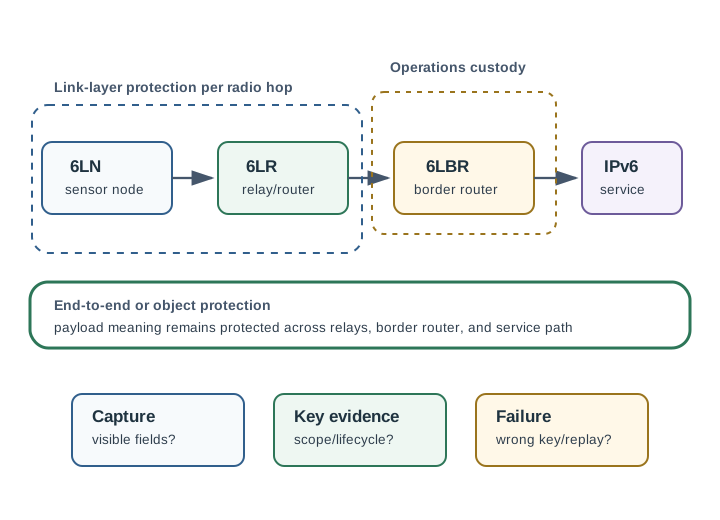
Read Figure 10.2 from the constrained node through the mesh to the 6LBR. Link protection covers one radio hop and changes at each forwarding node; it does not automatically protect the application record across the whole path. The border router is also a trust boundary because it joins the low-power domain to wider IPv6 services. Follow the failure branch to see whether identity, replay state, key scope, routing, or end-to-end authorization broke. The lab record should name which boundary was tested and which packet or receiver evidence supports the result.
Security is not one switch. A link-layer mechanism can protect radio frames on a hop or within a mesh, but relay or border-router behavior may still expose payloads depending on the stack and application design. Transport or object security can protect payload meaning across untrusted infrastructure, but it also changes packet size, handshake behavior, retry behavior, and key management.
10.14 Security Layer Stack
This section: Security Layer Stack — 6LoWPAN security is layered because the network is still an IPv6 stack.
6LoWPAN security is layered because the network is still an IPv6 stack. IEEE 802.15.4 can protect radio frames with AES-CCM* at the link layer. DTLS can protect UDP application exchanges such as CoAP across a path. Object security can protect the payload meaning even when intermediaries route, log, or transform metadata. These mechanisms answer different trust questions and should not be treated as interchangeable switches.
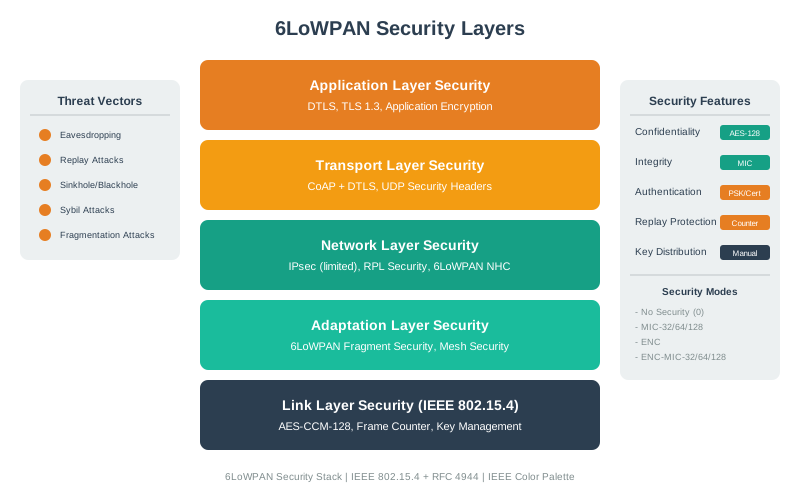
A hands-on lab should show the boundary with one named packet. With only link-layer security, a radio capture should not reveal the protected frame on that hop, but each forwarding device that participates in link security can process plaintext before re-encrypting for the next hop. With DTLS or object security added, the application payload remains protected beyond those forwarding points, so the border router can route without understanding the measurement.
The release record should therefore name three observation points: radio capture, border-router logs, and service endpoint. The radio capture proves what is visible on the constrained hop. The border-router log proves prefix, route, and forwarding custody. The service endpoint proves whether the application payload arrived with the expected identity and protection.
10.15 Link-Layer Security Evidence
This section: Link-Layer Security Evidence — IEEE 802.15.4 link-layer security can provide frame confidentiality, integrity, and replay protection on the radio link when configured correctly.
IEEE 802.15.4 link-layer security can provide frame confidentiality, integrity, and replay protection on the radio link when configured correctly. The lab should prove configuration and behavior, not just state that AES exists.
The security record should avoid universal claims. Link-layer security may be enough for a trusted private lab, but it is not a replacement for end-to-end payload protection when the border router, relay path, cloud path, or support process is outside the same trust boundary.
10.16 Frame Counter And Replay Evidence
This section: Frame Counter And Replay Evidence — AES-CCM* uses counter-mode encryption with authentication.
AES-CCM* uses counter-mode encryption with authentication. Like all counter-mode designs, it depends on a nonce that is never reused with the same key. In IEEE 802.15.4 security, the frame counter is part of that nonce. If a node reboots and repeats old counter values with the same key, the lab has not just lost a statistic; it has broken the cryptographic assumption behind confidentiality and integrity.
Make the nonce rule testable. Record the frame counter before reboot, reboot the node, send one protected frame, and confirm that the counter continues forward rather than restarting from an earlier value. Then test the receiver side: replay an old protected frame or simulate a stale counter and confirm the frame is rejected with a visible failure signal.
This is also where constrained-device choices matter. Symmetric AES is cheap and often hardware-accelerated by the radio, so it is common at the link layer. DTLS or object-security setup may use pre-shared keys, raw public keys, or elliptic-curve credentials to avoid heavyweight certificate handling. The lab should record credential type, replay-window behavior, packet growth, and the operator-visible log for wrong or stale credentials.
10.17 End-To-End And Object Security Evidence
This section: End-To-End And Object Security Evidence — For UDP and CoAP traffic, end-to-end or object security protects the application data beyond a single radio hop.
For UDP and CoAP traffic, end-to-end or object security protects the application data beyond a single radio hop. That may involve DTLS, OSCORE, or another application-specific protection model. The review question is not “which acronym is strongest.” The question is whether the security boundary matches the trust boundary and whether packet growth stays compatible with the constrained path.
Security evidence is strong when it links a threat to a measured path. It is weak when it assumes a named library or cipher automatically proves the deployment.
10.18 Worked Lab Reviews
This section: Worked Lab Reviews
10.19 UDP Telemetry Path
This section: UDP Telemetry Path
Scenario: A constrained node sends a small periodic telemetry message through a 6LoWPAN border router to a local IPv6 service.
Review: The lab should capture node address formation, compression context, parent route, border-router forwarding, service receipt, and a controlled route-repair event. If the message is protected only at the link layer, the record should state where plaintext is visible.
Decision: Accept as a hands-on telemetry lab only if the learner can explain the packet path and reproduce the evidence after a node or border-router restart.
10.20 CoAP Command With Security
This section: CoAP Command With Security
Scenario: A controller sends a command to a node and expects a constrained response.
Review: The command path should prove request identity, response identity, replay behavior, and what an observer can see at the radio, border-router, and service endpoints. If end-to-end or object security is used, the lab should confirm that the protected payload still fits the allowed packet path or has its own fragmentation review.
Decision: Mark release-ready only for the named command and response shape. A larger diagnostic response remains review-required.
10.21 Failed Prefix Or Key Test
This section: Failed Prefix Or Key Test
Scenario: The instructor deliberately changes a node prefix context or security key so the lab fails.
Review: A strong lab shows the failure in more than one place: node logs, border-router logs, packet capture, route or neighbor state, and application timeout. It also explains which signal distinguishes prefix failure from route failure or authentication failure.
Decision: Keep the failure test in the lab record. It is the evidence that learners can troubleshoot the system instead of only following a happy path.
10.22 Common Mistakes
This section: Common Mistakes
10.23 Release Checklist
This section: Release Checklist
Before accepting a hands-on and security chapter or lab, require evidence for each item:
10.24 Summary
This section: Summary — Hands-on 6LoWPAN and security work should leave behind a lab record, not just working code.
Hands-on 6LoWPAN and security work should leave behind a lab record, not just working code. The record should prove setup, prefix consistency, compression context, route behavior, border-router custody, packet capture, security boundary, and failure visibility. This lets learners understand why the lab works and how to diagnose the first real failure.
Security belongs in the same evidence flow. Link-layer protection, end-to-end protection, object security, key lifecycle, replay behavior, and packet growth all affect whether a constrained IPv6 path is acceptable. Strong chapters show those boundaries without making broad cost, battery, or compliance promises.
10.25 Key Takeaway
This section: Key Takeaway — 6LoWPAN Hands-On and Security Evidence should leave deployment evidence for compression, fragmentation, routing, security behavior, loss recovery, and observed packet traces.
6LoWPAN Hands-On and Security Evidence should leave deployment evidence for compression, fragmentation, routing, security behavior, loss recovery, and observed packet traces.
10.26 Concept Relationships
This section: Concept Relationships
10.27 What’s Next
This section: What’s Next
Continue with these chapters:
- 6LoWPAN Common Pitfalls, to review common configuration, packet, and routing failures.
- 6LoWPAN Comprehensive Review, to test the complete protocol story.
- Thread Network Architecture, to compare a managed product mesh built on constrained IPv6 foundations.
- Zigbee Hands-On and Future, to contrast a non-IP IEEE 802.15.4 stack.
10.28 Knowledge Check: Border Router Evidence
This section: Knowledge Check: Border Router Evidence
10.29 Knowledge Check: Security Boundary
This section: Knowledge Check: Security Boundary
10.30 Concept Match
This section: Concept Match — Match each hands-on evidence item with the question it answers.
Match each hands-on evidence item with the question it answers.
10.31 Evidence Order
This section: Evidence Order — Place the hands-on review steps in the strongest order.
Place the hands-on review steps in the strongest order.
Find help
3 reviewed answers.
Where should I start in a module?
Open the module page from the sidebar to see its chapters in order. Use the module map to return to a topic you need.
Modules and pathsReviewed
What can I try when a project does not work?
Check the symptom, then work through the diagnostic steps. Keep the error message and the smallest example that reproduces it.
When you are stuckReviewed
How do interactive examples work?
Use the interactive guide to check how examples and simulations work before changing your project.
Interactive examples guideReviewed