19 Zigbee Network Formation
How Zigbee networks are created, devices join, and commissioning options
19.1 Learning Objectives
By the end of this chapter, you will be able to:
- Trace the step-by-step network formation process initiated by the Coordinator, from energy scan through security initialization
- Differentiate how Routers and End Devices discover, associate with, and join an existing Zigbee network
- Evaluate PAN ID selection strategies and channel scanning outcomes to justify channel choices in interference-heavy environments
- Compare commissioning methods (Trust Center default key, Install Codes, Touchlink) and recommend the appropriate method for a given deployment scenario
- Diagnose common network joining failures using timing data, log messages, and troubleshooting checklists
19.2 Introduction
Network formation is the process of creating a Zigbee network and adding devices to it. Understanding this process is essential for successful deployment and troubleshooting joining issues.
Think of network formation like starting a new company:
- Coordinator = CEO opens the office, sets company name (PAN ID)
- Routers = Managers join the company, help new employees
- End Devices = Employees join through a manager
Just like a new employee needs ID badge and security clearance, new Zigbee devices need network address and encryption keys to participate in the network.
19.3 Network Formation by Coordinator
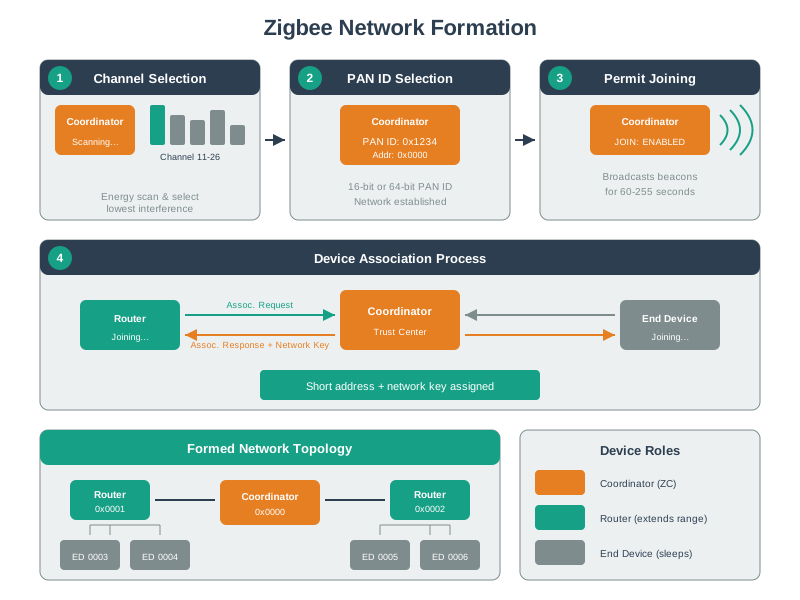
The Coordinator initiates the network by performing these steps:
19.3.1 Step 1: Channel Selection
The Coordinator scans available channels to find one with minimal interference:
Channel Scan Process:
1. Perform Energy Detect (ED) scan on channels 11-26
2. Measure noise/interference level on each channel
3. Select channel with lowest ED value
4. Alternatively, use pre-configured channel
Typical Results:
Channel 11: -65 dBm (Wi-Fi Ch 1 interference)
Channel 15: -72 dBm (Wi-Fi Ch 6 interference)
Channel 20: -68 dBm (moderate)
Channel 25: -85 dBm (clean) ← Selected
Channel 26: -82 dBm (clean)
19.3.2 Step 2: PAN ID Selection
The Personal Area Network ID uniquely identifies the network:
PAN ID Selection:
1. Generate random 16-bit PAN ID (0x0001 - 0xFFFE)
2. Scan for existing networks on selected channel
3. If PAN ID conflict detected, generate new one
4. Extended PAN ID (64-bit) provides additional uniqueness
Example:
PAN ID: 0x1A2B
Extended PAN ID: DD:DD:DD:DD:DD:DD:DD:DD
Channel: 25
19.3.3 Step 3: Security Initialization
The Coordinator establishes as Trust Center:
Trust Center Setup:
1. Generate 128-bit Network Key (random)
2. Configure Trust Center Link Key (default or custom)
3. Set security policies (join time window, key distribution)
4. Initialize device tables (empty)
Example Network Key: AB:CD:EF:12:34:56:78:90:AB:CD:EF:12:34:56:78:90
19.3.4 Step 4: Network Operational
19.4 Router Joining Process
When a Router powers on near an existing network:
19.4.1 Phase 1: Network Discovery
Router Scan Process:
1. Active scan: Send beacon requests on each channel
2. Collect beacon responses from nearby devices
3. Filter by:
- Permit Join = TRUE (accepting new devices)
- Signal strength (RSSI > threshold)
- Network capacity (can accept children)
Beacon Response Contains:
- PAN ID: 0x1A2B
- Source Address: 0x0000 (Coordinator)
- Permit Join: TRUE
- Router Capacity: YES
- End Device Capacity: YES
19.4.2 Phase 2: Association
Association Sequence:
1. Router selects best parent (Coordinator or another Router)
2. Sends Association Request to parent
- Includes 64-bit IEEE address
- Requests Router capability
3. Parent forwards to Trust Center
4. Trust Center approves and allocates address
5. Parent sends Association Response
- Includes 16-bit network address
- Status: Success
19.4.3 Phase 3: Security Key Distribution
Key Distribution:
1. Trust Center is notified of successful association
2. Trust Center verifies device identity (if using Install Codes)
3. Trust Center encrypts Network Key with Trust Center Link Key
4. Sends Transport Key command containing encrypted Network Key to Router
5. Router decrypts and stores Network Key
6. Router can now participate in encrypted network traffic
19.4.4 Phase 4: Router Active
19.5 End Device Joining Process
End Devices follow a similar process but with power-saving considerations:
19.5.1 Differences from Router Joining
| Aspect | Router | End Device |
|---|---|---|
| Scan type | Active (faster) | Passive (lower power) |
| Parent selection | Any router/coordinator | Must select parent |
| Post-join | Always on, routing | Sleep mode |
| Poll interval | N/A | Configure (7.5s typical) |
19.5.2 Parent Selection
End Devices must choose a parent Router carefully:
Parent Selection Criteria:
1. Signal strength (RSSI > -70 dBm preferred)
2. Link Quality Indicator (LQI > 200)
3. End Device capacity (parent can accept children)
4. Depth in network (prefer shallower)
Selection Algorithm:
- Collect all beacon responses
- Score each candidate: Score = RSSI + (LQI/10) - (Depth * 5)
- Select highest score
- Send association request to winner
19.5.3 Poll Configuration
After joining, End Devices configure their polling behavior:
Polling Setup:
End Device → Parent: "I'll poll every 7.5 seconds"
Parent: "OK, I'll buffer messages for you"
Power Impact:
- 1 second poll: High power, fast response
- 7.5 second poll: Medium power, slight delay
- 30 second poll: Low power, noticeable delay
Typical Configuration:
- Motion sensors: 3-5 second poll (fast response needed)
- Temperature sensors: 30-60 second poll (data not urgent)
- Door sensors: Event-driven + 10 second poll
19.6 Commissioning Methods
19.6.1 Trust Center Commissioning (Standard)
The default method uses the Trust Center Link Key:
Default Trust Center Link Key:
5A:69:67:42:65:65:41:6C:6C:69:61:6E:63:65:30:39
(ASCII: "ZigBeeAlliance09")
Process:
1. New device uses default link key
2. Trust Center sends Network Key encrypted with default key
3. Anyone knowing default key can join network
Security Concern:
- Default key is publicly known
- Attacker could capture Network Key during join
- Suitable for consumer devices, not high-security
19.6.2 Install Code Commissioning (High Security)
Install codes provide per-device security:
Install Code Process:
1. Each device has unique Install Code (printed on label)
Example: 83FE:D340:7A93:9F2B:CAFE
2. Administrator enters Install Code into Coordinator
3. Trust Center derives unique Link Key from Install Code
4. Network Key sent encrypted with device-specific key
5. Attacker cannot decrypt without Install Code
Security Advantage:
- No publicly known keys used
- Per-device key derivation
- Recommended for commercial/industrial
19.6.3 Touchlink Commissioning (Consumer)
Proximity-based pairing for ease of use:
Touchlink Process:
1. Bring devices within 10-20cm of each other
2. Initiator scans for Touchlink-capable targets
3. If RSSI > threshold, considered "close enough"
4. Devices exchange network credentials
5. Target joins initiator's network
Use Cases:
- Consumer lighting (Philips Hue)
- No hub required for basic setup
- Simplified user experience
Security Consideration:
- Proximity is the security factor
- Attacker must be physically close
- Less secure than Install Codes
19.6.4 Commissioning Comparison
| Method | Security | Ease of Use | Best For |
|---|---|---|---|
| Default TC Key | Low | Easy | Consumer, non-critical |
| Install Codes | High | Moderate | Commercial, sensitive |
| Touchlink | Medium | Very Easy | Consumer lighting |
| Out-of-Band | Highest | Complex | High-security |
19.7 Quick Check: Commissioning
An installer is deploying Zigbee temperature sensors in a residential home. The homeowner wants the easiest possible setup and has no security concerns beyond basic protection. Which commissioning method is most appropriate?
- Install Codes with QR scanning
- Out-of-Band commissioning with pre-shared certificates
- Default Trust Center Link Key with a time-limited permit-join window
- Touchlink commissioning requiring physical contact between devices
C) Default Trust Center Link Key with a time-limited permit-join window – For residential consumer deployments without heightened security requirements, the default Trust Center method offers the simplest setup. The installer opens the permit-join window, adds each sensor, then closes it. While the default key (“ZigBeeAlliance09”) is publicly known, the brief window and residential context make this an acceptable trade-off for ease of use. Install Codes add unnecessary complexity for temperature sensors, and Touchlink is mainly used for lighting products.
19.8 Permit Join Window
Networks control when new devices can join:
Permit Join Settings:
- Permit Join = TRUE: Network accepting joins
- Permit Join = FALSE: Network closed
Time Window:
- Typical: 60-180 seconds
- Opens when admin initiates pairing
- Closes automatically after timeout
- Can be limited to specific Routers
Command:
Coordinator: "Permit Join ON for 180 seconds"
All Routers: Enable join acceptance
After 180s: Automatically disable
19.8.1 Security Best Practice
Secure Deployment Pattern:
1. Configure all devices with Permit Join = FALSE (default)
2. When adding device:
- Open Permit Join for 60 seconds only
- Add single device
- Close Permit Join
3. Never leave Permit Join permanently open
4. Log all join events for auditing
19.9 Address Assignment
The Coordinator manages 16-bit address allocation:
19.9.1 Stochastic Assignment (Default)
Random Address Selection:
Address Pool: 0x0001 to 0xFFFD (65,533 addresses)
Reserved:
- 0x0000: Coordinator
- 0xFFFF: Broadcast
Process:
1. Generate random address
2. Check not already assigned
3. If collision, generate new
4. Assign to joining device
5. Store in device table
Advantage: Simple, no pre-planning
Disadvantage: Addresses not meaningful
19.9.2 Distributed Assignment (Optional)
Hierarchical Addressing:
Based on network depth and parent address
Coordinator (depth 0): 0x0000
├── Router 1 (depth 1): 0x0001
│ ├── End Device 1: 0x0002
│ └── End Device 2: 0x0003
├── Router 2 (depth 1): 0x1000
│ └── Router 3 (depth 2): 0x1001
│ └── End Device 3: 0x1002
Advantage: Address reveals network topology
Disadvantage: Requires pre-planning maximum children per device
19.10 Timing Details
Understanding join timing helps with troubleshooting:
| Phase | Duration | Notes |
|---|---|---|
| Channel scan | 100-500ms | Passive: 500ms, Active: 100ms |
| Beacon collection | 500-2000ms | Wait for all beacons |
| Association | 100-500ms | Request + response |
| Key exchange | 100-300ms | Trust Center round-trip |
| Total join time | 1-5 seconds | Typical successful join |
19.10.1 Timeout Values
Configurable Timeouts:
- Association timeout: 3 seconds
- Network key timeout: 5 seconds
- Permit join window: 60-255 seconds
- Orphan timeout: 30 seconds
If timeouts exceeded:
- Device retries from beginning
- May select different parent
- After 3-5 failures, report error
19.11 Troubleshooting Joining Issues
19.11.1 Common Problems and Solutions
| Symptom | Likely Cause | Solution |
|---|---|---|
| Device not finding network | Permit Join closed | Open Permit Join on Coordinator |
| Association fails | Network full | Check device table capacity |
| Key exchange timeout | Range issue | Move device closer |
| Device keeps rejoining | Parent offline | Check parent Router power |
| Wrong network joined | Multiple PANs nearby | Specify PAN ID manually |
19.11.2 Diagnostic Steps
Troubleshooting Checklist:
1. Verify Permit Join is OPEN (check Coordinator logs)
2. Check device is in pairing mode (LED blinking)
3. Confirm device is within range (< 10m for initial join)
4. Verify channel matches (no interference)
5. Check Install Code entered correctly (if using)
6. Reset device to factory and retry
Coordinator Logs to Check:
- "Association Request from [MAC]" - Device found network
- "Association Response sent" - Address assigned
- "Network Key transported" - Security established
- "Device [addr] online" - Join complete
Max the Microcontroller is setting up a new Zigbee network: “First, I need to pick a channel! I’ll scan all 16 channels and pick the quietest one – like finding the least crowded aisle in a supermarket.”
Sammy the Sensor wants to join: “How do I get in? I scan for beacon signals, find Max’s network, and send a join request. It’s like knocking on the door and asking to come in!”
Lila the LED explains security: “When you join, the Trust Center gives you a special key to encrypt your messages. It’s like getting a secret decoder ring that only members of our network have.”
Bella the Battery is happy: “Once I join, I can start sleeping to save energy. My parent Router wakes me up when there’s mail, like a mailbox that only opens when there’s a letter!”
Key ideas for kids:
- Energy scan = Checking all channels to find the quietest one
- PAN ID = The network’s unique name tag
- Association = Asking to join the network (like raising your hand)
- Network key = A secret code shared by all members for secure communication
19.12 Knowledge Check
Q1: What is the first step the Coordinator takes when forming a new Zigbee network?
- Assign addresses to all devices
- Perform an energy scan to select the least-noisy channel
- Generate encryption keys
- Send beacon frames to all devices
B) Perform an energy scan to select the least-noisy channel – The Coordinator scans all 16 available IEEE 802.15.4 channels (11-26) and selects the one with the lowest energy level (least interference). This ensures the network starts on the cleanest available channel for best reliability.
19.13 Knowledge Check
Q2: How does the Trust Center distribute the network key to a newly joining device?
- The key is pre-programmed in all devices at the factory
- The key is sent encrypted using a pre-shared key or Install Code
- The key is broadcast in plaintext on all channels
- The device generates its own key independently
B) The key is sent encrypted using a pre-shared key or Install Code – In Zigbee 3.0, the network key is distributed encrypted using either a default Trust Center link key (less secure) or an Install Code-based unique key (more secure). Install Codes are printed on each device and entered during commissioning, providing out-of-band authentication.
19.14 Worked Example: Hotel Smart Lighting — 1,200 Device Zigbee Commissioning
Scenario: HorizonStay, a 14-storey luxury hotel in Dubai, deploys Zigbee 3.0 smart lighting across 420 guest rooms (3 Zigbee devices per room: ceiling light, bedside lamp, bathroom light = 1,260 devices total), plus 180 corridor and lobby lights. The installer must commission all 1,440 devices in a 4-day window before the hotel opens.
19.14.1 Network Architecture
| Component | Count | Role | Notes |
|---|---|---|---|
| Zigbee Coordinator | 1 | Trust Center + PAN root | Server room, Floor 7 (central) |
| Zigbee Routers (corridor) | 56 (4 per floor) | Mesh backbone | Mains-powered, always on |
| Zigbee Routers (lobby/restaurant) | 12 | Public area mesh | Mains-powered |
| End Devices (room lights) | 1,260 | Guest room fixtures | Mains-powered but configured as sleepy for group control |
| End Devices (corridor lights) | 112 | Corridor fixtures | Mains-powered |
19.14.2 Channel Selection Challenge
The hotel’s energy scan revealed Wi-Fi interference from 120 access points deployed on all three non-overlapping channels (1, 6, 11):
| Zigbee Channel | Frequency | Energy Scan (dBm) | Wi-Fi Overlap | Decision |
|---|---|---|---|---|
| 15 | 2,425 MHz | -68 | Ch 6 edge | Reject |
| 20 | 2,450 MHz | -71 | Ch 6/11 gap | Reject (marginal) |
| 25 | 2,475 MHz | -83 | Above Ch 11 | Selected (PAN 1) |
| 26 | 2,480 MHz | -81 | Above Ch 11 | Selected (PAN 2) |
Two separate PANs were needed because a single Zigbee coordinator serving 1,440 devices would exceed the practical limit for responsive group commands (~500 devices per coordinator for <200 ms group latency).
19.14.3 Commissioning Plan
HorizonStay used Install Code commissioning (not the default “ZigBeeAlliance09” key) because hotel door locks on the same network require high security:
| Day | Task | Devices | Method | Time |
|---|---|---|---|---|
| 1 | Deploy coordinators + routers | 69 | Manual Install Code entry via laptop | 6 hours |
| 2 | Commission Floors 1-7 (PAN 1) | 660 room + corridor devices | QR-scan Install Codes, batch join (60s permit window per floor) | 10 hours |
| 3 | Commission Floors 8-14 (PAN 2) | 660 room + corridor devices | Same QR-scan method | 10 hours |
| 4 | Lobby, restaurant, testing | 120 devices + full system test | Install Codes + group command verification | 8 hours |
19.14.4 Commissioning Rate Analysis
Each device join takes approximately 3 seconds (scan + association + key exchange). With a 60-second permit-join window per floor section (20 devices), the installer achieves:
- Devices per hour: ~120 (accounting for walking between rooms, QR scanning)
- Install Code entry: 8 seconds per device (QR scan vs 45 seconds for manual hex entry)
- Join success rate: 97.2% first attempt, 100% after second attempt
- Failures: 40 devices (2.8%) required re-attempt due to range during join (installer moved device closer to nearest router)
19.14.5 Cost of Commissioning Method Choice
| Method | Per-Device Time | Total Time (1,440 devices) | Labor Cost (EUR 45/hr) |
|---|---|---|---|
| Default Trust Center Key | 15 sec/device | 6 hours | EUR 270 |
| Manual Install Code (hex) | 55 sec/device | 22 hours | EUR 990 |
| QR Install Code | 20 sec/device | 8 hours | EUR 360 |
Despite costing EUR 90 more in labor than the default key method, HorizonStay chose Install Codes because:
- Security: The default Trust Center Link Key (“ZigBeeAlliance09”) is publicly documented. An attacker in a hotel hallway with a EUR 30 Zigbee sniffer could capture the network key during any device join, then control all 1,440 lights (and potentially door locks)
- Insurance requirement: The hotel’s cybersecurity insurance required per-device authentication for any network controlling physical access
- Guest safety: Unauthorized light control in guest rooms creates liability (strobe attacks, blackouts during emergencies)
The QR-code variant of Install Codes was the breakthrough: the installer scans each device’s QR label with a phone app, which transmits the Install Code to the coordinator over Bluetooth. This reduced per-device commissioning from 55 seconds (manual hex) to 20 seconds, making high-security commissioning practical at scale.
How much time does Install Code commissioning add to a large deployment? Let’s calculate for the 1,440-device hotel.
Manual Install Code entry (16-byte hex string): \[ \text{Time per device} = 45 \text{ s (type)} + 10 \text{ s (verify)} = 55 \text{ s} \] \[ \text{Total time} = \frac{1{,}440 \times 55}{3600} = 22 \text{ hours} \]
QR-scan Install Code: \[ \text{Time per device} = 8 \text{ s (scan)} + 12 \text{ s (join)} = 20 \text{ s} \] \[ \text{Total time} = \frac{1{,}440 \times 20}{3600} = 8 \text{ hours} \]
Time savings: \(22 - 8 = 14\) hours. At EUR 45/hour, that’s EUR 630 saved. The QR method makes secure commissioning practical at scale.
Common Pitfalls
If the coordinator loses its PAN ID, short address assignments, and security keys due to a power cycle, all devices will lose their association and require rejoining. Persist coordinator state to non-volatile memory.
Selecting a Zigbee channel on or near an active Wi-Fi channel doubles packet error rates. Always run an energy scan before forming a network to select the channel with the lowest interference level.
Leaving the network open for joining indefinitely exposes the network to unauthorized device association. Open the join window only when actively commissioning devices and close it afterward.
19.15 Summary
This chapter covered Zigbee network formation and commissioning:
- Coordinator Startup: Channel selection, PAN ID generation, security initialization
- Router Joining: Active scan, association, key distribution, routing activation
- End Device Joining: Passive scan, parent selection, poll configuration
- Commissioning Methods: Default key (easy), Install Codes (secure), Touchlink (proximity)
- Address Assignment: Stochastic (random) or distributed (hierarchical)
- Timing: Typical join completes in 1-5 seconds
Key best practices: - Keep Permit Join closed except during device addition - Use Install Codes for commercial/security-sensitive deployments - Ensure adequate range during initial joining - Log and audit all join events
19.16 Knowledge Check
::
::
Key Concepts
- PAN Formation: The Zigbee network creation process initiated by the coordinator: energy scan to select channel, active scan to select unused PAN ID, then starting the network.
- Energy Scan: A coordinator process measuring energy levels on each 802.15.4 channel to identify the quietest channel for network operation.
- Active Scan: A Zigbee scan sending beacon requests on each channel and listening for responses to discover existing networks and avoid PAN ID collisions.
- Association: The 802.15.4 MAC-layer process by which a new device requests to join a PAN; the coordinator assigns a 16-bit short address.
- Trust Center Join: The Zigbee security process following association, where the Trust Center (coordinator) distributes the network key to the newly joined device.
- Orphan Scan: A Zigbee procedure by which a device that has lost its parent coordinator scans for the coordinator to re-associate without requiring a full network rejoin.
19.17 Concept Relationships
| Concept | Related To | How They Connect |
|---|---|---|
| PAN ID Selection | Channel Selection | Both determined during network formation by Coordinator |
| Install Codes | Trust Center Link Key | Install Code derives unique per-device Link Key |
| Association Request | Route Discovery | Device must join before it can participate in routing |
| Permit Join Window | Network Security | Open window is attack surface, should be time-limited |
| Stochastic Addressing | Device Table | Random addresses require Coordinator to maintain device registry |
| AODV Routing | Network Formation | Routes discovered after devices join the network |
19.18 What’s Next
Now that you understand how Zigbee networks are formed and devices join, explore the related topics below to deepen your knowledge of Zigbee communications:
| Chapter | Why It Matters |
|---|---|
| Zigbee Security | Dive deeper into Trust Center operations, network key rotation, and the AES-CCM encryption that protects all traffic after devices join |
| Zigbee Routing and Self-Healing | Understand how AODV route discovery and many-to-one routing work after devices have successfully joined the network |
| Zigbee Network Topologies | See how Coordinator, Router, and End Device roles map to star, tree, and mesh topologies that shape network formation strategy |
| Zigbee Application Profiles | Learn how ZCL clusters and profiles define what devices do once they are commissioned and communicating on the network |
| Zigbee Industrial Deployment | Apply network formation and commissioning best practices to large-scale industrial deployments with hundreds of devices |