68 Matter Protocol Simulation Lab
Putting Numbers to It
Lab execution time can be estimated before starting runs:
\[ T_{\text{total}} = N_{\text{runs}} \times (t_{\text{setup}} + t_{\text{run}} + t_{\text{review}}) \]
Worked example: With 5 runs and per-run times of 4 min setup, 6 min execution, and 3 min review, total lab time is \(5\times(4+6+3)=65\) minutes. This prevents under-scoping and helps schedule complete experimental cycles.
Minimum Viable Understanding
Matter organizes device capabilities into a hierarchy of endpoints, clusters, and attributes. Commissioning (PASE/CASE) establishes trust between controllers and devices, while multi-admin fabrics allow a single device to be controlled by multiple ecosystems simultaneously. Bindings enable direct device-to-device control without controller involvement.
68.1 Lab: Simulate Matter Protocol Communication
Learning Objectives
By completing this lab, you will be able to:
- Analyze the Matter device data model: Differentiate device types, endpoints, clusters, attributes, and commands within the hierarchy
- Implement cluster-based communication: Configure On/Off, Level Control, and Descriptor clusters to exchange commands and attribute reports
- Execute device commissioning: Perform PASE (Passcode-Authenticated Session Establishment) handshake to onboard simulated devices
- Configure device bindings: Establish controller-to-device and device-to-device relationships for direct command routing
- Evaluate multi-admin fabric behaviour: Commission a single device into multiple fabrics and verify simultaneous control by independent controllers
- Trace device discovery flow: Interpret mDNS-style service advertisement and commissioning log output
For Beginners: Matter Simulation Lab
This lab lets you experiment with the Matter protocol in a simulated environment, without needing physical smart home devices. You will create virtual devices, commission them into a network, and observe how they communicate. It is a risk-free way to learn Matter’s concepts before working with real hardware.
68.2 Prerequisites
Before diving into this lab, you should be familiar with:
- Matter Protocol Overview: Understanding what Matter is and its core concepts
- Matter Transport Options and Platforms: Transport selection and platform support
- ESP32 Basics: Basic familiarity with ESP32 programming
Why Simulate Matter?
Real Matter development requires the Matter SDK (connectedhomeip), Thread Border Router hardware, and significant setup time. This simulation lets you:
- Learn protocol concepts without hardware investment or SDK installation
- Visualize cluster interactions that would require packet capture tools with real Matter
- Experiment with multi-admin scenarios instantly
- Test binding and groupcast without physical devices
The simulation accurately models Matter’s data model, interaction patterns, and state machines - the same concepts you will apply with real Matter implementations.
68.3 Matter Concepts Demonstrated
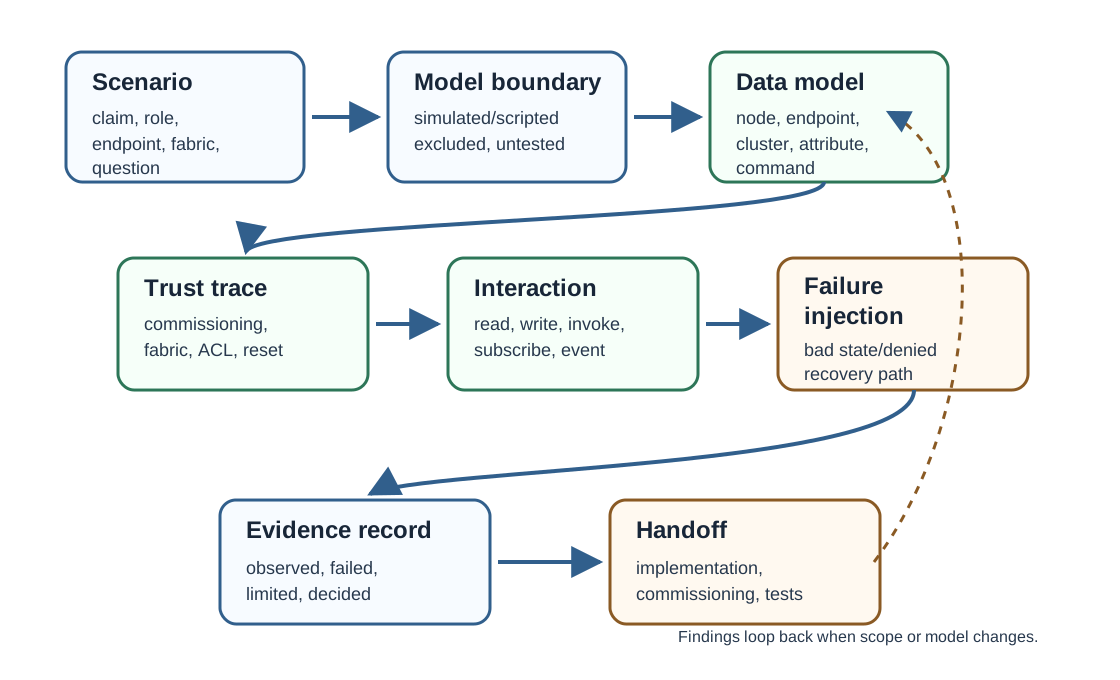
This hands-on lab uses the Wokwi ESP32 simulator to demonstrate Matter protocol concepts. Since Wokwi does not have native Matter SDK support, we simulate the Matter application layer using ESP-NOW for the physical transport, while implementing authentic Matter data models, cluster structures, device commissioning, binding, and multi-admin fabric concepts.
| Concept | Real Matter | This Simulation |
|---|---|---|
| Transport Layer | Thread/Wi-Fi/Ethernet | ESP-NOW 2.4 GHz |
| Data Model | Device Types, Endpoints, Clusters | Identical structure |
| Commissioning | PASE over BLE, CASE over IP | Simulated handshake |
| Fabric | Multi-admin with NOCs | Simulated fabric IDs |
| Binding | Node binding table | Endpoint-to-endpoint links |
| Clusters | Standard Matter clusters | On/Off, Level Control, Descriptor |
| Interaction | Read, Write, Subscribe, Invoke | Command/Response pattern |
68.4 Lab Architecture
The simulation creates a Matter network with four ESP32 devices representing a typical smart home setup:
68.5 Embedded Wokwi Simulator
How to Use This Simulator
- Click the green Play button to start the simulation
- Watch the Serial Monitor for detailed Matter protocol logs
- Copy the code below into the simulator to run the full demonstration
- Press BOOT button on Controller A to commission devices
- Press BOOT button on Controller B to join existing fabric (multi-admin)
- Press BOOT button on Smart Switch to toggle the bound light
Simulator Setup Instructions
Since Wokwi does not persist embedded projects, copy the complete Matter simulation code below into the simulator. For a multi-node simulation, open multiple browser tabs with separate Wokwi instances.
Quick Start: Copy the code, set NODE_TYPE to match the role (0 = Controller A, 1 = Controller B, 2 = Dimmable Light, 3 = Smart Switch), and run the simulation.
68.6 Matter Device Architecture
Before running the simulation, understand how Matter organizes device capabilities:
Key Matter Concepts:
- Device Type: Defines what the device is (light, lock, thermostat)
- Endpoint: A logical device within a physical device (e.g., dual outlet has 2 endpoints)
- Cluster: A collection of related attributes and commands (On/Off, Level Control)
- Attribute: A data value that can be read/written (CurrentLevel, OnOff state)
- Command: An action that can be invoked (On, Off, MoveToLevel)
68.6.1 Matter Data Model Structure
Key concepts:
- Device: Physical hardware (ESP32 in our simulation)
- Endpoint: Logical device within physical device (Endpoint 0 = root, Endpoint 1+ = application)
- Cluster: Collection of related attributes and commands (On/Off, Level Control)
- Attribute: Data value (OnOff state, CurrentLevel)
- Command: Action that can be invoked (On, Off, Toggle, MoveToLevel)
68.7 Complete Matter Simulation Code
This comprehensive code implements Matter protocol concepts including device data model, cluster interactions, commissioning, binding, and multi-admin fabric support:
// ============================================================
// Matter Protocol Simulator for ESP32
// Demonstrates: Data Model, Clusters, Commissioning, Binding, Multi-Admin
// Uses ESP-NOW as transport layer to simulate Thread/Wi-Fi
// ============================================================
#include <WiFi.h>
#include <esp_now.h>
#include <esp_wifi.h>
// ============ NODE CONFIGURATION ============
// Change this for each ESP32 in the simulation:
// 0 = Controller A (Google Home simulation)
// 1 = Controller B (Apple Home simulation)
// 2 = Dimmable Light (Matter Light Device Type)
// 3 = Smart Switch (Matter On/Off Light Switch)
#define NODE_TYPE 2
// ============ MATTER CONSTANTS ============
// Cluster IDs (from Matter Specification)
#define CLUSTER_ON_OFF 0x0006
#define CLUSTER_LEVEL_CONTROL 0x0008
#define CLUSTER_DESCRIPTOR 0x001D
#define CLUSTER_BINDING 0x001E
#define CLUSTER_BASIC_INFO 0x0028
// Attribute IDs
#define ATTR_ON_OFF 0x0000 // On/Off cluster
#define ATTR_CURRENT_LEVEL 0x0000 // Level Control cluster
#define ATTR_DEVICE_TYPE_LIST 0x0000 // Descriptor cluster
#define ATTR_SERVER_LIST 0x0001 // Descriptor cluster
#define ATTR_CLIENT_LIST 0x0002 // Descriptor cluster
// Command IDs
#define CMD_OFF 0x00
#define CMD_ON 0x01
#define CMD_TOGGLE 0x02
#define CMD_MOVE_TO_LEVEL 0x00
#define CMD_MOVE 0x01
#define CMD_STEP 0x02
// Device Types (from Matter Specification)
#define DEVICE_TYPE_DIMMABLE_LIGHT 0x0101
#define DEVICE_TYPE_ON_OFF_SWITCH 0x0103
#define DEVICE_TYPE_ROOT_NODE 0x0016
// Interaction Types
#define INTERACTION_READ 0x01
#define INTERACTION_WRITE 0x02
#define INTERACTION_SUBSCRIBE 0x03
#define INTERACTION_INVOKE 0x04
#define INTERACTION_REPORT 0x05
// Commissioning States
#define COMM_STATE_IDLE 0x00
#define COMM_STATE_ADVERTISING 0x01
#define COMM_STATE_PASE 0x02
#define COMM_STATE_CASE 0x03
#define COMM_STATE_OPERATIONAL 0x04
// ============ MATTER DATA STRUCTURES ============
// Endpoint Structure
typedef struct {
uint16_t endpointId;
uint16_t deviceType;
uint16_t serverClusters[10];
uint8_t serverClusterCount;
uint16_t clientClusters[10];
uint8_t clientClusterCount;
} MatterEndpoint_t;
// Cluster Attribute
typedef struct {
uint16_t attributeId;
uint8_t dataType;
uint32_t value;
bool reportable;
uint32_t lastReportTime;
} ClusterAttribute_t;
// Binding Entry
typedef struct {
uint64_t targetNodeId;
uint16_t targetEndpoint;
uint16_t clusterId;
bool valid;
} BindingEntry_t;
// Fabric Entry (Multi-Admin)
typedef struct {
uint16_t fabricId;
uint64_t rootPublicKey; // Simulated NOC
uint8_t fabricLabel[32];
bool valid;
} FabricEntry_t;
// Matter Frame (Interaction Model)
typedef struct __attribute__((packed)) {
uint8_t interactionType;
uint64_t sourceNodeId;
uint64_t destNodeId;
uint16_t sourceEndpoint;
uint16_t destEndpoint;
uint16_t clusterId;
uint16_t attributeOrCommandId;
uint32_t value;
uint16_t fabricId;
uint8_t transactionId;
} MatterFrame_t;
// Commissioning Frame
typedef struct __attribute__((packed)) {
uint8_t messageType; // 0=Announce, 1=PASE_Req, 2=PASE_Resp, 3=Commission, 4=Ack
uint64_t nodeId;
uint16_t vendorId;
uint16_t productId;
uint32_t setupPasscode; // For PASE (in real Matter, this goes through SPAKE2+)
uint16_t fabricId;
uint8_t deviceName[32];
} CommissioningFrame_t;
// ============ DEVICE STATE ============
// Light Device State
struct LightState {
bool onOff;
uint8_t currentLevel; // 0-254
uint8_t targetLevel;
uint16_t transitionTime;
} lightState;
// Node State
struct NodeState {
uint64_t nodeId;
uint16_t vendorId;
uint16_t productId;
uint8_t deviceName[32];
uint8_t commissioningState;
uint32_t setupPasscode;
// Fabrics (Multi-Admin support)
FabricEntry_t fabrics[5];
uint8_t fabricCount;
// Endpoints
MatterEndpoint_t endpoints[5];
uint8_t endpointCount;
// Bindings
BindingEntry_t bindings[10];
uint8_t bindingCount;
// Subscription tracking
uint64_t subscribers[10];
uint8_t subscriberCount;
} node;
// Controller State
struct ControllerState {
uint16_t fabricId;
uint64_t commissionedNodes[10];
uint8_t commissionedCount;
uint8_t pendingTransactionId;
} controller;
// ============ ESP-NOW TRANSPORT ============
uint8_t broadcastMAC[] = {0xFF, 0xFF, 0xFF, 0xFF, 0xFF, 0xFF};
// ============ HARDWARE ============
#define LED_BUILTIN 2
#define BUTTON_PIN 0 // BOOT button
// ============ HELPER FUNCTIONS ============
void printHex64(uint64_t val) {
Serial.printf("%08X%08X", (uint32_t)(val >> 32), (uint32_t)val);
}
const char* getInteractionName(uint8_t type) {
switch(type) {
case INTERACTION_READ: return "Read";
case INTERACTION_WRITE: return "Write";
case INTERACTION_SUBSCRIBE: return "Subscribe";
case INTERACTION_INVOKE: return "Invoke";
case INTERACTION_REPORT: return "Report";
default: return "Unknown";
}
}
const char* getClusterName(uint16_t clusterId) {
switch(clusterId) {
case CLUSTER_ON_OFF: return "On/Off";
case CLUSTER_LEVEL_CONTROL: return "Level Control";
case CLUSTER_DESCRIPTOR: return "Descriptor";
case CLUSTER_BINDING: return "Binding";
case CLUSTER_BASIC_INFO: return "Basic Information";
default: return "Unknown";
}
}
const char* getCommandName(uint16_t clusterId, uint16_t cmdId) {
if (clusterId == CLUSTER_ON_OFF) {
switch(cmdId) {
case CMD_OFF: return "Off";
case CMD_ON: return "On";
case CMD_TOGGLE: return "Toggle";
}
} else if (clusterId == CLUSTER_LEVEL_CONTROL) {
switch(cmdId) {
case CMD_MOVE_TO_LEVEL: return "MoveToLevel";
case CMD_MOVE: return "Move";
case CMD_STEP: return "Step";
}
}
return "Unknown";
}
// ============ MATTER DATA MODEL SETUP ============
void setupDimmableLightEndpoints() {
// Endpoint 0: Root Node (required)
node.endpoints[0].endpointId = 0;
node.endpoints[0].deviceType = DEVICE_TYPE_ROOT_NODE;
node.endpoints[0].serverClusters[0] = CLUSTER_DESCRIPTOR;
node.endpoints[0].serverClusters[1] = CLUSTER_BASIC_INFO;
node.endpoints[0].serverClusterCount = 2;
node.endpoints[0].clientClusterCount = 0;
// Endpoint 1: Dimmable Light
node.endpoints[1].endpointId = 1;
node.endpoints[1].deviceType = DEVICE_TYPE_DIMMABLE_LIGHT;
node.endpoints[1].serverClusters[0] = CLUSTER_ON_OFF;
node.endpoints[1].serverClusters[1] = CLUSTER_LEVEL_CONTROL;
node.endpoints[1].serverClusters[2] = CLUSTER_DESCRIPTOR;
node.endpoints[1].serverClusterCount = 3;
node.endpoints[1].clientClusterCount = 0;
node.endpointCount = 2;
// Initialize light state
lightState.onOff = false;
lightState.currentLevel = 254;
lightState.targetLevel = 254;
Serial.println("[MATTER] Dimmable Light data model initialized");
Serial.println(" Endpoint 0: Root Node (Descriptor, Basic Info)");
Serial.println(" Endpoint 1: Dimmable Light (On/Off, Level Control)");
}
void setupOnOffSwitchEndpoints() {
// Endpoint 0: Root Node
node.endpoints[0].endpointId = 0;
node.endpoints[0].deviceType = DEVICE_TYPE_ROOT_NODE;
node.endpoints[0].serverClusters[0] = CLUSTER_DESCRIPTOR;
node.endpoints[0].serverClusters[1] = CLUSTER_BINDING;
node.endpoints[0].serverClusterCount = 2;
node.endpoints[0].clientClusterCount = 0;
// Endpoint 1: On/Off Light Switch
node.endpoints[1].endpointId = 1;
node.endpoints[1].deviceType = DEVICE_TYPE_ON_OFF_SWITCH;
node.endpoints[1].serverClusters[0] = CLUSTER_DESCRIPTOR;
node.endpoints[1].serverClusterCount = 1;
node.endpoints[1].clientClusters[0] = CLUSTER_ON_OFF; // Client cluster!
node.endpoints[1].clientClusterCount = 1;
node.endpointCount = 2;
Serial.println("[MATTER] On/Off Switch data model initialized");
Serial.println(" Endpoint 0: Root Node (Descriptor, Binding)");
Serial.println(" Endpoint 1: On/Off Switch (On/Off Client)");
}
void setupControllerEndpoints() {
// Controller acts as commissioner and client for all clusters
node.endpoints[0].endpointId = 0;
node.endpoints[0].deviceType = DEVICE_TYPE_ROOT_NODE;
node.endpoints[0].serverClusterCount = 0;
node.endpoints[0].clientClusters[0] = CLUSTER_ON_OFF;
node.endpoints[0].clientClusters[1] = CLUSTER_LEVEL_CONTROL;
node.endpoints[0].clientClusters[2] = CLUSTER_BINDING;
node.endpoints[0].clientClusterCount = 3;
node.endpointCount = 1;
Serial.printf("[MATTER] Controller initialized (Fabric ID: 0x%04X)\n", controller.fabricId);
}
// ============ COMMISSIONING ============
void startAdvertising() {
node.commissioningState = COMM_STATE_ADVERTISING;
CommissioningFrame_t frame;
frame.messageType = 0; // Announce
frame.nodeId = node.nodeId;
frame.vendorId = node.vendorId;
frame.productId = node.productId;
frame.setupPasscode = node.setupPasscode;
frame.fabricId = 0; // Not yet commissioned
memcpy(frame.deviceName, node.deviceName, 32);
Serial.println("\n[COMMISSIONING] Starting device advertisement (simulated mDNS)");
Serial.printf(" Node ID: 0x%llX\n", node.nodeId);
Serial.printf(" Setup Code: %08d\n", node.setupPasscode);
Serial.println(" State: ADVERTISING - Waiting for controller...");
esp_now_send(broadcastMAC, (uint8_t*)&frame, sizeof(frame));
}
void sendPASERequest(uint64_t targetNodeId, uint32_t passcode) {
CommissioningFrame_t frame;
frame.messageType = 1; // PASE Request
frame.nodeId = node.nodeId;
frame.setupPasscode = passcode;
frame.fabricId = controller.fabricId;
Serial.println("\n[COMMISSIONING] Sending PASE request (simulated SPAKE2+)");
Serial.printf(" Target: 0x%llX\n", targetNodeId);
Serial.printf(" Passcode: %08d\n", passcode);
esp_now_send(broadcastMAC, (uint8_t*)&frame, sizeof(frame));
}
void handleCommissioningFrame(CommissioningFrame_t* frame, const uint8_t* senderMAC) {
switch(frame->messageType) {
case 0: // Announce (device advertising)
if (NODE_TYPE <= 1) { // Controllers
Serial.println("\n[DISCOVERY] Discovered Matter device:");
Serial.printf(" Node ID: 0x%llX\n", frame->nodeId);
Serial.printf(" Device: %s\n", frame->deviceName);
Serial.printf(" Vendor: 0x%04X, Product: 0x%04X\n",
frame->vendorId, frame->productId);
// Auto-commission for simulation
if (controller.commissionedCount < 10) {
Serial.println("\n[COMMISSIONING] Initiating PASE with discovered device...");
sendPASERequest(frame->nodeId, frame->setupPasscode);
}
}
break;
case 1: // PASE Request
if (NODE_TYPE >= 2) { // Devices
if (frame->setupPasscode == node.setupPasscode) {
Serial.println("\n[COMMISSIONING] PASE request received - passcode verified!");
node.commissioningState = COMM_STATE_PASE;
// Send PASE response
CommissioningFrame_t response;
response.messageType = 2; // PASE Response
response.nodeId = node.nodeId;
response.fabricId = frame->fabricId;
esp_now_send(broadcastMAC, (uint8_t*)&response, sizeof(response));
Serial.printf(" Joining Fabric: 0x%04X\n", frame->fabricId);
} else {
Serial.println("\n[COMMISSIONING] PASE failed - invalid passcode!");
}
}
break;
case 2: // PASE Response
if (NODE_TYPE <= 1) { // Controllers
Serial.println("\n[COMMISSIONING] PASE successful!");
Serial.println(" Issuing Node Operational Certificate (NOC)...");
// Send commission complete
CommissioningFrame_t complete;
complete.messageType = 3; // Commission
complete.nodeId = frame->nodeId;
complete.fabricId = controller.fabricId;
esp_now_send(broadcastMAC, (uint8_t*)&complete, sizeof(complete));
// Track commissioned device
controller.commissionedNodes[controller.commissionedCount++] = frame->nodeId;
Serial.printf(" Device 0x%llX commissioned to Fabric 0x%04X\n",
frame->nodeId, controller.fabricId);
}
break;
case 3: // Commission complete
if (NODE_TYPE >= 2 && frame->nodeId == node.nodeId) {
Serial.println("\n[COMMISSIONING] Commission complete!");
Serial.printf(" Now operational on Fabric 0x%04X\n", frame->fabricId);
// Add fabric to device
if (node.fabricCount < 5) {
node.fabrics[node.fabricCount].fabricId = frame->fabricId;
node.fabrics[node.fabricCount].valid = true;
sprintf((char*)node.fabrics[node.fabricCount].fabricLabel,
"Fabric_%04X", frame->fabricId);
node.fabricCount++;
Serial.printf(" Total fabrics: %d (Multi-Admin enabled)\n",
node.fabricCount);
}
node.commissioningState = COMM_STATE_OPERATIONAL;
// Send acknowledgment
CommissioningFrame_t ack;
ack.messageType = 4;
ack.nodeId = node.nodeId;
ack.fabricId = frame->fabricId;
esp_now_send(broadcastMAC, (uint8_t*)&ack, sizeof(ack));
}
break;
case 4: // Acknowledgment
if (NODE_TYPE <= 1) {
Serial.printf("\n[COMMISSIONING] Device 0x%llX acknowledged on Fabric 0x%04X\n",
frame->nodeId, frame->fabricId);
Serial.println(" Device is now fully operational!");
}
break;
}
}
// ============ CLUSTER OPERATIONS ============
void handleOnOffCommand(uint8_t command, uint16_t fabricId) {
Serial.printf("\n[CLUSTER] On/Off command received: %s (Fabric: 0x%04X)\n",
getCommandName(CLUSTER_ON_OFF, command), fabricId);
bool previousState = lightState.onOff;
switch(command) {
case CMD_OFF:
lightState.onOff = false;
break;
case CMD_ON:
lightState.onOff = true;
break;
case CMD_TOGGLE:
lightState.onOff = !lightState.onOff;
break;
}
// Update physical LED
digitalWrite(LED_BUILTIN, lightState.onOff ? HIGH : LOW);
Serial.printf(" Light state: %s -> %s\n",
previousState ? "ON" : "OFF",
lightState.onOff ? "ON" : "OFF");
// Report to all subscribers (all fabrics)
reportAttributeChange(CLUSTER_ON_OFF, ATTR_ON_OFF, lightState.onOff);
}
void handleLevelCommand(uint8_t command, uint8_t level, uint16_t transitionTime) {
Serial.printf("\n[CLUSTER] Level Control command: %s\n",
getCommandName(CLUSTER_LEVEL_CONTROL, command));
switch(command) {
case CMD_MOVE_TO_LEVEL:
lightState.targetLevel = level;
lightState.transitionTime = transitionTime;
Serial.printf(" Target level: %d (transition: %dms)\n",
level, transitionTime * 100);
break;
}
// Simulate instant transition for demo
lightState.currentLevel = lightState.targetLevel;
// Adjust LED brightness (PWM would be used in real implementation)
if (lightState.onOff) {
analogWrite(LED_BUILTIN, lightState.currentLevel);
}
reportAttributeChange(CLUSTER_LEVEL_CONTROL, ATTR_CURRENT_LEVEL, lightState.currentLevel);
}
void reportAttributeChange(uint16_t clusterId, uint16_t attrId, uint32_t value) {
MatterFrame_t report;
report.interactionType = INTERACTION_REPORT;
report.sourceNodeId = node.nodeId;
report.sourceEndpoint = 1;
report.clusterId = clusterId;
report.attributeOrCommandId = attrId;
report.value = value;
Serial.printf("[REPORT] Attribute change: %s.%s = %lu\n",
getClusterName(clusterId),
attrId == 0 ? "Primary" : "Secondary",
value);
Serial.printf(" Broadcasting to all fabrics (%d)\n", node.fabricCount);
// Broadcast to all fabrics
for (int i = 0; i < node.fabricCount; i++) {
report.fabricId = node.fabrics[i].fabricId;
esp_now_send(broadcastMAC, (uint8_t*)&report, sizeof(report));
}
}
// ============ BINDING ============
void addBinding(uint64_t targetNodeId, uint16_t targetEndpoint, uint16_t clusterId) {
if (node.bindingCount >= 10) {
Serial.println("[BINDING] Error: Binding table full!");
return;
}
node.bindings[node.bindingCount].targetNodeId = targetNodeId;
node.bindings[node.bindingCount].targetEndpoint = targetEndpoint;
node.bindings[node.bindingCount].clusterId = clusterId;
node.bindings[node.bindingCount].valid = true;
node.bindingCount++;
Serial.printf("\n[BINDING] Added binding:\n");
Serial.printf(" Target Node: 0x%llX\n", targetNodeId);
Serial.printf(" Target Endpoint: %d\n", targetEndpoint);
Serial.printf(" Cluster: %s (0x%04X)\n", getClusterName(clusterId), clusterId);
Serial.printf(" Total bindings: %d\n", node.bindingCount);
}
void sendBoundCommand(uint8_t command) {
if (node.bindingCount == 0) {
Serial.println("\n[BINDING] No bindings configured - command not sent");
return;
}
Serial.printf("\n[BINDING] Sending command to %d bound device(s):\n", node.bindingCount);
for (int i = 0; i < node.bindingCount; i++) {
if (!node.bindings[i].valid) continue;
MatterFrame_t frame;
frame.interactionType = INTERACTION_INVOKE;
frame.sourceNodeId = node.nodeId;
frame.destNodeId = node.bindings[i].targetNodeId;
frame.sourceEndpoint = 1;
frame.destEndpoint = node.bindings[i].targetEndpoint;
frame.clusterId = node.bindings[i].clusterId;
frame.attributeOrCommandId = command;
frame.value = 0;
frame.fabricId = node.fabrics[0].fabricId; // Use first fabric
frame.transactionId = random(256);
Serial.printf(" -> Node 0x%llX, Endpoint %d, Cmd: %s\n",
node.bindings[i].targetNodeId,
node.bindings[i].targetEndpoint,
getCommandName(node.bindings[i].clusterId, command));
esp_now_send(broadcastMAC, (uint8_t*)&frame, sizeof(frame));
}
}
// ============ MATTER FRAME HANDLING ============
void handleMatterFrame(MatterFrame_t* frame, const uint8_t* senderMAC) {
// Check if frame is for this node
if (frame->destNodeId != 0 && frame->destNodeId != node.nodeId) {
return; // Not for us
}
Serial.printf("\n[INTERACTION] %s from Node 0x%llX (Fabric: 0x%04X)\n",
getInteractionName(frame->interactionType),
frame->sourceNodeId, frame->fabricId);
Serial.printf(" Cluster: %s, Endpoint: %d\n",
getClusterName(frame->clusterId), frame->destEndpoint);
switch(frame->interactionType) {
case INTERACTION_INVOKE:
// Handle command invocation
if (frame->clusterId == CLUSTER_ON_OFF) {
handleOnOffCommand(frame->attributeOrCommandId, frame->fabricId);
} else if (frame->clusterId == CLUSTER_LEVEL_CONTROL) {
handleLevelCommand(frame->attributeOrCommandId, frame->value & 0xFF,
(frame->value >> 8) & 0xFFFF);
}
break;
case INTERACTION_READ:
// Handle attribute read
{
MatterFrame_t response;
response.interactionType = INTERACTION_REPORT;
response.sourceNodeId = node.nodeId;
response.destNodeId = frame->sourceNodeId;
response.clusterId = frame->clusterId;
response.attributeOrCommandId = frame->attributeOrCommandId;
response.fabricId = frame->fabricId;
if (frame->clusterId == CLUSTER_ON_OFF && frame->attributeOrCommandId == ATTR_ON_OFF) {
response.value = lightState.onOff;
} else if (frame->clusterId == CLUSTER_LEVEL_CONTROL) {
response.value = lightState.currentLevel;
}
esp_now_send(broadcastMAC, (uint8_t*)&response, sizeof(response));
Serial.printf(" Responded with value: %lu\n", response.value);
}
break;
case INTERACTION_SUBSCRIBE:
// Add to subscriber list
if (node.subscriberCount < 10) {
node.subscribers[node.subscriberCount++] = frame->sourceNodeId;
Serial.printf(" Added subscriber: 0x%llX (total: %d)\n",
frame->sourceNodeId, node.subscriberCount);
}
break;
case INTERACTION_REPORT:
// Handle incoming report (for controllers)
Serial.printf(" Received report: %s = %lu\n",
getClusterName(frame->clusterId), frame->value);
break;
}
}
// ============ ESP-NOW CALLBACKS ============
void OnDataRecv(const uint8_t* mac, const uint8_t* data, int len) {
if (len == sizeof(CommissioningFrame_t)) {
handleCommissioningFrame((CommissioningFrame_t*)data, mac);
} else if (len == sizeof(MatterFrame_t)) {
handleMatterFrame((MatterFrame_t*)data, mac);
}
}
void OnDataSent(const uint8_t* mac, esp_now_send_status_t status) {
// Silent callback - reduce serial noise
}
// ============ SETUP ============
void setup() {
Serial.begin(115200);
delay(1000);
Serial.println("\n============================================");
Serial.println(" MATTER PROTOCOL SIMULATOR");
Serial.println("============================================\n");
// Initialize hardware
pinMode(LED_BUILTIN, OUTPUT);
pinMode(BUTTON_PIN, INPUT_PULLUP);
// Initialize WiFi in station mode for ESP-NOW
WiFi.mode(WIFI_STA);
WiFi.disconnect();
// Initialize ESP-NOW
if (esp_now_init() != ESP_OK) {
Serial.println("[ERROR] ESP-NOW initialization failed!");
return;
}
esp_now_register_recv_cb(OnDataRecv);
esp_now_register_send_cb(OnDataSent);
// Add broadcast peer
esp_now_peer_info_t peerInfo = {};
memcpy(peerInfo.peer_addr, broadcastMAC, 6);
peerInfo.channel = 0;
peerInfo.encrypt = false;
esp_now_add_peer(&peerInfo);
// Configure based on node type
switch(NODE_TYPE) {
case 0: // Controller A (Google Home)
node.nodeId = 0x0000000000000001;
controller.fabricId = 0x0001;
strcpy((char*)node.deviceName, "Controller_A");
setupControllerEndpoints();
Serial.println("[CONFIG] Running as: Controller A (Google Home simulation)");
Serial.printf(" Fabric ID: 0x%04X\n", controller.fabricId);
Serial.println("\n[HELP] Press BOOT button to start commissioning...\n");
break;
case 1: // Controller B (Apple Home)
node.nodeId = 0x0000000000000002;
controller.fabricId = 0x0002;
strcpy((char*)node.deviceName, "Controller_B");
setupControllerEndpoints();
Serial.println("[CONFIG] Running as: Controller B (Apple Home simulation)");
Serial.printf(" Fabric ID: 0x%04X\n", controller.fabricId);
Serial.println("\n[HELP] Press BOOT button to join device as second admin...\n");
break;
case 2: // Dimmable Light
node.nodeId = 0x0000000000001234;
node.vendorId = 0xFFF1;
node.productId = 0x8001;
node.setupPasscode = 20202021; // Default Matter test passcode
strcpy((char*)node.deviceName, "Dimmable_Light");
setupDimmableLightEndpoints();
Serial.println("[CONFIG] Running as: Dimmable Light");
Serial.printf(" Node ID: 0x%llX\n", node.nodeId);
Serial.printf(" Setup Passcode: %08d\n", node.setupPasscode);
Serial.println("\n[HELP] Press BOOT button to start advertising...\n");
break;
case 3: // Smart Switch
node.nodeId = 0x0000000000005678;
node.vendorId = 0xFFF1;
node.productId = 0x8002;
node.setupPasscode = 20202022;
strcpy((char*)node.deviceName, "Smart_Switch");
setupOnOffSwitchEndpoints();
// Pre-configure binding to light for demo
addBinding(0x0000000000001234, 1, CLUSTER_ON_OFF);
Serial.println("[CONFIG] Running as: Smart Switch");
Serial.printf(" Node ID: 0x%llX\n", node.nodeId);
Serial.println(" Pre-bound to Dimmable Light (0x1234)");
Serial.println("\n[HELP] Press BOOT button to toggle bound light...\n");
break;
}
Serial.println("============================================\n");
}
// ============ MAIN LOOP ============
bool lastButtonState = HIGH;
unsigned long lastButtonPress = 0;
unsigned long lastStatusPrint = 0;
void loop() {
// Button handling with debounce
bool buttonState = digitalRead(BUTTON_PIN);
if (buttonState == LOW && lastButtonState == HIGH && millis() - lastButtonPress > 200) {
lastButtonPress = millis();
switch(NODE_TYPE) {
case 0: // Controller A - listen for devices
case 1: // Controller B - join existing fabric
Serial.println("\n[ACTION] Scanning for Matter devices...");
// Controllers just listen for announcements
break;
case 2: // Dimmable Light
if (node.commissioningState == COMM_STATE_IDLE) {
startAdvertising();
} else {
// Toggle light locally
handleOnOffCommand(CMD_TOGGLE, node.fabrics[0].fabricId);
}
break;
case 3: // Smart Switch
if (node.commissioningState == COMM_STATE_OPERATIONAL || node.bindingCount > 0) {
// Send toggle to bound light
static uint8_t toggleCmd = CMD_ON;
sendBoundCommand(toggleCmd);
toggleCmd = (toggleCmd == CMD_ON) ? CMD_OFF : CMD_ON;
} else {
startAdvertising();
}
break;
}
}
lastButtonState = buttonState;
// Periodic status for devices
if (NODE_TYPE == 2 && millis() - lastStatusPrint > 10000) {
lastStatusPrint = millis();
Serial.println("\n[STATUS] Light Device Status:");
Serial.printf(" State: %s, Level: %d%%\n",
lightState.onOff ? "ON" : "OFF",
(lightState.currentLevel * 100) / 254);
Serial.printf(" Fabrics: %d, Subscribers: %d\n",
node.fabricCount, node.subscriberCount);
for (int i = 0; i < node.fabricCount; i++) {
Serial.printf(" - Fabric 0x%04X: %s\n",
node.fabrics[i].fabricId,
node.fabrics[i].fabricLabel);
}
}
// Re-advertise if not commissioned
static unsigned long lastAdvert = 0;
if (NODE_TYPE >= 2 && node.commissioningState == COMM_STATE_ADVERTISING) {
if (millis() - lastAdvert > 5000) {
lastAdvert = millis();
startAdvertising();
}
}
delay(10);
}68.8 Step-by-Step Instructions
68.8.1 Step 1: Understand the Matter Data Model
Before running the simulation, understand how Matter organizes device capabilities. The simulation implements the same data model structure as real Matter devices.
68.8.2 Step 2: Run the Dimmable Light
- Open Wokwi simulator
- Copy the simulation code above
- Ensure
NODE_TYPEis set to2(Dimmable Light) - Click Play and observe Serial Monitor output
- Press BOOT button to start advertising
- You should see commissioning messages in the Serial Monitor
68.8.3 Step 3: Run Controller A (in a second tab)
- Open a new browser tab with Wokwi
- Copy the same code
- Change
NODE_TYPEto0(Controller A) - Click Play to start
- The controller will discover and commission the light automatically
- Watch the PASE handshake and NOC issuance messages
68.8.4 Step 4: Experience Multi-Admin (third tab)
- Open another Wokwi tab
- Set
NODE_TYPEto1(Controller B) - Start the simulation
- Controller B will commission the same light to its fabric (0x0002)
- The light now belongs to TWO fabrics simultaneously!
68.8.5 Step 5: Test Device Binding (fourth tab)
- Open a fourth Wokwi tab
- Set
NODE_TYPEto3(Smart Switch) - Start the simulation
- The switch is pre-bound to the light
- Press BOOT on the switch to send Toggle commands to the light
- Watch the bound command flow in all Serial Monitors
68.9 What You’re Observing
Matter Protocol Flow Explained
Commissioning (PASE):
Light: [COMMISSIONING] Starting device advertisement (simulated mDNS)
Node ID: 0x1234, Setup Code: 20202021
Controller A: [DISCOVERY] Discovered Matter device: Dimmable_Light
[COMMISSIONING] Initiating PASE with discovered device...
Light: [COMMISSIONING] PASE request received - passcode verified!
Joining Fabric: 0x0001
Controller A: [COMMISSIONING] PASE successful! Issuing NOC...
Device 0x1234 commissioned to Fabric 0x0001
Multi-Admin (Second Fabric):
Controller B: [COMMISSIONING] Initiating PASE with device 0x1234
Light: [COMMISSIONING] Commission complete!
Now operational on Fabric 0x0002
Total fabrics: 2 (Multi-Admin enabled)
Cluster Command (Binding):
Switch: [BINDING] Sending command to 1 bound device(s):
-> Node 0x1234, Endpoint 1, Cmd: Toggle
Light: [CLUSTER] On/Off command received: Toggle (Fabric: 0x0001)
Light state: OFF -> ON
[REPORT] Attribute change: On/Off.Primary = 1
Broadcasting to all fabrics (2)
68.9.1 Knowledge Check: Commissioning Flow
68.10 Challenge Exercises
Challenge 1: Add Level Control
Modify the Smart Switch to also control brightness:
- Add a binding to
CLUSTER_LEVEL_CONTROL - Implement a
sendLevelCommand()function - Use the BOOT button to cycle through brightness levels (25%, 50%, 75%, 100%)
Hint: The handleLevelCommand() function already exists - you just need to send the appropriate frame.
Challenge 2: Implement Groups
Matter supports groupcast commands to control multiple devices simultaneously:
- Add a group ID field to the Matter frame
- Create a group binding that targets group ID 0x0001
- Modify the light to check group membership
- Send commands to the group instead of individual nodes
Hint: In real Matter, groups use a separate Group cluster (0x0004) and group multicast addresses.
Challenge 3: Add Scenes Support
Scenes let you save and recall device states:
- Add a
SceneEntrystructure with level and on/off state - Implement
storeScene()when button is long-pressed - Implement
recallScene()when button is short-pressed - Store scenes per-fabric (each controller has its own scenes)
Hint: Scene cluster ID is 0x0005. Scenes are stored per endpoint and per group.
68.11 Key Matter Concepts Summary
| Concept | Description | Simulation Behavior |
|---|---|---|
| Endpoint | Logical device within physical device | Endpoint 0 = root, Endpoint 1 = application |
| Cluster | Feature grouping (On/Off, Level) | Defines available attributes and commands |
| Attribute | Data value that can be read/subscribed | OnOff, CurrentLevel values stored |
| Command | Action that can be invoked | On, Off, Toggle, MoveToLevel |
| Fabric | Administrative domain (ecosystem) | Separate fabric IDs for each controller |
| Binding | Device-to-device relationship | Switch bound to light for direct control |
| Commissioning | Device onboarding process | PASE simulation with passcode exchange |
| Multi-Admin | Same device in multiple fabrics | Light controlled by both controllers |
68.12 Knowledge Check
Self-Assessment Questions
After completing this lab, you should be able to answer:
- What is the difference between an endpoint and a cluster?
- An endpoint is a logical device within a physical device (e.g., a dual-outlet has 2 endpoints). A cluster is a collection of related attributes and commands (e.g., On/Off cluster).
- Why does Matter require Endpoint 0?
- Endpoint 0 is the “root node” that contains network-wide information like supported device types, basic information, and access control. It’s mandatory for all Matter devices.
- How does multi-admin work in Matter?
- Each controller issues its own fabric credentials (NOC). A device can store multiple fabric entries, allowing it to be controlled by different ecosystems (Apple, Google, Amazon) simultaneously.
- What is binding and why is it useful?
- Binding creates a direct relationship between devices. A switch bound to a light can control it directly without going through a controller, enabling faster response and local operation.
- What happens if two controllers send conflicting commands?
- In Matter, the last command wins. There’s no conflict resolution - if Apple says “on” and Google says “off” within milliseconds, the final state depends on processing order.
68.13 Knowledge Check Questions
68.13.1 Knowledge Check: Matter Data Model
68.13.2 Knowledge Check: Multi-Admin Fabric
68.13.3 Knowledge Check: Matter Binding
Sensor Squad: Matter Protocol Simulation
Lila the LED is excited about this lab! Think of a Matter smart home like a well-organized school:
The Data Model is like a school directory: - Device = a student (the whole person) - Endpoint = what the student can do (play piano, play soccer, do math) - Cluster = specific skills within each activity (dribbling, passing, shooting for soccer) - Attributes = current status (is the student playing now? what score?) - Commands = instructions (“Start playing!” “Stop!” “Change to defense!”)
Commissioning (PASE/CASE) is like enrollment day. First, the new student shows their admission letter (PASE with passcode). Then they get a permanent student ID (CASE certificate). Now they are officially part of the school!
Max the Microcontroller explains Multi-Admin: “Our school has multiple principals – one for Apple Home, one for Google Home, one for Amazon Alexa. Lila can follow instructions from ALL of them. Each principal has their own ID system (fabric), but Lila responds to everyone.”
Sammy the Sensor describes Binding: “It is like making two students ‘buddies.’ When you press the smart switch (buddy 1), it directly tells the light (buddy 2) to turn on – no need to ask the principal (controller) first! That makes things faster and works even if the principal is out sick.”
68.14 Common Mistake: Assuming Binding Requires Controller Intervention
Common Mistake: Misunderstanding Matter Binding Architecture
The Mistake: Developers assume that when a Matter switch is bound to a light, pressing the switch sends a command to the controller (e.g., Apple Home), which then forwards the command to the light. They design systems with cloud-dependent automation logic.
Why This Happens: This mental model comes from legacy smart home systems (Zigbee, Z-Wave) where a hub/controller mediates all device interactions. Many developers initially treat Matter bindings as “controller-managed automations” rather than direct device-to-device relationships.
What Actually Happens - Direct Device Communication:
When a Matter switch is bound to a light:
- Binding establishment (one-time setup by controller):
- User: “Link bedroom switch to bedroom light”
- Controller (Apple Home) sends
AddBindingcommand to switch - Switch stores binding:
{TargetNodeId: 0x1234, TargetEndpoint: 1, ClusterId: 0x0006}(light’s node ID, endpoint, On/Off cluster) - Controller sends
AddGroupcommand to both devices to establish mesh-local addressing
- Button press interaction (happens locally, no controller):
- User presses physical button on switch
- Switch wakes from sleep (if battery-powered)
- Switch reads binding table: “Send On/Off command to Node 0x1234, Endpoint 1”
- Switch sends direct Thread message to light via mesh routing
- Light receives On/Off command, updates state, turns on physically
- Light sends attribute report to all subscribed controllers (Apple, Google, etc.)
- Controller role (passive observer):
- Controller subscribes to light’s On/Off attribute
- When light changes state (from switch press), controller receives report
- Controller updates UI: “Bedroom Light: ON”
- Controller does NOT process the switch press or forward commands
Latency Comparison:
- With binding (direct): Switch → Light via Thread mesh: 50-150 ms
- Without binding (via controller): Switch → Controller → Cloud → Controller → Light: 500-2000 ms
- Network outage impact: Binding works offline; controller-mediated fails
Real-World Example - Eve Light Switch + Philips Hue Bulb:
Incorrect mental model (controller-mediated):
[Switch] --press event--> [Apple Home Hub] --On command--> [Hue Bulb]
↑ | ↓
| (cloud) (state update)
└───────────── UI update ──────────────────────────────┘
Correct model (direct binding):
[Switch] --On/Off command (via Thread mesh)--> [Hue Bulb]
| |
| (turns on)
| |
└─────────── attribute report ───────────────────>|
↓
[Apple Home Hub]
[Google Home Hub]
(observers)
Why Binding Is Critical:
- Low latency: Direct mesh communication is 5-10× faster than cloud routing
- Offline operation: Works when internet is down or controller is unreachable
- Energy efficiency: Battery switches don’t need to maintain controller connection
- Scalability: Removes controller bottleneck for time-critical interactions
Matter Binding vs. Legacy Systems:
| System | Switch → Light Path | Latency | Offline? |
|---|---|---|---|
| Matter (binding) | Direct via Thread mesh | 50-150 ms | ✅ Yes |
| Zigbee (group) | Multicast via coordinator | 100-300 ms | ⚠️ Limited |
| Z-Wave (association) | Direct via mesh | 50-200 ms | ✅ Yes |
| Wi-Fi smart home (IFTTT) | Cloud → Cloud → Device | 1-5 seconds | ❌ No |
Key Insight: Matter binding is a distributed control mechanism, not a centralized automation. The controller’s role is to establish bindings (configure which devices talk to which) and observe state changes for UI updates, but it does NOT mediate runtime communication. This is why Matter devices can respond instantly even when controllers are offline or in another room.
Production Implication: When building Matter devices, implement binding table management and direct message sending/receiving. Don’t rely on controllers to forward commands - your device must process binding table entries and send commands autonomously.
Common Pitfalls
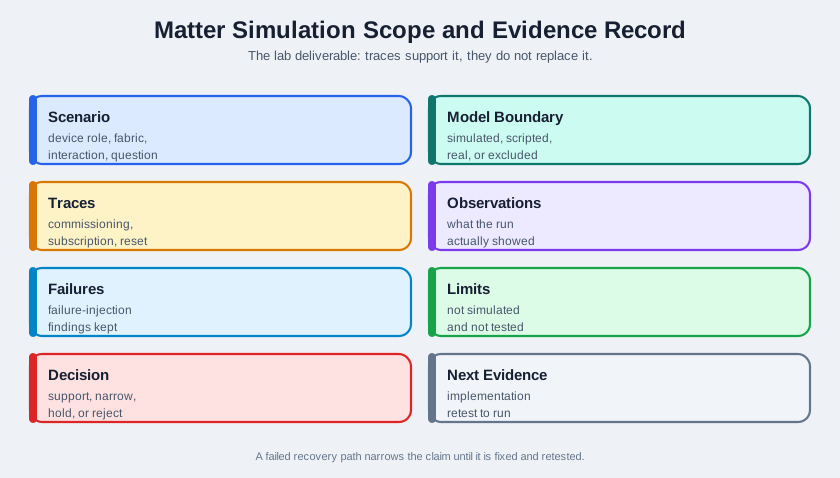
1. Treating Simulation Results as Certification Evidence
Matter chip-tool simulation tests demonstrate functionality but do not replace formal CSA certification testing. Passing all chip-tool tests is a necessary but not sufficient condition for certification.
2. Not Simulating Network Failures
Matter simulation labs that only test successful message flows miss error handling paths. Include scenarios with message loss, session expiry, and network partition to validate error recovery.
3. Running Multiple Matter Instances on the Same Machine Without Port Isolation
Multiple simulated Matter devices on one machine share the network stack and can interfere with each other’s discovery and commissioning. Use separate network namespaces or ports for each simulated device.
:
68.15 What’s Next
Now that you have experienced Matter protocol concepts hands-on, continue exploring the topics below.
| Chapter | Focus |
|---|---|
| Matter Architecture and Fabric | Protocol stack layers, fabric credential management, and security architecture |
| Matter Architecture: Interactions | Read, Write, Subscribe, and Invoke interaction model details |
| Matter Device Types and Clusters | Complete reference for standard device types, clusters, and the data model |
| Matter Implementation: SDK Setup | Setting up the connectedhomeip SDK for real Matter device development |
| Matter Implementation: Commissioning | Production commissioning flows with PASE, CASE, and certificate management |
| Thread Network Architecture | Thread as Matter’s primary mesh transport: roles, topology, and routing |