35 Matter Interaction Model

More
Depth: Practitioner
Progress saves as you read. Mark sections complete as you go; your progress appears in the sidebar.
Matter interactions are the evidence trail between a controller’s intent and a device’s accepted state change. A review should not only name Read, Write, Subscribe, Invoke, or Timed Request. It should prove the path, privilege, session, data-model target, report behavior, and failure handling that made the interaction safe for the scenario.
This chapter reviews Matter interaction evidence for advanced learners. It focuses on the interaction model, endpoint-cluster paths, subscription records, timed operations, commissioning handoffs, ACL boundaries, failure signatures, and bounded approval decisions.
35.1 Start With the Device Experience
This section: Start With the Device Experience — Picture a resident asking a smart lock to open for a visitor during a short approved window.
Bind One User Action to Its Exact Device Path
Picture a resident asking a smart lock to open for a visitor during a short approved window. The lock is online, but the request names the wrong endpoint and arrives after the window. The controller must reject it for the right reasons and leave evidence the resident can understand.
Write the action as a full path. Name the home, requesting subject, target device, endpoint, function, item or command, required right, and time bound. Keep request, reply, and visible outcome tied to one id so a later review can show where the choice was made.
Test a wrong path, weak right, expired window, repeated write, lost reply, stale update, and a device that wakes late. Check both accepted and rejected results. Reachability does not grant authority, and a sent request does not prove that the physical state changed.
Keep the lock’s local safety and manual path available when a phone or remote service fails. A delayed remote action should end safely rather than arrive after its meaning has changed.
This opening does not cover every device function or approve a lock. Practitioner turns read, write, watch, and act flows into tests. Under the Hood examines sessions, access checks, timed work, reports, retries, and the exact status behind each outcome.
Use a short release check. Is the target path exact? Is the right current? Is the time bound still open? Did the device accept or deny the act? Did the real state match? If any answer is no, do not report a good user result.
Start with a user expecting a Matter device to join, advertise, and respond through a controller without caring which vendor built each piece. Matter Interaction Model is the evidence route for deciding whether that expectation is realistic.
Keep one device story in view: commissioning, fabric membership, interaction model, transport, and certification all have to line up. The advanced details are useful when they explain where that story can break.
35.2 In 60 Seconds
This section: In 60 Seconds
- Matter controllers use Read, Write, Subscribe, and Invoke operations against paths in the data model.
- Timed Request is a protective interaction pattern used when a following Write or Invoke must arrive within a short accepted window.
- Every accepted interaction should be tied to an endpoint, cluster, attribute, command, or event path, not only to a device name.
- Subscribe is not just “push updates.” It needs min/max interval evidence, report source, lifecycle state, and cancellation behavior.
- Commissioning moves a device from discovery and PASE into operational credentials, CASE sessions, ACLs, and first verified interactions.
- A clean review separates transport reachability from Matter authorization. A reachable device can still reject an operation correctly.
- Approval should state which interaction type, fabric, controller subject, target path, privilege, and evidence window were checked.
35.3 Learning Objectives
This section: Learning Objectives
By the end of this chapter, you will be able to:
- Review Matter interaction evidence using data-model paths, session state, ACL privilege, and response status.
- Distinguish Read, Write, Subscribe, Invoke, and Timed Request evidence without collapsing them into generic message exchange.
- Evaluate subscription choices for constrained and mains-powered devices without relying on brittle traffic arithmetic.
- Trace commissioning from discovery through operational interaction approval.
- Diagnose common interaction failures such as wrong path, wrong privilege, stale subscription, timed-window mismatch, and commissioning handoff confusion.
35.4 Quick Check: Matter Interaction
This section: Quick Check: Matter Interaction
35.5 Prerequisites
This section: Prerequisites
This chapter assumes you have reviewed:
- Matter Protocol Stack and Data Model, for endpoints, clusters, attributes, commands, and events.
- Matter Architecture, for nodes, fabrics, controllers, bridges, and administrative boundaries.
- Matter Fabric Security Evidence, for PASE, CASE, operational certificates, and ACL records.
- Thread Security and Matter, for the network layer beneath Matter over Thread.
- 6LoWPAN RPL Routing Evidence, for constrained IPv6 path evidence below application interactions.
35.6 Interaction Review Claim
This section: Interaction Review Claim — The claim is intentionally narrow.
Use a claim that can be checked against records:
Matter interaction review claim: A Matter interaction is ready for the reviewed scenario only when the controller subject, fabric, CASE or commissioning session, target path, required privilege, interaction type, response status, subscription or timed-window behavior, and retest trigger all support the same bounded decision.
The claim is intentionally narrow. Evidence that a phone can turn on one light does not prove a management write, a door-lock command, a second fabric, a sleepy sensor subscription, or a group command path.
35.7 Interaction Evidence Map
This section: Interaction Evidence Map — The first figure shows how an interaction record should connect intent to an approval decision.
The first figure shows how an interaction record should connect intent to an approval decision.
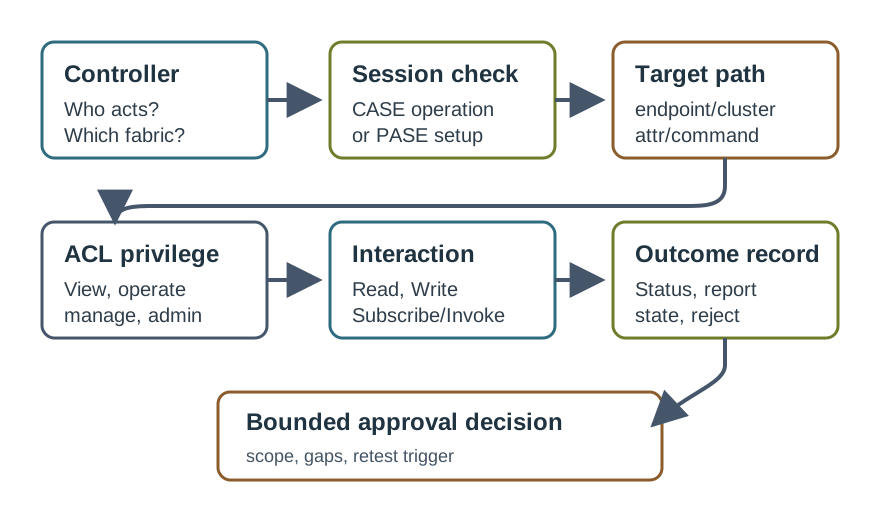
This map prevents a common review mistake: treating a successful app screen as proof that Matter behavior is correct. The approval needs the device path, privilege, protocol state, and outcome record that explain why the interaction succeeded or failed.
35.8 Evidence Families
This section: Evidence Families — Matter interaction review uses several evidence families.
Matter interaction review uses several evidence families. Missing evidence usually means the decision should stay open.
35.9 Interaction Types as Review Objects
This section: Interaction Types as Review Objects — Matter interaction types are not interchangeable.
Matter interaction types are not interchangeable. Each one asks a different evidence question.
35.10 Interaction Verb Ledger
This section: Interaction Verb Ledger — The core Matter verbs map cleanly onto the data model.
The core Matter verbs map cleanly onto the data model. Reads and Writes target attributes, Invokes target commands, and Subscriptions target attributes or events that should report over time.
| Interaction | Acts on | Example evidence |
|---|---|---|
| Read | An attribute or event path | CurrentLevel returned from endpoint 1 / Level Control with response status and capture time |
| Write | A writable attribute | Target temperature accepted within constraints, followed by a confirming read or report |
| Invoke | A command on a cluster | Toggle invoked on an On/Off endpoint with command response and resulting state evidence |
| Subscribe | Attributes or events with report-on-change behavior | Initial report, change report, heartbeat report, and cancellation or loss handling |
| Timed Request | A following sensitive Write or Invoke | Timed window accepted, command sent inside the window, and late replay rejected |
This ledger keeps the review anchored to protocol behavior rather than UI wording. For example, “turn on the light” should resolve to a concrete Invoke command path, while “show me whether the light is on” should resolve to Read or Subscribe evidence for the relevant attribute.
35.11 Data-Model Path Discipline
This section: Data-Model Path Discipline — Every interaction should be anchored to a path.
Every interaction should be anchored to a path. The reviewer should be able to answer:
- Which endpoint was targeted?
- Which cluster owns the attribute, command, or event?
- Is the target an attribute to read or write, a command to invoke, or an event/report source?
- Does the device type require that cluster and target, or is it optional behavior?
- Was the response from the expected endpoint and fabric-filtered view?
Path discipline catches mistakes that product demos often hide. A bridge may expose many endpoints. A dimmable light may support On/Off and Level Control. A lock may expose state attributes and security-sensitive commands. Treating those as one generic “device command” loses the evidence that matters.
35.12 Read Evidence
This section: Read Evidence
A Read review should prove more than “the value appeared in the app.”
35.13 Write Evidence
This section: Write Evidence — A Write review should prove that a writable attribute was changed inside its allowed boundary.
A Write review should prove that a writable attribute was changed inside its allowed boundary.
35.14 Subscribe Evidence
This section: Subscribe Evidence — Subscribe is often the best interaction for current-state visibility, but only when the subscription record is bounded.
Subscribe is often the best interaction for current-state visibility, but only when the subscription record is bounded.
35.15 Subscription Report Lifecycle
This section: Subscription Report Lifecycle — Subscribe is the interaction that makes Matter efficient at scale.
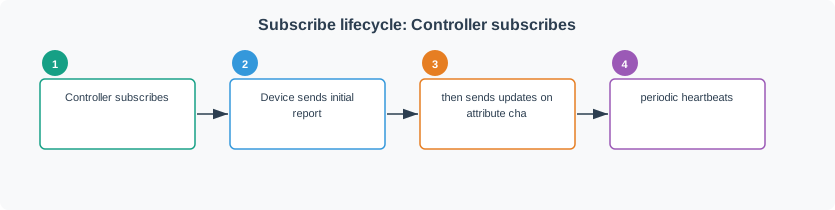
Subscribe is the interaction that makes Matter efficient at scale. If a controller kept fifty devices current by polling, it would repeatedly read values whether or not anything changed. That wastes bandwidth, wakes sleepy devices, and can flood a low-power mesh with repeated reads that mostly return the same value.
A subscription inverts that pattern. The device sends an initial report, then reports selected attribute or event changes. The minimum reporting interval rate-limits rapidly changing values, while the maximum reporting interval forces a periodic report even when nothing changed. That maximum report acts as a liveness heartbeat: if the controller does not hear from the device before the maximum interval expires, it can distinguish “unreachable” from “quiet.”
35.16 Invoke Evidence
This section: Invoke Evidence — Invoke is the command path.
Invoke is the command path. It should be reviewed as an action, not as an attribute write.
35.17 Timed Request Evidence
This section: Timed Request Evidence — Timed Request is used when the device requires a following operation to arrive inside an accepted window.
Timed Request is used when the device requires a following operation to arrive inside an accepted window. Review it as a security boundary.
35.18 Quick Interaction Check
This section: Quick Interaction Check
35.19 Commissioning Review Path
This section: Commissioning Review Path — Commissioning prepares the device for operational interactions.
Commissioning prepares the device for operational interactions. The second figure keeps commissioning evidence connected to the first approved Matter operation.
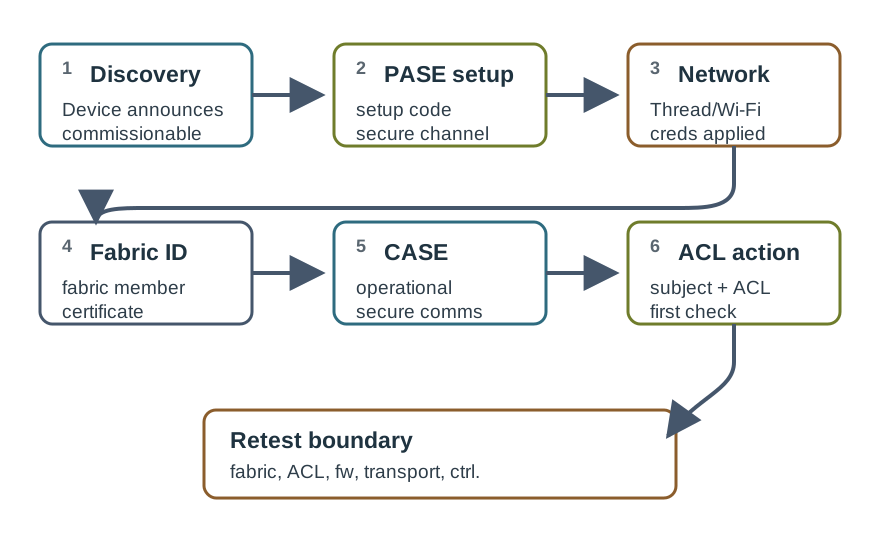
Commissioning should not be approved only because a QR code was scanned. The evidence should show how the device was found, how setup information established the commissioning session, how operational credentials were installed, which ACL entry was created, and which first interaction proves the intended operational state.
35.20 Commissioning Evidence Checkpoints
This section: Commissioning Evidence Checkpoints
Use checkpoints that match the flow:
35.21 Multi-Admin Interaction Boundaries
This section: Multi-Admin Interaction Boundaries — Multi-admin Matter deployments add interaction review work.
Multi-admin Matter deployments add interaction review work. A second ecosystem does not inherit the first fabric’s approvals.
For each fabric, record:
- Which administrator or commissioner created the fabric membership.
- Which controller subject performed the interaction.
- Which ACL entry authorized the subject and target.
- Whether the interaction used the correct fabric-filtered view.
- Whether the device accepted, rejected, or reported differently across fabrics.
- Which fabric change would require retesting the reviewed interaction.
This avoids false approval such as “the device works with one app, so it works with all ecosystems.” It may work with both, but that claim needs separate fabric and interaction evidence.
35.22 Failure Signatures
This section: Failure Signatures — Matter failures are easier to debug when the reviewer classifies the failure by evidence family.
Matter failures are easier to debug when the reviewer classifies the failure by evidence family.
35.23 Worked Review Records
This section: Worked Review Records
35.24 Record 1: Light State Looks Correct but Is Stale
This section: Record 1: Light State Looks Correct but Is Stale
Scenario: A mobile app shows a light as on after a group scene changed the room, but the device was later toggled from another controller.
Evidence found: The app had an old read value. There was no active subscription record for the On/Off path and no change report after the second controller acted.
Decision: Do not approve real-time state visibility. Require a bounded subscription record with initial report, change report, heartbeat behavior, and stale-state handling.
35.25 Record 2: Lock Command Rejected After Successful Read
This section: Record 2: Lock Command Rejected After Successful Read
Scenario: A controller reads a lock state but cannot invoke the unlock command.
Evidence found: The read path succeeded under a limited privilege, but the unlock command required stronger privilege and timed-operation evidence.
Decision: Treat rejection as expected until ACL and Timed Request evidence support the command. Do not classify the network path as failed.
35.26 Record 3: Second Ecosystem Commissioning Fails
This section: Record 3: Second Ecosystem Commissioning Fails
Scenario: A device already works in one fabric, but a second ecosystem cannot add it.
Evidence found: Operational interactions in the first fabric were healthy, but the commissioning window for the second fabric was not active and no new PASE session completed.
Decision: Keep first-fabric operation approved, but keep second-fabric onboarding open. Reopen commissioning and capture discovery, PASE, operational credential, ACL, and first interaction evidence for the second fabric.
35.27 Common Mistakes
This section: Common Mistakes
- Approving an interaction because the device is reachable over IP, without checking Matter authorization.
- Treating Read, Write, Subscribe, Invoke, and Timed Request as generic request/response traffic.
- Using one successful fabric as proof of another fabric.
- Replacing subscription evidence with polling screenshots that do not prove report lifecycle behavior.
- Ignoring rejected statuses even when the rejection is the security behavior the device should enforce.
- Approving a timed operation without checking what happens after the accepted window expires.
- Keeping tool commands in learner-facing content instead of reviewing the evidence those commands should produce.
35.28 Match the Evidence to the Interaction
This section: Match the Evidence to the Interaction
35.29 Order the Commissioning Evidence
This section: Order the Commissioning Evidence
35.30 Commissioning Decision Check
This section: Commissioning Decision Check
35.31 Review Checklist
This section: Review Checklist
Use this checklist before accepting an interaction claim:
35.32 Summary
This section: Summary — Matter interaction review is strongest when it keeps operation type, path, privilege, session, and outcome tied together.
Matter interaction review is strongest when it keeps operation type, path, privilege, session, and outcome tied together. Read proves data retrieval. Write proves constrained attribute change. Subscribe proves report lifecycle. Invoke proves command execution. Timed Request proves a protected window for sensitive operations. Commissioning evidence prepares the device for operation, but it does not replace current operational interaction evidence.
35.33 Key Takeaway
This section: Key Takeaway — Matter Interaction Evidence should map device types, clusters, attributes, commands, events, subscriptions, user behavior, and deployment evidence.
Matter Interaction Evidence should map device types, clusters, attributes, commands, events, subscriptions, user behavior, and deployment evidence.
35.34 Concept Relationships
This section: Concept Relationships
- Read and Subscribe: Read gives a point-in-time value; Subscribe maintains a report relationship with lifecycle evidence.
- Write and Invoke: Write changes writable attributes; Invoke executes commands exposed by clusters.
- Timed Request and Security-Sensitive Commands: Timed Request adds a temporal boundary to protected writes or invokes.
- PASE and CASE: PASE bootstraps commissioning before operational credentials exist; CASE protects operational interactions after commissioning.
- ACL and Interaction Outcome: ACL privilege explains why an operation is accepted or rejected.
- Fabric and Multi-Admin: Each fabric needs separate interaction evidence even when the physical device is the same.
35.35 What’s Next
This section: What’s Next
- Matter Fabric Security Evidence deepens the certificate, PASE, CASE, ACL, and multi-admin trust review behind these interactions.
- Matter Device Types and Clusters maps interaction evidence to conformance expectations for device types and clusters.
- Matter Implementation connects review records to implementation workflows.
- Matter Device Implementation and Commissioning focuses on production commissioning behavior and recovery evidence.
- Matter Testing and Certification explains how formal test evidence supports interoperability approval.
Find help
3 reviewed answers.
Where should I start in a module?
Open the module page from the sidebar to see its chapters in order. Use the module map to return to a topic you need.
Modules and pathsReviewed
What can I try when a project does not work?
Check the symptom, then work through the diagnostic steps. Keep the error message and the smallest example that reproduces it.
When you are stuckReviewed
How do interactive examples work?
Use the interactive guide to check how examples and simulations work before changing your project.
Interactive examples guideReviewed