15 Zigbee Application Profiles

More
Depth: Practitioner
Progress saves as you read. Mark sections complete as you go; your progress appears in the sidebar.
15.1 Test the Switch and Lamp Meaning
This section: Test the Switch and Lamp Meaning — Imagine a wall switch from one firm must control a lamp from another firm through a shared hub.
Imagine a wall switch from one firm must control a lamp from another firm through a shared hub. The team must decide whether both devices give the same meaning to the same action. Zigbee is a low-power wireless system for nearby devices. A gateway is a device or service that links one network or system to another.
The switch and lamp can exchange Zigbee messages yet still disagree about what an on command means. Application profiles describe endpoints, clusters, commands, and attributes; check those shared meanings and any hub bridge before promising cross-vendor control.
15.1.1 Check the Application Contract
- Which switch action must change which lamp state?
- Do both endpoints implement the needed cluster and command?
- Which profile version or optional feature changes the behaviour?
- Did the lamp actually reach the expected state through the hub?
Name both products, their profile and cluster choices, the hub path, and the observed result. Keep a failed or unsupported option explicit rather than treating a received packet as success.
15.1.2 When the Mesh Carries the Wrong Meaning
The radio and mesh can carry a message without agreeing on application meaning. The Practitioner depth reviews legacy profile boundaries and bridge evidence.
15.1.3 Before Promising Cross-Vendor Control
Press the switch and observe the lamp state, not only the send log. If the hub translated the command, record that bridge rule and its owner. A claim about this pairing should stay tied to the tested devices and options.
15.2 In 60 Seconds
This section: In 60 Seconds — Zigbee application profiles and the Zigbee Cluster Library define what a device means after it has joined the network.
Zigbee application profiles and the Zigbee Cluster Library define what a device means after it has joined the network. A routing path proves that packets can move. It does not prove that a switch, sensor, lock, light, meter, or controller shares the same application contract.
Application-profile review asks whether the device type, endpoint, cluster, command, attribute, binding, and gateway behavior all support the release claim. A mixed legacy deployment can work when a coordinator or gateway translates behavior, but that translation must be reviewed as evidence, not assumed.
15.3 Learning Objectives
This section: Learning Objectives
By the end of this chapter, you will be able to:
- Separate Zigbee network join evidence from application-profile compatibility evidence.
- Review device types, endpoints, clusters, commands, and attributes as interoperability claims.
- Identify when a gateway translation path is part of the release claim.
- Evaluate mixed legacy and Zigbee 3.0-style deployments without overclaiming universal compatibility.
- Build a profile review record with explicit retest triggers.
15.4 Quick Check: Zigbee Application
This section: Quick Check: Zigbee Application
15.5 Start With the Application Claim
This section: Start With the Application Claim — Application-profile review starts with a behavior claim.
Application-profile review starts with a behavior claim.
“These Zigbee devices are compatible” is too broad. A useful claim says what must happen:
- a switch command must control a lighting endpoint,
- a sensor report must be accepted by a controller rule,
- a scene must include the intended endpoints,
- a gateway must translate a legacy device behavior correctly,
- a commissioning path must expose the expected application clusters,
- a replacement device must preserve the same release behavior, or
- a migration must not hide unsupported commands.
The evidence should show the application contract, not only the network path.
15.6 Profiles, Clusters, and Endpoints
This section: Profiles, Clusters, and Endpoints — Application profile names the application domain and compatibility rules being used for the device behavior.
Use these terms carefully:
Application profile names the application domain and compatibility rules being used for the device behavior.
Device type describes the role exposed at the application layer, such as light, switch, sensor, thermostat, lock, or meter.
Endpoint is the addressable application surface on a device. One physical product may expose more than one endpoint.
Cluster groups related attributes and commands, such as on/off behavior, level behavior, measurement behavior, scenes, groups, or diagnostics.
Binding records a persistent relationship between a source cluster and a destination endpoint or group.
The review should connect all of these pieces to the release claim. A device can be joined, reachable, and secure while still failing the application profile contract.
At the application layer, the nesting is endpoint, cluster, then attribute or command. An endpoint, typically numbered from 1 to 240, is an addressable application surface on a device. A smart plug might expose one endpoint for the outlet and another for energy metering. A cluster is a functional block such as On/Off (0x0006), Level Control (0x0008), or Temperature Measurement (0x0402). Attributes hold state; commands request actions.
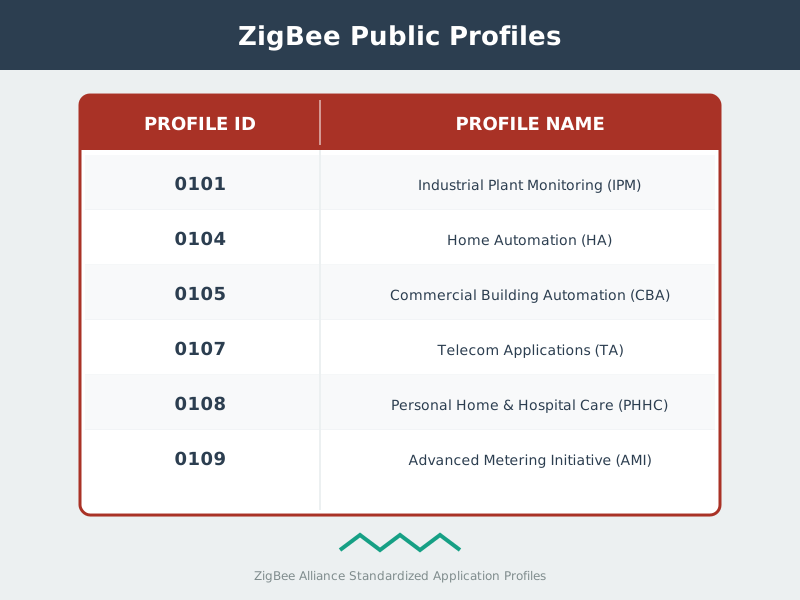
Historically, a profile ID grouped clusters for a domain, such as Home Automation (0x0104) or Zigbee Light Link (0xC05E). That means a compatibility claim should name the profile scope, endpoint, device type, cluster, attribute or command, and path that carries the behavior. Without that chain, a successful join can hide an application mismatch.
15.7 Legacy Profile Evidence
This section: Legacy Profile Evidence — Application-domain names are useful only when their behavioural contract and technology boundary remain attached.
Application-domain names are useful only when their behavioural contract and technology boundary remain attached. Figure 15.2 connects legacy public profiles to clusters and endpoints, then explicitly separates WirelessHART.

In Figure 15.2, Legacy public profiles include Home Automation, Smart Energy, Light Link, Building Automation, Telecom Applications, and Health Care. Profiles → clusters → endpoints turns those domains into interoperable commands and attributes, while WirelessHART boundary warns that shared 802.15.4 ancestry does not make an industrial HART mesh a Zigbee profile.
Legacy profiles are not automatically wrong. They are a review risk because two devices may share the Zigbee radio and network stack while using different application assumptions.
For a legacy profile claim, record:
- which profile or compatibility mode is in scope,
- which endpoint and device type are being used,
- which clusters are required for the release behavior,
- whether a controller, coordinator, or gateway is translating behavior,
- whether direct binding is expected or gateway mediation is required,
- what behavior fails when the translation path is unavailable, and
- which replacement or firmware change reopens the review.
Avoid approving a mixed deployment from a single successful command. The review needs to know whether the command works directly, through binding, through a group, through a scene, or through a gateway rule.
15.8 Zigbee 3.0 and Unified Behavior Evidence
This section: Zigbee 3.0 and Unified Behavior Evidence — Zigbee 3.0-style interoperability review should still be evidence-based.
Zigbee 3.0-style interoperability review should still be evidence-based.
It is reasonable to expect more consistent behavior when devices share a modern application framework and cluster library, but the reviewer still needs to check the release behavior:
- the declared device type matches the product behavior,
- mandatory and optional clusters used by the release are present,
- command direction and attribute reporting are correct,
- endpoint discovery returns what the controller expects,
- binding and group behavior are tested when used,
- security and commissioning evidence support the application path, and
- unsupported features fail in a visible and supportable way.
Certification labels and version names are useful starting points. They are not a substitute for observed compatibility evidence.
The main interoperability change is that Zigbee 3.0 unified what earlier deployments split across profile ecosystems. Legacy Home Automation and Zigbee Light Link devices shared the radio and network stack, but commissioning, security, and application assumptions could still diverge enough to require a translating hub. Zigbee 3.0 review can start from a stronger expectation of common clusters and joining behavior, but approval still comes from observed endpoint, cluster, command, reporting, and binding evidence.
| Era | Interoperability model | Review risk |
|---|---|---|
| Legacy profiles such as HA or ZLL | Separate profile ecosystems with different commissioning or security assumptions | Cross-profile behavior may depend on a gateway or hub translation. |
| Zigbee 3.0 | Unified application profile, common cluster model, and common security model | The label is useful, but endpoint and cluster evidence still need proof. |
15.9 Binding and Gateway Evidence
This section: Binding and Gateway Evidence — Many interoperability failures are not cluster-definition failures.
Many interoperability failures are not cluster-definition failures. They are path failures.
Ask:
- Is the controller using direct binding, group addressing, a scene, polling, reporting, or gateway logic?
- Does the release claim depend on the coordinator being online?
- Does a gateway translate a legacy profile into a common controller model?
- Are attributes reported automatically or only read on demand?
- Does a command reach the correct endpoint when multiple endpoints exist?
- Is failure visible to operations when translation breaks?
This distinction matters. Direct binding evidence and gateway translation evidence approve different operating assumptions.
Clusters have client and server sides. The server side holds attributes and executes commands: a light’s On/Off server holds the on/off state. The client side sends commands: a switch’s On/Off client sends On, Off, or Toggle. Binding connects a source client cluster on one endpoint to a matching server cluster on another endpoint or group, so a shared cluster ID is not enough if the roles are wrong.
Cross-vendor portability depends on standard clusters as well as matching roles. A product can work in its vendor app by using manufacturer-specific clusters or non-standard attributes, then fail when a generic hub tries to bind it through standard On/Off, Level Control, or measurement behavior. The review should separate “works through vendor logic” from “works through the standard cluster path.”
15.10 Binding Worked Example Boundary
This section: Binding Worked Example Boundary — A binding worked example belongs in the application-profile record when it proves endpoint and cluster behavior, not only message delivery.
A binding worked example belongs in the application-profile record when it proves endpoint and cluster behavior, not only message delivery.
Direct switch-to-light claim: Record source endpoint, client cluster, destination endpoint, server cluster, binding entry custody, and whether the controller is required after binding.
Report-to-gateway claim: Record attribute reporting path, gateway dependency, timestamp or event order, and what happens when the gateway rule is unavailable.
Group boundary: Separate group binding, scene behavior, and direct unicast behavior so one successful command does not approve every control pattern.
Replacement trigger: Reopen the review after device replacement, endpoint change, cluster support change, firmware update, gateway rule change, or profile migration.
The example should end with a narrow decision: direct binding, group behavior, gateway-mediated behavior, or unsupported behavior.
15.11 Knowledge Check: Compatibility Scope
This section: Knowledge Check: Compatibility Scope
15.12 Build a Profile Review Record
This section: Build a Profile Review Record — Use a record that ties application evidence to the release behavior.
Use a record that ties application evidence to the release behavior.
Release claim: State the behavior being approved, such as switch control, sensor reporting, scene recall, lock command, meter read, or gateway automation.
Profile scope: Record the profile, compatibility mode, or Zigbee 3.0 behavior expected for the device.
Endpoint and device type: Record the endpoint being used and the application device type it exposes.
Cluster evidence: Record required clusters, command direction, attributes, reporting, and unsupported behavior.
Path evidence: Record whether direct binding, group, scene, controller rule, polling, reporting, or gateway translation carries the behavior.
Retest trigger: Name what reopens the record: firmware update, device replacement, gateway change, controller change, profile mode change, or migration step.
Two devices sharing a Zigbee network does not prove they share an application contract. Figure 15.3 shows the record needed to approve one exact behaviour and path.

The Release Claim in Figure 15.3 names a behaviour such as switch control, scene recall, meter reading, or gateway automation. Profile Scope identifies HA, ZLL, Zigbee 3.0, compatibility, or migration context before Endpoint and Type fixes the addressable device role. Cluster Evidence then records IDs, client/server direction, commands, attributes, and reporting. From there the path splits: Direct or Group Path needs binding, group, or scene evidence, whereas Gateway Translation Path needs the legacy rule, polling or normalization behaviour, and its failure mode. Approval Scope can therefore say direct, gateway-mediated, unsupported, or limited, with the owner and firmware, device, gateway, controller, or migration retest triggers preserving that boundary for the worked review below.
15.13 Worked Review: Mixed Switch and Light
This section: Worked Review: Mixed Switch and Light — Scenario: A switch and light both join the same Zigbee network.
Scenario: A switch and light both join the same Zigbee network. The gateway can turn the light on when the switch is pressed, but direct binding does not work.
Review path:
- State whether the release claim requires direct operation or gateway-mediated operation.
- Discover the switch endpoint, light endpoint, device types, and required clusters.
- Check command direction and whether binding is supported by both sides.
- Test behavior with the gateway rule enabled and disabled.
- Record whether the release is approved as direct binding, gateway mediation, or unsupported.
Approval answer: Approve only the behavior that was proven. If the gateway is required, the gateway becomes part of the release boundary and retest plan.
15.14 Worked Review: Legacy Migration
This section: Worked Review: Legacy Migration — Scenario: A deployment is migrating from mixed legacy devices to a more unified controller and replacement-device policy.
Scenario: A deployment is migrating from mixed legacy devices to a more unified controller and replacement-device policy.
Review path:
- Inventory profiles, endpoint behavior, and gateway translation rules that support current operation.
- Identify which release claims depend on legacy translation.
- Choose a small pilot path that compares old and replacement behavior at the cluster and endpoint level.
- Record which unsupported features are acceptable, blocked, or need a different replacement.
- Add firmware, controller, and replacement-device changes as retest triggers.
Approval answer: Do not approve the migration from labels alone. Approve specific behaviors after the profile, endpoint, cluster, and path evidence match the release claims.
15.15 Common Profile Review Drift
This section: Common Profile Review Drift — Each mistake weakens the application evidence boundary.
Watch for these mistakes:
- treating network join as proof of application compatibility,
- treating a certification or marketing label as complete release evidence,
- ignoring endpoint selection on multi-endpoint devices,
- checking a cluster name without checking command direction or attribute behavior,
- approving gateway translation as if it were direct device binding,
- assuming scene or group behavior proves individual command behavior,
- forgetting to retest after firmware, gateway, or controller changes, and
- hiding unsupported features instead of documenting them.
Each mistake weakens the application evidence boundary.
15.16 Knowledge Check: Endpoint Evidence
This section: Knowledge Check: Endpoint Evidence
15.17 Match the Profile Evidence
This section: Match the Profile Evidence
15.18 Order the Profile Review
This section: Order the Profile Review
15.19 Profile Review Checklist
This section: Profile Review Checklist
Before approving a Zigbee application-profile claim, confirm:
- the release behavior is narrow enough to test,
- network join evidence is separated from application evidence,
- endpoint and device type evidence match the target behavior,
- cluster evidence includes command direction and attribute behavior,
- binding, group, scene, controller, and gateway paths are not confused,
- unsupported features are visible and documented,
- migration decisions are tied to observed behavior, and
- retest triggers are owned.
15.20 Summary
This section: Summary — Zigbee application profiles define application compatibility above the network layer.
Zigbee application profiles define application compatibility above the network layer. The reviewer must prove the behavior that matters: endpoint, device type, cluster, command, attribute, binding, and translation evidence. A successful join or a successful gateway command can be useful evidence, but neither proves every interoperability claim.
Quality review keeps the approval scope precise. If a release depends on a gateway, controller rule, scene, group, or replacement-device policy, that dependency belongs in the record.
15.21 Key Takeaway
This section: Key Takeaway — Approve Zigbee application compatibility only when endpoint, cluster, command or attribute, binding or gateway path, owner, and retest evidence support the exact behavior being released.
Approve Zigbee application compatibility only when endpoint, cluster, command or attribute, binding or gateway path, owner, and retest evidence support the exact behavior being released.
15.22 Concept Relationships
This section: Concept Relationships
- Zigbee protocol-stack evidence explains where application profiles sit above the APS and network layers.
- Network-formation evidence proves joining and commissioning before application behavior is reviewed.
- Zigbee security evidence explains how trust-center and key evidence interacts with profile behavior.
- Binding worked examples deepen direct binding, group, scene, and endpoint review inside this profile record.
- Common-mistakes review shows how profile assumptions become field failures.
15.23 What’s Next
This section: What’s Next
- Zigbee Network Formation - Review joining, commissioning, and address assignment before application behavior.
- Zigbee Security Architecture - Add Trust Center and key evidence to profile compatibility decisions.
- Zigbee Common Mistakes - Review common profile and interoperability mistakes.
- Zigbee Comprehensive Review - Integrate profiles with routing, security, deployment, and troubleshooting evidence.
Find help
3 reviewed answers.
Where should I start in a module?
Open the module page from the sidebar to see its chapters in order. Use the module map to return to a topic you need.
Modules and pathsReviewed
What can I try when a project does not work?
Check the symptom, then work through the diagnostic steps. Keep the error message and the smallest example that reproduces it.
When you are stuckReviewed
How do interactive examples work?
Use the interactive guide to check how examples and simulations work before changing your project.
Interactive examples guideReviewed