8 6LoWPAN Deployment Planning

More
Depth: Practitioner
Progress saves as you read. Mark sections complete as you go; your progress appears in the sidebar.
Deploying 6LoWPAN is not just placing small radios and declaring that IPv6 is available. A reliable deployment explains which constrained devices need IPv6 reachability, which traffic crosses the mesh, how compression context is kept consistent, when fragmentation is allowed, how routing recovers, and what evidence the border router keeps after the pilot is running.
This chapter gives a deployment framework. It keeps the practical value of topology, addressing, border-router, and protocol-selection planning, but treats every deployment claim as something that must be supported by site evidence.
8.1 Start With the IPv6 Packet That Must Fit
This section: Start With the IPv6 Packet That Must Fit — Picture a greenhouse unit that wakes, sends one reading, and sleeps.
Prove One Small Message Across the Real Mesh
Picture a greenhouse unit that wakes, sends one reading, and sleeps. The team wants normal Internet addressing, but the small radio frame cannot carry a large packet without help.
Internet Protocol is a set of rules for addressed packets. IPv6 is version six of Internet Protocol. 6LoWPAN means using IPv6 over a low-power wireless personal area network. It adapts IPv6 for small low-power radio frames. It can shorten headers and split a packet across frames.
A payload is the useful content carried inside a message. A protocol is an agreed set of rules for an exchange. Zigbee is a set of low-power mesh rules with its own network and application model. Do not use these names as if they prove the same path.
Send one known payload through the planned border unit. Record original size, each radio frame, route, loss, join state, and final result. Then grow the payload, lose one part, restart a parent, and let the unit sleep.
Repeat the test with two units sending at once. Check that a lost part does not become a false whole message. Keep the old and new results beside the chosen frame limit.
The first packet test cannot prove every route or busy hour. Practitioner builds the placement and release plan. Under the Hood explains memory, reassembly, sleepy forwarding, and security limits.
Start with one sleepy constrained node that still needs IPv6 behavior. 6LoWPAN Deployment Planning is the place to ask how a packet is compressed, fragmented, routed, and handed to the border router without losing the design claim.
The start-simple move is to write the evidence record first: original packet, adapted frames, route or parent state, reassembly outcome, and the retest trigger when the link or payload changes.
8.2 In 60 Seconds
This section: In 60 Seconds
- Start with a scoped deployment claim: device roles, traffic classes, operational boundary, and the reason 6LoWPAN is being considered.
- Place border routers from coverage, ownership, power, backhaul, monitoring, and failure-domain evidence, not from a fixed rule of thumb.
- Treat header compression as a shared-context contract. A deployment must show how context is distributed, checked, and changed safely.
- Make fragmentation a gate. Large, diagnostic, or bursty messages need reassembly, timeout, loss, and retry evidence before approval.
- Compare 6LoWPAN, Thread, Zigbee, Bluetooth LE, and LPWAN options by boundary and evidence, not by broad protocol slogans.
8.3 Learning Objectives
This section: Learning Objectives
By the end of this chapter, you will be able to:
- Build a 6LoWPAN deployment claim that names the devices, traffic, border-router duties, and release boundary.
- Review border-router placement using coverage, routing, backhaul, monitoring, ownership, and recovery evidence.
- Plan addressing, compression context, fragmentation policy, and routing resilience without relying on unsupported fixed numbers.
- Decide when raw 6LoWPAN, Thread, Zigbee, Bluetooth LE, or LPWAN is the better fit for a scenario.
- Produce a deployment record that lets a later reviewer retest the same assumptions without rediscovering the design.
8.4 Quick Check: 6LoWPAN Deployment
This section: Quick Check: 6LoWPAN Deployment
8.5 Prerequisites
This section: Prerequisites
This chapter assumes you have already reviewed:
- 6LoWPAN Overview, for the adaptation-layer purpose.
- 6LoWPAN Header Compression, for IPHC context and packet reconstruction.
- 6LoWPAN Routing with RPL, for route-over mesh behavior and root duties.
- 6LoWPAN Fragmentation, for split-packet risk and reassembly review.
8.6 Deployment Claim
This section: Deployment Claim — The claim prevents deployment drift.
Use a claim that can be tested later:
Deployment claim: This 6LoWPAN network is ready for the named devices and traffic because border-router coverage, compression context, fragmentation policy, routing recovery, security boundary, monitoring, and pilot evidence are documented and retestable.
The claim prevents deployment drift. It forces the plan to say what “ready” means, what is excluded, and which evidence would send the design back to revision.
8.7 Deployment Decision Path
This section: Deployment Decision Path — Use Figure 8.1 as the review sequence before choosing hardware counts or announcing capacity.
Use Figure 8.1 as the review sequence before choosing hardware counts or announcing capacity.
Before deployment Decision Path, inspect Figure 8.1 to compare “restart” with “Packet Policy”. Their juxtaposition makes 6LoWPAN deployment decision path visible.
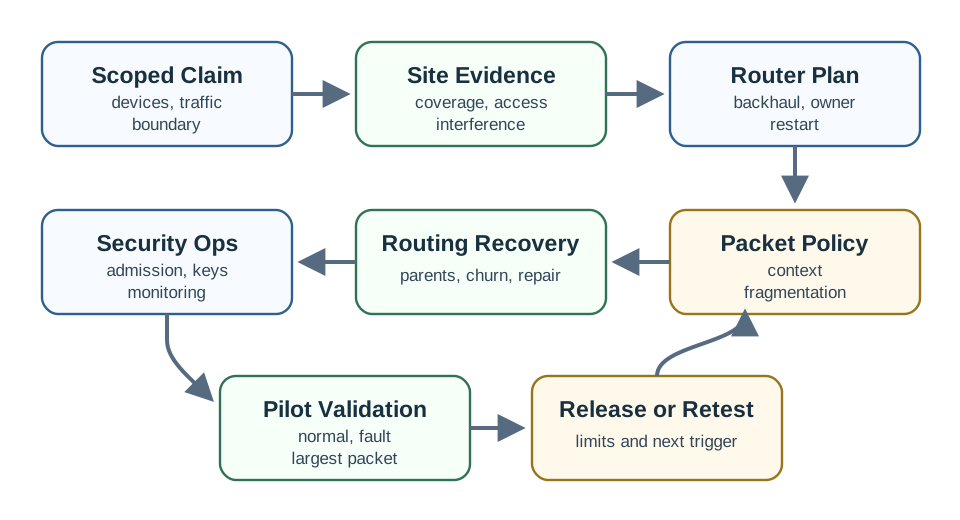
Read Figure 8.1 from “restart” to “Packet Policy”. Taken together, “restart” and “Packet Policy” express 6LoWPAN deployment decision path. For deployment Decision Path, the observed relationship between “restart” and “Packet Policy” is evidence that “restart” carries into the next decision.
The path is intentionally ordered. If the design jumps directly from “short-range mesh” to “deploy one router per area,” it can miss packet growth, inconsistent compression context, ownership gaps, or recovery behavior that only appears during a pilot.
8.8 Scope Before Topology
This section: Scope Before Topology — Topology is easier to draw than scope, but scope is what keeps the deployment honest.
Topology is easier to draw than scope, but scope is what keeps the deployment honest. A useful plan names both the desired behavior and the evidence that will be used to reject a weak design.
This scope-first step also makes protocol selection clearer. A network that needs phone-centric personal-area behavior, consumer Matter commissioning, or long-distance sparse telemetry may not be a raw 6LoWPAN deployment even if it uses low-power devices.
8.9 Border-Router Placement
This section: Border-Router Placement — The border router is the deployment custody point.
The border router is the deployment custody point. It connects the constrained IPv6 network to ordinary infrastructure, but it also owns context distribution, routing-root behavior, monitoring, captures, logs, restart behavior, and often the first practical troubleshooting boundary.
Use Figure 8.2 to check whether each proposed border router has enough evidence.
Before border-Router Placement, inspect Figure 8.2 to compare “Monitoring” with “or context change affects”. Their juxtaposition makes 6LoWPAN border-router deployment record visible.
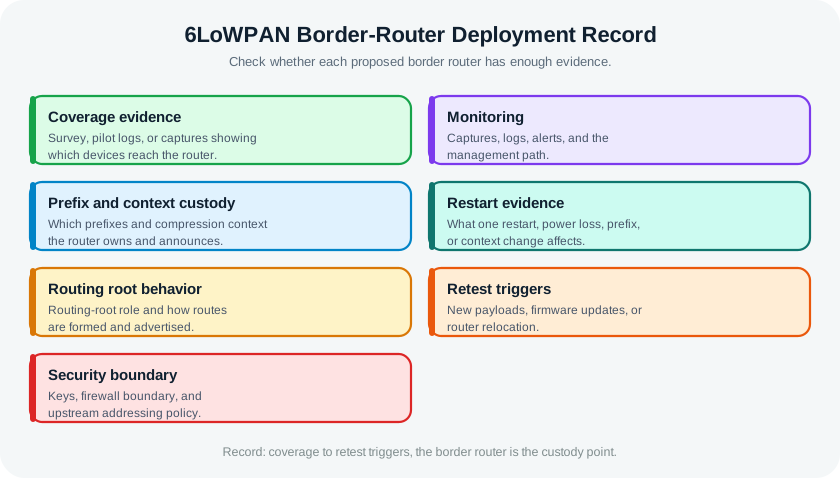
Read Figure 8.2 from “Monitoring” to “or context change affects”. Taken together, “Monitoring” and “or context change affects” express 6LoWPAN border-router deployment record. For border-Router Placement, the observed relationship between “Monitoring” and “or context change affects” is evidence that “Monitoring” carries into the next decision.
Avoid fixed placement rules. “One per floor,” “one per greenhouse,” or “one per zone” may be a useful first sketch, but it is not deployment evidence. The accepted count comes from coverage, path quality, backhaul, failure containment, operations, and pilot results.
8.10 Addressing and Context Plan
This section: Addressing and Context Plan — 6LoWPAN deployment depends on predictable reconstruction of IPv6 packets.
6LoWPAN deployment depends on predictable reconstruction of IPv6 packets. The addressing plan and the compression-context plan must be reviewed together.
A deployment is not stronger because it hides addressing behind automation. Automation is useful only when the resulting address, context, and reconstruction evidence are visible to reviewers.
8.11 Packet and Fragmentation Policy
This section: Packet and Fragmentation Policy — The deployment plan should describe ordinary traffic and worst-plausible traffic.
The deployment plan should describe ordinary traffic and worst-plausible traffic. Steady telemetry may be compact, while diagnostics, configuration, discovery, and maintenance payloads can be much larger.
Do not publish a single “fits in one frame” statement unless the claim is tied to the actual payload, headers, compression context, and support traffic. The safe deployment habit is to label packet fit as evidence-supported, bounded, or review-required.
8.12 Frame-Budget Triage
This section: Frame-Budget Triage — IEEE 802.15.4 frames are small before 6LoWPAN, UDP, application headers, and link security consume their share.
IEEE 802.15.4 frames are small before 6LoWPAN, UDP, application headers, and link security consume their share. A deployment record does not need to guess one universal usable byte count during early planning; it does need to classify traffic against the tested frame budget.
A 24-byte sensor payload plus compact UDP application metadata may be a single-frame candidate after valid header compression. A 180-byte diagnostic response is not. The first can be approved for the normal telemetry path if the pilot capture proves reconstruction. The second needs a separate fragmentation gate with reassembly timeout, loss, retry, memory, and operator-status evidence.
This is why deployment planning starts with traffic scope instead of node count. A mesh with 30 sleepy sensors sending small periodic readings may be easier to release than a mesh with five nodes that send large configuration dumps during faults. The planner should record which traffic is normal, which traffic is maintenance-only, which messages may fragment, and which messages stay out of scope until a pilot proves them.
8.13 Routing and Recovery
This section: Routing and Recovery — Many 6LoWPAN deployments use route-over IPv6 forwarding with RPL, but the review still needs to show how routing behaves in this site.
Many 6LoWPAN deployments use route-over IPv6 forwarding with RPL, but the review still needs to show how routing behaves in this site. The important question is not “does a routing protocol exist?” It is “what evidence shows that this path recovers acceptably for this application?”
Route stability is application-specific. A maintenance-monitoring network may tolerate a visible delay. A command path that changes equipment state needs stronger recovery, authorization, and operator-feedback evidence.
8.14 Node Capacity and Sleepy Forwarding Limits
This section: Node Capacity and Sleepy Forwarding Limits — Constrained nodes have hard state limits that shape deployment topology.
Constrained nodes have hard state limits that shape deployment topology. They can hold only a small number of reassembly buffers, neighbor entries, and routing records. A network that grows past the state a router can keep starts dropping otherwise valid traffic, especially when fragmenting maintenance messages occupy memory while ordinary telemetry continues.
Inspect Figure 8.3 to ask which nodes may sleep and which routers must stay ready to carry other nodes’ packets toward the IPv6 border.
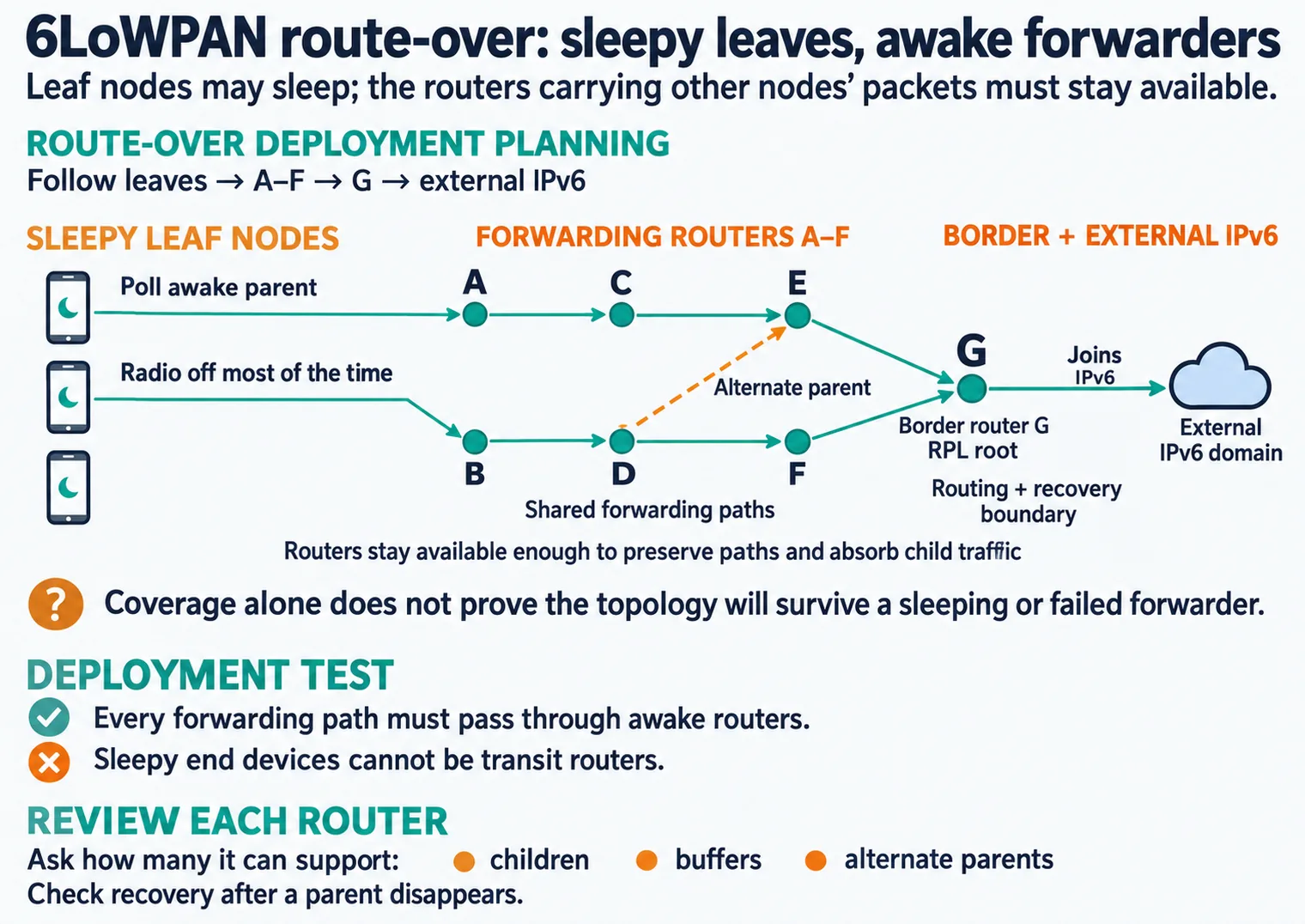
Read Figure 8.3 from sleepy leaf nodes into the forwarding routers marked A through F. Leaves can conserve energy because they do not carry other nodes’ packets; routers must remain available enough to preserve paths and absorb child traffic. The border router G joins this constrained mesh to the external IPv6 domain, making it both a routing and recovery boundary. Follow the shared paths last and ask how many children, buffers, and alternate parents each router can support. Coverage alone does not prove that the topology will survive a sleeping or failed forwarder.
The sharpest topology consequence is that sleepy end devices cannot be transit routers. A battery leaf saves energy by turning its radio off most of the time, so it is not listening when a neighbor needs a relay. Forwarding requires always-on routers, and every sleepy leaf must have an awake parent it can poll for messages that arrived while it slept.
Suppose a router can safely keep four fragment reassembly records and a maintenance burst sends five large datagrams through it while telemetry continues. If one fragment from each datagram is lost, the router may hold partial state until timeout, blocking later fragments or forcing drops. Even when every individual packet is valid IPv6, the constrained node is spending memory on unfinished work rather than forwarding the next small sensor reading.
A route-over mesh with a border router as RPL root therefore needs stable parent choices, usable link metrics, and recovery after a parent disappears. If a floor plan leaves three sleepy devices reachable only through another sleepy device, the topology is not merely inefficient; it is invalid for forwarding. The deployment test is simple: every forwarding path must pass through awake routers, and every exception must be visible in the pilot evidence.
This section:
This section:
8.15 Security and Operations Boundary
This section: Security and Operations Boundary — 6LoWPAN deployment creates an IPv6 boundary between constrained devices and the rest of the organization.
6LoWPAN deployment creates an IPv6 boundary between constrained devices and the rest of the organization. That boundary should be explicit before the network is expanded.
If an IPv4-only dashboard, cloud service, or legacy system must interact with sensors, document the translation boundary. A proxy can be appropriate, but the deployment record should show what is translated, what is logged, and what security policy applies on each side.
8.16 Worked Deployment: Building Environmental Telemetry
This section: Worked Deployment: Building Environmental Telemetry — Suppose a building team wants room sensors to report environmental readings through constrained IPv6 networks.
Suppose a building team wants room sensors to report environmental readings through constrained IPv6 networks.
The accepted topology might use one or more border routers per physical area, but the page should not claim a universal count. The count is accepted only when coverage, failure-domain, and operational evidence agree.
8.17 Worked Deployment: Greenhouse Monitoring
This section: Worked Deployment: Greenhouse Monitoring — Greenhouse monitoring can look like a natural fit for low-power sensing, but the deployment decision still depends on site shape, vegetation, moisture, gateway access, reporting pattern, and maintenance access.
Greenhouse monitoring can look like a natural fit for low-power sensing, but the deployment decision still depends on site shape, vegetation, moisture, gateway access, reporting pattern, and maintenance access.
The safe conclusion is not “6LoWPAN always wins for greenhouses” or “LPWAN always wins for farms.” The safe conclusion is a documented boundary: where constrained IPv6 is useful, where it becomes too operationally heavy, and when another network family should be selected.
8.18 Protocol Selection Boundary
This section: Protocol Selection Boundary — Protocol selection is part of deployment quality.
Protocol selection is part of deployment quality. The goal is not to promote one stack. The goal is to make the reason for the stack visible.
These are boundaries, not absolute rankings. A mature deployment record explains why the selected protocol fits the specific site, support model, traffic pattern, and integration requirement.
8.19 Pilot and Release Record
This section: Pilot and Release Record — A pilot is the evidence bridge between a design drawing and a released deployment.
A pilot is the evidence bridge between a design drawing and a released deployment. It should exercise the ordinary path, the largest expected packet, a router restart, a degraded link, and an operational handoff.
The release record should be short enough that operations teams will keep it current, but detailed enough that another reviewer can reproduce the decision.
8.20 Common Deployment Mistakes
This section: Common Deployment Mistakes
8.21 Deployment Checklist
This section: Deployment Checklist
Before a 6LoWPAN deployment chapter, design, or lab is approved, verify these items:
8.22 Knowledge Check: Border-Router Evidence
This section: Knowledge Check: Border-Router Evidence
8.23 Knowledge Check: Fragmentation Policy
This section: Knowledge Check: Fragmentation Policy
8.24 Interactive Review: Match Deployment Evidence to Review Risk
This section: Interactive Review: Match Deployment Evidence to Review Risk
8.25 Interactive Review: Order the Deployment Review
This section: Interactive Review: Order the Deployment Review
8.26 Summary
This section: Summary — 6LoWPAN deployment is an evidence process.
6LoWPAN deployment is an evidence process. The reviewer starts with a scoped constrained-IPv6 claim, then checks border-router custody, addressing and compression context, packet and fragmentation policy, routing recovery, security boundaries, monitoring, and pilot evidence. Good deployments avoid fixed placement formulas and protocol slogans. They document what is ready, what is limited, and what must be retested when the site or traffic changes.
8.27 Key Takeaway
This section: Key Takeaway — 6LoWPAN Deployment Evidence Framework should connect IPv6 adaptation, compression, fragmentation, routing, security, constrained-device limits, and deployment evidence.
6LoWPAN Deployment Evidence Framework should connect IPv6 adaptation, compression, fragmentation, routing, security, constrained-device limits, and deployment evidence.
8.28 Concept Relationships
This section: Concept Relationships
8.29 What’s Next
This section: What’s Next
- 6LoWPAN Pitfalls: Review common deployment mistakes and troubleshooting patterns.
- 6LoWPAN Lab Simulation: Practice controlled packet, routing, and evidence checks.
- 6LoWPAN Comprehensive Review: Combine architecture, compression, fragmentation, routing, and deployment evidence.
- Thread Network Architecture: See how Thread adds commissioning, roles, and ecosystem behavior on top of related constrained-network ideas.
- 6LoWPAN Hands-On and Security: Connect deployment planning to security and lab practice.
Find help
3 reviewed answers.
Where should I start in a module?
Open the module page from the sidebar to see its chapters in order. Use the module map to return to a topic you need.
Modules and pathsReviewed
What can I try when a project does not work?
Check the symptom, then work through the diagnostic steps. Keep the error message and the smallest example that reproduces it.
When you are stuckReviewed
How do interactive examples work?
Use the interactive guide to check how examples and simulations work before changing your project.
Interactive examples guideReviewed