36 Matter Fabric Security

More
Depth: Practitioner
Progress saves as you read. Mark sections complete as you go; your progress appears in the sidebar.
This trust layer lets a device participate in one or more Matter administrative domains without sharing one global household credential. A useful review does not stop at saying that Matter is encrypted. It checks which fabric issued the identity, which controller is allowed to act, which session protocol was used, and which permission record supports the interaction.
This chapter reviews Matter fabric and security evidence for advanced learners. It focuses on multi-admin boundaries, fabric certificate chains, Node Operational Certificates, PASE commissioning, CASE operational sessions, Access Control Lists, encrypted interaction checks, commissioning failure modes, and review decisions that stay within the evidence.
36.1 Start With the Trust Boundary
This section: Start With the Trust Boundary — Picture a rented flat where the tenant, landlord, and care service each need different control over a smart lock.
Prove Who May Control One Device
Picture a rented flat where the tenant, landlord, and care service each need different control over a smart lock. Adding a second controller must not grant every person the same rights or leave an old controller trusted after the tenancy ends.
Matter is a shared application model for connected devices. A fabric is one managed trust group with its own identity and keys. Record the device, group, approving person, controller, granted actions, target, start and end state, credential version, and evidence of each change.
Add a controller, deny an unapproved one, remove a person, restore an old backup, replace the device, lose the outside link, and present an expired or wrong credential. Check both directions: approved actions must work, while denied actions must remain blocked and visible in the review record.
Encrypted reachability does not prove that a person should be allowed to act. Membership also does not prove sensor truth, safe physical behavior, or correct account ownership.
Practitioner builds the access and change record. Under the Hood explains setup sessions, operational sessions, certificate chains, access lists, several trust groups, copied state, and recovery when controllers disagree.
Use this short trust review:
- Name the person asking for control.
- Name the device and exact action.
- Check who may approve the grant.
- Record the trust group and version.
- Grant only the rights that are needed.
- Test one allowed action end to end.
- Test one denied action end to end.
- Remove a controller and try again.
- Restore old state and check refusal.
- Show each change to the owner.
- Keep a safe path during loss.
- Reopen review when ownership changes.
- Check one old backup copy.
- Check one expired right.
- Review every shared controller.
- Close rights when service ends.
Start with the trust boundary in Matter Fabric Security: who is allowed to join, who can carry keys or credentials, and which record proves that the decision was made correctly. A short-range protocol is only as useful as the join, identity, and recovery evidence around it.
The start-simple move is to follow one device from discovery through approval to ordinary traffic. Once that path is visible, the deeper material can test replay protection, credential custody, fabric scope, and operational exceptions.
36.2 In 60 Seconds
This section: In 60 Seconds
- A Matter fabric is an administrative trust domain with its own root of trust, fabric identity, operational certificates, and access-control records.
- Multi-admin means one device can be commissioned into multiple fabrics, but each fabric keeps its own credentials and permissions.
- PASE is used before operational credentials exist; it authenticates commissioning with setup information and creates a protected commissioning session.
- CASE is used after commissioning; it authenticates operational nodes with fabric credentials and establishes encrypted operational sessions.
- A Node Operational Certificate is not just a label. It ties a node identity to a fabric and a certificate chain.
- ACL review should answer who can read, operate, manage, or administer each target, not only whether a controller can connect.
- A clean approval states which fabric, node, session, target, command class, and evidence window were reviewed.
36.3 Learning Objectives
This section: Learning Objectives
By the end of this chapter, you will be able to:
- Review Matter fabric security using fabric, certificate, session, ACL, and interaction records.
- Distinguish PASE commissioning evidence from CASE operational-session evidence.
- Explain how multi-admin control preserves separate trust domains rather than sharing one credential pool.
- Identify fabric-capacity, stale-credential, wrong-fabric, and overbroad-ACL failures before approving a deployment.
- Write bounded Matter security decisions with accepted claims, open gaps, and retest triggers.
36.4 Quick Check: Matter Fabric Security
This section: Quick Check: Matter Fabric Security
36.5 Prerequisites
This section: Prerequisites
This chapter assumes you have reviewed:
- Matter Architecture, for the role of nodes, endpoints, clusters, and ecosystems.
- Matter Protocol Stack and Data Model, for the interaction and data-model layers that security protects.
- Matter Interactions, for Read, Write, Subscribe, Invoke, Timed, and commissioning flow.
- Thread Security and Matter, for network-layer security below Matter.
- 6LoWPAN Architecture Review Evidence, for constrained IPv6 border and route evidence.
36.6 Fabric Security Review Claim
This section: Fabric Security Review Claim — The claim is intentionally narrow.
Use a claim that can be checked against records:
Matter fabric security claim: A Matter device is ready for the reviewed control scenario only when the fabric identity, operational certificates, PASE or CASE session evidence, ACL privileges, encrypted interaction records, controller scope, and retest triggers all support the same bounded claim.
The claim is intentionally narrow. Evidence that one controller can operate a light in one fabric does not automatically prove that another fabric, another endpoint, a management command, or a newly rotated certificate will work.
36.7 Fabric Evidence Path
This section: Fabric Evidence Path — The first figure follows the security evidence from commissioning to an approval decision.
The first figure follows the security evidence from commissioning to an approval decision.
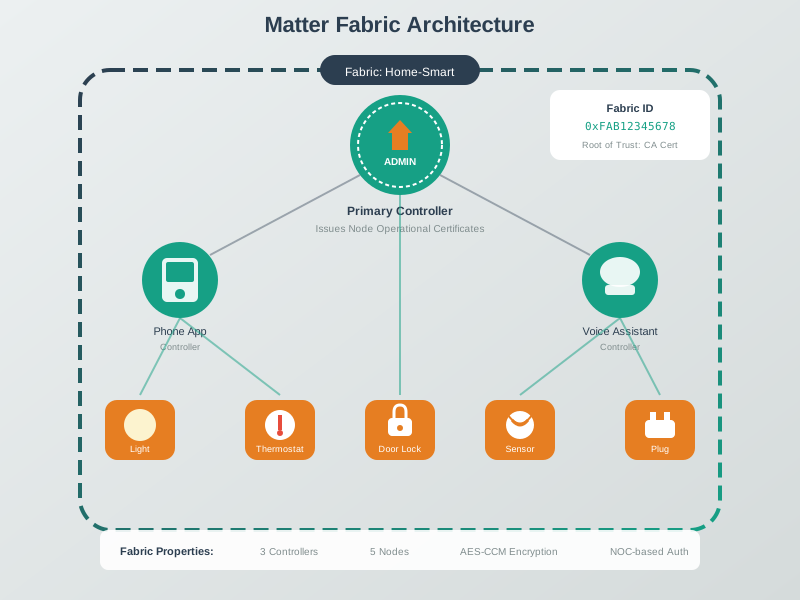
The path prevents a common security review failure: accepting a device because the app can toggle it once. A real approval needs to show how the device entered the fabric, which identity it received, which controller was authorized, and whether the operational interaction matched the approved privilege.
36.8 Evidence Families
This section: Evidence Families — Matter fabric security review needs several evidence families.
Matter fabric security review needs several evidence families. A missing family usually means the decision should stay open.
36.9 What a Fabric Proves
This section: What a Fabric Proves — A fabric proves membership in an administrative domain.
A fabric proves membership in an administrative domain. It does not prove that every controller is trusted equally, that every cluster can be controlled, or that another ecosystem has the same permissions.
For review, treat each fabric as a separate security record:
- Which controller or commissioner created the fabric membership?
- Which root trust anchor signs the operational identities?
- Which device fabric entry is active during the reviewed interaction?
- Which controllers are subjects in the ACL?
- Which targets and privileges are granted?
- Which operation was accepted or rejected?
This framing keeps multi-admin evidence honest. A device may have one fabric for a resident controller, another for a building operator, and another for a service workflow. Each fabric can be valid while still having different permissions and different review status.
36.10 Multi-Admin Boundaries
This section: Multi-Admin Boundaries — Multi-admin is not credential sharing.
Multi-admin is not credential sharing. Each administrator commissions the device into its own fabric, and the device stores separate fabric membership data. The evidence should show that one fabric cannot silently act as another fabric.
The second figure turns that multi-admin boundary into a worked two-fabric review. It follows the smart-plug scenario from the existing resident fabric through second-fabric commissioning, then compares the credential scope and authority retained by each fabric.
Inspect Figure 36.2 from left to right across the upper commissioning trace, then compare the two lower fabric records.
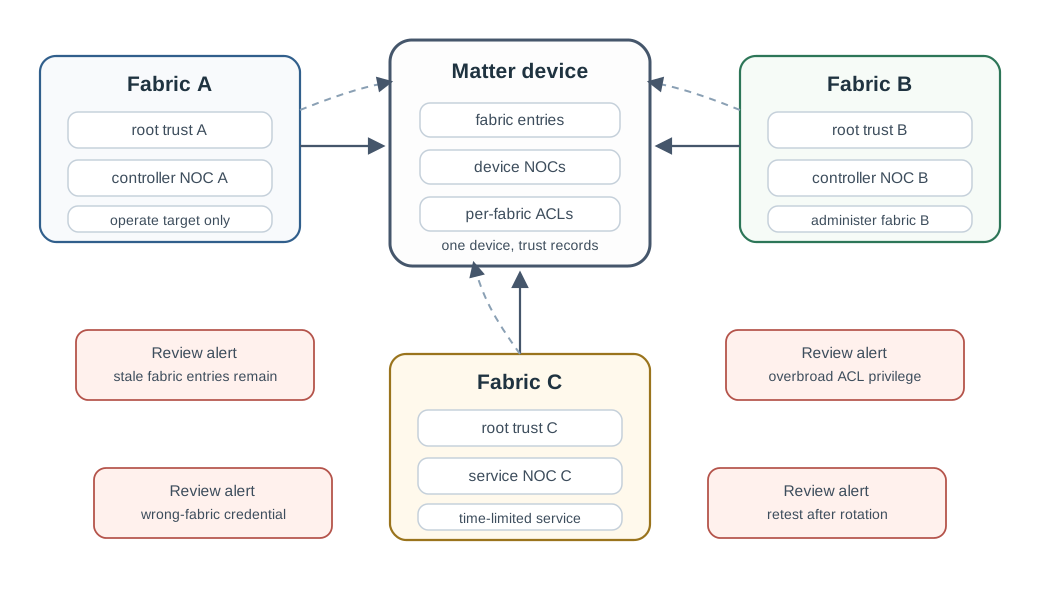
Read the upper trace first: commissioning establishes the second fabric and its operational identity, while the later CASE-plus-ACL test proves only the reviewed manager operation. The lower records make the security boundary explicit: manager Operate authority does not become resident fabric-administration authority.
The map is a review aid, not a capacity promise. The actual number of supported fabrics is a device capability that must be checked from the implementation or product evidence.
36.11 Certificate and Fabric Identity
This section: Certificate and Fabric Identity — Matter operational identity is fabric-scoped.
Matter operational identity is fabric-scoped. The reviewer should confirm that the node identity presented during operation chains to the expected fabric trust anchor and that the device stores the corresponding fabric entry.
Strong credential evidence includes:
- The issuing path from the fabric root trust anchor to the operational credential.
- The device and controller identities used in the reviewed interaction.
- The fabric entry associated with those identities.
- The credential validity state during the review window.
- The response when a credential is missing, stale, rotated, or from the wrong fabric.
Do not approve a claim because a certificate exists somewhere on the device. The credential must match the fabric and operation being reviewed.
36.12 PASE and CASE Evidence
This section: PASE and CASE Evidence — PASE and CASE answer different security questions.
PASE and CASE answer different security questions.
Confusing the two creates security drift. A setup code that proves a commissioning session does not prove that an operational controller is authorized later. A successful CASE session does not prove that the initial commissioning process was clean.
36.13 Access Control Lists
This section: Access Control Lists — ACL review connects identity to allowed action.
ACL review connects identity to allowed action. A controller that can establish a CASE session is not automatically allowed to do every operation. The ACL still decides which subject has which privilege over which target.
Review ACL privileges as capabilities:
- View: read state and subscribe where permitted.
- Operate: perform normal operational commands where permitted.
- Manage: change manageable device settings where permitted.
- Administer: change access control, fabrics, or other administrative state where permitted.
The review question is not “can this controller talk to the device?” The better question is “does this subject have exactly the privilege needed for this target and operation?”
Weak record: The voice assistant toggled the light, so access control is correct.
Stronger record: During the reviewed CASE session, the voice assistant subject in fabric B had Operate privilege for the On/Off target only, the Invoke command succeeded, setting writes and ACL edits were rejected, and the resident phone retained Administer privilege for fabric management.
36.14 Encrypted Interaction Evidence
This section: Encrypted Interaction Evidence — After secure session establishment, the interaction should be protected and authorized.
After secure session establishment, the interaction should be protected and authorized. The reviewer should preserve the interaction type and outcome with the security record.
Security evidence is strongest when successful operations and expected denials are both tested. A least-privilege design should show that allowed operations work and disallowed operations fail clearly.
36.15 Network Evidence That Still Matters
This section: Network Evidence That Still Matters — Fabric security sits above the transport, but the transport can still affect the review.
Fabric security sits above the transport, but the transport can still affect the review. Thread, Wi-Fi, Ethernet, border routers, and IP routing can explain reachability failures that look like security failures.
Keep these boundaries separate:
- A CASE failure points to operational identity, trust, session, or credential evidence.
- An ACL denial points to subject, target, privilege, or fabric evidence.
- A packet loss or route issue points to network, border-router, or transport evidence.
- A commissioning failure may involve setup information, PASE, network provisioning, operational credentials, or fabric capacity.
The final decision should name the layer that failed. Do not label a routing outage as an ACL failure, and do not label a wrong-fabric credential as a Thread problem.
36.16 Commissioning and Failure Evidence
This section: Commissioning and Failure Evidence — Commissioning is a lifecycle event.
Commissioning is a lifecycle event. It should leave a record that explains how the device entered the fabric and what administrative authority was created.
Fabric capacity is especially easy to misreview. A device may reject new commissioning because old test fabrics were not removed. The evidence should show the fabric table state and the administrative action used to remove or retain each fabric.
36.17 Worked Review: Adding a Second Fabric
This section: Worked Review: Adding a Second Fabric — Scenario: a smart plug already belongs to a resident controller fabric.
Scenario: a smart plug already belongs to a resident controller fabric. A building manager needs operational control for scheduling but should not be able to remove the resident fabric.
Evidence: the device opened a commissioning window from an authorized administrator, completed PASE with the new commissioner, installed operational credentials for the manager fabric, established CASE from the manager controller, and accepted only the intended operational commands. Attempts to change fabric membership from the manager controller were rejected.
Decision: accept the second-fabric operate claim for the reviewed plug endpoint and command set. Keep administrator changes open for the resident fabric only.
Retest trigger: repeat the review after firmware changes to fabric storage, ACL handling, commissioning-window behavior, or the controller identity used by the manager.
36.18 Worked Review: Wrong-Fabric Controller
This section: Worked Review: Wrong-Fabric Controller — Scenario: a controller presents valid operational credentials, but those credentials belong to another fabric.
Scenario: a controller presents valid operational credentials, but those credentials belong to another fabric. The app reports that the device is unavailable.
Evidence: network reachability is present, but the CASE evidence shows the presented identity does not chain to the expected fabric. The device rejects the session before any authorized interaction occurs.
Decision: reject the operational-control claim for that controller in the reviewed fabric. The issue is not Thread or Wi-Fi reachability. It is a fabric identity mismatch.
Retest trigger: recommission the controller into the correct fabric or intentionally share the device through a new fabric membership, then repeat CASE and ACL review.
36.19 Worked Review: Overbroad Voice Assistant ACL
This section: Worked Review: Overbroad Voice Assistant ACL — Scenario: a voice assistant can toggle a light, but it can also write settings and edit access-control entries.
Scenario: a voice assistant can toggle a light, but it can also write settings and edit access-control entries.
Evidence: CASE succeeds, the voice assistant subject appears in the ACL with administrative privilege, normal Invoke operations succeed, and out-of-scope management attempts also succeed.
Decision: reject the least-privilege claim. The device may be controllable, but the ACL is too broad for the reviewed role.
Retest trigger: reduce the subject privilege and target scope, then verify that intended operations still work and settings or ACL edits are rejected.
36.20 Common Mistakes
This section: Common Mistakes
36.21 Matter Fabric Security Checklist
This section: Matter Fabric Security Checklist
Before approving a Matter fabric security claim, confirm:
- The reviewed fabric, controller subject, device node, endpoint or cluster, and interaction type are named.
- PASE evidence is used only for commissioning or recommissioning claims.
- CASE evidence is tied to the operational credentials and fabric being reviewed.
- The operational credential chain belongs to the expected fabric.
- ACL privilege and target scope match the operation being approved.
- Expected denials are tested for out-of-scope operations when least privilege is part of the claim.
- Fabric capacity, stale fabric entries, and removal behavior are checked when commissioning or multi-admin is in scope.
- Network reachability evidence is separated from fabric identity and ACL evidence.
- The decision states what is accepted, what remains open, and what must be retested.
36.22 Knowledge Check 1
This section: Knowledge Check 1
36.23 Knowledge Check 2
This section: Knowledge Check 2
36.24 Match the Evidence
This section: Match the Evidence
36.25 Order the Review
This section: Order the Review
36.26 Fabric as the Unit of Trust
This section: Fabric as the Unit of Trust — Matter organizes trust into fabrics.
Matter organizes trust into fabrics. A fabric is a security domain of nodes that share a common root of trust, usually represented by a fabric Certificate Authority. Every node admitted to a fabric receives a Node Operational Certificate issued under that fabric authority, which becomes the node’s verifiable identity inside that fabric.
During normal operation, nodes prove fabric membership with those operational certificates. The trust decision is cryptographic and fabric-scoped, not based on product name, IP address, Thread parent, or controller UI state.
36.27 Certificates, Sessions, and Multi-Fabric Records
This section: Certificates, Sessions, and Multi-Fabric Records — Fabric review should preserve the security pieces in a form that another reviewer can check.
Fabric review should preserve the security pieces in a form that another reviewer can check. The important question is not whether a device is in “Matter”; it is which fabric identity and session evidence supported the reviewed operation.
| Element | What it is | Review role |
|---|---|---|
| Root CA | The fabric trust anchor. | Signs or anchors the operational certificate chain in the fabric. |
| NOC | Node Operational Certificate. | Provides a node’s identity inside one fabric. |
| PASE | Passcode-Authenticated Session Establishment using SPAKE2+. | Bootstraps a protected channel during commissioning. |
| CASE | Certificate-Authenticated Session Establishment. | Secures operational sessions using NOCs. |
| ACL | Access Control List cluster. | Governs what each subject may read, write, invoke, manage, or administer. |
A single node can belong to multiple fabrics at once, holding a separate operational identity in each. That is what enables multi-admin: one ecosystem fabric and another ecosystem fabric can contain the same physical device while keeping separate credentials, permissions, and removal paths.
36.28 Passcode Bootstrap, Certificate Operation
This section: Passcode Bootstrap, Certificate Operation — Matter uses two session patterns because commissioning and operation start from different trust states.
Matter uses two session patterns because commissioning and operation start from different trust states. At commissioning there is no shared fabric identity yet, so Matter uses PASE: a password-authenticated key exchange based on SPAKE2+ and the device setup passcode. The exchange establishes a protected channel by proving passcode knowledge without sending the passcode itself. Over that channel, the commissioner installs operational credentials.
After commissioning, the passcode is not the normal operational identity. Operational communication uses CASE, mutually authenticated by the certificates held by the participating nodes. This two-phase design keeps onboarding practical while moving routine control to fabric-scoped certificates and ACLs. It also explains why fabric removal and multi-admin sharing can be isolated: each fabric issues its own operational identity.
36.29 Summary
This section: Summary — Matter fabric security review is a fabric-scoped evidence task.
Matter fabric security review is a fabric-scoped evidence task. The reviewer checks fabric membership, operational credentials, PASE or CASE session records, ACL privileges, encrypted interaction outcomes, fabric lifecycle state, network boundaries, and retest triggers before approving a claim.
The safest decision is bounded. Approve the fabric, controller, target, and operation that the evidence proves. Keep other fabrics, other privileges, credential rotation, commissioning changes, and transport failures open unless separate evidence covers them.
36.30 Key Takeaway
This section: Key Takeaway — Matter Fabric Security Evidence should connect fabrics, certificates, access control, operational credentials, rotation, recovery, and deployment evidence.
Matter Fabric Security Evidence should connect fabrics, certificates, access control, operational credentials, rotation, recovery, and deployment evidence.
36.31 Concept Relationships
This section: Concept Relationships
- Matter Interactions explains the operations that ACLs authorize.
- Matter Protocol Stack and Data Model explains endpoints, clusters, commands, and attributes protected by Matter security.
- Matter Architecture places fabrics and nodes inside the broader Matter model.
- Thread Security and Matter separates Thread network security from Matter fabric security.
- Matter Implementation connects these review records to implementation and commissioning workflows.
36.32 What’s Next
This section: What’s Next
Next, review Matter Device Types and Clusters to connect fabric security and ACL review with specific device capabilities, then use Matter Implementation to check how SDK workflows preserve commissioning and operational evidence.
Find help
3 reviewed answers.
Where should I start in a module?
Open the module page from the sidebar to see its chapters in order. Use the module map to return to a topic you need.
Modules and pathsReviewed
What can I try when a project does not work?
Check the symptom, then work through the diagnostic steps. Keep the error message and the smallest example that reproduces it.
When you are stuckReviewed
How do interactive examples work?
Use the interactive guide to check how examples and simulations work before changing your project.
Interactive examples guideReviewed